---
title: "Setting Apple Business Mail using Apple Business Connect | DMARC Report"
description: "How to set up Apple Branded Mail in iOS 18.2: configure SPF, DKIM, and DMARC at quarantine or reject, verify a logo in Apple Business Connect, add a TXT record."
image: "https://dmarcreport.com/og/blog/setting-apple-business-mail-using-apple-business-connect.png"
canonical: "https://dmarcreport.com/blog/setting-apple-business-mail-using-apple-business-connect/"
---
Quick Answer
Apple Branded Mail, part of iOS 18.2 and Apple Business Connect, lets companies display a verified logo on emails sent through Apple Mail, a BIMI-style feature limited to the Apple ecosystem. To enable it, configure SPF, DKIM, and DMARC at quarantine or reject, sign in to Apple Business Connect, upload a square logo (JPG, PNG, or HEIF, 1024 to 4864 pixels), link your sending domain, and add Apple's TXT record. Final review usually takes 5 to 7 days, after which subdomains or specific addresses can be added through Branded Mail.
Related: [Free DMARC Checker](/tools/dmarc-checker/) ·[How to Create an SPF Record](/tools/spf-record-generator/) ·[SPF Record Format](/blog/spf-format-checker-dos-and-donts-for-email-authentication/)
Share
[ ](https://www.linkedin.com/sharing/share-offsite/?url=undefined%2Fblog%2Fsetting-apple-business-mail-using-apple-business-connect%2F "Share on LinkedIn") [ ](https://twitter.com/intent/tweet?text=Setting%20Apple%20Business%20Mail%20using%20Apple%20Business%20Connect&url=undefined%2Fblog%2Fsetting-apple-business-mail-using-apple-business-connect%2F "Share on X/Twitter") [ ](https://www.facebook.com/sharer/sharer.php?u=undefined%2Fblog%2Fsetting-apple-business-mail-using-apple-business-connect%2F "Share on Facebook") [ ](https://reddit.com/submit?url=undefined%2Fblog%2Fsetting-apple-business-mail-using-apple-business-connect%2F&title=Setting%20Apple%20Business%20Mail%20using%20Apple%20Business%20Connect "Share on Reddit") [ ](mailto:?subject=Setting%20Apple%20Business%20Mail%20using%20Apple%20Business%20Connect&body=Check out this article: undefined%2Fblog%2Fsetting-apple-business-mail-using-apple-business-connect%2F "Share via Email")


> The shift to mandatory email authentication in 2024-2025 was the biggest change in email security in a decade, says Brad Slavin, General Manager of DuoCircle. Google, Yahoo, and Microsoft all requiring DMARC means there’s no inbox provider left that accepts unauthenticated bulk mail. Every organization needs to adapt.
```
DMARC Report
```
Setting Apple Business Mail using Apple Business Connect
```
```
/
```
```
RSS Feed
```
Share
Link
Embed
```
/\*! This file is auto-generated \*/ ’ title=“Embed Code” class=“input-embed input-embed-20355” readonly/>
```
```
With so many emails hitting the inboxes of your targeted audience, it’s a challenge to grab their attention and have them open your emails. That’s why if you **affix a brand identity**, like a logo, there are more chances that they will engage with your email. [BIMI](https://dmarcreport.com/blog/the-role-of-bimi-in-the-fight-against-email-fraud-and-scam/) helps a business show its brand logo and name in the recipients’ inboxes, and now Apple has also jumped on the same bandwagon.
Apple Mail is not a very common preference when it comes to businesses choosing their official mailbox. This is because it lacks certain features, including the absence of **BIMI-like technology**. _But now, Apple is letting users send branded emails that carry their unique identity_.
This will not only pivot businesses towards considering Apple Mail as their \*\*official mailbox but will also reduce [phishing and spoofing](https://thehackernews.com/2024/07/proofpoint-email-routing-flaw-exploited.html) instances to some extent. Moreover, this initiative by Apple has once again evinced how this globally trusted brand prioritizes[cybersecurity](https://dmarcreport.com/blog/major-cybersecurity-trends-that-will-reign-in-2024/).
This new feature is all the more \*\*beneficial for mobile marketers as it makes personal branding and business marketing more flexible and doable. _With more people recognizing your messages through the brand logo and engaging with them, the sales numbers surely improve_.
## What is Apple Branded Mail?
[Apple Branded Mail](https://mapp.com/blog/apple-business-connect-branded-mail-mapp/) is the \*\*latest iOS 18.2 feature that allows you to affix your brand logo to emails sent through Apple Mail. While this makes your emails appear visually appealing in the recipients’ inboxes, it also instills a sense of trust in them. They are more likely to believe that it’s sent by [legitimate sources](https://www.forbes.com/sites/petersuciu/2024/12/04/elon-musk-claims-x-is-a-legitimate-source-for-news-can-it-be-trusted/).
_The new Apple Branded Mail feature is part of Apple Business Connect, which is like a tool that businesses use to increase their efficiency and presence on **Apple platforms** like Maps, Siri, Messages, and Mail_. While limited to Apple’s ecosystem, it offers businesses a unique opportunity to control how millions of Apple Mail users perceive their brands.
To enable Apple Branded Mail, companies must-
- Set up [domain authentication](https://enginemailer.zendesk.com/hc/en-us/articles/360018731691-What-is-Domain-Authentication-and-why-it-is-important) protocols: Implement DMARC, DKIM, and [SPF](https://dmarcreport.com/what-is-spf/) to ensure email authenticity and protect against spoofing or phishing.
- Verify their logo via Apple Business Connect: Upload and validate their logo in a compliant format (typically SVG), ensuring it meets **Apple’s specifications**.
## Key benefits of using Apple Branded Mail for business
As a marketer, standing out from the competition is always a challenge. _With so many brands sending newsletters, promotional messages, and notifications, it can be tough to get your target audience to open your emails_. If your emails lack a recognizable brand logo, recipients might not trust them. Verified logos make emails look more reliable, reducing the chance of being [marked as spam](https://pressgazette.co.uk/publishers/digital-journalism/facebook-spam-posts-independent-small-news-publishers/) or [phishing attempts](https://www.utilitydive.com/news/utilities-on-high-alert-as-phishing-attempts-cyber-probing-spike-related-t/573698/). This helps build customer trust in your **brand’s authenticity**.
To use Apple Branded Mail, you’ll need to set up SPF, [DKIM](https://dmarcreport.com/what-is-dkim/), and DMARC protocols. These not only enable the feature but also \*\*protect your domain from email-based threats like spoofing and phishing.
Additionally, this feature enhances your brand’s presence within the [Apple ecosystem](https://en.wikipedia.org/wiki/Apple%5Fecosystem), giving you greater control over how your brand is displayed on **Apple services like Maps and Siri**.
## How Do You Configure up Apple Branded Mail?
This feature is somewhat a part of [email authentication](https://dmarcreport.com/blog/why-email-security-matters-and-how-to-get-it-right/) only; hence, you must first set up DMARC. Here’s a step-by-step guide on how to go about it-
## How Do You Configure DMARC?
Deploy DMARC and set your [DMARC record](https://dmarcreport.com/dmarc-record/) to either p=quarantine or p=reject. DMARC helps domain owners specify how they want recipients’ mail servers to handle [unauthorized emails](https://news.trendmicro.com/2023/12/05/unauthorized-log-in-attempt-notification-email/) sent from their domains. The \*\*p=quarantine policy directs recipients’ servers to mark unauthorized emails as spam, while p=reject directs them to outrightly reject the entry of such emails.
## Log in to Apple Business Connect
\*\*Use your Apple ID to log in to your Apple Business Connect. I\_f you don’t have an account, create one by visiting the Apple Business Connect website and filling in details about your business, like its name, address, and contact information\_.
## Upload your logo
Upload your brand’s logo to your Apple Business Connect account. The logo should:
- Be in **JPG, PNG**, or [HEIF format](https://cloudinary.com/guides/image-formats/heif-format-meet-the-the-next-evolution-of-jpeg).
- Have a resolution between 1024px and 4864px.
- Maintain a square aspect ratio.
## Link your domain
Then, simply connect the \*\*email-sending domain to Apple Business Connect. It will confirm if it matches the business details you provided.
## Verify your domain
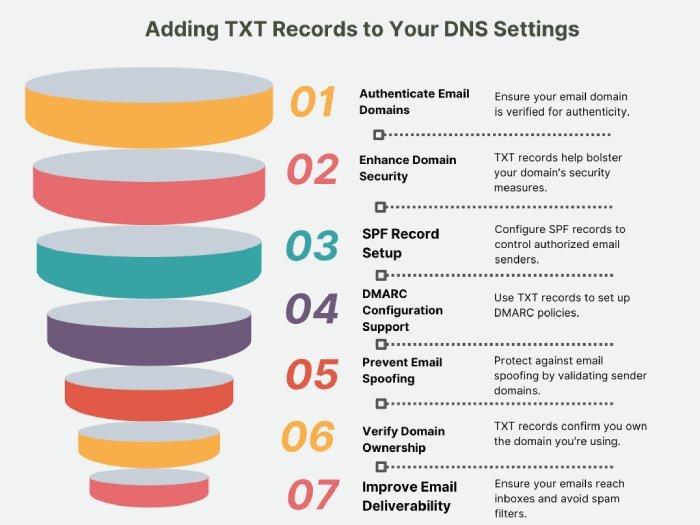
You will receive a unique TXT record from Apple. Sign in to your \*\*domain provider’s account and add the same TXT record to your [DNS settings](https://www.ntchosting.com/encyclopedia/dns/settings/). After that, return to Apple Business Connect and click ‘verify.’
## Submit for final approval
After setting everything up,\*\* submit your domain for Apple’s review. They’ll check your domain, logo, and email authentication. This usually takes 5-7 days. Once approved, you can start sending secure, branded emails to your customers.
## Simple steps to add a subdomain or email address
- Log in to Apple Business Connect using an **Administrator account**.
- Select your company. If you manage multiple companies, pick the one you want from the list.
- In the sidebar, click on ‘**Branded Mail**.’
- _Click ‘Add’ and enter your subdomain or email address_.
- Set up the TXT Record:
- If your IT or DNS admin is ready, click ‘Copy’ to copy the [TXT record](https://www.digicert.com/faq/dns/what-is-a-txt-record) and share it with them. Once they’ve added it, click ‘Verify.’
- If they’re not available, click ‘Skip’ to do it later.
- Click ‘Done’ to finish.
## Simple steps to remove a domain or email address
Follow these steps to remove a domain or email address from [Apple Business Connect](https://businessconnect.apple.com/), ensuring your brand name and logo won’t appear in future emails sent from them:
- Sign in to Apple Business Connect with an Administrator account if you’re not already logged in.
- In the sidebar, click ‘Branded Mail.’
- Next to the domain, subdomain, or email address you want to remove, click ‘More.’
- Select ‘Remove.’
## Final words
To begin with Apple Branded Mails, you must have SPF, DKIM, and [DMARC](https://dmarcreport.com/) in place. Configuring these email authentication protocols can be a bit complex, especially if you have dynamic [IP address](https://www.geeksforgeeks.org/what-is-an-ip-address/)\*\* ranges and multiple\*\* [third-party vendors](https://www.upguard.com/blog/third-party-vendor) sending emails on your behalf. So, if you are also struggling with \*\*setting and maintaining these protocols and need help, please [contact us](https://dmarcreport.com/contact/).
## Topics
[ BIMI ](/tags/bimi/)[ dkim ](/tags/dkim/)[ DMARC ](/tags/dmarc/)[ dmarc record ](/tags/dmarc-record/)[ SPF ](/tags/spf/)

[ Vishal Lamba ](/authors/vishal-lamba/)
Content Specialist
Content Specialist at DMARC Report. Writes vendor-specific email authentication guides and troubleshooting walkthroughs.
[LinkedIn Profile →](https://www.linkedin.com/in/vishal-lamba/)
## Take control of your DMARC reports
Turn raw XML into actionable dashboards. Start free - no credit card required.
[Start Free Trial](https://app.dmarcreport.com/) [Check Your DMARC Record](/tools/dmarc-checker/)
## Related Articles
[ Foundational 7m 4 sectors that need email authentication the most and why Oct 15, 2024 ](/blog/4-sectors-that-need-email-authentication-the-most-and-why/)[ Foundational 9m Answering Your Webinar Questions: Email Security - From The Desk Of DMARCReport Dec 2, 2025 ](/blog/answering-webinar-questions-email-security-dmarcreport-desk-insights-guide/)[ Foundational 12m Best DMARC Checker Tools Comparing Dmarcian, Mxtoolbox, And Proofpoint Dec 1, 2025 ](/blog/best-dmarc-checker-tools-comparing-dmarcian-mxtoolbox-and-proofpoint/)[ Foundational 11m What are common issues revealed by DMARC aggregate reports and how should I prioritize them? Feb 4, 2026 ](/blog/common-dmarc-aggregate-report-issues-and-how-to-prioritize-them/)
```json
{"@context":"https://schema.org","@type":"Organization","@id":"https://www.wikidata.org/wiki/Q138898167","name":"DMARC Report","url":"https://dmarcreport.com","logo":{"@type":"ImageObject","url":"https://dmarcreport.com/images/dmarcreport-logo.png"},"description":"DMARC reporting and email authentication management. Monitor aggregate and forensic DMARC reports, analyze authentication results, and enforce DMARC policies across all your domains.","parentOrganization":{"@type":"Organization","@id":"https://www.wikidata.org/wiki/Q138883901","name":"DuoCircle LLC","url":"https://www.duocircle.com","sameAs":["https://www.wikidata.org/wiki/Q138883901","https://www.crunchbase.com/organization/duocircle-llc","https://www.linkedin.com/company/duocircle","https://github.com/duocircle"],"subOrganization":[{"@type":"Organization","@id":"https://www.wikidata.org/wiki/Q138898167","name":"DMARC Report","url":"https://dmarcreport.com"},{"@type":"Organization","@id":"https://www.wikidata.org/wiki/Q138897474","name":"AutoSPF","url":"https://autospf.com"},{"@type":"Organization","@id":"https://www.wikidata.org/wiki/Q138897912","name":"Phish Protection","url":"https://www.phishprotection.com"}]},"sameAs":["https://www.wikidata.org/wiki/Q138898167","https://www.linkedin.com/company/duocircle","https://x.com/duocirclellc","https://www.g2.com/products/dmarc-report/reviews","https://github.com/duocircle","https://www.crunchbase.com/organization/duocircle-llc","https://www.trustradius.com/products/duocircle/reviews"],"aggregateRating":{"@type":"AggregateRating","ratingValue":"4.8","reviewCount":"470","bestRating":"5","worstRating":"1","url":"https://www.g2.com/products/dmarc-report/reviews"},"contactPoint":{"@type":"ContactPoint","contactType":"customer support","url":"https://dmarcreport.com/support/"},"knowsAbout":["DMARC","DMARC Reporting","DMARC Aggregate Reports","DMARC Forensic Reports","Sender Policy Framework","DKIM","Email Authentication","Email Security","DNS Management","Email Deliverability"]}
```
```json
{"@context":"https://schema.org","@type":"WebSite","name":"DMARC Report","url":"https://dmarcreport.com","description":"DMARC reporting and email authentication management. Monitor aggregate and forensic DMARC reports, analyze authentication results, and enforce DMARC policies across all your domains.","publisher":{"@type":"Organization","name":"DMARC Report","url":"https://dmarcreport.com","logo":{"@type":"ImageObject","url":"https://dmarcreport.com/images/dmarcreport-logo.png"},"description":"DMARC reporting and email authentication management. Monitor aggregate and forensic DMARC reports, analyze authentication results, and enforce DMARC policies across all your domains.","parentOrganization":{"@type":"Organization","@id":"https://www.wikidata.org/wiki/Q138883901","name":"DuoCircle LLC","url":"https://www.duocircle.com","sameAs":["https://www.wikidata.org/wiki/Q138883901","https://www.crunchbase.com/organization/duocircle-llc","https://www.linkedin.com/company/duocircle","https://github.com/duocircle"],"subOrganization":[{"@type":"Organization","@id":"https://www.wikidata.org/wiki/Q138898167","name":"DMARC Report","url":"https://dmarcreport.com"},{"@type":"Organization","@id":"https://www.wikidata.org/wiki/Q138897474","name":"AutoSPF","url":"https://autospf.com"},{"@type":"Organization","@id":"https://www.wikidata.org/wiki/Q138897912","name":"Phish Protection","url":"https://www.phishprotection.com"}]}}}
```
```json
[{"@context":"https://schema.org","@type":"BlogPosting","headline":"Setting Apple Business Mail using Apple Business Connect","description":"How to set up Apple Branded Mail in iOS 18.2: configure SPF, DKIM, and DMARC at quarantine or reject, verify a logo in Apple Business Connect, add a TXT record.","url":"https://dmarcreport.com/blog/setting-apple-business-mail-using-apple-business-connect/","datePublished":"2025-01-28T11:43:53.000Z","dateModified":"2026-04-16T15:53:43.000Z","dateCreated":"2025-01-28T11:43:53.000Z","author":{"@type":"Person","@id":"https://dmarcreport.com/authors/vishal-lamba/#person","name":"Vishal Lamba","url":"https://dmarcreport.com/authors/vishal-lamba/","jobTitle":"Content Specialist","description":"Vishal Lamba writes DMARC Report's how-to guides and vendor-specific configuration walkthroughs. His work focuses on step-by-step implementation guides for major email platforms (Google Workspace, Microsoft 365, SendGrid, Mimecast, Proofpoint, Brevo, and others), troubleshooting common SPF and DMARC errors, and translating RFC-level specifications into practical deployment procedures for IT administrators.","image":"https://media.mailhop.org/dmarcreport/images/team/vishal-lamba.jpg","knowsAbout":["SPF Vendor Configuration","Email Platform Integrations","SPF Troubleshooting","Technical Documentation","Step-by-Step Guides"],"worksFor":{"@type":"Organization","name":"DMARC Report","url":"https://dmarcreport.com"},"sameAs":["https://www.linkedin.com/in/vishal-lamba/"]},"publisher":{"@type":"Organization","@id":"https://www.wikidata.org/wiki/Q138898167","name":"DMARC Report","url":"https://dmarcreport.com","logo":{"@type":"ImageObject","url":"https://dmarcreport.com/images/dmarcreport-logo.png"},"description":"DMARC reporting and email authentication management. Monitor aggregate and forensic DMARC reports, analyze authentication results, and enforce DMARC policies across all your domains.","parentOrganization":{"@type":"Organization","@id":"https://www.wikidata.org/wiki/Q138883901","name":"DuoCircle LLC","url":"https://www.duocircle.com","sameAs":["https://www.wikidata.org/wiki/Q138883901","https://www.crunchbase.com/organization/duocircle-llc","https://www.linkedin.com/company/duocircle","https://github.com/duocircle"],"subOrganization":[{"@type":"Organization","@id":"https://www.wikidata.org/wiki/Q138898167","name":"DMARC Report","url":"https://dmarcreport.com"},{"@type":"Organization","@id":"https://www.wikidata.org/wiki/Q138897474","name":"AutoSPF","url":"https://autospf.com"},{"@type":"Organization","@id":"https://www.wikidata.org/wiki/Q138897912","name":"Phish Protection","url":"https://www.phishprotection.com"}]},"sameAs":["https://www.wikidata.org/wiki/Q138898167","https://www.linkedin.com/company/duocircle","https://x.com/duocirclellc","https://www.g2.com/products/dmarc-report/reviews","https://github.com/duocircle","https://www.crunchbase.com/organization/duocircle-llc","https://www.trustradius.com/products/duocircle/reviews"],"aggregateRating":{"@type":"AggregateRating","ratingValue":"4.8","reviewCount":"470","bestRating":"5","worstRating":"1","url":"https://www.g2.com/products/dmarc-report/reviews"},"contactPoint":{"@type":"ContactPoint","contactType":"customer support","url":"https://dmarcreport.com/support/"},"knowsAbout":["DMARC","DMARC Reporting","DMARC Aggregate Reports","DMARC Forensic Reports","Sender Policy Framework","DKIM","Email Authentication","Email Security","DNS Management","Email Deliverability"]},"mainEntityOfPage":{"@type":"WebPage","@id":"https://dmarcreport.com/blog/setting-apple-business-mail-using-apple-business-connect/"},"articleSection":"foundational","keywords":"BIMI, dkim, DMARC, dmarc record, SPF","wordCount":1409,"image":{"@type":"ImageObject","url":"https://media.mailhop.org/dmarcreport/images/2022/04/dmarc-alignment-6379.jpg","caption":"Setting Apple Business Mail using Apple Business Connect","width":900,"height":600},"speakable":{"@type":"SpeakableSpecification","cssSelector":[".answer-block","h1"]}}]
```
```json
{"@context":"https://schema.org","@type":"BreadcrumbList","itemListElement":[{"@type":"ListItem","position":1,"name":"Home","item":"https://dmarcreport.com/"},{"@type":"ListItem","position":2,"name":"Blog","item":"https://dmarcreport.com/blog/"},{"@type":"ListItem","position":3,"name":"Foundational","item":"https://dmarcreport.com/foundational/"},{"@type":"ListItem","position":4,"name":"Setting Apple Business Mail using Apple Business Connect","item":"https://dmarcreport.com/blog/setting-apple-business-mail-using-apple-business-connect/"}]}
```