---
title: "Setting DKIM for Microsoft 365 domain | DMARC Report"
description: "Microsoft highly encourages its users to deploy DKIM in tandem with SPF and DMARC for holistic and efficient protection against phishing and spoofing of emails."
image: "https://dmarcreport.com/og/blog/setting-dkim-for-microsoft-365-domain.png"
canonical: "https://dmarcreport.com/blog/setting-dkim-for-microsoft-365-domain/"
---
Quick Answer
DKIM (RFC 6376) signs email messages cryptographically, and unlike SPF, the signature survives email forwarding - which is why DMARC alignment via DKIM is more reliable than SPF alignment for forwarded mail. Setting DKIM for Microsoft 365 domain Setting DKIM for Microsoft 365 domain
Related: [Free DMARC Checker](/tools/dmarc-checker/) ·[How to Create an SPF Record](/tools/spf-record-generator/) ·[SPF Record Format](/blog/spf-format-checker-dos-and-donts-for-email-authentication/)
Share
[ ](https://www.linkedin.com/sharing/share-offsite/?url=undefined%2Fblog%2Fsetting-dkim-for-microsoft-365-domain%2F "Share on LinkedIn") [ ](https://twitter.com/intent/tweet?text=Setting%20DKIM%20for%20Microsoft%20365%20domain&url=undefined%2Fblog%2Fsetting-dkim-for-microsoft-365-domain%2F "Share on X/Twitter") [ ](https://www.facebook.com/sharer/sharer.php?u=undefined%2Fblog%2Fsetting-dkim-for-microsoft-365-domain%2F "Share on Facebook") [ ](https://reddit.com/submit?url=undefined%2Fblog%2Fsetting-dkim-for-microsoft-365-domain%2F&title=Setting%20DKIM%20for%20Microsoft%20365%20domain "Share on Reddit") [ ](mailto:?subject=Setting%20DKIM%20for%20Microsoft%20365%20domain&body=Check out this article: undefined%2Fblog%2Fsetting-dkim-for-microsoft-365-domain%2F "Share via Email")

## Try Our Free DKIM Lookup
Auto-discover DKIM selectors for any domain - scan 185 common selectors across all major providers.
[ Discover DKIM Selectors → ](/tools/dkim-lookup/)

DKIM ([RFC 6376](https://datatracker.ietf.org/doc/html/rfc6376)) signs email messages cryptographically, and unlike SPF, the signature survives email forwarding - which is why DMARC alignment via DKIM is more reliable than SPF alignment for forwarded mail.
> DKIM is the authentication protocol that survives email forwarding, says Brad Slavin, General Manager of DuoCircle. When SPF fails because a forwarder’s IP isn’t in the original record, DKIM alignment is the only path to DMARC pass. That’s why we monitor DKIM alongside SPF in every DMARC Report dashboard.
```
DMARC Report
```
Setting DKIM for Microsoft 365 domain
```
```
/
```
```
RSS Feed
```
Share
Link
Embed
```
/\*! This file is auto-generated \*/ ’ title=“Embed Code” class=“input-embed input-embed-23156” readonly/>
```
```
Microsoft highly encourages its users to deploy DKIM in tandem with SPF and DMARC for \*\*holistic and efficient protection against [phishing and spoofing](https://www.bleepingcomputer.com/news/google/google-now-blocks-spoofed-emails-for-better-phishing-protection/) of emails. DKIM digitally signs all outgoing emails, preventing [malicious actors](https://cybernews.com/news/malicious-actors-leak-us-criminal-database/) from altering messages in transit. When properly configured, DKIM adds a [cryptographic signature](https://www.ibm.com/docs/en/food-trust?topic=automation-cryptographic-signatures) to outgoing emails, which helps recipients to verify their authenticity.
In this guide, we’ll walk you through the step-by-step process of enabling [DKIM](https://dmarcreport.com/what-is-dkim/) for your [Microsoft 365 domain](https://dmarcreport.com/blog/dmarc-office-365-complete-setup-guide-2026/) to enhance email security, improve deliverability, and strengthen your **domain’s reputation**. Let’s get started!
## DKIM for MOERA users
If you are a Microsoft Online Email Routing Address or MOERA domain user, then you don’t have to worry about DKIM configurations. This is because Microsoft itself takes care of MOERA domains using [2048-bit](https://www.twilio.com/docs/sendgrid/ui/account-and-settings/migrating-to-2048-bit-domainkeys-identified-mail-dkim) strong public and [private keys](https://www.techtarget.com/searchsecurity/definition/private-key). All the outgoing emails are signed using this cryptographically \*\*secured key pair \*\*that helps the receiving server verify if someone has tampered with the email content in transit.
## DKIM for custom domain users
\*\*Microsoft automatically signs outgoing emails, but you still have to ensure the following for optimum protection against email-based menaces-
- For DKIM authentication to succeed under [DMARC](https://dmarcreport.com/), the domain used to sign the email must match the domain in the From address.
- When using [third-party](https://www.investopedia.com/terms/t/third-party.asp) email providers (such as bulk mailing services), configure DKIM on a subdomain instead of the **primary domain**. This helps safeguard your main [domain’s reputation](https://www.activecampaign.com/blog/domain-reputation) from potential issues with these services. _Keep in mind that each domain requires a separate DKIM setup_.
- Avoid publishing DKIM records for unused or parked domains, as this could allow attackers to exploit them for [spoofed emails](https://thehackernews.com/2024/07/proofpoint-email-routing-flaw-exploited.html) that pass DKIM validation.
- For comprehensive [email security](https://dmarcreport.com/blog/why-email-security-matters-and-how-to-get-it-right/), implement [SPF](https://autospf.com/blog/spf-guide-understanding-sender-policy-framework/) and DMARC alongside DKIM to create a robust authentication framework for your domain.
## How Do You Configure DKIM signing in Microsoft 365?
If you enable DKIM signing for a custom domain, the signing process switches from using the .onmicrosoft domain to the custom domain . _For this process, you can use a domain or subdomain_.
Before proceeding with the steps, ensure that your custom domain or subdomain appears in the DKIM tab of the [email authentication](https://dmarcreport.com/blog/why-email-security-matters-and-how-to-get-it-right/) settings page.
Verify DKIM Settings in the \*\*Details Flyout When you access the details flyout, check for the following:
- The ‘**Sign messages for this domain with DKIM signatures**’ toggle should be set to Disabled.
- The ‘**Status’** should display ‘**Not signing DKIM signatures for this domain**.’
- The ‘**Create DKIM keys**’ option should not be visible.
- The ‘**Rotate DKIM keys**’ option should be present but grayed out.
If everything matches, proceed with the next steps.
Enable DKIM in the Defender Portal
- Open the Defender portal.
- Navigate to \*\*Email & collaboration
> Policies & rules > Threat policies > Email Authentication Settings\*\*.
- Click on the DKIM tab and select the custom domain you want to configure by clicking anywhere in the row (except the checkbox).
- In the details flyout, locate the ‘**Sign messages for this domain with DKIM signatures**’ toggle, which is currently set to ‘**Disabled**.’ Also, take note of the ‘**Last checked date**.’
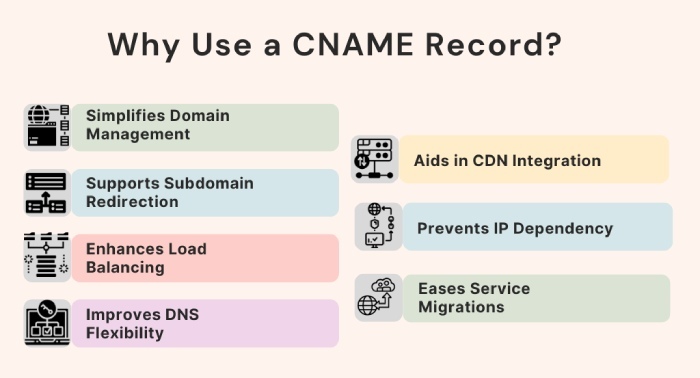
- An error message will appear, displaying the values needed to create two CNAME records at your domain registrar. Then, you need to create the following [CNAME records](https://support.dnsimple.com/articles/cname-record/) for your domain.
\*\*Hostname: \*\*selector1.domainkey
**Points to address or value:** \_selector1-yourdomain-com.\_domainkey.yourdomain.onmicrosoft.com \*\*Hostname: \*\*selector2.domainkey
**Points to address or value:** \_selector2-yourdomain-com.\_domainkey.yourdomain.onmicrosoft.com
- Copy the details from the \*\*error dialog and click **‘OK.’** \- Keep the \*\*domain details flyout open.
- In a new **browser tab or window**, go to your \*\*domain registrar’s platform and create \*\*two CNAME records using the copied information.
- Wait a few minutes to allow Microsoft to detect the newly added **CNAME records**.
- Return to the \*\*details flyout from step 5 and enable the \*\*‘Sign messages for this domain with \*\*[DKIM signatures’](https://docs.mapp.com/v1/docs/dkim-signature) toggle.
- A confirmation \*\*dialog box will appear - click **‘OK’** to close it.
- In the **details flyout**, verify the following:
- The **‘Sign messages for this domain with DKIM signatures’** toggle is now **Enabled**.
- The \*\*Status displays **‘Signing DKIM signatures for this domain.’** \- The **‘Rotate DKIM keys’** option is now available and no longer grayed out.
- The **‘Last checked date’** has been updated from what you noted earlier.
Configuring DKIM for Microsoft can get confusing. [Contact us](https://dmarcreport.com/contact/) for help.
## Topics
[ dkim ](/tags/dkim/)[ DMARC ](/tags/dmarc/)[ email security ](/tags/email-security/)[ SPF ](/tags/spf/)

[ Vishal Lamba ](/authors/vishal-lamba/)
Content Specialist
Content Specialist at DMARC Report. Writes vendor-specific email authentication guides and troubleshooting walkthroughs.
[LinkedIn Profile →](https://www.linkedin.com/in/vishal-lamba/)
## Take control of your DMARC reports
Turn raw XML into actionable dashboards. Start free - no credit card required.
[Start Free Trial](https://app.dmarcreport.com/) [Check Your DMARC Record](/tools/dmarc-checker/)
## Related Articles
[ Foundational 8m 10 Critical Learnings From Verizon’s 2021 DBIR - A DMARCReport Perspective Nov 25, 2025 ](/blog/10-critical-learnings-from-verizons-2021-dbir-a-dmarcreport-perspective/)[ Foundational 12m 10 DNS Blacklist Insights That Improve Email Security And Deliverability Fast Nov 14, 2025 ](/blog/10-dns-blacklist-insights-to-improve-email-security-and-deliverability/)[ Foundational 12m 10 Email Spoofing Detection Tools That Dramatically Improve Brand Protection Nov 11, 2025 ](/blog/10-email-spoofing-detection-tools-that-dramatically-improve-brand-protection/)[ Foundational 12m 10 Reasons SPF Filtering Is Critical For Email Security Nov 19, 2025 ](/blog/10-reasons-spf-filtering-is-critical-for-email-security/)
```json
{"@context":"https://schema.org","@type":"Organization","@id":"https://www.wikidata.org/wiki/Q138898167","name":"DMARC Report","url":"https://dmarcreport.com","logo":{"@type":"ImageObject","url":"https://dmarcreport.com/images/dmarcreport-logo.png"},"description":"DMARC reporting and email authentication management. Monitor aggregate and forensic DMARC reports, analyze authentication results, and enforce DMARC policies across all your domains.","parentOrganization":{"@type":"Organization","@id":"https://www.wikidata.org/wiki/Q138883901","name":"DuoCircle LLC","url":"https://www.duocircle.com","sameAs":["https://www.wikidata.org/wiki/Q138883901","https://www.crunchbase.com/organization/duocircle-llc","https://www.linkedin.com/company/duocircle","https://github.com/duocircle"],"subOrganization":[{"@type":"Organization","@id":"https://www.wikidata.org/wiki/Q138898167","name":"DMARC Report","url":"https://dmarcreport.com"},{"@type":"Organization","@id":"https://www.wikidata.org/wiki/Q138897474","name":"AutoSPF","url":"https://autospf.com"},{"@type":"Organization","@id":"https://www.wikidata.org/wiki/Q138897912","name":"Phish Protection","url":"https://www.phishprotection.com"}]},"sameAs":["https://www.wikidata.org/wiki/Q138898167","https://www.linkedin.com/company/duocircle","https://x.com/duocirclellc","https://www.g2.com/products/dmarc-report/reviews","https://github.com/duocircle","https://www.crunchbase.com/organization/duocircle-llc","https://www.trustradius.com/products/duocircle/reviews"],"aggregateRating":{"@type":"AggregateRating","ratingValue":"4.8","reviewCount":"470","bestRating":"5","worstRating":"1","url":"https://www.g2.com/products/dmarc-report/reviews"},"contactPoint":{"@type":"ContactPoint","contactType":"customer support","url":"https://dmarcreport.com/support/"},"knowsAbout":["DMARC","DMARC Reporting","DMARC Aggregate Reports","DMARC Forensic Reports","Sender Policy Framework","DKIM","Email Authentication","Email Security","DNS Management","Email Deliverability"]}
```
```json
{"@context":"https://schema.org","@type":"WebSite","name":"DMARC Report","url":"https://dmarcreport.com","description":"DMARC reporting and email authentication management. Monitor aggregate and forensic DMARC reports, analyze authentication results, and enforce DMARC policies across all your domains.","publisher":{"@type":"Organization","name":"DMARC Report","url":"https://dmarcreport.com","logo":{"@type":"ImageObject","url":"https://dmarcreport.com/images/dmarcreport-logo.png"},"description":"DMARC reporting and email authentication management. Monitor aggregate and forensic DMARC reports, analyze authentication results, and enforce DMARC policies across all your domains.","parentOrganization":{"@type":"Organization","@id":"https://www.wikidata.org/wiki/Q138883901","name":"DuoCircle LLC","url":"https://www.duocircle.com","sameAs":["https://www.wikidata.org/wiki/Q138883901","https://www.crunchbase.com/organization/duocircle-llc","https://www.linkedin.com/company/duocircle","https://github.com/duocircle"],"subOrganization":[{"@type":"Organization","@id":"https://www.wikidata.org/wiki/Q138898167","name":"DMARC Report","url":"https://dmarcreport.com"},{"@type":"Organization","@id":"https://www.wikidata.org/wiki/Q138897474","name":"AutoSPF","url":"https://autospf.com"},{"@type":"Organization","@id":"https://www.wikidata.org/wiki/Q138897912","name":"Phish Protection","url":"https://www.phishprotection.com"}]}}}
```
```json
[{"@context":"https://schema.org","@type":"BlogPosting","headline":"Setting DKIM for Microsoft 365 domain","description":"Microsoft highly encourages its users to deploy DKIM in tandem with SPF and DMARC for holistic and efficient protection against phishing and spoofing of emails.","url":"https://dmarcreport.com/blog/setting-dkim-for-microsoft-365-domain/","datePublished":"2025-03-25T11:43:31.000Z","dateModified":"2026-04-16T15:53:43.000Z","dateCreated":"2025-03-25T11:43:31.000Z","author":{"@type":"Person","@id":"https://dmarcreport.com/authors/vishal-lamba/#person","name":"Vishal Lamba","url":"https://dmarcreport.com/authors/vishal-lamba/","jobTitle":"Content Specialist","description":"Vishal Lamba writes DMARC Report's how-to guides and vendor-specific configuration walkthroughs. His work focuses on step-by-step implementation guides for major email platforms (Google Workspace, Microsoft 365, SendGrid, Mimecast, Proofpoint, Brevo, and others), troubleshooting common SPF and DMARC errors, and translating RFC-level specifications into practical deployment procedures for IT administrators.","image":"https://media.mailhop.org/dmarcreport/images/team/vishal-lamba.jpg","knowsAbout":["SPF Vendor Configuration","Email Platform Integrations","SPF Troubleshooting","Technical Documentation","Step-by-Step Guides"],"worksFor":{"@type":"Organization","name":"DMARC Report","url":"https://dmarcreport.com"},"sameAs":["https://www.linkedin.com/in/vishal-lamba/"]},"publisher":{"@type":"Organization","@id":"https://www.wikidata.org/wiki/Q138898167","name":"DMARC Report","url":"https://dmarcreport.com","logo":{"@type":"ImageObject","url":"https://dmarcreport.com/images/dmarcreport-logo.png"},"description":"DMARC reporting and email authentication management. Monitor aggregate and forensic DMARC reports, analyze authentication results, and enforce DMARC policies across all your domains.","parentOrganization":{"@type":"Organization","@id":"https://www.wikidata.org/wiki/Q138883901","name":"DuoCircle LLC","url":"https://www.duocircle.com","sameAs":["https://www.wikidata.org/wiki/Q138883901","https://www.crunchbase.com/organization/duocircle-llc","https://www.linkedin.com/company/duocircle","https://github.com/duocircle"],"subOrganization":[{"@type":"Organization","@id":"https://www.wikidata.org/wiki/Q138898167","name":"DMARC Report","url":"https://dmarcreport.com"},{"@type":"Organization","@id":"https://www.wikidata.org/wiki/Q138897474","name":"AutoSPF","url":"https://autospf.com"},{"@type":"Organization","@id":"https://www.wikidata.org/wiki/Q138897912","name":"Phish Protection","url":"https://www.phishprotection.com"}]},"sameAs":["https://www.wikidata.org/wiki/Q138898167","https://www.linkedin.com/company/duocircle","https://x.com/duocirclellc","https://www.g2.com/products/dmarc-report/reviews","https://github.com/duocircle","https://www.crunchbase.com/organization/duocircle-llc","https://www.trustradius.com/products/duocircle/reviews"],"aggregateRating":{"@type":"AggregateRating","ratingValue":"4.8","reviewCount":"470","bestRating":"5","worstRating":"1","url":"https://www.g2.com/products/dmarc-report/reviews"},"contactPoint":{"@type":"ContactPoint","contactType":"customer support","url":"https://dmarcreport.com/support/"},"knowsAbout":["DMARC","DMARC Reporting","DMARC Aggregate Reports","DMARC Forensic Reports","Sender Policy Framework","DKIM","Email Authentication","Email Security","DNS Management","Email Deliverability"]},"mainEntityOfPage":{"@type":"WebPage","@id":"https://dmarcreport.com/blog/setting-dkim-for-microsoft-365-domain/"},"articleSection":"foundational","keywords":"dkim, DMARC, email security, SPF","wordCount":996,"image":{"@type":"ImageObject","url":"https://media.mailhop.org/dmarcreport/images/2022/04/dmarc-alignment-6379.jpg","caption":"Setting DKIM for Microsoft 365 domain","width":900,"height":600},"speakable":{"@type":"SpeakableSpecification","cssSelector":[".answer-block","h1"]}}]
```
```json
{"@context":"https://schema.org","@type":"BreadcrumbList","itemListElement":[{"@type":"ListItem","position":1,"name":"Home","item":"https://dmarcreport.com/"},{"@type":"ListItem","position":2,"name":"Blog","item":"https://dmarcreport.com/blog/"},{"@type":"ListItem","position":3,"name":"Foundational","item":"https://dmarcreport.com/foundational/"},{"@type":"ListItem","position":4,"name":"Setting DKIM for Microsoft 365 domain","item":"https://dmarcreport.com/blog/setting-dkim-for-microsoft-365-domain/"}]}
```