---
title: "Setting DKIM keys for Salesforce | DMARC Report"
description: "Setting DKIM keys for Salesforce from DMARC Report explains practical steps for email authentication, domain protection, deliverability, and DMARC reporting."
image: "https://dmarcreport.com/og/blog/setting-dkim-keys-for-salesforce.png"
canonical: "https://dmarcreport.com/blog/setting-dkim-keys-for-salesforce/"
---
Quick Answer
DKIM (RFC 6376) signs email messages cryptographically, and unlike SPF, the signature survives email forwarding - which is why DMARC alignment via DKIM is more reliable than SPF alignment for forwarded mail and mailing lists. DMARC Report Setting DKIM keys for Salesforce
Related: [Free DMARC Checker](/tools/dmarc-checker/)
Share
[ ](https://www.linkedin.com/sharing/share-offsite/?url=undefined%2Fblog%2Fsetting-dkim-keys-for-salesforce%2F "Share on LinkedIn") [ ](https://twitter.com/intent/tweet?text=Setting%20DKIM%20keys%20for%20Salesforce&url=undefined%2Fblog%2Fsetting-dkim-keys-for-salesforce%2F "Share on X/Twitter") [ ](https://www.facebook.com/sharer/sharer.php?u=undefined%2Fblog%2Fsetting-dkim-keys-for-salesforce%2F "Share on Facebook") [ ](https://reddit.com/submit?url=undefined%2Fblog%2Fsetting-dkim-keys-for-salesforce%2F&title=Setting%20DKIM%20keys%20for%20Salesforce "Share on Reddit") [ ](mailto:?subject=Setting%20DKIM%20keys%20for%20Salesforce&body=Check out this article: undefined%2Fblog%2Fsetting-dkim-keys-for-salesforce%2F "Share via Email")
## Try Our Free DKIM Lookup
Auto-discover DKIM selectors for any domain - scan 185 common selectors across all major providers.
[ Discover DKIM Selectors → ](/tools/dkim-lookup/)
> DKIM is the authentication protocol that survives email forwarding, says Brad Slavin, General Manager of DuoCircle. When SPF fails because a forwarder’s IP isn’t in the original record, DKIM alignment is the only path to DMARC pass. That’s why we monitor DKIM alongside SPF in every DMARC Report dashboard.
DKIM ([RFC 6376](https://datatracker.ietf.org/doc/html/rfc6376)) signs email messages cryptographically, and unlike SPF, the signature survives email forwarding - which is why DMARC alignment via DKIM is more reliable than SPF alignment for forwarded mail and mailing lists. DMARC Report
Setting DKIM keys for Salesforce
```
```
/
```
```
RSS Feed
```
Share
Link
Embed
```
/\*! This file is auto-generated \*/ ’ title=“Embed Code” class=“input-embed input-embed-14877” readonly/>
```
```
Deploying and configuring DKIM, along with implementing [DMARC](https://dmarcreport.com/), is critical for Salesforce users to protect their domain’s reputation, improve [email deliverability](https://dmarcreport.com/blog/why-is-email-deliverability-important-for-online-businesses/), and maintain the integrity and authenticity of their **email communication**. DKIM and DMARC work together by integrating cryptography and \*\*policy-based authentication to verify if a [cybercriminal](https://www.bbc.com/news/technology-68344987) changed an email’s content or spoofed the sender while it was in transit.
What’s even impressive is that Salesforce itself encourages the adoption of [email authentication protocols](https://dmarcreport.com/what-is-dmarc/) within its platform. _This makes it quite simple for you to get started with the process and keep going_. Moreover, emails signed with DKIM instill trust in \*\*recipient’s mailboxes and have fewer chances of getting flagged for being spam. This helps most of your emails reach the intended recipients’ inboxes and not [spam folders](https://www.usatoday.com/story/tech/2023/06/23/emails-in-spam-folder/70350606007/).
## Steps to generate a DKIM key in Salesforce
Here’s what you need to do-
- Use your login credentials to sign in to your Salesforce account with administrative privileges.
- Go to [DKIM](https://dmarcreport.com/what-is-dkim/) settings by clicking on the gear icon you will see in the top right corner.
- Spot a ‘**Quick Find**’ box and type ‘DKIM.’ You will see the ‘Email’ section, under which you have to select ‘DKIM Keys.’
- To create a new DKIM key, click on the ‘**Create New Key’ button**, where you have to fill in the required fields-
- **Domain**: Enter the domain name you want to sign your emails with.
- **Selector**: Enter a unique name for the DKIM selector (e.g., salesforce2024). This selector will be used to differentiate this key in your [DNS records](https://www.ibm.com/topics/dns-records).
- **Key size**: Choose a key size. Salesforce typically offers [1024-bit or 2048-bit keys](https://www.mailjet.com/blog/deliverability/dkim-1024-vs-2048/), which provide stronger security.
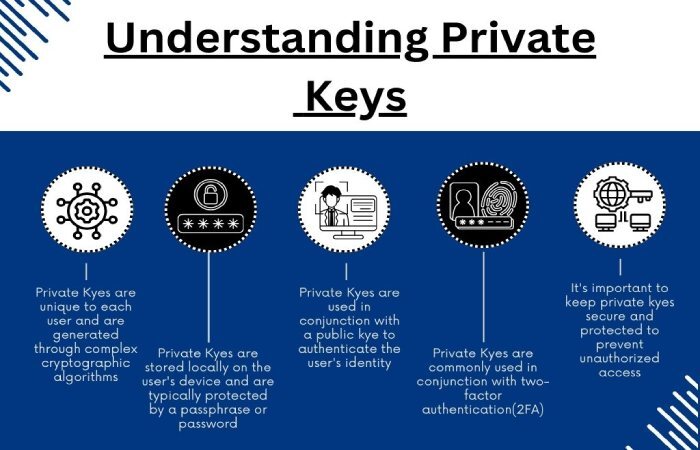
1. _Once you have filled out the details in the required fields, click ‘Generate_.’ You will receive a pair of public and private keys \*\*produced by Salesforce exclusively for your domain.
## Steps to add the DKIM key in Salesforce
- Once the key is generated, Salesforce will display the [public key](https://www.techopedia.com/definition/16139/public-key) and the exact [DNS TXT record](https://www.cloudflare.com/learning/dns/dns-records/dns-txt-record/) format you need to add to your domain’s DNS settings. So copy that.
- Log in to your \*\*DNS provider’s platform and look for an option to add a new [TXT record](https://www.digicert.com/faq/dns/what-is-a-txt-record) with the following details-
- **Name**: This should be the combination of the [DKIM selector](https://www.linkedin.com/pulse/understanding-dkim-selectors-dmarc-advisor) and your domain, e.g., salesforce2024.domainkey.yourdomain.com.
- **Type**: Select TXT.
- **Value**: Paste the [public key](https://www.techtarget.com/searchsecurity/definition/public-key) provided by Salesforce.
- When done, save the new TXT record in your **DNS settings**. Please wait for 24 to 48 hours for the changes to propagate across the internet.
## Steps to activate the DKIM key in Salesforce
- Return to the Salesforce DKIM Key setup page .
- Click on ‘Activate’ next to the key you generated.
- _Salesforce will check if the DNS TXT record is correctly set up and, once verified, will start signing your emails with the DKIM key_.
- Then, test the \*\*DKIM signature by [sending an email from Salesforce](https://www.bardeen.ai/answers/how-to-send-email-in-salesforce) and checking the email headers to ensure that your signature is valid and properly formatted.
## How Do You Monitor and Maintenance?
Monitor the status of your DKIM key in Salesforce regularly to ensure it continues to function correctly. Following a similar process, consider rotating your [DKIM keys periodically](https://dmarcreport.com/blog/dkim-key-rotation-best-practices-for-large-organizations-should-know/) for **added security**.
## Topics
[ dkim ](/tags/dkim/)[ DMARC ](/tags/dmarc/)[ dns record ](/tags/dns-record/)

[ Vishal Lamba ](/authors/vishal-lamba/)
Content Specialist
Content Specialist at DMARC Report. Writes vendor-specific email authentication guides and troubleshooting walkthroughs.
[LinkedIn Profile →](https://www.linkedin.com/in/vishal-lamba/)
## Take control of your DMARC reports
Turn raw XML into actionable dashboards. Start free - no credit card required.
[Start Free Trial](https://app.dmarcreport.com/) [Check Your DMARC Record](/tools/dmarc-checker/)
## Related Articles
[ Intermediate 4m Does DKIM break for forwarded emails and mailing lists? Jul 11, 2024 ](/blog/does-dkim-break-for-forwarded-emails-and-mailing-lists/)[ Intermediate 5m How to Set Up DKIM in Amazon SES? Jun 10, 2024 ](/blog/how-to-set-up-dkim-in-amazon-ses/)[ Intermediate 8m Decoding I-Tag DKIM Vulnerability and Its Impact on Email Deliverability and Security Jun 6, 2024 ](/blog/decoding-i-tag-dkim-vulnerability-and-its-impact-on-email-security/)[ Intermediate 6m How to Generate a DMARC Record for Subdomains: sp= Tag Guide Apr 13, 2026 ](/blog/generate-dmarc-record-subdomains-sp-tag-guide/)
```json
{"@context":"https://schema.org","@type":"Organization","@id":"https://www.wikidata.org/wiki/Q138898167","name":"DMARC Report","url":"https://dmarcreport.com","logo":{"@type":"ImageObject","url":"https://dmarcreport.com/images/dmarcreport-logo.png"},"description":"DMARC reporting and email authentication management. Monitor aggregate and forensic DMARC reports, analyze authentication results, and enforce DMARC policies across all your domains.","parentOrganization":{"@type":"Organization","@id":"https://www.wikidata.org/wiki/Q138883901","name":"DuoCircle LLC","url":"https://www.duocircle.com","sameAs":["https://www.wikidata.org/wiki/Q138883901","https://www.crunchbase.com/organization/duocircle-llc","https://www.linkedin.com/company/duocircle","https://github.com/duocircle"],"subOrganization":[{"@type":"Organization","@id":"https://www.wikidata.org/wiki/Q138898167","name":"DMARC Report","url":"https://dmarcreport.com"},{"@type":"Organization","@id":"https://www.wikidata.org/wiki/Q138897474","name":"AutoSPF","url":"https://autospf.com"},{"@type":"Organization","@id":"https://www.wikidata.org/wiki/Q138897912","name":"Phish Protection","url":"https://www.phishprotection.com"}]},"sameAs":["https://www.wikidata.org/wiki/Q138898167","https://www.linkedin.com/company/duocircle","https://x.com/duocirclellc","https://www.g2.com/products/dmarc-report/reviews","https://github.com/duocircle","https://www.crunchbase.com/organization/duocircle-llc","https://www.trustradius.com/products/duocircle/reviews"],"aggregateRating":{"@type":"AggregateRating","ratingValue":"4.8","reviewCount":"470","bestRating":"5","worstRating":"1","url":"https://www.g2.com/products/dmarc-report/reviews"},"contactPoint":{"@type":"ContactPoint","contactType":"customer support","url":"https://dmarcreport.com/support/"},"knowsAbout":["DMARC","DMARC Reporting","DMARC Aggregate Reports","DMARC Forensic Reports","Sender Policy Framework","DKIM","Email Authentication","Email Security","DNS Management","Email Deliverability"]}
```
```json
{"@context":"https://schema.org","@type":"WebSite","name":"DMARC Report","url":"https://dmarcreport.com","description":"DMARC reporting and email authentication management. Monitor aggregate and forensic DMARC reports, analyze authentication results, and enforce DMARC policies across all your domains.","publisher":{"@type":"Organization","name":"DMARC Report","url":"https://dmarcreport.com","logo":{"@type":"ImageObject","url":"https://dmarcreport.com/images/dmarcreport-logo.png"},"description":"DMARC reporting and email authentication management. Monitor aggregate and forensic DMARC reports, analyze authentication results, and enforce DMARC policies across all your domains.","parentOrganization":{"@type":"Organization","@id":"https://www.wikidata.org/wiki/Q138883901","name":"DuoCircle LLC","url":"https://www.duocircle.com","sameAs":["https://www.wikidata.org/wiki/Q138883901","https://www.crunchbase.com/organization/duocircle-llc","https://www.linkedin.com/company/duocircle","https://github.com/duocircle"],"subOrganization":[{"@type":"Organization","@id":"https://www.wikidata.org/wiki/Q138898167","name":"DMARC Report","url":"https://dmarcreport.com"},{"@type":"Organization","@id":"https://www.wikidata.org/wiki/Q138897474","name":"AutoSPF","url":"https://autospf.com"},{"@type":"Organization","@id":"https://www.wikidata.org/wiki/Q138897912","name":"Phish Protection","url":"https://www.phishprotection.com"}]}}}
```
```json
[{"@context":"https://schema.org","@type":"BlogPosting","headline":"Setting DKIM keys for Salesforce","description":"Setting DKIM keys for Salesforce from DMARC Report explains practical steps for email authentication, domain protection, deliverability, and DMARC reporting.","url":"https://dmarcreport.com/blog/setting-dkim-keys-for-salesforce/","datePublished":"2024-08-09T11:19:50.000Z","dateModified":"2026-04-16T15:53:43.000Z","dateCreated":"2024-08-09T11:19:50.000Z","author":{"@type":"Person","@id":"https://dmarcreport.com/authors/vishal-lamba/#person","name":"Vishal Lamba","url":"https://dmarcreport.com/authors/vishal-lamba/","jobTitle":"Content Specialist","description":"Vishal Lamba writes DMARC Report's how-to guides and vendor-specific configuration walkthroughs. His work focuses on step-by-step implementation guides for major email platforms (Google Workspace, Microsoft 365, SendGrid, Mimecast, Proofpoint, Brevo, and others), troubleshooting common SPF and DMARC errors, and translating RFC-level specifications into practical deployment procedures for IT administrators.","image":"https://media.mailhop.org/dmarcreport/images/team/vishal-lamba.jpg","knowsAbout":["SPF Vendor Configuration","Email Platform Integrations","SPF Troubleshooting","Technical Documentation","Step-by-Step Guides"],"worksFor":{"@type":"Organization","name":"DMARC Report","url":"https://dmarcreport.com"},"sameAs":["https://www.linkedin.com/in/vishal-lamba/"]},"publisher":{"@type":"Organization","@id":"https://www.wikidata.org/wiki/Q138898167","name":"DMARC Report","url":"https://dmarcreport.com","logo":{"@type":"ImageObject","url":"https://dmarcreport.com/images/dmarcreport-logo.png"},"description":"DMARC reporting and email authentication management. Monitor aggregate and forensic DMARC reports, analyze authentication results, and enforce DMARC policies across all your domains.","parentOrganization":{"@type":"Organization","@id":"https://www.wikidata.org/wiki/Q138883901","name":"DuoCircle LLC","url":"https://www.duocircle.com","sameAs":["https://www.wikidata.org/wiki/Q138883901","https://www.crunchbase.com/organization/duocircle-llc","https://www.linkedin.com/company/duocircle","https://github.com/duocircle"],"subOrganization":[{"@type":"Organization","@id":"https://www.wikidata.org/wiki/Q138898167","name":"DMARC Report","url":"https://dmarcreport.com"},{"@type":"Organization","@id":"https://www.wikidata.org/wiki/Q138897474","name":"AutoSPF","url":"https://autospf.com"},{"@type":"Organization","@id":"https://www.wikidata.org/wiki/Q138897912","name":"Phish Protection","url":"https://www.phishprotection.com"}]},"sameAs":["https://www.wikidata.org/wiki/Q138898167","https://www.linkedin.com/company/duocircle","https://x.com/duocirclellc","https://www.g2.com/products/dmarc-report/reviews","https://github.com/duocircle","https://www.crunchbase.com/organization/duocircle-llc","https://www.trustradius.com/products/duocircle/reviews"],"aggregateRating":{"@type":"AggregateRating","ratingValue":"4.8","reviewCount":"470","bestRating":"5","worstRating":"1","url":"https://www.g2.com/products/dmarc-report/reviews"},"contactPoint":{"@type":"ContactPoint","contactType":"customer support","url":"https://dmarcreport.com/support/"},"knowsAbout":["DMARC","DMARC Reporting","DMARC Aggregate Reports","DMARC Forensic Reports","Sender Policy Framework","DKIM","Email Authentication","Email Security","DNS Management","Email Deliverability"]},"mainEntityOfPage":{"@type":"WebPage","@id":"https://dmarcreport.com/blog/setting-dkim-keys-for-salesforce/"},"articleSection":"intermediate","keywords":"dkim, DMARC, dns record","wordCount":863,"image":{"@type":"ImageObject","url":"https://media.mailhop.org/dmarcreport/images/2022/04/dmarc-record-6071.jpg","caption":"Setting DKIM keys for Salesforce","width":900,"height":600},"speakable":{"@type":"SpeakableSpecification","cssSelector":[".answer-block","h1"]}}]
```
```json
{"@context":"https://schema.org","@type":"BreadcrumbList","itemListElement":[{"@type":"ListItem","position":1,"name":"Home","item":"https://dmarcreport.com/"},{"@type":"ListItem","position":2,"name":"Blog","item":"https://dmarcreport.com/blog/"},{"@type":"ListItem","position":3,"name":"Intermediate","item":"https://dmarcreport.com/intermediate/"},{"@type":"ListItem","position":4,"name":"Setting DKIM keys for Salesforce","item":"https://dmarcreport.com/blog/setting-dkim-keys-for-salesforce/"}]}
```