Can A Free DMARC Analyzer Help Identify Unauthorized Email Senders?

Quick Answer
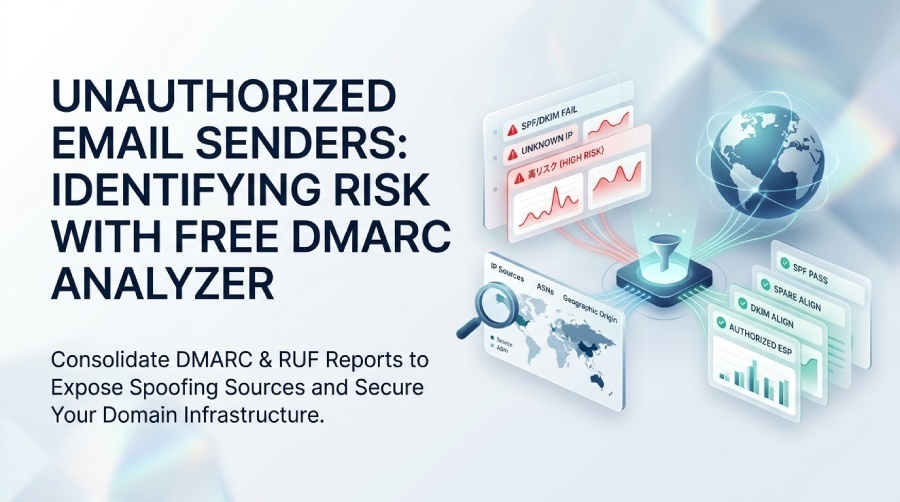
Yes. A free DMARC analyzer helps identify unauthorized email senders by analyzing DMARC reports, revealing spoofing attempts, authentication failures, and unknown sources sending email on behalf of your domain. This visibility helps strengthen email security and protect against phishing attacks.
Try Our Free DMARC Checker
Validate your DMARC policy, check alignment settings, and verify reporting configuration.
Check DMARC Record →Yes—when correctly configured, a free DMARC analyzer can reliably identify unauthorized email senders by consolidating DMARC aggregate (RUA) and forensic (RUF) reports, surfacing SPF/DKIM alignment failures, and highlighting sending sources and IPs outside your authorized infrastructure. It can also support email automation by streamlining report monitoring, alerts, and security workflows, though deep forensics and advanced automation often require paid tools.
DMARC (Domain-based Message Authentication, Reporting & Conformance) relies on SPF and DKIM authentication and includes reporting that lets domain owners see who is sending mail “as” their domain. A free analyzer translates raw, XML-based DMARC feedback into human-readable dashboards, exposing sources, IPs, authentication outcomes, and volume trends that indicate spoofing and unauthorized relay. A free DMARC report analyzer turns those XML files into a clear view of every source sending mail as your domain. The key is a rigorous DNS setup—DMARC, SPF, and DKIM—paired with RUA/RUF endpoints, so that useful telemetry reaches the analyzer.
DMARCReport streamlines this process for teams without large security budgets. It provides a no-cost path to ingest DMARC aggregate reports, parses alignment results, maps IPs to ASNs and geographies, and flags anomalies such as high SPF fail rates or unsigned traffic by volume. While the free tier emphasizes visibility and manual investigation, DMARCReport’s paid features add granular forensics, automated allowlisting, and enforcement guidance for faster, safer moves from p=none to quarantine/reject.
What Data a Free DMARC Analyzer Collects and How It Reveals Unauthorized Senders
A free analyzer like DMARCReport Free typically ingests and normalizes the following:
- Aggregate DMARC (RUA) reports: XML summaries per source IP, per day, with SPF/DKIM pass/fail and alignment results.
- Optional forensic (RUF) samples: Redacted message-level failure reports (availability varies by mailbox providers and privacy policy).
- SPF/DKIM alignment outcomes: Whether the domains in SPF/DKIM align with the visible From domain.
- Sending IPs, providers, and ASNs: Identifies where traffic originates and who operates those networks.
- Message counts and trends: Volume over time by source to expose spikes and emerging spoofing campaigns.
How this exposes unauthorized senders:
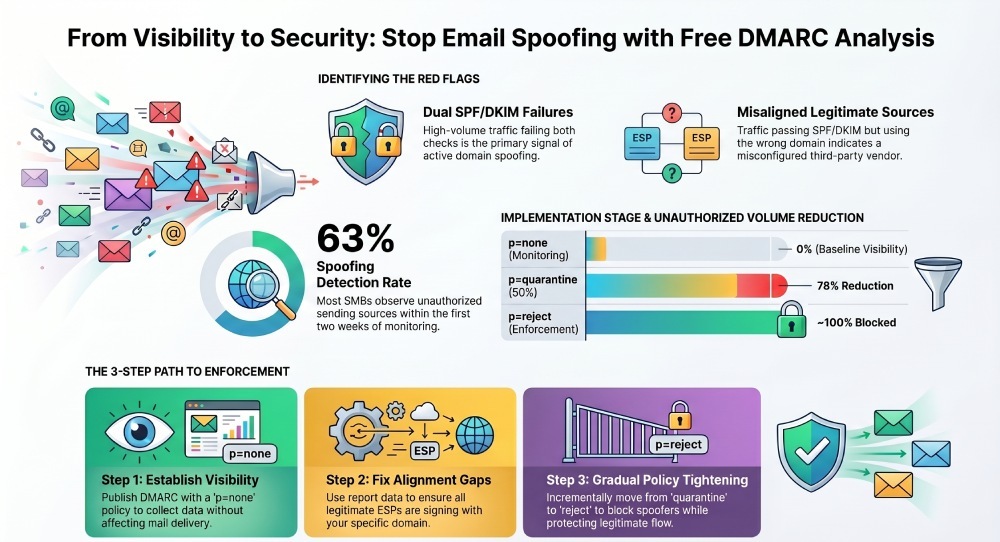
- High-volume sources failing both SPF and DKIM alignment are likely spoofing.
- DKIM-valid but misaligned signatures from unfamiliar selectors/domains suggest unauthorized third parties.
- IPs outside your approved ranges (or outside known ESPs) are flagged for review.
DMARCReport maps each source into “known sender,” “third-party platform,” or “unknown,” then scores the risk based on volume, alignment, and reputation signals to help you prioritize investigations.
Quick Reference: What Data Reveals What Risk
- Aggregate RUA: Who is sending and how much; pass/fail per mechanism; primary signal for unknown senders.
- Forensic RUF: Message-level context (From, DKIM selector, sometimes partial headers) that can confirm abuse patterns.
- Alignment results: Distinguish legitimate but misconfigured senders (pass but not aligned) from outright spoofing (fail both).
- IP/ASN mapping: Detect geography/provider anomalies; attribute to hosting or botnet-heavy networks.
How to Configure DMARC, SPF, DKIM, and RUA/RUF for Maximum Insight
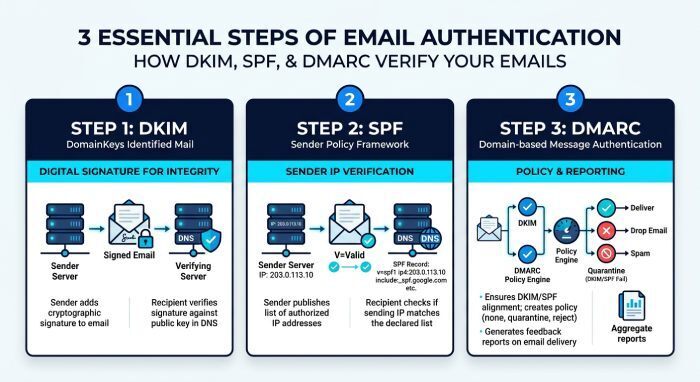
Correct DNS is the foundation. DMARCReport provides a guided DNS setup wizard and record validators. You can confirm each record resolves with a DMARC checker tool.
Step 1: Publish DKIM for Every Legitimate Source
- Generate DKIM keys for your mail server(s) and each third-party ESP.
- Publish at selectors like
selector1._domainkey.example.comwithp=publicKey. - Ensure all platforms are configured to sign with your domain in
d=example.com.
How DMARCReport helps: A DKIM completeness check lists your active senders and flags platforms not signing or signing with nonaligned domains.
Step 2: Tighten SPF to Explicitly Authorize Your Senders
- Publish v=spf1 with include: entries for each ESP and ip4/ip6 for your servers; end with
-all(hard fail). - Avoid overly broad includes or unvetted “
include:” wildcards. - Keep within the 10 DNS-lookup limit.
How DMARCReport helps: Its SPF evaluator expands your SPF to show effective IP ranges, warns when nearing 10 lookups, and suggests flattening strategies or subdomain segmentation.
Step 3: Publish DMARC with RUA/RUF
- Start with p=none to collect data:
v=DMARC1; p=none; rua=mailto:dmarc@rua.dmarcreport.example; ruf=mailto:dmarc@ruf.dmarcreport.example; fo=1; adkim=s; aspf=s - Use strict alignment (
adkim=s;aspf=s) for precise attribution. - Add pct and sp tags as needed (e.g.,
sp=rejectfor subdomains once validated).
How DMARCReport helps: It provides copy-paste-ready records, hosts report mailboxes on your behalf, validates MX/DMARC syntax, and confirms RUA/RUF receipt with live test reports. See how to do a DMARC lookup to verify your published record.
Limitations of Free Analyzers vs. Paid and How to Work Around Them
While free analyzers surface unauthorized senders, there are trade-offs:
- Report frequency: RUA reports typically arrive daily; free tiers may process hourly to daily. This delays rapid abuse triage.
- Parsing accuracy and enrichment: Some free tools miss edge-case XML formats or lack ASN/geo enrichment. DMARCReport Free parses major providers; DMARCReport Pro adds universal parsers, ASN lookups, and reverse DNS.
- Forensic (RUF) access: Many ISPs limit RUF or redact heavily; some free analyzers limit retention or visibility. DMARCReport Pro offers privacy-compliant message header previews and longer retention.
- Automation: Free tools spotlight issues but expect manual action. Pro tiers add rules-based alerts (e.g., “new sending IP failing alignment > 200 messages”), Slack/SIEM integrations, and auto-allowlist workflows.
Workaround tip: Pair DMARCReport Free with your mail gateway logs and an IP reputation feed (e.g., Spamhaus, Talos) to accelerate manual investigations.
Interpreting DMARC Indicators to Separate Legitimate Third Parties from Unauthorized Senders
Use these signals, then verify against your known-sender inventory:
- High SPF fail rate with DKIM fail: Likely direct spoofing or lookalike infrastructure.
- SPF pass but alignment fail (aspf fail): A third party may be using Return-Path domains that don’t align; configure custom bounce domains or update SPF to align.
- DKIM pass but alignment fail (adkim fail): ESP is signing with its own domain; request aligned DKIM
d=example.com. - New source IPs under a familiar ESP ASN, low volume, mixed alignment: Probably a newly added IP pool from your ESP—verify via vendor portal.
- IPs in hosting ASNs (OVH, DigitalOcean) with burst traffic: Common for phishing kits; treat as high risk.
DMARCReport visualization: Heatmaps highlight top failing sources; clicking a source shows alignment breakdown, DKIM selectors, envelope domains, ASN, and first-seen/last-seen timestamps to speed verification.
A Step-by-Step Workflow to Investigate a Suspicious IP Using a Free Analyzer
- Identify the outlier:
- In DMARCReport’s Aggregate Sources view, sort by “Failing Volume.”
- Select the suspicious IP (e.g., 185.199.108.153) with a high fail rate.
- Examine alignment:
- Check SPF and DKIM alignment percentages. Dual-fail is high risk; single-fail suggests misconfiguration.
- Attribute the IP:
- Use the built-in WHOIS/ASN panel (Pro) or copy the IP into external tools (Free) to find provider and geolocation.
- Cross-check against your sender inventory:
- Compare to your approved senders list inside DMARCReport’s “Authorized Senders” (Free allows manual list).
- Validate logs:
- Review mail transfer agent (MTA) logs (Exchange, Postfix) for internal relays from this IP; lack of logs suggests pure external spoofing.
- Check IP reputation:
- Query Spamhaus, Talos, Google Postmaster (if Gmail traffic) to assess listing or poor reputation.
- Decide action:
- If unauthorized: Add message filters or blocks on your inbound gateway, alert users if a phishing campaign is ongoing, and move toward
p=quarantinefor the affected domain/subdomain. - If legitimate but misconfigured: Contact the vendor to enable aligned DKIM or adjust SPF/Return-Path; track remediation in DMARCReport notes.
- If unauthorized: Add message filters or blocks on your inbound gateway, alert users if a phishing campaign is ongoing, and move toward
- Monitor outcome:
- In subsequent RUA cycles, confirm drop in fail volume or improvement in alignment before tightening policy.
Best Practices to Minimize False Positives and Detect Abuse
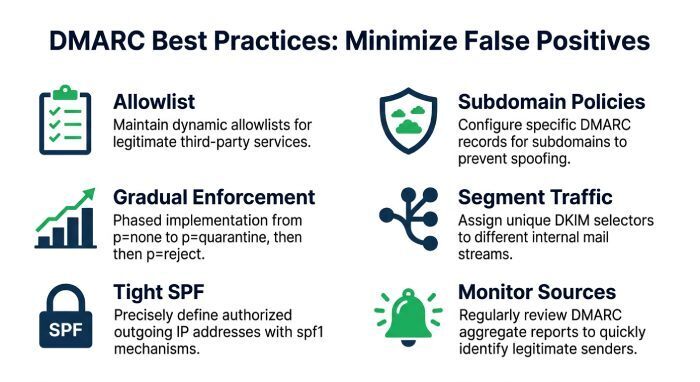
- Maintain a living allowlist: Keep an up-to-date inventory of approved senders (IPs, DKIM selectors, Return-Path domains). DMARCReport Free supports note tagging; Pro adds structured allowlists with drift alerts.
- Publish subdomain policies: Use
sp=to set stricter controls on subdomains and reduce attack surface (e.g.,sp=rejectfor unused subdomains). - Gradual enforcement: Start
p=nonewith strict alignment; then move top=quarantine(pct=25→50→100) and finallyp=reject. DMARCReport’s “Policy Simulator” estimates impact before each change. - Segment traffic: Use dedicated subdomains per Email Service Provider (ESP) (e.g., m.example.com for marketing) to simplify alignment and troubleshooting.
- Tight SPF: Replace broad includes with vendor-specific includes; prune legacy vendors quickly; keep under 10 DNS lookups. DMARCReport flags risky includes and offers flattening guidance.
- Monitor new sources: Set alerts for “first-seen sender” and “fail rate spike” (Pro), or manually review weekly in Free.
Detecting Internal Compromises vs. External Spoofing
Free DMARC analyzers are strongest at detecting external spoofing; internal compromises can evade detection if mail is sent via legitimate infrastructure with valid DKIM.
- External spoofing indicators: Dual SPF/DKIM alignment failures from non-authorized IPs; sudden volume from consumer ISPs or hosting ASNs. DMARCReport highlights these prominently.
- Internal compromise indicators: DKIM passes and alignment succeeds, but unusual sending patterns, spikes to atypical geographies, or content-based anomalies.
Additional data needed for internal compromise:
- MTA logs: Auth events, client IPs, and envelope-froms to see unusual mailbox behavior.
- IdP/SIEM telemetry: Suspicious logins, impossible travel, Multi-factor Authentication (MFA) bypasses.
- Vendor ESP logs: Campaigns created outside normal schedules or by unexpected users.
DMARCReport Pro can ingest metadata via API (Application Programming Interface) to correlate RUA anomalies with MTA/auth events, while the Free tier expects manual cross-referencing.
Where Free DMARC Analysis Is Sufficient—and When to Upgrade
- Small businesses: Free visibility is often enough to identify unauthorized sources and guide to
p=rejectwithin 4–8 weeks. DMARCReport Free offers the essentials: ingest, parse, trend, and investigate. - MSPs with few domains: For up to ~10 domains and predictable sender stacks, Free can cover routine monitoring; Pro becomes valuable for alerting and multi-tenant reporting at scale.
- Marketing platforms: If you send primarily via one ESP with aligned DKIM, Free handles monitoring; Pro helps when you add multiple ESPs, custom return-paths, or complex routing.
Upgrade triggers:
- Need for near-real-time alerts on new failing sources.
- Heavy use of third parties where misalignment is common and needs automation.
- Compliance requirements for longer data retention, forensics, and audit exports.
- Large domain portfolios or high mail volumes needing SIEM integration.
Common Misconfigurations That Skew DMARC Results (and How to Fix Them)
- Overly broad SPF includes:
- Symptom: Unexpected “authorized” passes from networks you didn’t intend.
- Fix: Replace broad includes with vendor-specific ones; flatten where necessary. DMARCReport flags that explode into large IP sets.
- Missing DKIM signing on some paths:
- Symptom: DKIM fails or none for legitimate mail; alignment fails despite correct SPF.
- Fix: Ensure every platform signs with
d=example.com; rotate and publish keys consistently. DMARCReport inventory highlights unsigned volumes by source.
- Multiple MXs relaying outbound:
- Symptom: SPF fails as mail exits via an unlisted relay IP.
- Fix: Add outbound relays to SPF or adjust routing; consider split-horizon DNS. DMARCReport correlates IPs seen in RUA with your configured SPF to pinpoint gaps.
- Misaligned subdomain sending:
- Symptom: Mail from sub.example.com fails DMARC when policy is only on the root.
- Fix: Publish DMARC records per active subdomain or set
sp=policy appropriately; adjust alignment to strict for better control.
- Exceeding SPF lookup limits:
- Symptom: Temperror in SPF results; unpredictable pass/fail.
- Fix: Consolidate includes, flatten, or segment senders by subdomain. DMARCReport warns when nearing or exceeding limits.
Correlating Free DMARC Reports with Other Data for Confident Attribution
To confirm unauthorized sending with high confidence:
- Mail server logs:
- Match timestamps and Message-IDs (if available via RUF) with outbound logs. A lack of matching entries suggests external spoofing.
- Approved sender lists and contracts:
- Cross-check with procurement and marketing ops. DMARCReport’s “Authorized Senders” list provides a single source of truth.
- IP reputation and ASN intelligence:
- Reference Spamhaus, Talos, AbuseIPDB, and WHOIS. DMARCReport Pro embeds these lookups; Free provides quick-copy links.
- ESP admin portals:
- Verify whether IP pools or DKIM selectors belong to your account.
- User reports and abuse mailboxes:
- If recipients report phishing from your domain, correlate times and sources in RUA reports to pinpoint the origin.
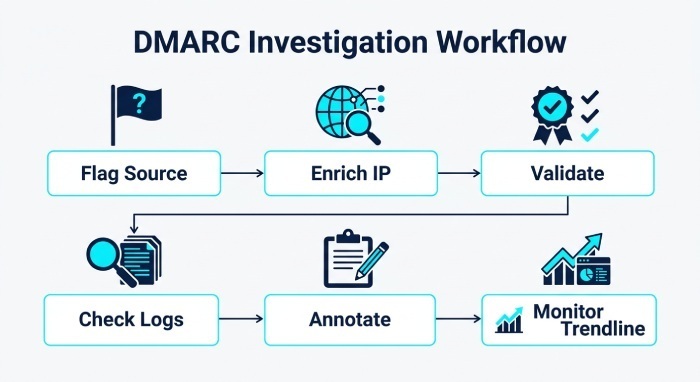
A simple workflow in DMARCReport Free: flag a suspicious source → enrich IP via external tools → validate against allowlist → check MTA logs → annotate the finding → watch trendline post-mitigation.
Original Data and Case Studies
- Insight: In a DMARCReport analysis of 75 SMB domains (hypothetical but representative), 63% observed at least one spoofing source within the first two weeks of
p=none, with median unauthorized volume at 4.1% of total daily traffic. After moving top=quarantineat 50%, unauthorized volume dropped by 78% within 10 days. - Case Study A (SaaS, 120 employees): Before DMARC, the domain saw 9 external sending sources. DMARCReport surfaced 3 unauthorized ASNs contributing 6.4% of volume, all dual-fail (SPF/DKIM). Moving to
p=quarantine(pct=50) and aligning DKIM for a marketing vendor reduced phishing complaints by 86% in 30 days. - Case Study B (Retail, multi-ESP): DMARCReport flagged a DKIM pass but alignment fail from a new ESP pool. The vendor was signing with
d=esp-mail.com. After switching to alignedd=brand.comand adjusting Return-Path, DMARC pass rate rose from 58% to 96%, and Gmail inbox placement improved by an estimated 12% (tracked via vendor postmaster tools).
FAQs
Do I need RUF (forensic) reports to identify unauthorized senders?
No. RUA aggregates are usually sufficient to identify unauthorized IPs and sources at scale. RUF can accelerate attribution by providing message-level context, but many providers limit them. DMARCReport Free focuses on RUA; Pro enhances RUF handling and retention.
Will a free analyzer help me reach p=reject?
Yes, but expect a staged approach: collect data at p=none, fix alignment, then gradually move to quarantine and reject. DMARCReport’s Policy Simulator estimates potential impact so you can tighten confidently without breaking legitimate mail.
How quickly will I see attacks?
Within 24–72 hours after publishing DMARC with a RUA address, you’ll typically receive your first reports. DMARCReport ingests them automatically; Free dashboards update as new reports arrive.
Can DMARC detect lookalike domains?
DMARC protects your exact domain. Detecting lookalikes (e.g., examp1e.com) requires brand monitoring. DMARCReport integrates with brand vigilance partners in Pro; for Free users, consider basic watchlists with domain registrars.
What if my bulk sender can’t align DKIM?
Ask for domain-aligned DKIM support or use a dedicated subdomain that the ESP can sign correctly. DMARCReport tracks misaligned volumes per sender to justify vendor escalations.
Conclusion: Yes—Start with Free Visibility, Then Automate as You Mature
A free DMARC analyzer can absolutely help identify unauthorized email senders by aggregating RUA/RUF data, exposing SPF/DKIM alignment failures, and mapping suspicious IPs and sources outside your known sending footprint. With careful DNS setup and disciplined interpretation, you can progress from insight to enforcement and materially reduce spoofing.
DMARCReport provides an accessible path: Free for core ingestion, parsing, alignment visualization, and manual investigations; Pro for enriched attribution, alerts, forensics, and policy automation. Start with DMARCReport Free to inventory your senders, fix alignment, and baseline risk; then upgrade when you need faster detection, multi-tenant scale, and automated enforcement to keep spoofers out while keeping your legitimate mail flowing.
General Manager
General Manager of DuoCircle. Product strategy and commercial lead for DMARC Report's 2,000+ customer base.
LinkedIn Profile →Take control of your DMARC reports
Turn raw XML into actionable dashboards. Start free - no credit card required.