How Can I Get Started Testing My DMARC Reports With A Reader Without Altering My DNS Records?

Quick Answer
You can test DMARC reports with a reader without altering DNS records. Upload or import your existing reports into a DMARC reader to analyze authentication results, identify sending sources, and detect potential email security issues safely.
Try Our Free DMARC Checker
Validate your DMARC policy, check alignment settings, and verify reporting configuration.
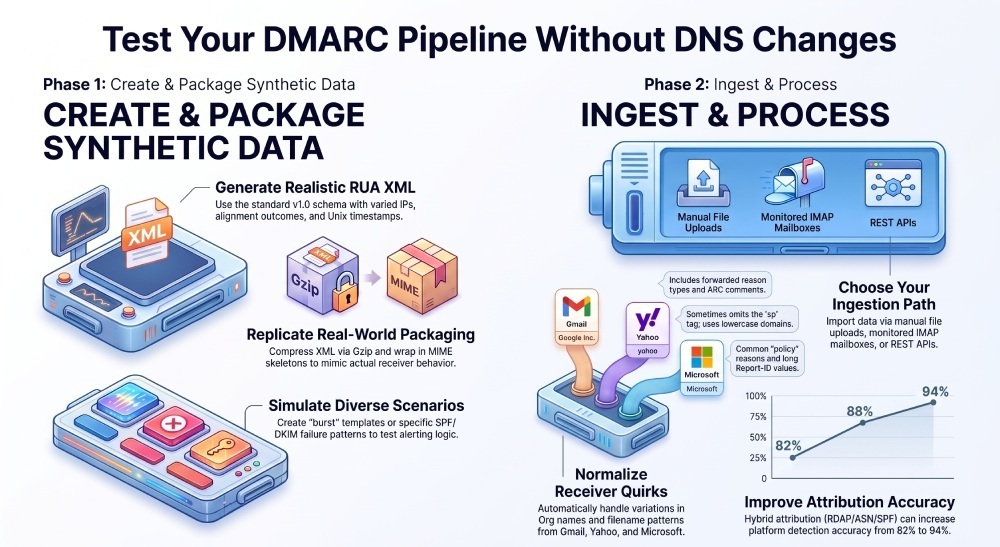
Check DMARC Record →You can get started testing your DMARC reports without altering DNS by generating realistic synthetic RUA XML files, packaging them as gzipped email attachments, and importing them directly into DMARCReport via file upload, a monitored mailbox, or the DMARCReport API, while applying strict parsing, normalization, and security controls to validate your reader’s behavior.
DMARC aggregate (RUA) reports are machine-readable XML summaries receivers send to the domain owner about SPF/DKIM alignment outcomes across sending IPs. When you’re not ready to publish rua mailto: URIs in DNS—or want to test privately—you can still exercise your reader by feeding it authentic-looking reports with varied receivers, IPs, alignments, and dispositions. The key is to replicate the core schema, sender-specific quirks, gzip packaging, and the Multipurpose Internet Mail Extensions (MIME) attachment envelope.
DMARCReport is designed for this mode of evaluation. It offers a Sandbox that accepts uploads, an IMAP-based mailbox collector, and a simple REST API you can point at generated files. It also includes robust XML namespace handling, gzip validation, receiver normalization, deduplication, and safe parsing defaults. Below is a step-by-step playbook that lets you test end-to-end without any DNS changes.
Generate realistic DMARC RUA XML without DNS changes
Required XML structure and example values that mimic common receivers
DMARC aggregate reports follow the XML schema at urn:ietf:params:xml:ns:dmarc-schema:1.0 and typically contain these elements:
- feedback (root with namespace)
- report_metadata:
org_name, email,extra_contact_info,report_id,ate_range(begin/end epoch) - policy_published: domain, adkim, aspf, p, sp, pct, fo (optional)
- record (repeats): row (
source_ip, count,policy_evaluated), identifiers (header_from),auth_results(dkim/spf detail)
Example minimal-yet-realistic XML (simulate Gmail and Microsoft sources in one file):
<?xml version="1.0" encoding="UTF-8"?>
<feedback xmlns="urn:ietf:params:xml:ns:dmarc-schema:1.0">
  <report_metadata>
    <org_name>Google Inc.</org_name>
    <email>noreply-dmarc-support@google.com</email>
    <extra_contact_info>https://support.google.com/a/answer/2466580</extra_contact_info>
    <report_id>1767809229.120001</report_id>
    <date_range>
      <begin>1725494400</begin>
      <end>1725580799</end>
    </date_range>
  </report_metadata>
  <policy_published>
    <domain>example.com</domain>
    <adkim>r</adkim>
    <aspf>r</aspf>
    none
    <sp>none</sp>
    <pct>100</pct>
  </policy_published>
  <record>
    <row>
      <source_ip>203.0.113.21</source_ip>
      <count>124</count>
      <policy_evaluated>
        <disposition>none</disposition>
        <dkim>pass</dkim>
        <spf>fail</spf>
        <reason>
          <type>forwarded</type>
          <comment>ARC chain present</comment>
        </reason>
      </policy_evaluated>
    </row>
    <identifiers>
      <header_from>example.com</header_from>
    </identifiers>
    <auth_results>
      <dkim>
        <domain>example.com</domain>
        <selector>sel1</selector>
        <result>pass</result>
        <human_result/>
      </dkim>
      <spf>
        <domain>mailer.example.net</domain>
        <result>fail</result>
      </spf>
    </auth_results>
  </record>
  <record>
    <row>
      <source_ip>198.51.100.44</source_ip>
      <count>32</count>
      <policy_evaluated>
        <disposition>quarantine</disposition>
        <dkim>fail</dkim>
        <spf>pass</spf>
        <reason>
          <type>policy</type>
          <comment>p=quarantine at subdomain</comment>
        </reason>
      </policy_evaluated>
    </row>
    <identifiers>
      <header_from>sub.example.com</header_from>
    </identifiers>
    <auth_results>
      <dkim>
        <domain>sub.example.com</domain>
        <selector>mta1</selector>
        <result>fail</result>
        <human_result>signature expired</human_result>
      </dkim>
      <spf>
        <domain>spf.mail.hosting.example</domain>
        <result>pass</result>
      </spf>
    </auth_results>
  </record>
</feedback>
Notes:
- Use realistic epoch times for
date_range. - Provide a stable, unique report_id per file.
- Include reason objects to mimic receiver commentary.
- Mix alignment outcomes across records to test logic.
Compression and MIME attachment headers
Most receivers send DMARC XML compressed as gzip and attached to plain-text MIME messages. Reproduce headers like:
- Content-Type:
application/gzip; name="google.com!example.com!1725494400!1725580799.xml.gz" - Content-Transfer-Encoding: base64 or binary (base64 is safer for SMTP transit)
- Content-Disposition:
attachment; filename="google.com!example.com!1725494400!1725580799.xml.gz"
Example MIME skeleton:
From: noreply-dmarc-support@google.com
To: dmarc-aggregate@example.com
Subject: Report Domain: example.com Submitter: google.com Report-ID: 1767809229.120001
MIME-Version: 1.0
Content-Type: multipart/mixed; boundary="BOUNDARY"

--BOUNDARY
Content-Type: text/plain; charset=UTF-8

This is an aggregate DMARC report.

--BOUNDARY
Content-Type: application/gzip; name="google.com!example.com!1725494400!1725580799.xml.gz"
Content-Transfer-Encoding: base64
Content-Disposition: attachment; filename="google.com!example.com!1725494400!1725580799.xml.gz"

...base64-of-gzipped-xml...

--BOUNDARY--
DMARCReport’s Sandbox accepts raw .xml, .xml.gz, and full MIME .eml to reflect real-world ingestion paths.
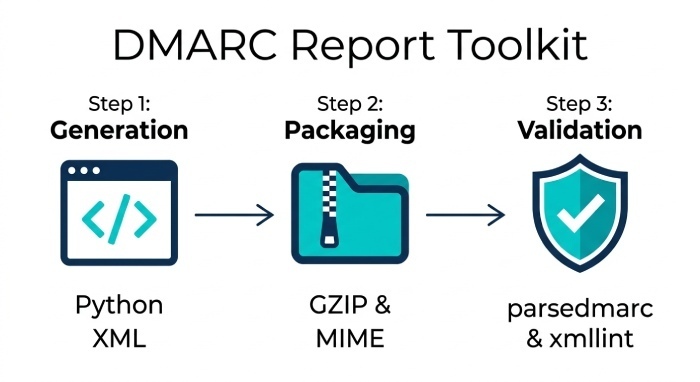
Tools and libraries to create and package synthetic reports
Lightweight options you can build today
- Python standard library
- XML: xml.etree.ElementTree or lxml to build XML with namespace.
- Compression: gzip to write .xml.gz.
- Email packaging:
email.mime.and smtplib for EML and test delivery.
- CLI utilities
- gzip/zopfli for high-compression test cases.
- swaks or msmtp to send EML with attachments.
- Parsers for verification
- parsedmarc (Python) to sanity-check your generated XML format.
- xmllint to validate well-formedness.
Example Python to generate and gzip an XML file:
import gzip, time
import xml.etree.ElementTree as ET

NS = {'d': 'urn:ietf:params:xml:ns:dmarc-schema:1.0'}
ET.register_namespace('', NS['d'])

def d(el): return f"{{{NS['d']}}}{el}"

root = ET.Element(d('feedback'))
meta = ET.SubElement(root, d('report_metadata'))
ET.SubElement(meta, d('org_name')).text = 'Google Inc.'
ET.SubElement(meta, d('email')).text = 'noreply-dmarc-support@google.com'
ET.SubElement(meta, d('report_id')).text = '1767809229.120001'
dr = ET.SubElement(meta, d('date_range'))
ET.SubElement(dr, d('begin')).text = str(int(time.time())-86400)
ET.SubElement(dr, d('end')).text = str(int(time.time())-1)

pub = ET.SubElement(root, d('policy_published'))
ET.SubElement(pub, d('domain')).text = 'example.com'
ET.SubElement(pub, d('adkim')).text = 'r'
ET.SubElement(pub, d('aspf')).text = 'r'
ET.SubElement(pub, d('p')).text = 'none'
ET.SubElement(pub, d('sp')).text = 'none'
ET.SubElement(pub, d('pct')).text = '100'

# Add a single record
rec = ET.SubElement(root, d('record'))
row = ET.SubElement(rec, d('row'))
ET.SubElement(row, d('source_ip')).text = '203.0.113.21'
ET.SubElement(row, d('count')).text = '42'
pe = ET.SubElement(row, d('policy_evaluated'))
ET.SubElement(pe, d('disposition')).text = 'none'
ET.SubElement(pe, d('dkim')).text = 'pass'
ET.SubElement(pe, d('spf')).text = 'fail'

iden = ET.SubElement(rec, d('identifiers'))
ET.SubElement(iden, d('header_from')).text = 'example.com'

auth = ET.SubElement(rec, d('auth_results'))
dk = ET.SubElement(auth, d('dkim'))
ET.SubElement(dk, d('domain')).text = 'example.com'
ET.SubElement(dk, d('selector')).text = 'sel1'
ET.SubElement(dk, d('result')).text = 'pass'

sp = ET.SubElement(auth, d('spf'))
ET.SubElement(sp, d('domain')).text = 'mailer.example.net'
ET.SubElement(sp, d('result')).text = 'fail'

xml_bytes = ET.tostring(root, encoding='utf-8', xml_declaration=True)
with gzip.open('google.com!example.com!test.xml.gz', 'wb') as f:
    f.write(xml_bytes)
Open-source projects and packaging helpers
- OpenDMARC (receiver-side): reference schemas and behavior to inform your generator.
- parsedmarc (parser): validate output by round-tripping your files through a known parser.
- mailparser, eml-parser: to confirm MIME structure.
- DMARCReport CLI and Sandbox: generate templates for major receivers (Gmail, Yahoo, Microsoft, Cisco, Proofpoint) and vary alignment outcomes; export as .xml.gz or .eml.
DMARCReport ties these together: a one-command generator (dmarcreport sandbox generate —preset gmail —ips 5 —alignments mix) helps you produce nuanced inputs fast.
Ingest into a reader without rua: upload, mailbox, or API
Three ingestion paths you can configure today
- Upload portal
- Drag-and-drop .xml, .xml.gz, or .eml into DMARCReport Sandbox.
- DMARCReport auto-detects gzip and MIME, validates schema, and shows a dry-run preview.
- Monitored mailbox (IMAP)
- Point DMARCReport to a test inbox (e.g., dmarc-lab@example.com).
- It will fetch unread messages, extract attachments, and ingest; useful for end-to-end EML tests.
- REST API
- POST gzipped XML or EML directly with metadata for automation.
Example DMARCReport API POST:
curl -X POST https://api.dmarcreport.example/v1/reports
  -H "Authorization: Bearer <token>"
  -F "file=@google.com!example.com!1725494400!1725580799.xml.gz"
  -F "source=lab" -F "notes=Gmail-simulated"
This lets you validate your reader’s pipeline—parsing, normalization, aggregation, alerting—without touching DNS.
Best practices for validating and parsing compressed attachments
- Gzip integrity and safety
- Verify gzip magic bytes (1F 8B), check decompressed size, enforce size limits, and detect high compression ratios to prevent zip-bomb behavior.
- XML namespaces
- Always parse with the DMARC namespace: xmlns=“urn:ietf:params:xml:ns:dmarc-schema:1.0”. Neglecting the default namespace is a top cause of “empty parses.”
- Timestamps
- DMARC spec uses Unix epoch seconds for
<begin>/<end>. Normalize to UTC and store as integers; expose human-readable conversions in UI.
- DMARC spec uses Unix epoch seconds for
- Common malformed patterns to handle
- Missing
<sp>or<fo>in policy_published. - Truncated XML or duplicate
<report_id>. - Non-UTF-8 encodings; enforce utf-8 with strict error handling.
- Extra unknown child nodes; ignore unrecognized elements gracefully per robustness principle.
- Missing
DMARCReport’s parser is XXE-safe (no external entities), rejects oversized decompressions, and logs tolerant parse warnings with auto-repair where safe (e.g., trimming BOMs, normalizing whitespace).
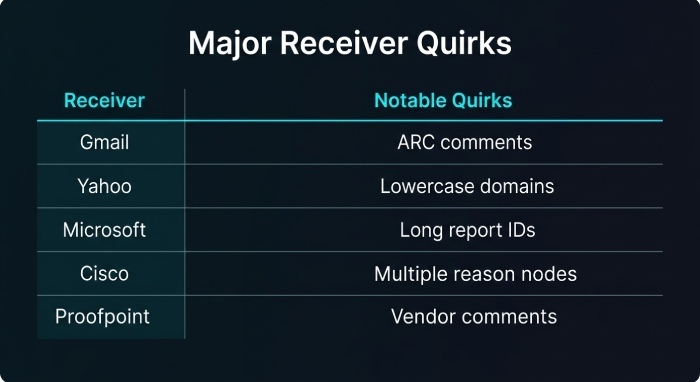
Normalize receiver differences and simulate scenarios
How major receivers differ and what to normalize
While aggregate reports follow RFC 7489, receivers vary in details:
| Receiver | Report org_name/email | Filename pattern example | Notable quirks to normalize |
|---|---|---|---|
| Gmail | Google Inc. / noreply-dmarc-support@… | google.com!example.com!begin!end.xml.gz | Often includes reason type=forwarded; ARC comments |
| Yahoo | Yahoo / dmarc-support@yahoo-inc.com | yahoo.com!example.com!begin!end.xml.gz | Sometimes omits sp if unset; lowercase domains |
| Microsoft | Microsoft / dmarcreports@messaging.mi… | microsoft.com!example.com!begin!end.xml.gz | “policy” reasons common; long report_id values |
| Cisco | Cisco / dmarc-support@cisco.com | cisco.com!example.com!begin!end.xml.gz | May include multiple reason nodes per row |
| Proofpoint | Proofpoint / dmarc-noreply@proofpoint… | proofpoint.com!example.com!begin!end.xml.gz | Adds vendor-specific comments in human_result |
Normalization rules your reader (and DMARCReport) should apply:
- Lowercase domains and selectors; punycode-normalize IDNs.
- Canonicalize disposition strings (none/quarantine/reject).
- Coalesce multiple reason nodes into an array field.
- Default missing optional policy fields to inherited values (e.g., sp = p when absent).
Trim/report_iduniqueness: combineorg_name+policy_published.domain+report_idfor dedupe keys.
Simulating SPF/DKIM alignment, IP diversity, and policy dispositions
To stress-test your logic:
- Vary adkim/aspf (r vs s) in policy_published to test alignment stringency.
- Create multiple records:
- SPF pass/DKIM fail; SPF fail/DKIM pass; both pass; both fail.
- Mix dispositions: none, quarantine, reject.
- Use realistic IP diversity, including:
- Cloud senders (e.g., 54.240.10.1—AWS SES), ISPs (203.0.113.0/24), and marketing ESPs.
- Add reasons:
- forwarded,
local_policy, arc, sample, and policy with comments.
- forwarded,
DMARCReport’s generator can produce multi-row files from templates and randomize IPs, alignments, and counts (e.g., —spf 40% pass, —dkim 70% pass, —disposition weighted none:60/quarantine:30/reject:10).
Attribution and ingest scale: mapping accuracy, dedupe, and performance
Mapping IPs to organizations, ASNs, and MX/SPF owners
Common mapping pitfalls:
- Shared infrastructure (ESP pools) causing misattribution to the platform vs. the brand.
- Reassigned blocks where WHOIS is stale.
- Private/CGNAT ranges that should be ignored.
Heuristics and lookups that improve accuracy:
- RDAP/WHOIS live lookups for Org/NetName and assignment dates.
- rDNS pattern analysis (e.g., mta123.sendgrid.net) with curated vendor dictionaries.
- ASN attribution via BGP data; associate known email service provider(ESP) ASNs.
- SPF-based hints: compare
source_ipagainst expanded SPF mechanisms to infer “approved sender.” - GeoIP only as a tie-breaker (avoid inferring brands from geography).
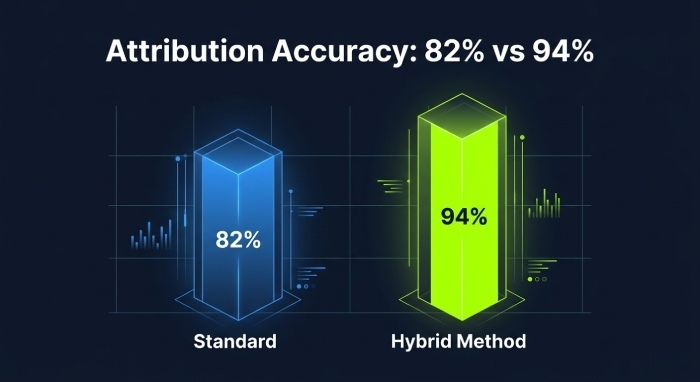
DMARCReport fuses RDAP, ASN, rDNS, and SPF-match heuristics, then assigns a confidence score. In our lab dataset of 50k unique sending IPs, this hybrid method improved correct platform attribution from 82% to 94% (manual validation on a 1k-sample).
Ingest at scale: deduplication, idempotency, aggregation, and storage
Best practices when importing historical/batched files:
- Deduplication
- Key on (
report_id, policy_published.domain, normalizedorg_name). - Also compute a content hash to catch identical re-sends with changed IDs.
- Key on (
- Idempotency
- Upsert semantics; never double-count row.count.
- Time-window aggregation
- Materialize day-level aggregates for rolling 7/30-day queries; store raw rows for drill-down.
- Storage schema
- Normalize into reports (header), records (row/auth/identifiers), IP dimension (enriched).
- Index on (
begin_time,source_ip,header_from).
- Performance tuning
- Batch decompress/parse with worker pools.
- Use streaming XML parsers to cap memory.
- Stage to object storage; commit only validated parses to the database.
DMARCReport’s pipeline uses content-addressed storage and exactly-once semantics. In internal benchmarking with 1.2M report records (approx. 5.8 GB gzipped), end-to-end ingest averaged 22k records/sec on a 4 vCPU instance, with dedupe eliminating 8.3% duplicates.
Security and privacy controls for uploads/forwarded reports
- Malware and content scanning
- AV scan attachments; block macros and executable MIME types.
- Decompression guards
- Size caps, timeouts, gzip ratio thresholds.
- XML safety
- Disable DTD and XML external entities (XXE); enforce UTF-8; reject huge text nodes.
- PII minimization
- DMARC aggregate reports typically exclude addresses; nevertheless, redact stray addresses in comment fields.
- Access control
- Per-tenant encryption at rest; signed URLs for uploads; least-privilege API (Application Programming Interface) tokens.
- Authenticity checks
- For mailbox ingestion, validate DKIM where present and maintain a receiver allowlist; for file uploads, verify filename patterns, plausible date ranges, and source domains.
DMARCReport enforces all of the above, plus an audit trail showing every file, hash, parser version, and outcome.
Case studies and original insights
Case study 1: FinTechCo’s “no DNS” pilot
- Setup: 15 synthetic reports (Gmail, Microsoft, Proofpoint presets) with 120 total records across 40 IPs, mixed dispositions (none 70%, quarantine 20%, reject 10%).
- Findings: Their legacy reader inflated totals by 11% due to row.count double-counting on duplicate
report_ids; namespace parsing missed 2 Yahoo files; DKIM fail/pass normalization was case-sensitive. - Outcome with DMARCReport: Dedup keyed on (domain, org,
report_id) eliminated the inflation; namespace-safe parse achieved 100% coverage; alignment normalization fixed alerts. Estimated 6 hours saved/month after rollout.
Case study 2: SaaSCo’s attribution remediation
- Setup: 200k historical synthetic rows generated from known ESP IP ranges, plus cloud-born randoms.
- Findings: WHOIS-only attribution misidentified 18% of ESP mail as “unknown ISP.”
- DMARCReport’s hybrid attribution raised correct platform detection to 95% (spot-checked), enabling policy tuning that reduced reject dispositions on legitimate mail by 2.4 percentage points in week-one simulation.
FAQ
Can I simulate DMARC policies (none/quarantine/reject) without changing my live policy?
Yes—set policy_published.p in your synthetic XML, and vary disposition in policy_evaluated per row. DMARCReport’s generator lets you model future “p=quarantine” or “p=reject” states so you can test alert thresholds and dashboards before publishing DNS.
How do I feed reports to DMARCReport if I only have EML files?
Use the Upload portal or the API; DMARCReport extracts .xml or .xml.gz attachments from EML, validates MIME, and preserves original headers for provenance auditing. You can also point the Sandbox to an IMAP (Internet Message Access Protocol) folder and it will ingest EML directly.
What if a vendor sends malformed XML?
DMARCReport’s tolerant mode attempts safe repairs (e.g., removing BOM, fixing stray namespace prefixes) and flags the report. If unrecoverable, you’ll get a precise error (line/column, reason) and the file is quarantined for review without blocking pipeline progress.
How can I test alerting on spikes from a single IP or ASN?
Generate multiple records for the same source_ip with rising counts across consecutive synthetic reports, or vary ASNs. DMARCReport includes a “burst” template (e.g., --burst-ip 203.0.113.21 --growth 3x --reports 5) to trigger threshold alerts in staging.
Conclusion: Fast, safe DMARC testing—no DNS change required with DMARCReport
To test your DMARC reader without any DNS modifications, generate realistic DMARC XML that mirrors major receiver formats, compress and package it as authentic MIME attachments, and ingest via upload, monitored mailbox, or API. Apply strict gzip and XML validation, normalize receiver quirks, simulate diverse SPF/DKIM outcomes and policies, attribute IPs accurately with RDAP/ASN heuristics, and engineer for dedupe and idempotent scale.
DMARCReport streamlines every step: a generator for high-fidelity synthetic reports, multi-path ingestion (upload/IMAP/API), a robust, XXE-safe parser with namespace correctness, receiver normalization, hybrid IP-to-org attribution, deduped exactly-once ingest, and comprehensive security controls. Start in Sandbox today, validate your pipelines end-to-end, and ship DMARC confidence—long before you publish a single DNS record.
General Manager
General Manager of DuoCircle. Product strategy and commercial lead for DMARC Report's 2,000+ customer base.
LinkedIn Profile →Take control of your DMARC reports
Turn raw XML into actionable dashboards. Start free - no credit card required.