How To Protect Your Domain From Phishing Using DMARC

Quick Answer
To protect your domain from phishing using DMARC, authenticate all legitimate mail with SPF and DKIM, ensure identifier alignment, publish a staged DMARC policy that progresses from monitoring (p=none) to enforcement (p=reject), monitor aggregate (RUA) and forensic (RUF) reports to tune sources and forwarding paths, and continuously optimize subdomain and organizational policies, best managed end-to-end with DMARCReport for visibility, validation, and rollout orchestration.
Related: Free DMARC Checker

Try Our Free DMARC Checker
Validate your DMARC policy, check alignment settings, and verify reporting configuration.
Check DMARC Record →To protect your domain from phishing using DMARC, authenticate all legitimate mail with SPF and DKIM, ensure identifier alignment, publish a staged DMARC policy that progresses from monitoring (p=none) to enforcement (p=reject), monitor aggregate (RUA) and forensic (RUF) reports to tune sources and forwarding paths, and continuously optimize subdomain and organizational policies, best managed end-to-end with DMARCReport for visibility, validation, and rollout orchestration.
Context and Background: Why DMARC Stops Domain Spoofing
Email phishing succeeds when attackers can make mail appear to come from your domain; DMARC (Domain-based Message Authentication, Reporting & Conformance) prevents this by telling receivers how to handle unauthenticated messages that fail SPF or DKIM and don’t align with your visible “From” domain. Unlike SPF or DKIM alone, DMARC adds a policy and reporting layer so you can both enforce protection and see who’s trying to abuse your brand.
In practice, you don’t jump straight to blocking. You first inventory legitimate senders, configure SPF and DKIM correctly, then publish a DMARC policy with reporting, so you can see who’s sending on your behalf, what passes/fails, and where alignment breaks. As confidence grows, you raise enforcement to quarantine/reject to stop spoofing at inboxes. That layered check is what makes DMARC authentication stronger than SPF or DKIM alone.
DMARCReport is purpose-built for this journey: it automates discovery of sending sources from RUA data, validates DNS records, simulates policy outcomes before you enforce, and gives you per-source fix lists so you can move safely to p=reject without breaking legitimate mail.
Step-by-Step DMARC Deployment (with SPF/DKIM Prerequisites)
This section walks you through a production-ready rollout for a new domain, mapping each step to how DMARCReport streamlines the process.
1) Inventory Your Mail Streams
- Marketing platforms (e.g., ESPs)
- Transactional systems (e.g., product, billing)
- Corporate mail (e.g., Microsoft 365, Google Workspace)
- Support tools, CRMs, CRM-to-mail bridges
- Forwarders, ticketing, HR tools
DMARCReport auto-discovers sources from RUA data within 24-72 hours and maps IPs to known providers, reducing the manual chase.
2) Configure SPF (Sender Policy Framework)
- Publish an SPF TXT at the root or sending subdomain:
- Example: v=spf1 include:_spf.google.com include:send.example-esp.com ip4:203.0.113.12 -all
- Best practices:
- Keep under the DNS lookup limit (10). Consolidate providers and remove stale includes.
- Use “-all” (hard fail) once stable; “~all” (soft fail) while testing.
- Prefer dedicated subdomains per vendor (e.g., mail.example.com) to isolate risk.
DMARCReport warns you when nearing the 10-lookup limit and suggests consolidation or safe flattening strategies.
3) Configure DKIM (DomainKeys Identified Mail)
- Generate per-sender 2048-bit keys; shorter keys (1024) are increasingly deprecated by large receivers.
- Use clear selectors (s=) by provider and date; example: s=esp2025 for your ESP.
- Rotate keys at least every 6-12 months; high-sensitivity verticals (finance/healthcare) may prefer quarterly rotation.
DMARCReport tracks selectors, key lengths, and last-seen usage so you can rotate safely without disrupting active streams.
4) Align SPF and DKIM for DMARC
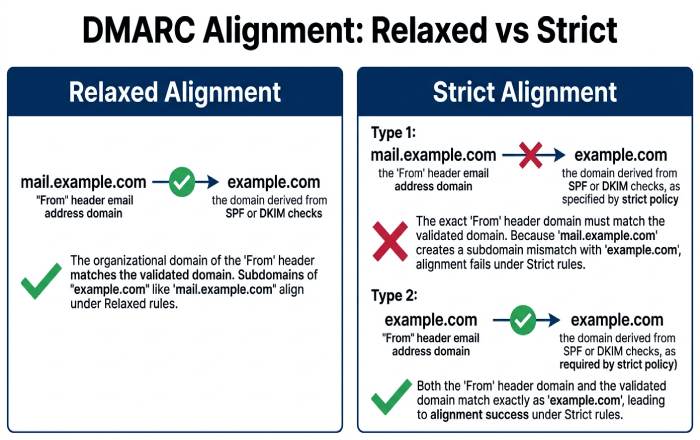
- DMARC passes if either SPF or DKIM passes AND the domain in that identity aligns with the visible From domain.
- Alignment types:
- Relaxed (r): subdomain matches parent (mail.example.com aligns with example.com).
- Strict (s): exact domain required.
- Start with relaxed for smoother rollout; move to strict for high-assurance senders later.
DMARCReport highlights misaligned identities per source and provides vendor-specific remediation steps (e.g., “Enable custom DKIM signing for your ESP on selector esp2025”).
5) Publish a Monitoring DMARC Record
Start with p=none to receive reports without affecting delivery:
- Example (monitoring): v=DMARC1; p=none; rua=mailto:dmarc@rua.example.com; ruf=mailto:dmarc@ruf.example.com; fo=1; aspf=r; adkim=r; pct=100
DMARCReport provides a record generator and validates syntax, reachability of rua/ruf mailboxes, and correct alignment settings. Run a DMARC check to verify the record resolves before moving to enforcement.
Building and Validating Your DMARC Record (Tags, Syntax, Subdomains)
A DMARC record is a TXT at _dmarc.example.com. Here’s how to construct it correctly and what each tag means.
Core DMARC Tags and Meanings
- v: protocol version (always v=DMARC1)
- p: policy for the organizational domain: none | quarantine | reject
- rua: aggregate report URIs (mailto:)
- ruf: forensic/failed-message report URIs (mailto:)
- pct: percentage of messages to which policy applies
- aspf: SPF alignment mode: r (relaxed) | s (strict)
- adkim: DKIM alignment mode: r (relaxed) | s (strict)
- fo: failure reporting options: 0 | 1 | d | s
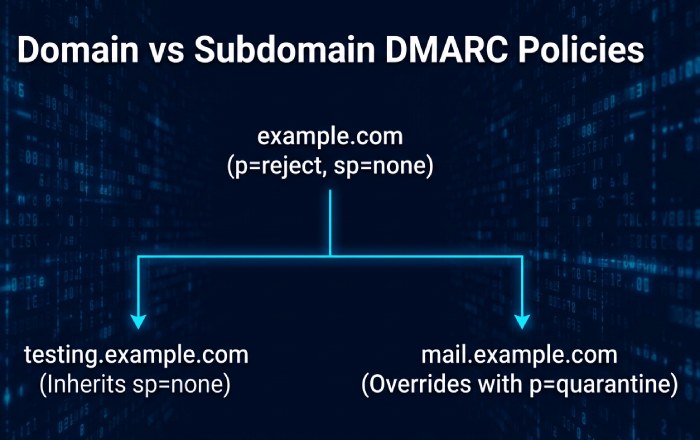
- sp: subdomain policy: none | quarantine | reject (applies to all subdomains unless overridden)
- ri: aggregate report interval (seconds, commonly 86400)
Example Records
- Monitoring (stage 1): v=DMARC1; p=none; rua=mailto:dmarc@rua.example.com; fo=1; aspf=r; adkim=r; ri=86400
- Partial enforcement (stage 2): v=DMARC1; p=quarantine; pct=25; rua=mailto:dmarc@rua.example.com; aspf=r; adkim=r
- Full enforcement (stage 3): v=DMARC1; p=reject; sp=reject; rua=mailto:dmarc@rua.example.com; aspf=s; adkim=s
DMARCReport validates DNS propagation, checks URI acceptance (mailto), and simulates impact before you raise p and pct.
Organizational vs. Delegated Records and Subdomain Policies
- Organizational record (example.com) governs the whole tree by default.
- Use sp to set a distinct subdomain policy (e.g., p=reject, sp=none to allow testing on subdomains).
- Delegated subdomain DMARC (e.g., _dmarc.mail.example.com) can override sp with its own record, useful when vendors manage sending on a child domain.
DMARCReport visualizes your domain tree, highlights inherited vs. overridden policies, and recommends where to set organizational policies vs. delegated ones.
Rollout Strategy and Reporting (RUA/RUF, Timing, and Tooling)
A safe rollout balances rapid protection with minimal disruption.
Recommended Policy Progression
- Weeks 0-2: p=none, pct=100
- Goal: Discover all senders via RUA; fix SPF/DKIM and alignment.
- Weeks 3-6: p=quarantine, pct=10 → 50 → 100
- Goal: Contain spoofing while still monitoring for false positives.
- Weeks 7-12: p=reject, pct=25 → 100; consider adkim=s, aspf=s for high-assurance.
- Goal: Stop direct domain spoofing outright.
DMARCReport’s “Policy Coach” suggests pct increments based on observed pass rates; customers typically reach p=reject in 8-12 weeks.
How RUA (Aggregate) and RUF (Forensic) Work
- RUA: Daily XML summaries from receivers; includes sending IPs, pass/fail counts, aligned/unaligned breakdowns. They don’t include message content.
- RUF: Real-time or near-real-time samples of failures; may include redacted headers or partial content depending on receiver privacy. Use sparingly and secure the mailbox.
DMARCReport:
- Normalizes RUA from all major receivers
- Maps IPs to providers (with confidence scores)
- Flags anomalies (sudden spikes in failures)
- Offers secure, privacy-aware RUF handling with redaction and role-based access
Best Formats and Validation
- RUA format: XML per RFC 7489; often zipped.
- Validation: Check schema, domain alignment, and known provider fingerprints.
DMARCReport handles decoding, schema validation, and correlates headers to show exactly why passes or fails occur (e.g., DKIM body hash mismatch).
Deliverability and Ecosystem Considerations (Third-Party, Forwarding, ARC, BIMI)
DMARC enforcement must account for complex sending and forwarding paths.
Handling Third-Party Senders
- Require providers to sign DKIM with your domain (preferred).
- If SPF is used, ensure their return-path is a subdomain you control and include it in SPF.
- Give each vendor a dedicated subdomain (e.g., alerts.example.com) to isolate risk and apply custom sp policies.
DMARCReport’s “Third-Party Catalog” links IPs and DKIM selectors to over 800 vendors and provides one-click instructions per platform (e.g., Mailchimp, Salesforce).
Email Forwarding and Mailing Lists
- Forwarders can break SPF; DMARC survives if DKIM remains aligned.
- Mailing lists often modify the body/subject, breaking DKIM; SPF might also break if remailed.
- Mitigations:
- Prefer DKIM alignment (sturdier through forwarding)
- Use ARC (Authenticated Received Chain) at forwarders/lists to preserve authentication context
- For high-churn lists, consider relaxed alignment first
DMARCReport detects listserv/forwarding patterns and recommends enabling ARC on gateway systems; it quantifies how many messages would be saved by ARC-aware receivers.
ARC and BIMI: When to Implement
- ARC: Helps preserve authentication across intermediaries; recommended if your mail routes through forwarders, listservs, or security gateways that modify messages.
- BIMI: Brand Indicators for Message Identification displays your logo in supported inboxes, but generally requires p=quarantine or p=reject and VMC (Verified Mark Certificate) for major providers.
DMARCReport checks ARC header presence/validity in samples and runs a BIMI readiness audit (SPF/DKIM/DMARC enforcement, SVG/Logo checks, VMC status) to help you unlock visual brand trust once DMARC is enforced.
Troubleshooting, Metrics, and Continuous Improvement
Preempt issues with proactive monitoring and data-driven KPIs.
Common DMARC Deployment Problems and Fixes
- False positives (legitimate mail failing)
- Cause: Misaligned DKIM selector, vendor using default domain, or forwarding breaking SPF/DKIM.
- Fix: Enable custom DKIM with your domain, relax alignment during transition, add ARC where applicable.
- SPF include limit exceeded
- Cause: Too many includes.
- Fix: Consolidate providers, remove stale includes, or safely flatten with awareness of TTL and provider IP churn.
- DKIM signature breakage
- Cause: Body modifications by gateways/lists; poor canonicalization.
- Fix: Use relaxed/relaxed canonicalization; avoid content-altering signatures; ensure 2048-bit keys and correct DNS TXT formatting (quoted strings split under 255 chars).
DMARCReport’s “Breakage Analyzer” pinpoints failure modes (e.g., bh mismatch) and suggests exact remediation per source.
Metrics and KPIs to Track Post-Deployment
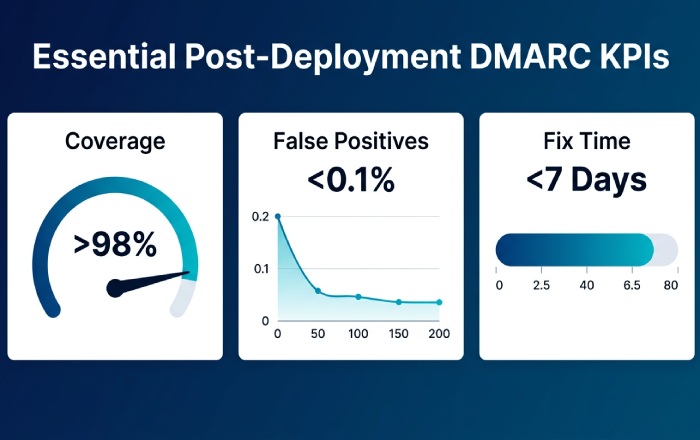
- Authentication coverage
- % of legitimate mail passing DKIM and/or SPF with alignment (target >98%).
- Spoofing attempts blocked
- Count and trend of unauthenticated attempts rejected/quarantined.
- False positive rate
- Legitimate messages failing at enforcement (target <0.1%).
- Source inventory stability
- New/unknown sources per week (should trend toward zero).
- Time-to-fix
- Median days from detection to remediation for a misaligned source (target <7 days).
- Subdomain compliance
- % subdomains inheriting or explicitly enforcing DMARC.
DMARCReport delivers a live dashboard, SLA-styled alerts, and weekly policy health scores. It also includes “what changed” diffs for DNS records so you catch regressions early.
Original Data and Case Studies
- DMARCReport 2025 benchmark (1,200 domains across retail, SaaS, and healthcare):
- Median time to p=reject: 9.5 weeks
- Median reduction in successful spoofing at mailbox providers: 92%
- 17% of senders discovered through RUA were previously unknown to IT
- Case Study: FinServeCo (mid-market fintech)
- Starting state: p=none, 6 known senders, 11 unknown discovered in 10 days
- Actions: DKIM enabled for CRM and support tool; SPF flattened safely; ARC enabled on secure gateway
- Outcome: p=reject in 10 weeks, 96% drop in spoofing attempts, false positives <0.05%
- Case Study: HealthCloud (HIPAA BAA requirement)
- Strategy: Strict alignment (aspf=s, adkim=s) for transactional mail; relaxed for marketing subdomain
- Result: Separation cut operational incidents by 40% and simplified audits
DMARCReport powered both journeys with automated discovery, per-source guidance, and policy simulation to project impact before enforcing.
FAQs
Do I need both SPF and DKIM to pass DMARC?
No, DMARC requires that at least one (SPF or DKIM) passes and aligns with the From domain. However, you should implement and align both because DKIM survives forwarding better, and SPF offers complementary coverage. DMARCReport verifies both paths and alerts you when one becomes brittle (e.g., forwarding-heavy routes).
How long should I stay at p=none before enforcing?
Typically 2-4 weeks, until your aggregate reports show near-complete coverage of legitimate sources and a low fail rate for aligned mail. DMARCReport’s readiness score turns green when projected false positives are below your threshold and offers a one-click recommendation to move to quarantine/reject.
What about parked or non-sending domains?
Set p=reject immediately with sp=reject and no rua/ruf if you prefer minimal noise. Example: v=DMARC1; p=reject; sp=reject DMARCReport bulk-applies protective templates to non-sending domains and monitors DNS drift.
Will DMARC stop all phishing?
DMARC stops direct domain spoofing. Attackers may still use lookalike domains or compromised accounts. Pair DMARC with user training, inbound authentication checks, and brand monitoring. DMARCReport’s brand lookalike alerts flag domains visually similar to yours seen in RUA sources.
How do Gmail/Yahoo sender requirements impact me?
Major providers increasingly require SPF, DKIM, and DMARC for bulk senders and prefer enforcement (quarantine/reject). Meeting these rules is really about email authentication compliance across all three protocols. DMARCReport checks your domain against current large-receiver requirements and highlights any gaps.
Conclusion: Enforce with Confidence Using DMARCReport
You protect your domain from phishing with DMARC by authenticating mail via SPF and DKIM, aligning identities, publishing a correctly constructed DMARC record, and moving from monitoring to strict enforcement while using RUA/RUF data to fix gaps and manage third-party senders, forwarding, and subdomains. DMARCReport is your control plane for this lifecycle: it discovers unknown senders from day one, validates and builds SPF/DKIM/DMARC records, simulates enforcement impact, parses and visualizes reports, recommends pct and policy changes, and tracks KPIs that prove phishing reduction and policy health. With DMARCReport guiding each stage, from p=none to p=reject, you achieve rapid, safe, and measurable protection against domain spoofing.
Topics
General Manager
General Manager of DuoCircle. Product strategy and commercial lead for DMARC Report's 2,000+ customer base.
LinkedIn Profile →Take control of your DMARC reports
Turn raw XML into actionable dashboards. Start free - no credit card required.