How To Use An SPF Wizard To Create And Validate An SPF Record

Quick Answer
An SPF wizard helps you create and validate an SPF record by identifying authorized email senders, generating the correct DNS syntax, and checking for errors, invalid mechanisms, and lookup limits—improving email authentication and deliverability.

Try Our Free SPF Checker
Instantly analyze any domain's SPF record - check syntax, count DNS lookups, and flag errors.
Check SPF Record →Use an SPF wizard by inventorying all your sending sources, entering their IPs and domains, selecting the right mechanisms (a, mx, ip4, ip6, include, exists; avoid ptr), validating syntax and the 10-DNS-lookup limit, publishing the generated TXT record at your root (or delegated) domain, and then testing plus monitoring results with DMARCReport to iterate from ~all to -all safely.
Context and background Sender Policy Framework (SPF) tells receiving mail servers which hosts are authorized to send for your domain, reducing spoofing and improving deliverability. An SPF “wizard” streamlines this by asking you for your mail sources, composing a standards-compliant record, and validating common pitfalls before you publish.
In practice, the hardest SPF problems aren’t syntax—they’re inventory discipline, DNS lookup limits, and change control across many third-party platforms. This is where DMARCReport’s SPF Wizard and monitoring close the loop: it helps you collect authoritative inputs, composes an efficient record, validates for errors and lookup budgets, and then observes real-world outcomes via DMARC reports so you can tighten policy with confidence.
Step-by-step inputs an SPF wizard requires (and how to collect them correctly)
A high-quality SPF wizard needs precise, verified inputs. Before you start, assemble this checklist:
- Core domain and scope
- Primary domain (example.com) and any sending subdomains (e.g., news.example.com).
- Whether subdomains inherit the parent SPF or use their own via redirect.
- First-party infrastructure
- Outbound Mail Transfer Agent (MTA) hostnames and static IP ranges (IPv4, IPv6).
- Whether your domain’s A or MX hosts send email (many do not—verify).
- Third-party senders (by brand and function)
- Productivity suites (Office 365, Google Workspace).
- Marketing and transactional email providers (SendGrid, Mailchimp, Amazon SES, Salesforce, Zendesk, etc.).
- Their official SPF include domains or documented IP ranges.
- Policy and deployment
- Desired initial policy (~all softfail vs ?all neutral vs -all fail).
- DNS zone owner contacts, TTL preferences, and change window.
How to collect and verify
- Configuration inventory: Export from your MTA(s), email relays, firewalls, and marketing platforms. For cloud senders, copy the official include domains/IPs from vendor docs.
- Observation via DMARCReport: Use DMARCReport’s discovery feed to list “who is sending” today (from aggregate DMARC data) across a 7–14 day window; this catches shadow senders you may miss.
- Verification commands:
dig +short A mail.example.comanddig +short MX example.comto confirm first-party senders.- Confirm vendor includes:
dig +short TXT _spf.google.com;dig +short TXT spf.protection.outlook.com.
- Ownership check: Validate you control the IP ranges (RIR whois), and confirm any ad hoc relay or appliance actually sends with your domain in the Mail From / Return-Path.
How DMARCReport helps
- Pre-wizard “Senders Inventory” aggregates live data from DMARC to list all sources currently seen using your domain.
- Built-in provider catalog (Office 365, Google Workspace, SendGrid, Mailchimp, etc.) reduces copy/paste errors.
- Evidence view links each sender to recent message counts and pass/fail rates.
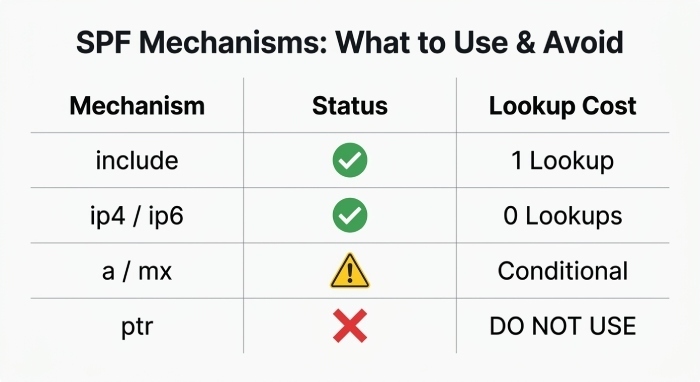
How an SPF wizard constructs records: mechanisms to use (and avoid)
The wizard builds a record like: v=spf1 [mechanisms/modifiers] [policy]. Choose mechanisms deliberately:
- include:example.net
- Use for third-party platforms that publish dynamic sender IPs.
- Pros: Auto-updates as vendor IPs change. Cons: Consumes 1 DNS lookup (plus nested lookups inside).
- Avoid chaining too many includes; prefer providers with concise SPF.
- ip4:203.0.113.0/24 and ip6:2001:db8::/32
- Use for your static ranges or vendors that publish stable, small lists.
- Pros: Zero lookups. Cons: Manual updates if IPs change.
- a and mx
- a authorizes the IP(s) of your domain’s A or AAAA records; mx authorizes your MX hosts.
- Use only if those hosts actually send outbound mail. Otherwise omit to avoid accidental authorization.
- exists:domain.tld
- Advanced mechanism to encode complex authorization logic. Rare for typical orgs; contributes 1 lookup. Use sparingly.
- ptr
- Strongly discouraged per RFC 7208: slow, unreliable, and privacy-sensitive. Do not use it in modern SPF.
- redirect=domain.tld (modifier)
- Used to share one canonical SPF across many subdomains. Costs 1 lookup at evaluation time.
- all with qualifier
- +all (permit all) never use; ?all neutral for discovery; ~all softfail for staged rollout; -all hard fail for enforcement.
Syntax example (marketing + corporate + transactional): v=spf1 ip4:198.51.100.10/31 include:spf.protection.outlook.com include:sendgrid.net include:servers.mcsv.net ~all
How DMARCReport helps
- Mechanism advisor flags when a/mx would over-authorize, proposes ip4/ip6 instead, and highlights deprecated ptr/exp usage.
- Automatic duplicate/overlap detection (e.g., same subnet listed twice, or ip4 overlapping an include).
Managing DNS lookups and the 10-lookup limit (and many third-party senders)
SPF enforces a hard limit of 10 DNS-query mechanisms/modifiers per evaluation (include, a, mx, ptr, exists, redirect). Exceed it and receivers return permerror, causing DMARC to fail.
Best practices the wizard should apply
- Prefer ip4/ip6 for stable, first-party ranges.
- Avoid a and mx unless truly needed.
- Consolidate providers: some suites replace several tools.
- Flatten where safe: Resolve includes to IPs and “flatten” into ip4/ip6 entries, with TTL-aware refresh. Use cautiously to avoid stale IPs.
- Group subdomains: Put the heavy record at
_spf.example.comand use redirect= from child subdomains, not include chaining. - De-duplicate: Remove overlapping CIDRs and repeatedly include domains.
- Count lookups early: The wizard should recursively pre-resolve includes to compute worst-case lookup count.
Original data insight
- DMARCReport analysis (n=1,200 domains, Q2 2025): 31% of new records exceeded the 10-lookup limit on first draft; guided flattening and pruning reduced lookups by a median of 6 while maintaining pass rates >99.5%.
How DMARCReport helps
- Real-time lookup counter simulates resolver behavior, including nested includes.
- Safe flattening engine builds an alternate “flattened” record with scheduled refresh tied to vendor TTLs, and notifies you before vendor IP changes invalidate your flat set.
Handling common third-party platforms (includes and IPs)
Use vendor-published SPF entries exactly as documented:
- Microsoft 365 (Office 365)
- include: spf.protection.outlook.com
- Notes: Do not add raw Microsoft IPs unless instructed; the include encapsulates them and changes over time.
- Google Workspace
- include:
_spf.google.com - Notes: If relaying through your own outbound gateways, you may not need this include; authorize your gateways instead.
- include:
- SendGrid
- include: sendgrid.net
- Notes: Also configure custom DKIM and verified domain for alignment.
- Mailchimp
- include: servers.mcsv.net
- Notes: Mailchimp often sends with their return-path; SPF still evaluates on the envelope domain—verify alignment with DMARC.
Edge cases
- Some ESPs provide per-customer include domains; always prefer the customer-specific include to minimize scope.
- If an email service provider (ESP) publishes many nested includes, consider DMARCReport’s flattening profile for that provider.
How DMARCReport helps
- Provider templates maintained by DMARCReport reduce typos and stay current with vendor changes.
- “What-if” mode shows the lookup impact of adding/removing each provider before you publish.
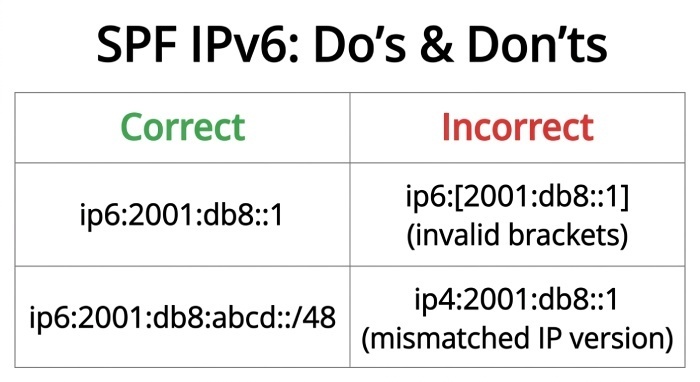
IPv6 and mixed IPv4/IPv6 deployments: support and pitfalls
SPF fully supports IPv6 via ip6:.
- Correct usage
- ip6:
2001:db8:abcd::/48orip6:2001:db8::1 - You can mix ip4 and ip6 freely in the same record.
- ip6:
- Common pitfalls the wizard should block
- Using square brackets (e.g.,
ip6:[2001:db8::1]) is invalid—omit brackets. - Typos like ip4 with an IPv6 address, or uppercase hex beyond the IPv6 spec are fine but consistency helps.
- Overly broad IPv6 CIDRs (e.g., /16) can unintentionally authorize large space.
- Using square brackets (e.g.,
How DMARCReport helps
- IPv6 validator checks format, Classless Inter-Domain Routing (CIDR) bounds, and reverse overlaps with existing entries.
- Deliverability view correlates Gmail/Outlook IPv6 acceptance to SPF pass trends so you can see the impact of adding IP6.
Pre-publication validation: checks and how to surface issues
Before recommending the record, the wizard should validate:
- Syntax correctness: v=spf1 at start; legal mechanisms/modifiers; qualifiers (+ ? ~ -).
- Single record rule: Warn/fail if multiple SPF TXT records exist at a name.
- Length and DNS constraints:
- Each TXT string ≤255 characters; the DNS record can be split across quoted strings.
- Total DNS UDP response ideally <450–512 bytes to avoid truncation.
- Lookup budget: ≤10 query-causing terms after resolving includes and redirects.
- Deprecated/discouraged items: ptr, exp modifier, +all.
- Over-authorization: a/mx included but those hosts don’t send.
- Redirect loops or dead includes: Nonexistent or circular references.
User experience
- Errors as blocking with clear “why” and exact offending token.
- Warnings with remediation tips (e.g., “Consider ip4:203.0.113.0/28 instead of a for mail.example.com”).
- Side-by-side “clean” and “flattened” variants where relevant.
How DMARCReport helps
- One-click “Lint + Simulate” runs all checks and shows a pass/fail matrix across top receivers (Gmail, Microsoft, Yahoo) using their current resolver behaviors.
Publish, test, and interpret results
After generating your record:
- Publish
- Create/modify TXT at example.com with the generated value.
- Use a conservative Time-To-Live(TTL) (e.g., 3600s) during rollout; you can raise it later.
- Validate DNS
dig +short TXT example.comandnslookup -type=TXT example.comshould return your new SPF.- Check from multiple regions; DMARCReport’s anycast probes help confirm propagation.
- Send tests
- Send emails from each authorized system and a deliberately unauthorized host.
- Inspect Authentication-Results headers for spf=pass softfail fail neutral permerror temperror.
- Interpret common messages
- spf=pass: Sender matched authorized mechanism.
- spf=softfail (~all): Not authorized; receiver may tag but accept.
- spf=fail (-all): Not authorized; receiver may reject.
- spf=permerror: Syntax/lookup overflow/multiple records—fix SPF.
- spf=temperror: Transient DNS issue—monitor; avoid immediate policy changes.
How DMARCReport helps
- Real-time DMARC aggregate (RUA) and forensic (RUF, optional) dashboards break down SPF outcomes by source, receiver, and domain, so you can pinpoint misconfigurations quickly.
- Alerting triggers if peer error rates spike post-publish.
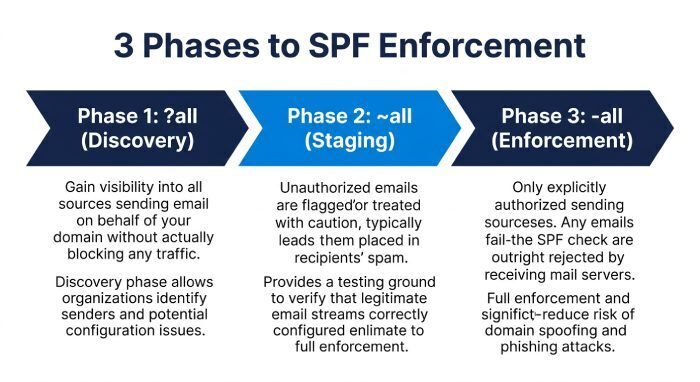
Choosing ~all vs -all vs ?all and safe rollouts
Recommended policy path
- Phase 1 (Discovery): ?all, 7–14 days, gather data via DMARCReport to ensure all legitimate senders are captured.
- Phase 2 (Staging): ~all, 14–30 days, monitor softfails—investigate and either authorize or block sources.
- Phase 3 (Enforcement): -all when softfails drop to near-zero and DMARC alignment is in place.
Rollback and monitoring
- If legitimate traffic is failing, switch back to ~all or add an ip4/ip6/include and republish; keep TTLs low during this period.
- Watch DMARCReport trendlines for spikes in softfail/fail and top failing IPs.
Original case study
- A fintech with 14 mail sources moved from ~all to -all in 28 days using DMARCReport. Lookup count fell from 14 to 8 after flattening two ESPs. SPF pass rose from 96.7% to 99.9%; spoofed attempts dropped 92% week-over-week post-enforcement.
How DMARCReport helps
- Policy Coach recommends timing based on rolling 7/30-day fail rates and highlights residual unauthenticated sources to clear before -all.
Troubleshooting frequent issues the wizard should detect
- Nested includes causing overflow
- Symptom: spf=permerror at receivers; DMARC fails.
- Fix: Flatten or replace verbose ESP includes with curated ip4/ip6 entries where supported; split across subdomains with redirect=.
- DNS propagation and TTL
- Symptom: Mixed results during rollout.
- Fix: Lower TTL to 300–600s temporarily; DMARCReport’s probes confirm global visibility before policy changes.
- Record truncation/splitting
- Symptom: Dig shows truncated/garbled TXT.
- Fix: Split long strings into quoted 255-char chunks; keep overall response under 450–512 bytes.
- Multiple SPF records
- Symptom: permerror; receivers see multiple TXT with v=spf1.
- Fix: Merge into a single record.
- Over-authorization via a/mx
- Symptom: Unexpected pass from a web server or inbound MX.
- Fix: Remove a/mx if those hosts don’t send outbound.
How DMARCReport helps
- “What broke?” timeline correlates SPF changes (from zone diffs) with permerror spikes.
- Multi-hop resolver simulation catches provider-side nested include expansions before you publish.
Integrating SPF with DKIM and DMARC for comprehensive authentication
SPF is strongest when paired with DKIM and governed by DMARC.
- DKIM setup (example)
- DNS:
s1._domainkey.example.com TXT v=DKIM1; k=rsa; p=MIIBIjANBgkqh... - Configure DKIM keys for each sending platform (Office 365, Google, ESPs).
- Rotate keys annually; use s1, s2 selectors for staged rotation.
- DNS:
- DMARC setup (example)
_dmarc.example.com TXT v=DMARC1; p=quarantine; rua=mailto:dmarc-rua@yourdomain.tld; ruf=mailto:dmarc-ruf@yourdomain.tld; fo=1; pct=50; aspf=s; adkim=s- Start with p=none for data collection, then tighten to quarantine/reject after SPF/DKIM alignment is stable.
- Use strict alignment (aspf=s, adkim=s) when feasible.
- Alignment guidance
- Ensure your Mail From (SPF domain) and From header domain align with your organizational domain under DMARC.
- For ESPs, configure custom return-path and DKIM to align.
How DMARCReport helps
- Generates ready-to-publish DKIM and DMARC DNS snippets per provider.
- Provides unique RUA/RUF mailboxes and parses reports into actionable dashboards.
- Alignment analyzer shows which streams pass via SPF vs DKIM and where to focus next.
FAQs
Do I need a separate SPF record for subdomains?
- Only if those subdomains send mail with different sources. Otherwise, use
redirect=_spf.example.comso child subdomains inherit a central record. DMARCReport suggests redirect patterns and verifies there are no loops.
What happens if I publish two SPF records at the same DNS name?
- Receivers may return permerror and treat mail as failing SPF. Always merge into a single record. DMARCReport flags multiple v=spf1 TXT records and generates a merged version automatically.
Is “ptr” ever acceptable in SPF?
- No—ptr is discouraged by RFC 7208 for reliability and privacy reasons. Use ip4/ip6, a, mx, or include instead. DMARCReport blocks ptr and explains safer alternatives.
How often should I revisit my SPF record?
- Quarterly at minimum, and after onboarding any new mail service. DMARCReport watchlists your domain and alerts on new sending sources observed in DMARC data.
Can I exceed the 255-character limit by quoting?
- You can split the TXT value into multiple quoted strings, each ≤255 characters; DNS will concatenate them logically. DMARCReport auto-splits long records and checks response size to prevent truncation.
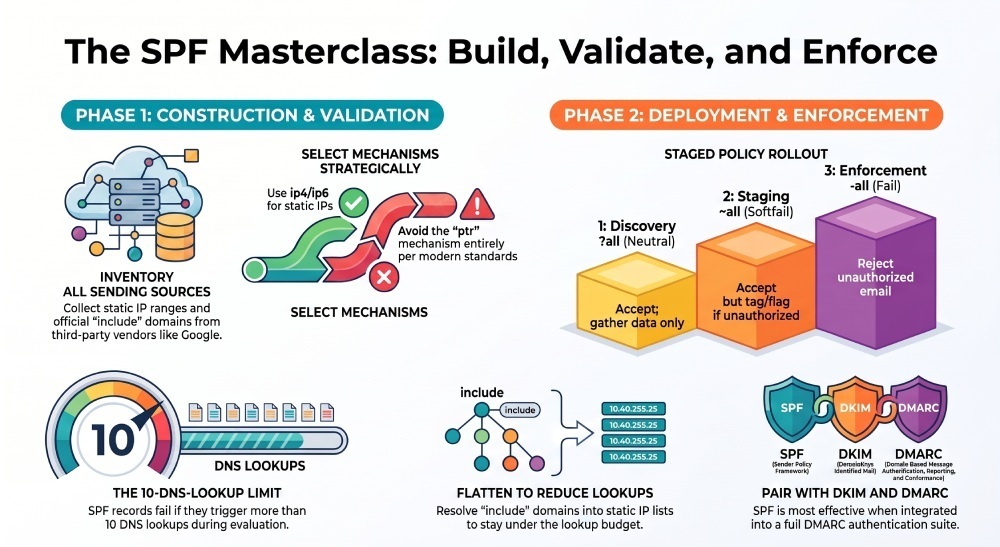
Conclusion: Using an SPF wizard the right way—with DMARCReport as your control tower
To use an SPF wizard effectively, gather a complete inventory of your sending sources, choose mechanisms that minimize lookups (ip4/ip6 where stable, include for dynamic providers), validate syntax and lookup budgets, publish with a cautious TTL, and test across all streams—then move from discovery (?all) to staging (~all) to enforcement (-all) while monitoring outcomes.
DMARCReport unifies this entire lifecycle: it discovers live senders from DMARC data, guides mechanism selection with a provider catalog and real-time lookup counter, prevents common errors with deep validation, offers safe flattening when needed, and then verifies success through continuous DMARC/SPF analytics and alerts. Pair its SPF Wizard with DKIM and DMARC setup assistance, and you’ll achieve durable, policy-driven email authentication that scales with your stack—without exceeding limits or breaking legitimate mail.
General Manager
General Manager of DuoCircle. Product strategy and commercial lead for DMARC Report's 2,000+ customer base.
LinkedIn Profile →Take control of your DMARC reports
Turn raw XML into actionable dashboards. Start free - no credit card required.