SPF Record Syntax Explained: Understanding SPF Structure, Components, and Best Practices

Quick Answer
An SPF record is a DNS TXT record that specifies which mail servers are authorized to send email for your domain. Understanding SPF record syntax, including mechanisms like ip4, ip6, a, mx, and include, helps prevent spoofing, improve email deliverability, and strengthen domain security.

Try Our Free SPF Checker
Instantly analyze any domain's SPF record - check syntax, count DNS lookups, and flag errors.
Check SPF Record →Email remains one of the most widely used communication channels for businesses, but it is also a favorite target for cybercriminals. Attackers frequently impersonate trusted domains to deliver phishing emails, spread malware, or commit business email compromise (BEC). To combat these threats, organizations rely on email authentication standards such as Sender Policy Framework (SPF).
SPF allows domain owners to define which mail servers are authorized to send emails on behalf of their domain. When receiving mail servers verify an incoming message against an SPF record, they can determine whether the email originated from an approved source. This helps reduce domain spoofing, strengthens email security, and supports improved email deliverability.
In this guide, we’ll explore SPF record syntax, explain every major component, discuss common mechanisms and qualifiers, review practical examples, and share best practices for creating reliable SPF records.
What Is an SPF Record?
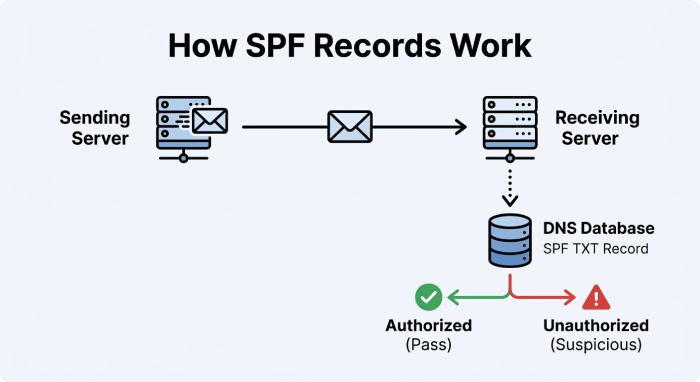
An SPF record is a DNS TXT record that identifies the mail servers authorized to send email using your domain name. Rather than relying on guesswork, receiving mail servers consult this DNS record whenever they receive an email claiming to originate from your domain.
If the sending server matches one of the authorized sources listed in the SPF record, the SPF evaluation succeeds. If it does not, the receiving server may mark the message as suspicious or apply additional filtering based on its own security policies.
SPF is one of the three core email authentication technologies, working alongside DKIM (DomainKeys Identified Mail) and DMARC (Domain-based Message Authentication, Reporting & Conformance). For a side-by-side look, see SPF, DKIM, and DMARC explained. You can run a quick DMARC lookup to confirm your policy is published correctly.
Why SPF Record Syntax Matters
Creating an SPF record isn’t simply a matter of listing IP addresses. Every SPF record follows a standardized format that determines how receiving mail servers interpret the policy.
Incorrect syntax may cause:
- SPF validation failures
- Permanent DNS errors
- Email delivery issues
- Failed DMARC alignment
- Legitimate messages being treated as suspicious
Understanding the structure of an SPF record helps administrators avoid configuration mistakes while ensuring every authorized sender is properly included.
Basic SPF Record Structure
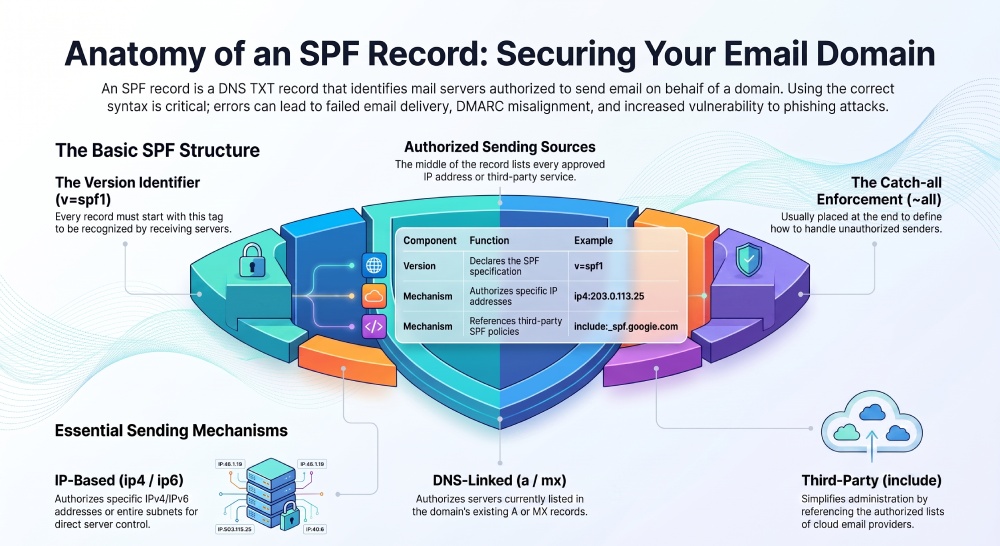
Every SPF record begins with a version identifier followed by one or more authorization mechanisms.
A simple SPF record may look like this:
v=spf1 ip4:203.0.113.25 include:_spf.examplemail.com ~allThis record tells receiving mail servers:
- The record follows SPF version 1.
- One IPv4 address is authorized.
- Another email provider is also authorized.
- Any sender not matching these rules should receive a SoftFail result.
Each portion of the record serves a different purpose.
Breaking Down SPF Record Components
1. Version Identifier
Every SPF record starts with:
v=spf1
This declaration tells mail servers that the TXT record contains an SPF policy using version 1 of the SPF specification.
Without this identifier, receiving systems will not recognize the record as a valid SPF policy.
Authorized Sending Sources
After the version tag, the record lists every approved source allowed to send emails for the domain.
These sources can include:
- Individual IP addresses
- IP ranges
- Mail servers
- Third-party email providers
- Cloud email services
Each source is defined using an SPF mechanism.
SPF Mechanisms Explained
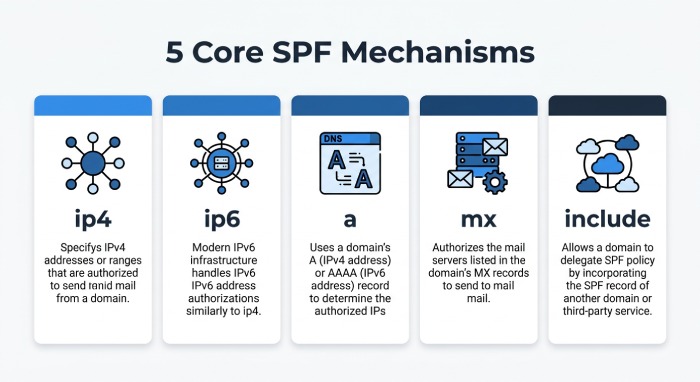
Mechanisms are the building blocks of an SPF record. Each mechanism instructs receiving mail servers how to verify whether a sender is authorized.
ip4
The ip4 mechanism authorizes one or more IPv4 addresses.
Example:
v=spf1 ip4:198.51.100.10 ~allYou can also authorize an entire subnet.
Example:
v=spf1 ip4:198.51.100.0/24 ~allThis approach is useful when multiple mail servers operate within the same network.
ip6
Organizations using IPv6 infrastructure can authorize IPv6 addresses with the ip6 mechanism.
Example:
v=spf1 ip6:2001:db8::/32 ~allThis ensures mail sent from IPv6-enabled infrastructure is evaluated correctly.
a
The a mechanism authorizes the IP address associated with a domain’s A or AAAA DNS record.
Example:
v=spf1 a ~allWhen receiving servers evaluate this mechanism, they resolve the domain’s A record and compare it with the sender’s IP address.
mx
The mx mechanism authorizes every server listed in the domain’s MX records.
Example:
v=spf1 mx ~allThis is helpful when the same mail servers responsible for receiving email also send outbound messages.
include
Modern organizations often use multiple cloud email providers.
Instead of manually copying every IP address, the include mechanism references another domain’s SPF policy.
Example:
v=spf1 include:_spf.google.com ~allWhen this mechanism is encountered, the receiving server evaluates Google’s SPF policy as part of the authentication process.
This method simplifies administration while allowing service providers to manage their own infrastructure changes.
General Manager
General Manager of DuoCircle. Product strategy and commercial lead for DMARC Report's 2,000+ customer base.
LinkedIn Profile →Take control of your DMARC reports
Turn raw XML into actionable dashboards. Start free - no credit card required.