What Is A DNS Forwarder? How It Works, Benefits, And Types

Quick Answer
A DNS forwarder is a DNS server that passes client DNS queries to another DNS server for resolution. It helps improve performance, reduces external DNS traffic, and simplifies DNS management. Common types include conditional and standard forwarders.
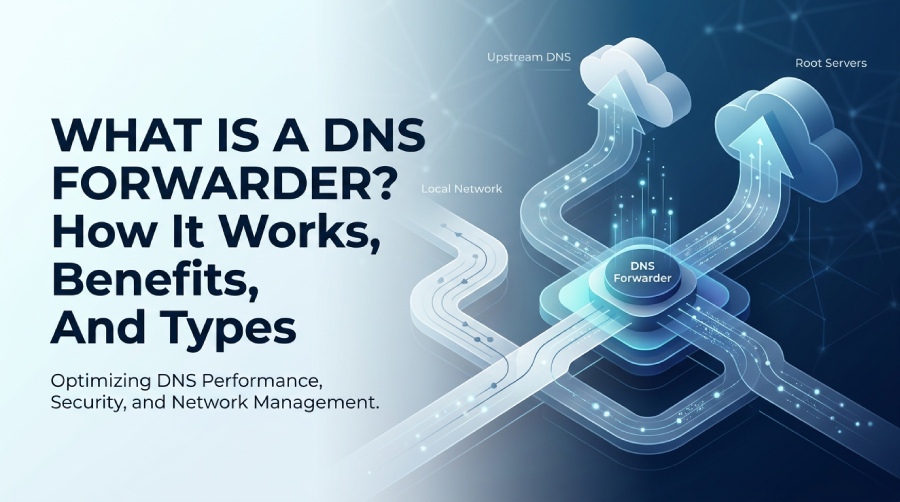
A DNS forwarder is a DNS server that forwards domain name queries to another DNS server instead of resolving them directly. It helps improve DNS performance, reduce external traffic, strengthen security, and simplify network management in both small and enterprise environments. By efficiently routing DNS requests, DNS forwarders play an important role in faster and more reliable internet and intranet name resolution. Understanding how a DNS forwarder works, its different types, and its key benefits can help organizations optimize their DNS infrastructure and enhance overall network efficiency. SPF, DKIM, and DMARC strengthen email security by verifying sender authenticity, preventing spoofing, and improving email deliverability. For a deeper breakdown of how each protocol contributes, see SPF, DKIM, and DMARC explained. You can create DMARC record entries in DNS to protect your domain from spoofing.
What Is a DNS Forwarder? Definition and Role in DNS Resolution
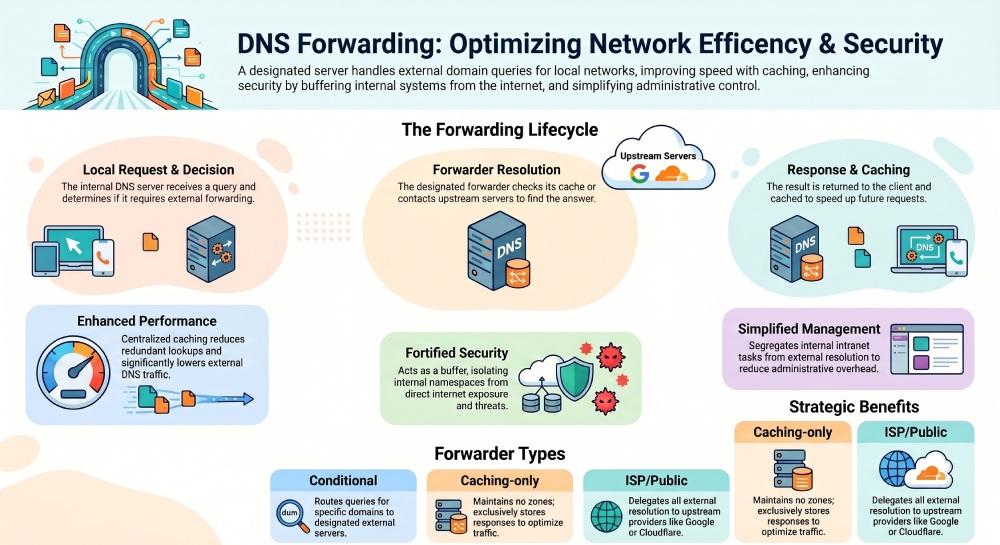
A DNS forwarder is a designated DNS server configured to handle DNS queries on behalf of other DNS servers or clients. Instead of resolving every query directly, a DNS forwarder receives queries—typically for external domains—and forwards them to another DNS server for resolution. The forwarding process can dramatically improve resolution efficiency, simplify DNS namespace management, and enhance security within both private and public DNS infrastructures.
In a typical enterprise environment, such as those using Windows Server 2022 or Windows Server 2019, the DNS forwarder’s primary function is to offload DNS queries—especially those for names outside the organization’s intranet DNS namespace—to a dedicated server or service. This allows internal DNS servers to focus on local name resolution using their own primary or secondary zones, while the forwarder handles all requests for external DNS name resolution.
For example, in a multi-site Active Directory(AD) deployment like “Contoso” with zones such as north.contoso.com, south.contoso.com, and outdoor.tailspintoys.com (from Tailspin Toys), a DNS forwarder can streamline the routing of external traffic or provide conditional forwarding for specific child zones or delegated namespaces.
How a DNS Forwarder Works: Step-by-Step Query Flow
The core function of a DNS forwarder revolves around its forwarding behavior. This behavior governs the forwarding sequence of DNS queries, from the originating DNS client to the authoritative DNS server, often via multiple intermediary DNS servers.
Step-by-Step Flow of a Forwarded DNS Query
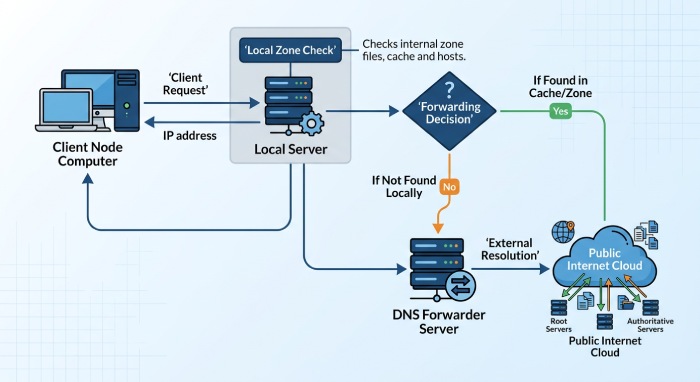
- DNS Client Request Initiation The client initiates a DNS resolver request for a DNS domain name (e.g., www.microsoft.com). If the DNS client is part of an internal network, its configured internal DNS server receives the recursive query.
- DNS Server Checks Local Zones The local DNS server examines its own primary or secondary zone data—covering intranet name resolution. If it cannot answer the query authoritatively (i.e., it lacks the necessary resource records for the requested name), it then consults its forwarder configuration.
- Forwarding Decision
Based on forwarding rules or conditional forwarders, the DNS server determines if the query should be forwarded, and to which IP address or external DNS server. For instance, a conditional forwarder for
outdoor.tailspintoys.commight direct queries for that domain to a specific external DNS resolver. - DNS Forwarder Handling The DNS forwarder receives the query. If its cache has a current (non-expired TTL) answer, it returns the cached query response instantly, improving resolution efficiency.
- Forwarding to Upstream DNS / Internet If the answer isn’t cached, the forwarder either forwards the query up the configured forwarders list, or—if none succeed or timeout settings expire—proceeds to use root hints to reach root servers for internet name resolution.
- Root Hints Fallback The forwarder consults its root hints list to contact a root server if all forwarders in the forwarders list fail to supply an answer. Root hints configuration is especially crucial for fallback to internet root servers in the absence of configurational errors or upstream failures.
- Result Delivery and Caching Once the authoritative DNS server or external DNS resolver supplies the answer, the response traverses back through the sequence to the original DNS client. Intermediate servers may cache this response to optimize future resolution attempts.
Detailed Scenario: DNS Forwarder and Conditional Forwarding in Action
Suppose “Contoso” has a private dns namespace and wants all queries for .outdoor.tailspintoys.com sent to Tailspin Toys’ DNS infrastructure. Using conditional forwarding, any DNS queries for this zone are sent directly to the external DNS server with a zone delegation in place, bypassing the iterative query to public root servers and ensuring targeted, efficient resolution.
Key Benefits of Using a DNS Forwarder for Performance, Security, and Management
The use of DNS forwarders introduces substantial advantages for network administrators and organizations striving for both security and high performance in DNS operations.
Performance Enhancement and Cache Optimization
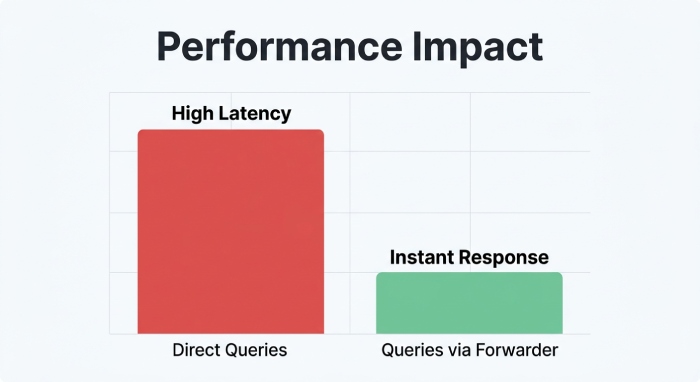
By aggregating queries through one or more DNS forwarders, organizations centralize DNS caching. This consolidates frequently queried external domains, reducing redundant lookups and lowering external DNS traffic. Cached responses improve the forwarder response time and overall user experience, leveraging longer Time to live (TTL) values and efficient DNS caching.
With advanced features such as Dynamic Forwarder Reordering in Windows Server 2022 or Windows Server 2025, DNS servers can dynamically adjust the forwarding sequence based on forwarder cache health and prior response times, further boosting resolution efficiency.
Security and Access Controls
DNS forwarders serve as security buffers, isolating internal DNS servers from direct internet name resolution. This limits the exposure of your internal DNS namespace to potential threats from external traffic. For example, only a designated forwarder communicates with external DNS servers and root hints servers, minimizing attack surfaces and containing potential DNS-based exploits.
Additionally, using forwarders makes enforcing DNS-level content filtering and monitoring easier, since all outbound DNS queries for internet name resolution can be monitored and filtered through the forwarder.
Simplified Management and Administrative Control
DNS forwarders help segregate internal DNS workloads (such as intranet name resolution for private zones) from public DNS resolution tasks. This reduces administrative overhead, especially in environments with complex zone delegations, child zones, and multiple authoritative DNS servers. As referenced in MicrosoftDocs and WindowsServerDocs, dedicated settings—such as timeout setting, forwarders list, and forwarding behavior—make management straightforward using either the GUI or PowerShell command (Set-DnsServerForwarder).
Types of DNS Forwarders: Conditional, Recursive, Caching, and ISP/Public Forwarders
DNS forwarding encompasses several distinct models, each suited for specific use cases and organizational needs.
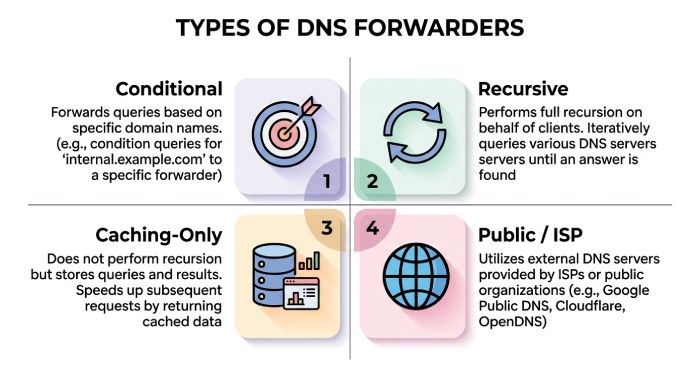
Conditional Forwarders
A conditional forwarder directs DNS queries for a specified DNS domain name or namespace (e.g., a child zone or external domain) to a particular external DNS server or IP address. This is particularly useful for organizations with trusted partners, multi-domain forests, or split-brain DNS deployments—where, for example, queries for north.contoso.com are always routed to a designated authoritative DNS server within another network boundary.
Recursive and Iterative Forwarders
- Recursive Forwarders: Process recursive queries on behalf of clients or other servers. They recursively resolve the DNS domain name, contacting each zone in the delegation chain (parent zone, child zone, down to the authoritative DNS server) until an answer is found.
- Iterative Forwarders: Provide referrals rather than full query responses, responding with the next hop in the delegation record rather than resolving the name completely. However, this model is less common in modern Windows Server deployments.
Caching-Only Forwarders
A caching-only forwarder does not maintain any DNS zones but focuses exclusively on caching both internet and intranet name resolution responses. This model is prevalent in SOHO router configurations and scenarios where reducing external DNS queries is essential.
ISP/Public DNS Forwarders
Organizations may opt to forward all non-authoritative queries to upstream ISP DNS servers or trusted public recursive resolvers (like Google Public DNS, Cloudflare, or OpenDNS). This delegation relies on external resources for DNS name resolution, providing redundancy and sometimes increased recursive resolver capacity.
Example: Forwarding Configuration with Microsoft DNS Servers
On a Windows Server 2016 or later, you can configure a forwarders list using the DNS Manager or via the Set-DnsServerForwarder PowerShell command. Dynamic forwarder reordering is also available, automatically optimizing the forwarding sequence for reliability and speed.
Best Practices for Configuring and Choosing a DNS Forwarder
Effective forwarder configuration is essential to maximize performance and minimize downtime. The following best practices are recommended by Microsoft Documentation and field experts in platforms like Server Fault and Ask Learn:
DNS Forwarder Configuration Guidelines
- Use Multiple Forwarders: Populate your forwarders list with multiple external DNS IP addresses to provide redundancy. Employ dynamic forwarder reordering if supported.
- Monitor Forwarder Response Time: Remove or deprioritize slow or unresponsive DNS forwarders; leverage PowerShell or event logs for ongoing health checks.
- Maintain Updated Root Hints: Keep the root hints list current to ensure correct fallback behavior when all forwarders in the forwarding sequence fail.
- Configure Appropriate Cache TTLs: Cache configuration directly impacts response time and load; balance TTL for performance and timely updates of DNS resource records.
Advanced Configurations
- Conditional Forwarding: Use conditional forwarders for branch offices (e.g., forwarding all queries for outdoor.tailspintoys.com to that partner’s DNS server) to streamline inter-company and child zone queries.
- Internal vs External DNS Segregation: Separate internal DNS servers for intranet name resolution from those involved in external traffic to safeguard your private DNS namespace.
- Regular Review Forwarder Cache and Logs: Analysis of the forwarder cache and DNS logs helps detect misconfigurations, stale entries, or unauthorized queries to authoritative DNS servers.
- PowerShell Command Automation: Automate forwarder configuration, zone delegation, and root hints updates using Windows PowerShell for consistency and speed, especially in enterprise Windows Server 2022/2025 environments.
By leveraging these practices and adapting forwarder settings to your specific DNS namespace and organizational needs, you can ensure high-availability name resolution, strong security posture, and optimal DNS performance across both internal and external DNS infrastructure.
General Manager
General Manager of DuoCircle. Product strategy and commercial lead for DMARC Report's 2,000+ customer base.
LinkedIn Profile →Take control of your DMARC reports
Turn raw XML into actionable dashboards. Start free - no credit card required.