What Is A Virus Link And How To Stay Safe From A Virus Link Online

Quick Answer
A virus link is a malicious URL designed to infect your device, steal personal information, or redirect you to harmful websites. Stay safe by avoiding suspicious links, verifying website addresses, using trusted security software, and keeping your devices and browsers updated.
A virus link is a deceptive or dangerous hyperlink that leads users to malware, credential theft, a fake website, or another malicious site. Attackers use these links in emails, texts, social media posts, ads, search results, and compromised websites to trigger a phishing attack, steal data, or push a harmful download. Because a dangerous URL can look ordinary, using a trusted link checker, URL scanner, and modern antivirus is essential for everyday online security.
What Is a Virus Link? Definition, Common Forms, and How It Works
A virus link is any URL designed to expose you to harm. It may open a malicious site, redirect you through several domains, start a file download, or impersonate a trusted brand through a fake website. Not every dangerous link immediately installs a “virus” in the traditional sense; many deliver spyware, ransomware, a Trojan, adware, or scripts that support botnets.
Common Forms of a Virus Link
A virus link can appear as:
- A malicious link in a phishing email claiming to be from Google, Microsoft, a bank, or a delivery company.
- A scam text with a shortened URL urging you to “verify your account.”
- A social media message offering a giveaway or urgent warning.
- A search ad that leads to a fake website.
- A compromised page hosting a malware sample or redirecting to a malicious URL.
- A file-sharing link that points to an infected executable file.
A safe link should match the expected domain, use HTTPS, and come from a trusted source—but even HTTPS (Hypertext Transfer Protocol Secure) alone does not guarantee link safety.
How a Virus Link Works
When you click a virus link, the browser contacts the destination URL. The page may attempt to fingerprint your browser, device, operating system, and location. If you are unprotected, it may serve a targeted payload or prompt you to install software.
Redirects and Obfuscation
Attackers often hide the final malicious site behind URL shorteners, tracking links, or multiple redirects. This is why a link checker or URL scanner is useful: it can expand and evaluate the destination before you visit it.
Malware Delivery
Some virus links lead to a direct download of a suspicious file type, such as a ZIP archive, script, Win32 Executable, Dynamic link library file, or installer. On Microsoft Windows, malware may disguise itself with legitimate-sounding names like UnrealCEFSubProcess, a fake updater, a console service, or a vendor-like label such as Aperture Solutions.
Detection by Security Tools
Security platforms use signatures, behavior rules, reputation data, and heuristics to detect malware. A virus scan may identify a Trojan-Dropper, ransomware loader, or other detected threats. Analysts may compare file hashes such as MD5, SHA1, and SHA256 during file analysis, especially when investigating samples from sources like VirusShare.
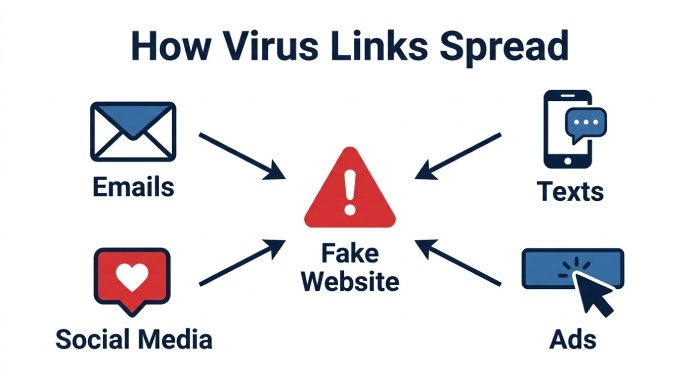
How Virus Links Spread: Emails, Texts, Social Media, Ads, and Fake Websites
Attackers distribute virus links wherever people click quickly. Their goal is to create urgency, curiosity, fear, or trust.
Emails, Texts, and Messaging Apps
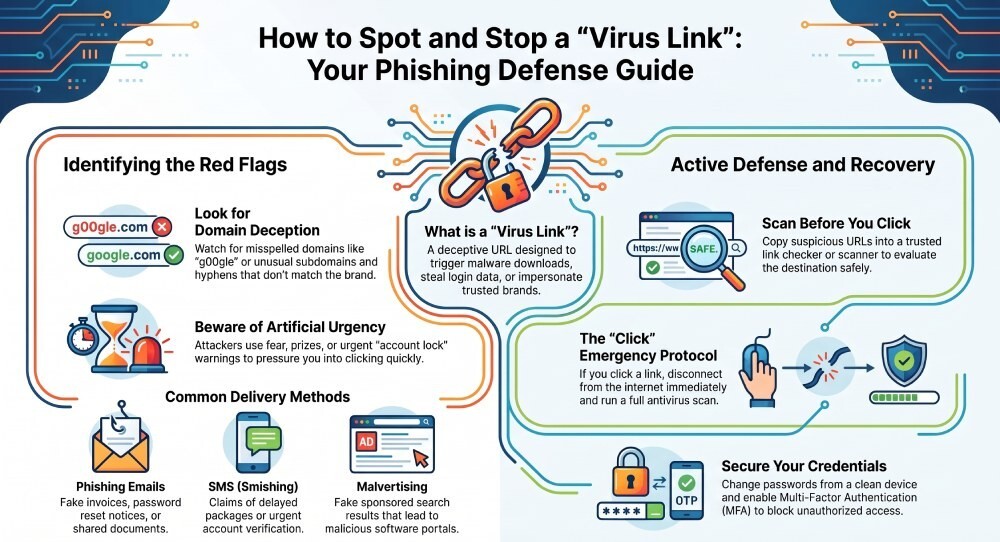
A common phishing attack starts with an email that looks like an invoice, password reset notice, shared document, or security alert. The URL may appear legitimate but actually points to a fake website. In mobile scams, a scam text may claim that a package is delayed or that your account will be locked. If you receive a suspicious link, do not tap it—copy it carefully and use a link checker to inspect it.
Social Media, Ads, and Fake Websites
Social media posts and paid ads can send users to a malicious site that imitates a login page, cryptocurrency exchange, streaming service, or software portal. These pages are designed for a phishing attack or to distribute malware under the cover of a “free tool.” Some campaigns use malvertising to place a dangerous URL in sponsored search results, making a fake website appear trustworthy.
A strong threat protection system can help block websites associated with malware, fraud, and credential theft before the page loads.
SPF, DKIM, and DMARC help verify email authenticity, reducing the risk of phishing emails that contain malicious virus links. Understanding SPF vs DKIM vs DMARC makes it clear how each protocol blocks spoofed senders before they reach the inbox. Running a DMARC checker confirms these records are set up correctly.
Warning Signs of a Virus Link: Red Flags to Check Before You Click
Spotting a virus link is partly technical and partly behavioral. Attackers depend on speed, pressure, and visual deception.
Red Flags in the URL and Page
Before clicking, inspect the URL for:
- Misspelled domains, such as “g00gle” instead of Google.
- Extra words, hyphens, or unusual subdomains.
- Shortened links with no context.
- A domain that does not match the sender or brand.
- Unexpected file downloads.
- Login prompts after clicking from an email or message.
Use a link checker or scan URL tool when you are unsure. Services such as VirusTotal can scan URL reputation across multiple security engines and may show results from vendors such as AhnLab-V3, Antiy-AVL, AVG, Avast, CrowdStrike, Cynet, ESET-NOD32, Elastic, Gridinsoft, Kaspersky, Kingsoft, Rising, Symantec, Tencent, VIPRE, Varist, and huorong. No single antivirus is perfect, but multiple engines can reduce threat exposure.
Behavioral Warning Signs
Be cautious if the message:
- Demands immediate action.
- Requests passwords, payment details, or recovery codes.
- Offers prizes, refunds, or urgent account warnings.
- Contains poor grammar or mismatched branding.
- Asks you to disable antivirus or browser warnings.
A legitimate company will not ask you to bypass threat protection to access your account. For stronger data privacy, use a password manager such as NordPass and never reuse passwords across services.
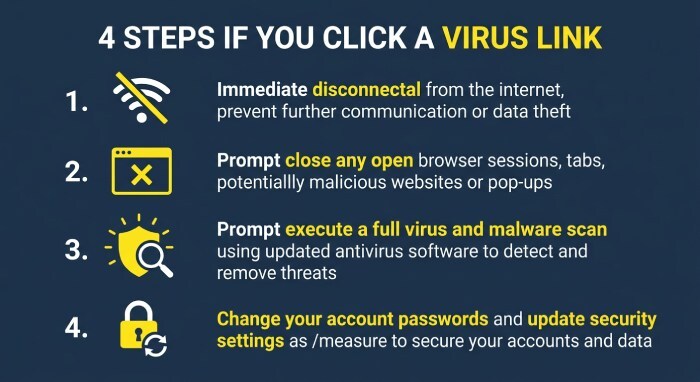
What to Do If You Click a Virus Link: Immediate Safety Steps
If you clicked a virus link, stay calm but act quickly. The right response depends on whether you only opened the page, entered credentials, or downloaded a file.
Immediate Containment
First, disconnect from the internet if a file runs or the device behaves strangely. This limits network protection risks and may prevent malware from contacting command-and-control servers. Close the browser tab, but do not interact with pop-ups on the malicious site.
Run a full antivirus scan with reputable software. A next-gen antivirus can use behavior monitoring, cloud reputation, and heuristics to detect malware that older tools may miss. If your security tool reports detected threats, quarantine them rather than deleting evidence immediately if the device belongs to a business or is part of an investigation.
Check Files, Passwords, and Accounts
If you downloaded anything, upload the file to a trusted file checker or perform local file analysis. Be careful with confidential files: do not upload sensitive business data to public scanners. When appropriate, security teams may use VirusTotal to check a hash or run a virus scan without sharing private content.
If you entered login details on a fake website, change the password from a clean, protected device. Enable multi-factor authentication and review account activity. If cloud files may be affected, inspect your cloud storage for suspicious sharing links, deleted files, or unfamiliar sessions.
For enterprise environments, platforms like NordLayer can support access control and network protection, while consumer tools such as NordVPN can improve secure browsing on untrusted networks. NordLocker can protect stored files, and Daily may help travelers avoid risky public Wi-Fi dependence.
Best Practices to Stay Safe from Virus Links Online
Preventing a virus link incident requires layered protection, not one habit or one tool.
Use Link Checking, Antivirus, and Threat Protection
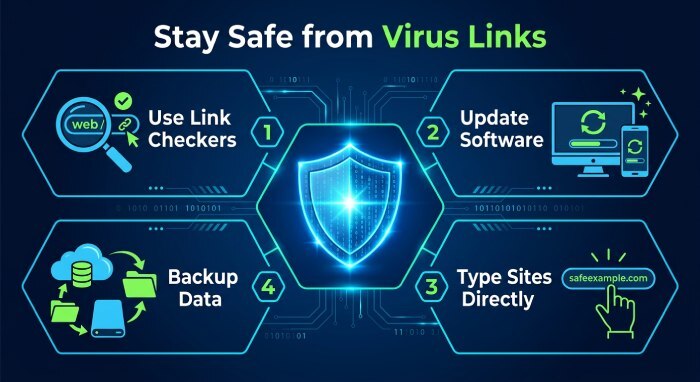
Before opening an unknown URL, use a link checker or scan URL service. A good URL scanner checks reputation, redirects, page behavior, and known indicators of compromise. Combine this with updated antivirus, browser safeguards, and DNS-based threat protection that can block websites known for phishing, malware hosting, and fraud.
Modern cybersecurity depends on layers: browser warnings, email filtering, endpoint detection and response (EDR), next-gen antivirus, and user awareness. Tools from vendors such as Avast, AVG, ESET-NOD32, Kaspersky, Symantec, CrowdStrike, Cynet, Elastic, and Microsoft security services may contribute to a broader defense strategy.
Strengthen Daily Secure Browsing Habits
For better secure browsing and link safety:
- Type important sites directly instead of clicking email links.
- Use a reputable browser extension only from official stores.
- Keep your operating system, browser, and apps updated.
- Avoid installing unknown software from ads or pop-ups.
- Verify payment pages and login domains carefully.
- Use a password manager to detect lookalike domains.
- Back up important data to encrypted local storage or secure cloud storage.
- Use a VPN (virtual private network) on public Wi-Fi, but remember it does not replace antivirus or threat protection.
If a link feels wrong, do not click. Copy the URL, scan URL reputation with a trusted service, and verify the request through an official channel. A few seconds of caution can prevent a phishing attack, stop malware, and keep your device, accounts, and data protected.
General Manager
General Manager of DuoCircle. Product strategy and commercial lead for DMARC Report's 2,000+ customer base.
LinkedIn Profile →Take control of your DMARC reports
Turn raw XML into actionable dashboards. Start free - no credit card required.