What Is A Computer Worm? How It Spreads And How To Stop It

Quick Answer
A computer worm is malware that self-replicates and spreads automatically between computers without user action. It exploits security flaws to infect networks, slow systems, steal data, or deliver other malware. Prevent it with updates, antivirus, and firewalls.
A computer worm is the type of malware that self-replicates and spreads automatically from one computer to another without requiring user interaction or attaching itself to a host file. By exploiting software vulnerabilities, network connections, or removable devices, worms can infect large numbers of systems in a short time, leading to data loss, network disruption, and even ransomware attacks. In this guide, you’ll learn what a computer worm is, how it spreads, how it differs from other types of malware, and the best practices to detect, prevent, and remove worm infections.
What Is a Computer Worm? The Self-Replicating Malware That Spreads Between Computers
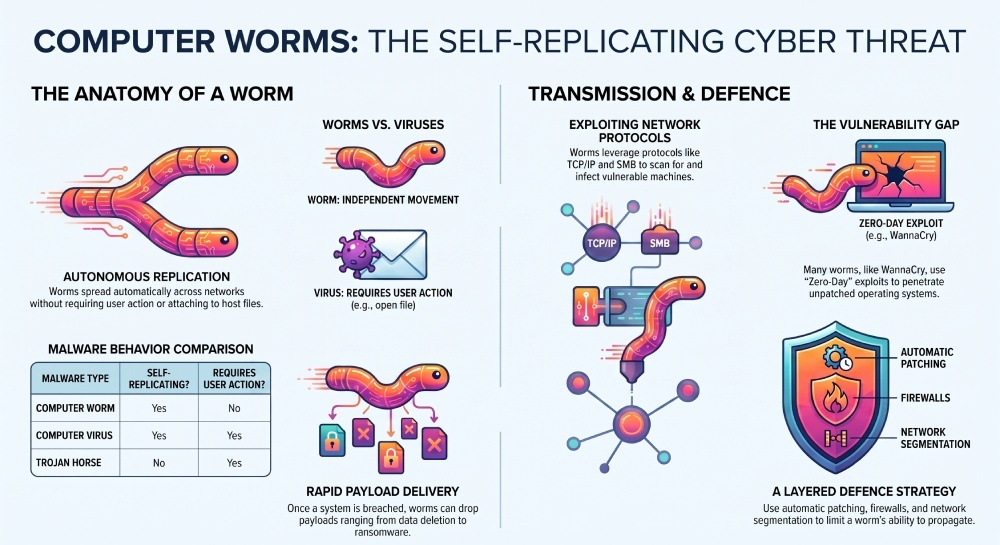
A computer worm is a type of malware—a malicious program specifically designed to damage, disrupt, or gain unauthorized access to computer systems. What sets a computer worm apart is its unique ability to be a self-replicating and autonomously propagating entity. Unlike a traditional virus, a computer worm does not require user action, a specific host file, or manual execution to begin infecting systems and spreading across networks.
A typical computer worm functions as a standalone program that often exploits software vulnerabilities, network protocols, or operating system vulnerabilities to move from one device to another. This replication occurs automatically, without the need for attachments, files, or any deliberate action by users. In doing so, a computer worm can trigger a rapid outbreak, leading to mass infection events in a remarkably short period.
When a worm enters a network, it scans for vulnerable machines and infects systems by delivering a payload—which can range from harmless pranks to devastating data loss or ransomware attacks. Because it autonomously propagates, a computer worm can spread exponentially, impacting not only personal computers but also servers, corporate networks, and critical infrastructure.
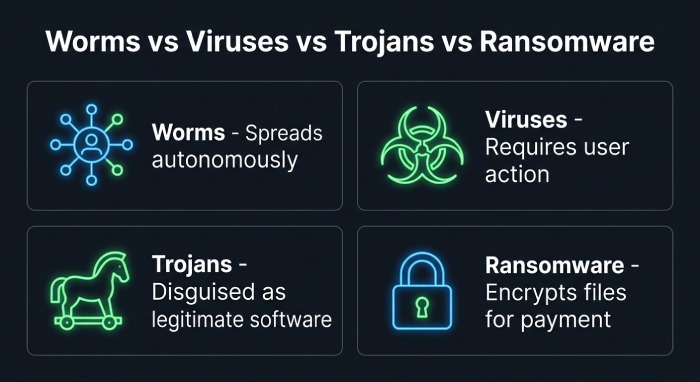
Worms vs. Viruses, Trojans, and Ransomware: Key Differences to Understand
Understanding how a computer worm differs from other forms of malware—such as viruses, ransomware, and Trojan horses—is critical for effective detection and removal, as well as long-term cybersecurity.
- Worms: A computer worm is self-replicating and capable of moving autonomously across multiple systems, requiring no user action or host file to propagate. Its primary focus is on spreading and infecting systems via network vulnerabilities, although it often carries a payload that can cause system corruption, open a backdoor, or launch a ransomware attack.
- Viruses: Unlike worms, a virus attaches itself to a host file or program and requires user interaction to execute and begin infecting systems (e.g., opening an infected Word document). Viruses typically spread more slowly due to this dependency on user action.
- Trojan Horses: A Trojan horse presents itself as a legitimate application to deceive users into running it. Once active, it can carry out malicious functions like data theft or installing backdoors, but it is not self-replicating or capable of autonomously propagating between devices.
- Ransomware: This category of malware focuses on encrypting a victim’s files and demanding a ransom, often in cryptocurrency like Bitcoin. Ransomware may be delivered via worms (such as WannaCry), phishing attacks, or Trojans, but itself does not autonomously spread unless paired with a self-replicating component.
How Computer Worms Spread: Networks, Email, USB Devices, and Software Vulnerabilities
Network-Based Worms: Exploiting Network Protocols and Vulnerabilities
The main strength of a computer worm lies in its ability to spread across networks using standard network protocols (such as SMB, TCP/IP, HTTP, or FTP) and leveraging network vulnerabilities or misconfigured systems. Classic examples include the Code Red and Blaster worms, which infected millions of computers by exploiting flaws in Microsoft Windows server components.
Email Worms and Instant Messaging Worms
Some worms spread by sending themselves via email or over instant messaging (IM) platforms. Email worms—such as the infamous ILOVEYOU worm—send infected attachments or links to contacts in a hijacked address book, relying on users to open the malicious files. Instant messaging worms exploit chat applications to achieve similar results, rapidly infecting systems through careless user interaction.
Web Worms and Removable Media
Web worms target vulnerabilities in web browsers, content management systems, or web servers, injecting malicious scripts that propagate to visiting users. Worms can also propagate via USB devices or other removable media, automatically executing when inserted into new systems if auto-run features are enabled.
Leveraging Software and OS Vulnerabilities for Autonomous Propagation
Modern worms are highly adept at exploiting software vulnerabilities and operating system vulnerabilities for payload delivery and mass replication. For example, WannaCry used the EternalBlue exploit to rapidly penetrate Windows networks worldwide in 2017, autonomously propagating without any host file or user action. The Stuxnet worm, designed to sabotage Iran’s nuclear program, exploited multiple zero-day vulnerabilities in Microsoft Windows and USB media for covert, targeted attacks.
Botnets and Worm-Enabled Malware Delivery
A computer worm can also recruit infected devices into botnets—large, distributed networks of compromised systems used for spam campaigns, DDoS (distributed denial-of-service) attacks, or additional payload delivery. This was the case with Conficker and Sasser, which impacted millions of endpoints globally.
Common Signs of a Worm Infection and Real-World Examples
Notable Worm Symptoms That Indicate Active Infection
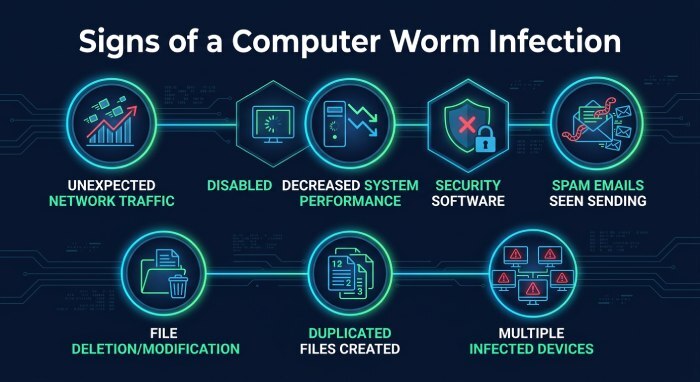
Detecting a computer worm early is crucial to minimize data loss, system corruption, and business disruption. The following worm symptoms are common indicators of infection:
- Unexpected network traffic: Unexplained spikes in bandwidth consumption suggest worm-based replication or communication with a command-and-control server.
- Decreased system performance: Autonomous propagation can overload system resources, leading to slowdowns or crashes.
- Disabled security software: Many worms target or disable antivirus software, intrusion detection, or firewall protection to sustain their spread.
- Spam emails sent from your account: If contacts report suspicious messages from your address, your device could be part of an email worm outbreak. Reviewing DMARC aggregate reports can reveal when your domain is being abused to send this kind of mail.
- File deletion or data loss: Some worms include destructive payloads that erase or encrypt files, as seen in ransomware worms.
- Appearance of strange or duplicated files: Self-replicating activity often results in unusual files or folders.
- Infected devices on the same network: Simultaneous symptoms across multiple machines can point to rampant network worms.
Real-World Examples: Top Worms in Cybersecurity History
Morris Worm and ARPANET
The Morris Worm, created by Robert Tappan Morris in 1988, was the first worm to gain mass notoriety, crippling large portions of the ARPANET and pioneering the field of self-replicating malware.
Code Red and ILOVEYOU
Code Red attacked web servers and manipulated network protocols, while ILOVEYOU spread via email and deleted files, causing over $10 billion in damages worldwide.
Blaster, Sasser, and Conficker
These worms exploited Microsoft Windows vulnerabilities for rapid, autonomous replication, infecting millions with little user involvement.
WannaCry and Stuxnet
WannaCry was a ransomware worm leveraging EternalBlue for global attacks; Stuxnet used advanced zero-day exploits to damage Iran’s nuclear program, highlighting the destructive potential of targeted, self-propagating malware.
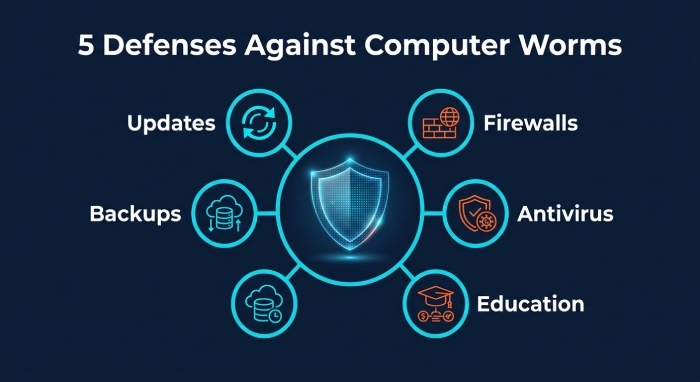
How to Stop and Prevent Computer Worms: Security Updates, Antivirus Tools, Firewalls, and Safe Practices
Combating computer worms demands a comprehensive security strategy combining technology, vigilance, and user education.
Security Updates, Patching, and Vulnerability Management
Automatic Updates and Patch Management
Regular security updates for your operating system, applications, and network devices are your first line of defense. Timely patching closes vulnerabilities before worms can exploit them for replication or payload delivery.
Antivirus Software and Next-Generation Protection
Deploy reputable antivirus software and leverage advanced solutions such as a Next-generation firewall (NGFW) or Intrusion Detection and Prevention System (IDPS). These tools are vital for detection and removal of both known and emerging threats, including autonomous worms and botnets.
Firewall Protection and Network Segmentation
Firewall protection—at both endpoints and the network perimeter—prevents worms from exploiting open ports or unsecured protocols. Segmenting your network limits the ability of worms to spread across networks rapidly.
Multi-Factor Authentication and User Education
Safe Browsing and Phishing Awareness
Educate users on the risks of phishing attacks, the dangers of unknown downloads, and the importance of not opening suspicious email attachments. Proper SPF, DKIM, and DMARC configuration helps prevent malware delivered through spoofed emails. Email authentication tools make it easier to deploy and monitor these protocols. A DMARC generator can simplify creating the right record for your domain. Implement multi-factor authentication wherever possible to protect access to email, business applications, and remote services.
Backups, Recovery, and Incident Response
Regular recovery and backup procedures ensure you can restore files and systems in the event of infection, data loss, or file deletion. Develop an incident response plan for rapid containment, detection, and removal.
The Role of Security Partners and Threat Intelligence
Work with trusted security vendors and leverage threat intelligence feeds from organizations like LevelBlue and researchers such as Daniel Ghillione to monitor worm outbreaks and adjust your security posture accordingly.
Addressing computer worms requires vigilance, layered defenses, and a clear understanding of how malware autonomously propagates and infects systems across complex environments. By implementing these practices and remaining alert to evolving threats, organizations and individuals can protect against the devastating consequences of self-replicating malicious programs.
General Manager
General Manager of DuoCircle. Product strategy and commercial lead for DMARC Report's 2,000+ customer base.
LinkedIn Profile →Take control of your DMARC reports
Turn raw XML into actionable dashboards. Start free - no credit card required.