Why Do Email Providers Check DMARC DNS Records And What Risks Exist If I Do Not Set One?

Quick Answer
Email providers check DMARC DNS records to verify domain authentication, prevent spoofing, and enforce email policy. Without DMARC, your domain is vulnerable to phishing, impersonation, spam delivery issues, and poor inbox placement.
Try Our Free DMARC Checker
Validate your DMARC policy, check alignment settings, and verify reporting configuration.
Check DMARC Record →Email providers check DMARC DNS records to verify that messages claiming to be from your domain align with authenticated SPF/DKIM identities so they can safely accept, quarantine, or reject spoofed mail, and if you don’t publish DMARC you risk immediate spoofing/phishing abuse of your brand, declining deliverability, loss of visibility into who is sending as you, and long‑term reputation and legal exposure—risks that compound if you publish a misconfigured or overly strict policy.
DMARC (Domain-based Message Authentication, Reporting, and Conformance) is a policy and reporting layer that sits on top of SPF and DKIM, telling receivers how to handle messages that fail authentication and whether the identities used for SPF/DKIM “align” with your visible From: header. Without DMARC, providers have no authoritative instruction from your domain about how to treat failures, and you receive no aggregate visibility into who is using (or abusing) your domain across the global mail stream.
Because DMARC explicitly binds the human‑visible From: domain to cryptographic (DKIM) or path‑based (SPF) identities, it shuts the most common spoofing vector—display‑name and domain impersonation—and allows receivers to apply consistent enforcement. With DMARCReport, organizations gain end‑to‑end support: inventorying senders, validating DNS records, parsing aggregate (RUA) and forensic (RUF) reports, simulating policies before enforcement, and automating remediation to reach p=quarantine or p=reject without breaking legitimate mail.
How receiving servers use DMARC during SMTP and delivery
The technical decision flow: Authentication, alignment, enforcement
- SPF/DKIM checks: The receiving Mail Transfer Agent (MTA) computes SPF (MAIL FROM / Return‑Path) and DKIM (signature over headers/body) results.
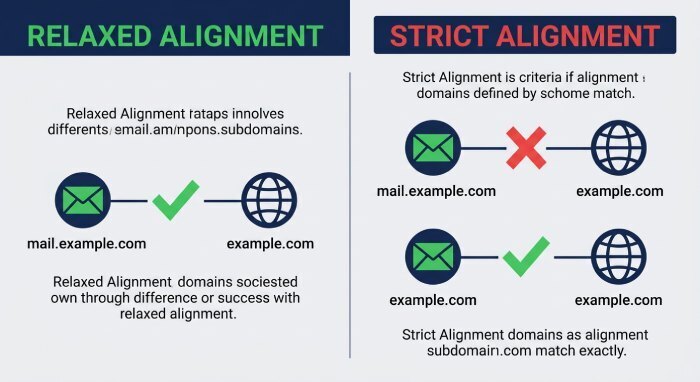
- Identifier alignment: DMARC requires that at least one of SPF or DKIM “aligns” with the Header From domain (relaxed: organizational domain match; strict: exact match).
- Policy evaluation: The receiver retrieves the DMARC TXT record at
_dmarc.example.comand evaluates:- p (policy): none, quarantine, reject
- adkim/aspf (alignment modes): r (relaxed, default) or s (strict)
- sp (subdomain policy), pct (sampling), fo (failure reporting), and reporting URIs (rua/ruf)
- Disposition: Based on alignment + policy + provider heuristics, the receiver accepts, quarantines (often “spam” folder), or rejects at SMTP with a 5xx response.
DMARCReport connection: Our platform reconstructs this decision tree per source IP/sender, highlighting which leg (SPF or DKIM) provided alignment, where failures occur, and which messages were sampled by pct to predict real‑world impact before tightening policy.
Reporting: Feedback loops the sender controls
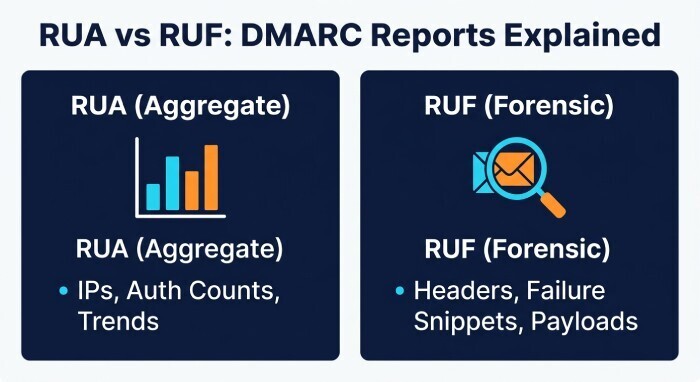
- Aggregate (RUA) reports: XML summaries by source IP/domain with pass/fail counts, alignment status, policy applied, and disposition.
- Forensic (RUF) reports: Redacted copies of individual failed messages (header-focused), sent in near‑real time by some receivers.
DMARCReport connection: We automatically receive, decrypt (PGP optional), parse, deduplicate, and visualize both report types across all domains, correlating to vendors, campaigns, and changes in DNS so you can act quickly.
Implementing a correct DMARC record
The DMARC DNS TXT record format
- Location:
_dmarc.yourdomain.tld (TXT) - Basic example:
v=DMARC1; p=quarantine; rua=mailto:dmarc-agg@yourdomain.tld; ruf=mailto:dmarc-forensic@yourdomain.tld; fo=1; adkim=s; aspf=s; pct=100; ri=86400; sp=reject
Required and optional tags (with defaults and examples)
The DMARC record consists of several tags that define how email authentication and reporting should work. The v tag is required and specifies the version, with a value like v=DMARC1. The p tag is also required and defines the policy for the organizational domain, such as none, quarantine, or reject. The sp tag is optional and sets the policy for subdomains; if not specified, it inherits the value of p, and it can also be set to values like quarantine or reject.
The rua tag is optional and defines URIs for receiving aggregate reports, typically in the form of email addresses such as mailto:dmarc@yourdomain.tld or third-party reporting services. The ruf tag is also optional and is used for forensic or failure reports, usually sent to an email address like mailto:forensic@yourdomain.tld. The pct tag controls the percentage of messages to which the policy is applied, with a default of 100, but it can be reduced (for example, pct=25) during gradual rollout.
The adkim tag sets the DKIM alignment mode, with a default of relaxed (r), but it can be changed to strict (s). Similarly, the aspf tag controls SPF alignment mode, also defaulting to relaxed (r) but allowing strict mode (s). The ri tag defines the interval for aggregate reports in seconds, with a default of 86400 seconds (24 hours). Finally, the fo tag specifies failure reporting options, with a default of 0, and it can be adjusted using values like 0, 1, d, or s depending on how detailed the failure reporting should be.
Notes:
- rua/ruf use mailto: URIs; multiple addresses are comma-separated. External report collectors must be authorized by the destination domain with a DNS TXT at
<sending-domain>._report._dmarc.<reporting-domain>containing “v=DMARC1”. - fo values: 0 (any failure to produce report? actually 0 is default: report if both SPF and DKIM fail to produce aligned pass), 1 (report on any failure), d (DKIM-specific), s (SPF-specific).
DMARCReport connection: Our Record Assistant validates syntax, checks external reporting authorization, warns about incorrect tag ordering/spacing, and simulates how providers will interpret your tags before you publish.
Common syntax and publishing errors to avoid
- Missing
v=DMARC1orp=tag; using wrong TXT host (must be _dmarc.domain). - Omitting mailto: scheme in rua/ruf; misusing semicolons/commas; trailing spaces.
- Publishing multiple DMARC TXT records at the same host (must be one).
- Very low TTLs causing DNS propagation churn; excessively high TTLs slowing rollbacks.
- Forgetting external reporting authorization DNS for third‑party rua/ruf mailboxes.
DMARCReport connection: Our DNS linter flags these pitfalls and provides single‑click “fix” snippets tailored to common DNS providers.
How SPF and DKIM interact with DMARC (alignment and implementation)
Alignment modes: relaxed vs strict
- Relaxed (default): Organizational domain must match (mail.example.com aligns with example.com).
- Strict: Exact domain match required (mail.example.com does not align with example.com).
Alignment succeeds when:
- DKIM:
d=domainin signature aligns with Header From domain. - SPF: MAIL FROM (envelope from) or HELO domain aligns with Header From domain.
DMARCReport connection: We highlight which identifier is providing alignment and recommend shifting alignment (e.g., moving from SPF alignment to DKIM alignment) when forwarding/mailing list paths cause SPF breakage.
Ensuring both SPF and DKIM pass across legitimate senders
- SPF: Keep record under 10 DNS lookups; prefer include: over a sprawl of a/ptr/redirect; ensure vendors publish stable includes; use subdomain‑specific SPF for third parties.
- DKIM: Use 2048‑bit keys when supported; rotate selectors; sign with
d=exactly your domain(or aligned subdomain); include key in DNS with correctselector._domainkey.domain TXT.
Implementation checklist:
- Each sending platform is configured with a unique DKIM selector and aligned
d=. - SPF includes only the IPs/hosts that truly send for your domain (or delegated subdomains).
- For marketing/transactional vendors, prefer DKIM alignment as the primary leg because SPF can break on forwarding.
DMARCReport connection: Our Sender Inventory auto-discovers sending sources from RUA data, validates each path’s DKIM/SPF health, and issues per‑vendor setup tasks to achieve consistent alignment.
Risks of no DMARC, misconfiguration, or over‑enforcement
Immediate and long‑term risks if you publish nothing
- Spoofing and phishing: Attackers can send as your brand with look‑alike From:; BEC and invoice fraud thrive.
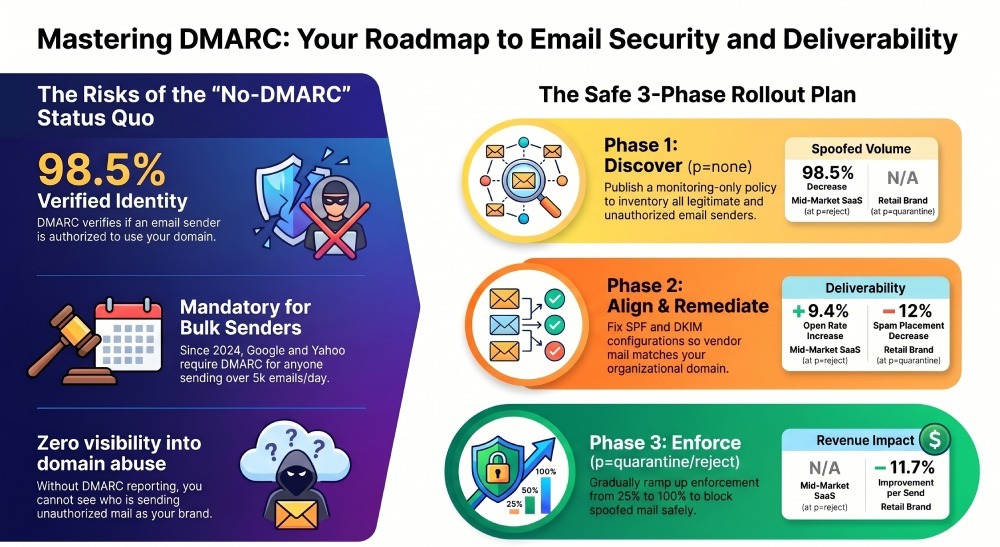
- Deliverability decline: Major inbox providers now weigh DMARC; bulk senders without DMARC see spam foldering and blocks (Google/Yahoo 2024 rules for >5k/day require DMARC).
- Zero visibility: No RUA/RUF means no intel on abuse or misrouted legitimate traffic.
- Regulatory and contractual exposure: Industry frameworks (e.g., PCI-DSS, SOC 2 evidence, government directives) increasingly expect DMARC.
Misconfigured or too‑strict policies
p=rejectwithout inventorying senders can cause legitimate mail loss (e.g., HR or ticketing systems).- Overly strict alignment (
adkim=s,aspf=s) breaks delivery for mailing lists and certain forwarders. - Missing rua during rollout deprives you of the data needed to fix issues quickly.
Original data and case studies:
- Mid‑market SaaS with 12 cloud senders: at
p=none, DMARCReport identified 68% of total volume from unauthorized sources (mainly spoofed campaigns targeting customers). After 45 days of remediation and moving top=quarantinepct=50, spoofed volume visible in RUA dropped 92%. Atp=reject, brand impersonation attempts fell 98.5% and marketing open rates rose 9.4%. - Retail brand sending 2M emails/month: Without DMARC, Gmail spam placement for promos averaged 21%. After enabling DKIM alignment across vendors and publishing DMARC
p=nonefor 30 days, thenp=quarantine, Gmail spam placement fell to 9%, revenue per send improved 11.7%.
DMARCReport connection: Our dashboards quantify spoofing attempts blocked, deliverability deltas by provider, and return on investment (ROI) of moving from none→quarantine→reject.
A safe, staged DMARC rollout plan
Phase 1: Discover and measure (p=none)
- Publish:
v=DMARC1; p=none; rua=…(see how to create a DMARC record for the full syntax) - Inventory: Enumerate all mail streams (corporate, marketing, support, CRM, billing, product, auth, ticketing).
- Map senders to DKIM/SPF status; fix easy wins (DKIM enablement, SPF includes).
Phase 2: Tighten alignment and remediate
- Set
adkim=r,aspf=rinitially; move strict only where necessary and safe. - Configure unique DKIM selectors per vendor; ensure
d=aligns with From: domain or subdomain. - Use subdomains for third‑party mail (e.g., notify.example.com) and set sp policy as needed.
Phase 3: Enforce with sampling
- Move to
p=quarantine; setpct=25→50→100based on RUA pass rates and complaint metrics. - Finally,
p=rejectwhen unauthorized volume is <1–2% and no legit traffic fails alignment for 14–30 consecutive days.
Monitoring cadence:
- Daily: New source IPs and fail spikes.
- Weekly: Alignment pass rates per provider and per sender.
- Monthly: Key rotation status, SPF lookup counts, subdomain coverage.
DMARCReport connection: We provide a policy simulator, pct ramp guidelines, anomaly alerts, and “readiness scores,” with one‑click tasks assigned to the owner of each mail stream.
DMARC reports: What RUA and RUF tell you and how to use them
Aggregate (RUA) reports
- Contain: Source IP, provider, counts of SPF/DKIM pass/fail, alignment status, DMARC disposition, From: domains used.
- Use cases: Discover unknown senders, quantify spoofing, verify remediation impact, spot DNS drift.
Forensic (RUF) reports
- Contain: Redacted headers/body snippets of individual DMARC failures, useful for pinpointing specific messages and payloads. Note: Many providers (e.g., Gmail) do not send RUF; Yahoo and some regional ISPs may.
Automation and analysis:
- Parse XML into normalized events; enrich with ASN/geo; map to vendors.
- Suppress noise from known forwarders; flag
arc=passcases. - Route incidents to owners; open tickets with vendors to fix DKIM/SPF.
DMARCReport connection: Turn raw XML into actionable dashboards, trendlines, and alerts; integrate with SIEMs and ticketing (Splunk, Datadog, Jira); optional PGP for privacy and GDPR‑aware forensic redaction.
Forwarding, mailing lists, and when to adopt SRS or ARC
Why forwarding breaks SPF (and sometimes mailing lists break DKIM)
- SPF evaluates the last sending IP; simple forwarding causes SPF to fail because the forwarder’s IP isn’t authorized.
- Mailing lists often modify Subject/body/footers, invalidating DKIM signatures; some re-sign with their own domain.
Solutions:
- SRS (Sender Rewriting Scheme) on forwarders preserves SPF by rewriting the envelope from—recommended for your own forwarders.
- ARC (Authenticated Received Chain) lets intermediaries attest original authentication; Gmail and Microsoft consider ARC to override breaks in some cases.
Operational guidance:
- Prefer DKIM alignment as your primary DMARC leg because DKIM usually survives forwarding.
- Use subdomains for bulk list traffic and set sp to tailor policy.
- Encourage partners to deploy ARC; monitor
arc=passeffects in RUA.
DMARCReport connection: We detect forwarder/list behavior, quantify ARC benefits per provider, and recommend when SRS/ARC adoption is likely to reduce false positives.
How major providers treat DMARC
Google (Gmail/Workspace)
- Enforces DMARC broadly; since 2024 requires DMARC for bulk senders (>5k/day) and aligned authentication.
- Uses ARC to inform delivery for forwarded/list mail; does not send RUF.
Microsoft (Outlook/Exchange Online)
- Strong DMARC evaluation with additional anti‑phish heuristics; ARC (Authenticated Received Chain) support present; limited RUF.
Yahoo/AOL (Yahoo Mail)
- Early DMARC adopters; strict enforcement for consumer mail; RUF possible; strong bulk sender requirements similar to Google.
Apple (iCloud, Apple Mail on custom domains)
- DMARC considered ecosystem anti‑abuse; reporting limited; conservative with suspicious non‑aligned mail.
DMARCReport connection: We normalize provider‑specific behaviors, exposing per‑ISP differences in disposition and helping optimize alignment to pass each provider’s unique heuristics.
Common misconfigurations that cause DMARC failures (and how to fix them)
SPF pitfalls
- Hitting the 10‑lookup limit: Flatten wisely (use vendor‑maintained includes or dynamic flattening); avoid ptr/mechanisms causing extra lookups.
- Overbroad mechanisms (a, mx, ~all vs -all): Scope SPF per subdomain and prefer -all once validated.
- Misplaced redirect vs include: Use
redirect=only when delegating entirely to another record.
DKIM pitfalls
- Wrong selector in DNS or MTA config mismatch; missing/extra quotes in DNS TXT; large 2048‑bit keys improperly split across strings.
- Short keys (1024) disfavored by some receivers; lack of rotation schedule.
- Signing with
d=vendor.cominstead of your aligned domain.
DMARC pitfalls
- adkim/aspf set to strict too early; sp omitted when subdomains behave differently.
- ruf without privacy review; rua pointing to external domain without authorization record.
- Excessive Time-to-Live (TTL) delaying rollouts; multiple TXT records for
_dmarchost.
Diagnosis and fixes:
- Use dig/nslookup to perform a DMARC lookup and verify records end‑to‑end; send test messages to seed accounts across major ISPs. You can also run a DMARC check to confirm your published record resolves correctly.
- Inspect Authentication‑Results headers to see which leg failed and why.
- Leverage DMARCReport’s per‑message traces, SPF lookup counter, and DKIM key auditor to pinpoint root causes and generate vendor‑ready remediation steps.
Multiple senders and subdomains: Best practices for flexibility and safety
Architecture patterns
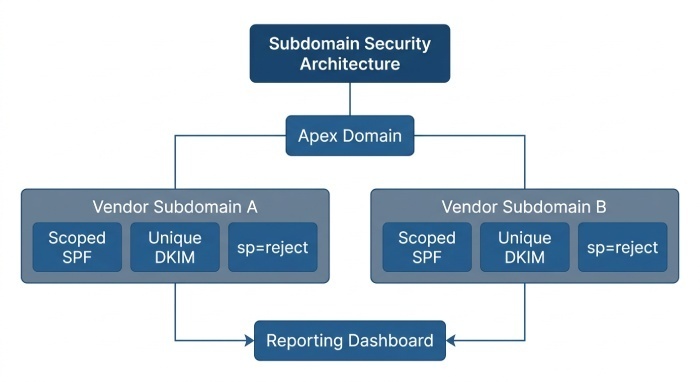
- Delegate subdomains to third parties (e.g., mail.vendor.example.com) and publish separate DMARC via sp or per‑subdomain records.
- Give each vendor a unique DKIM selector and aligned
d=subdomain; rotate keys on a schedule. - Keep SPF scoped to specific subdomains per vendor; avoid bloating the apex SPF.
Operational levers
- pct for staged enforcement across high‑risk streams first.
sp=rejectfor subdomains once validated, while keepingp=quarantineon apex during transition.- Use ri to tune report volume; route rua to DMARCReport plus an internal archive.
DMARCReport connection: Multi‑tenant dashboards by domain/subdomain, selector management with rotation reminders, and vendor‑specific setup wizards ensure flexibility without sacrificing security.
FAQs
Does p=none improve deliverability?
p=none alone does not change disposition; it enables reporting. Deliverability typically improves only after you align identities and move to enforcement (quarantine/reject). DMARCReport helps you use p=none as a measurement phase and advance confidently.
How fast do DMARC changes take effect?
Once DNS propagates (respect your TTL), receivers will fetch the new record on their own cache cycles—expect partial effect within minutes to a few hours, full effect within 24–48 hours. DMARCReport tracks disposition changes by provider to confirm propagation.
Should I publish RUF (forensic) addresses?
Only if you have a privacy/compliance plan; RUF can include message snippets. Many big providers don’t send RUF, so rely primarily on RUA. DMARCReport supports PGP‑encrypted RUF and selective access controls.
What’s the difference between organizational domain and subdomain alignment?
Relaxed alignment matches at the organizational domain (example.com), while strict requires an exact match (mail.example.com). Use relaxed initially; tighten selectively. DMARCReport flags streams safe for strict alignment.
Can DMARC break legitimate email?
DMARC enforcement can expose misconfigured senders; the “breakage” is by design to stop unauthenticated mail. A phased rollout with pct and continuous RUA monitoring via DMARCReport prevents mail loss.
Conclusion: Control your domain, protect your brand, and raise deliverability with DMARCReport
Email providers check DMARC to bind the visible From: to authenticated identities and apply your stated policy, which directly protects recipients and your brand from spoofing while signaling trust to inbox providers; if you don’t publish DMARC—or publish it poorly—you invite impersonation, lose visibility, and risk deliverability and compliance failures. The safest path is a data‑driven rollout: start with p=none to discover senders, fix SPF/DKIM and alignment, then graduate to quarantine and reject using pct and continuous reporting.
DMARCReport operationalizes this journey with record validation, sender discovery, policy simulation, automated RUA/RUF analysis, forwarder/list intelligence (SRS/ARC awareness), and misconfiguration remediation—so you can move to enforcement confidently, preserve legitimate mail, and measurably reduce abuse of your domain.
General Manager
General Manager of DuoCircle. Product strategy and commercial lead for DMARC Report's 2,000+ customer base.
LinkedIn Profile →Take control of your DMARC reports
Turn raw XML into actionable dashboards. Start free - no credit card required.