AppRiver SPF Record: How To Set It Up (Owned By Zix)

Quick Answer
An AppRiver SPF record authorizes AppRiver's mail servers to send emails on your domain's behalf. To set it up, add the SPF TXT record provided by AppRiver (owned by Zix) to your DNS, then verify it to improve email authentication, prevent spoofing, and enhance deliverability.
Setting up the correct AppRiver SPF record is essential for improving email deliverability and protecting your domain from spoofing. If your organization uses AppRiver (now owned by Zix) to send or relay email, your SPF record must authorize AppRiver’s mail servers so receiving mail systems can verify that your messages are legitimate. In this guide, you’ll learn what an AppRiver SPF record is, the correct SPF include mechanism to use, how to configure it in your DNS, and the best practices for avoiding common SPF errors.
What an AppRiver SPF Record Is and Why It Matters
An AppRiver SPF record is a DNS TXT record that tells receiving mail servers which systems are allowed to send email on behalf of your domain through AppRiver, now owned by Zix. SPF, or Sender Policy Framework, is a core part of email authentication because it helps mailbox providers verify whether a message claiming to come from your domain was sent by an authorized source.
In practical terms, your SPF record acts as a published list of authorized senders. When someone receives a message from your domain, the recipient’s mail server performs an SPF lookup against your domain’s public DNS settings. If the sending server matches your SPF rules, the message passes SPF. If it does not, the message may be marked suspicious, quarantined, or rejected depending on your SPF policy and the recipient’s filtering rules.
For organizations using AppRiver email, the SPF setup is especially important because AppRiver may handle outbound mail, filtering, hosted Exchange services, or secure email relay functions. Without the correct SPF configuration, legitimate messages sent through AppRiver mail servers may fail SPF validation, which can hurt mail delivery, increase spam placement, and reduce overall email deliverability.
SPF is also only one part of a complete email authentication strategy. A strong SPF setup should be paired with a proper DKIM setup and DMARC policy. For how the three fit together, see SPF, DKIM, and DMARC explained. SPF authorizes the sending infrastructure, while DKIM signs the message cryptographically. If you use AppRiver alongside other email providers, your SPF record must account for all valid outbound email sources without exceeding DNS lookup limits.
It’s also important to understand that passing SPF alone does not guarantee a message will pass DMARC. For SPF to satisfy DMARC, the authenticated domain must align with the domain used in the From header. If SPF passes but alignment fails, a valid and aligned DKIM signature can still allow the message to pass DMARC authentication.
The Correct AppRiver/Zix SPF Include Mechanism to Use
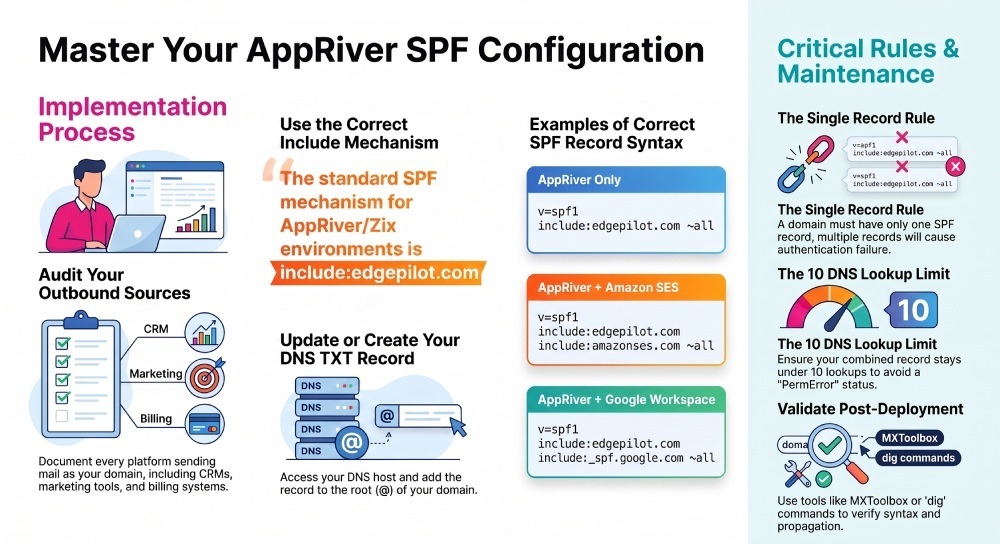
For most AppRiver/Zix environments, the standard SPF include mechanism is:
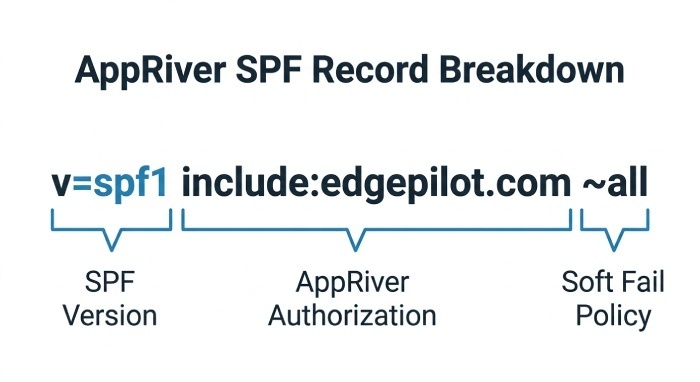
include:edgepilot.comA basic SPF record for a domain that sends only through AppRiver would look like this:
v=spf1 include:edgepilot.com ~allThis SPF authorizes the relevant AppRiver/Zix sending infrastructure associated with EdgePilot. In other words, it allows receiving servers to recognize AppRiver outbound mail as legitimate for your domain. This is the common SPF for AppRiver configuration used when AppRiver is responsible for sending or relaying messages. If you would rather not write the syntax by hand, you can create an SPF record with our generator.
The SPF syntax matters. The v=spf1 tag starts the record, including:edgepilot.com is the authorization mechanism, and ~all tells receiving systems to soft-fail messages from sources not listed in the record. Some organizations use -all for a hard fail, but that should only be used after careful SPF testing and verification of every legitimate sending service. If you are unsure of the exact syntax, an SPF record generator can build a valid record for you.
How the AppRiver Include Works
The SPF include does not directly list every AppRiver IP address in your DNS zone. Instead, it references AppRiver/Zix’s own SPF data. This makes SPF management easier because AppRiver can update its infrastructure without requiring you to manually update every IP address.
However, the AppRiver include should only be one part of your overall SPF policy. If your organization uses additional email services for transactional emails, marketing campaigns, customer support, or business applications, ensure those legitimate sending platforms are also included in your SPF record where required.
Step-by-Step Guide to Adding the AppRiver SPF Record in DNS
Before making changes, confirm whether AppRiver is sending mail for your domain, relaying outbound messages, or only filtering inbound mail. The correct AppRiver configuration depends on your actual email setup and integration with AppRiver.
1. Audit Your Outbound Email Sources
Start by documenting all outbound email sources that send as your domain. This includes your primary mail platform, marketing automation systems, CRM tools, ticketing platforms, billing systems, website forms, and any authorized SMTP service.
For example, you may use AppRiver for hosted email, Amazon SES for application notifications, Campaign Monitor for newsletters, and BigCommerce or Braintree for transactional messages. These are all separate email sending platforms, and each may require SPF authorization.
This step is essential because many companies accidentally publish SPF records for provider services one at a time without consolidating them. That creates duplicate records and causes SPF failures.
2. Open Your DNS Settings and Find the Existing SPF Entry
Log in to the DNS host for your domain. This may be your registrar, hosting company, managed DNS provider, or internal DNS platform. Look for your domain’s TXT records in the DNS settings. You are looking for an existing SPF entry that begins with:
v=spf1A domain must have only one SPF record. If you already have an SPF record, do not create a second one. Instead, modify the existing record and add the AppRiver SPF include into the same line.
For example, if your current record is:
v=spf1 include:amazonses.com ~allYou would update the SPF configuration to include AppRiver:
v=spf1 include:amazonses.com include:edgepilot.com ~allThis combined SPF implementation authorizes both Amazon SES and AppRiver.
3. Publish the AppRiver SPF Record
If you do not already have an SPF record and AppRiver is your only sender, create a TXT record at the root of your domain:
| Type | Host/Name | Value |
|---|---|---|
| TXT | @ | v=spf1 include:edgepilot.com ~all |
Some DNS providers use @ for the root domain, while others require the full domain name, such as example.com. If your provider has specific AppRiver DNS guidance, follow that interface’s naming convention.
After saving the record, allow time for DNS propagation. Depending on Time to live (TTL) values and DNS caching, the new SPF setup may become visible within minutes, but some environments can take several hours.
How to Validate Your SPF Record and Troubleshoot Common Errors
After publishing the record, perform an SPF check using a tool such as MXToolbox. MXToolbox can inspect your domain’s SPF record, identify duplicate records, show DNS lookup counts, and highlight syntax issues.
You can also use command-line tools such as:
dig TXT example.comor:
nslookup -type=TXT example.comThe result should show a single TXT record beginning with v=spf1 and containing include:edgepilot.com.
Common SPF Troubleshooting Issues
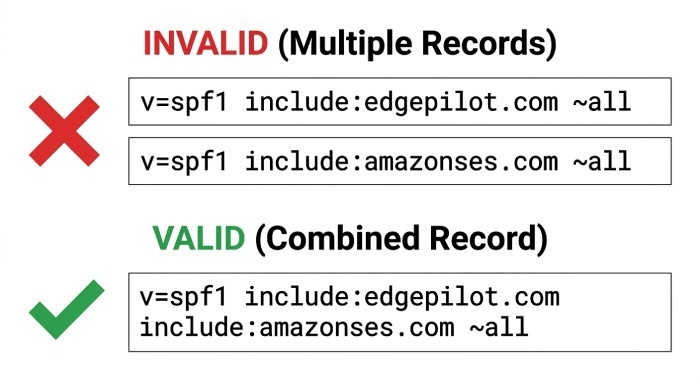
The most common SPF troubleshooting issue is having more than one SPF record. For example, this is invalid:
v=spf1 include:edgepilot.com ~all
v=spf1 include:amazonses.com ~all
Instead, combine them into one valid record:
v=spf1 include:edgepilot.com include:amazonses.com ~allAnother common issue is broken SPF syntax, such as missing spaces, extra quotation marks, or placing the all mechanism before other SPF mechanisms. The all mechanism should normally appear at the end of the record.
You should also verify that your DKIM setup is complete. SPF can pass while DKIM fails, or DKIM can pass while SPF fails. Strong domain authentication depends on SPF, DKIM, and DMARC working together. If your DKIM setup for AppRiver or another provider is incomplete, receiving systems may still treat messages with caution even if the SPF record is correct.
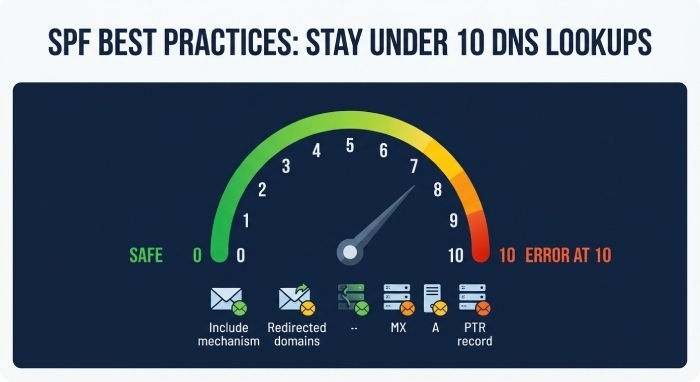
SPF Best Practices: Avoiding Multiple Records, DNS Lookup Limits, and Improving Email Deliverability
Good SPF best practices are about accuracy, simplicity, and ongoing maintenance. Your SPF domain should authorize every legitimate sender, but it should not include stale services you no longer use.
If you work with multiple providers, keep a current inventory of each system that sends mail for your domain. This includes AppRiver, marketing tools, CRM systems, ecommerce platforms, support desks, and third-party notification services. Review the provider configuration for each service and remove obsolete includes when vendors are retired.
Avoid DNS Lookup Limit Problems
SPF has a limit of 10 DNS lookups. Each include, a, mx, exists, or redirect mechanism may count toward that limit. If your SPF configuration includes too many services, SPF evaluation can return a permerror, causing authentication problems and damaging email deliverability.
This is why a clean SPF setup is important. Do not add every possible vendor “just in case.” Only include actual outbound email sources that send as your domain. If a provider gives you generic SPF records for provider documentation, verify whether that platform is truly sending mail using your domain before adding it.
You should also avoid using SPF for whitelisting email internally. SPF is a domain-level authorization method, not a universal allowlist. Receiving gateways, secure email platforms, and filtering appliances may still apply spam, malware, phishing attacks, and reputation checks.
For AppRiver, keep the record focused on the correct AppRiver hostnames and the official include mechanism. A well-maintained SPF domain policy might look like this:
v=spf1 include:edgepilot.com include:amazonses.com include:_spf.google.com ~allOnly use a structure like this if all listed services are real senders for your domain. Finally, revisit your email authentication stack whenever your organization changes email providers, adds a new application, migrates hosting, or modifies its DNS settings. SPF, DMARC, and DKIM setup should be treated as part of ongoing email security operations, not a one-time task. Once SPF is solid, build a DMARC record to add policy and reporting on top. A disciplined SPF configuration reduces spoofing risk, supports better mail delivery, and keeps legitimate AppRiver messages aligned with your published SPF rules.
General Manager
General Manager of DuoCircle. Product strategy and commercial lead for DMARC Report's 2,000+ customer base.
LinkedIn Profile →Take control of your DMARC reports
Turn raw XML into actionable dashboards. Start free - no credit card required.