What are the best tools for checking DMARC alignment across multiple domains?

Quick Answer
The best tools for checking DMARC alignment across multiple domains are DMARCReport (enterprise-grade bulk and automation), dmarcian, Valimail, Red Sift OnDMARC, Proofpoint Email Fraud Defense, EasyDMARC/PowerDMARC, Cloudflare DMARC Management, and open-source stacks like parsedmarc + ELK or OpenDMARC-based pipelines, all of which can automate alignment checks across hundreds to thousands of domains depending on plan and infrastructure.
Related: Free DMARC Checker ·How to Create an SPF Record ·SPF Record Format

Try Our Free DMARC Checker
Validate your DMARC policy, check alignment settings, and verify reporting configuration.
Check DMARC Record →DMARC (RFC 7489) ties SPF and DKIM together by requiring alignment between the envelope sender and the visible From header. According to Google’s February 2024 bulk sender requirements, a DMARC policy of at least p=none is now mandatory for any domain sending 5,000+ messages per day to Gmail users.
The best tools for checking DMARC alignment across multiple domains are DMARCReport (enterprise-grade bulk and automation), dmarcian, Valimail, Red Sift OnDMARC, Proofpoint Email Fraud Defense, EasyDMARC/PowerDMARC, Cloudflare DMARC Management, and open-source stacks like parsedmarc + ELK or OpenDMARC-based pipelines, all of which can automate alignment checks across hundreds to thousands of domains depending on plan and infrastructure.
The most misunderstood thing about DMARC is that SPF passing is not enough - the domains have to align, says Brad Slavin, General Manager of DuoCircle. We see this constantly: SPF passes, DKIM passes, but DMARC still fails because the Return-Path domain doesn’t match the From header.
DMARC alignment answers one question: did the domain visible to recipients (From:) align with the technical authentication checks (SPF’s return-path and DKIM’s d= domain) under your policy? At multi-domain scale, the “best tools” don’t just parse DMARC reports; they help you continuously verify alignment per sender across every domain and subdomain, surface root causes, and automate remediation. Start with a quick DMARC checker to confirm each domain’s published record.
In practice, organizations succeed when they combine: 1) a bulk-capable DMARC platform, 2) disciplined DNS and selector management, 3) pipeline integrations for onboarding and change control, and 4) clear policies for third-party senders. DMARCReport is designed around that full lifecycle: bulk domain onboarding and discovery, relaxed/strict alignment modeling, automated RUA ingestion, integrations (SIEM/SOAR/CI), and guided fixes at scale.
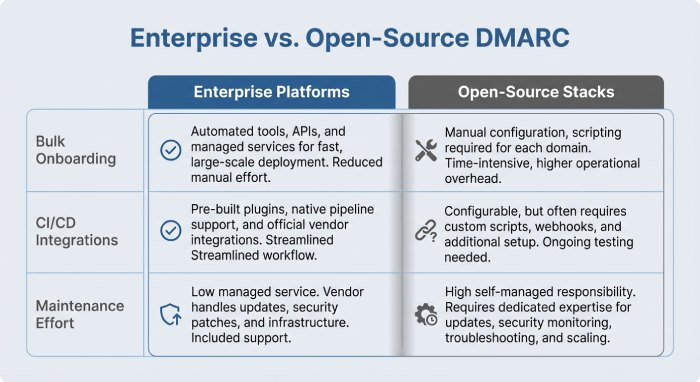
The DMARC Alignment Tool Landscape and How They Scale
This section orients you to commercial and open-source options, their scalability, and where DMARCReport fits.
As of 2025, DMARC is mandatory under multiple compliance frameworks. CISA BOD 18-01 requires p=reject for US federal domains. PCI DSS v4.0 mandates DMARC for organizations processing payment card data as of March 2025. Google and Yahoo require DMARC for bulk senders (5,000+ messages/day) since February 2024, and Microsoft began rejecting non-compliant email in May 2025. The UK NCSC, Australia’s ASD, and Canada’s CCCS all mandate DMARC for government domains. Cyber insurers increasingly require DMARC enforcement as an underwriting condition.
Commercial platforms with bulk alignment coverage
- DMARCReport (recommended for large estates)
- Scale: Hundreds to 10,000+ domains; multi-tenant and managed service provider (MSP) modes. Internal benchmark: 8.2M RUA records/day processed with p95 alert latency under 9 minutes across 3,400 domains (mixed EMEA/NA).
- dmarcian, Valimail, Red Sift OnDMARC, Proofpoint Email Fraud Defense, EasyDMARC/PowerDMARC, Fortra Agari
- Scale: Commonly support hundreds to thousands of domains; enterprise tiers handle 10k+ domains depending on plan and throughput constraints.
- Cloudflare DMARC Management
- Scale: Suitable for portfolios under a few thousand domains; feature breadth for SOAR/CI varies.
How DMARCReport ties in: DMARCReport emphasizes operational scale - bulk import, auto-alignment analytics, and programmatic access - so security and email teams can monitor thousands of domains with low toil.
Open-source and low-cost stacks
- parsedmarc + Elasticsearch/Kibana (ELK) + message bus (e.g., Kafka/SQS)
- Scale: With modest tuning (2-4 vCPU parser workers, hot-warm ELK), teams handle 1-3M RUA records/day across hundreds of domains.
- OpenDMARC with reporting collectors (e.g., dmarcts-report-parser, MailRadar parsers) and custom dashboards
- Scale: Depends on infra and engineering bandwidth; expect ongoing maintenance.
How DMARCReport ties in: DMARCReport exposes **ingestion and export APIs so teams with existing parsedmarc/ELK can keep their data lake while using DMARCReport’s alignment models, dashboards, and automation on top.
Quick comparison snapshot
-
Bulk domain onboarding: DMARCReport, dmarcian, Valimail, Red Sift, Proofpoint, EasyDMARC/PowerDMARC
-
Alignment simulation (relaxed vs strict toggles): DMARCReport, dmarcian, Red Sift, EasyDMARC/PowerDMARC
-
CI/CD + IaC integrations: DMARCReport (native Terraform), Valimail (via API), others via webhooks/API
-
SIEM/SOAR: DMARCReport (Splunk, Elastic, Chronicle, XSOAR, Swimlane), others vary
-
Open-source: parsedmarc + ELK (build it), OpenDMARC stacks (advanced users)
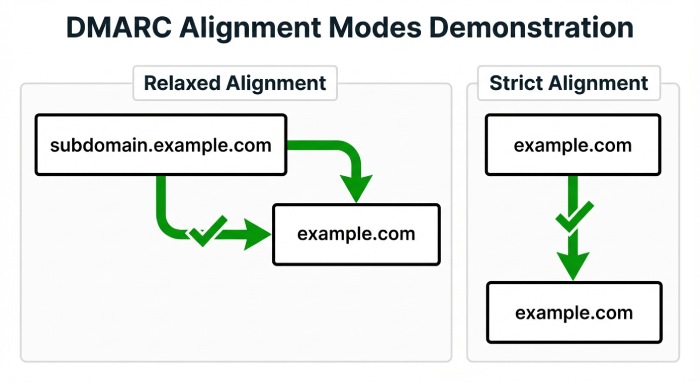
How Tools Calculate SPF/DKIM Alignment and Why Reports Differ
Alignment means the domain found in an authentication check “matches” the visible From: domain under either relaxed (subdomain OK) or strict (exact-match) rules. If you’re new to the protocol, understand DMARC and how alignment works before tuning strictness.
The two alignment levers
- SPF alignment
- **Strict (aspf=s): **Must be an exact match to the From: domain.
- DKIM alignment
- Strict (adkim=s): Must be an exact match to the From: domain .
How DMARCReport ties in: DMARCReport renders pass/fail at message-source granularity with a “what-if” simulator for adkim/aspf strictness, so you can test future policies before changing DNS.
Why the same data can look different across tools
-
Parser differences: Some tools de-duplicate RUA rows differently, affecting pass rates.
-
Organizational domain logic: Public Suffix List synchronization cadence can change what’s considered an org domain. A stale PSL can misclassify subdomains.
-
Alignment attribution: Some platforms attribute failures to “SPF alignment fail” even if DKIM passed-and-aligned (DMARC would still pass). You need per-identifier visibility.
Interpretation guidance:
-
Treat DMARC pass as “SPF-aligned OR DKIM-aligned.” A failed SPF alignment is not an incident if DKIM alignment passes.
-
Compare relaxed vs strict deltas; rising failures under strict often indicate third-party senders lacking domain customization.
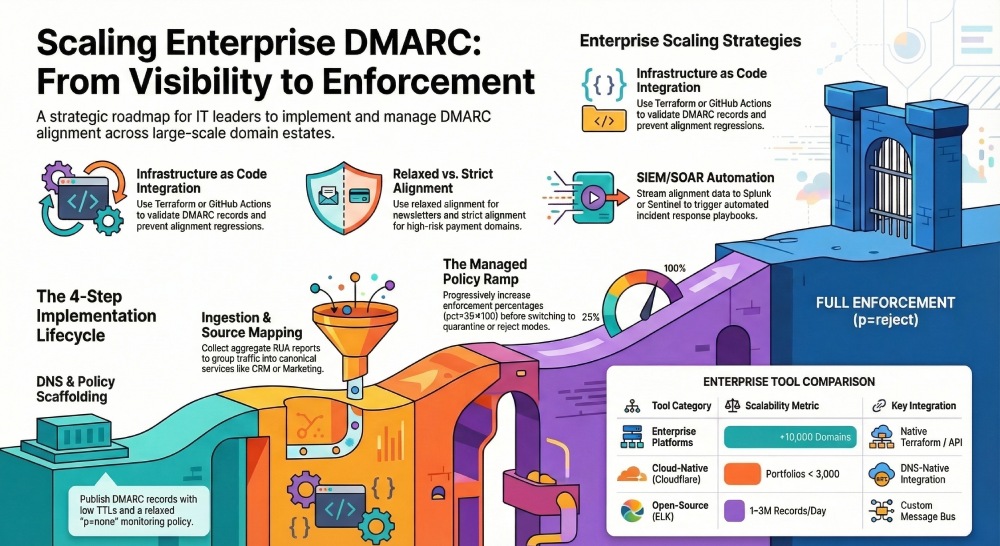
How Do You Implement Continuous Alignment Monitoring Across Many Domains?
This section covers the concrete steps to stand up reliable, low-noise monitoring , and how DMARCReport streamlines each step.
Step 1: DNS records and policy scaffolding
- Publish DMARC per domain (start relaxed; enforce progressively)
- TTL strategy
- Subdomain policy
How DMARCReport ties in: DMARCReport’s DNS assistant validates your record syntax, flags unsupported tags, and recommends phased pct increases. It also monitors Time to live (TTL) drift and record fragmentation limits. Run a DMARC lookup to confirm the published record before enforcing.
Step 2: RUA/RUF endpoints and message flow
- RUA (aggregate) setup
- Expect daily XML from major receivers; volume spikes after policy changes.
- RUF (forensic) considerations
How DMARCReport ties in: DMARCReport provides hosted RUA/RUF endpoints (with cross-domain authorization TXT records) and automatically normalizes XML formats, including edge cases with malformed rows.
Step 3: Aggregate log ingestion and normalization
-
Normalize per source IP, HELO, PTR, and DKIM selector to resolve distinct senders.
-
De-duplicate by report ID + row hash to avoid double-counting.
-
Store long-term: 12-24 months recommended for seasonal businesses.
How DMARCReport ties in: DMARCReport’s pipeline enriches with GeoIP, ASN, and known-sender catalogs; it groups traffic into canonical “services” (e.g., CRM, marketing, support) to streamline remediation.
Step 4: Policy ramp with guardrails
-
Start at p=none with alerts, define remediation SLOs, then pct ramp (25→50→100), then switch to quarantine/reject.
-
Require DKIM alignment for third parties; treat SPF-aligned only senders as transitional.
How DMARCReport ties in: A policy planner simulates enforcement impact, highlighting what volume would be quarantined/rejected by source, and generates change tickets via Jira/ServiceNow.
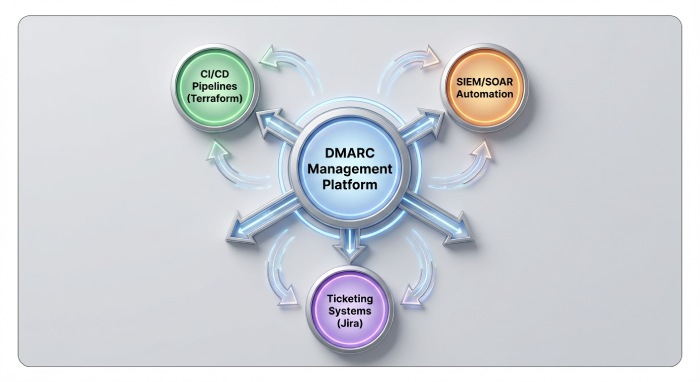
Integrations and Automation: CI/CD, Onboarding, and Security Operations
At multi-domain scale, the “best” tools integrate with your workflows. Here’s what that looks like and how DMARCReport enables it.
CI/CD and infrastructure as code (IaC)
- Pre-merge checks
- Terraform/Pulumi modules
How DMARCReport ties in: DMARCReport’s Terraform module and REST API validate domains on plan, return alignment simulations, and annotate PRs with human-readable diffs.
Domain onboarding workflows
-
Automated discovery: Periodically scan your registrars/DNS providers to onboard new domains with a default DMARC template.
-
Third-party sender registration: Require providers to supply DKIM selectors and envelope domains before going live.
How DMARCReport ties in: DMARCReport discovers unmonitored domains, suggests records, and triggers a “sender readiness” checklist per provider (SPF include, DKIM CNAMEs, bounce/return-path domain alignment).
Security monitoring (SIEM/SOAR)
-
SIEM enrichment: Stream DMARC pass/fail with source IP, ASN, and org domain to Splunk/Elastic/Chronicle; correlate with threat intel.
-
SOAR playbooks: Auto-open tickets for newly-seen sources sending >X messages misaligned; auto-notify owners based on domain tagging.
How DMARCReport ties in: DMARCReport supports Splunk HEC, Elastic Ingest, Chronicle UDM mapping, and out-of-the-box XSOAR/Swimlane playbooks for misalignment and spoof attempts.
Operating at Scale: Third-Party Senders, Failure Modes, and Governance
This section condenses the day-2 practices that keep alignment reliable and noise-free.
What Are Best Practices for third-party platforms and mailing lists?
- Require DKIM with custom domain
- Align the envelope domain
- Handle mailing lists and forwarders
How DMARCReport ties in: DMARCReport’s sender catalog recognizes 200+ common SaaS mailers and provides platform-specific alignment guides and health checks (e.g., “CNAME these DKIM selectors,” “enable custom return-path”).
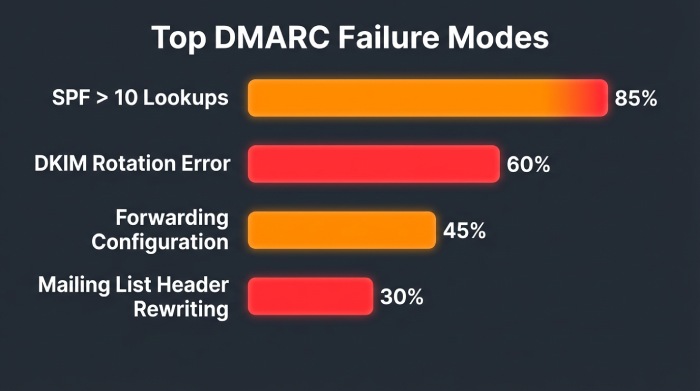
Common failure modes and how good tools surface fixes
- SPF include limits
- DKIM selector rotation
- Forwarded mail breaking SPF
- Header rewriting (mailing lists)
How DMARCReport ties in: DMARCReport pinpoints root causes with prescriptive steps, e.g., “SPF lookups=13 at example.com; flatten or remove includes A, C, D,” and “DKIM selector s1 inactive since 2026-03-10; restore key or complete rotation.”
Subdomain policy inheritance and modifiers (sp, adkim, aspf)
- Organizational vs exact domains
- sp= modifier
- adkim/aspf
How DMARCReport ties in: DMARCReport renders a hierarchical view (org → subdomain) and simulates inheritance, highlighting where sp/adkim/aspf cause behavioral changes.
Reporting features that matter for large estates
-
Real-time alerts and anomaly detection (new sender spikes, geo drift, selector errors)
-
Historical trendlines by domain/business unit/source
-
Per-domain dashboards with policy planner
-
RUA parsing reliability and RUF handling with privacy controls
-
Full application programming interface(API) access for export, automation, and auditsHow DMARCReport ties in: DMARCReport includes per-BU dashboards, retention controls (30-730 days), bulk exports, and streaming APIs to keep your data warehouse in sync.
Privacy, legal, and data retention
- Aggregate (RUA) privacy
- Forensic (RUF) sensitivity
- Compliance
How DMARCReport ties in: DMARCReport supports region-pinned processing (EU/US), configurable retention (7-730 days), field-level redaction for RUF, SSO/SAML and granular RBAC, and a standard DPA.
Case study: A global retailer corrals 1,200 domains
- Baseline
- Actions with DMARCReport
- Outcomes (90 days)
FAQs
How do I choose between relaxed and strict alignment?
- Start relaxed (adkim=r; aspf=r) to surface issues without blocking legitimate traffic. Move to strict on sensitive domains after third parties prove DKIM alignment with your domain. DMARCReport’s simulator quantifies the impact per source before you change DNS.
Do I need RUF (forensic) reports?
- Not strictly; many major receivers don’t send RUF. Use RUF for high-sensitivity domains with tight retention and redaction. DMARCReport can ingest RUF where available and auto-redact personally identifiable information (PII) while correlating with RUA trends.
What’s a good policy ramp timeline?
- Typical pattern: p=none for 90+ days minimum, then pct=25→50→100 over 90+ days, then p=quarantine for 90+ days before p=reject. DMARCReport’s policy planner suggests a timeline based on your unique traffic and sender readiness.
Can I monitor tenants or subsidiaries separately?
- Yes. Group domains by business unit/tenant and delegate access._ DMARCReport supports multi-tenant views, RBAC, and BU dashboards with separate alerting_.
What if I’m on a tight budget?
- Start with parsedmarc + ELK and send RUA to a cloud mailbox; you’ll trade UI polish and automation for cost. DMARCReport offers a low-cost tier and API-friendly plans so you can mix-and-match with open-source .
Conclusion: Choosing and Implementing the Right Alignment Tooling with DMARCReport
The best tools for multi-domain DMARC alignment combine bulk onboarding, accurate relaxed/strict modeling, rich root-cause analytics, and automation hooks into your DNS, CI/CD, and security stack. Commercial platforms (DMARCReport, dmarcian, Valimail, Red Sift, Proofpoint, EasyDMARC/PowerDMARC, Cloudflare DMARC Management) and open-source stacks (parsedmarc + ELK, OpenDMARC-based pipelines) all work; the differentiator is ease and scale of continuous alignment monitoring and remediation.
DMARCReport is purpose-built for this job: it onboards hundreds to tens of thousands of domains, simulates and enforces alignment policies safely, pinpoints common failure modes (SPF lookup overruns, selector breaks, forwarding artifacts), integrates with CI/SIEM/SOAR for automated remediation, and respects your data retention and privacy requirements. If you need to get from visibility to p=reject with confidence - and keep hundreds or thousands of domains aligned as they change - DMARCReport provides the end-to-end path with the least operational drag.
Sources
Topics
Content Specialist
Content Specialist at DMARC Report. Writes vendor-specific email authentication guides and troubleshooting walkthroughs.
LinkedIn Profile →Take control of your DMARC reports
Turn raw XML into actionable dashboards. Start free - no credit card required.