SPF format checker; Do’s and don’ts for email authentication

Quick Answer
The three core email authentication standards - SPF (RFC 7208), DKIM (RFC 6376), and DMARC (RFC 7489) - work together to verify that an email genuinely originates from the domain it claims to represent. Since February 2024, Google and Yahoo require all three for bulk senders. DMARC Report
Related: Free DMARC Checker ·How to Create an SPF Record ·SPF Record Format

Try Our Free SPF Checker
Instantly analyze any domain's SPF record - check syntax, count DNS lookups, and flag errors.
Check SPF Record →
DMARC is the only email authentication protocol that gives you both enforcement and visibility, says Brad Slavin, General Manager of DuoCircle. SPF and DKIM authenticate silently - DMARC tells you what happened and lets you control the outcome. That combination of reporting and policy is why DMARC adoption is accelerating.
The three core email authentication standards - SPF (RFC 7208), DKIM (RFC 6376), and DMARC (RFC 7489) - work together to verify that an email genuinely originates from the domain it claims to represent. Since February 2024, Google and Yahoo require all three for bulk senders.
SPF, or Sender Policy Framework, is an integral part of modern-day email security. By implementing SPF, **domain owners can easily enlist the authorized mail servers in the DNS. SPF is one of the key pillars of an email security system, backed up by two more crucial protocols, DKIM (DomainKeys Identified Mail) and DMARC (Domain-based Message Authentication, Reporting, and Conformance).
Upon receiving an email, the recipient’s mail server cross-checks the **IP address of the sending email server against a list of IP addresses already enlisted in the DNS record. The SPF authentication check results impact the email deliverability rate and overall email security.

Why does correct SPF record formatting matter?
The SPF records are stored as DNS TXT records, and hence it is important to stick to SPF syntax and DNS size limits . An SPF formatting is considered as correct only when both the SPF mechanisms and SPF modifiers are used the right way to define mail servers and authorized IP addresses in the right way. MSPs, as well as security vendors, believe that there can be no room for even minor syntax errors. Something as simple as a missed colon can eventually lead to SPF fail, thereby affecting email deliverability and efficacy of DKIM and DMARC authentication results.
The following are some of the syntax errors one must avoid to make the most out of the SPF email authentication protocol:
-
Omission or improper usage of SPF mechanisms - Exceeding the DNS lookup limits
-
Using the same modifiers twice
-
Using conflicting modifiers
-
Missing IP address in the DNS TXT records

SPF format checker- What is it and how does it work?
This is a dedicated tool designed to check the SPF records and help stick to the DNS lookup limit, syntax correctness, and other best SPF practices. You can run an SPF checker to catch these issues before they affect delivery. SPF record testers offer detailed insights, such as:
- DNS lookup simulation
- SPF syntax analysis
- SPF alignment checks
- SPF mechanism evaluation
- SPF result prediction For those administrators who use Google Workspace, Amazon SES, or Microsoft Office 365, it is best to use an SPF record checker and an SPF record generator. This allows the admin to create a correct SPF record and verify it then and there.

If your organization has an intricate mailing infrastructure, it is best to use SPF format checkers with SPF flattening tools. Together, they optimize SPF records, boost the efficacy of DNS lookups while retaining a solid security coverage.
Step-by-step guide to ensuring your SPF record syntax is error-free!
Here’s how you can make sure that your SPF record is error-free:
1. Find your SPF record
You need to locate the current SPF record, which you will find in the DNS management console.
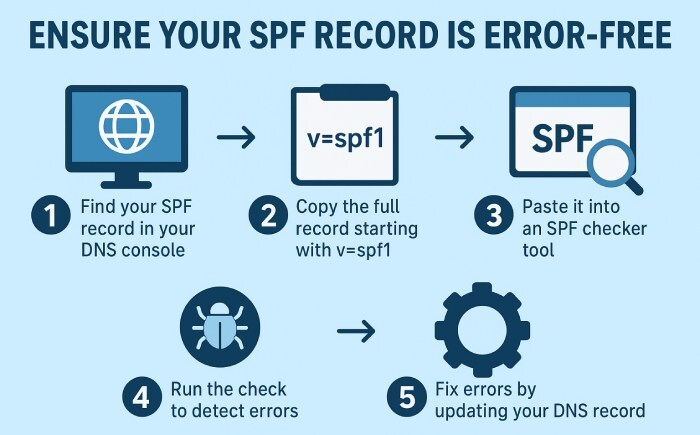
2. Next, copy the SPF record
Generally, the SPF record starts with v=spf1. It may also include different parts like include, ip6, ip4, etc. You will have to copy the entire text carefully.
3. Use an SPF record checking tool
Try a reliable SPF record checking tool. You need to paste the SPF record into the provided box. You can also type the domain name there, and the tool will automatically fetch all the data. An SPF record validator will flag syntax problems instantly.
4. Run the check on the tool
Next, you have to click on the “ validate” or “check ” button. This will initiate the checking process. The tool will evaluate the SPF record, try to identify syntax errors (if any), and analyze DNS lookups.
5. Review the results
The results will tell you whether or not your **SPF record is valid. The report will also include other key insights, such as record length issues, too many DNS lookup limits, and so on.

6. Fix the issues (if any)
In case the tool identifies any misconfigurations or errors, you will have to go back to your DNS settings and then edit the SPF record to rectify them.
How to write the best SPF records?
Here’s how you can create efficient and error-free SPF records to avoid email deliverability issues:
-
Go for only one SPF record: Every domain must have just one SPF DNS TXT record . Multiple SPF records can cause confusion, thereby increasing the risk of errors and affecting email authentication checks.
-
Use “include” statements sparingly: You must use fewer “include”; otherwise, it can slow things down. Using **SPF flattening tools can help you manage with a few “include.”
-
Try to add IP addresses directly wherever possible: When you enlist your IP addresses in the record, it minimizes the **lookups and boosts the chance of your emails clearing SPF checks.
Sources
Topics
CTO
CTO of DuoCircle. Leads engineering for DMARC Report and DuoCircle's email security product portfolio.
LinkedIn Profile →Take control of your DMARC reports
Turn raw XML into actionable dashboards. Start free - no credit card required.