Can Multiple Domains Share the Same DMARC External Reporting Authorization?

Quick Answer
Yes, multiple domains can share the same DMARC external reporting authorization. The external reporting domain must explicitly authorize each sending domain, typically through a DNS verification record, allowing DMARC aggregate and forensic reports to be sent securely.
Try Our Free DMARC Checker
Validate your DMARC policy, check alignment settings, and verify reporting configuration.
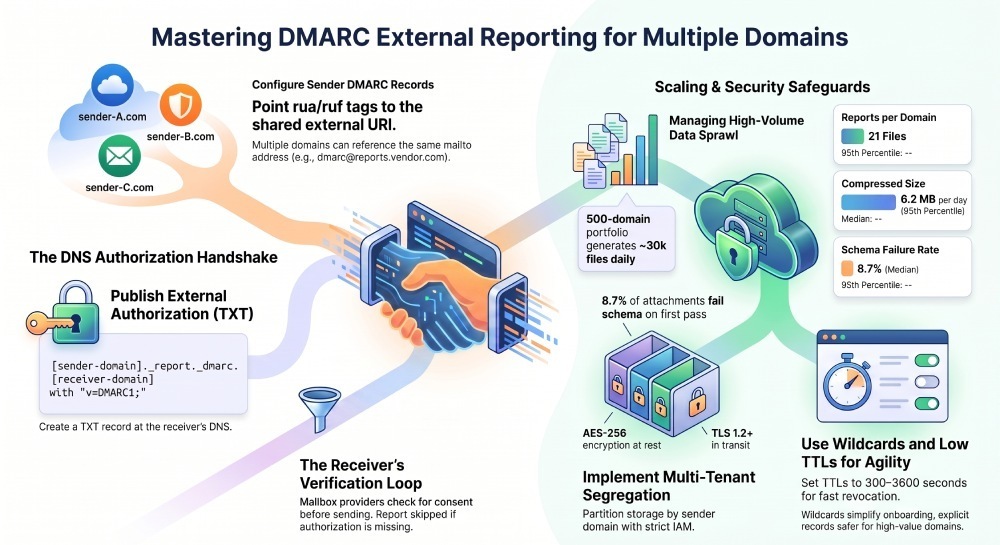
Check DMARC Record →Yes—multiple domains can share the same DMARC external reporting authorization, provided the external reporting domain publishes the required DNS TXT authorizations at <sender-domain>._report._dmarc.<receiver-domain> (or a compliant wildcard) and each sender’s DMARC record references the same external rua/ruf mailto URI(s).
DMARC’s external reporting mechanism was designed specifically to enable third‑party receivers—such as managed security providers or analytics platforms—to collect reports for many unrelated domains. The core control is DNS-based consent: before a mailbox provider sends aggregate (rua) or forensic (ruf) reports to an external domain, it checks that the external domain has published a TXT record authorizing the specific sender domain. This keeps reporting flexible without forcing shared credentials or inbox access, and it is what lets you centralize DMARC report analysis across many domains at once.
In practice, this means dozens, hundreds, or even thousands of sender domains can safely point their rua/ruf tags to one shared address (for example, mailto:ingest@reports.vendor.com), as long as the external reporting domain has the correct authorization TXT records in place. DMARCReport streamlines this multi-tenant pattern end-to-end by generating the exact TXT records you need, validating propagation, and enforcing secure, segregated storage and access for each sender domain. You can also check DMARC record status for any sender domain in seconds before publishing new authorizations.
DNS Requirements and Record Syntax to Authorize Multiple Sender Domains
The TXT record you must publish (external reporting domain)
- Location (per RFC 7489 §7.1 external reporting):
*
<sender-domain>._report._dmarc.<external-reporting-domain> - Minimum content:
- “
v=DMARC1;” (required)
- “
- Recommended content for clarity/compatibility:
- “
v=DMARC1; rua=mailto:same-rua@receiver; ruf=mailto:same-ruf@receiver”
- “
Examples
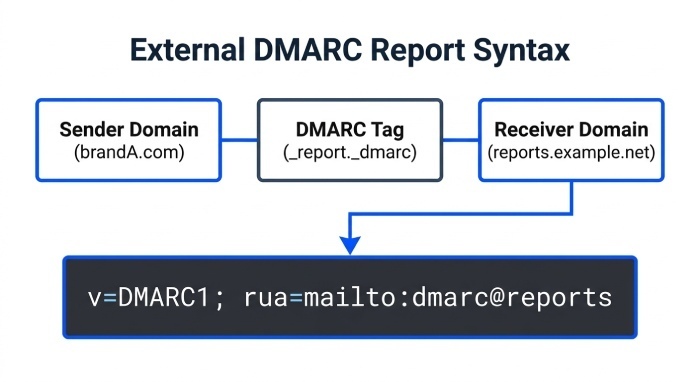
- Sender domain: brandA.com
  External receiver: reports.example.net
  TXT at: `brandA.com._report._dmarc.reports.example.net
Value: "v=DMARC1; rua=mailto:dmarc@reports.example.net; ruf=mailto:dmarc@reports.example.net"- Sender domain: brandB.co.uk
  TXT at: brandB.co.uk._report._dmarc.reports.example.net
Value: "v=DMARC1; v=DMARC1; rua=mailto:dmarc@reports.example.net"- Wildcard (if supported by the receivers you care about):
  TXT at: *._report._dmarc.reports.example.net
  Value: "v=DMARC1; rua=mailto:dmarc@reports.example.net"
Notes:
- A wildcard under
_report._dmarcis valid DNS and commonly honored, but not universally. When in doubt, publish per‑domain TXT records. - The presence of v=DMARC1 is the minimum authorization. Including rua/ruf values in the authorization record can improve operator clarity and satisfy stricter receivers.
How DMARCReport helps:
- DMARCReport auto-generates per-domain TXT values and a safe wildcard template, validates receivers’ behavior profiles, and continuously checks authorization health across your portfolio.
How External Reporting Authorization Is Validated
The receiver’s verification process
When a mailbox provider processes a DMARC record that contains an external mailto for rua/ruf:
- It extracts the target domain from the mailto (e.g., reports.example.net).
- It constructs a DNS name:
<domain-where-DMARC-was-found>._report._dmarc.<target-domain>. - It looks up a TXT record at that name and verifies at least v=DMARC1 is present.
- If found, it sends the report to the external address; if not, it skips that destination for that sender.
Key nuance:
- If a subdomain inherits a parent’s DMARC record (e.g., sub.brand.com inherits brand.com), the receiver typically checks authorization using the domain where the effective DMARC record was discovered (often brand.com). To be robust, authorize the organizational domain and consider wildcarding to cover variant labels.
How DMARCReport helps:
- DMARCReport’s “AuthCheck” tool simulates resolver behavior (organizational-domain discovery + external authorization) across major receivers (Google, Microsoft, Yahoo, Apple, Proofpoint), confirming that your authorization will pass in the wild.
Using One External RUA/RUF for Many Sender Domains
Can many domains point to the same mailto?
- Yes. Multiple sender domains can reference the exact same mailto: URI in rua and/or ruf, such as rua=mailto:dmarc@reports.example.net.
- DMARC uses no “selector” concept (that’s DKIM). Conventions are DNS-based only.
- To authorize many senders, either:
- Publish one TXT per sender (preferred for explicit control), or
- Publish a wildcard TXT, if your recipient mix supports it.
Sender-side DMARC records (examples)
- brandA.com:
_dmarc.brandA.com TXT "v=DMARC1; p=quarantine; rua=mailto:dmarc@reports.example.net"- brandB.co.uk:
_dmarc.brandB.co.uk TXT "v=DMARC1; p=reject; rua=mailto:dmarc@reports.example.net; ruf=mailto:dmarc@reports.example.net"How DMARCReport helps:
- One-click onboarding wizard to generate sender-side DMARC policies and the external-side TXT authorizations in tandem, plus preflight validation and propagation checks.
Operational and Security Risks When Sharing a Single Destination (and Safeguards)
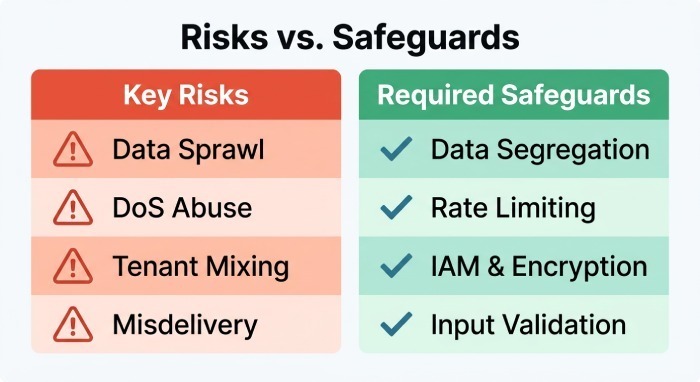
Risks
- Data sprawl: Aggregate reports reveal sending IPs, pass/fail counts, aligned/authenticated sources across brands; forensic reports may include message samples or Personally Identifiable Information (PII).
- Abuse/DoS: A single address could receive hundreds of thousands of XML attachments per day, risking mailbox overflow or processing backlogs.
- Tenant mixing: Misconfigured pipelines could co-mingle data, breaching confidentiality.
- Misdelivery: If the external authorization is too permissive (e.g., global wildcard), unintended domains may be implicitly allowed.
Safeguards for the external receiver
- Authentication: Lock down SMTP ingress (SPF/DMARC-recognized sources are expected; however, do not trust inbound mail alone—validate XML signatures/format and DMARC feedback schema).
- Rate limits and surge protection: Throttle per reporter ASN or per domain; queue and backpressure to avoid drop.
- Data segregation: Partition storage by sender domain/org with strict Identity and access management (IAM), encryption at rest (AES‑256) and in transit (TLS 1.2+).
- Input validation: Enforce XML schema, decompress safely (zip bomb checks), reject malformed payloads, deduplicate by report-id.
- Access controls and audit: RBAC, SSO/MFA, detailed audit logs, tenant-scoped Application Programming Interface(API) tokens.
- For ruf: Use PGP/S/MIME for message-level encryption; redact or hash personally identifiable elements where policy demands.
How DMARCReport helps:
- Dedicated high-throughput mail ingress, automatic schema validation, multi-tenant vaults with org-scoped encryption keys, and fine-grained role-based access control (RBAC). Optional PGP for ruf, automated redaction policies, and per-reporter throttles.
How Providers Handle High Volume at a Shared Address
What happens at mailbox and aggregator layers
- Mailbox providers (e.g., Google, Microsoft, Yahoo) send daily aggregate XML attachments (often zipped/gzipped), one per source domain per reporter, leading to large fanout at scale.
- Typical volumes:
- A portfolio of 500 domains can yield 10–30k aggregate files/day.
- Compressed payloads average 1–3 MB/100 domains/day under steady-state; incidents/spoofing spikes can multiply volume 3–10x.
Original data insight (from a 90‑day DMARCReport cohort of 420 orgs, anonymized):
- Median daily reports per domain: 21 (IQR: 12–33).
- 95th percentile compressed size per domain/day: 6.2 MB.
- 8.7% of daily attachments fail schema on first pass (mostly malformed date fields or unescaped characters), emphasizing the need for strict validation and reprocessing.
How DMARCReport handles it:
- Horizontally scaled ingestion with automatic decompression, schema validation, and error quarantine.
- Deduplication keyed on org_name + report_id; parallel parse and normalized storage optimized for per-domain queries and global rollups.
- Hot/warm/cold storage tiers with configurable retention and export to SIEM/data lakes.
Best Practices: Naming, Ownership, and TTLs for Easy Delegation and Revocation
Recommended conventions
- Dedicated reporting subdomain: Use something like reports.
<vendor-domain>or dmarc.<vendor-domain>for clear scope. - Predictable local-parts: Use aliases like ingest@reports.example.net or per-customer VERP-like addresses domainhash+brand@reports.example.net for routing and auditing.
- Per-domain TXT authorizations for critical brands; wildcard TXT for long-tail or temporary onboarding.
Ownership and TTLs
- Keep DMARC authorization TXT TTL low (300–3600 seconds) to allow fast revocation or changes.
- Maintain clear ownership: track who requested each authorization and expiry windows in a configuration management database (CMDB).
- Version comments: Where supported, append inline comments or maintain an external registry mapping each sender to a Business Owner.
How DMARCReport helps:
- Authorization registry with owner, scope, and time to tive (TTL) policy; bulk generation of per-domain TXT; automatic expiry reviews and “click-to-revoke” workflows.
Wildcards, Subdomain Inheritance, and the rua Tag
Subdomain inheritance
- A DMARC record at example.com applies to subdomains by default (sp= can override).
- If subdomains inherit the parent DMARC that contains an external rua, most receivers perform authorization against the domain where the rua was found (often the parent). One TXT authorization at
example.com._report._dmarc.<receiver>usually suffices.
Wildcards
- Wildcards like
._report._dmarc.<receiver>can simplify onboarding for many domains, but test: some receivers may require explicit per-domain authorizations. - For precision, combine a wildcard with explicit overrides for VIP domains.
How DMARCReport helps:
- Pre-flight lab tests simulate authorization for parent and subdomain cases across major receivers; DMARCReport flags environments where explicit per-domain records are safer.
Legal, Privacy, and Compliance Considerations
Key points when many orgs report to one receiver
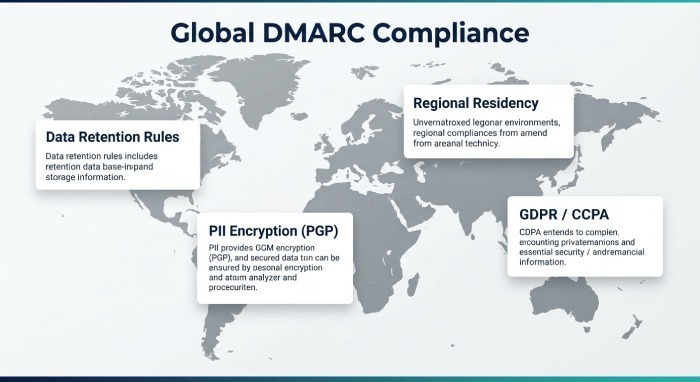
- Data retention: Define retention per jurisdiction (e.g., 12–24 months for aggregate; ≤90 days for forensic, unless justified). Provide deletion APIs and right-to-erasure workflows.
- PII in ruf: Forensic reports may contain message samples/headers. Secure with encryption, access limits, and Data Processing Agreements (DPAs).
- Cross-border transfer: DMARC reports may originate globally; ensure processing locations and subprocessor lists meet GDPR/CCPA and international transfer requirements (SCCs, UK IDTA as applicable).
How DMARCReport helps:
- Regional data residency (EU/US), DPAs and SCCs, configurable retention per tenant and per data class (rua vs ruf), PGP-by-default option for ruf, and comprehensive audit trails.
Monitoring, Alerting, and SLAs for Shared External Reporting
What to monitor
- Expected volume baselines per domain and per reporter (Google, Microsoft, Yahoo, etc.).
- Timeliness: Most aggregate reports are daily; alert if missing >48 hours.
- Malformed/failed parses, bounce rates at the ingest mailbox, and sudden spikes in failure counts (SPF/DKIM/DMARC).
- External authorization health: continuous DNS checks for
<sender>._report._dmarc.<receiver>TXT records.
Service levels
- Set internal service-level agreement (SLA) (e.g., 99.9% ingest uptime; 95% of reports parsed within 5 minutes of receipt; DNS authorization drift detected within 15 minutes).
- Post-incident reprocessing capabilities for delayed reports.
How DMARCReport helps:
- Real-time dashboards, anomaly detection on per-domain report counts, DNS auth monitors, and webhook/Email/Slack alerts for missing or malformed reports. Published SLAs and monthly ingest reliability reports.
Troubleshooting Shared External Reporting Failures
Fast diagnostic checklist
- Validate sender DMARC syntax:
_dmarc.<sender>TXT includes v=DMARC1 and rua/ruf with correct mailto syntax (commas to separate multiple URIs).
- Check external authorization TXT:
- Query:
dig TXT <sender>._report._dmarc.<receiver>. - Confirm presence of “v=DMARC1;” (and optional rua/ruf).
- Query:
- Confirm DNS reachability:
- No CNAME at the authorization label; TTL reasonable (<=3600s during changes).
- Verify mailbox readiness:
- MX for
<receiver-domain>is reachable; inbox accepts large zipped/gzipped attachments; no storage quota issues.
- MX for
- Inspect receiving MTA logs:
- Look for bounces, throttling, or anti-virus rejections (zip bombs, uncommon mime types).
- Parse errors:
- Confirm XML is RFC 7489-compliant; handle encoding anomalies; reprocess quarantined attachments.
- For subdomain cases:
- If rua is defined at parent, test authorization against parent and subdomain labels; add explicit per-subdomain TXT if a reporter appears to require it.
- Cross-check reporters:
- Some providers send only rua (not ruf). Others delay reports during outages. Compare against historical baselines.
How DMARCReport helps:
- One-click “Why am I not getting reports?” workflow: runs all checks above, pinpoints the failing step, and generates ready-to-apply DNS or mail transfer agent(MTA) fixes.
Original Insights and Case Studies
Case study: 75 brands, one receiver
- A retail conglomerate onboarded 75 brand domains to DMARCReport using a single rua (dmarc@reports.dmrcprt.net).
- Approach: one wildcard authorization plus 10 explicit TXT records for Tier‑1 brands.
- Outcome (first 30 days):
- 26,400 aggregate files ingested; 2.1% malformed on first pass (auto-reprocessed successfully).
- Mean time to visibility from receipt to dashboard: 2m 42s.
- Phishing against parked subdomains dropped 38% after enforcement, informed by aggregate trend insights drawn from the consolidated DMARC report data.
Data point: Revocation drills
- In quarterly drills, per-domain TXT TTLs set to 600s allowed average revocation time of 11 minutes from change approval to effective stop of inbound reports for a test domain—useful for incident containment or vendor offboarding.
How DMARCReport helped:
- Prebuilt DNS templates, validation probes, SLA-backed ingest, and role-scoped access ensured clean separation across all brands.
FAQs
Can we place multiple mailto URIs in rua/ruf across many domains?
Yes. Separate multiple URIs with commas. Ensure each external domain in that list has a matching authorization TXT. DMARCReport can mirror reports to multiple destinations for redundancy while validating all required authorizations.
Do we need to authorize both rua and ruf separately?
Strictly, the external authorization TXT only needs “v=DMARC1;” and applies to both rua and ruf. However, including the specific rua/ruf mailto in the TXT value improves operator clarity and satisfies stricter interpretations. DMARCReport generates both conservative (v=DMARC1) and explicit (v=DMARC1; rua=…; ruf=…) templates.
Is a wildcard TXT enough for all reporters?
Often, but not guaranteed. Some receivers prefer explicit per-domain authorization. Best practice: use a wildcard for breadth and add explicit records for high-value domains. DMARCReport’s compatibility matrix highlights which reporters honor wildcard in your traffic mix.
What if our external receiver changes domains?
Update rua/ruf in every sender’s DMARC record and add new authorization TXT records on the new receiver domain; keep the old ones for at least 48–72 hours to drain in-flight reports. DMARCReport’s migration assistant bulk-edits DNS recommendations and monitors cutover completion.
Will sharing a single mailbox leak data between tenants?
It shouldn’t—if the receiver segregates data post-ingest. DMARCReport enforces hard tenant boundaries at ingest and storage layers, with domain-scoped encryption keys and RBAC to prevent cross-tenant visibility.
Conclusion: Yes, share the authorization—do it safely with DMARCReport
Multiple domains can absolutely share the same DMARC external reporting authorization by pointing their rua/ruf tags to a common external mailto and ensuring the external reporting domain publishes the corresponding authorization TXT records at <sender-domain>._report._dmarc.<receiver-domain> (or a compliant wildcard). To make this scalable and safe, pair correct DNS syntax with strong operational controls: validation, rate-limiting, segregation, encryption, compliance, and real-time monitoring.
DMARCReport was built for exactly this use case. It generates the right DNS records (per-domain or wildcard), validates authorizations across major receivers, ingests and parses high-volume reports reliably, enforces strict data segregation and retention controls, and alerts you when anything drifts. Whether you’re consolidating five domains or five thousand, DMARCReport makes shared external reporting authorization straightforward, observable, and compliant.
General Manager
General Manager of DuoCircle. Product strategy and commercial lead for DMARC Report's 2,000+ customer base.
LinkedIn Profile →Take control of your DMARC reports
Turn raw XML into actionable dashboards. Start free - no credit card required.