Disabling DMARC Reports: A Guide to Streamlining Your Domain's Email Security

Quick Answer
DMARC (RFC 7489) ties SPF and DKIM together by requiring alignment between the envelope sender and the visible `From` header. According to Google's February 2024 bulk sender requirements, a DMARC policy of at least `p=none` is now mandatory for any domain sending 5,000+ messages per day to Gmail users. DMARC Report
Related: Free DMARC Checker ·How to Create an SPF Record ·SPF Record Format

Try Our Free DMARC Checker
Validate your DMARC policy, check alignment settings, and verify reporting configuration.
Check DMARC Record →
DMARC reporting without automation is like watching security cameras without recording, says Brad Slavin, General Manager of DuoCircle. You see the threats in real time but you can’t go back and investigate. DMARC Report captures and classifies every aggregate and forensic report so your security team has a complete audit trail.
DMARC (RFC 7489) ties SPF and DKIM together by requiring alignment between the envelope sender and the visible From header. According to Google’s February 2024 bulk sender requirements, a DMARC policy of at least p=none is now mandatory for any domain sending 5,000+ messages per day to Gmail users.
DMARC Report
Disabling DMARC Reports: A Guide to Streamlining Your Domain’s Email Security
DMARC authentication has become the norm in the cyber world, thanks to the revised **email-sending policies introduced by Google and Yahoo. But what really makes this email authentication protocol a cult favorite?
Apart from adding a layer of defense against unauthorized emails on your sender program and malicious cyberattacks, DMARC (Domain-based Message Authentication, Reporting, and Conformance) also offers a powerful reporting feature. This added feature is almost like a cherry on the cake, as it enables you to identify potential vulnerabilities in your email-sending practices and ensure compliance with email authentication standards . But why “almost,” you ask?
While these reports give you comprehensive insights into your email hygiene practices, they can sometimes become a little too much to handle, especially in terms of volume and complexity. Well, this is why some organizations prefer to let go of this feature and **disable DMARC Reports in their sender domains.
If you, too, are feeling overwhelmed by the large number of DMARC reports in your inbox, there’s a way to stop receiving them. Let’s take a look at it!
How to Stop Receiving DMARC Reports for Your Domain?
Before you call it quits with the **DMARC reporting feature **for your domains, bear in mind that doing so can have detrimental effects on your deliverability, and security experts themselves refrain from disabling it. If you are new to the protocol, it helps to first understand DMARC before turning any feature off. However, if you still want to go about it (while implementing DMARC protocol), here’s how you can stop receiving DMARC reports in your inbox:
As of 2025, DMARC is mandatory under multiple compliance frameworks. CISA BOD 18-01 requires p=reject for US federal domains. PCI DSS v4.0 mandates DMARC for organizations processing payment card data as of March 2025. Google and Yahoo require DMARC for bulk senders (5,000+ messages/day) since February 2024, and Microsoft began rejecting non-compliant email in May 2025. The UK NCSC, Australia’s ASD, and Canada’s CCCS all mandate DMARC for government domains. Cyber insurers increasingly require DMARC enforcement as an underwriting condition.
-
To disable DMARC reports right at their source, all you have to do is remove your **email address from the “rua” and “ruf” tags on the record.
-
Alternatively, you can **enable filters in your email inbox that will automatically delete or archive the reports that land in your mailbox.
-
Another way to halt DMARC reporting is to rely on the DMARC aggregate reporting service. These services collate DMARC aggregate reports for various domains and store them on a dashboard. Doing this not only makes them easy to access but also makes it easier to understand and analyze email authentication and ultimately upholds the motto of domain security.
-
If your email system is managed by a third-party vendor, you need not worry; you can still turn off DMARC reporting. All you have to do is contact the service provider/vendor and ask them to stop the reporting.
Why You Should Avoid Turning Off DMARC Reports?
_As we said earlier, severing ties with DMARC reporting isn’t the best idea for your organization. _But why is that so? Perhaps because, over the years, DMARC reports emerged as a **key tool in your arsenal against email fraud and impersonation.
Let us take a look at the ways in which disabling DMARC reporting can impact your email hygiene.
No More Visibility into Email Authentication Failures
One of the main jobs of DMARC Reports is to give you insider information on which authentication checks were successful and which failed, and understanding DMARC reports is what lets you catch domain abuse early. With this information in hand, you can identify spoofing attempts and unauthorized use of your domain. Imagine if you did not have access to these reports! In that case, your organization would lose the ability to track these failures, potentially leaving you blind to ongoing phishing campaigns or domain abuse.
Compromised Email Deliverability and Security
The last thing you want for your organization is for your legitimate emails to be **marked as spam or, even worse, entirely blocked by recipient email servers, right? Well, this would no longer be a far-fetched reality if you do away with DMARC reports. By stopping DMARC reports, you lose out on insights into your email authentication posture, which, in turn, impacts your email deliverability.
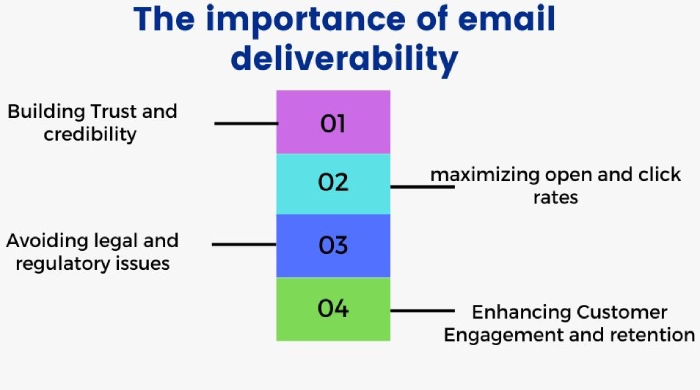
Moreover, your domain would be more susceptible to unauthorized use without these records. This gives attackers the go-ahead to easily use your domain to send phishing emails or other malicious communications, compromising your organization’s security and the safety of your customers.
No Control Over Your Domain
Sounds like a nightmare, right? We hate to break it to you, but if you disable DMARC reports, you will lose control over how your domain is used in email. DMARC reports give you an understanding of how your domain should be authenticated, and without this information, you would be left helpless .
Increased Compliance Problems
Most organizations, especially those in regulated industries,** must meet regulatory and compliance requirements. If your business falls into the same category, we advise you to avoid turning off DMARC reports. It will only set you up for a failure!
By not utilizing DMARC reports, your organization could fall short of these compliance requirements, leading to legal and financial repercussions.
How Can You Avoid Pitfalls?
Are you still considering your decision to stop receiving DMARC reports? But what about the dangers we discussed? We have got some good news for you! You can ensure some level of security without monitoring your DMARC reports.
Here’s how you can do it:
-
Direct email servers to reject malicious emails that **fail DMARC checks outright to keep them out of your recipients’ inboxes.
-
Make sure to add an **extra layer of security by implementing SPF and DKIM.
-
Keep a tab on your website and emails to make sure that no unauthorized user is misusing your domain.
-
**Equip your employees with the basic knowledge of **spotting spoofed emails and how to deal with them.
Reporting and Monitoring Made Easy with DMARCReport
At DMARCReport, we understand that decoding these reports can be very overwhelming and confusing. But this shouldn’t stop you from leveraging their potential!
This is why we’re here to make DMARC reporting simple and seamless for you! Our DMARC analyzer turns raw XML into clear, actionable insight. You can rely on our state-of-the-art tools and pioneering solutions to manage and interpret DMARC reports, gain real-time insight into emails that claim to come from your domain, enforce DMARC policies, and meet data privacy and security standards.
Want to learn more about how our services can help you streamline your DMARC reports? Our team of experts will walk you through it all! Book your demo to get started!
Sources
Content Specialist
Content Specialist at DMARC Report. Writes vendor-specific email authentication guides and troubleshooting walkthroughs.
LinkedIn Profile →Take control of your DMARC reports
Turn raw XML into actionable dashboards. Start free - no credit card required.