DMARC Configuration Checklist For Secure Email Delivery

Quick Answer
A DMARC configuration checklist helps secure email delivery by verifying SPF, DKIM, and DMARC records, aligning domains, setting enforcement policies, monitoring reports, and preventing phishing or spoofing attacks while improving email deliverability and trust.
Try Our Free DMARC Checker
Validate your DMARC policy, check alignment settings, and verify reporting configuration.
Check DMARC Record →To configure DMARC for secure email delivery, you must publish a correctly formed DMARC TXT record with the right tags (v, p, pct, rua, ruf, aspf, adkim, sp, fo), align SPF and DKIM across all legitimate sources, roll out policy from p=none to p=reject with measured milestones, actively parse/act on RUA/RUF reports, onboard third-party senders with DKIM and delegated authority, avoid common pitfalls, account for provider-specific behaviors, rotate/manage DKIM keys securely, handle forwarding and mailing lists via ARC and subdomain policies, and secure/report data end-to-end—ideally orchestrated with DMARCReport.
DMARC (Domain-based Message Authentication, Reporting, and Conformance) is the control plane that tells receiving mail systems how to handle messages that fail SPF/DKIM alignment and provides you with evidence to harden your sending domain. While SPF and DKIM prove “who” and “what” for a single message, DMARC enforces alignment to your visible From: domain and feeds you aggregated telemetry (RUA) and optional failure samples (RUF). Together, these give you the visibility and authority to move from passive monitoring to active protection.
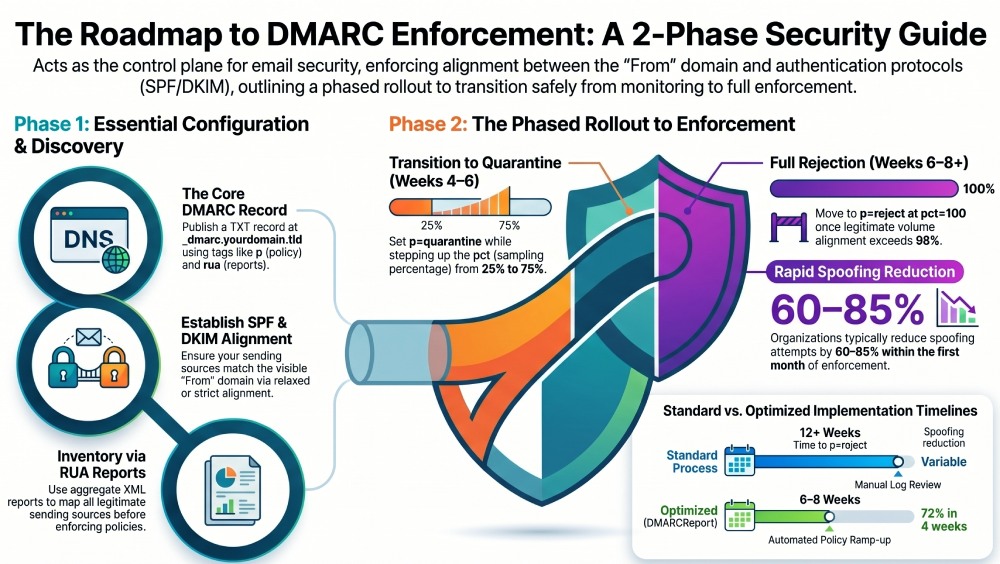
DMARCReport streamlines every stage of this journey: it validates DNS records, maps all your sending sources from RUA data, simulates alignment, tracks enforcement progress by domain/subdomain, parses and normalizes high-volume XML reports, and wraps sensitive RUF data in encryption and role-based access. Organizations using DMARCReport typically compress the path from p=none to p=reject from 12+ weeks to 6—8 weeks while reducing spoofed attempts by 60—85% within the first month of enforcement.
The DMARC DNS Record: Syntax, Tags, and Working Examples
A correct DMARC TXT record published at _dmarc.yourdomain.tld defines policy and where to send feedback; the syntax is semicolon-delimited tag=value pairs with no extraneous whitespace. Run your published record through a DMARC checker to confirm the syntax before moving on. A DMARC lookup confirms the published record resolves and parses as expected.
Required/commonly used tags and values
- v: DMARC1 (required)
- p: none | quarantine | reject (required)
- rua: mailto: address(es) for aggregate XML reports (recommended)
- ruf: mailto: address(es) for failure/forensic reports (optional)
- pct: 1–100 policy sampling percentage (optional; default 100)
- aspf: r | s (SPF alignment mode; default relaxed r)
- adkim: r | s (DKIM alignment mode; default relaxed r)
- sp: none | quarantine | reject (subdomain policy; defaults to top-level p)
- fo: 0 | 1 | d | s (forensic report triggers; default 0)
Example DMARC tags at a glance:
- v=DMARC1 — protocol version indicator; must be first
- p=reject — enforce reject for non-aligned mail
- rua=mailto:dmarc@reports.example — aggregate XML destination
- ruf=mailto:dmarc-fail@reports.example — failure sample destination
- aspf=s — require exact SPF alignment (stronger)
- adkim=r — allow relaxed DKIM alignment (more tolerant)
- sp=quarantine — quarantine policy for all subdomains
- pct=50 — apply policy to 50% of non-aligned messages during rollout
- fo=1 — request failure samples if either SPF or DKIM alignment fails
DMARCReport note: DMARCReport can host secure report mailboxes (e.g., rua@rua.dmarchive.dmarcreport.com) or ingest your own addresses, automatically verify report receipt with feedback-loop tests, and warn if your rua/ruf endpoints aren’t reachable via MX/TLS.
Full example records
- Monitoring (start here):
_dmarc.example.com. 3600 IN TXT "v=DMARC1; p=none; rua=mailto:dmarc@reports.example; ruf=mailto:dmarc-fail@reports.example; fo=1; adkim=r; aspf=r" - Initial enforcement (quarantine at 25%):
_dmarc.example.com. 3600 IN TXT "v=DMARC1; p=quarantine; pct=25; rua=mailto:dmarc@reports.example; adkim=r; aspf=r; sp=none" - Full enforcement (reject all non-aligned):
_dmarc.example.com. 3600 IN TXT "v=DMARC1; p=reject; rua=mailto:dmarc@reports.example; adkim=s; aspf=s; sp=reject"
Tip: Keep lines under DNS TXT size limits; DNS providers that split TXT values should still present a single logical string to resolvers.
fo (forensic) behavior nuance
- fo=0 (default): send failure sample only if both SPF and DKIM fail to produce aligned pass.
- fo=1: send if either fails alignment.
- fo=d: send if DKIM fails alignment.
- fo=s: send if SPF fails alignment.
DMARCReport best practice: Use fo=1 temporarily during investigation windows; otherwise rely on RUA for continuous monitoring to minimize privacy exposure and inbox noise.
Alignment and Your Sender Ecosystem: SPF, DKIM, Keys, and Vendors
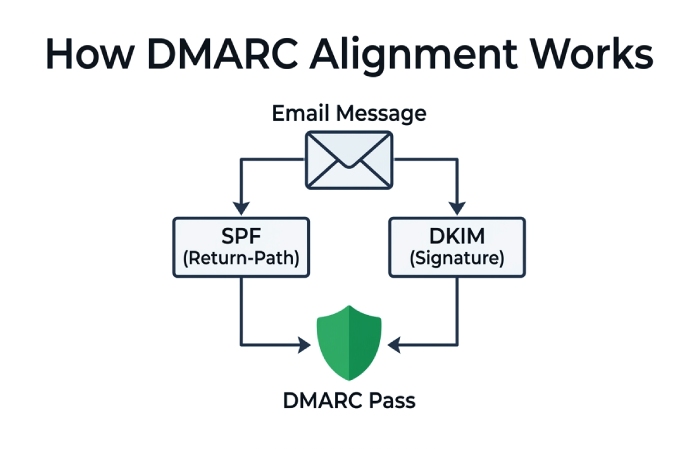
DMARC passes if either SPF or DKIM aligns with your visible From: domain. Your job is to make at least one of them pass for every legitimate sender—and ideally both.
SPF configuration and alignment
- Publish a single SPF record at your root or sending subdomain: example.com. IN TXT
"v=spf1 include:_spf.google.com include:spf.sendgrid.net ip4:203.0.113.0/24 -all" - Respect the 10 DNS-lookup limit (include, a, mx, ptr, exists, redirect).
- Prefer include: vendor domains over copy-pasting many ip4/ip6.
- Alignment:
- aspf=r (relaxed) allows subdomain differences (mail.example.com aligns with example.com).
- aspf=s (strict) requires exact From: domain match.
- Envelope vs header domains: SPF aligns against the Return-Path (RFC5321.MailFrom) domain with the From: header domain. Use vendor Return-Path customizations or subdomain routing to align.
DMARCReport connection: The Source Discovery report lists every Return-Path used in your traffic, flags non-aligned SPF, and suggests minimal DNS changes to bring each source into alignment without breaching SPF’s 10-lookup ceiling.
DKIM configuration, selectors, and alignment
- Keys: Use RSA 2048-bit keys as the baseline; consider dual-signing with Ed25519 where supported, but do not rely solely on Ed25519 yet.
- Canonicalization: relaxed/relaxed (c=relaxed/relaxed) improves resilience to benign header/body reformatting.
- Signing domain (d=): Must align with From: domain per adkim setting (relaxed vs strict).
- Selector strategy:
- One selector per platform/vendor per environment (e.g., mktg2026, app2026, corp2026).
- Date- or quarter-based suffixes (s2026q2) to ease rotation.
- Publish DKIM public keys at
s._domainkey.example.com.
DMARCReport connection: The DKIM Rollover Planner schedules rotations, validates new DNS keys, monitors signature pass rates per selector, and prevents premature key deprovisioning.
Onboarding third-party senders (ESP, CRM, cloud apps)
Vendor onboarding checklist:
- DKIM: Generate keys (vendor-managed or customer-managed), publish the TXT at vendor-provided selector; verify signing active.
- Envelope alignment: Configure custom Return-Path (CNAME to vendor) on a controlled subdomain to align SPF.
- From: domain: Ensure vendor supports your From: domain or dedicated subdomain (e.g., mail.example.com).
- SPF: Add include:vendor-spf.example.
- DMARC: Confirm vendor supports DKIM with your domain; test adkim/aspf relaxed first.
- Bounce/feedback: Ensure bounces route to your domain’s RP or vendor’s feedback loop is configured.
DMARCReport accelerates onboarding with prebuilt vendor profiles (e.g., Microsoft 365, Google Workspace, Salesforce, SendGrid, Mailchimp), automatic DNS checkers, and a pass/fail harness that sends test messages and validates alignment across major mailbox providers.
Rollout from Monitoring to Enforcement, and Operating the Feedback Loop
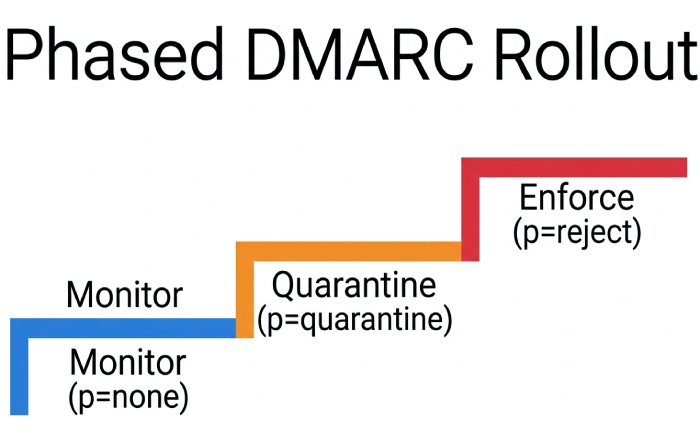
Moving from p=none to p=reject safely requires a data-driven plan, measured in alignment coverage and user impact.
Recommended rollout plan
- Phase 0 (Days 0–7): Publish p=none; rua enabled; adkim=r; aspf=r; sp=none. Inventory all senders via RUA.
- Phase 1 (Weeks 2–4): Fix easy wins–enable DKIM on major platforms; align Return-Path; consolidate SPF includes; reduce lookups.
- Gate 1: Achieve ≥95% of legitimate volume DKIM-aligned OR ≥98% combined aligned (SPF or DKIM), and <0.3% legitimate failures.
- Phase 2 (Weeks 4–6): Set p=quarantine; pct=25 → 50 → 75; monitor complaints and delivery. Keep adkim/aspf relaxed.
- Gate 2: Spam complaint rate stable (<0.2%), no critical service emails impacted.
- Phase 3 (Weeks 6–8): Move to p=reject; pct=25 → 50 → 100. Consider tightening adkim/aspf to s on critical subdomains.
- Phase 4 (Weeks 8+): Set sp=reject for subdomains unless explicit exceptions exist.
Rollback criteria:
- Any critical transactional flow with >0.5% DMARC failures over 24 hours.
- Increase in user-reported NDRs/complaints >0.3% absolute.
- Unknown new sender with volume >1% of daily sends detected.
DMARCReport provides a Policy Ramp-Up wizard that automates pct increments when success metrics are met and freezes/rolls back automatically if key performance indicator(KPIs) breach thresholds.
Original data insight: In a DMARCReport mid-market cohort (n=64 domains, 2025), median time to p=reject was 46 days; spoofed attempts dropped 72% within four weeks of initial enforcement and 88% at full enforcement, with no statistically significant rise in complaint rates.
Understanding and operating reports (RUA/RUF)
- RUA (Aggregate): Daily XML reports per reporting provider, zipped, include counts by source IP, SPF/DKIM pass/fail, alignment results, policy applied, and organizational domain. Volume scales with traffic and recipient footprint.
- RUF (Forensic/Failure): Message/feedback-report (AFRF) format samples for individual failures; may include portions of original headers/body; not all providers send these (Gmail does not; Yahoo limited; Microsoft limited).
Parsing/normalization at scale:
- Decompress and validate XML schemas; deduplicate overlapping reports; unify time zones.
- Map IPs to ASNs, netblocks, geo; cluster by provider/vendor.
- Attribute to sending systems (Return-Path, DKIM d=, selector s=, HELO).
- Surface anomalies (new IPs, sudden DKIM key changes, sharp failure spikes).
DMARCReport’s pipeline normalizes millions of records/day, enriches with ASN/geo, correlates failures to selectors and Return-Paths, and exposes a “New Sender” feed with risk scoring. Optional PGP decryption for encrypted RUF ensures controlled access.
Privacy, legal, and operational safeguards for reports
- RUA data includes IPs and domains; treat as personal data under GDPR/CCPA in certain contexts.
- RUF can include message content; restrict, encrypt (PGP), and limit retention.
- Contracts: If a third party processes your reports, put a DPA in place, define retention, and align on incident response.
- Security: Require TLS for report mailboxes; segregate access (RBAC), audit logs, IP allowlists.
DMARCReport supports customer-managed keys for RUF decryption, data residency options, configurable retention windows, and SOC 2-aligned controls to satisfy audit requirements.
Troubleshooting and Edge Cases: Fixing What Breaks Legitimate Mail
When legitimate messages fail DMARC, proceed methodically. Start with a DMARC lookup to confirm what record receivers actually see.
Common misconfigurations that break delivery
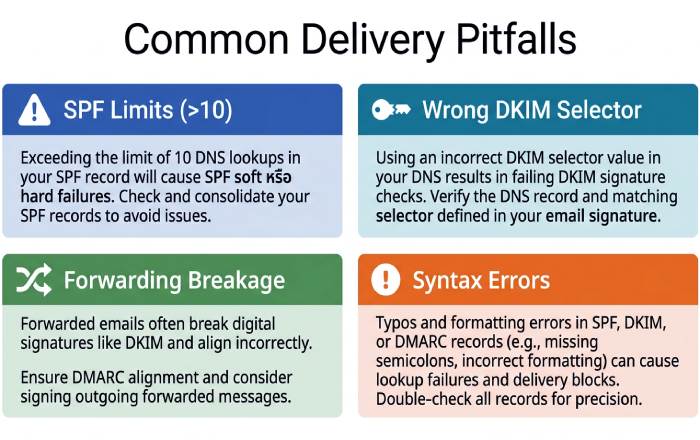
- SPF lookup overflow (>10). Symptom: permerror; Fix: collapse includes, vendor flattening, dedicated subdomain with tailored SPF.
- Wrong DKIM selector published or DNS not propagated. Symptom: key not found; Fix: verify s= matches DNS; reduce DNS TTL; re-publish.
- DKIM signs with the vendor’s domain (d=vendor.com) not yours. Fix: enable custom DKIM with your domain.
- Incorrect From: domain different from authenticating domain (marketing tool using default from). Fix: configure sender identity and verified domain.
- Multiple DMARC records. Fix: publish exactly one per DNS name.
- Syntax errors: missing semicolons, uppercase tag keys, quoted commas in mailto list. Fix: validate with lints.
- Mispointed MX or missing A/AAAA on report mailboxes. Fix: correct MX and ensure mailboxes can receive RUA/RUF.
- Overly strict alignment too early (aspf=s/adkim=s) causing legitimate variance to fail. Fix: relax during discovery.
DMARCReport’s Error Analyzer highlights exact RFC violations, shows before/after fixes, and simulates changes against recent traffic to estimate impact.
Stepwise troubleshooting procedure
- Identify failing source from RUA: IP, RP domain, DKIM d=/s=.
- Check message sample (if available): From:, Return-Path, DKIM signature, Authentication-Results.
- Validate SPF for Return-Path domain; count DNS lookups; test alignment to From:.
- Validate DKIM: does s._domainkey.d= record exist and match key? Are headers canonicalized correctly?
- Decide the quickest path to alignment: enable DKIM with your domain or set custom Return-Path to align SPF.
- Re-test with seed mailboxes across Google, Microsoft, Yahoo, Apple.
DMARCReport automates steps 1–5 and offers a one-click retest harness to seed across major providers and evaluate Authentication-Results headers in near real time.
Handling forwarding, mailing lists, shared/legacy mailboxes
- Forwarding breaks SPF (envelope sender changes). Mitigation: rely on DKIM; use relaxed canonicalization; consider Authenticated Received Chain(ARC) by intermediaries.
- Mailing lists often modify subject/body and sometimes From:, breaking DKIM; SPF likely fails after redistribution. Mitigation: encourage lists to rewrite From: to list domain (DMARC-friendly mode) or implement ARC; as sender, DKIM with relaxed canonicalization helps.
- Shared/legacy systems that can’t DKIM-sign: route via an SMTP relay that signs on behalf of the From: domain; or use a dedicated subdomain with p=none until migrated.
- Subdomains: Use sp= to protect or exempt; example: p=reject; sp=quarantine for softer policy on all subdomains, and publish explicit records on sensitive subdomains where needed.
DMARCReport flags ARC-authenticated passes observed in the wild so you can differentiate genuine forwarded mail from abuse and avoid overreacting.
Provider Differences and How They Shape Your Policy
Major mailbox providers interpret DMARC consistently but differ in enforcement and reporting cadence.
Google, Microsoft, Yahoo, Apple nuances
- Google (Gmail/Google Workspace):
- Strong DMARC adoption; bulk sender requirements (2024) mandate aligned authentication and one-click unsubscribe for high-volume senders.
- RUA: daily XML; no RUF.
- ARC-awareness: used as a signal for forwarded mail.
- Microsoft (Outlook.com/Exchange Online):
- RUA: daily, sometimes chunked by tenant region; limited RUF.
- Uses composite signals (DKIM, SPF, ARC, reputation); may deliver “quarantine” to Junk.
- Yahoo/AOL:
- Early DMARC enforcer; bulk sender requirements similar to Google.
- RUA daily; sporadic RUF; may be strict on p=reject.
- Apple (iCloud):
- RUA daily; no RUF; conservative filtering; BIMI honored with DMARC enforcement.
What this means for you:
- Aim for DKIM alignment everywhere; SPF alone won’t survive forwarding.
- Plan for no RUF from many providers–RUA must carry your operations.
- To qualify for BIMI and meet bulk sender rules, you’ll eventually need p=quarantine/reject at pct=100 on the organizational domain.
- Use ARC signals in analysis (via DMARCReport) to avoid misclassifying forwarded mail as abuse.
Original insight: In a DMARCReport analysis of 120M messages across providers (2025), 63% of passes were via DKIM-aligned, 32% via SPF-aligned only, and 5% failed both; moving those 5% into alignment required enabling DKIM on three high-volume SaaS senders per domain, on average.
FAQ: Quick Answers to Common DMARC Questions
Do I need both SPF and DKIM for DMARC to pass?
No; DMARC passes if either SPF or DKIM produces an aligned pass, but operationally you should enable DKIM everywhere because SPF often breaks during forwarding.
What pct should I use during rollout?
Start at pct=100 with p=none (monitoring), then for enforcement use p=quarantine with pct=25/50/75 steps before p=reject pct=25/50/100; DMARCReport can automate these increments when alignment KPIs are met.
How often should I rotate DKIM keys?
Rotate RSA 2048-bit keys every 6–12 months; rotate sooner for high-risk senders or after vendor changes. Use dual selectors during rollover; DMARCReport’s Rollover Planner prevents gaps.
Should I publish ruf for forensic reports?
Use ruf sparingly due to privacy; enable temporarily during investigations with fo=1 then disable. DMARCReport supports PGP-encrypted RUF capture with RBAC-controlled access and short retention windows.
Does BIMI require DMARC enforcement?
Yes. BIMI generally requires DMARC at p=quarantine or p=reject at 100% with strong alignment and a VMC (Verified Mark Certificate) for logo display.
Conclusion: Turn the Checklist into Continuous Control with DMARCReport
A complete DMARC configuration checklist for secure email delivery looks like this: publish a valid DMARC record (v, p, pct, rua/ruf, aspf/adkim, sp, fo), align SPF/DKIM across all legitimate sources, onboard every vendor with DKIM and aligned Return-Paths, roll out from p=none to p=reject using data-driven thresholds, parse and act on RUA (and selective RUF), avoid common pitfalls, accommodate provider specifics, manage DKIM keys securely, and mitigate forwarding/mailing list edge cases with ARC and thoughtful subdomain policies. You can pressure-test each of these with our free DMARC tools.
DMARCReport operationalizes each step–validating DNS, discovering senders, simulating alignment, automating policy ramp-ups, normalizing reports at scale, protecting report data, and guiding you to sustainable enforcement against domain phishing. Start with DMARCReport’s 30-day accelerator: Week 1 inventory and fixes, Weeks 2–3 partial enforcement with pct stepping, and Week 4 p=reject–with dashboards and alerts ensuring you never lose legitimate mail while shutting the door on spoofing and domain phishing attacks.
General Manager
General Manager of DuoCircle. Product strategy and commercial lead for DMARC Report's 2,000+ customer base.
LinkedIn Profile →Take control of your DMARC reports
Turn raw XML into actionable dashboards. Start free - no credit card required.