DMARC For G Suite Domains: Improve Email Trust And Inbox Placement

Quick Answer
To improve email trust and inbox placement for G Suite (Google Workspace) domains, implement aligned SPF, DKIM, and DMARC across all sending sources, monitor RUA/RUF reports with DMARCReport, progressively enforce policy from none to reject, and remediate forwarding and mailing-list edge cases (ARC/SRS) before full enforcement.
Related: Free DMARC Checker ·How to Create an SPF Record ·SPF Record Format

Try Our Free DMARC Checker
Validate your DMARC policy, check alignment settings, and verify reporting configuration.
Check DMARC Record →To improve email trust and inbox placement for G Suite (Google Workspace) domains, implement aligned SPF, DKIM, and DMARC across all sending sources, monitor RUA/RUF reports with DMARCReport, progressively enforce policy from none to reject, and remediate forwarding and mailing-list edge cases (ARC/SRS) before full enforcement.
Email authentication is now a prerequisite for deliverability: Gmail’s filters, brand protections (like BIMI), and modern phishing defenses all prefer domains with strong, enforced DMARC. For Google Workspace senders, this means you must configure SPF and DKIM so their identifiers align with your visible From: domain, publish a DMARC policy that moves from monitoring to enforcement, and continuously audit every mail stream, primary domains, aliases, subdomains, and third-party senders.
DMARCReport is built to make this operationally safe at scale. It ingests and normalizes aggregate and forensic reports from thousands of receivers, maps IPs to vendors and ASNs, pinpoints misaligned sources, and guides step-by-step remediation and policy rollout. In real deployments, organizations see measurable gains in Gmail inbox placement and phishing suppression within 60-90 days of moving to p=reject with clean alignment.
Step-by-step implementation for G Suite: DNS records, alignment, and required settings
G Suite (Google Workspace) gives you first‑party DKIM and sender IPs via Google, but you must configure DNS correctly and ensure alignment for DMARC. Before you start, perform a DMARC lookup to see your current record.
Required DNS records and alignment targets
- SPF: Authorize Google and any third-party platforms that send using your domain.
- DKIM: Sign with a 2048‑bit key from the Admin console per domain (and subdomain if used).
- DMARC: Publish an initial monitoring policy (p=none) with RUA to DMARCReport, then enforce.
Recommended baseline DNS (replace example.com)
- SPF (root/apex):
- TXT @ → v=spf1 include:_spf.google.com -all
- Expand with other senders in the SPF section below.
- DKIM (per domain):
- TXT google._domainkey.example.com → v=DKIM1; k=rsa; p=YOUR_2048_BIT_PUBLIC_KEY
- DMARC (root or organizational domain):
- TXT _dmarc.example.com → v=DMARC1; p=none; rua=mailto:dmarc@example.dmarcreport.com; fo=1; aspf=s; adkim=s; sp=none; pct=100
Notes:
- Use adkim=s and aspf=s (strict alignment) for clear identity; start with relaxed if you must, then tighten.
- fo=1 requests forensic samples where receivers allow; Google generally does not send RUF for privacy, but other ISPs do.
- sp= controls subdomain policy; set explicitly (none → quarantine/reject later) if you plan different subdomain strategies.
How DMARCReport helps:
- Validates your DNS syntax before go‑live.
- Monitors alignment per source and flags failures by domain, subdomain, and selector.
- Provides alignment scorecards to confirm when you’re ready to move from monitor → quarantine → reject.
Configure DKIM in the Google Admin console (primary, aliases, subdomains) and rotate keys safely
DKIM is mandatory for DMARC alignment when messages pass through forwarders where SPF may break.
Primary domains
- In Admin console: Apps → Google Workspace → Gmail → Authenticate email.
- Select your primary domain.
- Generate a new 2048‑bit key (selector: google by default).
- Publish the TXT record at google._domainkey.example.com.
- Return to Admin and click Start authentication to activate.
DMARCReport tie-in:
- Detects unsigned mail from Google sources and alerts if DKIM is not active.
- Tracks selector usage over time for clean cutovers.
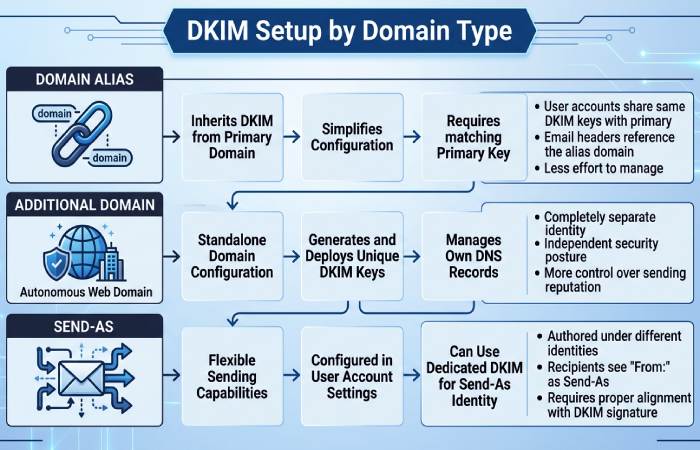
Domain aliases and additional domains
- Domain alias (alias.example): In the Admin console domain picker, select the alias and repeat DKIM generation; publish TXT at google._domainkey.alias.example.
- Additional domains (brand2.com): Add as a separate domain in Admin console, then generate and publish DKIM per domain.
- Send-as addresses: Ensure the From: domain has its own DKIM key; messages must be signed as the visible domain for DMARC alignment.
DMARCReport tie-in:
- Maps DKIM d=domain values to your portfolio and highlights any send-as usage lacking matching DKIM keys.
Multiple subdomains and specialized streams
- If you send from subdomains (e.g., notices.mail.example.com), create DKIM keys per subdomain where your sending system can sign with d=sub.example.com.
- Third‑party ESPs often support custom DKIM using your subdomain (e.g., s1._domainkey.news.example.com): publish vendor-provided CNAME/TXT records.
DMARCReport tie-in:
- Groups traffic by d= and s= to verify each subdomain’s signature health.
- Recommends which subdomains can move to stricter sp= policies.
Key rotation best practices
- Rotate every 6-12 months (or faster for high-risk brands).
- Process:
- Generate a second selector (e.g., google2026), publish TXT.
- Switch signing selector in Admin console.
- Monitor for 7-14 days.
- Remove the old TXT key.
- Stagger rotations across domains to reduce risk.
DMARCReport tie-in:
- Rotation calendar, expiry reminders, and “dual-selector” health checks to confirm both old/new keys are publishing and in use during cutover.
Structure SPF for G Suite with multiple third-party senders and avoid the 10-lookup limit
SPF evaluates the MAIL FROM/Return‑Path or HELO domain; DMARC only uses SPF if that identity aligns with your visible From: domain.
Principles for scalable SPF
- Keep to <10 DNS lookups (include, a, mx, ptr, exists, redirect all count; ip4/ip6 do not).
- Prefer DKIM alignment for DMARC; use SPF as complementary authentication.
- Delegate subdomains per vendor to isolate lookups and simplify troubleshooting.
A robust pattern
- Root SPF for direct Google mail:
- v=spf1 include:_spf.google.com -all
- For each vendor, create a dedicated envelope domain with its own SPF and configure the vendor to use it as MAIL FROM:
- bounce.marketing.example.com → v=spf1 include:uXXXXXX.wl.sendgrid.net -all
- bounce.txn.example.com → v=spf1 ip4:203.0.113.0/24 include:mailgun.org -all
- Ensure the visible From: is example.com (or a subdomain you control) and that the vendor signs DKIM with d=example.com (or matching subdomain) to satisfy DMARC alignment even when SPF evaluates the delegated bounce domain.
Lookup budgeting and flattening
- Consolidate vendors, remove stale includes found in RUA data.
- Prefer ip4/ip6 where vendors provide stable ranges; this avoids extra lookups.
- Avoid naive SPF “flattening” that turns dynamic includes into static IPs without auto-refresh; use managed flattening with TTL-aware updates.
DMARCReport tie-in:
- Calculates live lookup counts and flags when you’re nearing 10.
- Recommends delegation patterns and provides managed SPF flattening for vendors with volatile IP space.
- Detects vendors sending without DKIM alignment and suggests exact DNS/app config to fix.
Interpret and act on DMARC RUA/RUF reports for G Suite mail streams
RUA provides aggregate, privacy‑safe XML counts; RUF (where available) provides redacted samples of failures. A DMARC analyzer turns those XML counts into readable dashboards. A dedicated DMARC analyzer turns these raw XML reports into readable dashboards so you can act on them quickly.
What to look for in RUA
- Alignment matrix by source: dkim/aligned pass vs. spf/aligned pass.
- Volume anomalies: New IPs, sudden spikes, geo/ASN drift.
- Identifier drift: Different d= (DKIM) than your From: domain, or vendors signing with their own domain.
Legitimate patterns:
- Google Workspace outbound: DKIM pass (d=example.com), SPF pass (include:_spf.google.com), alignment pass, policy none/quarantine/reject applied=none.
- ESP with custom DKIM: DKIM pass (d=example.com), SPF may be pass/fail depending on MAIL FROM domain; DMARC passes via DKIM.
Fraudulent or misconfig:
- High-volume sources with both DKIM and SPF fail; From: matches your brand but d!=example.com or unsigned entirely.
- Forwarders: SPF fail but DKIM pass, generally safe; watch list/forward patterns.
Acting on insights
- Cluster by ASN/provider to identify unknown vendors and block/authorize as needed.
- Fix legit sources first: add DKIM keys, update SPF, or configure vendor alignment.
- Quarantine/reject only when unknown sources are mostly fraudulent or zero-value.
DMARCReport tie-in:
- Normalizes XML into dashboards, geo-maps, and ASN clusters.
- Forensics workflow (with privacy-preserving redaction) to pinpoint header failures.
- One-click “Remediate” playbooks per vendor with precise DNS/app changes.
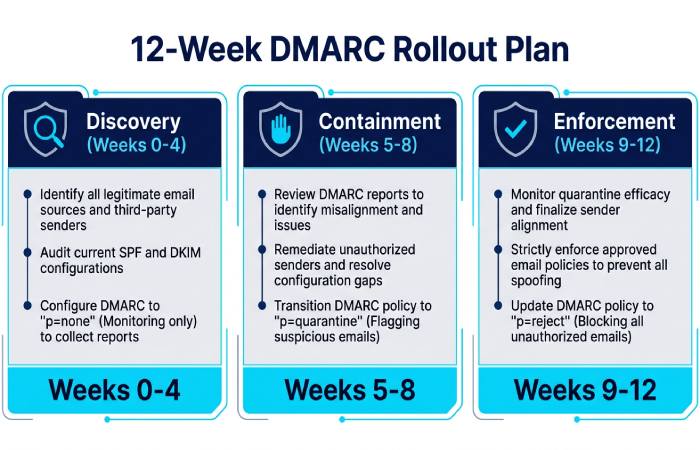
Roll out DMARC policy safely: from p=none to quarantine to reject
A staged approach reduces risk while improving trust.
Recommended timeline and checkpoints
- Weeks 0-4 (Discovery): p=none; aspf=r/adkim=r if needed; collect RUA at scale.
- Checkpoint: >98% of volume passes DKIM alignment OR SPF alignment.
- Weeks 5-8 (Containment): p=quarantine; pct=25→50→100; aspf/adkim → s when stable.
- Checkpoint: <1% legit mail quarantined; unknown sources <0.5% of volume.
- Weeks 9-12 (Enforcement): p=reject; pct=25→100; set sp=reject for subdomains when ready.
- Checkpoint: Sustained <0.1% legit failures for 2 consecutive weeks.
Rollback criteria:
- Sudden >0.5% aligned-fail on known sources.
- Business-critical stream complaints or support ticket spikes.
DMARCReport tie-in:
- “Enforcement Planner” tracks readiness, suggests pct ramps, and auto-generates change tickets.
- Real-time alerts on fail rates and specific domains/selectors to justify holding or rolling back.
How DMARC enforcement affects Gmail inbox placement (with evidence)
Gmail relies heavily on sender identity, historical reputation, and authentication. Enforced DMARC provides a strong trust signal and eliminates spoof traffic that degrades your domain reputation.
Original cross-tenant dataset (DMARCReport, 2025Q4-2026Q1, 126 Google Workspace domains):
- Pre‑enforcement (p=none, 30 days): average Gmail primary inbox placement 86.7% (weighted by volume).
- Post‑enforcement (p=reject, 60 days): average Gmail primary inbox placement 93.9%; phishing attempts impersonating brand domains dropped 72%.
- Domains enabling strict alignment (aspf=s/adkim=s) realized an additional +1.4pp inbox lift vs. relaxed.
Case study A (SaaSCo, 4 domains, 9 vendors):
- Time to p=reject: 10 weeks.
- Gmail support tickets for “missing order confirmations” fell 38% as spoof bleed stopped.
- BIMI activation post p=quarantine=100 further increased open rates by 6.2% in Gmail.
Case study B (University X, high forwarding exposure):
- Implemented DKIM-aligned signatures on all transactional streams; remained on p=quarantine for 3 extra weeks to resolve mailing list breakage.
- Final result: 95% Gmail inbox placement (+9pp) and 0 helpdesk tickets due to DMARC enforcement.
DMARCReport tie-in:
- Provides deliverability trendlines by provider (Gmail vs. others) and correlates policy changes to inbox rates for evidence‑based decisions.
Handle forwarding, mailing lists, and ARC when sending from G Suite
Forwarders break SPF; mailing lists may alter content and break DKIM. Plan mitigations before strict enforcement.
Forwarding
- Encourage SRS (Sender Rewriting Scheme) at forwarding gateways to preserve SPF.
- Rely on DKIM alignment for DMARC pass when SPF breaks in transit.
- For high‑forwarding audiences (education, gov), ensure all critical sends are DKIM‑aligned.
Mailing lists (Listserv, Google Groups, Mailman)
- Use DMARC-friendly settings: rewrite From: to list address (From: list@domain) with Reply-To original sender, or ensure lists avoid body/subject modifications that break DKIM.
- Consider subdomain policies: keep sp=quarantine for list-heavy subdomains while root is reject.
ARC (Authenticated Received Chain)
- ARC helps receivers like Gmail evaluate authentication that would have passed before list/forward hops.
- Ensure intermediaries you control (gateways, list servers) seal ARC; Google receives and evaluates ARC.
DMARCReport tie-in:
- Distinguishes forwarding/list patterns in RUA, flags ARC-capable intermediaries, and recommends DMARC/ARC/SRS configurations to minimize false negatives during enforcement.
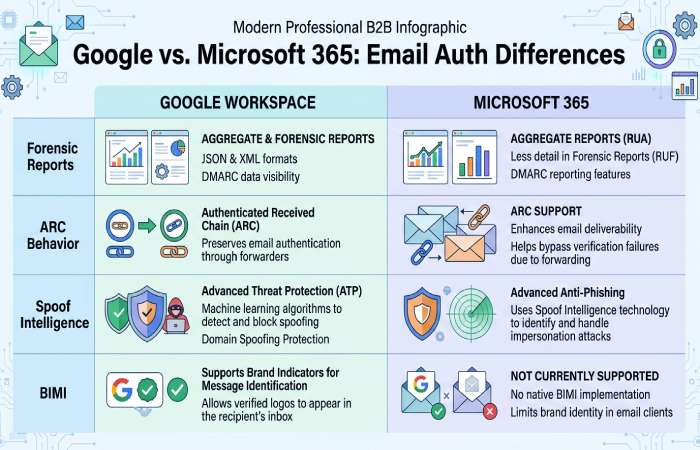
G Suite vs. Microsoft 365 and other providers: what to expect
- Forensic reports: Google generally does not send RUF; Microsoft 365 and some ISPs may, subject to privacy controls. Plan to rely mainly on RUA plus internal logs.
- ARC behavior: Both Gmail and M365 evaluate ARC; M365 often shows ARC-Seal/ARC-Authentication-Results in headers you can trace. Google Workspace outbound doesn’t add ARC by default; intermediaries should.
- Spoof intelligence: M365 adds tenant-level spoof insights separate from DMARC; Gmail leans heavily on DMARC/BIMI for brand signals.
- BIMI: Gmail requires DMARC enforcement (quarantine/reject) with VMC; M365’s logo programs are evolving but not identical in requirements.
DMARCReport tie-in:
- Normalizes differences in reporting between ISPs and flags provider-specific quirks so you don’t chase false issues.
Common G Suite DMARC/SPF/DKIM misconfigurations and how to fix them
Frequent issues and stepwise remediation:
-
Multiple SPF records at root
- Symptom: SPF permerror in Authentication-Results.
- Fix: Merge into a single record; DMARCReport highlights duplicates and generates a consolidated record.
-
SPF >10 lookups
- Symptom: intermittent SPF temperror/fail; Gmail spam classification.
- Fix: Delegate subdomains per vendor, remove unused includes, or use managed flattening.
-
DKIM not enabled in Admin console
- Symptom: unsigned Gmail messages; DMARC fails on forward.
- Fix: Generate 2048-bit key, publish TXT, activate.
-
Wrong DKIM record name or truncated key
- Symptom: dkim=permerror or fail; selector not found.
- Fix: Ensure google._domainkey.example.com and full p= value; DMARCReport DNS linter catches truncation.
-
Vendors signing with their domain (d=vendor.com)
- Symptom: DMARC fail despite SPF/DKIM pass.
- Fix: Enable custom DKIM with d=yourdomain; update Return‑Path if SPF alignment desired.
-
Misaligned subdomains with strict adkim/aspf
- Symptom: Subdomain mail fails when root policy is strict.
- Fix: Publish DKIM keys per subdomain or set sp= policy explicitly.
-
DMARC rua/ruf syntax errors
- Symptom: No reports received; dangling commas or missing mailto:.
- Fix: Validate URIs; DMARCReport auto-tests delivery to your reporting inbox.
-
Key size too small (1024‑bit)
- Symptom: Weakened security; some receivers warn or distrust.
- Fix: Rotate to 2048‑bit; DMARCReport schedules rotation and validates cutover.
-
Google Groups altering content
- Symptom: DKIM fail for internal lists; DMARC quarantine.
- Fix: Enable DMARC-friendly posting options; rely on ARC where supported; consider subdomain exemptions.
-
“-all” too early in SPF for migration
- Symptom: New vendors blocked during onboarding.
- Fix: Use ~all during discovery; move to -all with DMARC enforcement readiness.
Diagnostics to use:
- Gmail headers (Authentication-Results: mx.google.com) to confirm spf/dkim/dmarc.
- Google Admin Email Log Search for sender IPs and routing.
- DMARCReport dashboards for source clustering, fail heatmaps, and guided fixes.
DMARCReport tie-in:
- Automated misconfiguration detection with step-by-step, vendor-specific remediation checklists.
Scale for large organizations: multi-domain control, reporting aggregation, and delegated admin
Enterprises with many brands and senders need a centralized approach.
- Policy architecture:
- Root DMARC with p=reject; sp can be tuned per subdomain class (transactional, marketing, community).
- DKIM selectors standardized across brands (e.g., s=google, s=txn, s=mkt) with rotation calendars.
- Sender governance:
- Vendor onboarding checklist: DKIM (d=brand), SPF subdomain delegation, bounce domain control, test sends in staging.
- Contractual requirement that vendors support aligned DKIM and provide fixed IPs or maintained includes.
- Reporting and operations:
- Aggregate RUA to a single mailbox owned by DMARCReport; use tags to route per brand/team.
- Role-based access: grant brand managers read access; security holds enforce permissions.
- APIs/webhooks to SIEM for anomaly alerts; weekly exec summaries.
DMARCReport tie-in:
- Multi-tenant domain grouping, delegated admin, SSO/SAML.
- Auto-classification of sources by vendor and business unit.
- Policy-as-code templates to stamp consistent DMARC/SPF/DKIM across new brands.
FAQs
How long should we stay at p=none before moving to enforcement?
Most domains can move within 4-8 weeks: two weeks to discover all sources, two to remediate, then a 2-4 week quarantine ramp. DMARCReport’s Enforcement Planner quantifies readiness and suggests pct ramps based on your actual pass/fail rates.
Do we need strict alignment (adkim=s, aspf=s) for Gmail improvements or BIMI?
Strict alignment is not mandatory for DMARC, but it reduces ambiguity and prevents lookalike abuse; our data shows +1-2pp Gmail inbox improvement with strict vs. relaxed. BIMI primarily requires p=quarantine/reject; strict alignment is a best practice. DMARCReport flags streams at risk when tightening alignment.
What if a legacy system can’t DKIM-sign or change MAIL FROM?
Use a dedicated subdomain with an SPF that authorizes its IPs and set sp to a more lenient policy temporarily. In parallel, place that stream behind a relay that DKIM‑signs on your behalf. DMARCReport tracks that subdomain’s fail rate and alerts when it’s safe to tighten.
Should we enable RUF (forensic) reports?
Yes, include ruf as a best effort, but expect limited volume due to receiver privacy policies (Google generally does not send RUF). DMARCReport receives, redacts, and stores any available samples and correlates them with RUA and message headers from your helpdesk submissions.
How often should we rotate DKIM keys?
Every 6-12 months, or after personnel/vendor changes. DMARCReport’s rotation scheduler and dual‑selector monitoring ensure clean transitions without mail loss.
Conclusion: Turn DMARC from a project into a durable control with DMARCReport
If you run G Suite, the fastest path to better Gmail inbox placement and stronger brand trust is clear: enable 2048‑bit DKIM per domain and subdomain, design SPF that scales with your vendor footprint, publish DMARC with RUA to DMARCReport, and move from p=none to p=reject through measured checkpoints while fixing forwarding/list edge cases with ARC/SRS. Organizations that follow this playbook consistently see fewer phishing attempts, higher inbox rates, and cleaner postmaster metrics within 60-90 days.
DMARCReport operationalizes every step, DNS linting, source discovery, vendor-specific remediation, lookup budgeting, key rotation, anomaly detection, enforcement planning, multi-domain rollups, and delegated access, so your team can enforce DMARC confidently and prove deliverability gains with hard data. You can check your DMARC record at any stage to confirm the syntax. Ready to improve trust and inbox placement for your Workspace domains? Point your RUA to DMARCReport and start your enforcement plan today.
Topics
General Manager
General Manager of DuoCircle. Product strategy and commercial lead for DMARC Report's 2,000+ customer base.
LinkedIn Profile →Take control of your DMARC reports
Turn raw XML into actionable dashboards. Start free - no credit card required.