DNSSEC Test Tool: Free DNSSEC Checker And Validator

Quick Answer
A DNSSEC Test Tool checks whether your domain's DNSSEC configuration is correctly implemented and validated. It helps identify missing or incorrect DNSSEC records, improving DNS security and protecting against spoofing, tampering, and cache poisoning attacks.
DNSSEC (Domain Name System Security Extensions) helps protect DNS queries from tampering, spoofing, and cache poisoning by adding cryptographic validation to DNS records. Our free DNSSEC Test Tool lets you quickly check whether your domain’s DNSSEC configuration is correctly implemented, validate DNSKEY, DS, and RRSIG records, and verify the chain of trust. Use this DNSSEC checker to identify configuration issues, strengthen DNS security, and ensure your domain resolves safely across validating DNS resolvers worldwide.
What DNSSEC Is and Why It Matters for Secure DNS Propagation
DNSSEC, or Domain Name System Security Extensions, adds cryptographic validation to the domain name system so users can trust that a DNS response has not been forged, altered, or intercepted. Standard dns lookup behavior tells a browser where to find a domain, but DNSSEC helps prove that the dns result came from the correct authoritative source.
During dns propagation, DNS data moves through many layers: the root name server, the tld name server, the authoritative name server, ISP DNS infrastructure, public dns servers, and the recursive resolver used by a visitor’s internet service provider. Without DNSSEC, a recursive resolver may receive a technically valid response that is not cryptographically authenticated. With DNSSEC, the resolver checks signatures before accepting the answer.
This matters because dns propagation is not only about speed. It is also about integrity. If you change dns records, update dns records, move hosting, or modify nameservers at your domain registrar, the new data must be visible and valid across global dns networks. A DNSSEC failure can make a domain appear offline even when the a record, CNAME record, mx record, or ns record is otherwise correct.
DNSSEC also interacts closely with dns cache behavior. A recursive resolver may keep cached dns until the time to live expires. The time to live, commonly shown as ttl, determines how long dns servers should retain a response before performing a fresh dns lookup. If the ttl is too high, propagation time may increase. If DNSSEC data is wrong, the dns propagation delay can feel even worse because validating resolvers may reject the response entirely.
How a Free DNSSEC Checker Validates DNSKEY, DS, RRSIG, and Chain of Trust
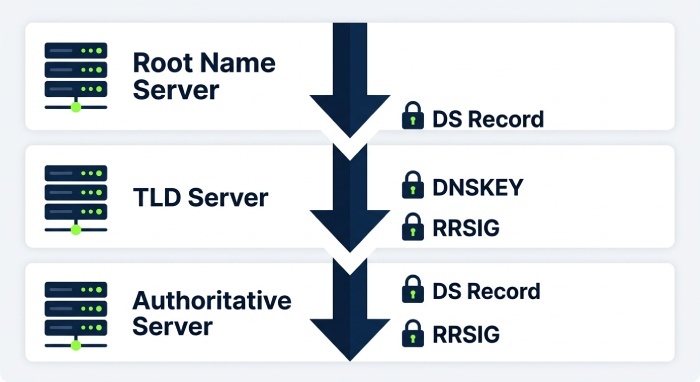
A free DNSSEC checker performs a structured validation of your DNSSEC configuration. It checks whether DNSKEY, DS, and RRSIG records align correctly from the parent zone to the child dns zone. In simple terms, it follows the chain of trust from the domain name system root to your domain and confirms that each cryptographic link is intact.
A reliable DNSSEC test tool will usually begin with a dns query to the root name server, then move to the tld name server, and finally query the authoritative name server for the domain. It compares the DS record published at the parent zone with the DNSKEY in the child zone. If those records do not match, a validating recursive resolver will fail dns resolve for the domain.
Key DNS Records a DNSSEC Checker Should Inspect
A DNSSEC checker does more than confirm whether DNSSEC is “on.” It should also show how DNSSEC affects ordinary dns records such as:
- a record for IPv4 web hosting
- aaaa record for IPv6 services
- CNAME record for aliases and CDN routing
- mx record for mail delivery
- txt record for SPF, DKIM, verification, and security policies
- ns record for nameserver delegation
- soa record for zone authority and serial information
- srv record for service discovery
- ptr record for reverse DNS
- caa record for certificate authority authorization
A complete check dns workflow validates both the cryptographic layer and the practical dns records that users depend on. For the email side of that stack, our DMARC toolset checks SPF, DKIM, and DMARC records. This is important because a DNSSEC-secured domain can still have outdated dns records, an incorrect ttl, or a broken dns update that affects dns propagation.
How Global Validation Differs from a Local DNS Lookup
A local dns lookup only shows what one resolver sees. A DNSSEC test tool or dns propagation checker shows whether your domain validates across multiple dns server location points. For example, a dns map may compare results from Cloudflare, OpenDNS, Speakeasy, Verizon, Cogeo Peer 1, Total Play, Claro, Completel SAS, Tele2 Nederland, Deutsche Telekom, Liquid, Teknet Yazlim, MTU Kristall JSC, CMPak, Skylink Fibernet, 3BB Broadband, Tefincom, CERNET, LG Dacom, and Telstra.
This global view is valuable because dns propagation is not instant everywhere. A user in Seattle WA may receive a new dns result while another in Holtsville NY, Dallas TX, Atlanta GA, Providence RI, Quebec, Mexico City, Santa Cruz do Sul, or Lille still receives cached dns from a previous ttl window. Tools like whatsmydns.net are commonly used to check dns propagation and compare dns globally across many resolver networks.
Common DNSSEC Errors That Can Slow or Break DNS Propagation
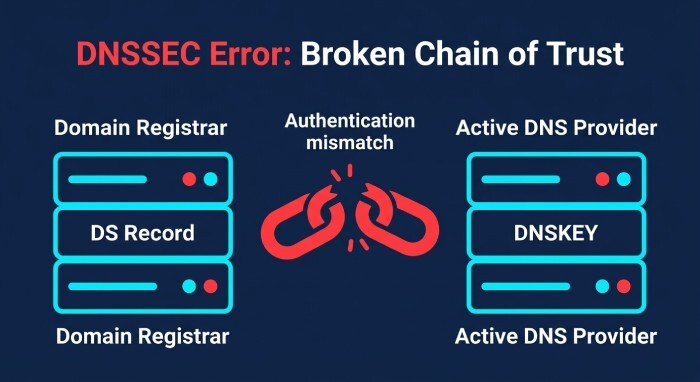
DNSSEC errors often appear after dns changes, especially when a domain is moved to a new DNS provider or when nameservers are changed at the domain registrar. The most serious problem is a broken chain of trust. If the DS record at the registrar does not match the DNSKEY published in the active dns zone, validating dns servers will treat the domain as insecure or invalid.
Another common issue is enabling DNSSEC at a provider such as Cloudflare but forgetting to update DS records at the registrar. The reverse can also happen: DNSSEC is disabled at the DNS host, but old DS records remain at the registrar. In both cases, a recursive resolver may reject the response, causing failed dns resolving even though non-validating resolvers still appear to work.
Incorrect ttl settings also create confusion. A long time to live can preserve cached dns across recursive resolver networks, increasing propagation time. DNS administrators often reduce ttl before planned dns changes, then restore a higher ttl after the dns update is stable. If you wait until after the change to lower the ttl, many dns servers may already be holding old data.
Practical Ways to Speed Up DNS Propagation with Correct TTL, Nameserver, and DNSSEC Settings
To speed up dns propagation, plan ahead. Lower the time to live on important dns records before the migration. For example, reduce the ttl on the a record, cname record, mx record, and related txt record values 24 to 48 hours before changing providers. This does not force every recursive resolver to refresh immediately, but it helps reduce propagation time once the change begins.
To speed up dns propagation further, confirm that the correct authoritative name server is listed in the ns record and that your domain registrar has the same nameserver delegation. Mismatched nameservers can cause different dns servers to return different answers, which makes check dns results inconsistent.
To speed up dns propagation safely with DNSSEC enabled, verify DS and DNSKEY records before and after the switch. Do not delete the old DNS provider too early if some resolvers still rely on its signed zone data. Also consider whether users are affected by isp dns cache behavior. Some internet service provider resolvers may hold cached dns until dns expiration, even when the visible ttl has already been reduced.
When to Flush DNS Cache and When It Will Not Help
You can flush dns cache on your local machine to remove stale local resolver data. This helps if your computer, browser, operating system, or hosts file is overriding the current dns lookup. However, flushing your local dns cache does not clear cached dns from ISP DNS infrastructure or public recursive resolver networks. If the propagation time is caused by remote dns servers honoring ttl, you must wait for dns expiration or query a different dns resolver.
Step-by-Step Guide to Using a DNSSEC Test Tool Before and After DNS Changes
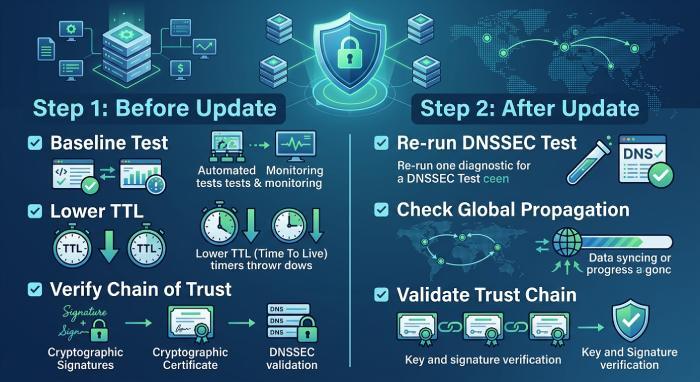
Before making dns changes, run a baseline DNSSEC test and save the current dns result. Confirm the active dns zone, authoritative name server, ns record, soa record, DNSKEY, DS record, and RRSIG status. Also run a standard dns lookup for the a record, aaaa record, cname record, mx record, txt record, caa record, srv record, and ptr record where applicable.
Next, review ttl values. If you are preparing to change dns records, reduce the time to live in advance. A lower ttl can reduce propagation time and help speed up dns propagation after the dns update. Remember that existing cached dns may remain until the previous ttl expires.
Before the DNS Update
Use a DNSSEC checker to confirm the current chain of trust. Then use dns tools to check dns results from multiple networks, including public resolvers and ISP DNS providers. A dns propagation checker can show whether the current records are consistent across global dns nodes.
Before you update dns records, verify:
- The domain registrar has the correct nameservers.
- The authoritative name server returns the expected dns records.
- The DS record matches the DNSKEY.
- The ttl and time to live values are appropriate for the change window.
- No outdated dns records remain in the old dns zone.
If you are using a hosts file for temporary testing, document that clearly. A hosts file can bypass normal dns lookup behavior and hide real dns propagation issues.
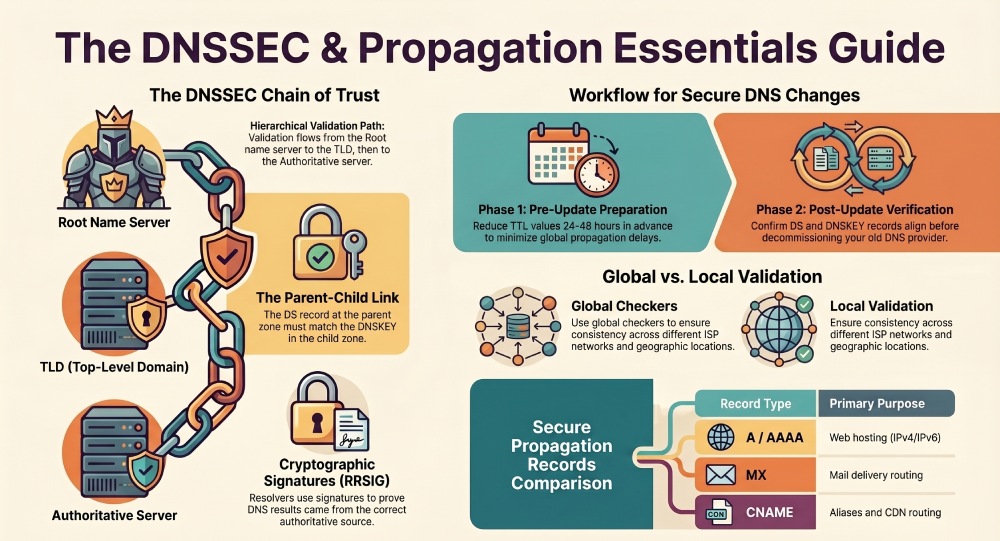
After the DNS Changes Go Live
After the dns update, run the DNSSEC test again. Confirm that the domain still validates from the root name server to the tld name server and down to the authoritative name server. Then perform a fresh dns lookup through several recursive resolver networks.
Use a dns propagation checker to check dns propagation across different cities and providers. If some locations show the new dns result and others show old data, the issue may simply be cached dns and ttl-based propagation time. If validating resolvers fail while non-validating resolvers work, the issue is likely DNSSEC rather than ordinary dns propagation.
Finally, compare dns globally using a dns map or global dns testing platform such as whatsmydns.net. Check whether dns servers in regions such as Seattle WA, Dallas TX, Quebec, Mexico City, Lille, and other locations return consistent answers. If the dns result remains inconsistent after the ttl has expired, inspect nameserver delegation, DS records, DNSKEY records, and the active dns zone for configuration errors.
While DNSSEC helps ensure DNS integrity, email security also depends on properly configured SPF, DKIM, and DMARC records. Run a quick DMARC lookup to confirm your policy is published correctly. Tools like DMARCReport can help verify DMARC deployment, analyze authentication data, and strengthen protection against domain spoofing. Running a DMARC record lookup confirms your policy is published and valid.
General Manager
General Manager of DuoCircle. Product strategy and commercial lead for DMARC Report's 2,000+ customer base.
LinkedIn Profile →Take control of your DMARC reports
Turn raw XML into actionable dashboards. Start free - no credit card required.