ERP Notifications Failing DKIM? Start With the Relay

Quick Answer
ERP notifications can fail DKIM when a mail relay alters the message after signing. Check relay settings, DKIM signing order, and message modifications to ensure the final email is correctly authenticated and delivered.
Try Our Free DKIM Lookup
Auto-discover DKIM selectors for any domain - scan 185 common selectors across all major providers.
Discover DKIM Selectors →A purchase order confirmation leaves the ERP. It arrives at the recipient’s gateway with spf=pass and no DKIM signature at all, and DMARC fails anyway. Someone adds another include: to the SPF record, nothing changes, and the ticket gets closed as “vendor issue.”
ERP notification mail breaks DMARC more predictably than almost any other stream on a corporate domain, and the reason is structural rather than accidental. The application usually doesn’t sign anything. It opens an SMTP session against whatever host is in its outbound mail settings and hands the message off, and every decision that determines whether a valid, aligned signature exists happens after that handoff. So the relay is the right place to start looking. Here’s what breaks there, what the aggregate reports look like when it does, and the order to fix it in.
The ERP Send Path Is Longer Than Its Config Screen Suggests
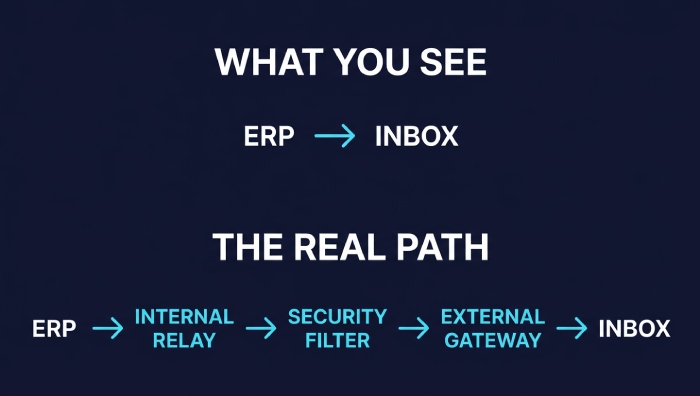
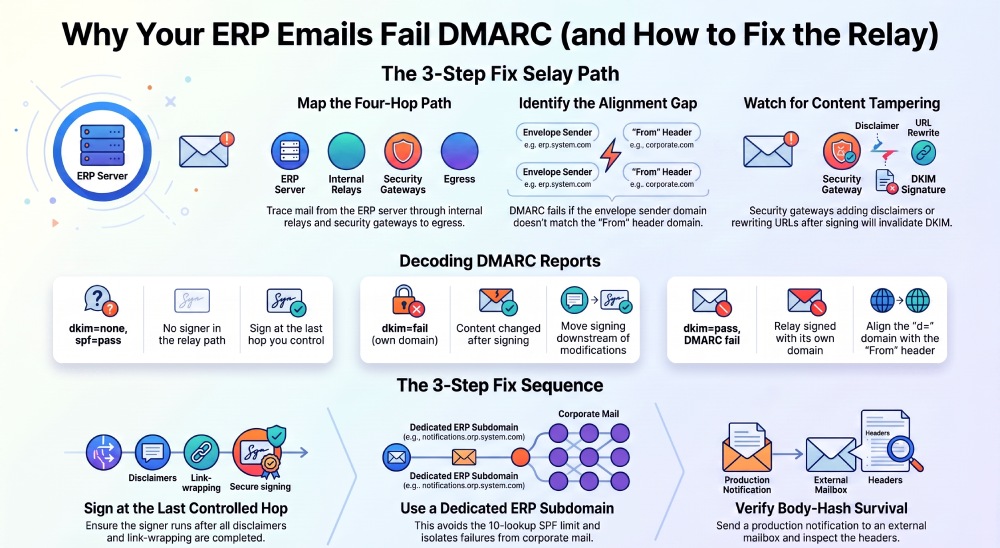
The ERP’s outbound mail settings expose one hop: a host, a port, credentials, maybe a TLS toggle and a From address field. The real path is usually three or four hops long:
- The ERP application server, composing and submitting the message
- An internal relay or smart host (an Exchange receive connector, Postfix, an IIS SMTP virtual server) that accepts unauthenticated submission from the app subnet
- A security gateway or cloud relay doing outbound scanning, disclaimer insertion, or URL rewriting
- The final egress to the internet
DKIM signing can live at any of those hops. In most deployments it lives at none of them for this particular stream, because the signer was configured for user mailboxes and the ERP’s relay path never went through it.
That produces a specific and frequently misread result. The verifier doesn’t report a DKIM failure; it reports no signature to evaluate. DMARC then has only SPF to work with, and SPF authenticates the envelope sender, RFC5321.MailFrom, not the header the recipient sees. ERP applications and relays routinely stamp an envelope sender like erp@app01.corp.example.net or the relay’s own bounce domain while the From: header says noreply@example.com. SPF passes cleanly on that envelope domain, and DMARC still fails, because a pass on an unaligned identifier is worth nothing.
Alignment is the part worth being exact about. DMARC’s default mode is relaxed for both identifiers, adkim=r and aspf=r, which requires that the Organizational Domains of the authenticated domain and the RFC5322.From domain be equal; strict mode accepts only an exact FQDN match. Relaxed alignment saves bounces.example.com against example.com. It does nothing for app01.corp.example.net, which is a different organizational domain entirely.
Who Actually Controls the Signing Hop
Before touching a selector, work out what your ERP lets you change, because that constrains every fix below.
- SaaS or hosted ERP: you typically get a relay hostname, credentials, and a sender address. No control over header construction, no signing, and often no way to see the envelope sender it uses. Your only lever is the relay you point it at.
- On-premise off-the-shelf ERP: you own the relay and the gateway, so signing belongs at one of those hops. The app’s header behavior is still fixed.
- In-house or heavily extended build: header construction and the signing step itself are in scope. The signing domain, the selector, and whether the message is modified after signing all become design decisions instead of vendor constraints.
That last distinction matters more than it looks. How outbound messaging gets scoped in custom ERP software development is useful reading for anyone weighing a build against a purchase on these grounds, since the ability to set d= to match the From: domain, or to sign as the last operation before submission, only exists when someone owns the code that composes the message. A hosted product will hand you a relay field and nothing else, and the fix has to be built around that limit rather than through it.
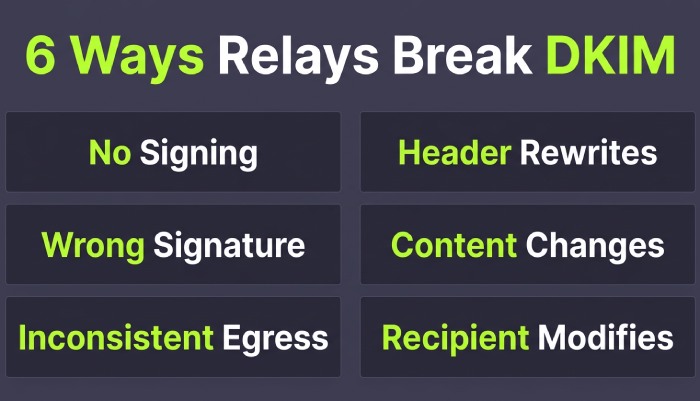
Six Ways the Relay Hop Breaks DKIM
Nothing in the path signs
The most common case, and the easiest to confirm: no DKIM-Signature header exists on the received copy. Check the relay’s signing configuration and, if it has one, which connectors or address ranges it applies to.
The relay signs as itself
Cloud relays and transactional providers sign with their own domain on default configuration, producing d=relay-vendor.example. That’s a genuine dkim=pass and a DMARC failure, since the signing domain shares no organizational domain with your From: header. The fix is publishing your own selector and having the relay sign as your domain.
Only one of several egress paths signs
Two connectors, a failover route, or a second gateway added during a migration will happily send unsigned mail while the primary path passes every test you run. This shows up as intermittent failures on a single message stream.
Headers get rewritten after signing
RFC 6376 requires the From: field to be covered by the signature, so any hop that rewrites From: after signing invalidates it. Subject normalization, header reordering by a non-conformant relay, or removal of a signed header does the same.
Content changes after signing
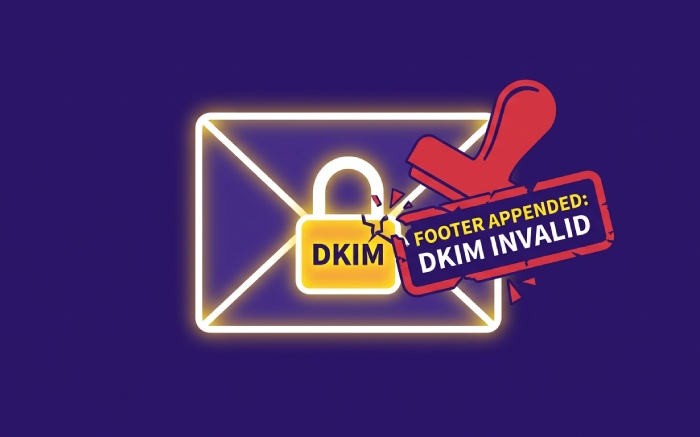
This is the one that produces the most confusing reports. A gateway appends a legal disclaimer, wraps links for click protection, adds an external-sender banner, or re-encodes the body from 8-bit to quoted-printable. The signature’s body hash covers the canonicalized body as limited by the l= tag, so any of those changes breaks verification. The l= tag looks like a workaround and is a bad one: RFC 6376’s security considerations call out body length limits precisely because they let content be appended to a signed message without invalidating the signature.
The recipient’s path modifies the message
Mailing lists and receiving gateways sit outside your control. Relaxed body canonicalization absorbs trailing whitespace and collapses internal whitespace runs; simple canonicalization tolerates only empty lines at the end of the body. Neither survives a footer.
| Failure symptom | Why it happens | What the aggregate reports show | Fix |
|---|---|---|---|
| dkim=none, spf=pass, DMARC fail | No signer in the path; SPF authenticated an unaligned envelope domain | Your relay’s IP, DKIM absent, SPF pass on a domain that isn’t the From: domain | Sign at the last hop you control and align d= with From: |
| dkim=fail with your own d= | Body or header modified after your signer ran | One source, your signing domain present but failing, SPF passing | Move signing downstream of the modifying hop |
| dkim=pass, DMARC still fail | Relay signed with its own domain | A DKIM result pass carrying a vendor domain in d= | Publish a selector for your domain on that relay |
| Failures on some messages only | Multiple egress paths, one unsigned | Two or more source IPs under one From: domain with different result pairs | Apply the signing policy to every connector |
| spf=permerror across all sources | Too many DNS-querying terms in the record | Permerror on every source, including ones that used to pass | Consolidate includes or delegate to a subdomain |
| Unknown IP, both mechanisms fail | App server sending direct, bypassing the relay | A low-volume IP in a hosting range, dkim=none and spf=fail | Force submission through the relay or authorize and sign that path |
SPF’s Own Trap on the Same Path
The reflex fix when ERP mail fails is to add the sending infrastructure to SPF as another include:. That reflex has a hard ceiling. RFC 7208 requires implementations to limit the total number of mechanisms and modifiers that cause DNS queries to 10 per check, returning permerror if the limit is exceeded. Three details get missed:
- The count covers include, a, mx, ptr, exists, and the redirect modifier, evaluated recursively. A vendor’s
include:that expands into four of its own costs you five, not one. ip4:,ip6:, and all cost nothing, which is why replacing an include with explicit addresses buys headroom.- Implementations should also cap void lookups (queries returning no answer or NXDOMAIN) at two, so stale includes pointing at retired hostnames burn budget without contributing anything.
Permerror is not a soft outcome. It’s a permanent evaluation failure, so SPF stops being an available identifier for DMARC on every message from every source at once, including the streams that were fine yesterday. An ERP go-live is a classic trigger, because it’s the eleventh include that fails the record, not the vendor’s.
The cleaner structure is a dedicated subdomain for transactional mail, with its own record: v=spf1 ip4:203.0.113.10 -all on erp.example.com costs the parent domain nothing. Keep the alignment consequence in view, though. If the From: header stays at the parent domain while SPF authenticates the subdomain, relaxed alignment covers it and aspf=s does not.
The other SPF-adjacent symptom is the unknown source. An app server that was pointed straight at the internet during testing, or a scheduled job on a box nobody documented, shows up in aggregate data as an IP with no PTR record and no explanation. It isn’t a spoofing incident; it’s your own infrastructure, undocumented.
Reading the Aggregate Reports Back to the Hop
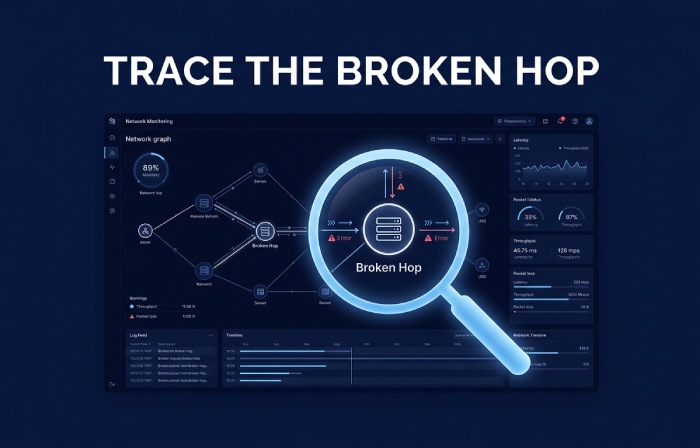
Aggregate reports won’t tell you which hop is broken, but they carry enough to identify the sender and narrow the hop to one candidate. The sequence:
- Filter to the affected
From:domain and a window that includes a known failed notification. - Sort sources by volume and set aside everything you can name. What’s left is the interesting part.
- For each unfamiliar source, read the result pair rather than the verdict: the SPF result and the domain it authenticated, plus the DKIM result and the d= domain and selector it used.
- Identify the host from the IP: reverse DNS, then the network’s owner. A vendor’s egress range, your own colo block, and a generic cloud region each imply a different hop.
- Compare that against the ERP’s documented egress path. The gap between what the reports show and what the runbook says is the answer most of the time.
The result pair maps to a cause reasonably tightly. DKIM absent means nothing in the path signed. A d= you don’t recognize means the relay signed as itself. A DKIM failure carrying your own signing domain means something downstream of your signer touched the message. And SPF passing on a domain that isn’t your From: domain is the alignment case from the first section.
One limitation to plan around: aggregate reports are counts of result pairs per source, not per-message evidence. They’ll tell you DKIM failed. They won’t tell you it was the body hash. That distinction comes from failure reports where available, or from sending a controlled test notification through the same route and reading the Authentication-Results header on the received copy. Per-source breakdowns in aggregate report analysis are how you find the hop; a test send is how you confirm what it did.
Fixing the Signing Path, In Order
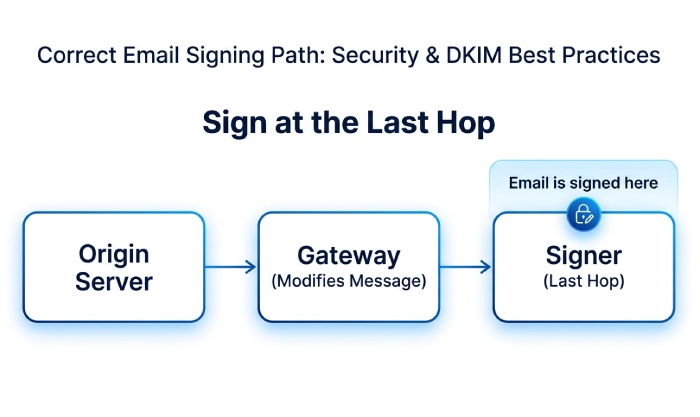
- Sign at the last hop you control. Whatever modifies the message must run before the signer, not after. If the gateway adds disclaimers, the gateway signs.
- Align the signing domain with the From: header. d= on the organizational domain of the
From:address, or an exact match if you run adkim=s. - Give the ERP its own subdomain and selector. noreply@erp.example.com signed with a selector used by nothing else keeps key rotation, and failures scoped to one stream instead of all corporate mail.
- Verify body-hash survival end to end. Send a real notification through the production route to an external mailbox and read the received headers. A test from the relay’s own console skips the hops that break things.
- Keep the SPF record inside the lookup budget, and re-count it after every infrastructure change rather than after the next outage.
- Only then move policy. Tightening toward p=reject while one transactional stream is unsigned turns a reporting problem into a lost invoice.
FAQ
Can DMARC pass without DKIM at all?
Yes. One aligned pass is enough, so SPF alone will do it if the envelope domain aligns with the From: domain. It’s a fragile arrangement: forwarding breaks SPF, and relays that stamp their own bounce domain break alignment. Signed ERP mail survives both.
Should the ERP sign at the application rather than the relay?
Only if the application is genuinely the last thing that touches the message. App-level signing followed by a gateway that appends a disclaimer gives you a broken signature instead of a missing one, which is harder to diagnose, not easier.
Does the l= tag solve the appended-footer problem?
It stops the body hash from breaking, and it opens a real gap: anything appended after the signed octet count verifies as authentic. RFC 6376 flags this in its security considerations. Fix the signing order instead.
Why does the same notification pass for one recipient and fail for another?
Something in that recipient’s path modified the message: a mailing list, a forwarding rule, an inbound gateway rewriting links. Canonicalization absorbs whitespace differences and nothing more, so any added or altered content fails the body hash.
Do we need a separate DMARC record for the ERP subdomain?
Not necessarily. The organizational domain’s policy applies to subdomains unless you override it with sp= or publish a record on the subdomain itself. Both are useful during remediation: keep erp.example.com at p=none while the parent domain stays enforced.
Where to Start Tomorrow
Pull the last two weeks of aggregate data, filter to the domain your ERP sends as, and find the sources you can’t name. For each one, read the SPF domain and the DKIM d= before reading the pass or fail, because the domains tell you which hop is responsible and the verdict doesn’t. Then confirm what your ERP actually lets you change, since a hosted product limits you to relay-side signing no matter what the documentation implies. Fix the signing hop, verify with a real notification through the production route, and re-count your SPF lookups before you touch policy.
General Manager
General Manager of DuoCircle. Product strategy and commercial lead for DMARC Report's 2,000+ customer base.
LinkedIn Profile →Take control of your DMARC reports
Turn raw XML into actionable dashboards. Start free - no credit card required.