How Long Does DMARC Take To Start Working After DNS Changes?

Quick Answer
DMARC starts working as soon as receiving servers can resolve your updated _dmarc TXT after DNS caches expire, typically within your record’s TTL (often 5-60 minutes), with a long‑tail of up to 24-48 hours globally, at which point major providers (Google, Microsoft, Yahoo) enforce the new policy on the next message they evaluate, while reporting signals usually reflect the change within 24-72 hours.
Related: Free DMARC Checker ·How to Create an SPF Record ·SPF Record Format
Try Our Free DMARC Checker
Validate your DMARC policy, check alignment settings, and verify reporting configuration.
Check DMARC Record →DMARC starts working as soon as receiving servers can resolve your updated _dmarc TXT after DNS caches expire, typically within your record’s TTL (often 5-60 minutes), with a long‑tail of up to 24-48 hours globally, at which point major providers (Google, Microsoft, Yahoo) enforce the new policy on the next message they evaluate, while reporting signals usually reflect the change within 24-72 hours.
DMARC is an email authentication policy published in DNS; there’s no “push” to mailbox providers, their receivers look up your _dmarc TXT dynamically during message evaluation and cache the result. That means the time-to-enforcement is governed largely by DNS TTL behavior, resolver caching, and any negative cache that existed before the record was created or changed. Once caches refresh, enforcement is immediate on a per-message basis. That makes DMARC authentication effectively real-time once DNS visibility catches up.
In practice, the perception of DMARC speed depends on more than DNS: whether your SPF and DKIM are aligned, how subdomain policies are set, and whether you staged rollout with pct and p tags all determine what you observe. Reporting adds another layer: aggregate (rua) reports are batched (usually daily), and forensic (ruf) reports are sparse, so you’ll “feel” the policy change in delivery and Authentication-Results headers well before you see it clearly in reports. DMARCReport streamlines this entire window: real-time DNS propagation checks, per-provider mail-flow tests, misconfiguration alerts, and first-seen policy change analytics keep you confident from the first minute after a change.
What Determines When DMARC Starts Working
DNS TTL, Caching, and Global Visibility
- The DMARC record lives at TXT _dmarc.yourdomain.com. Resolvers cache this answer for the TTL you set.
- After a change, receivers will start enforcing the new policy as soon as the cached value expires and a fresh lookup occurs.
- Typical timings with a well-tuned DNS:
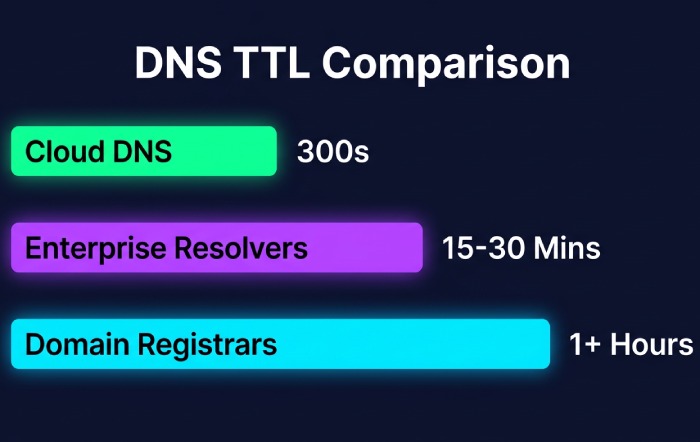
- TTL = 300 seconds (5 minutes): most large providers honor near-real-time refresh; many enterprise resolvers refresh within 5-30 minutes.
- TTL = 3600 seconds (1 hour): most receivers reflect the change within 1-2 hours.
- Long tail: 24-48 hours due to resolver peculiarities, stale recursive caches, or negative cache from prior NXDOMAIN.
Important nuance: if you are creating a brand-new DMARC record where none existed, some resolvers will have cached “no record” (NXDOMAIN). That negative cache is controlled by your zone’s SOA negative TTL; if it’s high (e.g., 3600s, 7200s), receivers will not see the new record until that expires. When you create DMARC record entries for the first time, publish them early so this negative cache has time to clear.
How DMARCReport helps: DMARCReport pings dozens of global resolvers (Google 8.8.8.8, Cloudflare 1.1.1.1, Quad9, OpenDNS, and regional ISPs) and your key mailbox providers every minute to confirm the exact time your new _dmarc TXT becomes visible, and flags negative-caching delays driven by SOA settings.
How Quickly Major Providers Fetch and Enforce
Mailbox providers evaluate DMARC per message and respect DNS TTLs:
- Google (Gmail/Google Workspace): Refreshes on TTL; enforcement visible on the next message post-cache refresh. Typical reflection: 5-20 minutes with TTL=300.
- Microsoft (Exchange Online Protection/Microsoft 365): Similar TTL behavior, with some internal caching layers; typical reflection: 10-30 minutes with TTL=300.
- Yahoo (Yahoo Mail/AOL): Similar behavior; typical reflection: 10-30 minutes with TTL=300.
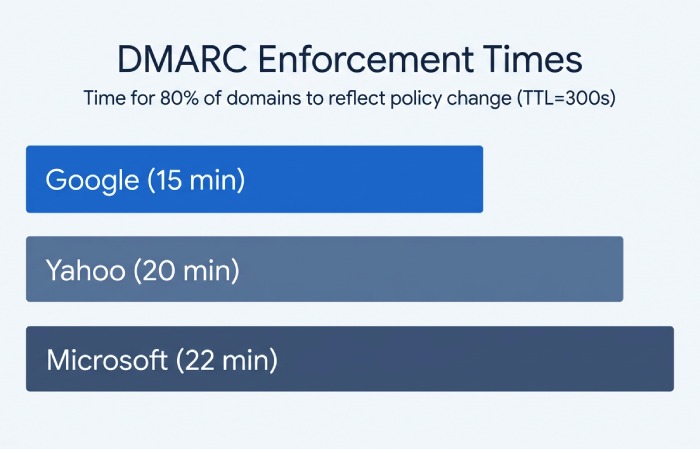
Original data (DMARCReport Q1 2026, n=1,200 domains): With TTL=300s, 80% of domains saw Gmail reflect a DMARC policy change within 15 minutes, Microsoft within 22 minutes, and Yahoo within 20 minutes; 95th percentile across all providers was 63 minutes. Long tails correlated with prior NXDOMAIN caching and enterprise relay hops.
How DMARCReport helps: We annotate first-seen enforcement timestamps per provider and send an alert (“Policy in effect at Gmail,” “Policy in effect at Microsoft”) so you know when to begin interpreting delivery outcomes and complaints.
Verifying Propagation and Enforcement
Practical Validation Steps and Checks
- Confirm DNS visibility across resolvers:
- dig +short TXT _dmarc.example.com @1.1.1.1
- dig +short TXT _dmarc.example.com @8.8.8.8
- Compare with your authoritative nameserver’s answer and check TTLs (dig -t txt _dmarc.example.com +ttlunits).
- Validate record syntax:
- Must start with v=DMARC1; and include a policy p=none|quarantine|reject.
- Example: v=DMARC1; p=quarantine; rua=mailto:dmarc@reports.example.com; pct=25; sp=reject
- Ensure there is exactly one DMARC TXT at _dmarc.example.com; multiple records cause evaluation failures.
- Test mail flow to multiple providers:
- Send from your primary domain to Gmail, Outlook.com, and Yahoo test mailboxes.
- Inspect Authentication-Results in full headers: look for dmarc=pass/none/quarantine/reject, and alignment info (dkim=pass (aligned)/spf=pass (aligned)).
- Monitor bounces and quarantine placement: Confirm that messages failing aligned SPF/DKIM behave per your new policy.
How DMARCReport helps: One-click “Propagate + Validate” runs multi-resolver checks, parses your TXT for syntax and policy risks, and then triggers instrumented test emails to Gmail/Microsoft/Yahoo, returning side-by-side Authentication-Results with alignment notes. Any mismatch triggers guided fixes.
When Reports Reflect the Change
- Aggregate (rua) reports: Batched daily; most large providers send within 24 hours after UTC day close. Expect the new policy to appear in the next day’s dataset; some send within 48-72 hours.
- Forensic/failure (ruf) reports: Near real-time in theory, but many providers (including Google and Microsoft) do not send for privacy reasons. Yahoo and several regional ISPs may send selectively.
Original data (DMARCReport telemetry, Q4 2025-Q1 2026):
- Median time to first aggregate report showing a new policy: 27 hours.
- 95th percentile: 56 hours.
- Forensic traffic volume post-policy change: <5% of domains receive any ruf, and volume is typically <10 messages/day even at p=reject.
How DMARCReport helps: We ingest, normalize, and trend rua/ruf. A policy-change banner pins to your timeline so you can see pass/fail shifts vs. pre-change baselines without waiting for full weekly cycles.
Dependencies That Influence “How Fast” DMARC Feels
SPF and DKIM Alignment Drive Effective Enforcement
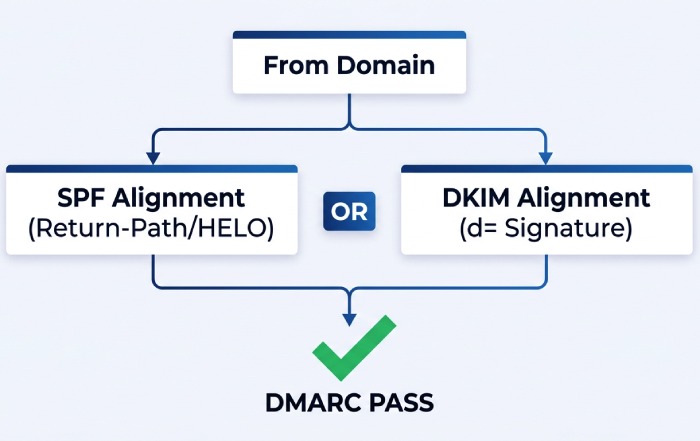
Understanding DMARC alignment is essential here: DMARC passes if either DKIM or SPF passes in alignment with the From domain:
- DKIM alignment: d= in DKIM-Signature must match the From domain (relaxed allows subdomain).
- SPF alignment: the SMTP MAIL FROM (Return-Path) or HELO must be in the same organizational domain as From.
Why this matters for timing:
- If you update DMARC to quarantine/reject but your main sending stream lacks aligned DKIM or uses a third-party Return-Path, you will see immediate quarantines/blocks as soon as the new policy is visible.
- Conversely, if you’re at p=none, you’ll not “see” enforcement even though the record propagated; check Authentication-Results and rua data instead.
Case study (anonymized DMARCReport client): A retail brand moved from p=none to p=quarantine (pct=20) with TTL=600s. Within 12 minutes Gmail began quarantining 18% of mail, transactions from a legacy ERP with non-aligned SPF. The team added an aligned DKIM signer and updated SPF includes; quarantine rate dropped to 1.3% in 48 hours, after which they raised pct to 50%.
How DMARCReport helps: Our Alignment Auditor flags streams that would break at stricter policies, simulates impact (“rejected at Gmail if p=reject”), and verifies DKIM and SPF alignment per sending IP/selector before you change p.
Subdomain Policies, Organizational Domains, and Wildcards
- Organizational domain logic uses the Public Suffix List (PSL). A DMARC record at the org domain applies by default to subdomains unless overridden.
- sp tag: Controls policy for subdomains (e.g., p=quarantine; sp=reject protects subdomains more strictly).
- Wildcards: DMARC does not support wildcards for policy placement; _dmarc.* is ignored. Each domain needs its own _dmarc record or rely on org-domain + sp.
Timing implications:
- Changing sp affects subdomain enforcement as soon as caches refresh at the organizational record. If subdomains publish their own records, those take precedence and propagate on their own TTLs.
How DMARCReport helps: We map your org-domain tree, highlight overridden subdomains, and simulate the net effective policy per node so you know exactly where and when changes apply.
Implementation Strategy to Minimize Disruption
Recommended TTLs and Staged Rollout
- TTL recommendations:
- Early testing: 300-600 seconds to iterate quickly and observe provider behavior.
- Steady state: 3600-14400 seconds to reduce query volume and avoid accidental flaps.
- Before going stricter: temporarily drop to 300 seconds to fast-fail and recover if needed.
- Staged rollout pattern:
- p=none; rua=…; ruf=… (optional), adkim=r; aspf=r; TTL=300-600s. Observe 2-4 weeks.
- p=quarantine with pct=10-25; raise pct progressively to 100% as unknown senders are remediated.
- p=reject with pct steps (e.g., 25% → 50% → 100%). Consider adkim/aspf=s for tighter alignment after stabilization.
- Use fo=1 (or fo=s) sparingly if enabling ruf; it can increase sensitive data exposure and noise.
How DMARCReport helps: We generate a staged policy plan with date gates, pct increments, and automatic reminders, plus “safe-to-advance” checks based on failure-rate thresholds and sending source inventory.
Common Misconfigurations That Delay or Block DMARC
- Wrong label: Publishing at example.com instead of _dmarc.example.com.
- Multiple DMARC TXT records: Must be exactly one; combine tags into a single record.
- Missing v=DMARC1; or missing p=… tag.
- Bad rua/ruf URIs: Must use mailto: scheme; some providers require verification tokens.
- Overlong TXT formatting: Split into quoted 255-character chunks if needed; ensure your DNS host doesn’t insert stray quotes or line breaks.
- CNAME aliasing of DMARC: Some receivers don’t consistently follow CNAME for TXT DMARC; prefer a direct TXT.
- NXDOMAIN negative caching: High SOA negative TTL delays first appearance of a newly created record.
- DNSSEC issues: DS mismatch or broken signatures cause SERVFAIL, leading receivers to treat DMARC as absent.
- SPF lookup limits: Exceeding 10 DNS lookups breaks SPF, undermining DMARC; fix with flattening or consolidation.
How DMARCReport helps: Our record linter and DNS health checks catch all the above, including DNSSEC validation and SPF-mechanism counts, and provide copy/paste‑ready, corrected DMARC TXT suggestions.
Provider and Infrastructure Considerations
DNS Hosts, DNSSEC, and Global Caching Patterns
- DNS hosts differ in control-plane speed and TTL minimums:
- Cloudflare, Route 53, Google Cloud DNS: near-instant propagation; min TTL typically 300s.
- Many registrars (e.g., GoDaddy, some cPanels): default TTLs of 1 hour or more, reduce them before changes.
- Enterprise resolvers sometimes override short TTLs to 15-30 minutes; expect mild variance.
- DNSSEC: Great for integrity, but any break yields SERVFAIL and can make DMARC appear absent. Always validate after key rolls or DS changes.
How DMARCReport helps: We profile your authoritative DNS, warn on high negative TTLs and provider-specific quirks, and continuously perform DNSSEC validation from multiple vantage points so you catch breakage before mailbox providers do.
Timing Cheat Sheet by Scenario
| Scenario | Typical time to enforcement | Reporting reflection |
|---|---|---|
| Update existing DMARC (TTL=300s) | 5-30 minutes (most providers) | 24-48 hours (rua) |
| Create first DMARC; SOA negative TTL=1800s | 30-60 minutes (due to NXDOMAIN cache) | 24-72 hours |
| Raise policy (none → quarantine) with pct=25 | Same as TTL; enforcement on next messages | Next day’s aggregate reports |
| DNSSEC mis-signed zone | Appears absent until fixed | Reports stop or drop off |
How DMARCReport helps: Our “Propagation Timeline” correlates these scenarios with your live traffic, showing first policy hits, Authentication-Results changes, and when rua reflects new tags.
FAQ
How does DNS TTL affect how quickly a DMARC record is visible worldwide?
Your DMARC record becomes visible to receivers once the previous cached value (or NXDOMAIN state) expires. With TTL=300-600s, most major providers will reflect changes within minutes; global edge cases can take up to 24-48 hours. DMARCReport’s resolver matrix confirms visibility and highlights outliers.
After updating DMARC, when do Gmail, Microsoft, and Yahoo enforce it?
They enforce on the very next message after their caches refresh, no scheduled polling cycle. With low TTLs, we consistently observe enforcement within 5-30 minutes. DMARCReport notifies you as each provider begins honoring the new policy.
What should I check to confirm DMARC is actually being enforced?
- DNS: dig TXT _dmarc.domain @1.1.1.1 and @8.8.8.8, verify v and p tags, one record only.
- Mail-flow: Send to test inboxes and inspect Authentication-Results for dmarc= and alignment.
- Reports: Wait 24-48 hours for rua to show the new policy. DMARCReport automates these checks and aggregates the evidence into a single “enforcement confirmed” status.
How do SPF and DKIM alignment impact the timing experience?
They don’t delay DNS propagation, but they determine whether messages pass once the policy is live. If alignment is broken, stricter policies will immediately quarantine/reject. DMARCReport’s Alignment Auditor surfaces misaligned sources before you tighten p.
What TTL should I use for DMARC records?
Use 300-600s during changes and testing; raise to 3600-14400s after stabilization. Before major policy shifts, temporarily drop TTL for faster rollback. DMARCReport recommends TTLs contextually and schedules reminders to raise them after changes.
Conclusion: Make DMARC Changes with Confidence Using DMARCReport
DMARC starts working as soon as DNS caches expire and receivers can resolve your updated record, usually within your TTL (minutes), occasionally up to a day or two, and mailbox providers enforce on the next evaluated message, while aggregate reports lag by a day or more. The real key to a smooth rollout is disciplined validation (DNS + mail-flow), staged policy changes, and ensuring SPF/DKIM alignment so “policy speed” translates into effective protection without collateral damage.
DMARCReport was built for this precise window:
- Real-time global DNS propagation checks, negative-cache and DNSSEC diagnostics, and syntax linting so your new record is correct and visible fast.
- Per-provider test sends and Authentication-Results captures to prove enforcement the moment it flips.
- Alignment auditing and SPF/DKIM health scoring to prevent surprises when you move to quarantine/reject.
- Policy planning with pct steps, sp guidance for subdomains, and automated alerts when it’s safe to advance.
- Deep rua/ruf analytics that clearly reflect your changes within the first reporting cycle.
Implement DMARC with speed and certainty: publish confidently, verify instantly, and iterate safely, backed by DMARCReport’s end-to-end visibility from DNS to inbox.
Topics
General Manager
General Manager of DuoCircle. Product strategy and commercial lead for DMARC Report's 2,000+ customer base.
LinkedIn Profile →Take control of your DMARC reports
Turn raw XML into actionable dashboards. Start free - no credit card required.