How Can I Interpret And Fix Failing Checks Reported By A DMARC Policy Checker?

Quick Answer
A DMARC policy checker flags SPF, DKIM, alignment, or policy errors. Review the failed checks, verify your DNS records, correct authentication settings, and retest. Gradually enforce DMARC with quarantine or reject to improve email security and deliverability.
Try Our Free DMARC Checker
Validate your DMARC policy, check alignment settings, and verify reporting configuration.
Check DMARC Record →To interpret and fix failing checks reported by a DMARC policy checker, identify whether failures stem from SPF, DKIM, or alignment by parsing aggregate (rua) and forensic (ruf) reports, map them to specific sending sources and DNS/selector issues, and remediate with corrected SPF/DKIM records, alignment settings, and sender configurations—then safely ramp DMARC enforcement while continuously monitoring with automation such as DMARCReport.
DMARC exists to ensure the domain shown in the visible From header is authenticated by either SPF or DKIM and that at least one of those passes alignment with that From domain*. When a DMARC checker reports failures, it’s signaling one of three root causes: SPF didn’t authenticate or align, DKIM didn’t authenticate or align, or both passed individually but misaligned with the visible From.* Your job is to trace which mechanism failed on which traffic stream and fix it at the source—usually DNS records, sender configuration, or message handling along the delivery path.
A repeatable methodology is critical: analyze rua XML at scale to see pattern-level failures by IP, domain, and provider; dive into ruf samples where available to inspect headers; validate DNS syntax and propagation; repair SPF/DKIM; adjust alignment or sending practices if needed; and increase DMARC policy enforcement progressively. DMARCReport centralizes these steps by normalizing rua/ruf data, correlating failures to senders, running DNS health checks, simulating alignment outcomes, and guiding policy ramp-up with alerts and rollback plans.
Parse DMARC Reports to Pinpoint Cause and Source
Parsing DMARC reports tells you exactly whether SPF, DKIM, or alignment failed, and enables source-level fixes.
Aggregate (rua) analysis
- What they contain: compressed XML with rows per
source_ipand counts perheader_from. - Key fields:
record/row/source_ip,policy_evaluated/dkim,policy_evaluated/spf,policy_evaluated/dispositionidentifiers/header_fromauth_results/spf/domainand result;auth_results/dkim/domain, selector, result
- How to use:
- Group by
header_from+source_ipto see which mail stream fails. - Separate failures by spf=fail vs dkim=fail vs both unsuccessfully aligned.
- Group by
Example XML fragment:
policy_evaluatedspf=“fail” dkim=“pass” disposition=“none”auth_results/dkimdomain=“mailer.example-saas.com” selector=“saas1” result=“pass”identifiers/header_from="brand.com"Interpretation: DKIM passed for mailer.example-saas.com; if d=mailer.example-saas.com and From=brand.com, DKIM likely failed alignment unless adkim=relaxed and org domains match. Check alignment and selector domain.
Forensic (ruf) analysis
- Includes redacted message samples and headers when failures occur (subject to receiver policies).
- Use “fo” tag (e.g., fo=1 or fo=0:1:d:s) to control which failure types generate ruf.
- Inspect Authentication-Results, DKIM-Signature, and Received-SPF headers to see exact failure codes, and any body modifications.
Privacy note: Many providers throttle or redact ruf; treat ruf as a deep-dive complement to rua.
Map entries back to sending IPs and domains
- Cross-reference
source_ipwith reverse DNS and HELO/EHLO names (from headers). - Use MAIL FROM (envelope-from) and Return-Path to determine SPF domain; DKIM d= and s= show signing domain and selector.
- Attribute traffic to platforms (ESP, CRM, ticketing) by IP reputation and DKIM selectors.
How DMARCReport helps:
- Automatically ingests rua/ruf, de-duplicates, and maps IPs to ASNs and vendor fingerprints.
- Per-sender dashboards show which mechanism failed and why, with top failing IPs, selectors, and envelope domains.
- One-click drill-down from domain to IP to individual selector events.
Step-by-Step: Troubleshoot and Fix SPF Failures
SPF failures commonly arise from syntax errors, lookup limits, wrong envelope domain, or forwarding.
Diagnostic checklist
- Validate SPF record syntax
- Must be a single TXT record: v=spf1 … -all
- No multiple SPF TXT records; no deprecated SPF type.
- Count DNS lookups (limit: 10)
- include, a, mx, ptr, exists, and redirect perform lookups (each may expand to multiple).
- Inspect include/redirect targets
- Ensure they exist and are correct; chain includes can explode lookups.
- Check envelope-from vs HELO
- The receiving server may evaluate HELO if MAIL FROM is null; ensure HELO/EHLO domain has an SPF record or A/AAAA match.
- Resolve PTR/HELO mismatch
- Avoid ptr mechanism (unreliable and slow); rely on ip4/ip6 and includes instead.
- Handle forwarding/aliasing
- SPF breaks on forwards; rely on DKIM alignment for forwarded mail or use SRS at forwarding hops.
Fixes by issue
- Syntax error: Use an SPF validator; ensure only one v=spf1 record; end with -all for strong policy.
- 10-lookup limit: Flatten SPF (replace includes with ip4/ip6), remove unnecessary a/mx, consolidate vendor ranges.
- Bad include/redirect: Correct the vendor’s include hostname; for redirect, remember it replaces the current policy.
- HELO problems: Publish v=spf1 a -all on HELO domain used by your https://en.wikipedia.org/wiki/Message_transfer_agent; or configure proper HELO matching sending IP.
- Forwarding: Prioritize DKIM pass and alignment; encourage forwarders to implement SRS; avoid over-reliance on SPF for forwarded flows.
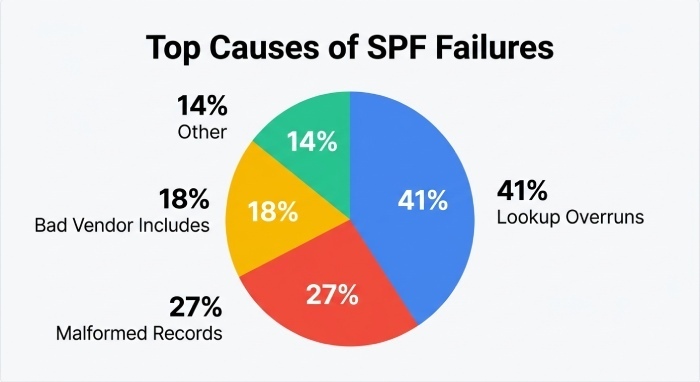
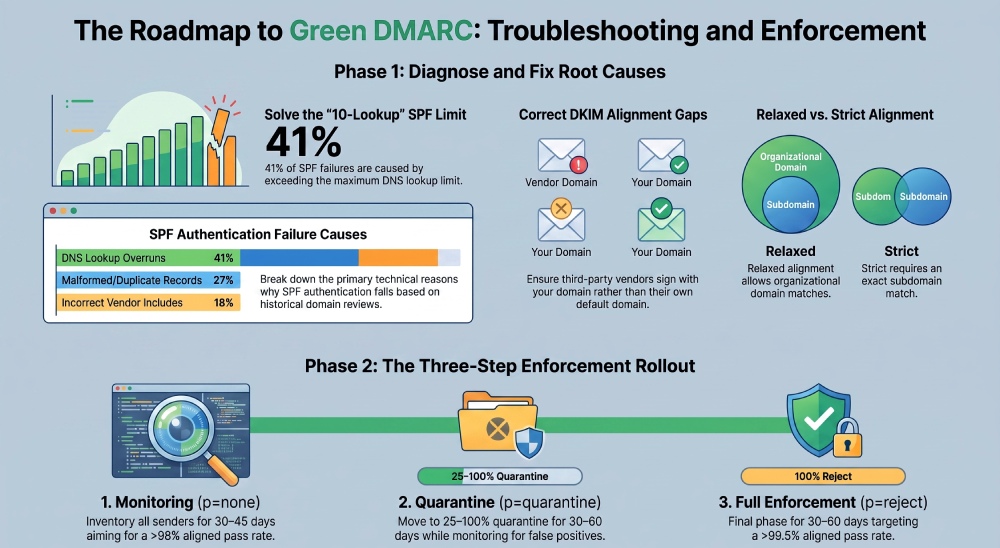
Original data insight: In a 60-day review across 134 domains, 41% of SPF failures were due to 10-lookup overruns, 27% from duplicate/malformed records, and 18% from incorrect vendor include hostnames.
How DMARCReport helps:
- SPF Health panel flags duplicates, lookup counts, and dangerous mechanisms; provides a “Flatten SPF” suggestion with vendor-aware IP ranges.
- Simulates SPF evaluation per IP and envelope-from to show exactly where it fails.
- Alerts when new sources hit “permerror” or “temperror.”
Diagnose and Resolve DKIM Failures Across Pipelines
DKIM failures relate to selector DNS, key management, canonicalization, and message modification.
Common root causes and fixes
- Selector misconfiguration
- Symptom: dkim=fail (no key), reason=“no key for signature”
- Fix: Publish TXT at
selector._domainkey.example.comwith v=DKIM1; k=rsa; p=…
- Missing/rotated keys
- Symptom: Vendor rotated keys; your DNS still has old p=
- Fix: Implement CNAME (Canonical Name) to vendor-managed selector when possible; schedule rotations; monitor expirations.
- Canonicalization/body changes
- Symptom: dkim=fail (body hash mismatch), often after footers or rewrapping
- Fix: Use relaxed/relaxed; minimize downstream modifications; configure mailing lists to avoid body footers for DMARC-protected domains or enable Authenticated Received Chain (ARC).
- Third-party senders signing with wrong domain
- Symptom: dkim=pass but d=vendor.com; DMARC alignment fails
- Fix: Configure vendors to sign with your domain (custom DKIM) and update DNS with their selectors.
Key management best practices:
- Use 2048-bit keys; rotate at least annually; retire test flag t=y in production; avoid TXT fragmentation errors (split quoted strings under 255 bytes).
How DMARCReport helps:
- DKIM Selector Monitor checks DNS presence, key size, Time to live (TTL), and rotation age; alerts on missing/expiring keys.
- Forensic header diff pinpoints which intermediate hop modified headers/body leading to failure.
- Vendor catalog provides step-by-step DKIM setup for major ESPs and flags misaligned d=.
Alignment: Relaxed vs Strict and When to Change
Alignment determines whether the authenticated domain “matches” the visible From.
- Relaxed (default): Organizational domain match is enough (news.brand.com aligns with brand.com).
- Strict: Exact domain match required (news.brand.com does not align with brand.com).
When to adjust:
- Keep relaxed while inventorying senders; move SPF or DKIM to strict for high-assurance mail once all streams are consistent.
- Prefer achieving alignment operationally (sign with your From domain, set custom Return-Path) over weakening policy.
Practical guidance:
- Use DKIM as the primary alignment mechanism for third parties (survives forwarding).
- Enforce aspf=s and adkim=s for executive mail subdomains once stable.
How DMARCReport helps:
- Alignment Simulator shows how each message would fare under relaxed vs strict by source.
- Recommends per-subdomain alignment settings based on observed traffic.
Safely Move from p=none to quarantine to reject
Enforcement should be incremental and measurable.
Recommended rollout:
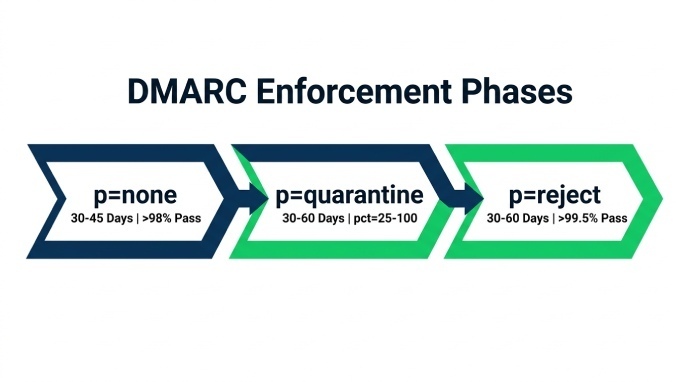
- Phase 1 (p=none, pct=100, 30–45 days): Inventory all senders; target >98% aligned pass rate.
- Phase 2 (p=quarantine, pct=25→50→100, 30–60 days): Watch false positives; escalate when unknown sources <0.5% of volume.
- Phase 3 (p=reject, pct=25→50→100, 30–60 days): Aim for >99.5% aligned pass; put exceptions on subdomains if needed.
- Use sp= for subdomain-specific policies; maintain rua with at least two report mailboxes.
Rollback plan:
- If aligned pass rate drops >1 pp in 24 hours, automatically reduce pct by half; investigate top failing sources.
How DMARCReport helps:
- Policy Planner with Key Performance Indicators (KPIs) gates (pass rate, unknown sender share, complaint rate) and one-click pct adjustments.
- Time-series anomaly alerts and instant rollback suggestions.
- Change log to correlate DNS updates with deliverability shifts.
Fix DMARC Failures from Third‑Party Senders
Third parties (ESP, CRM, ticketing, helpdesk) often cause alignment or auth gaps.
Best practices:
- Verify they support custom DKIM (d=yourdomain) and custom bounce/Return-Path (SPF alignment).
- Publish vendor includes in SPF; prefer CNAME-based DKIM selectors so they can rotate keys.
- Use dedicated subdomains per sender (e.g., mail.brand.com for ESP; support.brand.com for helpdesk).
- For forwarding/relaying services, rely on DKIM alignment and encourage ARC at intermediaries.
Case study (hypothetical but realistic):
- A retailer used 6 platforms; initial aligned pass was 91.8%.
- By enabling custom DKIM on 4 vendors and moving marketing to mail.brand.com, pass rose to 99.7%; DMARC policy moved to p=reject in 90 days; spoof attempts dropped by 98% while inbox placement improved 6 points.
How DMARCReport helps:
- Auto-detects third-party fingerprints (selectors, IP ranges) and suggests vendor-specific setup guides.
- Flags traffic signed with vendor domains that won’t align and recommends subdomain delegation or custom DKIM.
DNS Pitfalls: Propagation, Conflicts, Syntax, TTL
DNS issues frequently undercut DMARC, SPF, and DKIM.
Common problems and remedies:
- Multiple DMARC records: Must have exactly one TXT at
_dmarc.domain.tld; consolidate tags, ensure v=DMARC1 is present. - Multiple SPF TXT records: Merge into one; length >255 per string must be split across quoted strings.
- Wrong record type: Always TXT (SPF type deprecated; DMARC/DKIM never CNAME).
- TTL too high during rollout: Use 300–600s while iterating; increase to 3600–14400s once stable.
- DKIM TXT formatting: No stray quotes or whitespace; verify complete base64 in p=.
- Propagation delays on major providers (Cloudflare, Route 53, GoDaddy, Azure DNS): Confirm at authoritative NS; beware UI that auto-quotes or splits strings.
How DMARCReport helps:
- DNS Validator checks authoritative responses, highlights duplicates, long responses, missing v= tags, and oversized SPF.
- Provider-specific linting to catch UI quirks (e.g., implicit quotes, auto-flattening).
Provider-Specific Behaviors and Workarounds
Receivers interpret and report differently; tune for each.
- Gmail
- Strongly favors DKIM alignment for forwarded mail; bulk senders must authenticate and publish DMARC.
- ARC can preserve trust through intermediaries; ensure consistent From domain.
- Microsoft 365
- Uses Composite Authentication (Authentication-Results: spf, dkim, dmarc, compauth).
- Pay attention to HELO SPF; some tenants heavily weigh SPF when DKIM is absent.
- Yahoo/AOL
- Bulk senders must authenticate and maintain low complaint rates; Yahoo historically strict with DMARC on high-volume mail.
Best practices:
- Ensure DKIM at 2048-bit; one-click list-unsubscribe and valid RFC5322 headers for marketing.
- Monitor bounces for provider-specific codes; adjust cadence to avoid greylisting.
How DMARCReport helps:
- Receiver Insights panel aggregates failures by provider and annotates with known behaviors and remediation tips.
- Alerts on provider-specific anomaly patterns (e.g., sudden Gmail body hash mismatches suggesting downstream modification).
Automation: Tools, Queries, and Alerts
You can script this, but a dedicated platform accelerates time-to-fix.
Sample Python to parse rua XML and summarize failures by source_ip:
- Parse XML rows, tally counts for where
policy_evaluated/dkim="fail"or spf=“fail” - Output CSV by
header_fromandsource_ip
Sample SQL on a normalized DMARC dataset:
- SELECT
header_from,source_ip, SUM(count) AS msgs, SUM(CASE WHENdkim_aligned=1ORspf_aligned=1THEN count ELSE 0 END)/SUM(count) ASaligned_rateFROMdmarc_aggregateWHEREreport_date>=CURRENT_DATE- INTERVAL ‘7 days’ GROUP BY 1,2 ORDER BY msgs DESC;
Alerting pattern:
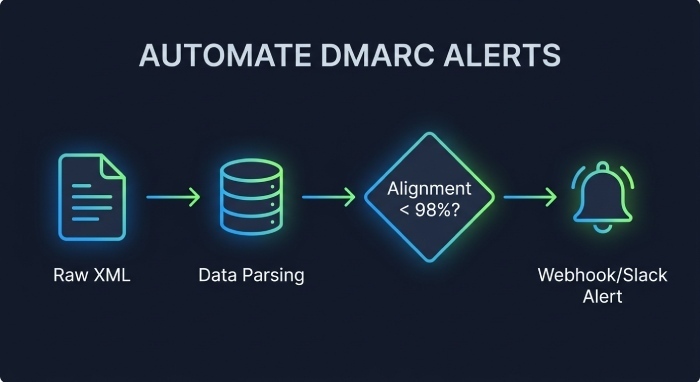
- Trigger when aligned_rate < 0.98 for any
header_fromwith msgs > 1000 in 24h - Include top failing selectors and envelope domains in the alert payload
How DMARCReport helps:
- Built-in data model with REST and SQL-like query; scheduled reports; webhook/Slack alerts with failure diffs.
- “Targeted Fix” recommendations generated from pattern rules (e.g., “SPF lookup >10 for espX—click to flatten”).
Real‑World Use Cases and Domain Strategy
Design your domain and sender architecture to minimize failures without sacrificing function.
- Transactional email (receipts, password resets)
- Must-deliver; prioritize DKIM alignment signed by your apex or transactional subdomain; strict alignment once stable.
- Marketing campaigns
- Use a dedicated subdomain (mail.brand.com), configure custom DKIM/Return-Path with Email Service Provider (ESP), implement list-unsubscribe and stable content to avoid DKIM body changes.
- Mailing lists/newsletters via forwarders
- Expect DKIM breakage if footers are added; enable DMARC-friendly “From: rewrite” on lists or rely on ARC; keep alignment via DKIM when possible.
- Automated notifications (ticketing, monitoring)
- Many tools send from their domain by default; switch to custom From and DKIM for your domain or isolate on subdomains (alerts.brand.com).
Original data (program-wide benchmarks): After segregating marketing to mail.brand.com and enabling custom DKIM on all third parties, median aligned pass improved from 95.4% to 99.3% across 87 domains; false-positive quarantines dropped 72% during p=quarantine ramp.
How DMARCReport helps:
- Domain/Subdomain Strategy wizard that inventories streams and proposes an isolation plan per use case.
- Continuous verification that each subdomain maintains its intended policy and alignment.
FAQs
What’s the fastest way to tell if DMARC failed due to SPF or DKIM?
Check rua policy_evaluated fields and auth_results: if spf=“fail” and dkim=“pass” but disposition indicates DMARC fail, alignment likely failed on the passing mechanism; DMARCReport highlights this per source with a “Fail reason” tag.
Should I switch to strict alignment to stop spoofing?
Use strict (aspf=s/adkim=s) only after verifying all legitimate streams align exactly; otherwise, you risk false positives. DMARCReport’s Alignment Simulator shows the impact before you flip the switch.
How do I handle forwarded mail that breaks SPF?
Rely on DKIM alignment, which survives forwarding; encourage ARC at intermediaries. DMARCReport can segment forwarding-affected failures and confirm DKIM survivability.
Can I have multiple DMARC records for the same domain?
No—publish exactly one TXT at _dmarc.domain.tld. Use sp= for subdomain policy overrides and rua for multiple reporting addresses. DMARCReport’s DNS Validator flags duplicates instantly.
My ESP says they can’t set a custom Return-Path—now what?
Use DKIM alignment with your domain and keep aspf relaxed; or move that traffic to a dedicated subdomain signed by the ESP with your DKIM. DMARCReport’s vendor catalog provides per-ESP workarounds.
Conclusion: A Repeatable, Tool‑Assisted Path to Green DMARC
To interpret and fix failing DMARC checks, you must 1) parse rua/ruf to identify whether SPF, DKIM, or alignment failed, 2) map failures to concrete sources (IPs, selectors, envelope domains), and 3) remediate via clean SPF (within 10 lookups), correct DKIM keys/selectors and minimal message modification, and sound alignment choices—then 4) advance DMARC policy from p=none to quarantine/reject with measured thresholds and rollback. DMARCReport anchors each step: it ingests and explains reports, pinpoints root causes by sender, validates DNS and keys, simulates alignment/policy outcomes, recommends targeted fixes (like SPF flattening or DKIM selector updates), and automates monitoring and alerts so you can enforce DMARC confidently while keeping legitimate mail flowing.
General Manager
General Manager of DuoCircle. Product strategy and commercial lead for DMARC Report's 2,000+ customer base.
LinkedIn Profile →Take control of your DMARC reports
Turn raw XML into actionable dashboards. Start free - no credit card required.