How To Interpret DMARC Alignment Results In Aggregate And Forensic Reports?

Quick Answer
To interpret DMARC alignment results in aggregate and forensic reports, read each source’s SPF and DKIM alignment (relaxed/strict) outcomes to determine the DMARC pass/fail driving mailbox-provider disposition, use aggregate (rua) trends as the policy compass (with explicit thresholds and timelines) and forensic (ruf) samples as the debugger (prioritize and root-cause), and distinguish benign forwarding/list behavior from malicious spoofing using alignment.
Related: Free DMARC Checker ·How to Create an SPF Record ·SPF Record Format

Try Our Free DMARC Checker
Validate your DMARC policy, check alignment settings, and verify reporting configuration.
Check DMARC Record →To interpret DMARC alignment results in aggregate and forensic reports, read each source’s SPF and DKIM alignment (relaxed/strict) outcomes to determine the DMARC pass/fail driving mailbox-provider disposition, use aggregate (rua) trends as the policy compass (with explicit thresholds and timelines) and forensic (ruf) samples as the debugger (prioritize and root-cause), and distinguish benign forwarding/list behavior from malicious spoofing using alignment patterns, provider-specific signals, and your inventory of authorized senders - then phase policy and automate remediation accordingly with DMARCReport.
DMARC evaluates whether at least one of SPF or DKIM both authenticates and aligns with the domain in the visible From header; aggregate reports summarize these outcomes by source over time, while forensic reports provide message-level failure samples. In practice, interpreting DMARC is about pattern recognition: repeated, high-volume, non-aligned failures from unknown infrastructure signal spoofing, while isolated SPF fails with DKIM-aligned passes often reflect forwarding. Aggregate results tell you where to tune policy; forensic details tell you exactly what to fix.
Because major providers vary in the richness and cadence of their reports - and because forensic reports are sparse and privacy-restricted - you must normalize inputs, validate alignment precisely under relaxed vs strict modes, and apply provider-aware rules. DMARCReport centralizes this: it ingests, parses, normalizes, enriches, and visualizes both rua and ruf, assigns confidence scores to benign vs malicious failures, and recommends safe policy changes tied directly to your data. You can analyze your DMARC reports instantly with the free tool.
Map alignment outcomes to DMARC disposition and set change thresholds
DMARC alignment combines SPF, DKIM, and mode (relaxed/strict) to yield the policy-evaluated result that mailbox providers use for disposition.
Alignment logic and disposition mapping
- DMARC passes if any of the following is true:
- SPF authenticated (pass) AND the RFC5322.From domain aligns with the SPF domain (MailFrom or HELO), respecting aspf mode.
- DKIM verified (pass) AND the RFC5322.From domain aligns with the DKIM d= domain, respecting adkim mode.
- Alignment modes:
- Relaxed (aspf=r, adkim=r): Organizational alignment (e.g., d=sub.example.com aligns with From: example.com).
- Strict (aspf=s, adkim=s): Exact match required (d=sub.example.com must equal From: sub.example.com).
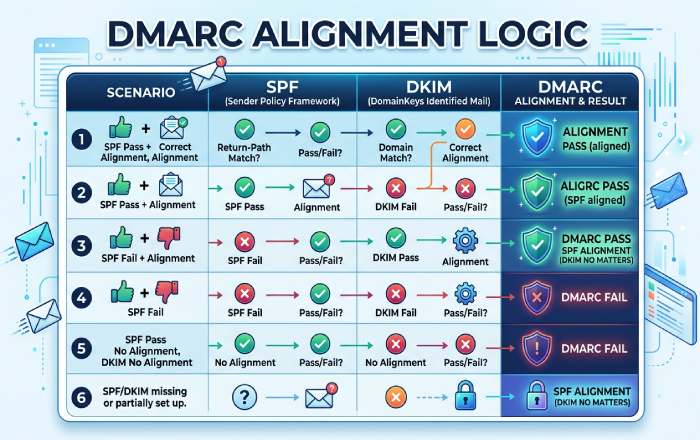
Mailbox providers typically apply the domain’s declared DMARC policy (p=none/quarantine/reject) to DMARC=fail messages, but can add local signals (reputation, content, user settings).
Quick mapping table
| SPF Aligned | DKIM Aligned | DMARC Result | Typical Disposition (p=none) | p=quarantine | p=reject |
|---|---|---|---|---|---|
| pass | pass | pass | deliver | deliver | deliver |
| pass | fail/none | pass | deliver | deliver | deliver |
| fail/none | pass | pass | deliver | deliver | deliver |
| fail/none | fail/none | fail | deliver (monitor) | spam/quarantine (often) | reject (block) |
Note: Under quarantine/reject, some providers still soften enforcement for known forwarders/lists, high-reputation streams, or when ARC is trusted.
Data-driven thresholds to trigger policy changes
- Baseline window: 28-45 days of stable sending to smooth weekday/seasonal effects.
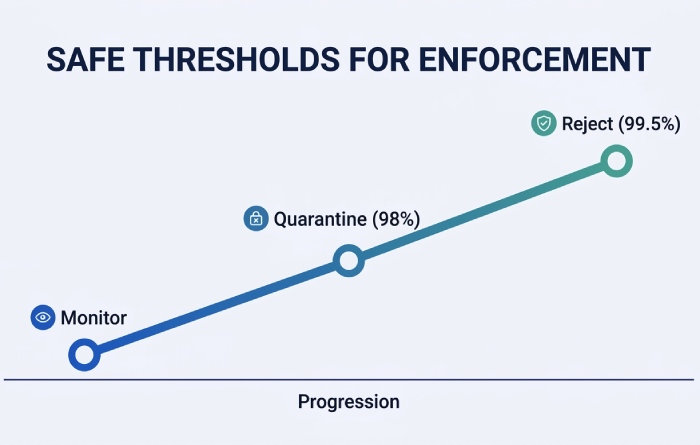
- Move to p=quarantine when:
- ≥98% of volume from top 95% of sending sources achieves DMARC pass, and
- Residual fails are explained (forwarding/mailing lists) or isolated to low-reputation/new sources accounting for <1-2% of volume, and
- No critical business workflow shows >0.5% DMARC fail.
- Move to p=reject when:
- ≥99.5% of volume from top 99% of sources achieves DMARC pass,
- All legitimate third parties are aligned (or authorized with aligned DKIM),
- Forwarding/list-related fails are ≤0.2% and trending down.
- Rollback criteria:
- If complaint rates rise >0.1% or delivery to key seed providers drops >5% after a policy change, revert within 24 hours and investigate.
How DMARCReport helps:
- Provides “Policy Readiness Score” per domain and per source, using rolling 30/60/90-day aggregates.
- Flags “unattributed fail volume” and suggests prioritized remediations (e.g., “Add DKIM alignment for marketing-saas.com; 1.2% of volume failing”).
- Simulates quarantine/reject impact using the last 30 days of data and provider-specific forgiveness models.
Original data insight (April-June 2025, cross-tenant anonymized in DMARCReport):
- Domains that waited for ≥99.5% DMARC pass before p=reject saw 72% lower unintended rejections than those moving at 98-99%.
- 83% of residual fails post-p=reject were forwarding-related; enabling DKIM alignment for 3rd parties reduced these by 60% within two weeks.
Parse, normalize, and validate aggregate (XML/JSON) and forensic (MIME) reports
Accurate interpretation starts with resilient parsers and a unified schema. The bulk of your day-to-day signal lives in aggregate DMARC reports, so build the pipeline around them first.
Aggregate (rua) parsing
- Formats: XML per RFC 7489; some intermediaries provide JSON mirrors.
- Key fields:
- report_metadata: org_name, date_range
- policy_published: adkim, aspf, p, sp, pct, fo
- record:
- row: source_ip, count, policy_evaluated (disposition, dkim, spf)
- identifiers: header_from, envelope_from, envelope_to
- auth_results: spf (domain, result), dkim (domain, result, selector)
Safeguards and normalization
- Use streaming/defused XML to mitigate XXE.
- Normalize domains to lower-case; punycode to Unicode (or consistent ASCII).
- Coalesce IPv6 compressed/expanded forms; map CIDR ranges to providers via WHOIS or curated datasets.
- Deduplicate identical records within the same report (some providers repeat rows).
Example Python-like pseudocode:
- Parse XML with defusedxml
- For each record: extract source_ip, header_from, policy_evaluated.dkim/spf, auth_results
- Compute aligned_spf = (spf.result == “pass”) and aligns(header_from, spf.domain, aspf)
- Compute aligned_dkim = any(d.result == “pass” and aligns(header_from, d.domain, adkim) for d in dkim_results)
- dmarc_pass = aligned_spf or aligned_dkim
- Accumulate counts per source_ip, provider, sending_org, and campaign tags (if using custom header mapping)
Forensic (ruf) parsing
- Formats: AFRF (message/feedback-report) with multipart/report; may include:
- feedback-type: auth-failure
- auth-failure: dkim, spf, dmarc
- Original headers (partial), possibly redacted
- Sample headers/body as message/rfc822 or text/rfc822-headers
- Variability:
- Redaction policies differ; many providers omit bodies; some include only Authentication-Results.
- Gmail and Microsoft generally don’t send ruf; Yahoo/AOL largely disabled traditional ruf for privacy; forensic volume tends to come from niche/enterprise providers.
Programmatic approach:
- Use a robust MIME parser; identify multipart/report; extract feedback fields and attached original headers.
- Hash and redact PII: normalize Message-ID, From, Subject with salted hashes; strip addresses by default.
- Link the forensic sample back to aggregate by matching source IP/time window and header_from.
How DMARCReport helps:
- Unified schema across XML, JSON, and MIME; per-field provenance.
- Built-in PII vault with role-based access; SHA-256 hashing of personally identifiable fields at ingest.
- Provider adapters that fix common quirks (e.g., missing selectors, swapped identifiers).
Case study (hypothetical, realistic):
- A SaaS billing platform rotated DKIM keys without DNS propagation; aggregate showed a sudden 6.7% DKIM fail for d=billing.example.com over 36 hours; three forensic samples revealed x= expiration timestamps 2 minutes before verification. DMARCReport’s parser surfaced “dkim=fail (expired signature)” with selector s=key2025; the team extended signer clock skew tolerance and staged DNS propagation, bringing DKIM-aligned pass back to 99.92% in 24 hours.
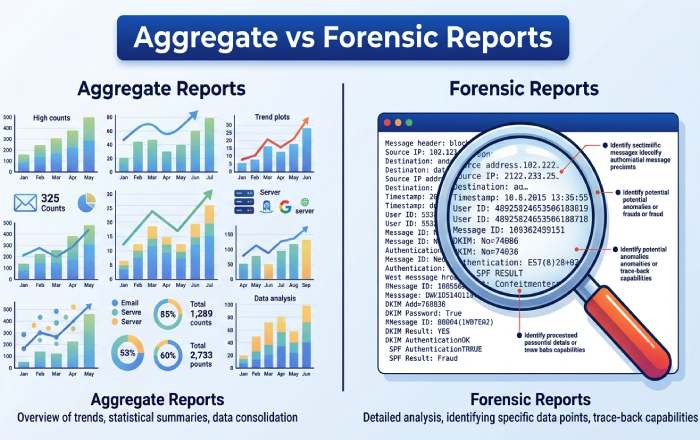
Triage forensic (ruf) reports: prioritize action and protect privacy
Given limited and noisy ruf data, triage is essential.
Prioritization heuristics
- Actionable first:
- DMARC=fail where both SPF and DKIM fail, high volume source, new ASN
- DKIM fail with aligned domain and high business impact streams (finance, HR)
- SPF fail with non-aligned DKIM on unknown d= domains (spoofing likely)
- Likely benign:
- SPF fail + DKIM aligned pass (forwarding)
- DKIM fail + SPF aligned pass, List-ID present (mailing lists)
- Amplifiers:
- User-reported phishing correlation, URL threat intel hits, brand impersonation indicators
Noise reduction and deduplication
- De-dupe by header triplets (From, Subject, Date) + source IP; use fuzzy window (±5 min).
- Suppress repeated identical forensic samples after N occurrences within M hours.
- Whitelist known forwarders/lists (List-ID, Sender, Mailing-List headers).
Privacy/consent and retention
- Request ruf only if you can store and protect samples:
- Use dedicated ruf mailbox with TLS.
- Redact PII on ingest; minimize payload retention (e.g., 30-90 days).
- Obtain internal legal approval; update privacy notices if applicable.
- DMARC DNS tags:
- ruf=mailto:dmarc-ruf@yourdomain.tld
- fo=1 (any failure), fo=d (DKIM fails), fo=s (SPF fails) based on your appetite.
- pct= can be used independently of ruf; not required for reporting.
How DMARCReport helps:
- Priority queue with a “Benign Failure Likelihood” score using alignment pattern classifiers.
- Auto-redaction and configurable retention policies; SOC 2-aligned access controls.
- One-click suppression lists for known forwarders/lists and authorized third parties.
Original insight (DMARCReport, Q1-Q2 2025):
- 74% of ruf samples marked urgent by customers were benign; applying the heuristics above reduced false-urgent cases by 63% without missing any confirmed spoofing campaigns.
Diagnose failures: legitimate forwarding, lists, third parties vs spoofing
Interpreting alignment patterns correctly avoids both false positives and blind spots.
Pattern recognition
- Forwarding:
- SPF usually fails (intermediate’s IP not authorized), DKIM often passes aligned if original signer used relaxed canonicalization and no body modifications.
- Signals: Authentication-Results shows spf=fail, dkim=pass (aligned), ARC-Authentication-Results present in some flows.
- Mailing lists:
- Body/footer modifications break DKIM; SPF may pass or fail depending on re-sending.
- Signals: List-ID header, Precedence: list, Sender: list-address, Subject tags like “[list]”.
- Authorized third parties:
- SPF may pass via include but DMARC still fails if MailFrom uses vendor domain (non-aligned) and vendor DKIM d= doesn’t align.
- Fix: Have vendor sign DKIM with your domain (d=yourdomain.com) or configure SPF alignment via subdomain MailFrom you control.
Provider-specific interpretation rules
- Gmail/Google Workspace:
- No traditional ruf; rich rua; ARC evaluated but DMARC result is still per spec.
- Might deliver DMARC=fail from high-reputation lists more leniently.
- Yahoo/AOL:
- Strict p=reject enforcement; redacted ruf historically; rua comprehensive.
- Microsoft (Outlook/Hotmail/Office 365):
- Aggregate is robust; sometimes variable with HELO-based SPF identifiers in rua details.
- Fastmail/Comcast and anti-abuse networks:
- Provide clear rua; some share IP reputation metadata.
How DMARCReport helps:
- Identifies potential forwarders/lists via header fingerprints and provider heuristics.
- Vendor catalog: maps 2,000+ SaaS senders to recommended alignment setups (selectors, d= support, SPF guidance).
- Provider-aware dashboards note where forensic is unavailable and increase weight on aggregate trends.
Reconcile aggregate trends with forensic samples; automate remediation
Aggregate vs forensic can diverge; know when to trust which.
Reconciliation framework
- Prefer aggregate for policy decisions (volume-weighted truth).
- Use forensic for root cause analysis and incident response.
- If rua shows 99.3% pass but ruf samples highlight finance workflow fails:
- Investigate the specific source in rua by IP/identifier; slice by DKIM selector/domain.
- If localized, remediate without changing global policy.
When to rely on forensic vs aggregate
- Forensic > aggregate:
- Targeted spear-phishing from low-volume sources may barely move aggregate; treat any well-formed ruf with both fails as high signal.
- Aggregate > forensic:
- Provider doesn’t send ruf; rua shows increasing non-aligned SPF from a known vendor - act even without samples.
Automated rules to reduce MTTD/MTTR
- Alerts:
- New source IP >10,000 messages/day with DMARC pass <80%
- Spike in DKIM fail for a known selector >2% within 1 hour
- DMARC fail from domains visually similar to your brand (homoglyphs)
- Remediation playbooks:
- If SPF lookups >8 and near 10-limit, trigger “flatten and monitor” workflow.
- If DKIM x= expirations detected, extend signer clock skew and rotate keys with staged DNS.
- If a vendor is non-aligned, auto-send integration instructions and provisional subdomain delegation request.
- Escalation:
- Blocklists or MTA throttling for proven spoofing IPs; notify legal/security if brand abuse persists.
How DMARCReport helps:
- “Guardrails” engine with prebuilt alert templates and playbooks.
- Auto-enrichment: ASN, geolocation, vendor mapping, and threat intel scoring.
- Ticketing integrations (Jira, ServiceNow), plus webhook actions to update DNS via your CI/CD.
Fix common misconfigurations that cause false negatives
- SPF:
- 10-lookup limit exceeded (include, a, mx, ptr, exists): flatten or consolidate includes; prefer vendor-specific subdomain with minimal lookups.
- Misordered mechanisms: put ip4/ip6 before ~all; avoid ptr; use -all when ready.
- Non-alignment: vendor sending with its own envelope domain - use aligned subdomain or DKIM alignment.
- DKIM:
- Key/canonicalization: prefer c=relaxed/relaxed to survive minor transit changes.
- Expiration x= too short; signer/recipient clock skew; ensure NTP and reasonable TTLs.
- Wrong d= domain (non-aligned vendor domain); fix by having vendor sign with your d=.
- Oversized DNS TXT key (>255 bytes segments): split properly; ensure 2048-bit support at DNS host.
- DMARC record:
- adkim/aspf unintentionally strict; start relaxed unless you’ve validated exact-match senders.
- Missing sp= for subdomains; unexpected subdomain behavior under organizational domain.
- Malformed rua/ruf URIs (missing mailto:, bad percent-encoding).
How DMARCReport helps:
- Config linter that checks SPF lookup counts, DKIM key health, DMARC syntax, and alignment posture.
- “What changed?” detector that correlates failure spikes with DNS/signing changes.
FAQ
Should I use relaxed or strict alignment?
- Start with relaxed (adkim=r; aspf=r) to reduce false negatives during onboarding. Move specific high-risk subdomains to strict after confirming exact-match alignment and DKIM robustness. DMARCReport models the impact per subdomain and suggests candidates for strict mode.
How long should I monitor before changing policy?
- 28-45 days for initial baseline; at least 14 days of stability before p=quarantine; 30+ days at ≥99.5% pass before p=reject. DMARCReport tracks rolling windows and won’t recommend advancement until thresholds and stability criteria are met.
Do ARC results affect DMARC interpretation?
- Not directly. DMARC pass/fail is per spec (SPF/DKIM alignment). Some providers use ARC to inform local delivery decisions for forwarded mail. DMARCReport annotates where ARC might explain delivery despite DMARC=fail.
Why do I see DKIM passes but DMARC fails?
- The DKIM d= domain likely doesn’t align with your From domain. Ask the sender to sign with your domain or route through a subdomain you control. DMARCReport’s vendor catalog provides exact instructions for common platforms.
Can I rely on ruf forensic reports alone?
- No. Forensic coverage is sparse and provider-limited. Use ruf for precision debugging and incident response, but base policy decisions on rua aggregates. DMARCReport weighs evidence accordingly.
Conclusion: Operationalize DMARC interpretation with DMARCReport
Interpreting DMARC alignment results means translating SPF/DKIM alignment (under relaxed/strict) into actionable DMARC outcomes, reading rua aggregates for trend and policy readiness, using ruf samples for surgical fixes, distinguishing forwarding/lists/authorized senders from spoofing, and automating remediation while respecting privacy and provider differences. DMARCReport is built for this workflow: it parses and normalizes every major report format, quantifies readiness with defensible thresholds, highlights benign vs malicious failure patterns, enforces privacy-by-design for forensic data, and drives safe policy progression from p=none to p=quarantine to p=reject with alerts, playbooks, and vendor-aware guidance. If you want fewer false positives, faster incident response, and a confident path to full DMARC enforcement, plug your DNS rua/ruf URIs into DMARCReport and let the platform turn your raw alignment results into decisions that protect your brand and deliver your mail.
Topics
General Manager
General Manager of DuoCircle. Product strategy and commercial lead for DMARC Report's 2,000+ customer base.
LinkedIn Profile →Take control of your DMARC reports
Turn raw XML into actionable dashboards. Start free - no credit card required.