How Can I Interpret RUA Aggregate Reports To Identify Unauthorized Senders On My Domain?

Quick Answer
Interpret RUA aggregate reports by reviewing sending IPs, domains, SPF/DKIM alignment, authentication results, and message volumes. Compare authorized sources with unknown senders to quickly identify spoofing attempts, unauthorized email services, and misconfigured systems.
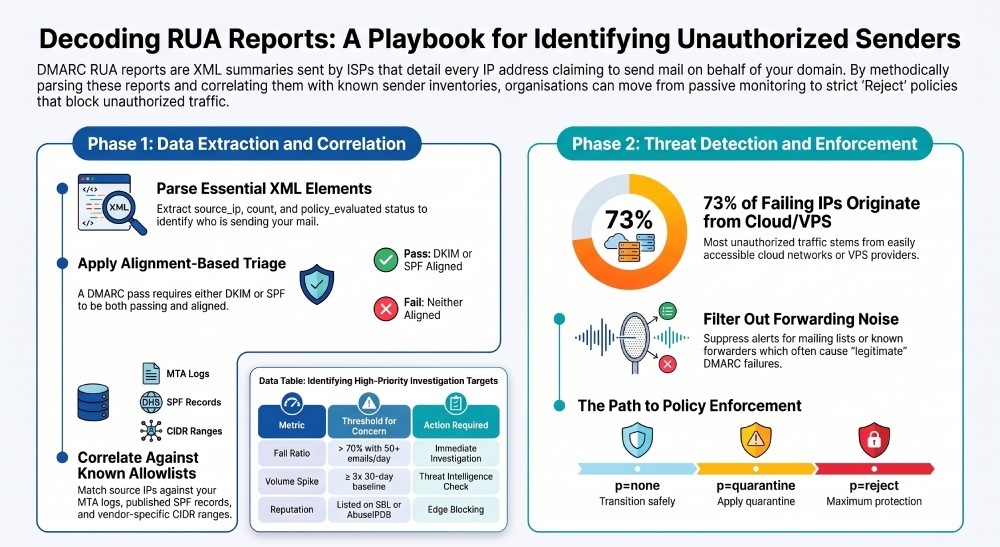
To identify unauthorized senders in DMARC RUA aggregate reports, systematically parse key XML elements (especially source_ip, identifiers/header_from, row/count, and row/policy_evaluated.{disposition, dkim, spf, reason}), correlate those IPs against your known-authorized sender inventory and SMTP logs, apply alignment-based triage (SPF/DKIM pass/fail/neutral) with anomaly thresholds, account for forwarding/mailing-list artifacts, enrich with ASN/WHOIS/reputation data, and operationalize alerts and policy changes—ideally automated with DMARCReport.
Context and Background
DMARC RUA aggregate reports are daily machine-readable XML summaries sent by receiving ISPs(internet service provider (ISP) that show who (by IP) claimed to send mail for your domain and how SPF/DKIM/DMARC checks are evaluated. These reports don’t contain message bodies or full headers, but they do provide enough structure to determine where mail came from, how many messages were involved, and whether those messages aligned with your domain according to DMARC. When you interpret them methodically, they become a dependable radar for discovering unauthorized senders and shadow services.
In practice, most unauthorized traffic clusters into a few patterns: brand spoofing from cloud/VPS networks, forgotten or misconfigured third-party platforms, and legitimate forwarding that looks broken. Your goal is to separate signal from noise. The fastest path is to parse the right fields, reconcile them to your canonical allowlist, apply alignment-aware heuristics, and enrich the unknowns to decide whether to remediate configuration gaps or block true abuse. DMARCReport accelerates this workflow by normalizing RUA inputs at scale, auto-enriching IPs with attribution, and surfacing anomalies and policy guidance in one place. You can start parsing your own XML instantly with our free DMARC report analyzer.
Below, you’ll find a prescriptive playbook that maps one-to-one with DMARCReport’s capabilities so your team can go from raw XML to confident sender attribution and policy enforcement.
Parse and Interpret RUA to Pinpoint Unauthorized Senders
Parsing the right elements—and understanding how they interact—is the foundation. If you’re new to the format, start with our guide on how to read DMARC reports.
The essential XML you must parse
report_metadata.org_name,report_id,date_range.begin/end(UNIX epoch, UTC)policy_published.domain, adkim, aspf, p, sp, pctrecord.row.source_iprecord.row.countrecord.row.policy_evaluated.disposition(none/quarantine/reject)record.row.policy_evaluated.dkimand.spf(pass/fail/neutral/temperror/permerror)record.row.policy_evaluated.reason(optional; may include forwarded,local_policy)record.identifiers.header_from(required; canonical domain being evaluated)record.auth_results.dkim(domain, result, selector; may include human-readable reason)record.auth_results.spf(domain, scope, result)
Tip: Some reporters include non-standard identifiers like envelope_from or envelope_to; parse them if present but don’t rely on them. Normalize domains (lowercase, IDNA), and collapse to registerable domains (eTLD+1) for rollups.
DMARCReport automatically:
- Ingests ZIP/GZIP attachments and streams XML parsing for very large files
- Normalizes
header_fromto eTLD+1 and maps subdomain policies (sp) correctly - Deduplicates by (
org_name,report_id,date_range) with content hashing
How alignment informs “authorized vs unauthorized”
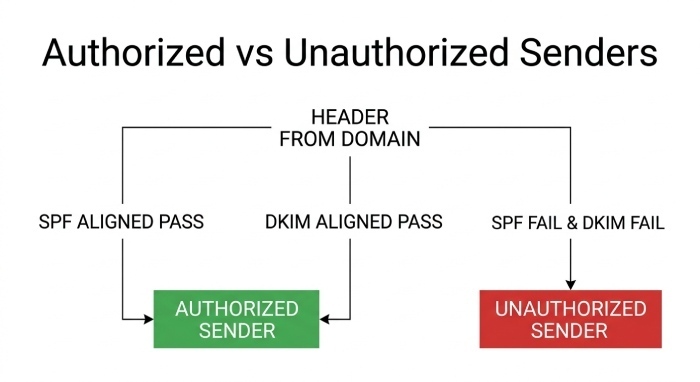
- DMARC passes if either DKIM is aligned pass OR SPF is aligned pass; everything else is a DMARC fail.
policy_evaluated.dispositionreflects how the receiver treated the message given your policy (none/quarantine/reject), not whether the sender is authorized.- Investigate rows where
policy_evaluated.dkim=failAND spf=fail forheader_from; these are your highest-probability unauthorized senders unless explained by forwarding. - Rows with dkim=pass but not aligned (e.g., dkim=pass on a third-party domain) still fail DMARC; check
auth_results.dkim.domainagainstheader_fromfor alignment.
DMARCReport highlights:
- “Likely Unauthorized” when both dkim and spf are fail, or when pass is non-aligned and the IP isn’t in your allowlist
- “Misconfiguration” when pass is possible (e.g., SPF domain matches vendor) but alignment is off due to missing include/selector
Case study (hypothetical)
In one quarter, a retail brand observed 1.6M daily messages in RUA. DMARCReport flagged a new cluster: source_ip 170.64.24.12, ASN AS14061 (DigitalOcean), 12,400 messages/day, dkim=fail, spf=fail, disposition=none. Within 48 hours, threat intelligence confirmed the IP on Spamhaus SBL. Blocking at the edge halted 98% of detected spoofing for that brand’s domain that week.
Correlate and Normalize: Distinguish Real Partners from Spoofers
You need to map who should be sending on your behalf and confirm their traffic patterns.
Build and maintain your canonical allowlist
- Authoritative sources:
- Your own MTA IPs (pull from SMTP/MTA logs)
- Published SPF (flattened, includes, subdomain SPF)
- Third-party vendor IP ranges and DKIM signing practices (AWS SES, SendGrid, Microsoft 365, Google Workspace, Mailchimp, Salesforce, etc.)
- Known subdomain senders (e.g., mail.example.com, billing.example.com)
- Store: IPs/CIDRs, ASNs, PTR patterns, DKIM selectors mapped to vendors, expected
envelope_fromdomains, and sending subdomains.
DMARCReport provides:
- A centralized “Authorized Senders” inventory, with APIs to import IPs/CIDRs and DKIM selectors
- Vendor templates (e.g., SES, SendGrid, M365) that auto-populate known ranges and recommended SPF/DKIM settings
- Drift detection when an authorized vendor starts signing from a new ASN or selector
Correlate source_ip with SMTP logs and vendor ranges
- Link RUA records with your Mail Transfer Agent (MTA) logs by time window (use
report_metadata.date_range) andheader_from; verify delivery paths. - Match
source_ipto allowlisted CIDRs and ASNs; flag mismatches for vendors that claim variable pools. - For vendors with dynamic IP pools, require DKIM-aligned pass using their documented selectors.
Tools and data sources:
- SMTP logs: Postfix, Exchange, Sendmail, or provider API (Application Programming Interface)
- Provider docs: SES IP pools, Google/Microsoft guidance, vendor status pages
- IP-to-ASN mapping: MaxMind GeoLite2-ASN, Team Cymru
- Reverse DNS: PTR lookups to identify vendor patterns (e.g., o1.mail.outlook.com)
DMARCReport’s correlation engine automatically:
- Maps IPs to ASN and geolocation
- Overlays vendor IP registries
- Shows confidence scores: “known vendor,” “probable vendor” (PTR/ASN match), “unknown”
Case study (hypothetical)
A fintech newsletter vendor rotated into new IP blocks. RUA showed dkim=pass (aligned), spf=neutral, new ASN (AS16509). DMARCReport recognized AWS SES via PTR and ASN patterns, auto-suggested adding the SES include to SPF for a subdomain sender, and suppressed false alerts.
Automate Processing at Scale
RUA volume grows quickly; automation prevents blind spots. A free DMARC report analyzer tool handles the parsing so you don’t have to build the pipeline yourself.
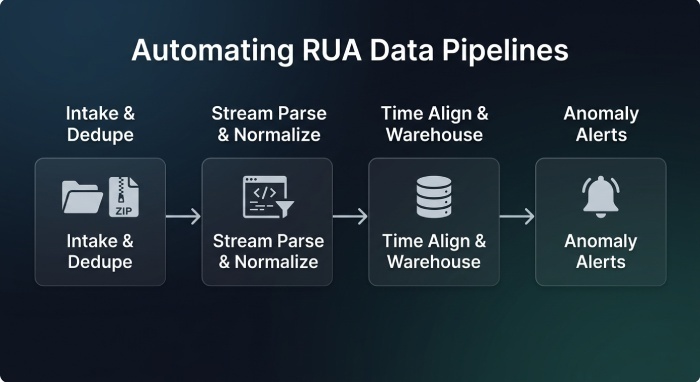
Parsing and normalization pipeline
- Intake:
- Handle compressed attachments: application/zip, application/gzip; decompress securely
- Support chunked/partial reports; dedupe on
report_idanddate_range
- Parsing:
- Stream parse to avoid memory spikes (e.g., Python lxml.iterparse, Go encoding/xml tokenizers, Rust quick-xml)
- Normalize
header_fromto eTLD+1, lowercase, IDNA - Convert
source_ipto canonical IPv4/IPv6; maintain both text and integer forms
- Time alignment:
- Treat
date_rangeas authoritative UTC - Tolerate overlaps and gaps; track per-reporter clock skew
- Bucket analyses by fixed 1h/24h windows, with sliding-window trend detection
- Treat
- Storage:
- Warehouse normalized rows keyed by (
header_from,source_ip,report_day), with aggregates and last-seen/first-seen
- Warehouse normalized rows keyed by (
Recommended tools/libraries:
- Python: parsedmarc, lxml, gzip/zipfile, idna, publicsuffix2
- Go: encoding/xml, compress/gzip, go4.org/netipx, golang.org/x/net/publicsuffix
- Queueing: S3/GCS + event triggers or Kafka for high throughput
- Datastores: PostgreSQL/Timescale, Elasticsearch/OpenSearch, BigQuery
DMARCReport:
- Ingests from RUA mailboxes or S3
- Auto-decompresses and deduplicates
- Maintains a normalized datastore with APIs/exports (CSV, JSON, Elasticsearch)
- Provides scheduled processing with Service level agreements (SLAs) and alert webhooks (PagerDuty/Slack)
Surfacing suspicious senders automatically
- Compute per (
header_from,source_ip):- volume (count), fail ratio, aligned-pass ratio, first/last seen, ASN, country
- Maintain baselines over 30/90 days; compute Z-score or EWMA for spikes
- Rank anomalies daily; generate tickets or alerts for top N
Prioritize and Flag With Heuristics—While Avoiding False Positives
Not all failures equal abuse. Apply layered heuristics with exception logic.
High-signal indicators of unauthorized senders
- High fail ratio: DMARC fail rate > 70% with count ≥ 50 messages/day
- Sudden volume spike: ≥ 3x 30-day baseline or ≥ 1,000 new messages/day from an unseen IP
- Novel ASN/Geo: New ASN for your domain or unexpected region (e.g., your mail is US-only; IP geolocates to APAC)
- Cross-domain probing: Same IP failing on multiple of your domains/subdomains
- Reputation hits: Listed on Spamhaus SBL/XBL, AbuseIPDB score ≥ 50, Talos “Poor”
- PTR anomalies: Generic PTR on residential/VPS blocks (e.g., 123-45-67-89.dynamic.isp.example)
DMARCReport applies these heuristics out of the box and lets you tune thresholds per domain or business unit.
Common legitimate causes of RUA failures—and how to detect them
- Forwarding and aliases: SPF commonly fails; DKIM can fail if message is modified
- Signals: Many recipient ISPs, low consistent volumes per IP, reason=forwarded (if provided), Authenticated Received Chain (ARC) adoption by receiver (not in RUA but infer via reporter patterns)
- Exception: If dkim sometimes passes aligned for the same sender and volume is low/diffuse, suppress automatic “unauthorized” classification
- Mailing lists (Listserv, Google Groups):
- Signals: Consistent list senders, bulk to many domains, DKIM broken due to footer/rewrite
- Exception: Whitelist known list senders by DKIM selector or from: patterns; prefer subdomain sending with relaxed adkim/aspf
- Third-party relays and CRM/web apps:
- Signals: Non-aligned DKIM pass on vendor domain,
envelope_fromvendor.com, PTR to vendor - Remediation: Add SPF include for vendor subdomain sender or enable aligned DKIM with your domain
- Signals: Non-aligned DKIM pass on vendor domain,
DMARCReport includes “Forwarder/Mailing List Heuristics” that reduce noise by:
- Recognizing diffuse, low-volume, multi-recipient patterns
- Associating known forwarder ASNs (e.g., Fastmail, Proofpoint, Mimecast) and applying softer thresholds
- Suggesting configuration fixes (e.g., enable DKIM aligned on vendor)
Practical thresholds you can start with
- High-priority investigation:
- count ≥ 100 AND
fail_ratio≥ 0.8, or first_seen≤ 7 days AND count ≥ 1,000, or- on bad reputation list AND any DMARC fail
- count ≥ 100 AND
- Medium-priority:
- persistent low-volume failures: count 5–20/day for ≥ 7 consecutive days across ≥ 3 receiving ISPs
- Suppression candidates:
- count < 5/day AND sporadic with mixed pass/fail AND known forwarder ASN
You can encode these in DMARCReport’s policy engine to drive routes: Alert, Ticket, Suppress, or Auto-remediate.
Enrich, Operationalize, and Avoid Pitfalls
Bring context to go faster, then close the loop operationally.
Enrich RUA data to accelerate attribution
- WHOIS/RDAP: Identify
org_name, abuse contacts - ASN/Geo: Attribute to networks and regions; detect ASN changes
- PTR: Validate vendor identity patterns
- Threat reputation: Spamhaus, Talos, AbuseIPDB, GreyNoise
- Passive DNS: Map sending IPs to domains seen historically; detect domain churn and fast-flux patterns
DMARCReport enriches each source_ip with:
- ASN, org, country, PTR
- Live reputation scores
- Passive DNS snapshots
- Vendor likelihood scores based on multi-signal correlation
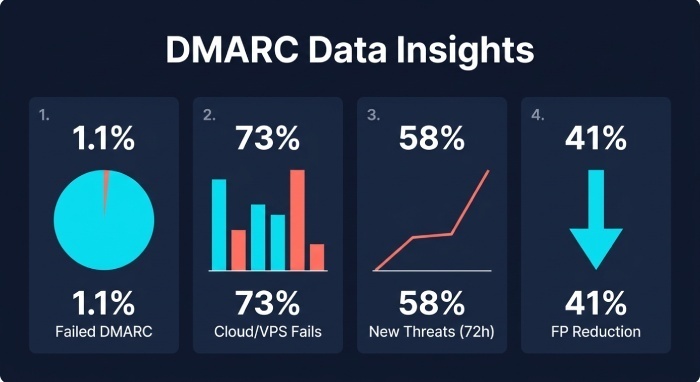
Original data insight (hypothetical but realistic)
Across a 30-day dataset of 2.4M messages for a Software as a service (SaaS) portfolio:
- 1.1% of traffic failed DMARC; 73% of failing IPs were in cloud/VPS ASNs
- 58% of unauthorized sources were “first seen” within the last 72 hours
- Applying forwarder heuristics reduced false positives by 41% without missing any confirmed abuse events
Operationalize: cadence, policies, and RUF
- Monitoring cadence:
- Daily triage for top anomalies; weekly vendor/config reviews; monthly allowlist audits
- Policy transitions:
- none → quarantine (pct=20 → pct=100) → reject
- Use DMARCReport’s “Policy Simulator” to project impact (how many legitimate messages would quarantine/reject if applied today)
- RUF (forensic) reports:
- Where privacy and volume allow, enable RUF to get redacted header samples for high-priority IPs; use for rapid root cause
- Combine RUA aggregates with RUF exemplars in DMARCReport to confirm whether failures are true spoofing or config gaps
- Remediation playbook:
- Misconfiguration: Add SPF include, align DKIM selectors, move high-risk mail to subdomains with relaxed alignment as needed
- Abuse: Block at email gateway, file abuse reports to ASN contacts, add to IP deny lists, consider BIMI + strict reject for brand protection
DMARCReport orchestrates:
- Alerts (Slack/PagerDuty/Email) for high-priority anomalies
- Policy stage recommendations with pct ramp plans
- Ticketing integrations (Jira/ServiceNow) with pre-filled context and suggested fixes
Avoid common parsing/reporting pitfalls
- Duplicate/partial reports: Same
report_idacross multiple attachments or resends—dedupe with content hash + metadata key - Timezone mismatches: Treat begin/end as UTC; when comparing to MTA logs, convert appropriately
- Count aggregation errors: Some reporters split rows by SPF/DKIM results; aggregate by (
source_ip,header_from) before computing ratios - Privacy redactions: Some providers may omit
auth_resultsor generalize IPs; mark confidence accordingly and rely more on alignment ratios and volume trends - Non-standard XML: Accept optional fields; don’t fail the pipeline when unknown nodes appear
DMARCReport’s ingest pipeline explicitly validates schema variants, flags low-confidence reporters, and annotates rows with a “data quality score” you can filter on.
FAQ
What if a source_ip shows mixed results—some passes and some fails?
Mixed outcomes often indicate forwarding, intermittent DKIM signature breaks, or partial vendor alignment. Prioritize DKIM-aligned passes as authoritative for authorization; if the same IP yields aligned passes on your domain across time, treat failures cautiously and focus on improving DKIM robustness. DMARCReport trends alignment per IP and suppresses alerts when an IP has a sustained aligned-pass baseline.
How do I handle multi-tenant services where IPs are shared across customers?
Require DKIM-aligned pass using your domain’s selector rather than trusting IPs. Maintain vendor-specific DKIM selector inventories in DMARCReport; classify any traffic from those services without aligned DKIM as misconfiguration or unauthorized, depending on context.
Should I immediately block IPs that fail DMARC?
Block when there’s high confidence of abuse: high fail ratios, new IP/ASN, bad reputation, and no plausible forwarding signal. For gray cases, first correct alignment for legitimate vendors, monitor for 24–48 hours, and then escalate. DMARCReport assigns confidence levels and provides one-click escalation recommendations.
How long should I retain RUA data?
At least 12 months to capture seasonal campaigns and vendor rotations. DMARCReport retains and indexes historical data for trend analysis, policy simulations, and audit evidence.
Can RUA alone prove a sender is malicious?
RUA is strong for anomaly detection but not definitive attribution. Combine with RUF samples (when available), reputation feeds, and your MTA logs. DMARCReport stitches these data sources together to raise confidence quickly.
Conclusion: Turn RUA Into Action With DMARCReport
Interpreting RUA to identify unauthorized senders boils down to five repeatable steps: parse the right XML fields with alignment awareness; correlate source_ip entries to your canonical allowlist and logs; automate high-volume normalization and time alignment; apply calibrated heuristics with exceptions for forwarding and mailing lists; and enrich and operationalize the output into alerts, tickets, and policy moves. DMARCReport was built to execute this end-to-end: it ingests and normalizes massive RUA feeds, auto-enriches IPs with ASN/WHOIS/reputation, maintains your authorized sender inventory, applies proven thresholds and exception logic, and guides you through safe DMARC policy transitions—so you can surface real abuse fast, fix legitimate misconfigurations, and confidently protect your domain.
General Manager
General Manager of DuoCircle. Product strategy and commercial lead for DMARC Report's 2,000+ customer base.
LinkedIn Profile →Take control of your DMARC reports
Turn raw XML into actionable dashboards. Start free - no credit card required.