How Do I Perform A BIMI Lookup And Check My BIMI Record?

Quick Answer
A BIMI lookup checks your domain’s BIMI DNS record and verifies key settings, including the BIMI TXT value, logo URL, and VMC. Use a BIMI checker to identify errors and confirm your brand logo is configured correctly for supported email providers.
Try Our Free BIMI Checker
Verify your BIMI record, fetch the brand logo, and check VMC certificate status.
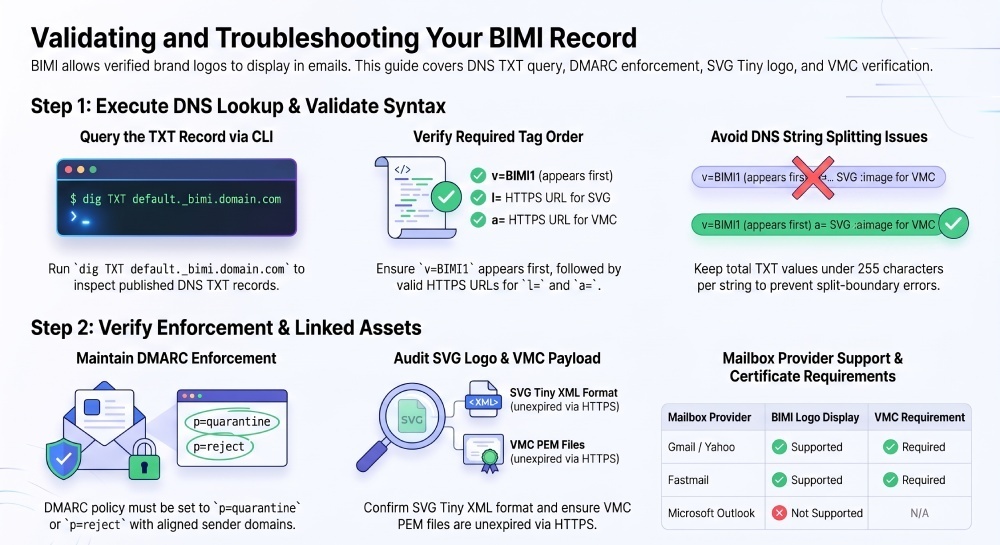
Check BIMI Record →To perform a BIMI lookup, query the DNS TXT record at selector._bimi.yourdomain.com, usually default._bimi.yourdomain.com. Check for a valid v=BIMI1 record with the appropriate l= logo URL and, when required by the mailbox provider, an a= certificate URL. You should also verify DMARC enforcement and that the linked assets are accessible and valid.
BIMI (Brand Indicators for Message Identification) lets mailbox providers display your verified brand logo next to authenticated email, but it only works when your domain is DMARC-enforced and your BIMI record, logo SVG, and (for most providers) VMC are valid and reachable. The lookup itself is a simple DNS TXT query; the work is in validating syntax, assets, and policy so providers accept and show your logo.
Below we go a click deeper with exact CLI commands, what to inspect in responses, how to validate tag-value pairs and provider requirements, how VMC changes outcomes, and how to diagnose failures. Each step is paired with how DMARCReport monitors, validates, and alerts on regressions so your BIMI stays healthy in production.
Step-by-Step BIMI Lookup and What to Inspect (dig/host/nslookup)
BIMI records live under selector._bimi.domain, where selector defaults to default unless overridden per-message via a BIMI-Selector header.
- Linux/macOS (dig)
- Basic:
dig +noall +answer TXT default._bimi.example.com
- Short:
dig +short TXT default._bimi.example.com
- Against a specific resolver:
dig @1.1.1.1 -t TXT default._bimi.example.com
- Basic:
- Linux/macOS (host)
host -t TXT default._bimi.example.com
- Cross-platform (nslookup)
nslookup -type=TXT default._bimi.example.com- Windows with explicit resolver:
nslookup -type=TXT default._bimi.example.com 8.8.8.8
What you should see in the Answer section:
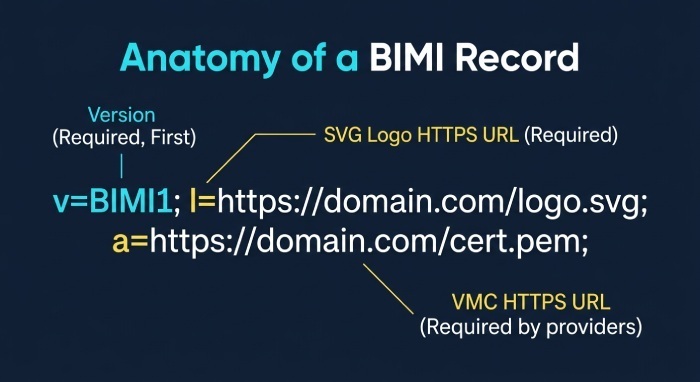
- v=BIMI1 must be present and first
- l=https://brand.example.com/logo.svg (fully qualified HTTPS URL)
- a=https://brand.example.com/vmc.pem (optional but required by major providers)
- Time to Live (TTL) and authoritative nameserver (for propagation diagnostics)
- No stray quotes, unescaped semicolons, or multi-string split that mangles tag boundaries

Example valid response:
"v=BIMI1; l=https://assets.example.com/brand/bimi.svg; a=https://assets.example.com/brand/vmc.pem"
Troubleshooting tip: DNS often splits long TXT values into multiple quoted strings; most resolvers concatenate transparently, but misquoting can break tags. Keep the BIMI value under ~255 characters per DNS string or ensure proper quoting.
DMARCReport connection:
- DMARCReport’s BIMI Lookup tool runs parallel DNS queries (authoritative and public resolvers), highlights TTL and split-string issues, and flags missing or malformed tags in real time.
Verify BIMI Record Syntax and Tag-Value Pairs
BIMI TXT tags (per spec):
- v= (required): Must be BIMI1 and first
- l= (required): HTTPS URL to your SVG logo
- a= (optional in spec, but required by most providers): HTTPS URL to your PEM-encoded Verified Mark Certificate (VMC)
Important clarifications:
- There is no s= tag in the BIMI TXT record. The “selector” is the left-hand DNS label (
selector._bimi.domain). The s= parameter is used only in the BIMI-Selector email header to choose a non-default selector for a given message (BIMI-Selector: v=BIMI1; s=holiday). - Only HTTPS URLs are permitted for l= and a=, with valid Transport Layer Security (TLS) chains and no authentication prompts.
CLI and validation steps:
- Check quoting and order:
dig +noall +answer TXT default._bimi.example.com- Look for v=BIMI1 first; ensure tags are semicolon-delimited with optional spaces.
- Validate URL reachability and content type:
curl -sIhttps://assets.example.com/brand/bimi.svg| egrep -i "HTTP|content-type|location"- Expect HTTP/1.1 200 OK and Content-Type: image/svg+xml
curl -sIhttps://assets.example.com/brand/vmc.pem| egrep -i "HTTP|content-type"- Expect 200 OK and a textual PEM payload (application/x-pem-file or text/plain)
- Ensure minimal or no redirects (limit to one 301/302 max); some providers are strict about redirects.

DMARCReport connection:
- DMARCReport parses your BIMI TXT, normalizes concatenated strings, and runs HTTP/TLS checks on l= and a= targets, with actionable error messages (e.g., wrong MIME type, 3+ redirects, 404/403).
Prerequisites: DMARC Alignment and Enforcement
BIMI will only be honored if DMARC is at enforcement:
- Publish
_dmarc.example.comTXT with p=quarantine or p=reject (reject recommended) - Ensure alignment: the domain in the From: header must align with SPF or DKIM (preferably DKIM)
- DMARC pass on live mail: either aligned DKIM=pass or aligned SPF=pass for the message
Commands and checks:
dig +short TXT _dmarc.example.com- Example:
"v=DMARC1; p=reject; adkim=s; aspf=s; rua=mailto:dmarc@dmarcreport.com"
- Example:
- Inspect real message headers (e.g., Gmail original):
- Authentication-Results: dmarc=pass (p=reject) header.from=example.com
- … dkim=pass (d=example.com) or spf=pass smtp.mailfrom=example.com
Provider realities (2026):
- Google/Gmail: Requires DMARC enforcement and VMC for logo display.
- Yahoo: Requires DMARC enforcement and VMC for logo display.
- Fastmail: Supports BIMI; VMC required for logo display.
- Microsoft (Outlook/Exchange Online): Does not display BIMI logos; BIMI has no visible effect. Microsoft uses separate brand experiences (not BIMI).
DMARCReport connection:
- DMARCReport’s Enforcement Readiness tracks aggregate DMARC data (RUA), alignment rates by source, and guides you to p=reject without breaking mail. It blocks BIMI rollout until alignment SLA (Service Level Agreement) are met, then green-lights BIMI.
VMC: When It’s Required and How to Validate
A Verified Mark Certificate cryptographically ties your trademarked logo to your domain.
- Required by Gmail, Yahoo, and Fastmail for BIMI logo display
- Issued by approved CAs (e.g., Entrust, DigiCert) after trademark verification
- The BIMI a= tag must point to the current VMC (PEM)
Validation steps:
- Is the VMC reachable?
curl -sIhttps://assets.example.com/brand/vmc.pem| egrep -i "HTTP|content-type"
- Inspect certificate fields locally:
openssl x509 -in vmc.pem -noout -text | sed -n '1,120p'- Check Not Before/Not After, Subject, and BIMI-specific SAN/extension
- Check expiry/OCSP:
openssl x509 -in vmc.pem -noout -enddate- Use CA tools or OCSP endpoints (your CA provides instructions)
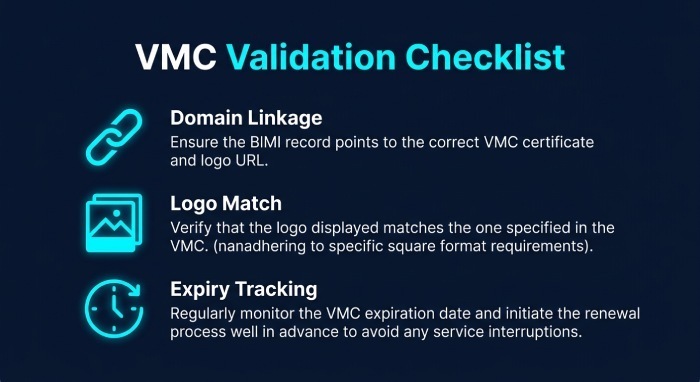
- Verify domain linkage: The VMC must identify the same organization as your From domain brand, and the logo embedded in the VMC must match the one at l=.
DMARCReport connection:
- DMARCReport validates VMC fetch, parses expiry, watches for 30/15/7-day expiry windows, and warns on org mismatch or OCSP failures. It also confirms a= and l= assets correspond to the same visual mark.
Diagnosing Common BIMI Lookup Failures
Typical failure modes and how to isolate them:
- DNS propagation/TTL issues
- Symptom: Old record persists in some regions.
- Check:
dig @1.1.1.1 TXT default._bimi.example.com vs. dig @8.8.8.8 ... - Fix: Lower TTL (e.g., 300) before changes; wait for max(old TTL).
- Wrong selector
- Symptom:No answer for default._bimi.example.com.
- Check alternates:
dig TXT holiday._bimi.example.com - Confirm sender header: BIMI-Selector: v=BIMI1; s=holiday
- Fix: Publish the used selector, or remove the header if unintended.
- Unreachable logo URL
- Symptom: 404/403 or timeout on l=.
- Check:
curl -I and curl -L; verify CDN/firewall rules allow provider fetchers. - Fix: Correct path, permissions, or origin; allow-list provider ASNs if needed.
- SVG format errors
- Symptom: Provider rejects logo despite 200 OK.
- Check basic conformance:
xmllint --noout bimi.svgegrep -i "<(script|foreignObject|iframe|image|use)b" bimi.svg(disallow external refs)svgo --multipass bimi.svg(optimize and remove disallowed constructs)
- Best practices:
- Square artboard (1:1), explicit viewBox, solid background
- No external resources, fonts, JavaScript, or CSS
- Content-Type: image/svg+xml
- Fix: Re-export to BIMI-safe subset; rehost with correct headers.
- VMC issues
- Symptom: BIMI record resolves, but no logo shows in Gmail/Yahoo.
- Check: VMC present (a=), not expired, CA-approved, matches logo and org.
- Fix: Reissue/renew VMC; update the a= URL if the PEM location changed.
- DMARC not enforced
- Symptom: dmarc=fail or p=none.
- Fix: Fix alignment (DKIM domains), then move p=quarantine→reject with monitoring.
DMARCReport connection:
- DMARCReport’s BIMI Health panel shows per-check status (DNS, syntax, HTTP, SVG, VMC, DMARC) with root-cause and guided remediation. Historical timelines help correlate a change (e.g., CDN header change) with the exact timestamp your logo disappeared.
Preparing, Hosting, and Validating the BIMI SVG Logo
SVG preparation checklist:
- Must be SVG Tiny/secure subset (no scripts, external refs, fonts, or embedded rasters)
- Square aspect ratio; explicit viewBox (e.g., 0 0 256 256)
- Clear brand mark with sufficient padding; legible at small sizes
- File size kept small (optimized via svgo) for fast fetches
- Background: include a shape-filled background for contrast
Hosting requirements:
- HTTPS with a valid chain (no TLS errors)
- Content-Type: image/svg+xml
- Stable URL (avoid rotating query strings)
- Minimal redirects; cache-control reasonable (e.g., max-age=86400)
- Avoid geo-blocking; allow mail provider fetchers
Validation commands:
- file bimi.svg (should report SVG XML)
xmllint --noout bimi.svg(well-formed XML)svgo --multipass bimi.svg(optimize)curl -sIhttps://assets.example.com/bimi.svg| egrep -i "HTTP|content-type|cache-control"

DMARCReport connection:
- DMARCReport runs a BIMI SVG policy linter (no forbidden elements, proper MIME, TLS checks) and simulates provider fetches from multiple regions to detect Content Delivery Network (CDN) or firewall inconsistencies.
Multiple Selectors, Fallbacks, and Provider Compatibility
Selectors enable seasonal/region-specific logos without changing defaults:
- DNS: publish TXT at
holiday._bimi.example.com - Message header to invoke: BIMI-Selector: v=BIMI1; s=holiday
- Providers may fall back to default if the selected record fails; behavior is not guaranteed—test both.
Cross-provider notes (2026):
- Gmail/Yahoo/Fastmail: Will fetch
selector._bimi.domainper header or default; VMC required for display. - Microsoft: No BIMI display; no selector effect on UI.
Testing approach:
- Send test mail with and without BIMI-Selector header to seed accounts across providers.
- Inspect Authentication-Results and pull logs to confirm BIMI fetch/decision.
DMARCReport connection:
- DMARCReport’s multi-inbox tests inject messages with varying selectors, then captures headers and screenshots where available, reporting per-provider outcomes.
Continuous Testing, Monitoring, and CI/CD
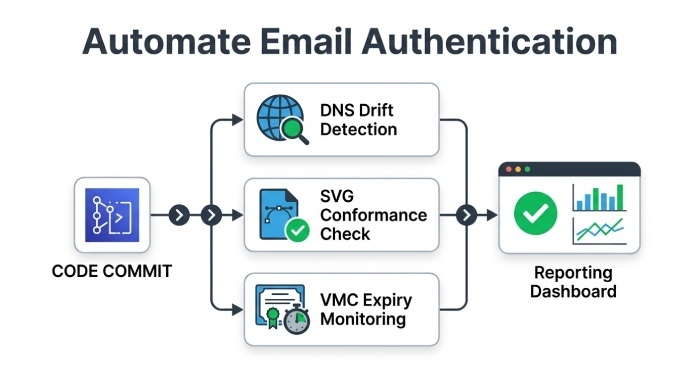
Automation reduces downtime from subtle changes (e.g., CDNs changing headers). Recommended checks:
- DNS drift detection: Alert on TXT changes for
selector._bimi and _dmarc - HTTP uptime and header validation for l= and a= targets
- SVG conformance lint on asset changes
- VMC expiry countdown and OCSP health
- DMARC alignment regression watch (RUA analytics)
Example CI shell snippet (pre-merge):
dig +short TXT default._bimi.example.com | grep -q "v=BIMI1" || exit 1curl -sfIhttps://assets.example.com/bimi.svg| grep -qi "image/svg+xml" || exit 1xmllint --noout bimi.svgopenssl x509 -in vmc.pem -noout -enddate
DMARCReport connection:
- DMARCReport offers GitHub/GitLab Actions for BIMI checks, real-time alerting (Slack/Email), and dashboards that correlate BIMI health with DMARC pass rates and deliverability Key Performance Indicator (KPI).
FAQ
Where do I publish my BIMI record?
Publish a TXT record at selector._bimi.yourdomain (default selector is default). Example: default._bimi.example.com TXT "v=BIMI1; l=https://.../bimi.svg; a=https://.../vmc.pem". DMARCReport validates the hostnames and flags typos like default._bmi.
Do I need a VMC for BIMI to work?
Most major providers that display BIMI logos (Gmail, Yahoo, Fastmail) require a VMC. Without it, your BIMI record may be technically valid but will not result in a displayed logo. DMARCReport shows provider-by-provider impact if a= is missing.
Can I use multiple BIMI selectors?
Yes. Publish multiple selector._bimi records and select at send time via the BIMI-Selector header (BIMI-Selector: v=BIMI1; s=holiday). DMARCReport can auto-test each selector across seeded inboxes.
How long does BIMI take to show after changes?
Expect up to 24–48 hours due to DNS caching, provider fetch schedules, and internal caches. DMARCReport tracks fetch attempts and first-seen times to confirm rollout.
Does BIMI improve deliverability?
Indirectly. BIMI does not override spam filtering, but when paired with strong DMARC enforcement, it can help strengthen brand recognition and user trust by displaying a verified brand logo in supported mailboxes.
Practical Remediation After a Failed BIMI Lookup
Use this checklist and re-run verification after each fix.
- DNS record correction
- Ensure TXT at
selector._bimi.domaincontains v=BIMI1 first, then l= and a= - Fix quoting; keep total length manageable
- Lower TTL to 300 during changes; validate with dig against multiple resolvers
- Re-run:
dig +noall +answer TXT default._bimi.example.com
- Ensure TXT at
- SVG fixes
- Confirm HTTPS reachability and MIME type
image/svg+xml - Remove disallowed elements; ensure quiet viewBox and solid background
- Re-run:
curl -sI --bimi.svg; xmllint --noout; svgo pass
- Confirm HTTPS reachability and MIME type
- VMC fixes
- Renew or reissue if expired or org mismatch
- Update A to the correct PEM URL; confirm 200 OK
- Re-run:
curl -sI .../vmc.pem; openssl x509 -in vmc.pem -noout -enddate
- DMARC enforcement
- Move to p=quarantine or p=reject; ensure alignment via DKIM
- Re-run: send test; verify Authentication-Results: dmarc=pass
- Selector/header alignment
- If using non-default, publish corresponding DNS and include BIMI-Selector header
- Re-run: send test with and without header across providers
- Provider confirmation
- Allow 24–48 hours; check Gmail/Yahoo display and message headers
- Re-run: DMARCReport provider tests and screenshots
DMARCReport connection:
- DMARCReport’s Remediation Wizard walks you through each failing check with exact commands, validates the fix as soon as it’s live, and notifies you when providers start displaying the logo again.
Conclusion: Make BIMI Reliable with DMARCReport
Performing a BIMI lookup is simple DNS, but achieving stable logo display requires precise syntax, correctly hosted assets, a valid VMC, and strict DMARC alignment. DMARCReport streamlines this from start to finish: it checks your TXT record and selectors, validates SVG and VMC over HTTPS, confirms DMARC enforcement on real traffic, monitors for drift and expirations, and tests across major mailbox providers. By automating BIMI verification and continuous monitoring, DMARCReport reduces time-to-fix from days to minutes and turns BIMI into a dependable, on-brand user experience in the inbox.
General Manager
General Manager of DuoCircle. Product strategy and commercial lead for DMARC Report's 2,000+ customer base.
LinkedIn Profile →Take control of your DMARC reports
Turn raw XML into actionable dashboards. Start free - no credit card required.