How To Perform A Scam Email Lookup And Verify A Suspicious Message

Quick Answer
A scam email lookup helps you assess suspicious messages by checking the sender’s address, domain, email headers, links, attachments, and common phishing signs. Verify these details before clicking links, opening files, replying, or sharing sensitive information.
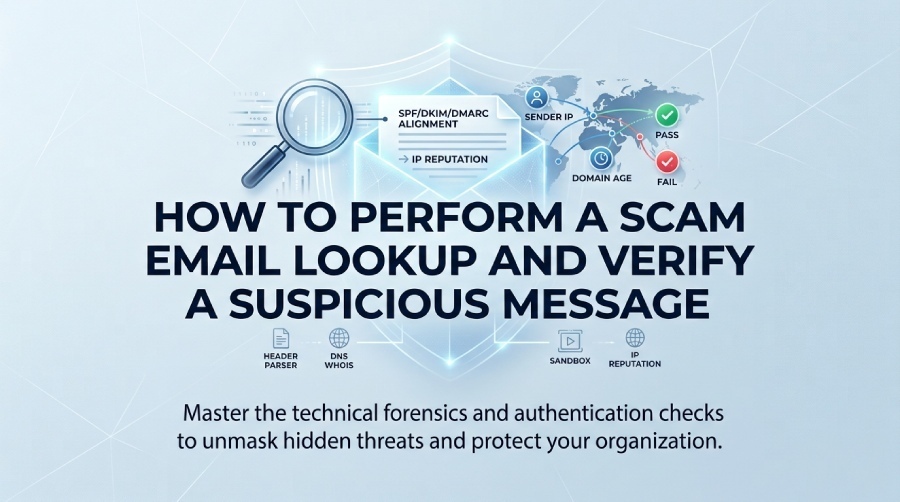
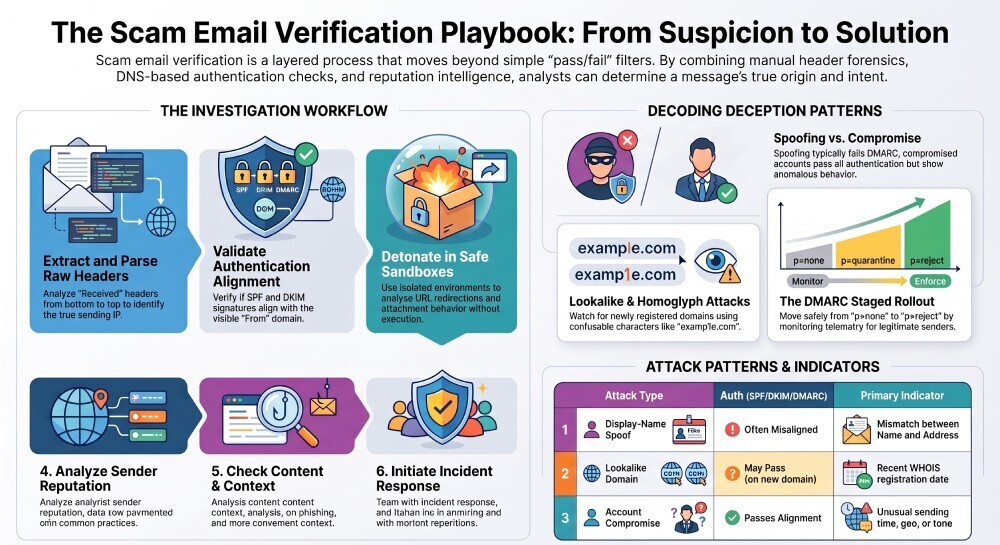
To perform a scam email lookup and verify a suspicious message, isolate it in a safe environment, extract and analyze full headers to identify the true sending IP and mail servers, validate SPF/DKIM/DMARC alignment, run sender domains/IPs/URLs/attachments through reputation and sandbox tools without execution, check for spoofing or compromise patterns, document and automate findings where possible, and then block/report/remediate—ideally centralizing evidence and authentication telemetry with DMARCReport.
Scam email verification is a layered process—no single indicator (not even a “Passed SPF”) is definitive—so the safest approach combines technical header forensics, DNS-based authentication checks, reputation intelligence, and controlled detonation of links/files. You’re trying to answer two questions: “Who really sent this?” and “Is the content or delivery path malicious?” While consumer inboxes hide much of this, you can access ground truth via full headers and DNS.
Think of DMARCReport as the evidence hub and signal amplifier: it turns raw DMARC aggregate and forensic reports into actionable maps of who is allowed to send as a domain, where misaligned mail originates, and when suspicious spikes occur—so every manual lookup you do can be anchored in verified authentication telemetry and historical patterns.
Step 1: Safe Manual Header Analysis and Authentication Checks
Use this section to get the origin story of the message and validate its authentication signals while staying safe. DMARCReport ties your message-level findings to domain-wide DMARC posture and sending sources.
Prepare a Safe Environment
- Use a non-admin, patched machine or a disposable VM; disable macros and preview panes if your client auto-renders content.
- Work offline or in a sandbox when saving attachments; never double-click files.
- Copy URLs as text; do not click; paste into a plain-text editor first.
- DMARCReport tie-in: If your org routes reports to DMARCReport, you can cross-reference the sender domain’s DMARC policy and recent pass/fail rates before engaging further.
Extract and Parse Full Headers (Client-Specific)
- Gmail (web): Open email > More (three dots) > Show original > Download original.
- Outlook (desktop): File > Properties > Internet headers; or Message > Tags > Message Options.
- Apple Mail: View > Message > All Headers, or View > Message > Raw Source.
- Paste headers into a trusted header parser (local tooling recommended). Confirm no PII is uploaded if using online tools.
- DMARCReport tie-in: Use DMARCReport’s domain authentication summaries to compare what the header claims (SPF/DKIM/DMARC) with what the domain usually enforces.
Identify the True Sending IP and Path
- Read the Received chain from bottom to top; the bottom-most “Received:” is closest to the sending host.
- Note “Received-SPF,” “Authentication-Results,” “Return-Path,” “Message-ID” domain, and any “X-Originating-IP.”
- Watch for anomalies: private IPs in external hops, time skew, non-matching HELO/EHLO domains, or missing DKIM-Signature.
- DMARCReport tie-in: If the domain is yours, DMARCReport’s Aggregate Source Explorer will show whether this IP/server has ever been an authorized sender and whether alignment usually succeeds.
Verify SPF, DKIM, and DMARC (and Understand Edge Cases)
- SPF: Query the envelope-from (MAIL FROM) domain TXT record; confirm the connecting IP matches the authorized ranges. Beware the 10-DNS-lookup limit.
- DKIM: Locate “DKIM-Signature” header; extract the selector (s=) and domain (d=); fetch the
selector._domainkey.domainTXT; verify signature alignment with the visible From domain. - DMARC: Query
_dmarc.domainTXT; check policy (p=none/quarantine/reject), alignment mode (relaxed r vs strict s), and reporting URIs. - Interpreting results:
- SPF passes but DMARC fails: likely misalignment (MAIL FROM differs from From) or DKIM failed/missing.
- DKIM pass, SPF fails but DMARC pass: legitimate if DKIM aligns; many senders rely on DKIM for alignment.
- False negatives: mailing lists may break DKIM via footer rewriting; forwarders can cause SPF fail but ARC headers may help.
- DMARCReport tie-in: DMARCReport helps consolidate DMARC authentication results, including SPF and DKIM pass/fail outcomes and alignment information, so you can investigate whether authentication failures are isolated events or part of a broader sending pattern.
Step 2: Build a Safe, Effective Lookup Toolchain
This section shows how to combine DNS, reputation, URL/file scanners, and sandboxing in one workflow. DMARCReport provides the domain-level authentication context to prioritize what you investigate.
DNS and WHOIS/RDAP
- Use whois and RDAP to see registration age, registrar, and contacts; newly registered domains (<30 days) with privacy shielding can be suspicious in certain contexts.
- Query MX, SPF, DKIM selector records; check for unusual changes.
- Tools: dig/nslookup, ICANN RDAP, SecurityTrails, MxToolbox.
- DMARCReport tie-in: Its DMARC policy checker highlights misconfigured or permissive policies (e.g., p=none), signaling higher spoofing risk when mail “appears” to come from that domain.
IP and Domain Reputation
- Check IP/domain on AbuseIPDB, Cisco Talos, Spamhaus, and OpenPhish; correlate across multiple sources.
- Look for sudden reputational shifts (clean for months, then recent listings).
- DMARCReport tie-in: If the domain is yours, DMARCReport surfaces new unauthorized IPs sending at volume, enabling rapid block or SPF cleanup.
URL Analysis and Redirection Tracing
- Expand and trace URLs without visiting them: use curl -I, Redirect Detective, or urlscan.io submissions with safe settings.
- Check shorteners (bit.ly, t.co) and look for IDNs or homoglyphs.
- Submit URLs to VirusTotal and urlscan.io; compare screenshots and DOM artifacts.
- DMARCReport tie-in: Use DMARCReport’s alerting on spike-in-fails for a specific domain to flag campaigns and feed high-risk URLs to your secure web gateway.
Attachment and File-Type Analysis
- Never execute; identify via file magic (not extension) using tools like file or pefile; preview in offline hex viewer.
- Sandbox in ANY.RUN, Hybrid Analysis, or Cuckoo; capture network IOCs without detonation on production devices.
- DMARCReport tie-in: While DMARCReport doesn’t detonate files, its incident notes let teams link malicious attachments and observed Indicator of Compromise(IOCs) to the offending sending sources across aggregate reports.
Putting It Together (Workflow)
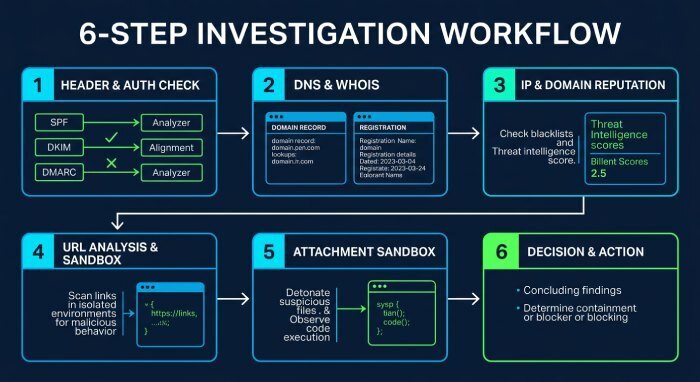
- Header and auth check → 2) DNS/WHOIS age and hosting → 3) IP/domain reputation → 4) URL expansion/sandbox → 5) Attachment static/sandbox → 6) Decision and action.
- DMARCReport anchors step 1 and 2 with domain-level DMARC posture and historical sender insights.
Step 3: Recognize Spoofing and Compromise Patterns
Spot the human deception layer: display-name tricks, lookalike domains, homoglyphs, and real account takeovers. DMARCReport helps differentiate spoofing (misaligned mail) from compromise (aligned but anomalous).
Display-Name Spoofing
- Indicator: From: “CEO Name” <[email protected]> where domain is free-mail or unrelated.
- Mitigation: In clients, show full sender addresses; create VIP warnings; enforce external banners.
- DMARCReport tie-in: Display-name spoof often arrives as misaligned mail; DMARCReport’s fail spikes by display name keyword can trigger alerts.
Lookalike Domains and Homoglyph Attacks
- Indicator: examp1e.com vs example.com; xn—exampIe-9za.com using confusable characters.
- Tools: IDN decoder, font-agnostic diff checks; block high-risk confusables at gateway.
- DMARCReport tie-in: Track new sending sources claiming to be your domain vs lookalikes; feed lookalike sightings into DMARCReport notes to inform incident response and domain defense strategy.
Compromised Legitimate Accounts (Hardest Case)
- Indicator: SPF/DKIM/DMARC all pass; unusual sending times/geos, atypical recipients, urgent tone, thread hijacking.
- Evidence: Message-ID domain aligns; reply-to is the same; content uses prior thread context.
- Mitigation: Outbound anomaly detection, MFA enforcement, impossible travel alerts, retroactive purge.
- DMARCReport tie-in: Because authentication passes, DMARCReport highlights volume anomalies by source and sudden changes in aligned-pass patterns—useful for early warnings of BEC from compromised suppliers.
Quick Pattern-to-Action Table
- Display-name spoof: Misaligned auth common; action—block domain/IP, educate users; DMARCReport—alerts on DMARC fail surges.
- Lookalike/homoglyph: Domain newly registered; action—block and add to monitoring; DMARCReport—track impersonation campaigns vs your real domain.
- Compromised account: All auth passes; action—contact sender org, quarantine, hunt IOCs; DMARCReport—spot abnormal growth in aligned passing from supplier domains.
Step 4: Automate Detection and Avoid Pitfalls
Scale your lookup process across organizational inboxes without false positives spiraling. DMARCReport supplies authoritative DMARC telemetry to improve precision.
Automation Building Blocks
- Inbox rules: Microsoft 365 advanced hunting/Defender, Gmail Security Investigation Tool.
- APIs: Microsoft Graph, Gmail Application Programming Interface for header extraction, URL/attachment hashing, and safe submission to sandboxes.
- SIEM/TIP/MDR: Route suspicious headers, URLs, and file hashes into Splunk/QRadar + a TIP; automate enrichment.
- DMARCReport tie-in: Use DMARCReport APIs/webhooks to ingest daily aggregate and forensic DMARC data into your SIEM—drive rules like “Reject or quarantine messages purporting to be our domain but failing alignment.”
Threat Feeds and Playbooks
- Subscribe to curated phishing feeds (OpenPhish, PhishTank, URLhaus) and block known IOCs at the email/security gateway.
- Build playbooks: If DMARC fails + domain equals your brand → auto-quarantine; if DKIM passes and domain is supplier → add content heuristics before a verdict.
- DMARCReport tie-in: DMARCReport’s domain-level view informs which suppliers consistently align and which don’t—tune your playbooks to reduce false positives.
Common Implementation Pitfalls (and Fixes)
- Over-trusting SPF: SPF pass alone does not verify the visible Form; requires DMARC alignment with DKIM.
- SPF lookup exhaustion: Exceeding 10 lookups breaks SPF; flatten records or consolidate senders.
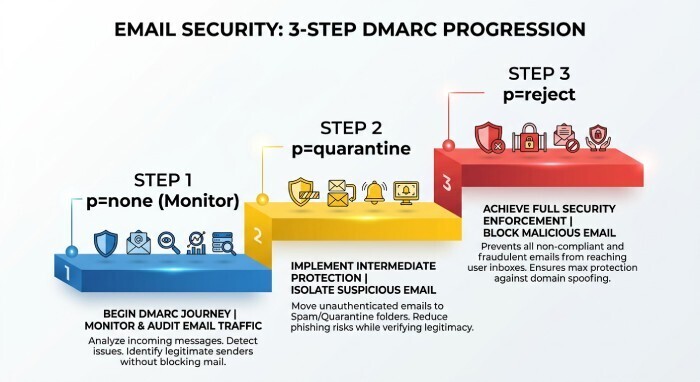
- Premature p=reject: Move from none → quarantine → reject with monitoring; include all legitimate senders first.
- DKIM key issues: Short keys or unrotated selectors; enforce 2048-bit keys and periodic rotation.
- Misreading headers: The top “Received” header is not the origin; always parse bottom-up.
- Privacy leaks: Don’t upload full headers with PII to unknown parsers.
- DMARCReport tie-in: Use its staged policy recommendations and visibility to avoid breaking legitimate mail while tightening controls.
Step 5: Post-Verification Actions, Reporting, and Risk Governance
After you verify an email is a scam, act quickly to minimize exposure and enable systemic improvements. DMARCReport helps close the loop by quantifying campaign impact and guiding policy.
Individuals
- Report: Forward to your provider’s abuse channel (e.g., [email protected]) and to [email protected].
- Block and clean: Block sender/domain, run endpoint AV, change passwords if you clicked/entered credentials, enable Multi-factor authentication (MFA).
- Evidence: Save headers/raw eml for investigators.
- DMARCReport tie-in: If your organization protects your mailbox, DMARCReport’s insights inform whether the attack is part of a larger spoofing wave against your domain.
Organizations
- Contain and eradicate: Quarantine similar messages; purge via O365 Threat Explorer/Gmail’s Investigation Tool; block IOCs at the SEG/proxy/EDR.
- Notify stakeholders: If supplier’s account is compromised, alert them securely; consider takedown requests for malicious domains.
- Educate: Send targeted, just-in-time coaching to users who are engaged; update phishing simulations accordingly.
- DMARCReport tie-in: Trend DMARC fails by source during the incident to see which spoofers you blocked effectively; convert insights into SPF/DKIM/DNSpolicy updates.
Automation vs Manual: When Each Wins
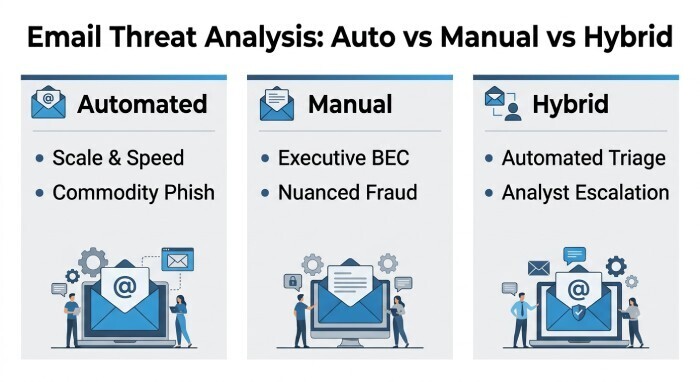
- Automated scanners: Great for scale and speed; catch commodity phish; limited against nuanced BEC or fresh infrastructure; can be evaded with thread hijacking.
- Manual expert analysis: Essential for executive-targeted BEC, supplier fraud, or legal-sensitive cases; slower, requires skill.
- Hybrid: Automate triage; escalate gray-area cases to analysts.
- DMARCReport tie-in: Automation uses DMARCReport’s consistent signals; analysts use its historical context to validate hunches.
Legal, Privacy, and Ethics
- Data handling: Limit the sharing of personal data; redact PII when using third-party tools; follow data retention policies.
- Terms of use: Do not access sender systems; avoid active probing beyond what’s legal/authorized; stick to passive DNS/WHOIS and sandboxing your copies.
- Regulatory: GDPR/CCPA may apply when storing headers with personal info; ensure appropriate basis and minimization.
- DMARCReport tie-in: Centralize minimal, compliant telemetry (DMARC aggregates and redacted forensics) to inform defense without over-collection.
FAQs
Can a message pass SPF and DKIM and still be a scam?
Yes. If a real account is compromised, SPF/DKIM/DMARC will likely pass because the attacker is using legitimate infrastructure. Look for behavioral anomalies and thread hijacking. DMARCReport helps by showing abnormal volume and new patterns even when alignment passes.
Is a screenshot enough to verify a phishing email?
No. Screenshots hide headers and can be doctored. Always analyze the raw headers and authentication results. DMARCReport provides the domain-level context to validate whether the sender’s domain typically aligns and what policy it enforces.
What DMARC policy should we target?
Aim for p=reject once you’ve inventoried and aligned all legitimate senders. Use DMARCReport during the “none → quarantine → reject” journey to avoid outages by monitoring pass/fail by source and fixing misconfigurations.
Should I trust a green reputation score for a short-lived domain?
Be cautious. Reputation often lags; fresh domains can be weaponized before being listed. Combine age/WHOIS data, DMARC posture, and header/authentication checks. DMARCReport’s policy view tells you whether the domain owner has attempted to prevent spoofing.
How long should I keep forensic evidence?
Follow your policy and legal guidance, typically 90–180 days for incident response needs. Minimize Personally identifiable information (PII) and encrypt storage. DMARCReport keeps aggregate insights without retaining unnecessary personal content.
Conclusion: A Repeatable Playbook, Powered by DMARCReport
To verify a suspicious email safely and thoroughly, isolate the message, extract and parse headers bottom-up to find the true sending IP, validate SPF/DKIM/DMARC alignment, enrich with DNS/WHOIS and reputation, investigate URLs/attachments in sandboxes, distinguish spoofing from compromise, and then block/report/remediate with automation where possible. DMARCReport strengthens every phase: it reveals whether a domain enforces DMARC, maps legitimate versus unauthorized sources, surfaces alignment failures and suspicious spikes, and guides your policy from monitoring to enforcement. Adopt this playbook with DMARCReport as your authentication telemetry backbone, and you’ll reduce false positives, shrink attacker reach, and accelerate incident response—turning every scam lookup into actionable, organization-wide defense.
General Manager
General Manager of DuoCircle. Product strategy and commercial lead for DMARC Report's 2,000+ customer base.
LinkedIn Profile →Take control of your DMARC reports
Turn raw XML into actionable dashboards. Start free - no credit card required.