How to Protect Your Email Server from Cyber Threats

Quick Answer
Protect your email server by enabling MFA, using strong passwords, and enforcing role-based access. Keep software and security patches updated, use spam and malware filtering, enable TLS encryption, monitor logs for suspicious activity, and maintain regular secure backups. Use firewalls & IDS tools.
Email continues to be one of the most widely used communication tools for businesses and individuals alike. Unfortunately, it also remains one of the biggest targets for cybercriminals. Attackers frequently exploit unsecured email servers to spread malware, launch phishing campaigns, steal credentials, and impersonate legitimate organizations.
A compromised email server can damage your reputation, expose sensitive information, and disrupt business operations. That’s why securing your email infrastructure is no longer optional—it’s a critical part of modern cybersecurity.
This guide explains practical strategies to strengthen your email server security, reduce risks, and improve the reliability of your email communications.
Why Email Server Security Matters
Every day, organizations exchange confidential data through email, including financial information, contracts, passwords, customer details, and internal communications. Without proper protection, attackers can intercept or manipulate these messages.
An insecure email environment can lead to:
- Phishing attacks
- Spoofed domains
- Malware infections
- Data breaches
- Business Email Compromise (BEC)
- Spam abuse
- Reputation blacklisting
Strong email security helps prevent unauthorized access while improving email deliverability and trustworthiness.
Common Threats Facing Email Servers
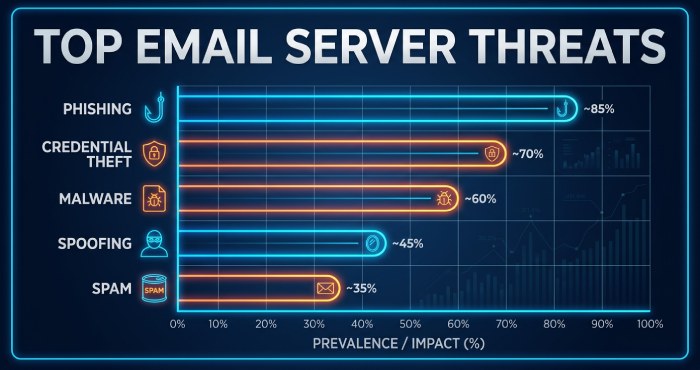
Before improving security, it’s important to understand the risks email servers face.
Phishing Attacks
Phishing emails are designed to trick recipients into revealing sensitive information or downloading malicious files. Attackers often impersonate trusted companies or coworkers.
Domain Spoofing
Cybercriminals can forge your domain name to send fake emails pretending to come from your organization. This damages credibility and may deceive customers or employees.
Malware and Ransomware
Email attachments and malicious links are common methods used to distribute malware. Once opened, these threats can encrypt files, steal data, or spread through networks.
Spam Abuse
If attackers gain access to your server, they may use it to send spam campaigns. This can cause your IP address and domain to become blacklisted.
Credential Theft
Weak passwords and poor authentication practices make it easier for attackers to compromise user accounts.
Essential Steps to Secure an Email Server
Use Strong Authentication Methods
Weak login credentials are one of the easiest ways attackers gain access to mail systems.
Improve authentication security by:
- Requiring complex passwords
- Enforcing password rotation policies
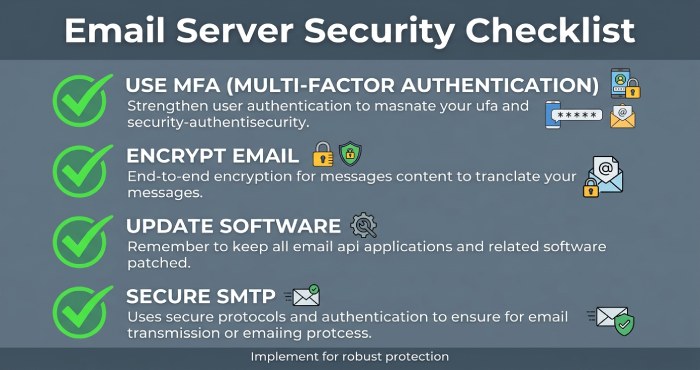
- Using multi-factor authentication (MFA)
- Preventing password reuse
- Disabling inactive accounts
MFA adds an additional security layer by requiring users to verify their identity beyond just a password.
Implement SPF, DKIM, and DMARC
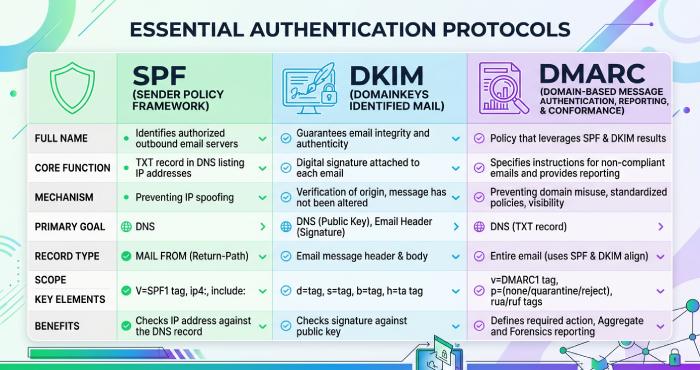
Email authentication protocols are essential for protecting domains from spoofing and unauthorized use.
SPF (Sender Policy Framework)
SPF allows domain owners to specify which mail servers are permitted to send emails on behalf of their domain.
Benefits include:
- Reduced spoofing attempts
- Better sender reputation
- Improved deliverability
DKIM (DomainKeys Identified Mail)
DKIM attaches a digital signature to outgoing messages. Receiving servers can verify the signature to confirm the email was not altered during transit.
Advantages:
- Message integrity protection
- Improved trust with email providers
- Reduced email tampering
DMARC (Domain-based Message Authentication, Reporting, and Conformance)
DMARC builds on SPF and DKIM by defining how receiving servers should handle suspicious messages.
DMARC helps organizations:
- Monitor email activity
- Prevent unauthorized sending
- Receive authentication reports
- Reduce phishing attacks
A proper DMARC policy significantly improves domain security and visibility into email traffic. Publishing your DMARC record and tuning it from p=none to p=reject is the key first step. Use a DMARC checker to confirm your policy record is published correctly.
Encrypt Email Communications
Encryption protects email content while it travels across networks.
TLS Encryption
Transport Layer Security (TLS) secures the connection between mail servers, making it harder for attackers to intercept messages.
Organizations should:
- Enforce modern TLS versions
- Disable outdated encryption protocols
- Monitor certificate validity
- Configure secure cipher suites
End-to-End Encryption
For highly sensitive communications, end-to-end encryption ensures only intended recipients can read messages.
Popular encryption technologies include:
Encryption reduces exposure to data interception and unauthorized access.
Keep Email Software Updated
Outdated software creates security vulnerabilities that attackers can exploit.
Regularly update:
- Mail server software
- Operating systems
- Plugins and extensions
- Webmail applications
- Security tools
Applying security patches quickly helps close known vulnerabilities before attackers can abuse them.
Secure SMTP Configuration
SMTP is responsible for sending emails, but poor SMTP configuration can create major security risks.
Best practices include:
- Disabling open relay settings
- Restricting unauthorized access
- Limiting outbound email rates
- Monitoring SMTP logs
- Using authenticated SMTP connections
A properly configured SMTP server reduces spam abuse and unauthorized sending.
Enable Anti-Spam and Anti-Malware Protection
Modern email security requires filtering malicious content before it reaches users.
Email filtering systems can:
- Block suspicious attachments
- Detect phishing links
- Identify spam campaigns
- Scan for malware signatures
- Prevent malicious downloads
Advanced threat protection systems use AI and behavioral analysis to identify evolving threats.
Monitor Email Traffic and Logs
Continuous monitoring helps detect unusual activity before it escalates into a major incident.
Administrators should regularly review:
- Login attempts
- Failed authentication events
- Sending patterns
- IP reputation issues
- Suspicious forwarding rules
Automated alerts can notify security teams about abnormal activity in real time.
Protect Against Email Forwarding Risks
Email forwarding can unintentionally weaken security controls.
Improper forwarding configurations may:
- Break SPF validation
- Cause DMARC failures
- Create delivery issues
- Allow spoofed emails to bypass protection
Organizations should carefully review forwarding rules and ensure authentication mechanisms remain aligned.
Use DNS Security Best Practices
DNS records play a major role in email authentication and routing.
Important DNS protections include:
- DNSSEC implementation
- Accurate SPF records
- Proper DKIM key rotation
- Secure DMARC policies
- Monitoring DNS changes
Incorrect DNS configurations can weaken overall email security.
Restrict User Permissions
Not every employee needs administrative access to the email system.
Limit permissions by:
- Applying role-based access controls
- Restricting administrator privileges
- Separating user responsibilities
- Auditing access regularly
Reducing unnecessary privileges minimizes internal security risks.
Educate Users About Email Security
Technology alone cannot stop every attack. Human awareness is equally important.
Security awareness training should teach users how to:
- Identify phishing emails
- Avoid suspicious attachments
- Verify sender authenticity
- Report unusual activity
- Use strong passwords safely
Educated users are less likely to fall victim to email-based attacks.
Back Up Email Data Regularly
Backups help organizations recover from ransomware, hardware failures, or accidental deletions.
A strong backup strategy should include:
- Automated backups
- Encrypted storage
- Offsite copies
- Regular testing
- Recovery planning
Reliable backups reduce downtime and improve disaster recovery capabilities.
Strengthen Outbound Email Reputation
Mailbox providers evaluate sender reputation when deciding whether emails reach inboxes or spam folders.
Improve reputation by:
- Maintaining clean mailing lists
- Avoiding spam-like content
- Monitoring bounce rates
- Authenticating emails correctly
- Preventing unauthorized sending
Good reputation management improves both security and deliverability.
Benefits of a Secure Email Server
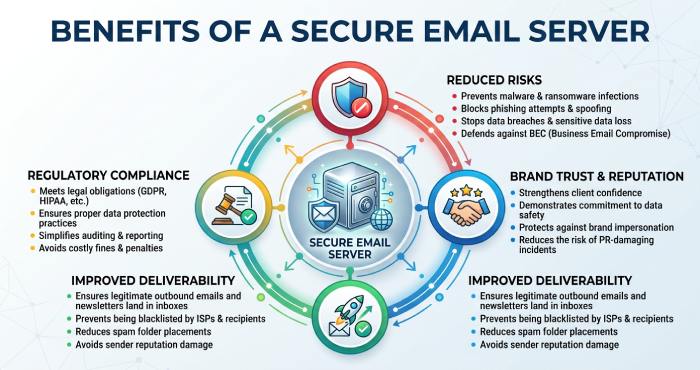
Securing your email infrastructure offers long-term advantages beyond protection alone.
Key benefits include:
- Reduced phishing risks
- Stronger brand trust
- Better inbox placement
- Compliance support
- Improved customer confidence
- Reduced spam abuse
- Lower risk of data breaches
A secure email environment also helps maintain business continuity and operational stability.
Final Thoughts
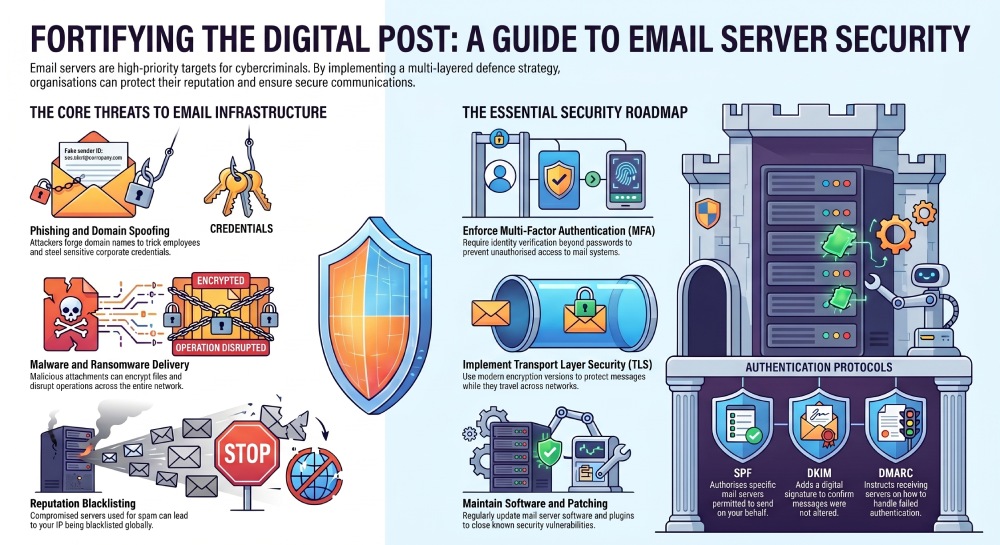
Email remains one of the most important communication channels in the digital world, making it a constant target for cyber threats. Organizations that fail to secure their email servers face increased risks of phishing, spoofing, malware infections, and reputational damage.
By implementing authentication protocols like SPF, DKIM, and DMARC, enforcing encryption, monitoring activity, updating systems regularly, and educating users, businesses can build a far more resilient email infrastructure. A monitoring platform ties it together—explore the DMARCReport features built for exactly this.
Email security is not a one-time setup—it requires ongoing monitoring, maintenance, and improvement. A proactive approach helps organizations stay ahead of evolving threats while ensuring secure and trustworthy communication.
General Manager
General Manager of DuoCircle. Product strategy and commercial lead for DMARC Report's 2,000+ customer base.
LinkedIn Profile →Take control of your DMARC reports
Turn raw XML into actionable dashboards. Start free - no credit card required.