How To Recognize A Zip Bomb In Spam Email Attachments

Quick Answer
A zip bomb is a compressed file designed to expand massively when opened, consuming system resources. Watch for unexpected ZIP attachments, unusually small file sizes, unknown senders, and suspicious email content before opening any archive.
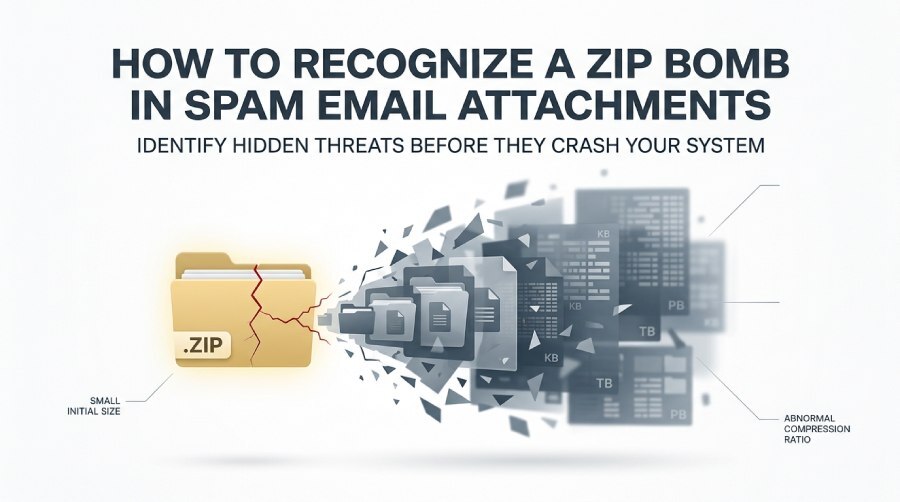
Spam emails often use ZIP attachments to bypass security filters and trick recipients into opening malicious files. One lesser-known threat is the zip bomb—a compressed archive that appears harmless but expands into an enormous amount of data when extracted, potentially overwhelming system resources and causing crashes or denial-of-service conditions. Recognizing the warning signs of a zip bomb before opening an attachment is an important part of email security. SPF, DKIM, and DMARC help verify email authenticity, prevent spoofing, and reduce the risk of malicious spam attachments such as zip bombs reaching users’ inboxes. Reviewing your DMARC aggregate reports reveals whether spoofed senders are trying to slip malicious archives past your filters. Run a DMARC check to confirm your domain’s policy is blocking spoofed senders. This guide explains how zip bombs work, the red flags to watch for in spam emails, and the safest ways to inspect suspicious ZIP files without putting your device at risk.
What a Zip Bomb Is and Why Attackers Use It in Spam Campaigns
A zip bomb is a specially crafted archive designed to look small while expanding into a massive amount of uncompressed data during extraction. It is also called a decompression bomb, archive bomb, or zip of death because its purpose is not usually to steal data directly, but to overwhelm the target system’s memory usage, disk space, and computational power.
The core trick is extreme data expansion. A file that appears to be only a few kilobyte or a small gigabyte ZIP attachment may contain compressed data that expands into many gigabytes, terabytes, or even petabytes of uncompressed data. The famous 42.zip example, discussed widely in security circles and by writers such as John Leyden and Ernie Smith, demonstrated how a tiny archive could unpack into an enormous volume of data. Some reports and analyses, including references seen in communities such as the vuln-dev mailing list, helped make the zip of death a recognizable security concept.
Attackers use a malicious archive file in spam campaigns because email systems, help desks, HR departments, finance teams, and customer support inboxes often receive ZIP attachments as part of routine work. A fake invoice, résumé, shipping document, or legal notice may hide a zip bomb behind ordinary business language. Once the victim or an automated security scanner attempts file extraction, the decompression bomb can cause a crash, system freeze, out-of-memory condition, or even a localized denial-of-service attack.
Why Compression Makes Zip Bombs Dangerous
The danger comes from the compression ratio: the relationship between the size of the compressed data and the resulting uncompressed data. Normal ZIP files have reasonable compression ratios. A zip bomb, by contrast, has an abnormal compression ratio that can be thousands or millions of times larger than expected.
Many ZIP archives use DEFLATE, though other compression methods such as bzip2 may also be relevant in broader archive analysis. Attackers abuse how compression stores repeated patterns efficiently. In more advanced cases, an archive bomb may rely on recursion, where one archive contains another archive, which contains another archive, and so on. This creates a recursive zip bomb, where every layer of recursion multiplies the amount of uncompressed data generated.
A recursive zip bomb may include a nested zip file structure, sometimes resembling quines, where archives reproduce or reference archive-like content repeatedly. Researchers such as David Fifield and Russ Cox have written about efficient and inefficient handling of these patterns, including how poor algorithms can lead to quadratic scaling rather than safe linear behavior. This is similar in spirit to other resource-exhaustion attacks such as ReDoS, the Billion laughs attack, a Black fax, a Fork bomb, a Logic bomb, or a Time bomb—all of which abuse a system’s assumptions about resource use.
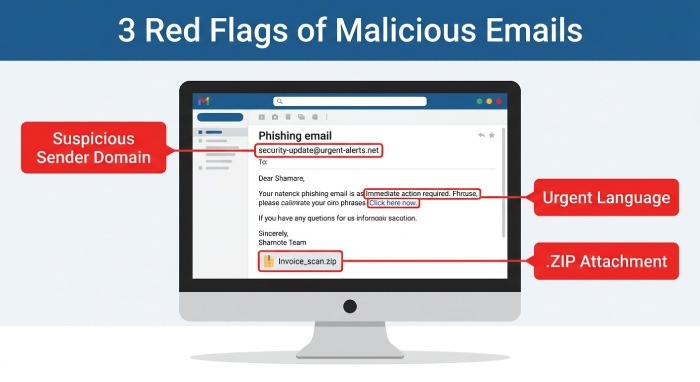
Common Email Red Flags: Suspicious Senders, Urgent Language, and Unexpected Attachments
A spam email carrying a malicious archive file often relies on social engineering before it relies on technical exploitation. The attacker wants you to open the attachment before thinking carefully. Common warning signs include mismatched sender addresses, unfamiliar domains, spoofed display names, and messages pretending to come from banks, delivery services, government agencies, or internal executives.
Urgent language is another major clue. Phrases such as “final notice,” “payment overdue,” “account suspension,” “legal action required,” or “open immediately” are designed to bypass skepticism. A zip bomb hidden in a fake invoice may not contain traditional malware, but it can still damage availability by consuming disk space and causing security tools or endpoints to freeze.
Business-Themed Lures That Commonly Carry Archive Bombs
Watch carefully for ZIP attachments attached to messages about:
- Invoices, purchase orders, and remittance advice
- Résumés and job applications
- Tax forms, payroll documents, or HR notices
- Shipping labels and customs documents
- Court summonses, contracts, and scanned documents
Attackers prefer ZIP files because the zip file format is widely trusted and supported across Windows, macOS, Linux, and cloud services. A recipient using Ubuntu, Windows, or a virtual test system such as VirtualBox may all be able to open the same archive. That broad compatibility makes the archive bomb an attractive spam payload.
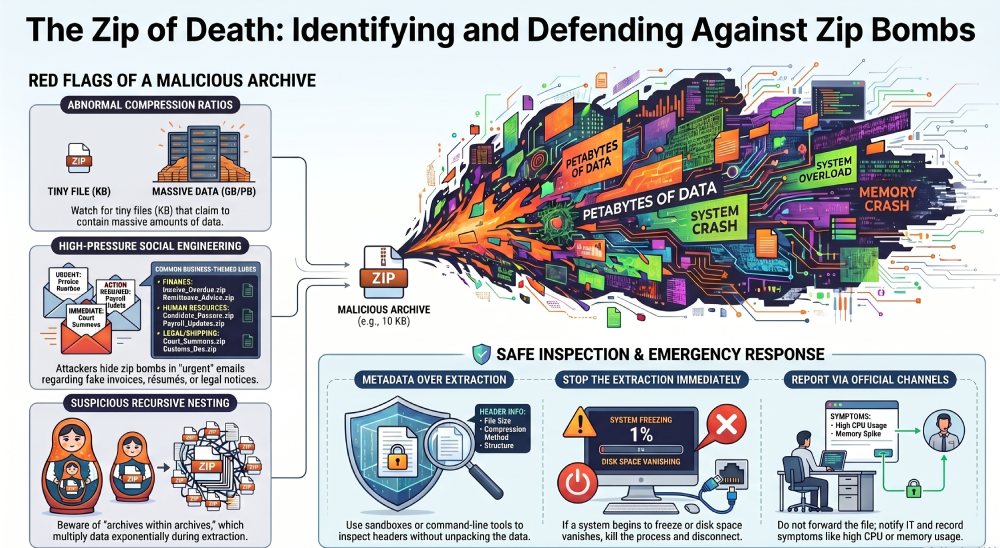
Attachment Warning Signs: Tiny ZIP Files, Nested Archives, and Unusual File Names
The most recognizable attachment warning sign is a ZIP file that is suspiciously tiny but claims to contain something large or important. A payroll package, photo set, software bundle, or legal evidence archive that is only a few kilobytes may be worth questioning. A decompression bomb often depends on a highly abnormal compression ratio, where small compressed data expands into huge uncompressed data.
A second sign is the presence of multiple archive layers. If an attachment contains ZIP files inside ZIP files, especially many repeated names or numbered folders, you may be looking at a recursive zip bomb. This type of recursion produces exponential growth during file extraction. Each layer expands into more layers, and each layer contains more compressed data that becomes more uncompressed data.
Technical Clues Inside a Suspicious ZIP
A trained analyst may inspect ZIP metadata without extracting the content. In the zip file format, information may appear in the Central Directory and in each Local File Header, commonly abbreviated LFH. Mismatches between the Central Directory and LFH, strange sizes, duplicate entries, or impossible offsets can indicate a malicious archive file or a malformed archive designed to trigger parser bugs.
Some advanced archive bomb techniques use an overlap technique, where overlapping files point to the same compressed regions or manipulate offsets so that extraction tools repeatedly process shared data. These tricks can confuse a weak file parser, inflate the apparent content, or trigger edge cases such as buffer overflow, excessive memory usage, or out-of-memory failures.
File Names and Metadata That Should Raise Suspicion
Be cautious when you see:
- Thousands of similarly named files such as a.zip, aa.zip, aaa.zip
- Deep folder paths suggesting heavy recursion
- File names with random characters or misleading extensions
- Archives claiming impossible unpacked sizes
- ZIPs using unexpected features such as Zip64 for small-looking files
Zip64 is legitimate, especially for large archives, but in a suspicious spam attachment it can be a clue that the sender expects the archive to represent huge sizes. A zip of death may report an unpacked size far beyond normal business use, sometimes into Gibibyte or larger ranges.
Safe Ways to Inspect Suspicious ZIP Attachments Without Opening Them
Do not double-click a suspicious archive. Safe inspection means looking at metadata, reputation, and structure without performing full extraction. Opening a zip bomb directly can cause a crash, consume available disk space, or trigger a denial-of-service attack against your own workstation.
Use reputable antivirus software and secure email gateways, but do not rely on them alone. Some antivirus software may attempt to scan inside the archive and encounter the same resource-exhaustion problem the victim would face. Modern tools include countermeasures, but older scanners have historically been vulnerable to decompression bomb behavior.

Use Sandboxing and Read-Only Analysis
Sandboxing is one of the safest approaches. A suspicious ZIP can be inspected in an isolated virtual machine, container, or detonation environment with strict CPU, memory, and storage limits. For example, an analyst might use VirtualBox with a disposable Ubuntu guest, no shared folders, and a capped virtual disk. If the archive tries to expand aggressively, the sandbox limits the damage.
Security teams may also use command-line listing tools that show archive contents without extracting them. The goal is to estimate the compression ratio, review the Central Directory, compare header sizes, and detect suspicious recursion. A safe workflow checks the claimed uncompressed data size before any file extraction.
Filesystem and Storage Protections
Some environments add storage-level defenses. A file system such as zfs may support quotas, snapshots, transparent compression, and deduplication. However, these features are not a substitute for safe handling. zfs with LZ4 compression can reduce storage pressure in normal workloads, but a malicious archive file can still waste CPU and I/O during decompression. Likewise, deduplication may help when repeated blocks appear, but it may also increase memory demands if poorly sized.
Researchers and practitioners have proposed safer archive handling using strict size limits, bounded recursion depth, and more efficient algorithms. Dynamic programming can help avoid repeated processing in some recursive structures, and the SEI CERT Oracle Coding Standard for Java from Carnegie Mellon University emphasizes defensive coding practices relevant to resource management. Sites such as Bamsoftware.com, along with analysis by Peter Bieringer, David Fifield, and Russ Cox, have helped explain why robust parsers must account for adversarial inputs rather than trusting archive metadata.
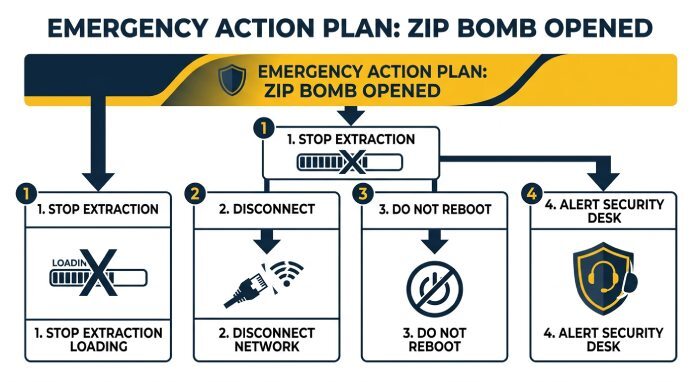
What to Do If You Receive or Accidentally Open a Suspected Zip Bomb
If you receive a suspected zip bomb, do not open it, forward it casually, or upload it to consumer tools that may automatically unpack it. Preserve the email if your organization needs evidence, but report it through the approved phishing or security channel. If you are unsure, treat the attachment as a malicious archive file until proven otherwise.
If you accidentally opened a decompression bomb or zip of death, act quickly:
- Stop the extraction process if possible.
- Disconnect from the network if system performance is collapsing.
- Do not reboot repeatedly unless instructed by IT; repeated startup scans may re-trigger the archive bomb.
- Notify security staff and provide the original email details.
- Record symptoms such as freeze, crash, high CPU, high memory usage, or rapidly shrinking disk space.
A recursive zip bomb can continue expanding until the system reaches out-of-memory conditions or the drive fills. In enterprise environments, this can affect shared folders, mail gateways, endpoint detection and response tools, and backup systems. Joseph N. Pelton’s work on connected infrastructure, including themes in Smart Cities of Today and Tomorrow, underscores a broader point: availability attacks against digital systems can have real operational consequences.
Practical Countermeasures for Users and Security Teams
Effective countermeasures combine user awareness, technical controls, and safe parsing. Mail filters should flag abnormal compression ratio values, excessive archive depth, suspicious Zip64 fields, and inconsistencies between the Central Directory and Local File Header. Endpoint tools should limit archive scanning depth and cap total uncompressed data processed from a single attachment. Domains that achieve DMARC compliance also cut down on the spoofed messages that carry these archives in the first place.
Security teams should also test how their stack handles archive bomb samples in controlled environments—not production mailboxes. References such as 42.zip, analyses covered by outlets like Vice, and technical discussions from researchers can help defenders understand how a zip bomb, decompression bomb, or zip of death behaves without exposing users to unnecessary risk.
For everyday users, the safest rule is simple: a tiny ZIP attachment from an unexpected sender, especially one with urgent language or nested archives, should be treated as a potential malicious archive file. Whether it is a classic archive bomb, a modern recursive zip bomb, or a malformed file targeting parser bugs, the risk comes from forcing your system to turn small compressed data into overwhelming uncompressed data.
General Manager
General Manager of DuoCircle. Product strategy and commercial lead for DMARC Report's 2,000+ customer base.
LinkedIn Profile →Take control of your DMARC reports
Turn raw XML into actionable dashboards. Start free - no credit card required.