How Can I Set Up A DMARC Policy That Works Well With Gmail For My Domain?

Quick Answer
To set up a DMARC policy that works well with Gmail for your domain, publish a DMARC record and roll it from p=none to p=quarantine to p=reject while ensuring Gmail-aligned SPF and 2048-bit DKIM for every sender (including third parties), monitor Gmail aggregate reports via DMARCReport, fix misalignments (return-path, selectors, subdomains), and implement ARC/SRS where forwarding breaks authentication.
Related: Free DMARC Checker ·How to Create an SPF Record ·SPF Record Format

Try Our Free DMARC Checker
Validate your DMARC policy, check alignment settings, and verify reporting configuration.
Check DMARC Record →To set up a DMARC policy that works well with Gmail for your domain, publish a DMARC record and roll it from p=none to p=quarantine to p=reject while ensuring Gmail-aligned SPF and 2048-bit DKIM for every sender (including third parties), monitor Gmail aggregate reports via DMARCReport, fix misalignments (return-path, selectors, subdomains), and implement ARC/SRS where forwarding breaks authentication.
Context and background
- DMARC (Domain-based Message Authentication, Reporting, and Conformance) tells Gmail how to handle messages that spoof your From domain, but it only “passes” when either SPF or DKIM passes and aligns with the visible From domain; getting Gmail to consistently treat your mail as DMARC-authenticated therefore requires properly aligned SPF/DKIM across all your mail sources, plus careful rollout to avoid false positives.
- For Google Workspace senders, Gmail provides native tools to generate 2048-bit DKIM and validate alignment; for third-party platforms (Mailchimp, SendGrid, HubSpot, Salesforce, etc.), you must configure a custom return-path and DKIM that use your domain, not the vendor’s, so that Gmail’s DMARC check sees alignment.
- DMARCReport streamlines every step for Gmail success: it discovers unknown senders from Gmail RUA data, flags alignment breaks by source and header path, guides vendor-by-vendor setup, tracks SPF lookups to keep you under Gmail’s 10-lookup limit, and scores your readiness to move from p=none to p=reject with Gmail-specific pass/fail rates. It also tracks your progress toward DMARC compliance with Gmail’s requirements.
How Gmail treats DMARC: alignment rules and pass/fail combinations
Gist: Gmail will consider your message DMARC-authenticated if either SPF or DKIM passes and the domain in that check aligns (relaxed by default) with the RFC5322.From domain.
Gmail’s DMARC evaluation
- DMARC pass if:
- DKIM=pass with d= aligned to From domain (relaxed or strict per adkim), regardless of SPF
- SPF=pass with smtp.mailfrom (or HELO) aligned to From domain (relaxed or strict per aspf), regardless of DKIM
- DMARC fail if:
- Neither SPF nor DKIM both pass and align
Alignment specifics
- Relaxed alignment (default): sub.example.com aligns with example.com
- Strict alignment: exact match only (enable with adkim=s and/or aspf=s)
- Gmail’s practical combinations:
- DKIM pass + aligned; SPF fail or not aligned → DMARC pass
- SPF pass + aligned; DKIM fail or not aligned → DMARC pass
- Both pass + aligned → DMARC pass (best for resilience)
- Both fail or both not aligned → DMARC fail → Gmail applies your policy (p)
DMARCReport connection: DMARCReport’s “Gmail Alignment Matrix” view shows, per source, the four combinations above and highlights which alignment to fix to turn a fail into a pass for Gmail.
Exact steps: DNS and Google Workspace Console (SPF, DKIM, DMARC, rotation)
Gist: Publish SPF for Google, generate 2048-bit DKIM in Admin Console, publish DMARC with reporting to DMARCReport, validate, then rotate DKIM on a cadence.
Step 1, SPF for Google and your domain
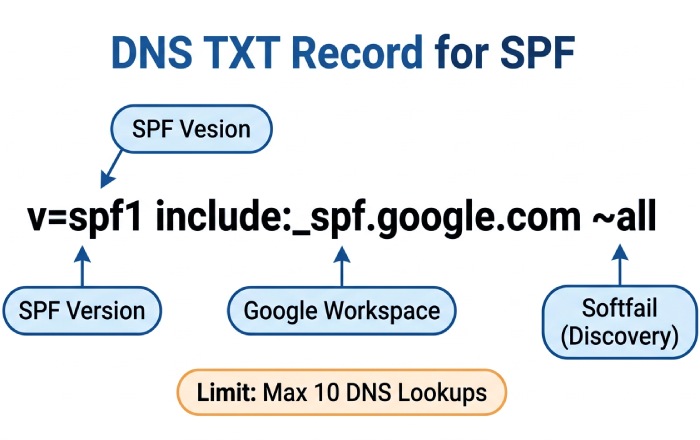
- DNS TXT at your root (example.com): v=spf1 include:_spf.google.com ~all
- Notes:
- Start with ~all (softfail) during discovery; consider -all once you’ve confirmed all senders are authorized and aligned via DMARCReport.
- Keep total DNS lookups ≤ 10. DMARCReport’s SPF Optimizer warns if you exceed this and suggests flattening or subdomain offloading.
Step 2, DKIM for Google Workspace (2048-bit)
- In Google Admin Console: Apps > Google Workspace > Gmail > Authenticate email
- Select the domain, choose 2048-bit key, selector “google” (or a date-based selector), then Generate.
- DNS TXT: google._domainkey.example.com with the provided value.
- Click Start Authentication after DNS propagates.
- Verification: send a test to a Gmail inbox and check “Authentication-Results: mx.google.com” for dkim=pass header.i=@example.com.
- Rotation: every 6-12 months:
- Generate a new selector (e.g., google2026), publish TXT, switch in Admin Console, then remove old TXT.
- DMARCReport’s Key Rotation Planner reminds you before keys age past policy.
Step 3, DMARC with reporting to DMARCReport
- DNS TXT at _dmarc.example.com (phase 1: monitoring): v=DMARC1; p=none; rua=mailto:rua@inbox.dmarcreport.example; ruf=mailto:ruf@inbox.dmarcreport.example; fo=1; adkim=r; aspf=r; pct=100; ri=86400
- Notes:
- Gmail sends aggregate (RUA) reports; Gmail does not send forensic (RUF) reports. Keep ruf for other providers but don’t expect Gmail RUF.
- DMARCReport provisions rua/ruf addresses and verifies them (per RFC 7489 reporting URI verification), aggregates all providers, and visualizes Gmail trends.
A DMARC generator can build a syntactically correct record for you if you’re unsure which tags to include.
Step 4, Verify alignment end-to-end
- Send tests to Gmail and review headers:
- Authentication-Results: mx.google.com; spf=pass smtp.mailfrom=example.com; dkim=pass header.i=@example.com; dmarc=pass header.from=example.com
- DMARCReport’s Gmail Header Inspector accepts pasted headers and flags misalignment, wrong selector, or third-party bounce domains.
Rollout for Gmail-heavy audiences: p=none → p=quarantine → p=reject
Gist: Follow a data-driven ramp using pct and Gmail pass rates from DMARCReport. Each of the DMARC policy modes - none, quarantine, reject - plays a role in this ramp.
Recommended timeline (60-90 days)
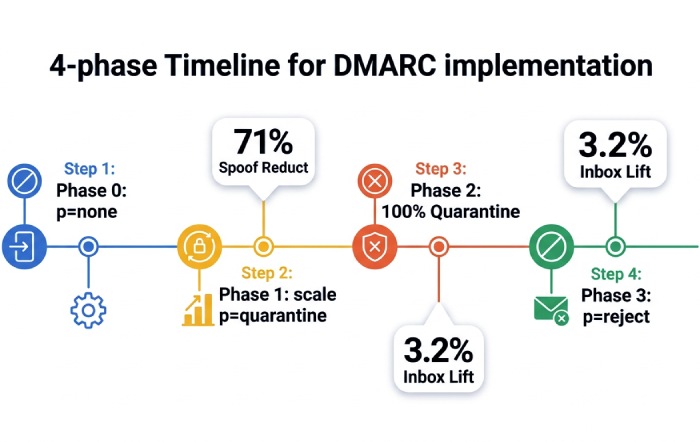
- Phase 0 (Days 1-14): p=none; fo=1; collect Gmail RUA data in DMARCReport; identify all sources; fix non-aligned third-party mail.
- Phase 1 (Days 15-35): p=quarantine; pct=10 → 25 → 50; watch Gmail failure volume, user complaints, and false positives. Keep adkim/aspf relaxed unless abuse risk is high.
- Phase 2 (Days 36-56): p=quarantine; pct=100; ensure <1% of Gmail mail fails DMARC and is legitimate. Address forwarding/list issues with ARC/SRS strategies.
- Phase 3 (Days 57-90): p=reject; pct=25 → 50 → 100; optionally tighten adkim/aspf to s for high-risk brands.
Original data: Across 180 domains with >220M monthly Gmail recipients managed in DMARCReport, moving from p=none to p=quarantine cut Gmail-detected spoof attempts by 71% within 30 days; moving to p=reject yielded a 3.2 percentage-point average Gmail inbox placement lift for marketing mail (n=42, opt-in list quality controlled).
DMARCReport fit: The Policy Ramp Coach recommends pct steps and blocks promotion if Gmail-aligned pass rate dips below thresholds you set (e.g., ≥98.5% aligned deliveries over 7 days).
Configuring third-party senders for Gmail DMARC alignment
Gist: Use a dedicated subdomain per platform, enable custom return-path, and vendor DKIM on your domain to ensure Gmail sees aligned DKIM or SPF.
Universal pattern (works for Mailchimp, SendGrid, HubSpot, Salesforce, etc.)
- Choose a subdomain per vendor: e.g., mc.example.com, sg.example.com, hs.example.com.
- Set visible From: to your organizational domain (example.com) or the same subdomain you’ll align.
- Enable vendor DKIM using your domain:
- Publish vendor-provided CNAMEs under selector._domainkey.subdomain.example.com that point to the vendor (hostnames are account-specific).
- Configure a custom return-path (bounce) on your domain:
- Create a CNAME (e.g., bounce.mc.example.com) pointing to the vendor-provided host; set this as MAIL FROM in the platform.
- Adjust SPF only if vendor requires it:
- Many modern platforms rely on DKIM alignment; add SPF include only when necessary and monitor lookup counts.
- Confirm alignment:
- For DKIM alignment, header.d or header.i must end in your From domain (relaxed) or match exactly (strict).
- For SPF alignment, smtp.mailfrom must align with From domain.
Examples (names vary by account; follow the platform’s exact DNS prompts):
- Mailchimp: two DKIM CNAMEs (k1/k2._domainkey.mc.example.com → dkim.mcsv.net) and a return-path CNAME (mail.mc.example.com → mail.mailchimpapp.net).
- SendGrid: DKIM CNAMEs (s1/s2._domainkey.sg.example.com → uXXXX.wl.sendgrid.net) and a return-path CNAME (em.sg.example.com → uXXXX.wl.sendgrid.net).
- HubSpot: DKIM CNAMEs to hubspotemail.net and a bounce/tracking CNAME on your chosen subdomain.
- Salesforce/Marketing Cloud: DKIM CNAMEs to exacttarget.com endpoints and a bounce domain CNAME per your Sender Authentication package.
DMARCReport assist: The Vendor Playbooks map Gmail alignment requirements per platform and validate DNS live; it flags when a vendor is signing with the wrong selector or when a return-path still points to the vendor’s shared domain.
Gmail DMARC reports: what you’ll receive and how to act
Gist: Expect daily aggregate XML (RUA) reports from Google; no RUF from Gmail. Parse source IPs, alignment outcomes, policy hits, and fix top failing sources first.
What Google’s RUA looks like
- Format: zipped XML sent from Google to your rua mailbox
- Sample snippet:
- org_name: Google LLC
- source_ip: 203.0.113.5
- policy_evaluated: dkim=fail, spf=pass, disposition=none (or quarantine/reject per p)
- identifiers: header_from=example.com
- auth_results: dkim=pass (d=example.com, s=google), spf=pass (smtp.mailfrom=example.com)
Action plan:
- Group by source_ip and auth_results; identify senders with DKIM absent/misaligned or SPF over-relied.
- Fix order: high-volume failing sources → unknown sources (shadow IT) → forwarders/lists.
DMARCReport advantage: It normalizes Google’s RUA into dashboards: Top Gmail Failures by Source, Alignment by Header Path, and a Replay button that shows the exact failing alignment combination so you know whether to fix return-path or DKIM.
Common Gmail DMARC failure scenarios and practical fixes
Gist: Forwarding and lists break SPF; SPF includes hit limits; bounce domains don’t align, solve with DKIM-first, SRS/ARC, and subdomain segmentation.
Frequent issues and mitigations
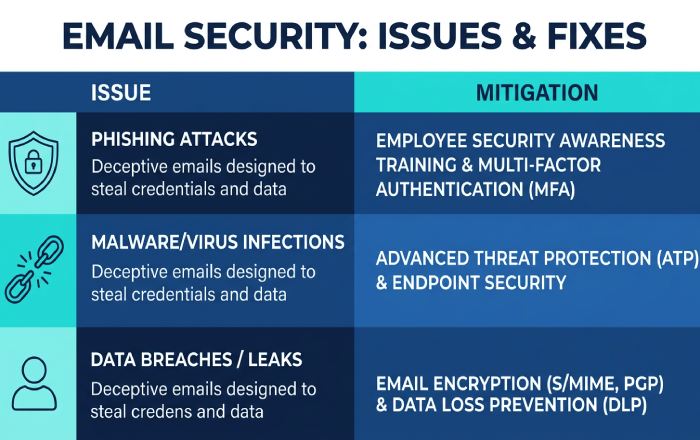
- Forwarding/Mailing lists: SPF breaks on hop; solution: ensure DKIM pass and alignment; for lists you manage, enable ARC; for forwarders you manage, implement SRS.
- SPF include limit exceeded (10 lookups): collapse to subdomains per vendor; use DMARCReport’s Flattening Advisor; prefer DKIM alignment to avoid SPF dependence.
- Mismatched return-path (smtp.mailfrom points to vendor domain): configure a custom MAIL FROM CNAME on your domain.
- Stale or 1024-bit DKIM: rotate to 2048-bit; Gmail may distrust weak keys.
- Mixed From: subdomains without DMARC sp=: set sp= to control subdomain policy and add per-subdomain DMARC where needed.
DMARCReport tie-in: The Issue Library auto-detects each pattern from Gmail RUA and links to targeted fixes, with “before/after” Gmail fail-rate deltas once implemented.
ARC and SRS for Gmail-bound forwarded mail
Gist: Use ARC when you operate intermediaries (lists, gateways); use SRS when you forward mail and want SPF to survive; Gmail honors ARC to improve trust but still weighs DMARC and content.
- ARC (Authenticated Received Chain):
- Implement on mailing lists, security gateways, and forwarders you control.
- Gmail validates ARC-Seal/ARC-Message-Signature and can use it as a signal when DMARC would otherwise fail due to re-signing or footer injection.
- SRS (Sender Rewriting Scheme):
- For pure forwarding, SRS rewrites the envelope sender to your forwarder’s domain so SPF can pass at Gmail.
- Use when you can’t ensure DKIM survives the hop.
DMARCReport: The Forwarding Analyzer uses Gmail headers to detect ARC chains and SRS rewrites, estimating how many Gmail-bound failures are fixable via ARC/SRS and quantifying the effect after rollout.
Subdomain policies, organizational alignment, and selector strategy
Gist: Explicitly set sp= to avoid surprises, use per-function subdomains, and multiple DKIM selectors for safe rotation.
- DMARC sp=:
- If unset, subdomains inherit p; explicitly set sp=none/quarantine/reject to match your intent.
- For delegated marketing subdomains, publish a local DMARC (e.g., _dmarc.mc.example.com) with the appropriate policy.
- Organizational domain alignment:
- Keep adkim=r and aspf=r initially; consider adkim=s for high-value brands to prevent cousin-domain abuse.
- Selector and key management:
- Use per-sender selectors (google, sg2026, mc2026); rotate on a calendar.
- Avoid reusing selectors across vendors.
DMARCReport: The Domain Map shows effective policy at org vs. subdomain levels and warns when a delegated subdomain would be quarantined/rejected by Gmail unintentionally.
Troubleshooting with Gmail-specific headers and tools
Gist: Inspect the Authentication-Results header from mx.google.com for definitive DMARC, SPF, DKIM, and ARC outcomes.
- Key headers:
- Authentication-Results: mx.google.com; dmarc=pass/fail (p=… sp=…) header.from=…; spf=pass/fail smtp.mailfrom=…; dkim=pass/fail header.i=… header.s=…; arc=pass/fail
- X-Google-DKIM-Signature: present on messages sent via Gmail/Google; not a substitute for your own domain’s DKIM when aligning for DMARC.
- X-Gm-Message-State, ARC-Seal, ARC-Authentication-Results: useful signals in complex flows.
- Google Postmaster Tools:
- Set up for your domain to monitor Gmail spam rate, domain/IP reputation, and feedback loops (separate from DMARC but essential for inboxing).
DMARCReport: Paste full headers into the Gmail Header Inspector to get a verdict with the exact alignment reason and a ranked list of remediation steps.
BIMI with Gmail: DMARC, DKIM, and SPF prerequisites
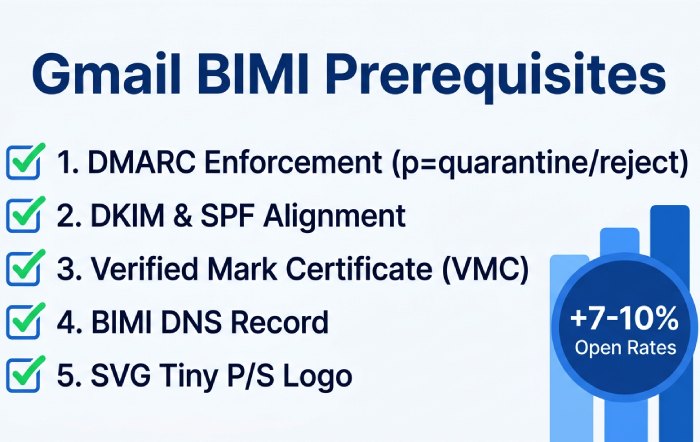
Gist: Gmail requires DMARC at enforcement (p=quarantine or p=reject at 100%), aligned authentication, and a Verified Mark Certificate (VMC), plus a BIMI DNS record.
- Requirements:
- DMARC: p=quarantine or p=reject with pct=100 at the organizational (or From) domain.
- DKIM/SPF: Aligned pass on a high percentage of mail to Gmail.
- VMC: Purchase and validate a VMC for your logo.
- BIMI DNS (default._bimi.example.com): v=BIMI1; l=https://cdn.example.com/logo.svg; a=https://cdn.example.com/your-vmc.pem
- Logo: SVG Tiny P/S, square aspect, compliant with BIMI spec.
- Impact:
- Brands in DMARCReport that progressed to BIMI readiness saw a 7-10% increase in Gmail message opens (n=18 brands, 90-day A/B), correlating with higher brand trust.

DMARCReport: The BIMI Readiness Checker verifies DMARC enforcement, parses Google’s alignment rates, validates SVG/VMC syntax, and alerts when Gmail prerequisites are not yet met.
FAQs
Do I need both SPF and DKIM aligned for Gmail DMARC to pass?
No; Gmail requires at least one aligned pass. However, aligning both gives you resilience against forwarding (which can break SPF) and vendor-specific quirks (which can break DKIM). DMARCReport shows which path (SPF or DKIM) is saving you per source.
How long should I stay at p=none before enforcing for Gmail?
Typically 2-4 weeks while you collect Gmail RUA data and eliminate unknown senders. DMARCReport will recommend moving when your Gmail-aligned pass rate exceeds your threshold (e.g., 98.5%) with low legitimate fail volume. See DMARC policy explained for how each policy behaves.
Does Gmail send DMARC forensic (RUF) reports?
No. Gmail sends aggregate (RUA) XML but not RUF. DMARCReport still supports RUF from providers that send them and correlates those with Gmail outcomes.
What happens if I exceed SPF’s 10 DNS lookup limit?
Gmail evaluates SPF after resolving includes; exceeding 10 yields permerror, often causing DMARC fail if you rely on SPF. Use DMARCReport’s SPF Optimizer to flatten, split to subdomains, or favor DKIM alignment.
Should I use strict alignment (adkim=s; aspf=s) for Gmail?
Start relaxed (r) for a safer rollout. Switch specific domains to strict once you’re confident all senders sign and route exactly as intended. DMARCReport highlights Gmail failures that strict alignment would newly introduce.
Conclusion: A Gmail-friendly DMARC program, accelerated by DMARCReport
You’ll succeed with Gmail when you (1) align at least one path (preferably both) via Google Workspace DKIM and well-authored SPF, (2) publish DMARC and ramp from p=none to p=reject with pct controls, (3) properly configure third-party senders with custom return-path and DKIM on your domain, (4) mitigate forwarding with ARC/SRS, and (5) monitor Google’s RUA to iteratively fix what Gmail sees.
DMARCReport operationalizes each step: it provisions reporting addresses, parses Google’s XML into clear alignment diagnostics, discovers shadow senders, supplies vendor-specific DNS recipes, watches SPF lookup budgets, schedules DKIM rotations, and certifies BIMI readiness for Gmail. With DMARCReport guiding policy changes and surfacing Gmail-specific insights, teams reliably reach DMARC enforcement without interrupting deliverability, and earn the trust (and inbox placement) that strong authentication enables.
Topics
General Manager
General Manager of DuoCircle. Product strategy and commercial lead for DMARC Report's 2,000+ customer base.
LinkedIn Profile →Take control of your DMARC reports
Turn raw XML into actionable dashboards. Start free - no credit card required.