How To Speed Up DNS Propagation: Tips, Checks, And Expected Timelines

Quick Answer
You can speed up DNS propagation by lowering TTL values, using a reliable DNS provider, and clearing local caches. Check updates with DNS lookup tools. Most changes propagate within minutes, but full worldwide updates may take up to 48 hours.

DNS changes are essential when migrating websites, updating servers, changing email providers, or modifying domain settings. However, these updates are not visible everywhere on the internet immediately due to DNS propagation. Understanding how DNS propagation works and the factors that influence it can help reduce delays and prevent service disruptions. In this guide, you’ll learn how to speed up DNS propagation, perform effective DNS checks, and understand the typical timelines involved so your DNS updates take effect as quickly and smoothly as possible.
What DNS Propagation Means and Why It Takes Time
DNS propagation is the period after a DNS change when different parts of the internet begin returning the updated DNS records for a domain name. In practice, DNS propagation is not a single global “push.” Instead, it depends on how DNS cache layers, recursive resolver behavior, and authoritative nameserver responses interact across networks.
When someone visits example.com their browser or application sends a DNS request that eventually becomes a DNS lookup for the needed record. A DNS resolver, often operated by an internet service provider, public DNS platform, or enterprise network, checks whether it already has cached results. If it does, it returns the stored DNS response. If not, the recursive resolver follows the DNS hierarchy: root servers, the TLD server or TLD nameserver, and finally the authoritative nameserver for the domain.
The main reason for propagation delay is caching. Each DNS record has a time to live value, usually shown as TTL. The TTL tells a recursive resolver how long it can keep a DNS cache entry before asking the authoritative nameserver again. If your old A record had a TTL of 86,400 seconds, a recursive resolver may continue serving the old IP address for up to 24 hours after your DNS update.
DNS propagation can also be affected by ISP cache behavior, DNS server implementation differences, registry update timing, and whether you changed records inside an existing zone file or changed the name server delegation itself.
The resolver path: from domain registrar to authoritative nameserver
A typical DNS lookup follows several steps. Your domain registrar manages the domain delegation, including NS records that point to the correct authoritative nameserver. The authoritative nameserver hosts the zone file containing DNS records such as an A record, AAAA record, CNAME record, MX record, TXT record, SOA record, SRV record, PTR record, and CAA record.
Different DNS record types affect different services. An A record maps a domain name to an IPv4 IP address, while an AAAA record maps it to IPv6. A CNAME record aliases one hostname to another. An MX record controls mail routing. A TXT record is often used for verification, SPF, DKIM, or security policies. An SOA record defines zone authority and timing values. SRV, PTR, and CAA records support service discovery, reverse lookup, and certificate authority restrictions.
A propagation delay occurs when some recursive resolver locations still have old cached results while others have already refreshed and received the new DNS response from the authoritative nameserver.
Pre-Change Steps to Speed Up DNS Propagation: Lower TTLs and Plan Ahead
The best way to speed up DNS propagation is to prepare before the DNS change. You cannot force every recursive resolver in the world to forget its DNS cache instantly, but you can reduce the TTL ahead of time so caches expire faster when the change happens.
For planned migrations, lower the time to live on important DNS records at least one previous TTL period before the move. For example, if your current TTL is 24 hours, reduce it to 300 seconds a full day before changing the IP address or mail routing. This allows existing DNS cache entries to expire and be replaced with lower-TTL versions.
This is especially useful for website migrations, email platform changes, Cloudflare onboarding, or switching authoritative nameserver providers. Large platforms such as Google, PayPal, Facebook, and Twitter use disciplined DNS configuration practices because propagation time affects availability, routing, security, and user experience.
Lower the TTL before the DNS change
To speed up DNS propagation, set a short TTL such as 300 seconds or 600 seconds before modifying production DNS records. Keep in mind that lowering TTL after the fact does not affect recursive resolver caches that already stored the old value. The recursive resolver will honor the TTL it received during the previous DNS lookup.
For example, if example.com has an A record pointing to an old IP address with a TTL of 12 hours, changing the TTL to 5 minutes at the same time as the IP address change will not help resolvers that cached the old A record earlier. Planning ahead is what helps speed up DNS propagation.
Practical pre-change checklist
Before making a DNS update:
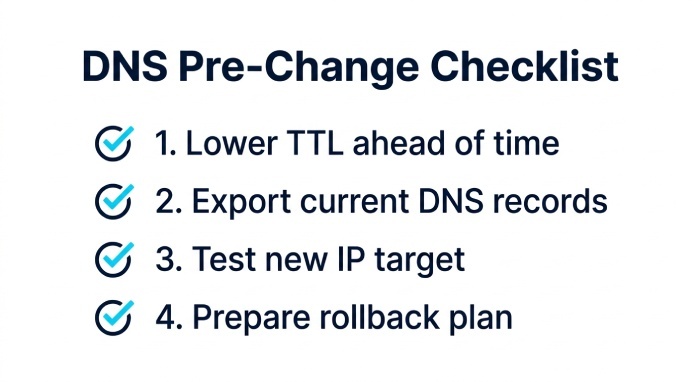
- Lower TTL values on the records you plan to change.
- Confirm the current authoritative nameserver and zone file.
- Review NS records at the domain registrar.
- Export or document existing DNS records.
- Check the SOA record for zone serial and timing values.
- Test the new IP address, mail server, CDN, or hosting target.
- Prepare a rollback DNS configuration.
- Know how to flush DNS cache locally and clear DNS cache in your operating system or browser if needed.
If you need to test privately before public domain propagation, you can temporarily use a hosts file entry on your workstation. This bypasses normal DNS lookup behavior for that machine only and helps validate a new server before changing public DNS records.
How to Make DNS Changes Correctly: Nameservers, Records, and Cache Considerations
To speed up DNS propagation and avoid unnecessary DNS delay, make sure you are editing DNS records in the correct place. A common mistake is updating records at the domain registrar while the domain actually uses external authoritative nameserver hosting elsewhere, such as Cloudflare or another DNS provider.
First, identify the active name server set using a manual query:
dig NS example.com
dig A example.com
dig MX example.com
Then query the authoritative nameserver directly:
dig @ns1.example-dns-provider.com example.com A
This kind of manual query helps separate an authoritative answer from cached results returned by a recursive resolver. If the authoritative nameserver returns the new DNS records but public resolvers return old data, the issue is normal DNS cache behavior. If the authoritative nameserver still returns old data, the DNS change was not applied correctly.
Changing NS records can take longer than changing an individual A record or CNAME record because delegation updates involve the parent zone, the TLD nameserver, and sometimes registry or domain registrar systems. A nameserver change can therefore create a longer propagation delay than a simple record edit inside an already-active zone file.
Also verify that your DNS server is authoritative for the zone and that there are no conflicting records. For example, a hostname cannot usually have both a CNAME record and another record type at the same name. Incorrect DNS configuration can look like DNS propagation when it is actually a zone error.
Tools and Checks to Monitor DNS Propagation Worldwide
A global DNS check helps you see how different networks are resolving your domain name. Tools such as whatsmydns.net are commonly used as a DNS propagation checker because they query multiple locations and show DNS results from around the world.
You can compare results from public resolvers such as Google DNS, Cloudflare DNS, and OpenDNS, as well as regional or ISP networks. Some monitoring platforms and DNS propagation checker services may show results from providers or networks such as Speakeasy, Comodo, Bellsouth, Cogego Peer 1, Total Play, Claro, France Telecom, Freedom Registry, Deutsche Telekom, Liquid, Teknet Yazlim, Yandex, CMPak, Skylink Fibernet, 3BB Broadband, Tefincom, CERNET, LG Dacom, and Telstra. Seeing differences across the United States, Europe, Asia, and other regions is normal during dns propagation.
Running a global DNS check and manual query
When monitoring DNS propagation, check the exact record type you changed. If you change an A record, do not only check the root domain visually in a browser. If you changed an MX record, confirm mail routing specifically. For TXT record verification, make sure the full hostname is correct, especially for SPF, DKIM, DMARC, or vendor validation. If you still need to publish one, you can create DMARC record values with our free generator before adding them to your zone.
Useful checks include:
dig example.com A
dig example.com AAAA
dig example.com MX
dig example.com TXT
dig +trace example.com
nslookup example.com 8.8.8.8
For TXT-based email authentication records, you can also run a DMARC record checker to confirm the updated policy is resolving. A DNS lookup through a public recursive resolver may still show cached results. A direct query to the authoritative nameserver should show the current source of truth. If your local computer still sees the old DNS response, flush the DNS cache locally. On some systems, restarting the browser, clearing browser DNS cache, changing networks, or testing through another DNS resolver can help.
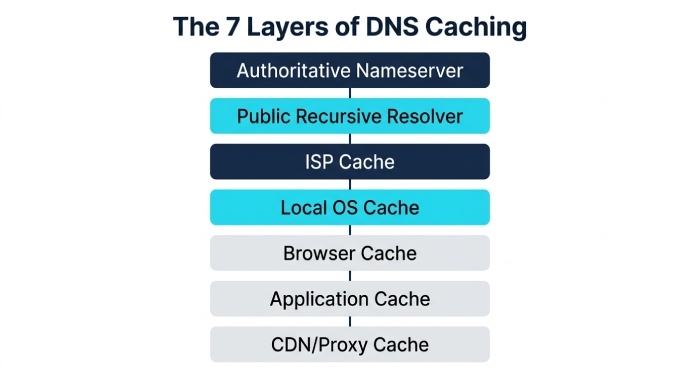
For dns troubleshooting, compare:
- Authoritative nameserver answer
- Public recursive resolver answer
- ISP cache answer
- Local operating system DNS cache
- Browser DNS cache
- Application-level cache
- CDN or proxy cache
Technical communities such as Stack Overflow and Server Fault often recommend distinguishing DNS cache behavior from application caching, web server redirects, SSL certificate issues, and CDN configuration mistakes.
Expected DNS Propagation Timelines and Troubleshooting Delays
Expected dns propagation depends mainly on TTL and the type of DNS change. A low-TTL A record or CNAME record update may appear globally within minutes, while some recursive resolver caches may take longer. A nameserver delegation change can take 24 to 48 hours in some cases because the TLD nameserver and registrar systems are involved.
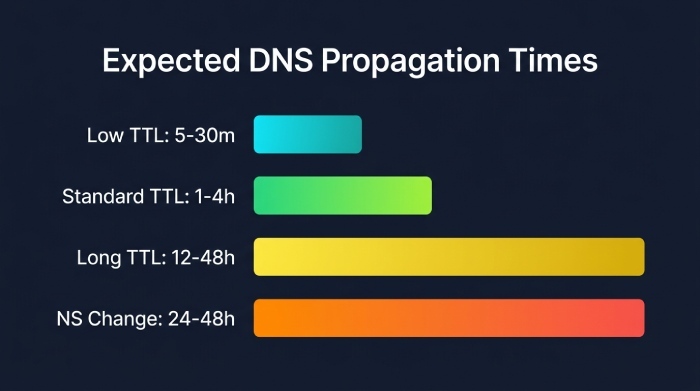
Typical propagation time ranges:
- Low TTL record update: 5 to 30 minutes
- Standard TTL record update: 1 to 4 hours
- Long TTL record update: 12 to 48 hours
- NS records or authoritative nameserver change: 24 to 48 hours
- Stubborn ISP cache or unusual resolver behavior: sometimes longer
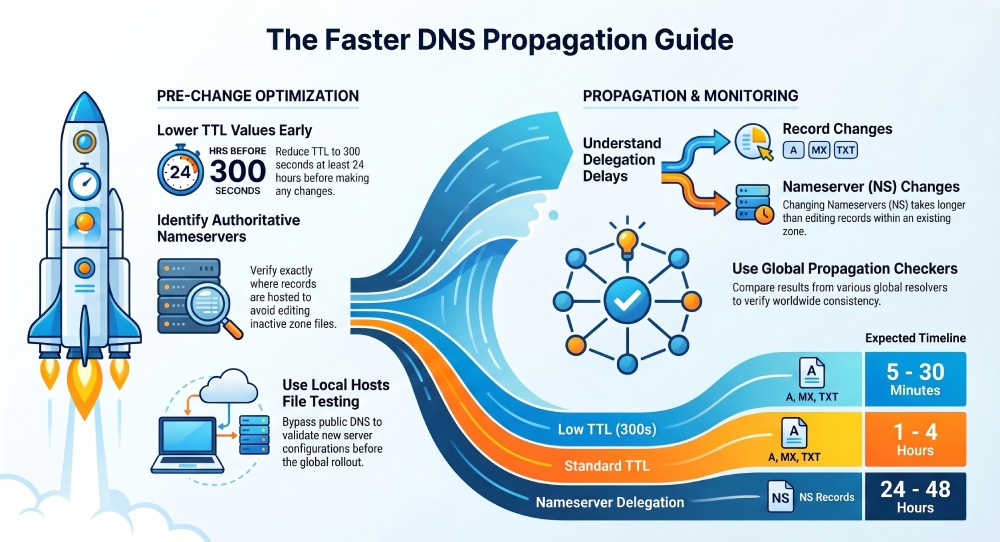 If you are trying to speed up DNS propagation after the change has already been made, your options are limited. You can flush DNS cache locally, ask affected users to clear DNS cache, test with another DNS resolver, or temporarily access the service using a hosts file entry. However, you generally cannot force an external recursive resolver to discard cached results before the TTL expires.
A persistent propagation delay may indicate a real configuration problem rather than normal domain propagation. Check that the authoritative nameserver contains the correct DNS records, the zone file was published, the SOA record serial updated if required, and the domain registrar points to the correct NS records. Also verify that DNSSEC, if enabled, is configured correctly; broken DNSSEC can cause failed DNS lookup results that look like a dns delay. Our free DMARC tools can help you validate email authentication records once your DNS changes have propagated.
The key principle is simple: to speed up DNS propagation, reduce time to live values before the change, make the DNS update at the active authoritative nameserver, verify with manual query tools, and monitor dns propagation with a global DNS check until recursive resolver caches refresh.
General Manager
General Manager of DuoCircle. Product strategy and commercial lead for DMARC Report's 2,000+ customer base.
LinkedIn Profile →Take control of your DMARC reports
Turn raw XML into actionable dashboards. Start free - no credit card required.