Learning to analyze an email for security and deliverability

Quick Answer
The three core email authentication standards - SPF (RFC 7208), DKIM (RFC 6376), and DMARC (RFC 7489) - work together to verify that an email genuinely originates from the domain it claims to represent. Since February 2024, Google and Yahoo require all three for bulk senders.
Related: Free DMARC Checker ·How to Create an SPF Record ·SPF Record Format


The most common support case we handle is ‘my email is going to spam since the Google changes,’ says Vasile Diaconu, Operations Lead at DuoCircle. Nine times out of ten, the fix is publishing a DMARC record and ensuring SPF/DKIM alignment. It takes 5 minutes once you know what to do.
The three core email authentication standards - SPF (RFC 7208), DKIM (RFC 6376), and DMARC (RFC 7489) - work together to verify that an email genuinely originates from the domain it claims to represent. Since February 2024, Google and Yahoo require all three for bulk senders. Email authentication directly impacts deliverability: Google and Yahoo’s February 2024 bulk sender requirements enforce SPF + DKIM + DMARC as hard prerequisites for inbox placement. Unauthenticated bulk mail is now routed to spam or rejected outright by both providers. Understanding how DMARC alignment works matters here, since DMARC passes only when SPF or DKIM aligns with the visible From domain.
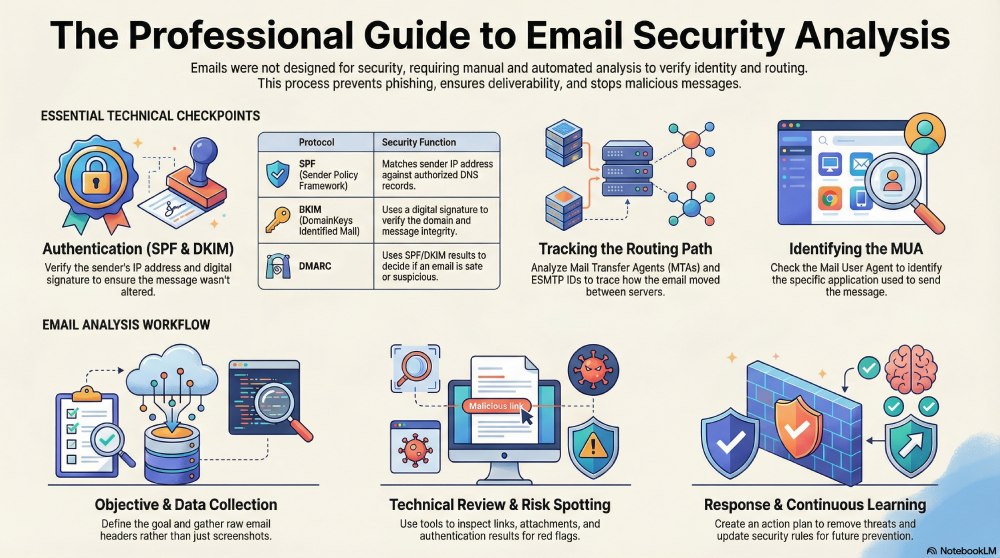
Emails were never designed with security in mind, which is precisely why they require cautious use and integration with third-party tools. Email analysis is a practical approach that checks email authentication results, sender identity, routing paths, and attachments to ensure the message is safe to open and engage with.
You can manually analyze emails for security and deliverability; however, this approach is slow and prone to human errors. So, it’s suggested to use email analysis tools that break down headers, check SPF, DKIM, and DMARC results, scan URLs, and highlight suspicious patterns.
Why email analysis matters for security and deliverability

As of 2025, DMARC is mandatory under multiple compliance frameworks. CISA BOD 18-01 requires p=reject for US federal domains. PCI DSS v4.0 mandates DMARC for organizations processing payment card data as of March 2025. Google and Yahoo require DMARC for bulk senders (5,000+ messages/day) since February 2024, and Microsoft began rejecting non-compliant email in May 2025. The UK NCSC, Australia’s ASD, and Canada’s CCCS all mandate DMARC for government domains. Cyber insurers increasingly require DMARC enforcement as an underwriting condition.
Email is often the easiest way for attackers to get in. Just one bad email slipping through can be enough to cause trouble. That’s why regularly reviewing and analysing emails is so important for security teams. It helps catch problems early, limit damage, and keep communication safe.
Early detection for proactive protection
One of the biggest benefits of email analysis is spotting threats before someone clicks a link, opens a file, or replies. Many phishing or fake emails are made to look completely normal. The logo looks right, the tone feels familiar, and nothing seems suspicious at first. Email analysis helps teams look beyond looks. By checking who sent the email, whether it passed authentication, and what links or attachments it contains, security teams can catch red flags that users may miss. This early warning helps stop attacks like password theft or fake payment requests before any real harm is done.
Stopping suspicious emails from spreading inside the company
If an attacker succeeds once, they often try to spread the same email to more people inside the organization. Email analysis allows **security teams to see how far a suspicious message has travelled and find similar emails in other inboxes.
Removing these emails quickly reduces the number of people exposed. This keeps the issue small, limits internal damage, and prevents a single mistake from turning into a company-wide problem.
What Is who can be trusted?
Over time, analysing emails helps build a clearer picture of which senders and domains are trustworthy. Authentication results, sending behaviour, and domain history all help show whether an email is genuinely coming from the person or company it claims to be.
This is especially useful for spotting fake emails that pretend to be from vendors, senior leaders, or internal teams. Instead of guessing, organizations can rely on **technical evidence to decide what is safe. This takes pressure off employees and reduces mistakes caused by human judgment.
Meeting compliance needs and showing security responsibility
Email analysis also supports compliance and accountability. Many organizations need to prove they are actively monitoring email risks, especially when handling sensitive or business-critical information.
Investigation records, logs, and reports show that email threats are being taken seriously. This makes audits easier and helps during incident reviews. It clearly shows that the organization is not ignoring email risks and is actively working to protect its communication systems.

Sections/fields of an email header
It’s important to know what each field indicates if you have to analyse your emails-
SMTP and ESMTP
**SMTP is the basic system used to send emails between mail servers. ESMTP is a newer version that supports additional features, such as larger emails and attachments. These details help track how an email travels from the sender to the receiver.
ESMTP ID
The ESMTP ID is a unique code given to an email while it is being sent. It works like a tracking number and helps teams follow the **email’s path or investigate delivery and security issues.
CC and BCC
CC shows who else received the email openly, while BCC hides recipient addresses from others. From a security point of view, unexpected BCC usage can sometimes be a sign of phishing or mass email activity.
MUA (Mail User Agent)

The MUA is the email app used to send or read messages, such as Gmail, Outlook, or Apple Mail. This information helps show how the email was created or accessed.
MTA (Mail Transfer Agent)
MTAs are the systems that move emails between servers. Examples include Postfix and Microsoft Exchange. Checking MTA details helps understand the route an email took during delivery.
MDA (Mail Delivery Agent)
The MDA is responsible for placing the email into the recipient’s mailbox. It confirms the final step of delivery and shows where the email ended up after being sent.
SPF (Sender Policy Framework)
SPF checks whether the server sending an email is allowed to send emails for that domain. It does this by matching the sender’s **IP address with the SPF record published in DNS. An SPF failure does not always mean the email is harmful, but it is a warning sign that should be checked along with DKIM and DMARC results.

DKIM (DomainKeys Identified Mail)
DKIM helps confirm that an email originated from the domain shown and that the message was not altered during delivery. It works by adding a digital signature to the email, which is verified using information stored in DNS. When DKIM passes, it increases trust in the email. Both SPF and DKIM feed into the DMARC evaluation, which is why publishing the DMARC record is the foundation of a trustworthy email program.
MIME (Multipurpose Internet Mail Extensions)
MIME explains how an email is built and how text, images, and attachments are combined into one message. It helps email apps understand how to display the email correctly and handle files like PDFs or images.
Character Encoding (for example, ISO-8859-1)
Character encoding tells email programs how to show letters, symbols, and special characters properly. Older formats like ISO-8859-1 still appear in some emails and may suggest older systems or unusual formatting.

7 steps of the email analysis process
Almost all email analysis tools follow these steps. So, even if you take the manual route, you must go step by step.
Step 1- Clarity of the objective
Before starting, decide why you are reviewing the email. You may want to check if it is phishing, understand how it slipped past security filters, or see if other users could be affected. Knowing the goal from the start keeps the investigation focused and prevents unnecessary checks. It also helps you **choose the right tools and focus on the most important signals.

Step 2- Gather the email data
Once the goal is set, collect the full email details. This includes the full headers, the message content, links, and any attachments. Screenshots or forwarded emails often miss important technical information, so working with the original email is always better. Most analysis tools require raw email data to produce reliable results.
Step 3- Get the email ready for review
Before analysing anything, clean up and arrange the email data. Separate the headers from the message body, note sender and recipient details, and flag anything that looks odd at first glance. Remove duplicate or irrelevant information so you can focus on what actually matters. Professional tools make this easier by breaking complex headers into readable sections. This step helps keep the analysis structured instead of messy.
Step 4- Check technical details and message context

This is the main analysis phase. Use email analysis tools to review SPF and DKIM results, check sender domains, inspect links and attachments, and trace how the email travelled between servers. Alongside technical checks, look at context, such as strange requests, unusual timing, or unexpected messages.
Step 5- Spot risks and important red flags
After reviewing everything, identify what stands out. This could be failed authentication, a domain that does not match, suspicious links, or unsafe attachments. These findings help decide whether the email is dangerous, questionable, or safe. Recording these details is important for response and future reference.
Step 6- Create an action and response plan
Based on what you find, decide what needs to be done. This might involve removing similar emails, blocking a sender, alerting users, or escalating the issue for deeper investigation. Many email security tools help by finding related emails across inboxes. The goal is not just to analyse, but to act quickly and correctly.

Step 7- Learn and improve
Email analysis does not stop after one case. Reviewing the outcome helps teams see what worked, what was missed, and how to detect future threats faster. Over time, this process improves security rules, user awareness, and overall email protection. This is how email analysis moves from reacting to threats to preventing them.
Summary
Learning how to analyze emails is important for both **security and deliverability because email was never built to be secure by default. Attackers exploit this gap, which is why even a single unsafe email can lead to serious problems. Email analysis helps teams check who sent the message, whether authentication mechanisms like SPF and DKIM were used, how the email travelled between servers, and whether links or attachments are risky.
While emails can be analysed manually, this process is slow and easy to get wrong. Email analysis tools make the job easier by breaking down headers, highlighting red flags, and showing what really matters. Regular analysis helps catch phishing attempts early, stop malicious emails from spreading internally, and clearly identify which senders can be trusted.
It also supports compliance by **keeping investigation records and proof of active monitoring. Over time, following a structured email analysis process helps teams respond faster, reduce human error, and move from reacting to threats to preventing them altogether.
Sources
Topics
General Manager
General Manager of DuoCircle. Product strategy and commercial lead for DMARC Report's 2,000+ customer base.
LinkedIn Profile →Take control of your DMARC reports
Turn raw XML into actionable dashboards. Start free - no credit card required.