Multiple SPF Records: Can One Domain Have More Than One?

Quick Answer
A domain should have only one SPF record. Multiple SPF records cause an SPF PermError and can prevent email authentication. Combine all authorized sending sources into a single SPF TXT record.
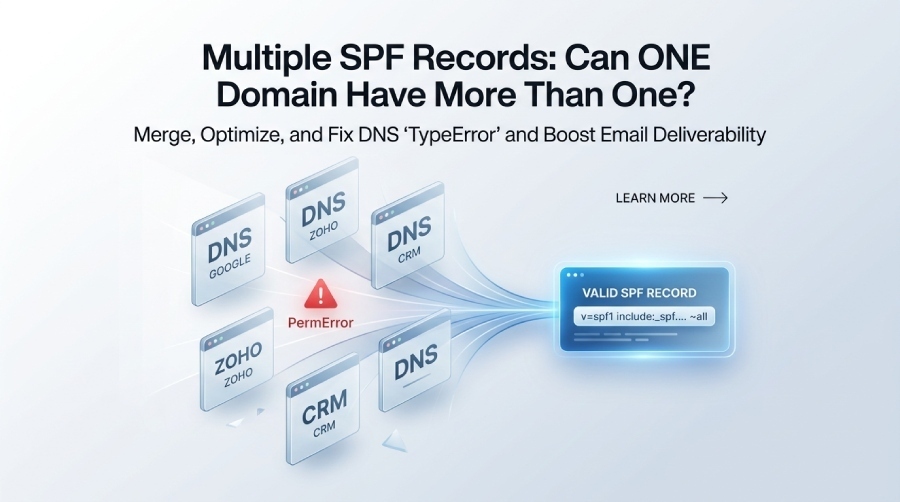
If you’ve found multiple SPF records for your domain, you’re not alone. It’s a common DNS configuration mistake that can lead to SPF PermError, email authentication failures, and reduced email deliverability. While different email providers often ask you to add their own SPF records, a domain should only have one valid SPF record for each hostname.
In this guide, we’ll explain whether a domain can have multiple SPF records, why having more than one causes problems, how it affects SPF, DKIM, and DMARC, and the correct way to merge multiple SPF records into a single, valid policy.
What SPF Records Are and Why They Matter for Email Authentication
Sender Policy Framework, or SPF, is an email authentication protocol that helps receiving mail servers verify whether an email server is authorized to send messages for a domain. An SPF record is published as a DNS TXT record in the domain’s DNS zone, and it defines the domain’s approved sending infrastructure.
In practical terms, SPF protects the Return-path address—also called the envelope sender—from unauthorized use. When a message arrives, the recipient server performs an SPF check by comparing the sending IP address against the domain’s published SPF policy. If the sender matches an authorized source, the message can receive an SPF pass result. If not, the result may be SPF fail, softfail, neutral, or another outcome depending on the SPF syntax used. A basic SPF record example looks like this:
v=spf1 include:_spf.google.com include:zoho.com -allThe v=spf1 tag identifies the record as SPF. Each SPF mechanism, such as include, ip4, ip6, a, or mx, tells receivers how to evaluate authorized sending sources. An SPF authorizes another domain’s SPF record, commonly used for Email vendor platforms like Google Workspace, Zoho, marketing tools, CRMs, ticketing systems, and transactional email providers.
Why SPF Authentication Is Critical
SPF authentication matters because it helps prevent domain spoofing, phishing, and forged sender identities. Without a valid SPF configuration, attackers may abuse your domain in fraudulent campaigns, and legitimate email delivery may suffer.
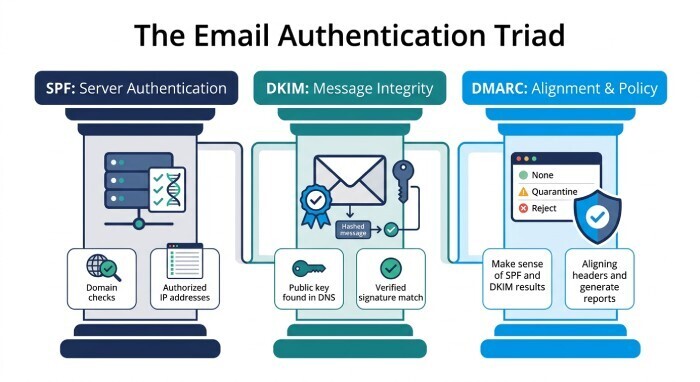
SPF also works alongside DKIM and DMARC. DKIM signs messages cryptographically, while DMARC tells receivers what to do when SPF authentication fails or DKIM authentication fails. A well-managed SPF record improves email deliverability and gives the domain owner better control over sender authorization.
Can a Domain Have Multiple SPF Records? The Short Answer and DNS Rule
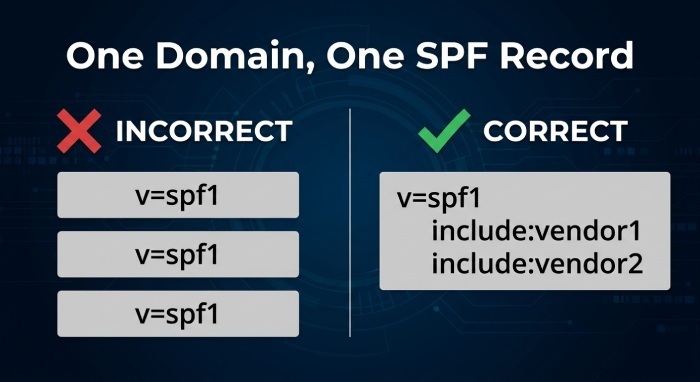
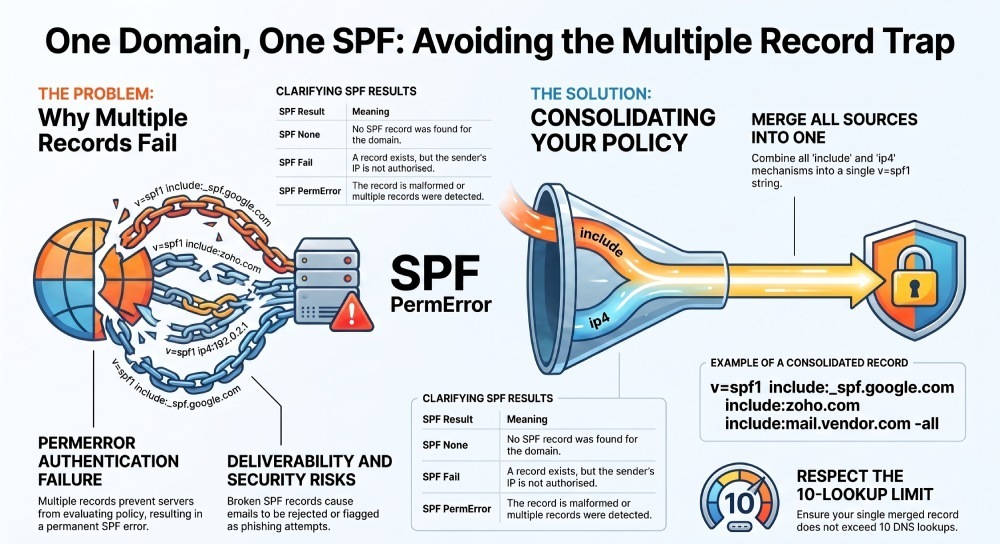
No—a domain should not have multiple SPF records. A domain must have a single SPF record published as one DNS TXT record beginning with v=spf1. If two or more DNS TXT records at the same hostname start with v=spf1, receiving mail servers treat this as a policy error.
This rule comes from the SPF specification, including guidance originating from RFC 4408 and later SPF updates. The DNS rule is simple: one domain, one valid SPF policy. You may have many TXT records for other purposes, such as Google site verification, DKIM selectors, or DMARC, but only one DNS TXT record at the root or relevant subdomain should contain an SPF record value beginning with v=spf1.
How Multiple SPF Records Usually Happen
Multiple SPF records often appear when different vendors provide separate setup instructions. For example, Google may ask you to publish:
v=spf1 include:_spf.google.com ~allZoho may provide:
v=spf1 include:zoho.com ~allA marketing platform may add another SPF include, creating a third SPF record. If each instruction is added independently in Cloudflare, GoDaddy, Namecheap, CloudDNS, DNS Made Easy, or another DNS provider, the DNS zone ends up with multiple SPF records instead of one consolidated policy.
This is a common SPF multiple records error. It is not fixed by waiting for DNS propagation; it must be corrected in the DNS management console or zone editor.
What Happens When Multiple SPF Records Exist: PermError, Deliverability Issues, and Security Risks
When a receiver runs an SPF record lookup and finds multiple SPF records for the same hostname, the SPF check cannot evaluate a single policy. The result is typically PermError, also written as SPF PermError or spf permerror.
A PermError means the SPF authentication process encountered a permanent policy problem. In this case, the problem is invalid SPF syntax caused by multiple policies. Because SPF authentication fails at the policy level, the receiving system may not know which SPF record to trust.
Deliverability Impact of PermError
A PermError can hurt email deliverability. Some receivers may still accept the message, while others may place it in the email spam folder, apply stricter filtering, or reject email outright. If DMARC is enabled with an enforcement policy such as p=quarantine or p=reject, a broken SPF configuration can contribute to DMARC failure—especially when DKIM is also misaligned or missing.
Common outcomes include:
- SPF check returns PermError instead of SPF pass authentication
- SPF authentication fails for legitimate platforms
- Messages from authorized sending sources are filtered
- Security gateways flag the sender domain as misconfigured
- DMARC reports show recurring SPF error patterns
SPF None, SPF Fail, and PermError Are Not the Same
An SPF none result means no SPF record was found. SPF fail means a record exists, but the sending IP is not authorized under the SPF policy. PermError means the SPF record exists but cannot be correctly processed, often because of multiple SPF records, broken SPF syntax, excessive DNS lookup count, or malformed mechanisms.
Why This Creates Security Risk
When SPF authentication fails due to misconfiguration, the domain owner loses visibility and control. Attackers may exploit weak enforcement, while legitimate systems may be treated suspiciously. Inconsistent SPF authentication also weakens DMARC, Reporting and Alerts, and broader domain protection efforts.
How to Consolidate Multiple SPF Records Into One Valid SPF Policy
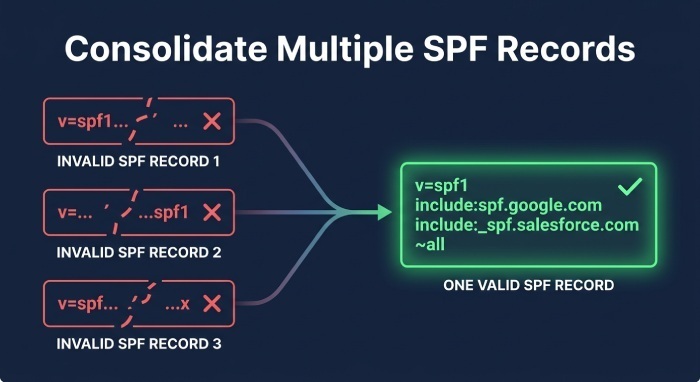
To fix multiple SPF records, you need to combine SPF records into one valid DNS TXT record. Our SPF record generator tool builds a single valid record from all your sending sources. Do not publish separate v=spf1 entries. Instead, merge all authorized sending sources into a single SPF record value.
For example, if your domain uses Google, Zoho, and a transactional Email vendor, your consolidated record might look like:
v=spf1 include:_spf.*google*.com include:*zoho*.com include:mail.vendor.com -allThis structure keeps one v=spf1 declaration while preserving each SPF include. The included entries are examples of an SPF mechanism. Other SPF mechanism types may include ip4:, ip6:, a, and mx.
Step-by-Step Consolidation Process
- Open your DNS management console with your DNS hosting provider.
- Go to the DNS Records, Domains, or zone editor section.
- Locate all DNS TXT record entries beginning with v=spf1.
- Copy each SPF record value before deleting anything.
- Identify every SPF include, IP address, SPF modifier, and ending qualifier.
- Build one consolidated SPF policy.
- Remove the duplicate SPF records.
- Publish the single SPF record as one DNS TXT record.
- Wait for DNS propagation.
- Run an SPF record checker or SPF checker tool to verify the result.
A reliable SPF record checker can confirm whether the final record returns one SPF policy, whether the SPF syntax is valid, and whether the SPF check produces the expected result. Tools from dmarcly, PowerDMARC, Safe SPF, and other email authentication platforms can help detect an SPF multiple records error, SPF PermError, and lookup-limit issues.
Watch the 10 DNS Lookup Limit
SPF allows a maximum of 10 DNS lookup mechanisms during evaluation. Too many include, a, mx, ptr, exists, or redirect mechanisms can trigger a PermError even if you have only one SPF record. This is where SPF flattening and SPF record optimization become important.
SPF flattening replaces some SPF include references with direct IP ranges to reduce DNS lookup dependency. However, flattening must be maintained carefully because vendors can change their IP ranges. Services such as Safe SPF, PowerDMARC, dmarcly, or an SPF record generator may help automate safer SPF record optimization.
Best Practices for Managing SPF Records Alongside DKIM and DMARC
SPF should not be managed in isolation. The strongest email authentication setup uses SPF, DKIM, and DMARC together. SPF authenticates the sending server, DKIM validates message integrity, and DMARC aligns authentication results with the visible From domain.
Maintain One Authoritative SPF Record
Always maintain one authoritative SPF record per hostname. If you send mail from the root domain and from subdomains, each hostname may have its own single SPF record, but each must be published as one DNS TXT record beginning with v=spf1.
Use clear SPF syntax and keep the SPF record value as simple as possible. Avoid unnecessary mechanisms, outdated IP addresses, or unused SPF include entries. A clean SPF configuration reduces the risk of PermError and improves SPF authentication reliability.
Use DKIM and DMARC for Stronger Enforcement
Enable DKIM for every major sending platform, including Google, Zoho, marketing automation tools, billing systems, and support platforms. Then configure DMARC to monitor alignment and gradually move toward an enforcement policy.
A typical DMARC rollout starts with monitoring:
v=DMARC1; p=none; rua=mailto:*dmarc*-reports@example.comAfter reviewing reports in a Dashboard from platforms such as dmarcly or PowerDMARC, organizations may move to quarantine and eventually reject. This reduces spoofing risk and supports stronger email delivery controls.
Use Monitoring and Regular SPF Checks
SPF is not “set and forget.” Email vendors change infrastructure, teams add SaaS platforms, and DNS providers update interfaces. Periodically look up your SPF record to catch drift before it breaks authentication. Build an SPF troubleshooting checklist that includes:
- Running a regular SPF check
- Reviewing SPF record lookup results
- Checking for multiple SPF records
- Validating SPF syntax after vendor changes
- Confirming SPF pass results for approved senders
- Monitoring DMARC aggregate reports
- Removing unused SPF mechanism entries
- Checking whether SPF authentication fails for legitimate systems
- Reviewing alerts from dmarcly, PowerDMARC, or similar tools
You can also use command-line DNS queries to inspect records directly:
dig TXT example.com
or:
nslookup -type=TXT example.com
These checks help confirm whether the DNS zone contains a single SPF record, whether the DNS TXT record begins with v=spf1, and whether duplicate records are still present after DNS propagation. Effective SPF monitoring, combined with SPF optimization best practices, keeps authentication stable as your sending environment evolves.
General Manager
General Manager of DuoCircle. Product strategy and commercial lead for DMARC Report's 2,000+ customer base.
LinkedIn Profile →Take control of your DMARC reports
Turn raw XML into actionable dashboards. Start free - no credit card required.