MXLookup Tool, Check MX Records Online Instantly

Quick Answer
For successful email delivery, there’s one essential aspect you must get right: the MX records of your domain. These records serve as the guiding instructions that direct internet traffic to the correct email destinations. Even a tiny mistake can cause emails to not deliver, arrive late, or increase the chances of being marked as spam.
Related: Free DMARC Checker ·How to Create an SPF Record ·SPF Record Format

For successful email delivery, there’s one essential aspect you must get right: the MX records of your domain. These records serve as the guiding instructions that direct internet traffic to the correct email destinations. Even a tiny mistake can cause emails to not deliver, arrive late, or increase the chances of being marked as spam.
Using an MXLookup tool simplifies this task by letting you quickly verify your domain’s MX records, check their priority order, and ensure that your email routing is set up correctly. Whether you’re diagnosing delivery problems, configuring a new mail server, or checking DNS updates, performing an MX lookup is a crucial part of ensuring effective and secure email communication.
What Are MX Records? How Email Routing Works and Why MX Lookup Matters
MX records and the path of email routing
An MX record (mail exchange record) tells the Internet where to deliver messages for a given domain name. When someone sends you a message, the sending system performs a DNS lookup to find the MX record set for your domain’s mail servers, then uses the Simple Mail Transfer Protocol (SMTP) to connect and hand off the message for final delivery. In practice, a mail server consults your DNS records to identify the correct targets, usually hostnames that resolve via an A record or AAAA record to an IP address.
Behind the scenes, your recursive DNS server queries the authoritative name server for the domain name to retrieve the mail exchange record set. That authoritative name server response governs email routing and ensures email delivery reaches the right mail server. Running an MX lookup repeatedly while changing email configuration is the most reliable way to verify that the right records are in place and resolvable. In the same way, you should perform a DMARC lookup to confirm your authentication records resolve correctly.
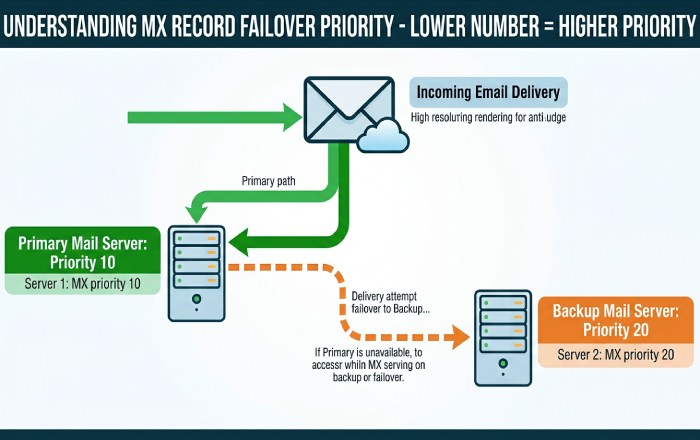
Priority order and MX priority explained
MX records have a preference value that determines priority order. Lower numbers indicate higher priority, so a server with preference 10 will be tried before one at 20. This design enables fallback and redundancy: if the primary target is unavailable, the sending system attempts the next host according to MX priority. It is common to publish a backup MX record with a higher preference number to catch temporary outages or maintenance windows. During an MX lookup, you’ll see this priority order clearly, allowing you to confirm the intended failover path for email delivery and verify that each mail server is reachable.
Why run an MX lookup as part of DNS lookup and validation
An MX lookup validates the mail exchange record set published on the authoritative name server and confirms that the DNS lookup path is healthy end-to-end. This is critical for email health and spam prevention: mismatched records or missing hosts can break email routing, create backscatter, or open the door to email spoofing. A disciplined workflow includes MX checks along with SPF record and DMARC reviews, reverse DNS confirmation for your outbound IP address, and periodic diagnostics against anti-spam databases (RBL/DNSBL). It only takes a moment to check your DMARC record alongside these MX validations. Together, these checks reduce the risk of deliverability issues and ensure email delivery aligns with policy. Use an online tool to check DMARC record syntax and policy before you rely on it.
Related DNS records and Nameservers context
MX records do not stand alone. Each MX target must resolve via an A record or AAAA record; avoid pointing an MX directly to a CNAME record. Your NS record set names the authoritative name server(s) that publish the zone, and those Nameservers must be consistent across registrars and providers. If you change providers or move to a new mail server platform, a thorough MX lookup plus supporting DNS validation helps catch DNS misconfiguration before it impacts users.
Using the MXLookup Tool and Interpreting Results
Using the MXLookup tool: inputs, outputs, and instant online checks
To run an MX lookup, enter the domain name into your preferred DNS checker and execute a DNS lookup for MX. The tool queries a DNS server, ideally the authoritative name server, or a selected public resolver and returns:
- Each mail exchange record target (hostnames of the domain’s mail servers)
- The preference (priority order / mx priority)
- The TTL (time to live) indicates the cache lifetime
- Resolved IP address data when expanded (via linked A/AAAA)
A quality MX lookup also surfaces related diagnostics, such as whether an MX target has a valid address record, whether the hostname is reachable on SMTP, and whether reverse DNS exists for outbound relays. Platforms such as MxToolbox (MXToolBox, Inc) provide these checks within their SuperTool, along with linked features like SPF Validation, DMARC Validation, and Email Health. Many vendors document programmatic options via an API Reference, and MxToolbox’s Delivery Center and Blog offer ongoing guidance for operations teams.
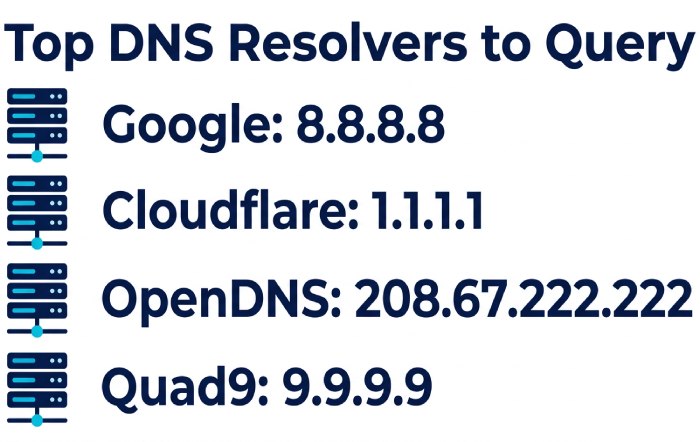
Which resolvers to query and DNS propagation reality
When verifying changes, check multiple resolvers to account for caching and DNS propagation:
- Google Public DNS (8.8.8.8)
- Cloudflare (1.1.1.1)
- OpenDNS (208.67.222.222)
- Quad9 (9.9.9.9)
- Yandex DNS Tools like DNSChecker.org and WhatsMyDNS can show you how MX answers vary worldwide as TTLs expire. For the final source of truth, query the authoritative name server directly; this eliminates variability from intermediary caches and speeds confirmation of email configuration changes.
Interpreting results: priority, fallback servers, TTLs, and common patterns
Once you have the MX lookup results, review the priority order first. The lowest number should be your primary mail server. Confirm the backup MX record entries have higher numbers and that each target resolves cleanly to an IP address. If you see a single MX only, verify upstream redundancy at the provider level or add a fallback host to improve resilience.
Next, examine TTL values. Short TTLs (e.g., 300 seconds) are useful during email migration to hasten DNS propagation, while longer TTLs reduce query load in steady state. Validate that each mail exchange record points to a hostname with an A record or AAAA record and that no target is a CNAME record. Finally, ensure SMTP connectivity is open and not inadvertently configured as an open relay; this can lead to blacklist listings in anti-spam databases (RBL/DNSBL) and failed email delivery.
Quick patterns to recognize during MX lookup
- Equal preferences across multiple hosts: load distribution with peer priority order
- Stepped preferences (10, 20, 30): classic primary/secondary/tertiary fallback
- MX points to non-existent host: DNS misconfiguration likely; fix at authoritative name server.
- MX target resolves via CNAME: not recommended; convert to an A/AAAA record
Troubleshooting and deliverability: misconfigurations, propagation delays, and migration pitfalls
If delivery falters after a change, start with an MX lookup and a full DNS lookup of supporting records. Common issues include:
- Stale caches: DNS propagation can take longer than expected if TTLs were high; query different DNS servers and the authoritative name server.
- Broken chain: MX target lacks an A/AAAA record, returns an unrouted IP address, or the Nameservers are inconsistent.
- Policy gaps: Missing or incorrect SPF record and DMARC policy allow email spoofing and hurt spam prevention; run an SPF lookup, SPF Validation, and DMARC Validation.
- Connectivity: SMTP blocked by a firewall or mis-set port; use a Port Checker.
- Reverse mapping: Ensure reverse DNS matches your greeting hostname to avoid spam filters.
- Security posture: Confirm you’re not an open relay. Check RBL/DNSBL listings if you suspect a blacklist problem.
- Migration hazards: During email migration, coordinate TTL reductions in advance, pre-stage MX for new infrastructure, and maintain a backup MX record or provider-level redundancy until cutover is stable.
Complement MX lookup with broader diagnostics: verify NS record delegation and Nameservers, perform ASN WHOIS Lookup if routing anomalies are suspected, and confirm overall DNS health and email health via monitoring dashboards. If you use a network inventory, a MAC Address Lookup is occasionally helpful in on-prem triage, though not directly tied to MX.
Best practices and advanced tips: redundancy, DNSSEC, monitoring, and CLI alternatives (dig/nslookup)
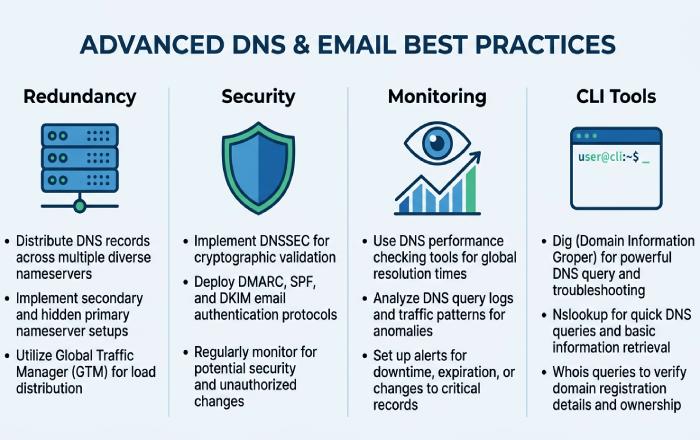
- Redundancy and design: Publish multiple MX hosts with a clear priority order and test fallback routinely. Ensure each mail server has a robust mail server configuration, including TLS, authentication, and rate limits. Consider provider redundancy so that a single data center outage doesn’t halt email delivery.
- Security and integrity: Enable DNSSEC on your zone to protect the integrity of DNS lookup answers coming from the authoritative name server. Combine this with strict DMARC and a well-scoped SPF record for stronger spam prevention.
- Monitoring and alerting: Use services like MxToolbox SuperTool for on-demand checks and Delivery Center or Email Health monitors for ongoing oversight. Their Blog often highlights emerging deliverability issues, while the API Reference can help integrate continuous MX lookup and DNS validation into CI/CD or NOC workflows.
- Broader ecosystem checks: Periodically scan anti-spam databases (RBL/DNSBL) for blacklist status, verify reverse DNS, and recheck SMTP banner and TLS. Validate DNS health across A/AAAA, NS records, and other dependencies.
- CLI proficiency: For precision and speed, use dig and nslookup. Examples:
- dig MX yourdomain.tld +trace to follow the path to the authoritative name server
- dig @a.gtld-servers.net yourdomain.tld NS to confirm delegation
- nslookup -type=mx yourdomain.tld against multiple DNS servers (e.g., Cloudflare or Google) to compare cache vs. authority
- Global perspective: Cross-check via DNSChecker.org and WhatsMyDNS during changes to visualize DNS propagation. Compare answers from Cloudflare, Google, OpenDNS, Quad9, and Yandex resolvers to catch regional anomalies quickly.
By integrating routine MX lookup into your operations, validating every mail exchange record via multiple DNS servers, and maintaining a clear, tested priority order for your domain name, you build a resilient posture for reliable email routing and consistent email delivery.
General Manager
General Manager of DuoCircle. Product strategy and commercial lead for DMARC Report's 2,000+ customer base.
LinkedIn Profile →Take control of your DMARC reports
Turn raw XML into actionable dashboards. Start free - no credit card required.