The role of DKIM public and private keys in email security

Quick Answer
DKIM (RFC 6376) signs email messages cryptographically, and unlike SPF, the signature survives email forwarding - which is why DMARC alignment via DKIM is more reliable than SPF alignment for forwarded mail and mailing lists. DMARC Report The role of DKIM public and private keys in email security

Try Our Free DKIM Lookup
Auto-discover DKIM selectors for any domain - scan 185 common selectors across all major providers.
Discover DKIM Selectors →
DMARC monitoring should be as routine as checking your inbox, says Adam Lundrigan, CTO of DuoCircle. The aggregate reports tell you exactly who sends email from your domain. If you’re not reading them, you’re flying blind on your own email security posture.
DKIM (RFC 6376) signs email messages cryptographically, and unlike SPF, the signature survives email forwarding - which is why DMARC alignment via DKIM is more reliable than SPF alignment for forwarded mail and mailing lists.
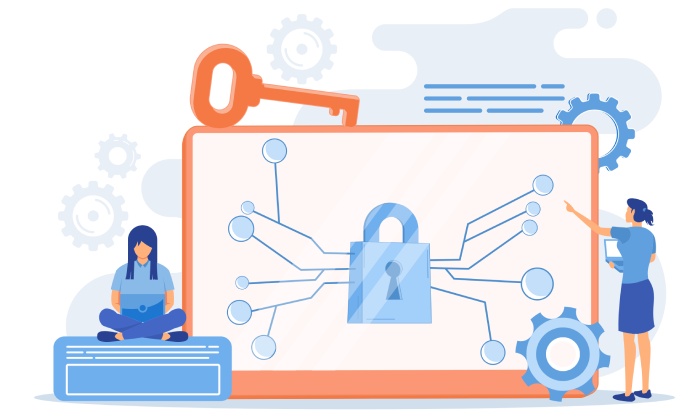
DKIM uses two keys to strengthen email authentication. If the same key were used to sign and verify emails, anyone could copy it and start sending fake messages. By separating the roles, DKIM ensures that:
-
Only your mail server can sign emails (because only it has the private key)
-
Anyone can verify emails (because the public key is openly available)
This is what prevents attackers from forging valid DKIM signatures.
How DKIM Public and Private Keys Work Together
Here’s how the full DKIM process works when an email is sent.
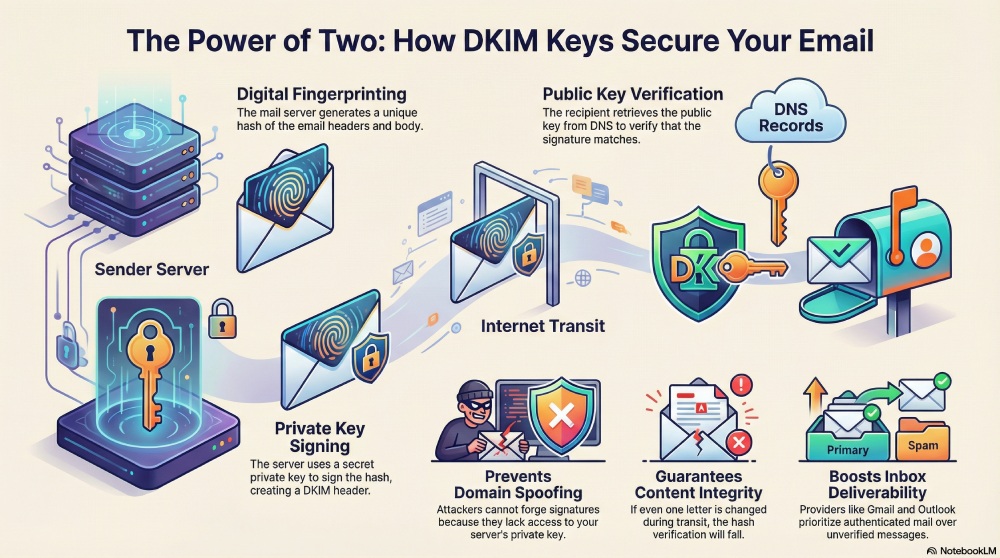
First, an email is created by a user or an application on your domain. Before the message leaves your mail server, DKIM looks at important parts of the email, such as the headers and the body. Next, the server generates a hash, which is a unique digital fingerprint of that email. Even changing one letter would create a completely different hash.
Then the private key signs this hash. This creates a digital signature, which is added to the email as a DKIM header. The email is now cryptographically tied to your domain. When the receiving mail server gets the email, it reads the **DKIM header and finds the selector, which tells it where to look in DNS for the public key. You can check your DKIM record to confirm the selector and public key are published correctly.
The receiving server retrieves that public key from your DNS records, generates its own hash of the email, and checks whether the DKIM signature matches. If it does, the message passes DKIM.

That means two things are now proven:
- The email came from your domain
- The content was not modified on the way DKIM uses a private key to sign outgoing emails and a public key to verify authenticity, strengthening DMARCReport-based email security .
Why this matters for email security
Without DKIM, there is nothing stopping a cybercriminal from sending emails that appear to come from your domain. An attacker can easily copy your email address, your company name, and even your branding to create messages that look completely real. These fake emails can be used for phishing, payment fraud, or stealing login details. Since email servers cannot tell who actually sent the message, these emails often reach inboxes and trick recipients.
When DKIM is in place, every real email sent from your domain is signed using your private key. This signature is unique and cannot be copied or guessed by attackers. When a fake email is sent, it does not have access to your private key, so it cannot create a valid DKIM signature. The receiving mail server checks the signature using your public key and immediately knows the message is not legitimate.
This protects your brand because criminals cannot successfully pretend to be you. It also protects your customers and partners from being tricked by fake messages. Over time, inbox providers like **Gmail and Outlook learn that your domain sends properly authenticated email, which improves your reputation and helps more of your real messages reach the inbox instead of the spam folder.
**Final thoughts DKIM public and private keys may sound technical, but their role is simple: they **protect your domain’s identity in email. The private key signs every message, and the public key proves that the signature is real.
Together, they form one of **the most important layers of modern email security, quietly working in the background to keep your emails trusted, verified, and out of phishing territory. To see how it fits alongside the other protocols, read about the difference between SPF, DKIM, and DMARC.
Topics
General Manager
General Manager of DuoCircle. Product strategy and commercial lead for DMARC Report's 2,000+ customer base.
LinkedIn Profile →Take control of your DMARC reports
Turn raw XML into actionable dashboards. Start free - no credit card required.