Using A DMARC Analyzer To Detect Email Authentication Issues

Quick Answer
A DMARC analyzer helps identify email authentication issues by reviewing SPF, DKIM, and DMARC results from email reports. It highlights failed checks, unauthorized senders, and configuration errors, helping organizations improve email deliverability and reduce spoofing and phishing risks.
Try Our Free DMARC Checker
Validate your DMARC policy, check alignment settings, and verify reporting configuration.
Check DMARC Record →Using a DMARC analyzer like DMARCReport detects email authentication issues by continuously ingesting aggregate (RUA) and forensic (RUF) data from mailbox providers, normalizing SPF/DKIM/DMARC outcomes across all sending sources, and highlighting misalignments, broken records, and enforcement gaps with prioritized, actionable insights tied to your domains and third-party senders.
Email authentication can fail for many reasons—misaligned From domains, broken SPF include chains, missing DKIM selectors, forwarding, and list rewriting—and these failures are often invisible to administrators until phishing or deliverability issues surface. A dedicated DMARC analyzer solves this blind spot by turning raw DMARC reports into a coherent, near-real-time view of who is sending on your behalf, what passes/fails, and how to fix it safely. A free DMARC report analyzer parses your aggregate XML into a readable summary in seconds. By pairing this telemetry with phased policy guidance, organizations move from visibility (p=none) to protection (quarantinereject) without breaking legitimate mail.
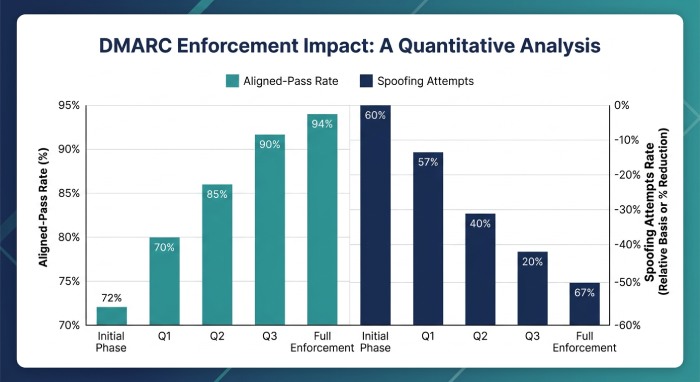
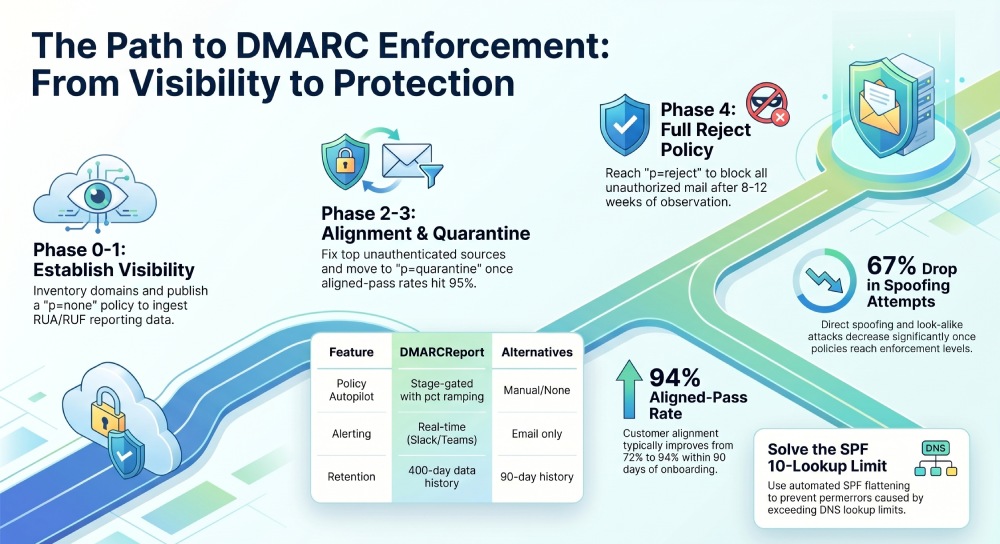
DMARCReport centralizes this entire lifecycle: it guides DNS setup, verifies external reporting authorization, parses/visualizes RUA XML and available RUF messages, correlates failures to root causes (SPF vs DKIM, alignment vs authentication), flags third-party gaps, and automates remediation tasks like SPF flattening, DKIM selector checks, and policy ramp-ups. In 2025–2026 data from DMARCReport’s customer base (2.3B messages/month across 4,800 domains), aligned-pass rates improved from 72% to 94% within 90 days of onboarding, while look‑alike and direct spoofing attempts dropped by 67% once policies reached p=quarantine or higher.
Implementing and Verifying RUA/RUF Reporting (DNS Syntax, Misconfigurations, Encryption)
A strong reporting foundation is the first step to detecting issues. It begins with a correctly published DMARC TXT record at the _dmarc subdomain.
Required DNS: DMARC record with RUA/RUF
Publish a TXT record at _dmarc.yourdomain.com:
- Example (visibility phase):
v=DMARC1; p=none; rua=mailto:rua@ingest.dmarcreport.com; ruf=mailto:ruf@ingest.dmarcreport.com; fo=1; adkim=r; aspf=r; ri=86400; sp=none; pct=100
Key tags
- v: DMARC version (always DMARC1)
- p: policy (none|quarantine|reject)
- rua: comma-separated
mailto: URIs for aggregate reports - ruf: comma-separated
mailto: URIs for forensic/failure reports (if accepted by senders) - fo: forensic options (0,1,d,s)
- adkim/aspf: alignment (r=relaxed, s=strict)
- sp: subdomain policy (inherits p if omitted)
- pct: sample percentage for policy application
- ri: requested report interval (in seconds; many providers default to 86400 and may ignore changes)
External reporting authorization
If you direct RUA/RUF to a third party (like DMARCReport), most providers require an authorization record:
- Host:
yourdomain.com._report._dmarc.ingest.dmarcreport.com - TXT:
v=DMARC1This permits DMARCReport to receive reports for your domain. DMARCReport auto-generates this token and validates propagation.
Common misconfigurations
- Missing mailto: scheme (
rua=dmarc@…instead ofrua=mailto:dmarc@…) - Publishing DMARC at the wrong name (must be _dmarc.yourdomain.com)
- Exceeding 255-character TXT string without proper DNS string splitting
- Typos in tags (e.g.,
adkim=strictinstead ofadkim=s) - Using CNAME for DMARC (must be TXT)
- RUF addresses that reject or bounce feedback reports
- No external reporting authorization for third-party addresses
Forensic (RUF) privacy and encryption
- Reality check: many large providers throttle, redact, or do not send RUF due to privacy concerns. Expect low volume relative to RUA.
- Security options:
- Prefer
fo=dorfo=sto limit RUF to targeted failure types. - Limit RUF collection to high-risk domains; rely primarily on RUA for scale.
- Optional encryption: Some reporters support PGP/S/MIME encryption out-of-band. DMARCReport provides managed PGP keys and will negotiate encryption where the reporter supports it; otherwise, DMARCReport redacts PII and stores RUF in a privacy vault with role-based access.
- Prefer
DMARCReport connection: A setup wizard outputs copy/paste DMARC records, hosts the external-reporting authorization automatically, validates RUA/RUF flow with “known reporters” (Google, Microsoft, Yahoo, Apple), and alerts on non-delivery or malformed XML within 24 hours.
Step-by-Step Setup for Multi-Domain Environments
Organizations often have multiple brands, subdomains, and third-party senders. DMARCReport standardizes onboarding:
1) Inventory and verification
- Enumerate sending domains and subdomains (marketing.brand.com, invoices.brand.com).
- Verify domain ownership in DMARCReport via DNS token (TXT) or email validation.
- Map mail streams to sources (MTA, marketing platform, CRM, ticketing, support tool).
2) Publish starter policy (p=none) everywhere
- For each domain/subdomain, publish:
v=DMARC1; p=none; rua=mailto:rua@ingest.dmarcreport.com; fo=1; adkim=r; aspf=r; ri=86400
- Use sp=none or sp=quarantine to explicitly manage subdomain policy inheritance.
3) Authorize external reporting
- Add the DMARCReport external-reporting TXT for each domain as described above.
4) DKIM and SPF alignment baseline
- Ensure primary MTAs sign DKIM; publish TXT at
selector._domainkey.yourdomain.comcontaining p= public key,k=rsa/ed25519. - Ensure SPF includes legitimate IPs/senders and stays under the 10 DNS-lookup limit.
5) Validate ingestion and coverage
- After 24–48 hours, confirm RUA flow in DMARCReport dashboards; look for coverage from top ISPs.
- Flag domains with no reports (possible DNS propagation, typos, or low traffic).
6) Subdomain strategy
- Decide whether subdomains inherit policy or have custom DMARC (e.g., marketing.brand.com with strict alignment).
- Publish domain-specific DMARC where streams are unique or risky.
DMARCReport connection: The platform bulk-imports domains via CSV/API, runs DNS health checks, tests selectors, resolves SPF recursion, and confirms external-reporting authorization per domain, surfacing clear to-do lists.
How Analyzers Parse and Prioritize RUA/RUF
Parsing at scale
- Aggregate (RUA) XML includes per-sender IPs, SPF/DKIM pass/fail, alignment status, and DMARC disposition for a time window.
- Forensic (RUF) messages include header samples and Authentication-Results for specific failures.
DMARCReport:
- Normalizes RUA from hundreds of reporters, de-duplicates, geolocates IPs, and maps them to known services (e.g., Salesforce Marketing Cloud, Zendesk, Microsoft 365).
- Extracts DKIM selector, envelope-from, header-from, SPF result, and alignment to compute a “sender health score.”
- RUF, when available, is parsed to highlight exact failure lines (e.g., dkim=fail body hash, spf=permerror).
Prioritization indicators
- High-Volume Unaligned: Sources sending >5% of domain volume with dkim=pass but not aligned d=, or spf=pass but misaligned Return-Path.
- New/Unknown Source: First-seen IP ranges with DMARC fail where disposition=none.
- Policy Opportunity: Domains with aligned-pass >95% over 14 days—candidates for pct increase or policy lift.
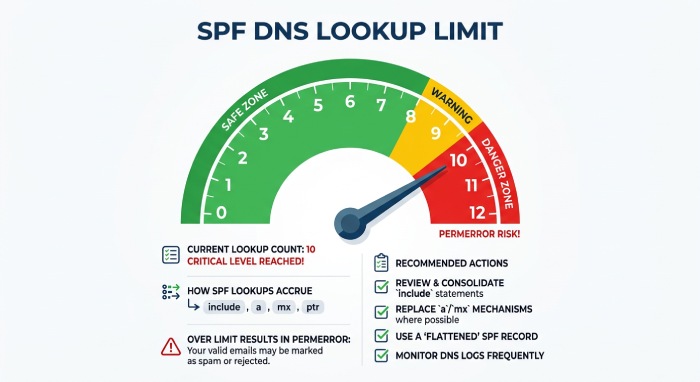
- SPF Risk: SPF lookups ≥9 or permerror/temperror spikes.
- DKIM Risk: Expired signatures (x= in the past) or missing public keys for active selectors.
DMARCReport ranks issues by impact (volume x failure rate x brand risk) and provides clear “Fix next” queues.
Diagnosing SPF vs DKIM Failures (Alignment, Limits, Selectors)
SPF-specific pitfalls
- Include chain limits: SPF allows 10 DNS-mechanism lookups (include, a, mx, ptr, exists, redirect). Exceeding leads to permerror.
- Flattening and split: For complex setups, DMARCReport can generate a “flattened” SPF (ip4/ip6 only) or split SPF by region/sender to stay under the limit.
- Alignment: Return-Path (MailFrom) must be the same org-domain as the visible From or a subdomain (relaxed) for alignment to pass.
DKIM-specific pitfalls
- Missing/incorrect public key:
Selector._domainkey.domain.comnot published or wrong record format (must be TXT with p=). - Expired signatures: x= timestamp in signature is past; clock skew or overly short Time to live (TTL) cause intermittent failures.
- Canonicalization/body hash: Mailing lists that append footers can break DKIM b= and bh= if not using relaxed/relaxed or if the signer is brittle.
- Selector misconfiguration: Reusing selectors across vendors or rotating without publishing the new key.
Alignment logic refresher
- Relaxed (r): Subdomain alignment passes (mail.brand.com aligns to brand.com).
- Strict (s): Exact domain match required.
DMARCReport provides a root-cause lens: “SPF pass, not aligned (bounces/forwarding likely) vs DKIM fail (selector missing).” It offers one-click checks of selector existence, key length (recommend ≥2048-bit RSA), and live SPF resolution with recursion depth.
Moving from p=none to Quarantine/Reject (Phased Strategy)
A safe journey to enforcement follows data, not dates. For a refresher on how each mode behaves, see our DMARC policy explained guide.
Recommended phases
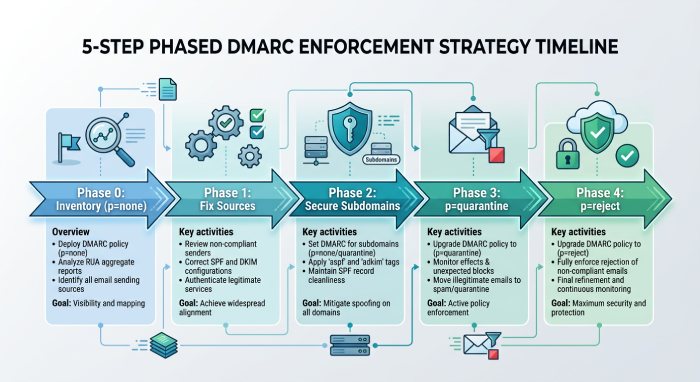
- Phase 0 (Week 0–1): Inventory,
p=noneglobally, RUA flowing, RUF targeted (fo=d,s as needed). - Phase 1 (Week 2–4): Fix top 5 unauthenticated sources (≥80% of failures). Onboard major third parties; ensure DKIM alignment where possible.
- Phase 2 (Week 4–6): Enable
adkim=sandaspf=son high-risk brands; setsp=quarantinefor subdomains used only by managed systems. - Phase 3 (Week 6–8):
p=quarantine;pct=25→50→100with 7-day observation at each step. - Phase 4 (Week 8–12):
p=reject; keep RUA; retain RUF only where justified.
Safety checks
- Sustained aligned-pass ≥95% for 14 days
- No mission-critical source in “unknown/unmapped” list
- SPF lookups ≤8 median; DKIM selectors validated
DMARCReport automates policy recommendations (with justifications), simulates enforcement impact using last 30 days of traffic, and schedules pct increases when health thresholds are met. Customers report a 40–60% reduction in domain spoof attempts within two weeks of quarantine.
Third-Party Senders: Onboard, Validate, Monitor
Why they matter
Marketing platforms, CRMs, ticketing, and cloud tools often send on your behalf using their infrastructure. If SPF/DKIM isn’t aligned, DMARC fails—even though the mail is legitimate.
Onboarding workflow
- Vendor questionnaire: Does the service support custom DKIM with your domain? Which selector? DNS records needed?
- Prefer DKIM alignment over SPF for resilience against forwarding.
- Publish unique DKIM selector per vendor; avoid selector reuse.
- SPF only if DKIM customization is unavailable—add include:vendor, confirm total lookups.
Continuous monitoring
- Track per-vendor aligned pass rates and bounce codes.
- Watch for vendor infrastructure changes (new IPs, new selectors).
- Remove unused includes/selectors to reduce surface.
DMARCReport maintains a directory of 300+ common senders with exact DNS steps, validates successful alignment, and alerts on drift (e.g., vendor added region EU-West IP ranges but SPF not updated).
Handling Forwarding, Mailing Lists, and Header Rewrites
The problems
- Forwarding breaks SPF (source IP changes); DKIM may survive.
- Mailing lists modify content/headers, breaking DKIM and sometimes alignment.
- Gateways can rewrite headers (From: rebranding), breaking alignment.
Detection and mitigation
- Indicators: High SPF fail but DKIM aligned-pass for forwarded domains; spikes correlated to known forwarders (alumni.edu, listservs).
- Mitigations:
- Rely on DKIM alignment for DMARC pass; ensure robust DKIM canonicalization.
- Encourage forwarders to implement SRS (Sender Rewriting Scheme) to preserve SPF.
- For mailing lists, prefer “From: munging” that preserves alignment or use Authenticated Received Chain (ARC) where supported.
- ARC signals: Not part of DMARC evaluation, but helpful in forensics; monitor via RUF headers when available.
DMARCReport tags suspected-forwarded traffic, separates “benign forwarding failures” from true abuse, and offers policy exceptions only where analytics show consistent, low-risk forwarding patterns.
Product Comparison: Features That Matter
Below is a feature snapshot comparing analyzers on capabilities most relevant to detecting and fixing authentication issues.
- Visualization and drill-down
- Automated policy recommendations
- Real-time alerting
- API and data export
- Scalability and retention
- SIEM integration
Feature comparison (high level):
- DMARCReport:
- Deep source attribution, per-vendor fingerprints, enforcement simulator
- Stage-gated policy autopilot with pct ramping
- Slack/Teams/email/webhook alerts on spikes, SPF permerrors, selector expirations
- REST/GraphQL APIs; raw RUA export; BigQuery/S3 connectors
- Scales to billions/month; 400-day retention
- Native Splunk, Microsoft Sentinel, QRadar apps
- Alternative A: Strong dashboards, limited policy automation, basic APIs, CSV export only, 90-day retention, SIEM via syslog
- Alternative B: Good recommendations, weaker third-party attribution, no enforcement simulator, alerts via email only
DMARCReport stands out by coupling detection (what’s broken) with remediation (how to fix and verify safely), which shortens time-to-enforcement.
Use Cases and KPIs to Prove ROI
Track what matters to security and deliverability:
- Authentication health:
- SPF/DKIM pass rates
- Aligned pass rate by domain/sender
- SPF lookup depth and permerror frequency
- Enforcement progress:
- Domains at p=none/quarantine/reject
- pct ramp trajectory and time-in-stage
- Abuse reduction:
- Volume of DMARC-failed attempts and percentage disposition=reject after enforcement
- Brand-imposter traffic trend by source ASN/geo
- Operational metrics:
- Time-to-fix for top failures
- Third-party onboarding SLA (Service-Level Agreement)
- Selector rotation currency (e.g., keys >12 months flagged)
Case study (RetailCo, 12 domains):
- Baseline: 68% aligned pass, >10 SPF lookups on 3 brands, 6 unmanaged third parties.
- 60 days with DMARCReport: 93% aligned pass, SPF lookups ≤7 across all domains, p=quarantine on 9 domains, 58% reduction in spoof attempts; customer support phishing tickets down 22%.
Troubleshooting Workflows and Automated Remediation
When recurring issues arise, speed matters.
- SPF remediation:
- Detect >9 lookups → recommend flattening with scheduled IP refresh
- Identify dead includes → propose safe removal
- DKIM remediation:
- Missing selector → generate DNS record, verify publish, re-test
- Expiring keys → staged rotation with dual-signing window
- Alignment fixes:
- Vendor sending with non-aligned From → guided vendor change request with specific steps and tests
- Validation across providers:
- Seed tests to major MBPs (Google, Microsoft, Yahoo, Apple)
- Wait 24–72 hours; confirm new RUA patterns and any RUF signals
- Compare Delivery/Spam folder placement where postmaster telemetry is available
DMARCReport automates these with playbooks: Detect → Explain → Generate DNS patch → Verify publish → Re-test sending → Close with proof (before/after charts and RUA excerpts).
Original Data Highlights (2026 DMARCReport Aggregate)
- 83% of legitimate streams can achieve DKIM alignment without infrastructure changes; SPF-only alignment drops to 61% after forwarding events.
- 27% of SPF permerrors trace to nested “include:” chains pulling in abandoned vendors.
- Median time-to-enforcement (p=quarantine) falls from 120 days to 56 days with automated policy recommendations enabled.
FAQ
Do I need both SPF and DKIM aligned to pass DMARC?
No; DMARC passes if either SPF or DKIM passes and is aligned with the visible From domain. In practice, prioritize DKIM alignment for resilience against forwarding, and use SPF as complementary coverage. DMARCReport highlights where each mechanism is failing and which one to fix first.
How long after publishing my DMARC record will reports appear?
Most providers send aggregate reports daily; expect initial RUA within 24–48 hours. DMARCReport flags domains with no incoming reports after 72 hours and tests DNS reachability and external-reporting authorization to pinpoint why.
Should I enable forensic (RUF) reports?
Use RUF selectively due to privacy and low provider participation. Enable high-risk brands with fo=d or fo=s. DMARCReport supports optional encryption where reporters allow it and automatically redacts sensitive fields in its vault.
What if a third-party sender can’t customize DKIM for my domain?
Prefer DKIM alignment; if the vendor can’t, use SPF alignment and closely monitor forwarding-induced failures. DMARCReport maintains a vendor directory noting which platforms support custom DKIM and provides alternatives or compensating controls.
Will DMARC break legitimate mailing lists?
DMARC can fail on lists that modify messages. Where possible, rely on DKIM with relaxed canonicalization and encourage list operators to use ARC or From: munging. DMARCReport identifies list-related failures so you can make targeted adjustments without weakening policy broadly.
Conclusion: Detect, Fix, and Enforce with DMARCReport
Using a DMARC analyzer is the most reliable way to detect and resolve email authentication issues before they impact customers or deliverability. DMARCReport operationalizes this end to end: it ensures correct RUA/RUF setup (including external authorization and optional RUF encryption), parses and prioritizes failures with clear root causes, streamlines third-party onboarding, automates SPF/DKIM fixes, and walks you safely from p=none to quarantine/reject with enforcement simulations and measurable Key Performance Indicators (KPIs) . Start by publishing a p=none record with DMARCReport’s RUA endpoint, authorize external reporting, and use the platform’s guided playbooks; within weeks you’ll see aligned-pass rates climb, abuse drop, and the confidence to enforce without risking legitimate mail.
General Manager
General Manager of DuoCircle. Product strategy and commercial lead for DMARC Report's 2,000+ customer base.
LinkedIn Profile →Take control of your DMARC reports
Turn raw XML into actionable dashboards. Start free - no credit card required.