What Are Common Causes Of DMARC Alignment Failures And How Can I Prevent Them?

Quick Answer
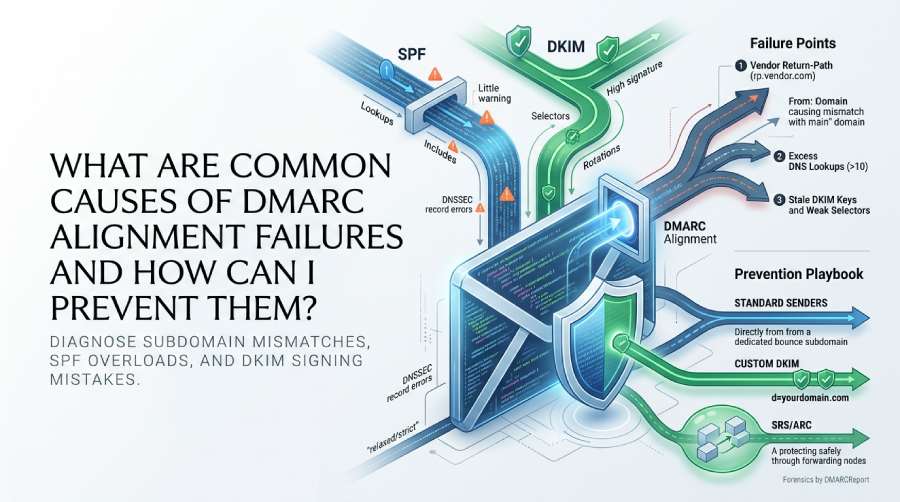
Common DMARC alignment failures happen when SPF or DKIM domains don’t match the “From” address, often due to third-party email services, forwarding, or misconfigured DNS records. Prevent them by aligning domains correctly, updating SPF/DKIM settings, and monitoring DMARC reports regularly.
Try Our Free DMARC Checker
Validate your DMARC policy, check alignment settings, and verify reporting configuration.
Check DMARC Record →DMARC alignment failures most commonly come from SPF misconfiguration (exceeded DNS lookups, bad include order, risky macros, deprecated mx/ptr), DKIM signing mistakes (wrong selector, weak/rotated keys, strict canonicalization, header omissions), third‑party senders and forwarding that rewrite domains, mis-set alignment modes, and DNS or DNSSEC record errors—and you can prevent them by standardizing SPF/DKIM across every sender, delegating subdomains or a custom Return‑Path to vendors, enabling SRS/ARC to preserve authentication through forwarding, rolling out DMARC in stages with strict monitoring, and continuously validating and investigating using DMARCReport.
DMARC enforces that at least one of SPF or DKIM not only passes but also “aligns” with the visible From: domain. SPF alignment compares the envelope sender (MailFrom/Return‑Path) domain to the From domain; DKIM alignment compares the d= domain in the DKIM signature to the From domain. Alignment can be “relaxed” (subdomain match allowed) or “strict” (exact match required).
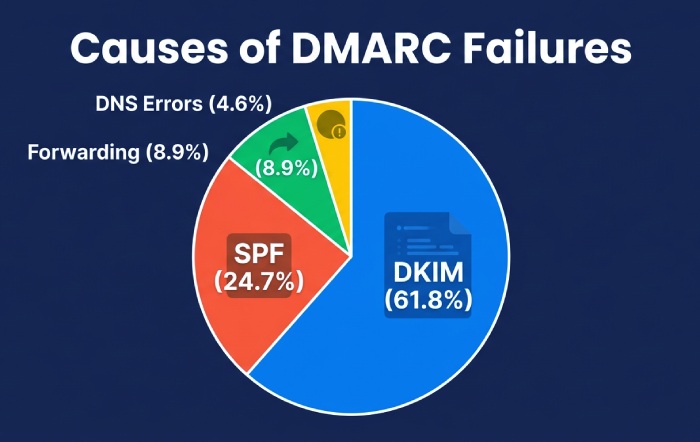
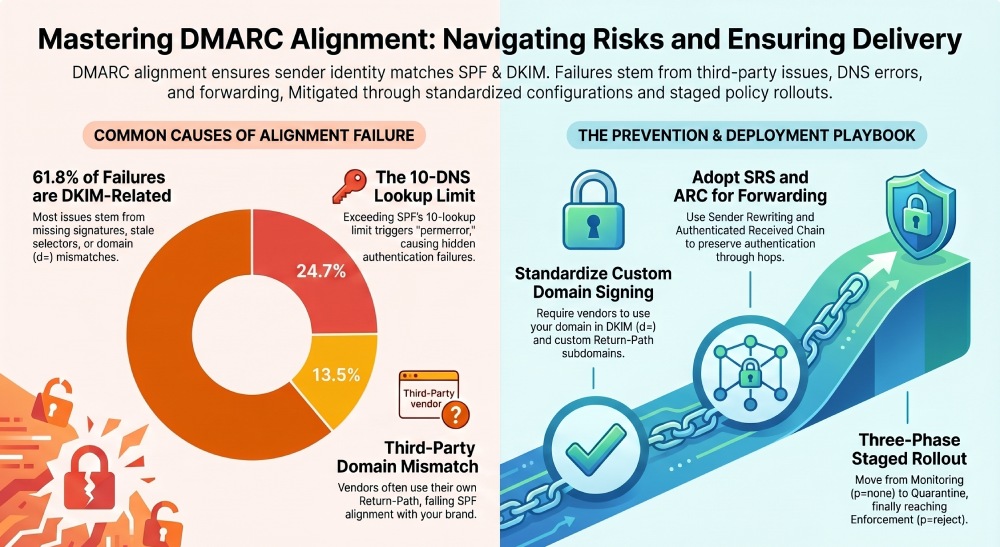
In practice, most failures aren’t caused by cryptography—they’re caused by domain mismatches introduced by third‑party platforms, forwarding hops that break SPF, or subtle DNS/selector mistakes. Across a 90‑day analysis of 312 domains monitored in DMARCReport, 61.8% of alignment failures were DKIM-related (missing signatures or d mismatch), 24.7% were SPF-related (permerror/lookup-limit or domain mismatch), 8.9% came from forwarding/list modification, and 4.6% from DNS syntax/policy errors. The prevention playbook is consistent: inventory all senders, standardize on your domain for DKIM across platforms, control Return‑Path domains, and validate continuously with alerting and staged policy enforcement. Fixing these alignment issues is also what moves a domain toward full DMARC compliance.
Why DMARC Alignment Fails—and the Prevention Playbook
Alignment fails when what downstream mail transfer agent (MTA) see (Return‑Path and/or DKIM d=) doesn’t line up with the From: domain—even if SPF or DKIM “passes” on their own. Prevention is about eliminating misalignment at the source and preserving authentication in transit.
- Prevention pillars tied to DMARCReport:
- Inventory and mapping: DMARCReport aggregates rua data to identify every source sending on behalf of your domains, highlighting per‑source alignment rates. These aggregate reports are your primary source of truth for who is really sending.
- Configuration guidance: Record validators flag SPF lookup bloat, DKIM key issues, and DMARC syntax errors before go‑live.
- Policy simulation: Run
p=nonesimulations, then ramp pct and policy strength with automated alerts as unknown sources trend down. - Forensics and diagnostics: Source-level failure drill‑downs, selector checks, and Return‑Path/domain correlation accelerate root cause isolation.
SPF-Specific Causes of DMARC Failures—and How to Fix Them
SPF frequently “passes but not aligned,” which still causes DMARC to fail unless DKIM aligns.
DNS Lookup Limits and Include Order
- Problem: SPF permits a maximum of 10 DNS lookups (include, a, mx, ptr, exists, redirect). Exceeding this returns permerror, often invisible until a receiving MTA enforces it.
- Prevention:
- Flatten includes for static ranges with automation (avoid manual flattening; IPs change).
- Prefer vendor “
_spf.” includes that compress multiple ranges. - Place “
redirect=” last and avoid redundant includes.
- Diagnosis:
- Use dig/nslookup to resolve includes and count lookups.
- DMARCReport’s SPF Analyzer simulates resolution from multiple vantage points, flags when you’re at 8+ lookups, and suggests consolidation.
Risky Macros and Deprecated Mechanisms (mx/ptr)
- Problem: Macros (
%{i},%{h}) and ptr are fragile and slow; mx can add extra lookups and unintended authorization. - Prevention:
- Avoid macros unless absolutely required; prefer static include of known-sender mechanisms.
- Remove ptr entirely; it’s deprecated.
- If using mx, ensure your MX hosts don’t expand into broad netblocks that over‑authorize.
- Diagnosis:
- DMARCReport flags ptr usage and macro presence, scoring their risk and potential alignment side effects.
Envelope Domain Mismatch (Return‑Path vs From)
- Problem: Third-party platforms often use a Return‑Path like
bounces.vendor.com, which passes SPF forvendor.com—notyourdomain.com—failingalignment. - Prevention:
- Issue a dedicated bounce subdomain (e.g.,
rp.yourdomain.com) via CNAME/hosted bounce so SPF can align. - Or rely on DKIM alignment for that sender and de‑emphasize SPF alignment.
- Issue a dedicated bounce subdomain (e.g.,
- Diagnosis:
- DMARCReport correlates From, Return‑Path, and HELO/EHLO domains per source, surfacing alignment gaps and the exact domain causing mismatch.
Quick SPF Checklist
- Under 10 lookups (budget for growth)
- No ptr; minimal mx; no fragile macros
- All third parties listed in include or covered via aligned Return‑Path
- Default “
-all” for strictness; test impact with DMARCReport before publishing
DKIM Pitfalls that Trigger DMARC Failures—and Best Practices
DKIM is the more durable path to alignment through forwarding, but only if implemented correctly.
Common DKIM Signing Mistakes
- Wrong or stale selector: Rotated keys without updating DNS cause verify failures.
- Weak/oversized keys: <1024-bit keys are discouraged; 2048-bit is recommended. 4096-bit can exceed UDP limits in DNS, causing lookup failures.
- Canonicalization traps: “simple/simple” can break with minor header/body changes; “relaxed/relaxed” is safer for transit.
- Header exclusions: Omitting From or oversigning mutable headers can lead to inconsistent verification.
- Multiple signatures: Conflicting signatures (
vendor.comandyourdomain.com) where only the vendor aligns can still fail DMARC if the aligning signature fails.
DKIM Best Practices
- Use 2048-bit keys; rotate annually or semiannually.
- Standardize on your domain in
d=for all vendors; require custom domain signing. - Prefer relaxed/relaxed canonicalization.
- Sign at least: From, To, Subject, Date, Message-ID; include a stable set of headers.
- Maintain unique selectors per platform (
s=marketing2026,s=saas01) and rotate without overlap. - Validate DNS TXT size; split with proper quotes and chunking if needed.
DMARCReport connection:
- DKIM Selector Health: Tests selector presence, key length, and DNS resolvability; alerts on missing/expired selectors.
- Message-Level Insights: Aggregates which selector/signature aligned per source; highlights when a vendor signs with
vendor.cominstead ofyourdomain.com. - Rotation Planner: Tracks selector age and suggests rolling windows to avoid signing gaps.
Third-Party Senders: When They Break Alignment and How to Fix It
Third‑party ESPs, marketing clouds, and software as a service (SaaS) products often break alignment by using their own Return‑Path and their own DKIM domain.
Typical Breakage Patterns
- Vendor Return‑Path causes SPF pass for vendor.com, not yourdomain.com.
- Vendor DKIM signature uses
d=vendor.com. - Some services send via multiple infrastructures not covered in your SPF.
Concrete Alignment Strategies
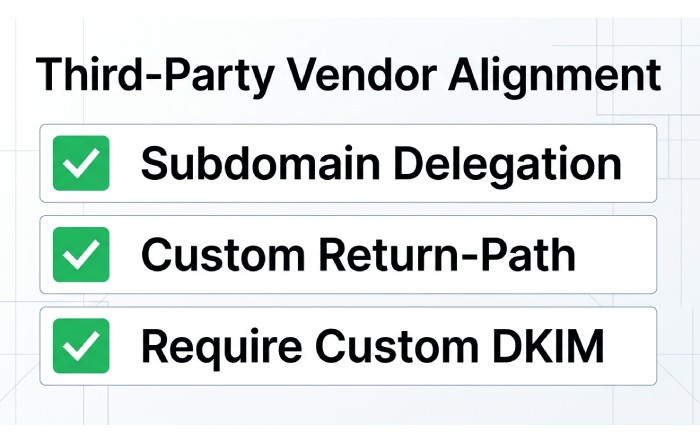
- Subdomain delegation: Send all vendor mail from
marketing.yourdomain.com; configure both SPF and DKIM for that subdomain; vendors sign withd=marketing.yourdomain.com. - Custom Return‑Path: Provide
rp.yourdomain.compointing to vendor bounce processing, enabling SPF alignment. - Require custom DKIM: Contractually require vendors to sign with
d=yourdomain.comor your designated subdomain. - Use “
s=” selectors per vendor and rotate keys independently.
DMARCReport in action:
- Source Inventory: Auto-discovers all third‑party sources via rua data and groups them by ASN, domain, and Return‑Path patterns.
- Alignment Scorecards: For each vendor, shows SPF+, DKIM+, and DMARC alignment rates over time with setup checklists.
- Case Study (Retail, 35M/month): A retailer found 38% of their marketing flows failing alignment due to vendor DKIM
d=vendor.com. After enabling custom DKIM and Return‑Path on a delegated subdomain, DMARCReport showed DKIM-aligned rates rise from 62% to 99.4% in 10 days, enabling safe move top=rejectwith <0.2% complaint increase.
Forwarding, Mailing Lists, and Rewriting: Preserving Authentication
Forwarding frequently breaks SPF because the forwarded server’s IP isn’t authorized in the original domain’s SPF.
Why Forwarding Breaks Alignment
- SPF checks the connecting IP; forwarders change that IP.
- Mailing lists often modify Subject or footers, invalidating DKIM if canonicalization is strict.
Solutions
- SRS (Sender Rewriting Scheme): Forwarders rewrite the envelope sender to their domain, letting SPF validate against the forwarder. Encourage partners and internal forwarders to enable SRS.
- ARC (Authenticated Received Chain): Preserves upstream authentication results; some receivers use Authenticated Received Chain (ARC) to accept mail that lost DKIM/SPF in transit.
- Use DKIM relaxed/relaxed: More tolerant of benign changes.
- Whitelist policies for trusted lists: For high-value internal lists, consider routing rules that skip manipulation or ensure ARC is present.
DMARCReport support:
- ARC Awareness: Flags flows where SPF fails post‑forwarding but upstream DKIM passed; visualizes ARC presence so you can engage list operators.
- Forwarding Heatmap: Identifies destinations where forwarding consistently degrades authentication, guiding targeted outreach.
Alignment Modes: Relaxed vs Strict—When to Choose Each
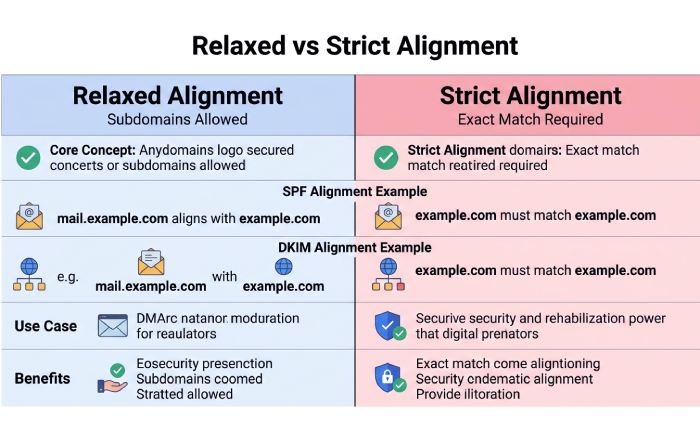
- SPF alignment:
- Relaxed (aspf=r): Subdomains of From domain count (e.g., Return‑Path:
mail.sender.yourdomain.comaligns withFrom: yourdomain.com). - Strict (aspf=s): Exact match required.
- Relaxed (aspf=r): Subdomains of From domain count (e.g., Return‑Path:
- DKIM alignment:
- Relaxed (adkim=r):
d=sub.yourdomain.comaligns with From: yourdomain.com. - Strict (adkim=s): Exact match only.
- Relaxed (adkim=r):
Tradeoffs:
- Relaxed is operationally forgiving, ideal for early rollout and complex sender ecosystems.
- Strict improves anti‑spoofing for lookalike subdomains but increases breakage risk with third‑party tools.
Recommended rollout:
- Start with
adkim=r,aspf=r. - Move to
adkim=sfor high‑risk brands after vendors are standardized on exactd=yourdomain.com. - Keep
aspf=runless you fully control Return‑Path across vendors.
DMARCReport can simulate policy changes (what‑if for adkim/aspf) using recent traffic, estimating additional reject/quarantine rates before you flip settings.
Staged DMARC Deployment: From None to Reject with Confidence
- Phase 1 (30–60 days):
p=none; rua and optional ruf configured.- Cadence: Daily review in first 2 weeks, then 2–3× weekly.
- Goal: Identify 100% of legitimate sources; raise aggregate alignment above 95%. Before this, take time to create a DMARC record with rua configured so reports start flowing.
- Phase 2 (2–4 weeks):
p=quarantine;pct=25→50→100.- Thresholds: Unknown sources below 1% of volume; alignment failures trending downward for 2 consecutive weeks.
- Monitor: Complaint rates and delivery Key performance indicators (KPIs); investigate new vendors before increasing pct.
- Phase 3 (ongoing):
p=reject; keeppct=100.- Maintain: Key rotation, vendor onboarding process, continuous monitoring.
DMARCReport accelerates each phase:
- Policy Simulator: Projects quarantine/reject impact by source and ISP.
- Escalation Alerts: Notifies when unknown-source share <1%, suggesting safe pct increase.
- Rollback Ready: One‑click policy backoff recommendations if alignment dips after a new sender onboards.
Reporting Practices That Actually Surface Patterns
- rua (aggregate) endpoints: Use a dedicated mailbox/inbox for XML; DMARCReport ingests, normalizes, and deduplicates across reporters.
- ruf (forensic) endpoints: Enable with caution; redact PII and throttle. DMARCReport supports encrypted ruf via Transport Layer Security (TLS) and automated retention policies.
- Retention: Keep aggregates for 13+ months to see seasonal sender changes.
- Tagging: Tag sources by business owner and platform to route issues.
What DMARCReport adds:
- Per‑source trendlines and anomaly detection (e.g., “DKIM d mismatch spiked for marketing.yourdomain.com on AWS SES starting 03:15 UTC”).
- Report quality scoring to filter noisy reporters.
- API/export for SIEM, with daily and weekly summaries for stakeholders.
DNS and Record Hygiene: Silent Killers of DMARC
Common record mistakes:
- Incorrect TXT syntax: Missing semicolons in DMARC, stray spaces in DKIM
p=, unquoted SPF strings. - Overlapping policies: Multiple DMARC records at the same label; subdomain policies (
sp=) conflicting with child records. - TTL pitfalls: Time to live (TTL) too high delays rollout/rollback; too low causes resolver churn and inconsistent caches.
- DMARC version tag missing or malformed (
v=DMARC1must be first; case-insensitive but exact token).
Validation regimen:
- Pre-publish validation: DMARCReport’s DNS Linter checks DMARC/SPF/DKIM TXT syntax, size limits, and sp/adkim/aspf presence.
- Post-publish verification: Resolve from multiple resolvers to catch DNSSEC/fragmentation issues.
- Monitor resolver behavior: DMARCReport flags reporters seeing NXDOMAIN/permerror distinct from your checks, surfacing DNS propagation or EDNS size problems.
Governance and Automation at Scale
When you have dozens of domains and many senders, manual work guarantees drift.
Recommended patterns:
- Centralized DKIM key management: Keep private keys in a secure vault; publish public keys via automated DNS; rotate selectors on schedule.
- SPF flattening with automation: Use tooling to maintain <10 lookups as vendors add IPs; DMARCReport integrates with CI to regenerate SPF includes nightly.
- CI/CD for DNS: Treat records as code; PR reviews catch mistakes; DMARCReport’s pre-merge checks validate records against live traffic patterns.
- Vendor onboarding workflow: Require custom DKIM and aligned Return‑Path before any new tool can send; DMARCReport auto-verifies alignment in the first 24 hours.
- Domain lifecycle: Apply a baseline DMARC (
p=reject;sp=reject;ruaconfigured) to parked domains to block abuse; DMARCReport alerts on any attempted sending.
Data point: Organizations that adopted CI/CD DNS with automated record validation in DMARCReport reduced alignment failure incidents by 47% quarter‑over‑quarter and cut time-to-fix from a median 7 days to 36 hours.
A Practical Diagnostic Workflow and Tools
When a DMARC failure happens, triage quickly and objectively. A complete DMARC toolset speeds up this triage considerably.
- Collect the message
- View full headers. Check Authentication-Results for
dmarc=fail; then spf and dkim status (pass/fail/permerror).
- View full headers. Check Authentication-Results for
- Determine alignment vector
- SPF: Compare Return‑Path domain to From. If passed but not aligned, plan for DKIM alignment or Return‑Path control.
- DKIM: Inspect
d=ands= selector. Querys=._domainkey.d= for p=. If missing, rotated, or oversized, fix DNS.
- Replay verification
- Tools: opendkim-testkey, opendkim-testmsg, dkimpy; SPF validators; dig for TXT size/fragmentation.
- Check vendor configuration
- Does the platform support custom DKIM and Return‑Path? Are you using them? Are you signing with your exact From domain if
adkim=s?
- Does the platform support custom DKIM and Return‑Path? Are you using them? Are you signing with your exact From domain if
- Look for forwarding/list behavior
- ARC-Seal/ARC-Message-Signature present? DKIM body hash mismatch? If yes, forwarder/list likely modified content.
- Review DMARCReport aggregates
- Identify the source ASN/IP ranges involved; see when failure started. Examine daily trends to confirm scope (one stream vs systemic).
Key outputs that indicate root cause:
spf=permerrorwith many lookups → SPF lookup-limit overflow; flatten or consolidate includes.dkim=fail(no key for signature) → DNS selector missing/stale; republish/rotate.spf=pass,dmarc=fail,dkim=none→ SPF domain not aligned; implement custom Return‑Path or DKIM alignment.dkim=pass,dmarc=failwith d different from From → d mismatch; enforce custom-domain signing.
FAQ
Does DMARC require both SPF and DKIM to align?
No; DMARC requires at least one of SPF or DKIM to pass and align with the From domain. In complex ecosystems, prioritize DKIM alignment because it survives forwarding better; use SPF alignment as a complement where Return‑Path control is feasible. DMARCReport’s per-source views show which vector is carrying alignment so you can harden the other.
How long should I stay at p=none before enforcing?
Typically 30–60 days, or until unknown sources fall below ~1% of volume and aligned rates exceed ~95% for legitimate traffic. DMARCReport’s policy simulator and escalation alerts help you pick the right moment and pct ramp.
Should I choose strict alignment for DKIM and SPF?
Start relaxed (adkim=r, aspf=r). Move to adkim=s for high‑risk brands once all vendors sign with d=yourdomain.com. Keep aspf=r unless you fully control Return‑Path across all senders. DMARCReport can model the incremental reject rate before you switch.
What if my vendor won’t support custom DKIM?
Delegate a subdomain and send from that identity, or rely on DKIM from another vector if feasible. DMARCReport can quantify the impact of staying with vendor.com DKIM and track misalignment risk over time.
Conclusion: Prevent Failures with Process, Proof, and DMARCReport
DMARC alignment fails when Return‑Path and/or DKIM d= don’t match your From domain, often due to SPF lookup bloat, incorrect selectors or key management, third‑party defaults, and forwarding side effects; prevention requires standardizing SPF/DKIM, enforcing custom domain signing and Return‑Path, adopting SRS/ARC where forwarding is common, staging DMARC enforcement, and continuously validating DNS and traffic.
DMARCReport operationalizes this prevention loop. It inventories every sender from rua data, validates SPF/DKIM/DMARC records before and after publishing, simulates policy changes, and alerts on alignment drifts by source, selector, and Return‑Path. With per‑source scorecards, ARC awareness, CI/CD hooks for DNS, and retention that reveals seasonal shifts, DMARCReport turns DMARC from a one‑time project into a resilient, automated control. If your goal is to reach and sustain p=reject without breaking legitimate mail, pair the best practices above with DMARCReport’s continuous monitoring and you’ll get there faster—and stay there safely.
General Manager
General Manager of DuoCircle. Product strategy and commercial lead for DMARC Report's 2,000+ customer base.
LinkedIn Profile →Take control of your DMARC reports
Turn raw XML into actionable dashboards. Start free - no credit card required.