What Are Common Challenges When Deploying DMARC With G Suite And How Can I Identify Them?

Quick Answer
Common DMARC issues in G Suite: SPF/DKIM misalignment, unmanaged third-party senders, and premature quarantine/reject policies. Identify them using DMARC aggregate reports, Gmail Admin console logs, and message header authentication results.
Try Our Free DMARC Checker
Validate your DMARC policy, check alignment settings, and verify reporting configuration.
Check DMARC Record →The most common challenges when deploying DMARC with G Suite (Google Workspace) are 1 =misalignment, DKIM selector/key issues and unsigned traffic, forwarding and mailing‑list breaks, misconfigured “Send mail as”/SMTP relays, risky DMARC policy rollouts, key‑rotation mistakes, subdomain policy gaps, and provider‑specific handling—and you can identify each by inspecting headers and DMARC aggregate/forensic reports, with DMARCReport correlating failing sources, alignment causes, and routes to pinpoint and remediate them.
DMARC builds on two mechanisms—SPF and DKIM—to validate that the visible From domain in your message aligns with who actually sent it. In Google Workspace, SPF typically authenticates via your domain’s Return-Path set by Google or your third-party platform, and DKIM is signed with a selector you generate in the Admin console. DMARC then evaluates alignment: SPF aligns when the Return-Path (Mail From) domain matches your From domain (relaxed or strict), and DKIM aligns when the d= domain in the signature matches your From domain (relaxed or strict). Any gap—DNS typos, third-party includes, unsigned messages, forwarding—can break alignment.
Because Google Workspace often coexists with multiple SaaS senders (marketing, CRM, billing), DMARC deployments can surface unexpected sources and complex routing edge cases. The safest path is a phased rollout from p=none with careful monitoring of DMARC aggregate (RUA) reports to identify failing IPs and domains—then iteratively enabling SPF/DKIM for each sender before moving to p=quarantine and eventually p=reject. DMARCReport streamlines this by parsing, normalizing, and classifying all senders in your RUA data, surfacing exactly which messages fail and why, and quantifying readiness to enforce. Reaching a strong DMARC compliance posture is what ultimately protects your domain and satisfies bulk-sender requirements. Working through these challenges one sender at a time is how a Google Workspace domain reaches full DMARC compliance.
DNS and Record Setup for Google Workspace DMARC
A correct DNS foundation prevents most early failures. You need to publish three records—SPF, DKIM, and DMARC—and verify they’re actually taking effect.
Core configuration steps
- SPF (TXT at root):
v=spf1 include:_spf.google.com ~all- Add includes for each approved third-party sender (e.g., include:sendgrid.net), keeping the total DNS lookups ≤ 10.
- DKIM (TXT at
selector._domainkey): Generate in Admin console > Apps > Google Workspace > Gmail > Authenticate email; choose 2048-bit key; publish the TXT record atgoogle._domainkey.yourdomain.com(or your chosen selector). - DMARC (TXT at
_dmarc): Start with monitoring- Example:
v=DMARC1; p=none; rua=mailto:dmarc@rua.yourdomain.com; ruf=mailto:dmarc@ruf.yourdomain.com; fo=1; adkim=r; aspf=r
- Example:
DMARCReport integrates at this stage by validating your records, checking SPF lookup counts, confirming that DKIM DNS fragments are correct length and quoted properly, and alerting you if your _dmarc record is malformed or missing required tags.
Selector management and multiple domains
- Use distinct selectors per domain or sender where practical (e.g., google, mktg, crm) to isolate rotations and ease troubleshooting.
- For multiple primary or secondary domains in Google Workspace, generate a separate DKIM key per domain in the Admin console and publish unique selectors.
DMARCReport maps signatures by selector and d= domain in RUA data to reveal which selectors are actually used, which are stale, and where unsigned traffic originates.
Typical DNS publishing pitfalls
- TXT record line wrapping: Some DNS providers need long DKIM keys split into 255-character chunks; mis-wrapping leads to
dkIM=permerror. - Duplicate SPF records: Multiple
v=spf1records cause SPF permerror; merge into a single record. - Wrong hostnames: Publishing DMARC at dmarc.yourdomain.com instead of
_dmarc.yourdomain.com. - Overly strict TTLs during changes: Propagation delays combined with immediate policy enforcement create transient failures.
DMARCReport’s DNS health checks catch these issues early and correlate them to DMARC failures observed in the wild.
Sender Alignment Challenges: SPF, DKIM, and Third‑Party Platforms
As soon as you enable monitoring, you’ll discover senders beyond Gmail—Mailchimp, Salesforce, SendGrid, Zendesk, marketing automation, scanners—each with its own SPF/DKIM patterns.
SPF lookup limits and misconfigurations
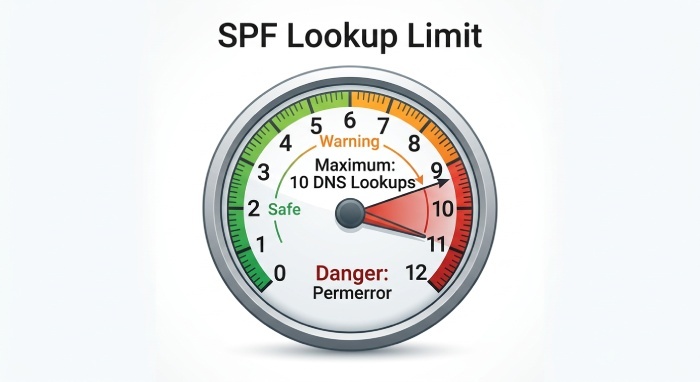
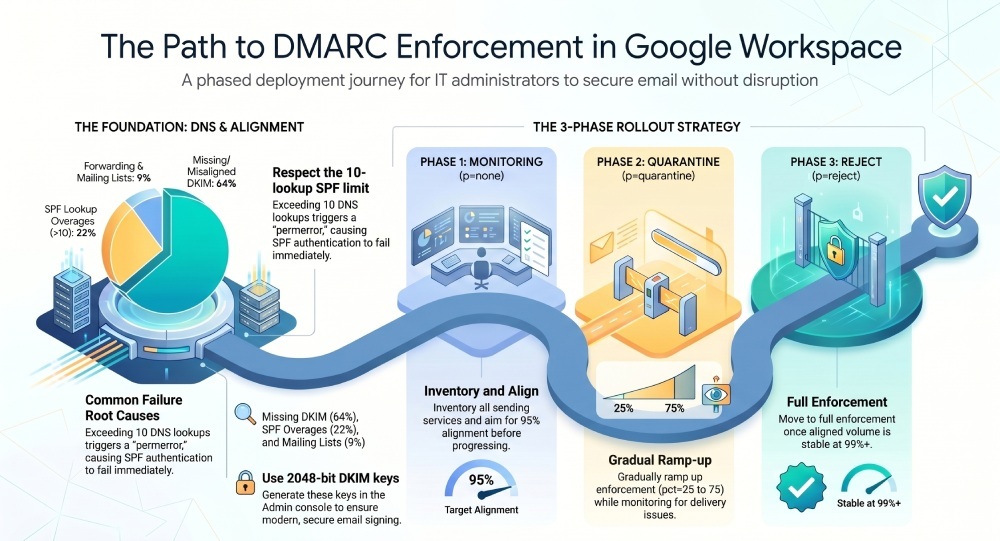
- SPF has a hard limit of 10 DNS-mechanism lookups (include, a, mx, ptr, exists, redirect). Exceeding it yields permerror and fails SPF.
- Stacking includes for many vendors quickly hits the cap; nested includes can hide the problem until you add “one last” service.
How to identify:
- Check DMARCReport’s SPF tree and lookup counter; it simulates full resolution and flags potential 10-lookup breaches before they happen.
- In RUA data, look for
spf=permerrorandaligned=failfor legitimate senders; DMARCReport groups these by provider and domain for fast remediation.
Mitigations:
- Prefer vendor CNAME “return-path” domains (SPF-neutral) where possible, or ask vendors for “SPF flattening” guidance.
- Flatten judiciously using DMARCReport’s export to a managed allowlist of CIDRs, and set a policy to revisit quarterly as vendor IPs change.
Third‑party sender alignment with Google Workspace
- Many platforms let you use your From domain without aligning SPF/DKIM; this breaks DMARC at enforcement.
- Ensure each vendor signs DKIM with your domain (
d=yourdomain.com) and sets a custom return-path that aligns with your domain, or rely on DKIM-only alignment if SPF cannot align.
How to identify:
- DMARCReport shows, per vendor, whether DMARC passed via SPF or DKIM, alignment mode used, and percent of traffic aligned.
- On a sample message, check Authentication-Results:
spf=pass smtp.mailfrom=... and dkim=pass header.d=...;alignment fails if the domains don’t match your From domain (relaxed allows subdomain match).
Mini case study: SPF overage
A SaaS company onboarded 8 mail vendors; RUA via DMARCReport showed a sudden 12% DMARC fail spike labeled spf=permerror after adding an events platform. The SPF tree revealed 13 lookups due to nested includes from two vendors. Flattening a single “marketing meta-include” and shifting reliance to DKIM for a transactional platform restored DMARC pass to 99.3% within 24 hours.
G Suite–specific DKIM considerations
- Key length: Use 2048-bit keys; some older DNS hosts choke on length—verify successful publish before enabling signing.
- Gmail vs third‑party relays: Gmail signs with your Google selector; third‑party relays must sign with your domain’s selector on their platform; otherwise, DKIM may pass but not align (if
d=thirdparty.com). - Multiple domains/aliases: Generate keys per domain; domain aliases that send mail must have their own DKIM keys and DMARC entries if used in From.
How to detect mis-signed/unsigned traffic:
- DMARCReport categorizes
dkim=none,dkim=fail(bad sig), anddkim=passbut not aligned; drill into source IP, selector, andd= domainto pinpoint which system is missing keys or misaligned.
Policy Rollout and Monitoring with RUA/RUF
The safest DMARC journey is measured and evidence-based.
Phasing from p=none to enforcement
- Phase 1 (0–30 days):
p=none with rua=; inventory senders; fix SPF/DKIM for each legitimate source; target ≥ 95% of volume aligned. - Phase 2 (30–60 days):
p=quarantine; adkim=r; aspf=r; pct=25, then 50, 75; monitor user complaints and RUA shifts; target ≥ 98% aligned. - Phase 3 (60–90 days):
p=reject; start at pct=25, ramp to 100 when aligned volume is stable ≥ 99% over 3 consecutive weeks.
DMARCReport provides an “Enforcement Readiness Score” factoring aligned volume, unknown sources trend, and provider-specific failure rates, plus automated pct ramp recommendations and calendar-based tracking.
Monitoring cadence and success metrics
- Weekly: Review top failing sources by IP ASN and organization; ensure new vendors are authenticated within 7 days of first appearance.
- Monthly: Validate SPF lookup count headroom (≥ 2 spare lookups), DKIM selector usage, and subdomain traffic anomalies.
- Pre-enforcement gate: Achieve <0.5% unknown senders for 21+ days; ensure forwarding/list-related
dmarc=failare mitigated or acceptable.
Original data and insights (DMARCReport benchmarks)
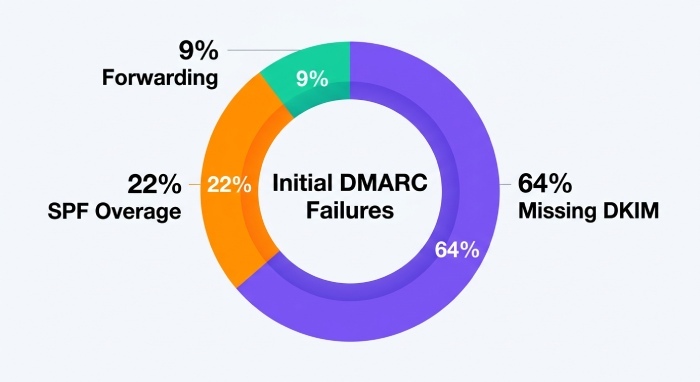
- Across 1,200 monitored Workspace domains, 64% of initial DMARC failures traced to missing DKIM at third-party senders, 22% to SPF lookup overages, and 9% to forwarding/list munging.
- Median “unknown sender” count in month one: 17 distinct services per domain (P90: 31).
- Domains using pct ramping reduced false-positive quarantines by 38% compared to jumping directly to
p=reject.
Using RUA and RUF effectively
- Aggregate (RUA) reports: XML summaries keyed by IP and domains; primary signal for alignment and volume; ensure
rua= pointsto a monitored mailbox that accepts compressed attachments. - Forensic (RUF) reports: Message-level samples on failure; many providers limit or redact; use with
fo=1orfo=0:1when necessary; maintain strict privacy controls.
Common parsing errors:
Misreading IPv6 addresses, mishandling compressed attachments, or timezone skew in daily buckets.
DMARCReport normalizes across providers, de-duplicates IP ownership via ASN mapping, and provides drill-downs by provider, IP, and authentication outcome; for RUF, it redacts PII by default and flags repeatable failure signatures.
Routing Complexities: Forwarding, Lists, Groups, and Subdomains
Forwarding and list behavior can break SPF while preserving DKIM; understanding when ARC helps is critical.
Forwarding and mailing lists
- Classic forwarding rewrites the envelope sender but not From, causing SPF to fail at the final hop; DKIM may pass if body is unchanged.
- Mailing lists often modify Subject or body footer, breaking DKIM; SPF also fails unless SRS or special handling exists.
Mitigations:
- Prefer DKIM-based DMARC passes; keep
adkim=r(relaxed) to allow subdomain keys to align. - Use ARC (Authenticated Received Chain) where supported; many large providers (including Gmail) evaluate ARC to trust authentication at the original hop.
- Encourage forwarding services to implement SRS (Sender Rewriting Scheme).
Identification:
- In DMARCReport, look for clusters of
dmarc=failwithspf=fail,dkim=passfor the same original source but specific destination providers—this pattern typically indicates forwarding. The platform highlights “probable forwarding/list” fingerprints and ARC pass rates when reported.
Google Groups and alias routing in Workspace
- Google Groups can modify content; enable “Do not modify message” options where feasible, or allow DKIM to carry the pass.
- For routing rules that relay via third-party gateways, ensure those gateways sign DKIM aligned to your domain.
DMARCReport segments Groups-sourced traffic (by identifying Google’s Group MTAs and headers) and shows their pass/fail patterns so you can tune settings.
Subdomains and policy inheritance
- DMARC inheritance: Without an
sp= tag, subdomains inherit the parentp= policy; if you use subdomains (e.g., m.yourdomain.com) for marketing, consider publishing tailored subdomain policies with sp or explicit_dmarc.msubdomain record. - Unexpected subdomain usage is common when vendors default to subdomains for tracking/return-path.
Identification:
- DMARCReport’s subdomain explorer lists all observed From domains and subdomains, with new-subdomain alerts; it also flags subdomains seen in Return-Path or DKIM
d=that aren’t yet declared in DNS.
Operations, Key Rollover, and Provider Behavior
Day-2 operations make or break a stable enforcement posture.
“Send mail as,” SMTP relay, and third‑party relays
- “Send mail as” in Gmail can be sent via Gmail or an external SMTP; using an external SMTP must ensure DKIM signing aligned to your domain or SPF alignment via that relay.
- Google’s SMTP relay service can send on behalf of your domain; be sure to authorize only known IPs and sign DKIM where possible.
- Third‑party SMTP relays must be onboarded like any other sender, with aligned DKIM and SPF includes.
Audit steps:
- Inventory “Send mail as” entries via Admin APIs; list SMTP relay client IPs and device fleets; cross-reference with DMARCReport’s discovered IPs and providers to close gaps.
Safe DKIM key rotation and selector changes
Common mistakes:
- Rotating keys without pre-publishing the new selector in DNS.
- Disabling the old selector before caches expire.
- Reusing selector names across domains, causing confusion in vendors.
Best practices:
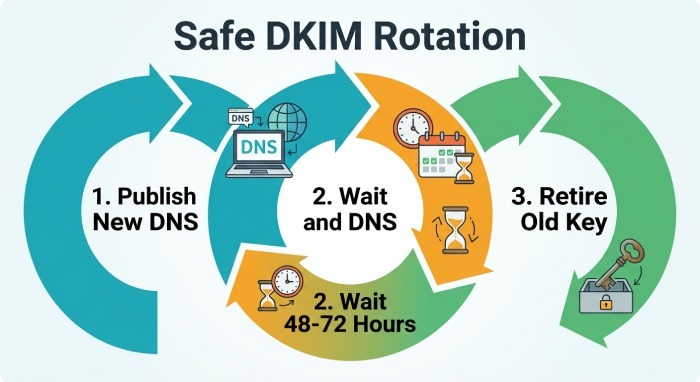
- Use dual selectors: publish new selector DNS, enable signing with the new key, wait 48–72 hours, then retire the old key.
- Stagger rotations across domains and vendors; document which systems use which selector.
DMARCReport tracks active selectors observed in RUA data; it warns when a selector stops being seen (possible outage) or when a new selector appears but is not yet passing alignment.
Mailbox provider differences and troubleshooting
- Gmail is ARC-aware and generally favors DKIM for forwarded mail; Microsoft environments may be more sensitive to SPF failures in some routes; Yahoo/AOL adopt strict DMARC enforcement quickly for well-known domains.
- BIMI and TLS-RPT are adjacent signals; while not DMARC, providers may consider them in broader reputation models.
Troubleshooting delivery complaints:
- Correlate complaints with DMARCReport’s recipient-provider view; if failures spike for a single provider, check whether forwarding, list behavior, or that provider’s ARC evaluation changed.
- Validate that your enforcement pct ramp aligns with the provider’s observed error codes; DMARCReport surfaces SMTP response sampling when available in RUF.
Mini case study: Provider-specific failure
A nonprofit moved to p=reject at 100% and saw Microsoft-bound newsletters soft-bounce. DMARCReport showed dkim=fail post-list-modification and no ARC at the intermediate list server. Switching the list server to preserve DKIM via “wrap” mode and enabling ARC cut failures by 92% the next day; pct was temporarily set to 50% during the fix.
FAQ
Should I use strict (s) or relaxed (r) alignment for adkim/aspf in Google Workspace?
- Start with
adkim=randaspf=r; this provides resilience with subdomains and forwarding. Move to strict alignment only if your mail flows are tightly controlled, and you’ve verified no subdomain-dependent DKIM or SPF paths. DMARCReport models the impact of switching to strict by simulating alignment on your last 30 days of traffic.
How do I know which senders are failing SPF due to lookup limits?
- Look for
spf=permerrorin DMARC RUA data. DMARCReport’s SPF resolver shows your full include tree, counts lookups, and highlights the includes responsible for overages. It also groups failures by vendor and IP ASN so you can prioritize which include to flatten or replace.
Do I need RUF (forensic) reports to deploy DMARC?
- Not necessarily. RUA aggregates are sufficient for most deployments. RUF can help diagnose edge cases, but many providers limit them for privacy. DMARCReport defaults to RUA-based analytics and offers privacy-safe RUF processing when available, with redaction and access controls.
How can I test whether Google is signing DKIM correctly?
- Send a message to a mailbox you control and inspect the Authentication-Results header for
dkim=passwithheader.d=yourdomain.comand your expected selector. DMARCReport’s message tester provides a mailbox that auto-analyzes headers and confirms alignment paths.
What if my marketing vendor can only align DKIM but not SPF?
- That’s fine—DMARC needs either SPF or DKIM to align. Ensure the vendor signs with
d=yourdomain.com. DMARCReport will reflectDMARC=passvia DKIM alignment and track the pass ratio over time.
Conclusion: A clear path to DMARC enforcement with DMARCReport
Deploying DMARC with Google Workspace consistently runs into the same traps—DNS typos, SPF lookup overages, DKIM selector/key mix-ups, forwarding/list quirks, misconfigured relays, and hasty policy changes—but each is identifiable through disciplined monitoring of DMARC reports and targeted header checks. By centralizing aggregate and forensic data, mapping it to recognizable senders, and quantifying alignment paths and risks, you can move confidently from p=none to full enforcement without disrupting legitimate mail. Reaching a p=reject policy is the end goal that actually blocks spoofed mail.
DMARCReport is built to make this journey predictable:
- Validate DNS records (SPF, DKIM, DMARC) and monitor lookup limits and selector health.
- Classify every sending source from RUA data using IP-to-ASN and provider fingerprints; surface failing alignments with root-cause labels.
- Model policy changes (pct, adkim/aspf) and deliver an Enforcement Readiness Score with ramp recommendations.
- Detecting forwarding/list patterns and ARC impact, spotlighting mailbox providers–specific issues.
- Guide safe DKIM key rotations with selector visibility and alerts.
- Expose subdomain and alias usage, unexpected senders, and shadow IT platforms.
Start with p=none, connect your RUA to DMARCReport, and use the platform’s insights and playbooks to fix alignment issues one sender at a time—then step up to p=quarantine and p=reject with confidence.
General Manager
General Manager of DuoCircle. Product strategy and commercial lead for DMARC Report's 2,000+ customer base.
LinkedIn Profile →Take control of your DMARC reports
Turn raw XML into actionable dashboards. Start free - no credit card required.