What Is a DNS Server and How Does It Work as Your Internet Gateway?

Quick Answer
A DNS server is a specialized system that translates human-readable domain names like example.com into numeric IP addresses that computers use to communicate. It works as your internet gateway by intercepting every URL request, resolving it through a hierarchy of root, TLD, and authoritative nameservers, and returning the correct IP address so your browser connects to the right destination - all in milliseconds.
Related: Free DMARC Checker ·How to Create an SPF Record ·SPF Record Format

A DNS (Domain Name System) server translates human-readable domain names into the numeric IP addresses that computers use to route traffic across the internet. When you type a website URL into your browser, a DNS server finds the correct IP address and connects you to the right destination, typically in under 50 milliseconds. According to Cloudflare’s 2024 resolver performance data, the median DNS lookup time is 11ms on their 1.1.1.1 service, demonstrating just how fast this critical infrastructure operates. DNS is often called your internet gateway because it makes browsing fast, seamless, and user-friendly without requiring you to memorize complex numbers.
Understanding DNS is essential for email security as well. Every DMARC, SPF, and DKIM record is published as a DNS TXT record, meaning DNS reliability directly impacts your email authentication posture. A misconfigured DNS server can silently break DMARC reporting, SPF lookups, and DKIM verification. If you’re new to these protocols, our guide on SPF vs DKIM vs DMARC explains how they differ and work together.
What Is a DNS Server and Why Does It Exist?
How Does DNS Provide Human-Friendly Addressing for a Machine-Driven Network?
The Domain Name System exists to translate human-readable names into routable numbers. When you type a domain name such as example.com, a DNS server maps that hostname to the numeric IP address of the destination web server so your device can connect across the internet. Without this translation, every website would require remembering an IP address - impractical at internet scale, where over 350 million domain names are registered globally according to Verisign’s 2024 Domain Name Industry Brief.
Where Do DNS Servers Fit in the Internet’s Control Plane?
DNS is the internet’s addressing directory and a foundational infrastructure component. Oversight bodies like ICANN (Internet Corporation for Assigned Names and Numbers) and IANA (Internet Assigned Numbers Authority) coordinate the global namespace, including the Root Servers and TLDs (Top-Level Domains). Operators such as Verisign maintain critical registries (for example, .com), while DNS providers deliver DNS service to end users and organizations. A nameserver may run software like BIND, Unbound, or PowerDNS and participates in the DNS protocol to answer queries.
What Are the Two Core Roles of a DNS Server?
Every DNS interaction involves two complementary roles:
- A DNS resolver (recursive DNS) performs lookups on behalf of a DNS client (your device or web browser), chasing down answers through the hierarchy.
- An authoritative DNS server is the definitive source for a DNS zone and publishes the DNS records configured via DNS management tools.
Both roles are essential to DNS resolution, DNS security, and reliable hostname resolution across the network. For email authentication, the authoritative server is where your DMARC, SPF, and DKIM records must be correctly published and reachable.
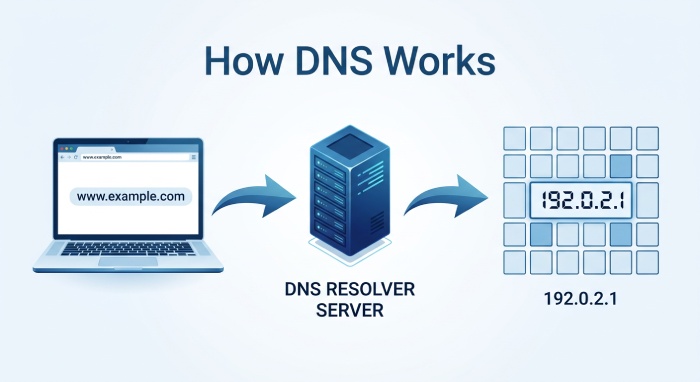
How Does a DNS Lookup Turn a URL Into an IP Address?
What Happens Between Your Browser and the Resolver?
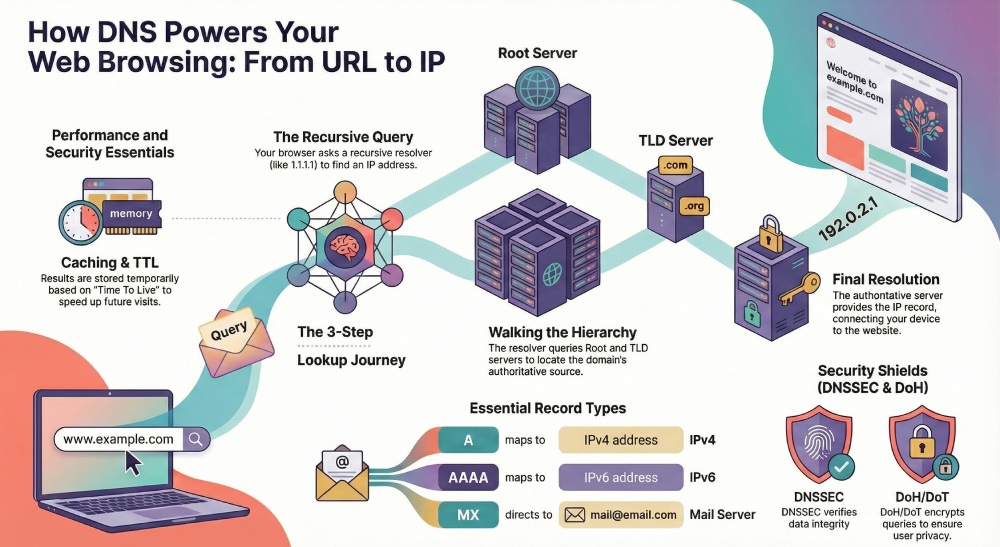
When you visit a website, your web browser (Chrome, Firefox, or Edge) triggers a DNS lookup. The local DNS client asks a configured DNS resolver - often your ISP (Internet Service Provider) or a public resolver such as Cloudflare’s 1.1.1.1, Google Public DNS (8.8.8.8), OpenDNS from Cisco, or Quad9 - to find the IP address for the target hostname. This initial DNS query starts the resolution process.
How Does the Resolver Walk the DNS Tree?
If the resolver lacks a cached answer, it queries up the hierarchy through three levels:
- Root server: The resolver asks a Root Server which nameservers handle the relevant TLD.
- TLD server: The TLD nameserver (for example, .com) points to the authoritative DNS server for the specific domain name.
- Authoritative nameserver: The authoritative DNS responds with the DNS record (such as an A or AAAA record) holding the IP address of the web server that serves the site.
Each step yields a DNS response that guides the next hop. Once the resolver obtains a final answer, it returns the IP address to the DNS client, and the browser connects to the destination web server. This same hierarchical resolution process is what mail servers use when performing SPF lookups and retrieving DMARC policies.
How Do Caching and TTL Improve DNS Performance?
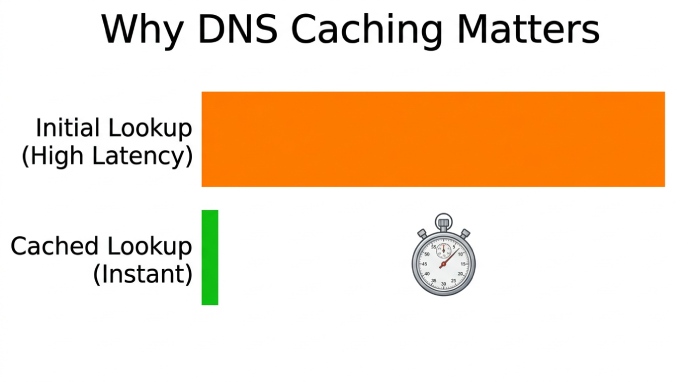
To reduce DNS traffic and latency, resolvers use DNS caching. Answers are stored in a cache for the TTL (Time To Live) specified by the zone’s DNS record. Subsequent DNS queries for the same hostname can be answered instantly from cache, improving network performance and speeding up access to content delivered by CDNs like Akamai and Cloudflare. When you update a DNS record - such as changing an SPF include or rotating a DKIM selector - the TTL determines how long old records persist in caches worldwide.
What Are the Core DNS Components and Record Types?
What Is the Difference Between Recursive and Authoritative DNS?
-
Recursive DNS: The DNS resolver that performs the iterative work. Public options include 1.1.1.1, Google Public DNS, OpenDNS, and Quad9. Enterprises often run Unbound or BIND as their internal resolvers.
-
Authoritative DNS: The server that hosts your DNS zone and DNS records. Managed DNS providers include Amazon Web Services Route 53, Dyn, UltraDNS, Verisign, GoDaddy, Namecheap, and Network Solutions. Many run PowerDNS or BIND.
Authoritative DNS directly influences DNS propagation: after changes, the new data spreads as caches expire across the internet. This is why DMARC policy changes (moving from p=none to p=quarantine) can take hours to propagate globally.
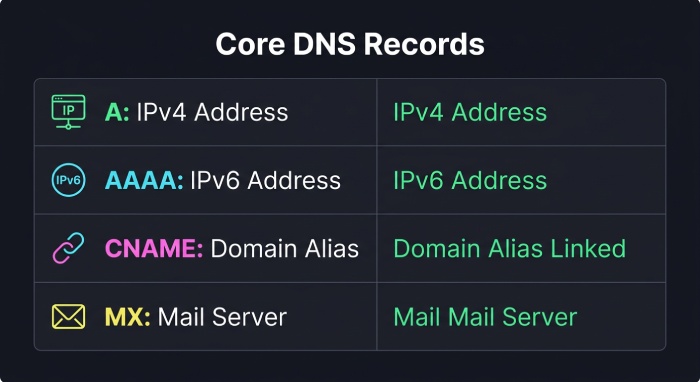
Which DNS Record Types Are Essential for Hostname Resolution?
A and AAAA records map a hostname to an IPv4 or IPv6 address, respectively. These records point browsers to the correct web server.
CNAME records create an alias from one hostname to another canonical name, enabling flexible DNS management and migrations without changing the underlying IP address. Some DNS providers support CNAME-like behavior at the zone apex using ANAME or ALIAS records to preserve compatibility while simplifying DNS management.
MX records identify mail exchangers for email delivery, distinct from the web server, and often pointing to specialized infrastructure. MX records are what direct incoming email to the correct mail server, making them critical for email security alongside SPF and DKIM.
TXT records hold arbitrary text data and are the mechanism for publishing SPF policies, DKIM public keys, and DMARC policies. You can verify your TXT records using a DMARC checker or SPF checker.
How Does TTL Affect DNS Updates and Propagation?
TTL governs how long a DNS response can stay in cache. Lower TTLs speed DNS propagation and enable faster cutovers during migrations, but increase DNS traffic. Reverse DNS (PTR records) maps an IP address back to a hostname, which is important for email reputation and diagnostics. According to Google’s 2024 bulk sender requirements, properly configured reverse DNS is one of the factors that influences email deliverability for high-volume senders.
How Does DNS Act as Your Internet Gateway for Performance, Routing, and Security?
How Does Your DNS Resolver Affect Performance and Routing?
Your chosen DNS server acts like an internet gateway for navigation. A fast DNS resolver reduces page-load latency and can steer you to nearby CDN (Content Delivery Network) edge servers via geo-aware DNS responses. Anycast networks operated by Cloudflare, Google, and Quad9 place resolvers close to users, trimming network distance. Accurate DNS resolution also helps pick optimal endpoints for services hosted on AWS or behind Akamai.
How Does DNS-Level Filtering Provide Threat Defense?
Many resolvers provide a DNS firewall feature, enforcing policy at the DNS layer. OpenDNS (Cisco Umbrella) and Quad9 can block malicious hostnames and thwart phishing via policy-based DNS responses. Enterprises deploy Response Policy Zones and security analytics to inspect DNS traffic and bolster DNS security, limiting the blast radius of malware that relies on domain name lookups, dynamic DNS, or command-and-control hostnames. This same DNS-layer protection complements DMARC enforcement by blocking phishing domains before they can deliver spoofed email.
How Do You Choose and Configure the Right DNS Resolver?
- Public resolvers: 1.1.1.1 (Cloudflare), 8.8.8.8/8.8.4.4 (Google Public DNS), OpenDNS, and Quad9 emphasize speed, privacy, and protection.
- ISP resolvers: Convenient defaults with local peering; quality varies by provider.
Configure primary DNS and secondary DNS in your router’s DNS settings or on each device. For home-lab scenarios, dynamic DNS helps expose a service on your residential network under a stable hostname, even as your ISP changes your IP address.
For enterprises, centralized DNS management, split-horizon design, and conditional forwarding improve control. Logging and analytics reveal misconfigurations and suspicious hostname resolution patterns that could indicate DNS-based attacks.
How Do DNSSEC, DoH, and DoT Protect DNS Security and Privacy?
How Does DNSSEC Ensure Authenticity and Integrity?
DNSSEC (Domain Name System Security Extensions) adds cryptographic signatures so a DNS resolver can verify that a DNS response truly originated from the authoritative DNS and was not altered in transit. It defends against DNS spoofing and cache poisoning. Major TLDs are signed, and many providers - Verisign, AWS Route 53, Dyn, and UltraDNS - support zone signing. Ensure the full chain (Root Servers, TLD, zone) is properly configured to prevent attackers from redirecting your domain’s email traffic.
How Do DoH and DoT Encrypt DNS Traffic?
DNS-over-HTTPS (DoH) and DNS-over-TLS (DoT) encrypt the DNS protocol in transit, preventing eavesdropping on queries. Public resolvers from Cloudflare, Google, and Quad9 support both protocols. Some browsers, like Firefox, can enable DoH to a trusted resolver. On Windows, macOS, and many mobile operating systems, you can set DoH/DoT in system DNS settings for device-wide protection. This encryption prevents ISPs and network operators from seeing which domains you query.
What Are the Most Common DNS Troubleshooting Steps?
- Flush cache: Clear the OS DNS cache and the browser cache to bypass stale entries from DNS caching.
- Check propagation: After changing DNS records, allow time for DNS propagation according to TTLs.
- Validate records: Use
digornslookupto query authoritative nameservers directly and confirm A, AAAA, CNAME, MX, and NS records. For email authentication, use a DMARC checker or domain auth checker to validate TXT records. - Inspect resolver health: Verify your recursive DNS or local DNS server (BIND, Unbound) is reachable and not rate-limited.
- Review reverse DNS: Ensure PTR records match hostnames for mail servers and diagnostics - mismatched PTR records can cause email delivery failures.
- Watch for hijacking: Mismatched IP addresses, unexpected DNS responses, or certificate errors may indicate DNS spoofing or a malicious DNS provider.
- Test network path: If a site resolves but will not load, the web server or upstream route - not DNS - may be at fault; test reachability to the resolved IP address.
When in doubt, temporarily switch your DNS resolver to a well-known DNS provider like 1.1.1.1 or Google Public DNS to isolate whether issues stem from the current DNS service or the destination web server. At the same time, ensure your email authentication setup - including DMARC report monitoring, DKIM signing, and SPF validation - is correctly configured to maintain strong email security. DNS misconfigurations are one of the most common causes of DMARC alignment failures.
General Manager
General Manager of DuoCircle. Product strategy and commercial lead for DMARC Report's 2,000+ customer base.
LinkedIn Profile →Take control of your DMARC reports
Turn raw XML into actionable dashboards. Start free - no credit card required.