What Is a DMARC Failure Report? A Complete Guide by DMARCReport

Quick Answer
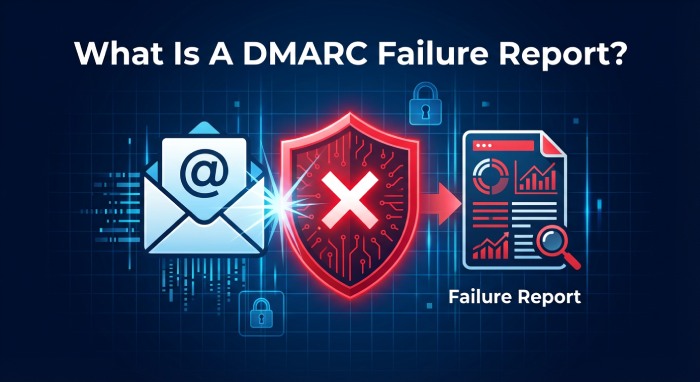
DMARC failure means an email from your domain failed both SPF alignment and DKIM alignment checks. The receiving server applies your DMARC policy (none, quarantine, or reject) to the failed message. Common causes: third-party senders not configured in SPF, missing DKIM signatures, or Return-Path domain not matching the From header.
Related: Free DMARC Checker ·How to Create an SPF Record ·SPF Record Format

Try Our Free DMARC Checker
Validate your DMARC policy, check alignment settings, and verify reporting configuration.
Check DMARC Record →**DMARC failure means an email from your domain failed both SPF alignment and DKIM alignment checks. The receiving server applies your DMARC policy (none, quarantine, or reject) to the failed message. Common causes: third-party senders not configured in SPF, missing DKIM signatures, or Return-Path domain not matching the From header.
DMARC (RFC 7489) ties SPF and DKIM together by requiring alignment between the envelope sender and the visible From header. According to Google’s February 2024 bulk sender requirements, a DMARC policy of at least p=none is now mandatory for any domain sending 5,000+ messages per day to Gmail users.
From an operations standpoint, the difference between a domain with DMARC monitoring and one without is visibility, says Vasile Diaconu, Operations Lead at DuoCircle. We see organizations discover unauthorized senders they didn’t know existed within 48 hours of enabling DMARC reporting. That visibility alone justifies the setup time.
How Do You Detect Spoofing Attempts?
Cybercriminals frequently attempt to impersonate legitimate domains tosend phishing emails.
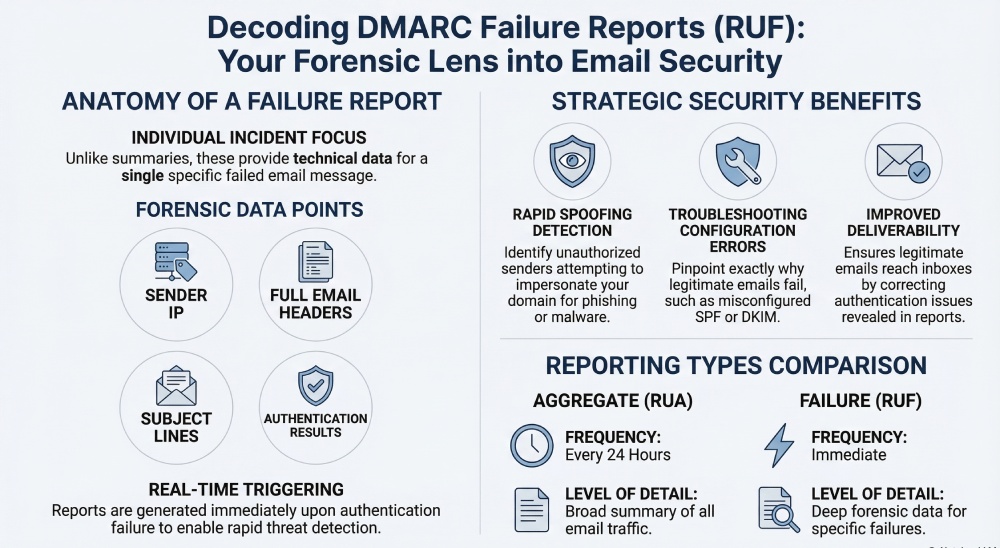
Failure reports can reveal unauthorized senders attempting to use your domain. By examining sending IP addresses and authentication results, administrators can quickly identify suspicious activity. This early detection allows organizations to respond faster to domain abuse.
How Do You Troubleshoot Authentication Issues?
Sometimes legitimate emails fail DMARC checks due to configuration errors.
For example:
-
An authorized email service may not be included in your SPF record
-
DKIM signatures may not be properly configured
-
Domain alignment settings may be incorrect
Failure reports help pinpoint exactly where the authentication chain is breaking.
Once the issue is identified, administrators can adjust DNS records or email configurations accordingly.
Improving Email Deliverability
DMARC failures can negatively affect email deliverability.
Messages that fail authentication may be:
-
Quarantined in spam folders
-
Delayed by receiving servers
-
Completely rejected
By monitoring failure reports, organizations can ensure **legitimate emails authenticate correctly and reach recipients’ inboxes.
Strengthening Domain Protection
DMARC policies such as **quarantine and **reject help protect domains from abuse. However, enforcing these policies without understanding your email ecosystem can lead to legitimate emails being blocked .
Failure reports provide the data needed to confidently move toward stricter DMARC policies while ensuring legitimate senders are properly authenticated.
How to Enable DMARC Failure Reports
To receive failure reports, you must configure specific tags in your DMARC DNS record.
The key tags involved are **ruf and fo.
The RUF Tag
The ruf (Report URI Forensic) tag specifies the email address where failure reports should be sent.
For example:
v=DMARC1; p=none; ruf=mailto:dmarc@yourdomain.com
This tells receiving mail servers where to deliver failure reports when authentication fails.
The FO Tag
The **fo tag defines when failure reports should be generated.
Common values include:
-
fo=0, generate reports when both SPF and DKIM fail
-
fo=1, generate reports when either SPF or DKIM fails
These settings allow domain owners to control the sensitivity of reporting.
Once these tags are included in your DMARC record, supporting email providers may begin sending failure reports when authentication failures occur.
Limitations of DMARC Failure Reports
Despite their usefulness, failure reports are not always widely available.
Many email providers limit or **avoid sending forensic reports due to privacy concerns, since they may include message headers or parts of the original email.
Because of this, organizations often rely more heavily on aggregate reports for monitoring overall email authentication performance.
Additionally, failure report formats can vary between different mail providers, which can make analysis more complex.
This is why specialized DMARC analysis tools are often **used to process and interpret these reports automatically.
How DMARCReport Helps You Analyze Failure Reports
Managing DMARC reports manually can be challenging. Failure reports contain technical data that may be difficult to interpret without the right tools.
DMARCReport simplifies this process by:
-
Collecting DMARC reports automatically
-
Converting complex data into easy-to-understand dashboards - Identifying unauthorized senders
-
Highlighting authentication failures
-
Helping organizations strengthen their email authentication policies
With the right analysis tools, businesses can **transform raw DMARC data into actionable insights that protect their domain and improve email deliverability. Our DMARC report analyzer tool does this parsing for you in the browser.
Final Thoughts
DMARC failure reports provide an in-depth look at emails that fail authentication checks. Unlike aggregate reports that summarize large volumes of data, failure reports focus on individual incidents, offering detailed insight into why an email failed verification. For a broader primer on the data these reports contain, see understanding DMARC reports. For organizations serious about email security, these reports are invaluable.
They help detect spoofing attacks, diagnose authentication problems, and ensure legitimate emails pass DMARC checks successfully.
However, because failure reports can be complex and inconsistently supported across providers, organizations benefit greatly from automated DMARC monitoring and analysis tools .
By leveraging both aggregate and failure reports - and using a reliable analysis platform like DMARCReport - businesses can gain complete visibility into their email infrastructure and build a stronger defense againstphishing and domain abuse.
Topics
Content Specialist
Content Specialist at DMARC Report. Writes vendor-specific email authentication guides and troubleshooting walkthroughs.
LinkedIn Profile →Take control of your DMARC reports
Turn raw XML into actionable dashboards. Start free - no credit card required.