What Is DNS Hijacking? How to Detect, Fix, and Prevent DNS Hijacking Attacks

Quick Answer
DNS hijacking is a cyberattack that redirects users to malicious websites by altering DNS settings. Detect it through unexpected redirects, fix it by restoring DNS configurations, and prevent it with secure DNS services, router updates, and strong security practices.

DNS hijacking is a cyberattack that manipulates the Domain Name System (DNS) to redirect users to fraudulent or malicious websites without their knowledge. By altering DNS settings, compromising routers, poisoning DNS caches, or tampering with DNS records, attackers can intercept traffic, steal credentials, distribute malware, and conduct phishing campaigns. Because DNS serves as the internet’s address book, a successful DNS hijacking attack can affect individuals, businesses, and entire networks. In this guide, you’ll learn what DNS hijacking is, how it works, the warning signs to watch for, and the best ways to detect, fix, and prevent DNS hijacking attacks.
What DNS Hijacking Is and How It Works
DNS hijacking is a DNS attack in which an attacker manipulates how a domain name is resolved so users are sent to the wrong destination. Instead of reaching the legitimate IP address for a website, the victim’s DNS queries are altered, intercepted, or answered by a rogue DNS server. The result is often DNS redirection to malicious sites that look like real login pages, banking portals, software update pages, or corporate applications.
Normally, DNS resolution follows a predictable path: a browser sends DNS queries to a DNS resolver, which checks the DNS cache, consults an authoritative name server if needed, and returns the correct DNS record for the requested domain name. In a DNS hijacking scenario, that chain of trust is broken. Attackers may change local DNS settings, compromise a router, tamper with DNS records at a DNS registrar, poison a DNS cache, or position themselves as a Man in the Middle (MITM) between the user and the DNS server.
DNS resolution in a normal request
When an end user types a domain name into a browser, the device asks a resolver for the matching IP address. If the resolver already has the answer in its DNS cache, it responds immediately. If not, it queries the broader DNS infrastructure, eventually reaching the authoritative name server for the DNS zone. Some environments also use a Slave Name Server, DNS proxies, or managed DNS services through a CDN (Content Delivery Network) provider.
A clean DNS communication path should return the correct DNS records. In DNS hijacking, however, DNS queries may be silently redirected, and the user may never realize that DNS redirection has occurred.
Why attackers target DNS
DNS is attractive because it controls navigation. A successful DNS attack can enable phishing, pharming, malware delivery, credential theft, session hijacking, ad fraud, and surveillance. Instead of breaking HTTPS encryption directly, an attacker may use DNS hijacking to send users to malicious sites before a secure connection is established.
High-value targets
Site owners, enterprise administrators, ISPs, Internet Service Providers, and Domain Name Registrar accounts are especially attractive targets. If attackers gain access to a DNS registrar account, they can modify a DNS record, change name servers, or redirect large volumes of traffic.
Research and industry context
Security teams at companies such as Imperva, along with researchers and practitioners including Bar Menachem, Muly Levy, Yohann Sillam, and Ron Masas, have documented how DNS manipulation, vulnerable DNS servers, and weak access control can expose organizations to large-scale DNS attack campaigns.
Common Types of DNS Hijacking Attacks
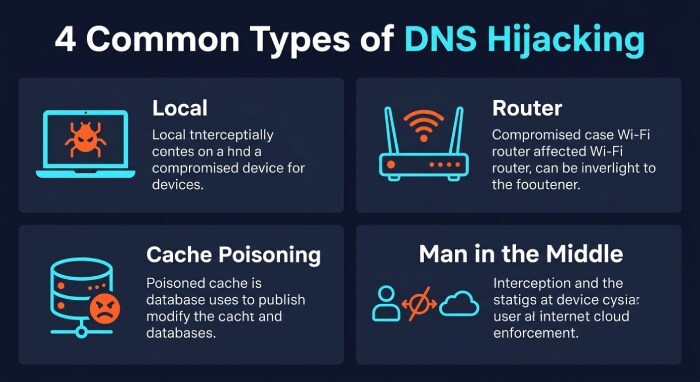
DNS hijacking can happen at several layers: the user device, the home router, the network path, the recursive resolver, or the registrar and authoritative DNS layer. The most common forms include local DNS hijack, router DNS hijack, cache poisoning, and Man in the Middle interception.
Local DNS hijack
A local DNS hijack occurs when malware or trojan malware changes DNS settings on a user’s device. A Trojan or other Malware strain may replace trusted resolvers with a rogue DNS server controlled by attackers. Once this happens, DNS queries from that device can be answered with fraudulent IP address mappings.
This type of DNS hijacking is common in consumer environments because users may not notice altered DNS settings. A local DNS hijack can send users to malicious sites even when they type the correct domain name. It is often combined with a Phishing Attack, fake antivirus alerts, or credential-stealing pages.
Malware-driven DNS changes
In a malware-driven local DNS hijack, attackers may also disable antivirus tools, alter browser proxy settings, or install certificates to make DNS redirection harder to detect. Strong endpoint protection, regular scans, and patching help reduce this risk.
Router DNS hijack
A router DNS hijack happens when attackers compromise a home or small-business router and change its DNS server configuration. Every device using that router may then send DNS queries to a rogue DNS server. This allows broad DNS redirection across laptops, phones, smart TVs, and IoT devices.
A router DNS hijack often succeeds because many routers still use default passwords, outdated firmware, or exposed admin panels. Once attackers control the router, they can redirect users to malicious sites, inject ads, or route traffic through infrastructure used for a larger dns attack.
Common router weaknesses
Weak admin credentials, remote management exposure, outdated firmware, and lack of firewall rules can all enable a router DNS hijack. Organizations should patch vulnerabilities and monitor router DNS settings regularly.
DNS spoofing and cache poisoning
DNS spoofing is the practice of returning false DNS responses so the victim reaches the wrong IP address. Cache poisoning, sometimes called a cache poisoning attack, targets a resolver’s DNS cache so future DNS queries receive malicious answers without repeatedly contacting the attacker.
This form of dns attack can be especially damaging because one poisoned resolver can affect many end users. Attackers may use DNS spoofing to redirect traffic to malicious sites for phishing or pharming, or to impersonate software repositories and internal services.
Man in the Middle DNS interception
In a Man in the Middle attack, the attacker intercepts DNS communication between the client and DNS server. This may occur on compromised Wi-Fi, hostile networks, or through malicious DNS proxies. A man in the middle can observe DNS queries, tamper with responses, or force DNS redirection to a rogue DNS server.
Using an encrypted virtual private network (VPN) , HTTPS, DNS over HTTPS, or services such as Google DNS over HTTPS can reduce exposure on untrusted networks. Google Public DNS and Cisco OpenDNS are also commonly used alternatives to ISP resolvers, though secure configuration and monitoring remain essential.
Warning Signs and How to Detect DNS Hijacking
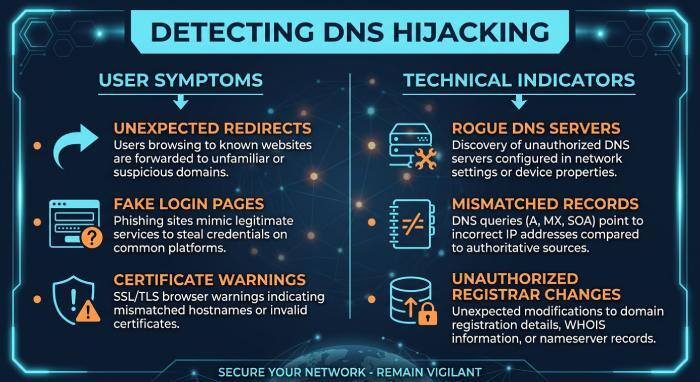
Detecting DNS hijacking requires comparing expected DNS behavior with actual responses. A single warning sign may not confirm a dns attack, but multiple indicators should trigger immediate investigation.
User-facing symptoms
Common signs include unexpected redirects, certificate warnings, fake login pages, unusual pop-ups, disabled antivirus, and repeated visits to malicious sites despite entering the correct domain name. Users may also notice that search results or banking sites behave differently across networks.
A local DNS hijack may affect only one device, while a router DNS hijack usually affects every device behind the same router. If one laptop is redirected but another is not, inspect local DNS settings. If all devices show the same DNS redirection, inspect the router.
Technical indicators
Security teams should check:
- Whether DNS queries are going to an approved DNS server
- Whether DNS records match the authoritative name server
- Whether the resolver response differs from Google Public DNS, Cisco OpenDNS, or another trusted provider
- Whether the DNS registrar account shows unauthorized changes
- Whether the DNS zone has unexpected records or name server updates
- Whether logs show suspicious zone transfer attempts
- Whether Firewalls or network security tools report unusual DNS traffic
A rogue DNS server may return correct answers for some domains and malicious answers for banking, email, or enterprise applications. This selective behavior makes dns hijacking harder to notice.
Useful diagnostic commands
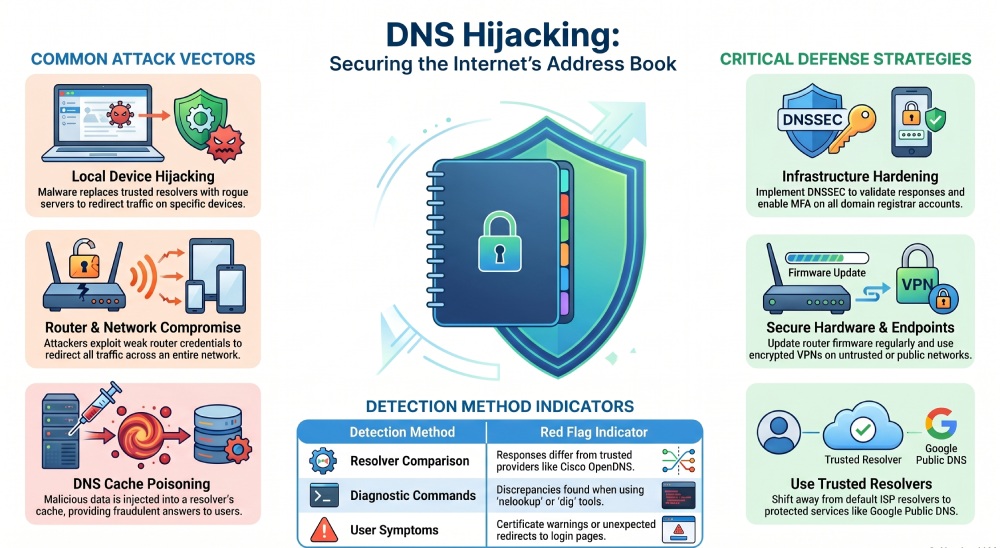
Administrators can use tools such as nslookup, dig, packet captures, endpoint telemetry, and resolver logs. Compare results from the local DNS server, ISP resolver, Google Public DNS, and Cisco OpenDNS. If answers differ unexpectedly, investigate possible dns hijacking, cache poisoning, or DNS redirection.
Steps to Fix a DNS Hijacking Incident
When DNS hijacking is suspected, act quickly to stop traffic from reaching malicious sites and preserve evidence for investigation.
- Disconnect affected systems from the network. This limits additional DNS queries to a rogue DNS server and reduces the chance of credential theft.
- Check local DNS settings. If a local DNS hijack is present, reset DNS settings to approved resolvers and remove suspicious proxy entries.
- Scan for malware. Use trusted antivirus and endpoint detection tools to remove trojan malware, browser hijackers, and other malware.
- Reset the router. In a router DNS hijack, restore factory defaults, update firmware, disable remote administration, change admin credentials, and reconfigure the DNS server.
- Review DNS registrar activity. If the Domain Name Registrar account was compromised, rotate passwords, enable multi-factor authentication, restore valid DNS records, and apply client lock or Name Server Protection.
- Validate authoritative DNS. Confirm the authoritative name server, Slave Name Server, DNS zone, and zone transfer settings are correct.
- Flush caches. Clear the device DNS cache, browser cache, router cache, and resolver cache where possible.
- Force password resets. If users reach malicious sites, assume phishing exposure and reset credentials.
- Monitor for recurrence. Watch for repeated DNS redirection, new rogue DNS server entries, or abnormal DNS queries.
If the incident involved public-facing services, site owners should coordinate with their DNS provider, CDN, DDoS Protection vendor, and incident response team. DNS hijacking can overlap with a DDOS or DDoS attack, especially when attackers combine redirection with traffic disruption.
Best Practices to Prevent DNS Hijacking
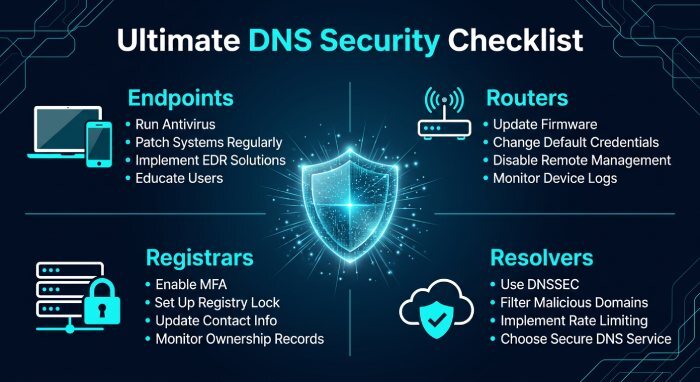
Preventing DNS hijacking requires layered security measures across endpoints, routers, registrars, resolvers, and authoritative DNS infrastructure.
- Use trusted resolvers. Consider reputable DNS services such as Google Public DNS, Cisco OpenDNS, enterprise DNS resolvers, or protected ISP services.
- Enable DNSSEC. DNSSEC helps validate DNS responses and reduces the risk of forged DNS records, especially for domains that support signed zones.
- Secure registrar accounts. Use multi-factor authentication, role-based access control, strong passwords, client lock, and registrar-level change approval.
- Harden routers. Prevent router DNS hijack by changing default credentials, updating firmware, disabling remote administration, and applying firewall rules.
- Protect endpoints. Keep operating systems patched, run antivirus, monitor DNS settings, and block malware that could cause a local DNS hijack.
- Encrypt risky connections. Use an encrypted VPN on public Wi-Fi, require HTTPS, and consider DNS over HTTPS where appropriate.
- Monitor DNS traffic. Analyze DNS queries for unusual domains, high failure rates, unexpected resolvers, or signs of DNS redirection.
- Restrict zone transfers. Allow zone transfer only between authorized name servers and audit DNS zone changes.
- Prepare for availability attacks. Use CDN services, DDoS Protection, and resilient authoritative DNS providers to reduce impact from DDOS activity.
- Train users. Teach end users to recognize phishing, Pharming symptoms, certificate warnings, and suspicious redirects to malicious sites.
Securing DNS is essential for maintaining the integrity of SPF, DKIM, and DMARC authentication. For a primer on how these layers work together, see SPF, DKIM, and DMARC explained. You can confirm your published policy is intact with a free DMARC check.
Strong network security depends on treating DNS as critical infrastructure. By protecting the DNS server, validating DNS records, securing the DNS registrar, and monitoring dns queries continuously, organizations can reduce the likelihood that a dns attack, man in the middle interception, rogue DNS server, local DNS hijack, or router DNS hijack will compromise users or business systems.
General Manager
General Manager of DuoCircle. Product strategy and commercial lead for DMARC Report's 2,000+ customer base.
LinkedIn Profile →Take control of your DMARC reports
Turn raw XML into actionable dashboards. Start free - no credit card required.