What is identifier misbinding, and how does DMARC fix it?

Quick Answer
DMARC (RFC 7489) ties SPF and DKIM together by requiring alignment between the envelope sender and the visible `From` header. According to Google's February 2024 bulk sender requirements, a DMARC policy of at least `p=none` is now mandatory for any domain sending 5,000+ messages per day to Gmail users. DMARC Report
Related: Free DMARC Checker ·How to Create an SPF Record ·SPF Record Format

Try Our Free DMARC Checker
Validate your DMARC policy, check alignment settings, and verify reporting configuration.
Check DMARC Record →
DMARC is the only email authentication protocol that gives you both enforcement and visibility, says Brad Slavin, General Manager of DuoCircle. SPF and DKIM authenticate silently - DMARC tells you what happened and lets you control the outcome. That combination of reporting and policy is why DMARC adoption is accelerating.
DMARC (RFC 7489) ties SPF and DKIM together by requiring alignment between the envelope sender and the visible From header. According to Google’s February 2024 bulk sender requirements, a DMARC policy of at least p=none is now mandatory for any domain sending 5,000+ messages per day to Gmail users.
When you send out an email, there are multiple domains tied to that message, not just the one that you and your recipients see in your sender address (From domain), but also the domain that is used in the envelope sender (SPF domain), along with the domain that appears in the **cryptographic signature **(DKIM domain).
In an ideal situation, all these domains would point to the one brand or organization. This happens when all three domains - the From domain, the SPF domain, and the DKIM domain align with each other, telling both the recipient and the receiving server that the email is coming from a trusted source.

But the problem arises when these domains don’t align, as SPF and DKIM validate their own domains without verifying the domain in the From field. In this case, anyone can exploit this gap by authenticating mail with a domain they control while displaying a different, trusted domain to the recipient. This is what is called identifier misbinding .
In this article, we will dig deeper into what identifier misbinding really means and how you can fix the issue by implementing DMARC.
What exactly is identifier misbinding?
As we established earlier, sometimes the domains tied to an email don’t match with each other, and this creates a security gap.
While both SPF and DKIM might validate the domain individually, neither of them really checks if the validated domain matches the one in the From header. This allows the attackers to get past the authentication checks, even if the sending domain does not belong to the brand that appears in the From address.
For instance, an attacker can easily send a fraudulent email that appears to be from support@yourbrand.com but **passes SPF or DKIM checks using a domain they control, such as malicious.com. To your recipient, it might look like the email is safe to open as it has passed all authentication checks. In reality, the message is fraudulent. This false sense of trust, where the authentication result is tied to one domain while the user sees another, is exactly what is meant by identifier misbinding.
What are the risks of identifier misbinding?
If the various domains of an email don’t match, it’s not just about a security gap. The real problem is that attackers can easily exploit this gap to make fraudulent messages look legitimate. They can easily do this by authenticating their emails with a domain they own and control, while showing a different, **trusted brand in the From field.
Here’s all that can go wrong with identifier misbinding:

Brand impersonation attacks
If the three domains of your outgoing email don’t match, attackers can take this as an opportunity to impersonate your brand. T_hey can send fraudulent or fake messages that appear to come from your domain, but in reality, are authenticated under their domain._ So, when your clients or employees receive such emails, they might think they are engaging with a legitimate message from you. This not only puts them at risk of being scammed but also puts your reputation at stake.
Increases the risk of phishing attacks
With identifier misbinding, the risk of phishing attacks becomes all the more severe. Since attackers can make it look like the email is coming from a legitimate source while authenticating it under their own domain, the message appears both genuine and technically validated. With these layers of validation, there is a very small chance that anyone will even suspect the message to be fraudulent. This makes it much easier for attackers to lure recipients into clicking malicious links, entering sensitive credentials, or opening infected attachments, ultimately increasing the success rate of phishing campaigns.
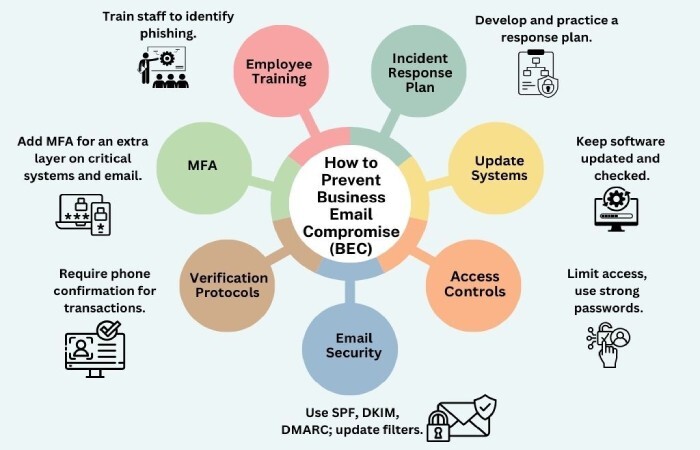
Opens the door for Business Email Compromise (BEC)
Identifier misbinding also makes it easier for attackers to carry out Business Email Compromise. In these attacks, cybercriminals pretend to be a company executive, partner, or vendor. They send emails that look like they are from a trusted person but are actually authenticated under their own domain. It becomes easy for the attackers to pull off such an attack when the email appears to pass **security checks and shows a familiar name in the From field.
How does DMARC fix identifier misbinding?
Although there is no direct correlation between DMARC and the way SPF and DKIM validate domains, DMARC builds on them by adding an important rule: authentication only counts if the authenticated domain is aligned with the From domain. What this means is that DMARC doesn’t really care if SPF or DKIM pass on their own; what really matters is whether the domain they validated matches the one that appears in the From address.
So, let’s say SPF passes, but the Return-Path domain does not match the From domain, DMARC will fail. Similarly, if DKIM passes but the d= domain does not match the From domain, DMARC fails.
As you know, for an email to make it to the recipient’s inbox, it should at least pass one of the authentication checks, and most importantly, that check must align with the From domain. If neither check aligns, the email fails DMARC and the receiving server applies the policy published by the domain owner, whether that’s to monitor, quarantine, or reject the message. You can perform a DMARC lookup to confirm which policy your domain currently publishes.
To put it simply, DMARC ensures that the authentication result (SPF or DKIM) and the visible sender (From domain) are tied together, which ultimately addresses the problem of identifier misbinding. Our free DMARC tools make it easy to check your alignment and spot gaps before attackers do.
Now that we know passing SPF and DKIM checks does not suffice, the only way to truly close the gap of identifier misbinding is by implementing DMARC. It makes sure the domain that passes authentication is the same one shown in the From address, blocking attackers from misusing your **brand and protecting your email communication.
If you want to secure your domain and ensure that your **brand’s integrity is not compromised by fraudulent emails, implementing DMARC is the way to go. Explore our DMARC monitoring plans to keep alignment enforced as your sending sources change. Reach out to us today to get started with your DMARC implementation journey!
Content Specialist
Content Specialist at DMARC Report. Writes vendor-specific email authentication guides and troubleshooting walkthroughs.
LinkedIn Profile →Take control of your DMARC reports
Turn raw XML into actionable dashboards. Start free - no credit card required.