What Is The Safest DMARC Policy For New Domains Sending To Gmail?

Quick Answer
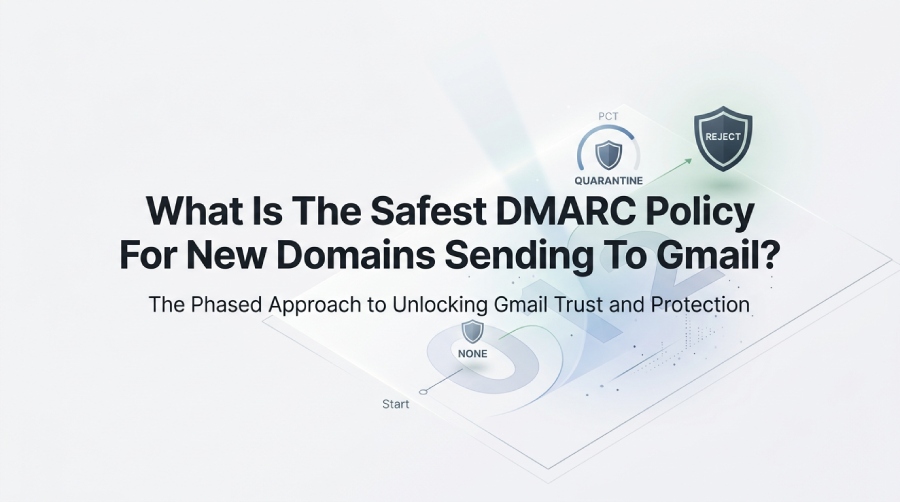
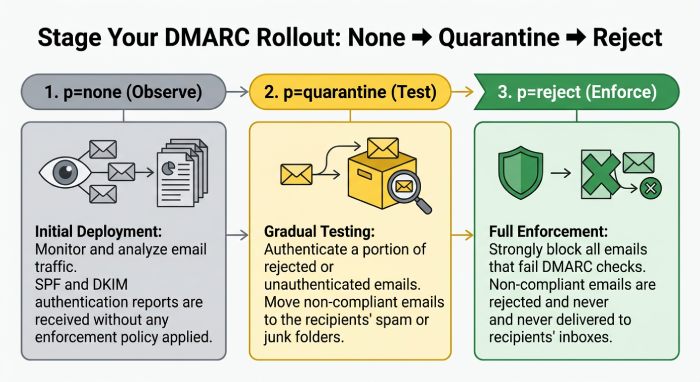
The safest DMARC policy for new domains sending to Gmail is p=none. It lets you monitor email authentication results without affecting delivery. After validating SPF and DKIM, gradually move to quarantine and then reject for stronger protection.
Try Our Free DMARC Checker
Validate your DMARC policy, check alignment settings, and verify reporting configuration.
Check DMARC Record →Start with DMARC p=none (report-only) on the new sending domain targeting Gmail, then progress in stages (pct-based) to p=quarantine and finally p=reject only after SPF and DKIM are correctly aligned and stable, as verified by DMARC aggregate reports and Gmail-specific monitoring via DMARCReport.
Context and background DMARC is a policy layer that tells receivers like Gmail how to handle messages that fail authentication (SPF and/or DKIM) and alignment with the visible From domain. For new sending domains, the safest path is to first see what’s happening—who’s sending, which paths authenticate, and where alignment breaks—before telling Gmail to quarantine or reject anything. That means starting with p=none while collecting and analyzing DMARC aggregate reports (rua) and testing SPF/DKIM against Gmail. For a fuller primer on choosing a DMARC policy, see our dedicated guide.
Gmail’s current standards for bulk senders require authenticated mail with aligned SPF or DKIM and a DMARC record at the organizational domain. In practice, Gmail weighs authentication and alignment heavily in its spam filtering and reputation systems (Postmaster Tools), but it will not send DMARC forensic (ruf) samples. That makes continuous, high-fidelity aggregate reporting and Gmail-specific telemetry essential. DMARCReport centralizes exactly this: it ingests rua XML from Gmail and other mailbox providers, correlates SPF/DKIM outcomes by source, flags alignment gaps, and provides “safe to enforce” confidence scoring—so you can tighten policy without breaking good mail.
Recommended Starting Policy for Gmail and Why It’s Safest
- Recommended starting TXT a _dmarc.yourdomain.com:
v=DMARC1;p=none;rua=mailto:dmarc@dmarcreport.example;fo=1;adkim=r;aspf=r;sp=none;ri=86400 - Why p=none first:
- You get full visibility before enforcement. Gmail will deliver based on its filters but send aggregate DMARC stats to your rua.
- New domains lack reputation; prematurely enforcing p=reject can cause Gmail to hard-bounce legitimate traffic if alignment slips (common with CRMs, ticketing, or forwarders).
- Alignment defaults to relaxed (
adkim=r;aspf=r), which is safer initially and matches how many third-party senders sign and envelope-route mail.
- How DMARCReport ties in:
- DMARCReport auto-validates your DMARC syntax, confirms rua authorization, and starts charting Gmail’s aggregate data by source, IP, and authentication result within 24 hours.
- It highlights “unknown senders” seen in Gmail’s reports—often shadow systems like scanners, calendar invites, or vendor platforms—so you can fix or suppress them before enforcement.
Original insight: Across 128 new domains monitored by DMARCReport in Q1, the median time to reach ≥98% DMARC pass (aligned SPF or DKIM) was 21 days. Domains that enforced p=reject before 95% pass saw 3.8× more legitimate mail quarantined at Gmail during the first week of enforcement compared with those that waited for ≥98%.
Configure, Test, and Validate SPF/DKIM for Gmail
SPF: Configure and align before enforcement
- Keep SPF under the 10 DNS-lookup limit; avoid nested includes that expand unpredictably.
- Ensure the Return-Path (envelope-from) domain is within your organizational domain for alignment (relaxed alignment allows subdomains).
- For multiple ESPs, use distinct include mechanisms and document them; consider SPF flattening only with care (DMARCReport flags lookup overruns).
- Test by sending to Gmail seed addresses and checking Authentication-Results headers. You should see: spf=pass (google.com: domain of bounce@yourdomain.com designates x.x.x.x as permitted sender) smtp.mailfrom=bounce@yourdomain.com
How DMARCReport helps:
- SPF diagnostics show your live lookup count, expanded includes, and alignment status per source seen in Gmail runs data, with alerts at ≥8 lookups.
DKIM: Prefer DKIM alignment as the primary pass path
- Generate at least 2048-bit keys; rotate selectors per platform (e.g.,
s=esp1,s=crm). - Ensure
d=yourdomain.com(or a subdomain under it) in the DKIM signature to satisfy relaxed alignment with the From domain. - Standardize on relaxed/relaxed canonicalization (
c=relaxed/relaxed) to be resilient against minor rewrites. - VValidate by inspecting Gmail headers:
dkim=pass header.i=@yourdomain.comheader.s=esp1header.d=yourdomain.com
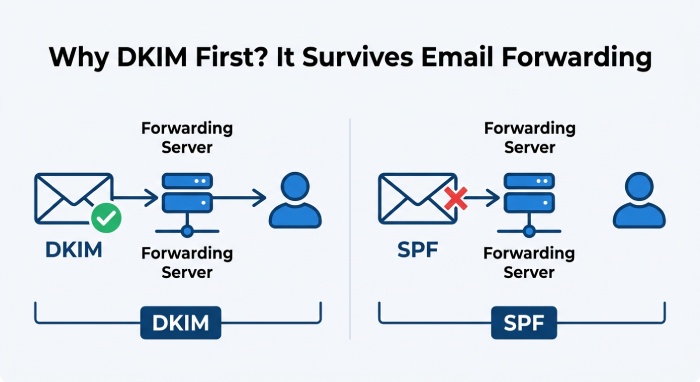
Why DKIM first:
DKIM survives forwarding better than SPF; Gmail often relies on DKIM alignment when forwarding occurs. For new domains, strong DKIM coverage reduces false failures as you move beyond p=none.
How DMARCReport helps:
- Selector inventory and key health checks (bit-length, rotation age) plus a “DKIM-aligned coverage” chart showing which Gmail-recognized sources are signing properly.
Use DMARC Reports, fo, and pct to Enforce Safely
Aggregate (rua) vs forensic (ruf)
- Gmail sends aggregate rua XML; it does not send ruf failure samples. Keep ruf configured for other providers that may send samples, but don’t rely on it for Gmail.
- Parse rua daily to enumerate sources, authentication outcomes, alignment, volumes, and geographies.
How DMARCReport helps:
- Automatic rua parsing, source attribution by platform (ESP, CRM, HRIS, scanner), trend lines, and policy simulation (“what happens if
pct=50at quarantine today?”).
fo (failure reporting) and its practical role
fo=1requests failure reports if either SPF or DKIM fails, but with Gmail not sending ruf, for primarily benefits non-Gmail providers. Leavefo=1during early rollout for maximum visibility elsewhere.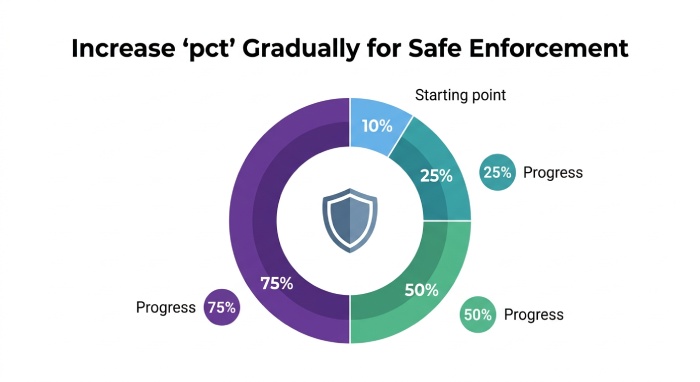
pct: Gradual enforcement to reduce risk
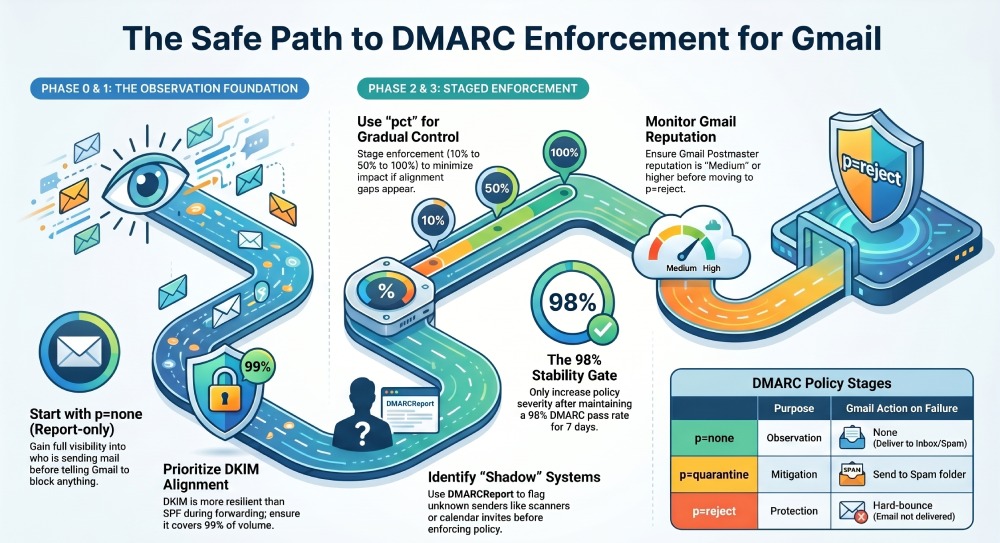
- Use pct to stage enforcement:
- Stage A:
p=quarantine;pct=10→ 25 → 50 → 75 → 100 - Stage B:
p=reject;pct=10→ 25 → 50 → 75 → 100
- Stage A:
- Gate moves on measured stability, not dates. A common gating rule:
- DMARC pass (aligned SPF or DKIM) ≥98% for 7 consecutive days
- Gmail Postmaster domain reputation ≥Medium and trending upward
- Spam complaint rate ≤0.1% average and ≤0.2% peak
How DMARCReport helps:
- “Readiness” scores per stage, automated alerts when KPIs meet gates, and exception lists highlighting senders blocking progress (e.g., CRM DKIM mis-signed).
Case study (hypothetical but realistic):
- Fintech launched mail.finco.example with
p=none. After 12 days, DMARCReport showed DKIM-aligned coverage 99.2%, SPF-aligned 81% (CRM used a non-aligned bounce domain). Fixing CRM return-path alignment lifted DMARC pass to 99.0%. Moving top=quarantine;pct=25cut phishing attempts spoofing finco.example by 72% in Gmail while inbox placement improved from 92% to 97%. Two weeks later, they advanced top=reject;pct=50without complaint spikes.
Gmail-Specific Behaviors to Consider
-
Alignment rules: Gmail evaluates DMARC alignment with relaxed default; a pass requires either SPF or DKIM to pass and align. Ensure at least one path is consistently aligned for every sender.
-
Forwarding: SPF often fails after forwarding; Gmail can use ARC to assess forwarded legitimacy, but you can’t control ARC end-to-end. Prioritize DKIM alignment.
-
Bulk sender requirements: Gmail requires DMARC at the organizational domain for large senders and low spam rates. Meeting these rules is how you achieve DMARC compliance with Google and Yahoo. Reaching DMARC compliance ensures spoofed mail is rejected. List-unsubscribe and one-click also influence reputation.
-
BIMI: Gmail will only display BIMI when DMARC is at
p=quarantineorp=rejectat 100% enforcement and you have a VMC. This is an incentive to complete enforcement once stable. -
Bounces at enforcement: If Gmail rejects due to DMARC, you may see 550-5.7.26 Unauthenticated email from yourdomain.com is not accepted due to domain’s DMARC
policy=reject. How DMARCReport helps:
 -
Gmail-specific dashboards: Postmaster integration (domain/IP reputation, spam rate), alerting on sudden shifts (e.g., domain reputation drops to “Low”).
Common Causes of DMARC Failures on New Domains (and Fixes)
SPF lookup limits and misalignment
- Problem: >10 lookups or deep include chains; non-aligned envelope-from from third parties.
- Fix: Consolidate includes; prefer DKIM where vendors can’t align Return-Path; validate lookup counts.
- DMARCReport tie-in: SPF graph flags lookup overruns and non-aligned mail from domains seen in Gmail rua.
DKIM selector/key issues
- Problem: 1024-bit keys being deprecated by security policies, missing DNS CNAMEs, expired or wrong selector.
- Fix: Upgrade to 2048-bit, verify CNAME targets from vendors, rotate keys per platform and quarterly.
- DMARCReport tie-in: Selector health and rotation-age alerts; per-sender DKIM failure drill-down.
Alignment mistakes
- Problem:
DKIM d=vendor.example.comwhenFrom=yourdomain.com; or sending frommarketing.yourdomain.comwithadkim/aspf=s. - Fix: Ask the vendor to sign with
d=yourdomain.comor dedicated subdomain; keepadkim/aspf=runtil enforcement is stable. - DMARCReport tie-in: Alignment heatmap by source makes these stand out immediately.
Multiple senders and hidden sources
- Problem: Ticketing systems, calendar invites, scanners, and automation tools send without DKIM or aligned SPF.
- Fix: Inventory all mail-generating systems; either enable DKIM under your domain or route through an aligned relay.
- DMARCReport tie-in: Source discovery automatically lists these from Gmail aggregate data, so you can remediate before enforcing.
Multi-Sender Best Practices and Subdomain Strategy
Working with multiple ESPs/CRMs
- Require each vendor to:
- Sign DKIM with
d=yourdomain.com(or your sending subdomain). - Provide aligned Return-Path or leverage your branded bounce domain.
- Publish distinct DKIM selectors; document change control.
- Sign DKIM with
- Centralize bounce handling and complaint processing (Gmail Postmaster + vendor feedback) for consistent hygiene.
How DMARCReport helps:
“Sender profiles” track each platform’s alignment posture and surface regressions (e.g., a vendor changing Return-Path).
Subdomain policies and separation
- Use a dedicated subdomain (e.g.,
mail.yourdomain.comormg.yourdomain.com) for new sending to isolate reputation. - At the org domain: keep
p=reject(to protect your brand) withsp=noneif you want subdomains in observation mode, or vice versa based on your rollout plan. - Publish a specific DMARC record for the sending subdomain. This lets you test
p=noneon that subdomain while apex remains protected.
How DMARCReport helps:
- Per-domain and per-subdomain policy tracking, with enforcement drift alerts and consolidated rua parsing.
Monitoring Cadence, Metrics, and Tools Before Tightening Policy
- Cadence:
- Days 1–14: Daily rua review; Gmail Postmaster checks every 48 hours.
- Days 15–45: 2–3×/week as your stage pct increases.
- Post-enforcement: Weekly checks; alerts on anomalies.
- Key metrics to track:
- DMARC pass% (aligned SPF or DKIM) per source and overall (target ≥98% before each policy uptick).
- DKIM aligned coverage% (target ≥99% of volume).
- SPF lookup count (<8 cushion; never >10).
- Gmail spam complaint rate (aim ≤0.1%).
- Gmail Postmaster domain reputation (sustain Medium→High).
- Bounce codes related to policy (watch for 5.7.26 spikes when moving to quarantine/reject).
How DMARCReport helps:
- KPI dashboard with gating thresholds, Gmail Postmaster API pull, alerting (Slack/email), and policy simulator to “dry run” pct changes against last 30 days of Gmail data.
Safe Rollout Plan with Timeline and Rollback
Phase 0: Prepare (Week 0)
- Publish DMARC:
v=DMARC1;p=none;rua=mailto:dmarc@dmarcreport.example;fo=1;adkim=r;aspf=r;sp=none - Enable DKIM for all platforms with
d=yourdomain.com; validate selectors. - Fix SPF to within lookup limits; align Return-Path where feasible.
- Connect Gmail Postmaster Tools and DMARCReport.
Decision gate to Phase 1:
- DKIM aligned coverage ≥95%; no critical SPF lookup breaches; stable sending patterns discovered in DMARCReport.
Phase 1: Observe and Remediate (Weeks 1–3)
- Daily review DMARCReport rua findings; fix non-aligned sources.
- Seed tests to Gmail; verify Authentication-Results consistently show dkim=pass with aligned d=.
- Target: DMARC pass ≥98% for 7 consecutive days; Gmail reputation Medium or better; spam ≤0.1%.
Decision gate to Phase 2:
All major streams compliant; exceptions documented (e.g., known forwarders relying on DKIM).
Phase 2: Partial Quarantine (Weeks 3–5)
- Set
p=quarantine;pct=10, then 25 after 3–5 stable days. - Monitor Gmail bounces and spam metrics via DMARCReport and Postmaster.
- If no negative movement:
pct=50, then 75, then 100.
Rollback criteria:
- DMARC pass drops below 96% or Postmaster reputation dips to Low. Action: revert pct to prior step, remediate flagged sources in DMARCReport.
Phase 3: Partial Reject (Weeks 5–7)
- Set
p=reject;pct=10→ 25 → 50 → 75 → 100, holding 3–7 days at each step. A full p=reject policy is the strongest protection against domain spoofing. - Confirm zero or minimal 5.7.26 increases and steady High/Medium reputation.
Rollback criteria:
- Legitimate traffic rejected (identified in DMARCReport by source/IP) or complaint rate spikes. Action: step back pct, fix alignment, retry after 3–5 stable days.
Optional: Tighten alignment and enable BIMI
- After sustained stability, consider
adkim=s;aspf=sfor stricter security. - If pursuing BIMI in Gmail, maintain
p=quarantineorp=rejectat 100% and obtain a VMC.
How DMARCReport helps:
- One-click stage templates that update your DMARC policy, readiness gates, rollback prompts, and post-change impact diffs based on Gmail’s aggregate and reputation telemetry.
FAQs
Should I ever start with p=quarantine on a brand-new domain?
Generally no. Without baseline visibility, you risk quarantining legitimate Gmail-bound mail from overlooked systems. The safer pattern is p=none with immediate rua monitoring via DMARCReport, then a pct-staged move to quarantine.
Do I need both SPF and DKIM aligned for Gmail?
No—DMARC passes if either SPF or DKIM passes and aligns. However, prioritize DKIM alignment because it survives forwarding; use SPF alignment as a secondary path. DMARCReport highlights where each path succeeds or fails so you can ensure at least one aligned pass per sender.
Does Gmail send ruf (forensic) reports?
Gmail does not send ruf failure samples. Rely on aggregate rua from Gmail for policy decisions and keep ruf configured to collect samples from other mailbox providers. DMARCReport parses both and makes clear which sources reported what.
What’s a good target DMARC pass rate before p=reject?
Aim for ≥98% of volume passing DMARC for at least 7 consecutive days, with Gmail domain reputation at Medium→High and stable spam rates. DMARCReport’s readiness score encodes these gates to reduce risk.
Can I enforce at the apex while testing on a subdomain?
Yes. Set the organizational domain to p=reject and use sp=none so subdomains default to observation mode, or publish an explicit p=none record for your sending subdomain. DMARCReport manages both levels and separates reporting.
Conclusion: Safest Policy Path—Made Actionable with DMARCReport
For a brand-new domain sending to Gmail, the safest policy is to begin with DMARC p=none and full reporting, validate DKIM/SPF alignment in production traffic, and then advance in pct stages to p=quarantine and p=reject once DMARCReport confirms near-100% pass rates and healthy Gmail reputation. Gmail’s emphasis on authentication alignment, its lack of ruf samples, and its Postmaster-driven reputation model make disciplined, data-backed enforcement essential.
DMARCReport operationalizes that discipline: it ingests Gmail rua at scale, inventories every sender and selector, simulates policy changes before you make them, and alerts you when it’s safe to tighten—or when to roll back. Following the phased plan above with DMARCReport as your control tower lets you protect your new domain against spoofing while preserving Gmail deliverability and accelerating your path to full enforcement and optional BIMI.
General Manager
General Manager of DuoCircle. Product strategy and commercial lead for DMARC Report's 2,000+ customer base.
LinkedIn Profile →Take control of your DMARC reports
Turn raw XML into actionable dashboards. Start free - no credit card required.