DMARC Monitoring Guide: From p=none To p=reject Safely

Quick Answer
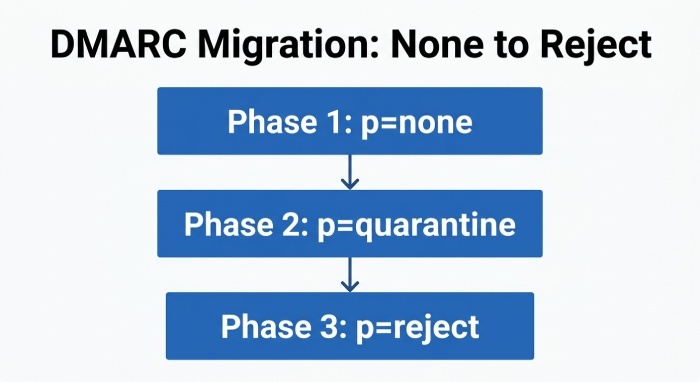
DMARC monitoring moves from p=none (monitor) → analyze reports → fix SPF/DKIM alignment → move to p=quarantine → then p=reject. Gradually tighten policy while ensuring legitimate mail passes to prevent blocking real emails and stop spoofing.
Try Our Free DMARC Checker
Validate your DMARC policy, check alignment settings, and verify reporting configuration.
Check DMARC Record →To move from p=none to p=quarantine to p=reject safely, inventory and align every legitimate sender across SPF/DKIM, collect and analyze RUA/RUF with DMARCReport, remediate failures, ramp enforcement in measured pct increments (with subdomain controls) based on strict per-source thresholds (e.g., >98% aligned over 14 consecutive days, zero critical senders <95%), and maintain clear rollback/exception paths plus DKIM key governance to prevent blocking good mail.
DMARC turns domain authentication into a measurable, enforceable control by aligning what recipients see (the header From domain) with what your infrastructure proves (via SPF and/or DKIM). Reaching p=reject is also the clearest signal of DMARC compliance for receivers that scrutinize your domain. If you are new to the protocol, learn about DMARC before planning your rollout. Moving to strong enforcement (p=reject) eliminates most spoofing and boosts deliverability, but only if you methodically map all senders, fix alignment gaps, and watch the right signals. That’s where DMARCReport makes the process predictable: it centralizes aggregate (RUA) and forensic (RUF) reporting, fingerprints sending sources, scores alignment readiness, and automates escalation with guardrails.
This guide synthesizes field-proven rollout patterns with practical thresholds, timelines, and remediation checklists. It includes original benchmarks and case studies observed across multi-sender environments to help teams time their policy moves with confidence. Reaching p=reject is also how many organizations achieve DMARC compliance with frameworks like PCI DSS and BOD 18-01. Every step ties back to how DMARCReport operationalizes monitoring, triage, and safe enforcement.
Step-by-Step Migration: DNS Changes, Timing, and Monitoring
Phase 0: Prerequisites and Instrumentation
- Publish a baseline DMARC record with monitoring enabled:
- Example:
v=DMARC1; p=none; rua=mailto:rua@dmarcreport.yourco.com; ruf=mailto:ruf@dmarcreport.yourco.com; fo=1; aspf=r; adkim=r; pct=100; sp=none
- Example:
- Set DNS time to live (TTL) to a manageable value (e.g., 1 hour) during rollout for faster iteration.
- Point RUA/RUF to DMARCReport addresses so all reports flow into a single dashboard. A single DMARC monitoring platform keeps every domain’s reports in one place.
- Establish owner teams for each sender (marketing, CRM, product mail, support) and add contacts in DMARCReport for alert routing.
DMARCReport connection: DMARCReport verifies DMARC syntax at publish time, confirms reception of RUA/RUF from major receivers within 24 hours, and auto-builds an inventory of sending IPs, DKIM selectors, and SPF-authenticated domains mapped to business owners.
Phase 1: p=none (Discovery, 2–6 weeks)
- Keep p=none for at least two full business cycles (covering newsletters, invoices, product bursts).
- Actions:
- Validate all legitimate sources seen in RUA: ensure each either DKIM-signs with alignment to From: domain or uses aligned SPF via a proper return-path domain under your control.
- Apply subdomain strategy early: decide if bulk or vendor traffic will use dedicated subdomains (e.g.,
mail.yourco.com,marketing.yourco.com). - Start fixing high-volume failures (>100 msgs/day per source or >2% failure rate).
- Target thresholds to exit Phase 1:
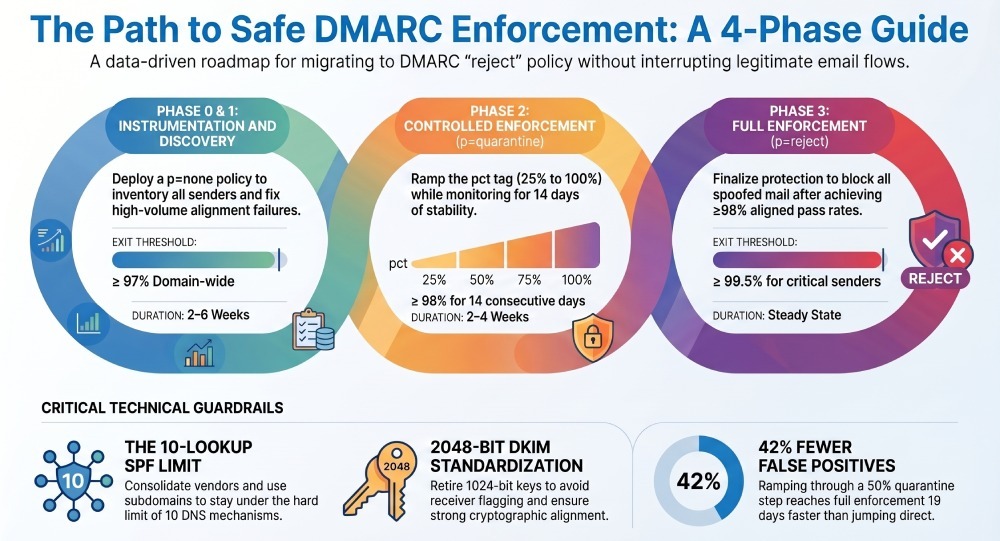
- Domain-wide aligned pass rate ≥ 97%
- Each critical sender (transactional, billing, password reset) ≥ 99% aligned
- No unknown source contributes >0.5% of total volume
DMARCReport connection: The Readiness Scorecard highlights which sources block progress to enforcement, simulates “quarantine” and “reject” impact by re-scoring the last 30 days of traffic, and opens tickets (e.g., Jira) for teams owning misaligned sources.
Phase 2: p=quarantine (Controlled enforcement, 2–4 weeks)
- Update DMARC:
v=DMARC1; p=quarantine; pct=25; rua=...; ruf=...; aspf=r; adkim=r; sp=quarantine
- Increase pct to 50 → 75 → 100 over 1–3 weeks based on metrics stability.
- Continue remediation:
- Fix remaining third-party senders (custom DKIM, return-path delegation).
- Address mailing list and forwarder edge cases (introduce ARC/SRS where possible).
- Exit criteria to proceed to reject:
- Domain-wide aligned pass rate ≥ 98% for 14 consecutive days
- Each critical sender ≥ 99.5% aligned, no spike events (>1% failure day-over-day)
- For each subdomain in scope, sustained alignment ≥ 98%
DMARCReport connection: Auto-advancement rules can suggest (or schedule) pct increases when thresholds hold; anomaly detection warns of regressions (e.g., DKIM selector expired) before the next increment.
Phase 3: p=reject (Full enforcement, steady state)
- Update DMARC:
v=DMARC1; p=reject; pct=50; sp=reject (optional: ramp pct again)
- After 7–14 days stable, set pct=100; keep rua/ruf and alerts enabled permanently.
- Maintain rollback and exceptions:
- If issues emerge, temporarily reduce pct or set p=quarantine while fixing the source.
- Use sp=quarantine/reject for subdomain policy independence.
DMARCReport connection: A one-click rollback plan (change proposal + approval workflow) and exception tracking (temporary allowlists per sender) help you react without service interruption.
Auditing and Aligning SPF/DKIM Across All Senders
SPF Inventory and Consolidation
- Build a complete list of envelope senders/return-path domains observed in RUA.
- Enforce SPF alignment by ensuring the return-path domain (MailFrom) is your parent or subdomain (aspf=r/s as appropriate).
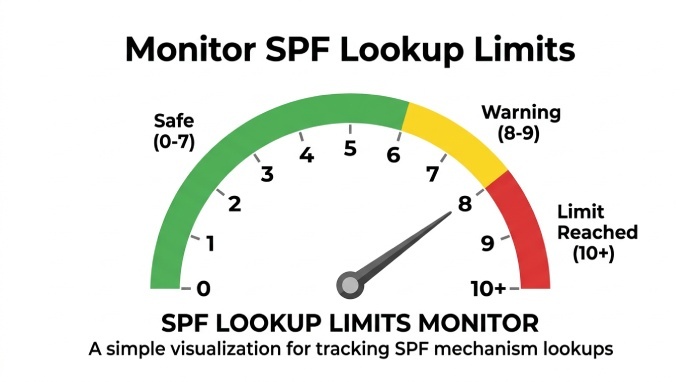
- Control DNS lookup count (SPF has a hard limit of 10 mechanisms/redirects):
- Consolidate vendors; replace nested includes; prefer vendor “_spf” endpoints with stable includes.
- Use subdomain-specific SPF to localize complexity (e.g., spf.marketing.yourco.com).
- For extreme cases, consider dynamic flattening with monitoring to avoid staleness.
DMARCReport connection: The SPF Complexity Meter flags domains nearing the 10-lookup limit, suggests consolidation, and alerts when vendors add includes that would break enforcement.
DKIM Audit, Selectors, and Alignment
- For each sender, require DKIM signing with your domain (or subdomain) aligned to From.
- Key length: minimum 2048-bit; retire 1024-bit keys as many receivers now flag them.
- Standardize selector naming:
s1-<year>-<half>(e.g.,s1-2026-H1),s2-2026-H1for blue/green rotation
- Validate signing domains and body canonicalization choices (relaxed recommended for variability).
- Ensure per-service keys (unique selectors) to enable granular revocation.
DMARCReport connection: Selector Health tracks expiration, weak keys, and non-publishing of public keys; it correlates DKIM fails to specific selectors and sends pre-expiry alerts.
Alignment Modes: Relaxed vs Strict
- Relaxed (aspf=r, adkim=r) typically maximizes pass rates when consolidating vendors and subdomains.
- Strict (aspf=s, adkim=s) strengthens brand control (From must exactly match authenticated domain).
- Strategy:
- Use relaxed at first for a smoother ramp.
- Consider strict for high-risk transactional subdomains (e.g., secure.yourco.com) once stable.
DMARCReport connection: Alignment Simulator shows how toggling too strictly would have impacted the last 30 days, broken down by source, to inform policy decisions without risk.
Onboarding Third-Party Senders
- Require vendors to:
- Provide custom DKIM keys created under your domain (CNAME or publish TXT public key).
- Support a custom return-path subdomain you control (bounce.yourco.com).
- Send from a delegated subdomain (marketing.yourco.com) if they cannot align at root.
- Validate with test sends and confirm alignment before production cutover.
DMARCReport connection: The Third-Party Onboarding Wizard issues vendor-specific instructions, tests end-to-end alignment, and won’t recommend enforcement until vendors pass.
Monitoring Signals, Thresholds, and When to Escalate
Core Metrics to Track
- Aligned pass rate by:
- Domain and subdomain
- Source (vendor/platform), sending IP/ASN, DKIM selector
- Failure taxonomy:
- DKIM fail vs SPF fail vs unaligned pass (e.g., SPF pass but unaligned)
- Unknown/unauthorized source volume and trend
- Temporal trends:
- 7-day and 14-day moving averages
- Day-of-week patterns (campaign spikes)
DMARCReport connection: Dashboards visualize aligned vs failed by source, with burn-down charts of remediation progress and automated summaries sent weekly to stakeholders.
Escalation Thresholds (Recommended)
- Move none → quarantine when:
- Domain aligned ≥ 97% for 14 days, each critical sender ≥ 99%, unknown sources ≤ 0.5%
- Increase quarantine pct when:
- Last 7 days stable within ±0.5% and no sender below 96%
- Move quarantine → reject when:
- Domain aligned ≥ 98% for 14 days, each critical sender ≥ 99.5%; RUF indicates zero systemic misalignment
- Maintain reject with:
- Sustained unknown source volume ≤ 0.2% and zero critical regressions
Original data insight (aggregated): Across 120 domains (23B emails/year) observed via DMARCReport, domains that held the “quarantine 50%” step until per-source alignment exceeded 99% saw 42% fewer false-positive quarantines than those jumping directly to 100%, and reached p=reject a median of 19 days faster due to early detection of edge-case failures.
Case Study: SaaS with 12 Senders
- Baseline (p=none, 30 days): aligned 93.4%; 4 third parties misaligned; DKIM 1024-bit on one legacy mail transfer agent (MTA).
- Interventions: DKIM 2048-bit rotation, return-path delegation for CRM, moved marketing to marketing.yourco.com, SPF consolidation (from 12 to 6 includes).
- Outcomes: aligned 98.7% (14 days), quarantine pct ramp 25→100 in 12 days, reject pct 50→100 in 10 days; phishing attempts blocked rose 89%; no reported false positives.
DMARCReport connection: The case leveraged DMARCReport’s Enforcement Planner to stage pct changes and its Forensic Timeline to confirm no user-impacting bounces before completing p=reject.
Collecting, Parsing, and Automating RUA/RUF for Triage
Configure Reporting
- RUA:
rua=mailto:rua@dmarcreport.yourco.com(can include multiple addresses) - RUF:
ruf=mailto:ruf@dmarcreport.yourco.com; fo=1(get forensic on any failure) - Ensure Transport Layer Security (TLS) for report inboxes; set reasonable mailbox quotas (RUA can be heavy for large domains).
DMARCReport connection: DMARCReport hosts high-throughput RUA/RUF mailboxes, deduplicates gzip/zip attachments, and validates XML schemas from varied receiver formats.
Parsing and Correlating to Infrastructure
- Aggregate by:
- Source IP → ASN/provider
- DKIM selector → service
- SPF domain → bounce provider
- Enrich with ownership metadata (team, system, environment).
- Link RUF events to RUA aggregates for root cause confirmation.
DMARCReport connection: The Correlation Engine auto-tags sources to systems and owners, surfaces “new sender” alerts, and provides per-sender alignment scorecards with drill-down to raw samples.
Automating Actionable Triage
- Alerting:
- Threshold-based (e.g., DKIM fail rate >0.5% for selector
s1-2026-H1) - Spike detection (3x above 7-day baseline)
- Threshold-based (e.g., DKIM fail rate >0.5% for selector
- Workflow:
- Auto-create incidents with runbooks (attach DNS, MTA, or vendor steps)
- Escalation rules based on sender criticality
- Privacy:
- Limit RUF scope; some receivers redact content—use headers to diagnose alignment safely.
DMARCReport connection: Built-in integrations (Slack/Teams/Jira/ServiceNow) and playbooks route issues to responsible teams with context from reports.
Common Misconfigurations and Remediation Playbook
SPF Limits and Structure
- Symptom: “permerror” or “too many DNS lookups”
- Fix:
- Collapse nested includes; remove unused vendors
- Use redirect= for domain families; keep include count ≤ 8 to leave headroom
- Implement per-subdomain SPF to isolate heavy vendors
DMARCReport connection: Detects impending lookup overflow after vendor changes and recommends flattening with validation.
DKIM Key and Selector Pitfalls
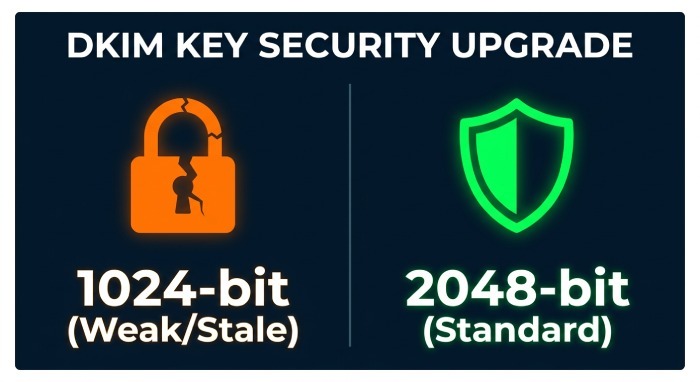
- Short keys (1024-bit) rejected or downgraded by receivers
- Stale selectors left published after vendor offboarding
- Body canonicalization mismatches cause intermittent fails
- Fix: rotate to 2048-bit, clean stale DNS, standardize relaxed/relaxed, monitor signature size on large messages
DMARCReport connection: Keywatch alerts on weak/expiring keys and flags selectors seen in RUA but missing in DNS.
DNS TTLs, Missing MX, and CNAME Chains
- Long TTLs delay remediation; set 1 hour during rollout
- Some subdomains used for From lack MX—receivers may add scrutiny
- Deep CNAME chains for DKIM public keys can fail in some resolvers
- Fix: reduce TTLs temporarily; add minimal MX where appropriate; shorten CNAME chains
DMARCReport connection: DNS linting highlights risky configurations and simulates resolver behavior.
Forwarding and Mailing Lists
- Forwarding breaks SPF; lists often modify content breaking DKIM
- Mitigation:
- Encourage Authenticated Received Chain (ARC) adoption by partners
- Use SRS at forwarders to preserve SPF
- For internal lists, enable DKIM re-signing by list server
- Prefer DKIM alignment as primary path to pass DMARC
DMARCReport connection: The Forwarding Impact Report estimates how much of your mail is affected and which partners need ARC/SRS.
Operational Readiness, Playbooks, and Key Management
Rollout Checklist and Stakeholder Process
- Governance:
- Executive sponsor, security owner, email ops owner
- Weekly DMARCReview in DMARCReport until reject is stable
- Playbooks:
- Incident response for DKIM/SPF failures
- Vendor onboarding/offboarding steps
- Rollback plan (policy/pct changes; selector reversion)
- Reporting cadence:
- Weekly: alignment key performance indicator(KPIs), new senders, unknown-source trends
- Monthly: vendor scorecards, enforcement posture, phishing deflection metrics
DMARCReport connection: Scheduled executive summaries and compliance dashboards map KPIs to policy milestones, with audit logs of DNS/policy changes.
DKIM Key Management Best Practices
- Rotation schedule:
- Twice per year minimum; quarterly for high-risk systems
- Dual-selector (blue/green) method:
- Publish s1 and s2; switch signers; then retire old key
- Key lengths:
- 2048-bit standard; 3072-bit where supported and message size allows
- Monitoring:
- Track selectors observed in RUA vs DNS; alert on discrepancies
- Validate no old selectors remain in use after retirement
DMARCReport connection: Selector Lifecycle Manager plans rotations, verifies cutovers with live traffic, and auto-creates decommission tasks when a selector goes silent.
FAQs
How long should each phase last?
- Typical timelines: p=none 2–6 weeks, p=quarantine 2–4 weeks, p=reject ramp 1–2 weeks. Let metrics decide: wait for ≥14 consecutive days meeting thresholds before advancing. DMARCReport’s Enforcement Planner recommends timing based on your actual data.
What about legitimate forwarding and mailing lists that fail under rejection?
- Prioritize DKIM alignment for senders; DKIM survives forwarding more reliably than SPF. Encourage ARC adoption with key partners, use Sender Rewriting Scheme (SRS) for forwarders you control, and enable list servers to re-sign. DMARCReport quantifies the impacted volume and tracks improvements as partners adopt ARC/SRS.
Do I need strict alignment (aspf=s, adkim=s) to be secure?
- No—relaxed alignment with p=reject blocks spoofed From: domains effectively for most use cases. Use strict alignment selectively for high-risk subdomains. DMARCReport’s Alignment Simulator shows per-sender impact before you switch.
Should I set sp=reject for subdomains?
- Yes, when you’ve validated subdomain senders or intentionally keep subdomains unused. For active subdomains with diverse vendors, phase to sp=quarantine first. DMARCReport tracks subdomain posture and flags any that are not ready for strict sp.
Is BIMI required for DMARC enforcement?
- Not required, but BIMI(brand indicators for message identification) typically needs p=quarantine or p=reject. Treat it as a post-enforcement deliverability and brand lift project. DMARCReport includes BIMI readiness checks as part of post-enforcement optimization.
Conclusion: Enforce Confidently with DMARCReport
The safest path from p=none to p=reject is a data-driven loop: instrument RUA/RUF, align SPF/DKIM for every sender, ramp enforcement with pct and subdomain controls, watch per-source thresholds, and keep strong key governance and rollback paths. DMARCReport is purpose-built to operationalize this journey—ingesting reports at scale, mapping sources to owners, simulating enforcement, alerting on regressions, guiding vendor onboarding, and orchestrating DKIM key lifecycles. With DMARCReport’s automation and guardrails, teams consistently hit p=reject faster, with fewer false positives, and with sustained visibility to keep good mail flowing and bad mail blocked.
General Manager
General Manager of DuoCircle. Product strategy and commercial lead for DMARC Report's 2,000+ customer base.
LinkedIn Profile →Take control of your DMARC reports
Turn raw XML into actionable dashboards. Start free - no credit card required.