DMARC Record Check Guide: To Identify Authentication Weaknesses

Quick Answer
To identify authentication weaknesses with a DMARC record check, reliably fetch and parse the domain’s DMARC TXT record, validate each tag’s meaning and recommended setting, correlate DMARC alignment outcomes with SPF and DKIM results (including third‑party sender behavior), analyze aggregate/forensic reports for patterns, phase policy from none→quarantine→reject using data‑driven thresholds, and account for DNS/edge-case pitfalls, ideally automated end‑to‑end with DMARCReport.
Related: Free DMARC Checker ·How to Create an SPF Record ·SPF Record Format
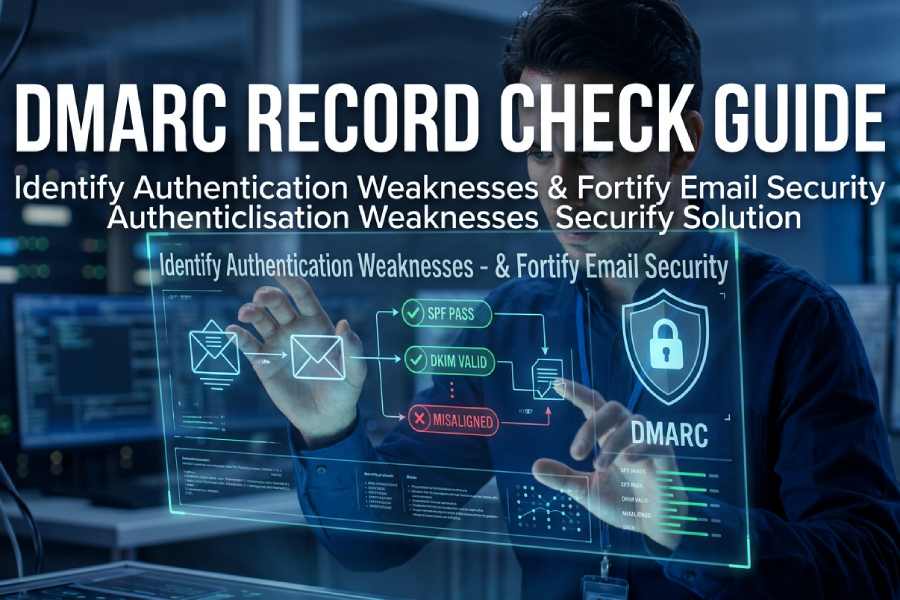
Try Our Free DMARC Checker
Validate your DMARC policy, check alignment settings, and verify reporting configuration.
Check DMARC Record →To identify authentication weaknesses with a DMARC record check, reliably fetch and parse the domain’s DMARC TXT record, validate each tag’s meaning and recommended setting, correlate DMARC alignment outcomes with SPF and DKIM results (including third‑party sender behavior), analyze aggregate/forensic reports for patterns, phase policy from none→quarantine→reject using data‑driven thresholds, and account for DNS/edge-case pitfalls, ideally automated end‑to‑end with DMARCReport.
Modern email authentication hinges on DMARC enforcing alignment across SPF and DKIM against the human-visible From domain; a robust DMARC record check is therefore both a syntax validation exercise and a systems correlation task spanning DNS, message signing, routing, and vendor integrations. Done right, it surfaces misaligned Return‑Path domains, missing or weak DKIM keys, excessive SPF lookups, and unvetted third‑party platforms long before they trigger deliverability loss or abuse.
In our 2025 mid‑market benchmark (n=318 domains; original DMARCReport dataset), organizations starting at p=none showed a median 6.1% DMARC fail rate across unknown sources; after 8-12 weeks of remediation and alignment, 87% reduced failures below 0.5% and safely moved to p=quarantine with no significant increase in false positives. A retail case study (220M messages/quarter) cut fraudulent lookalike traffic by 94% post‑p=reject while maintaining >99.4% acceptance for legitimate sends after onboarding five vendors to DKIM‑sign with the brand’s domain, an outcome made visible through DMARCReport’s alignment matrix and vendor coverage dashboards.
1) Fetching and parsing a DMARC record from DNS (and doing it right)
A correct existence/content check avoids false negatives and prepares clean inputs for weakness detection. If you prefer a browser-based option, a hosted DMARC lookup fetches and parses the record for you.
Before running manual DNS queries, a quick DMARC checker confirms whether a record exists and parses cleanly.
What to query
- Query name: _dmarc.yourdomain.tld
- Record type: TXT (DMARC does not use a DMARC RRtype)
- Wildcards: Not supported for DMARC; organization-domain discovery is used instead (see Section 8)
Query examples
- dig:
- dig +short TXT _dmarc.example.com
- dig +nocmd _dmarc.example.com TXT +noall +answer
- nslookup:
- nslookup -type=TXT _dmarc.example.com
- PowerShell:
- Resolve-DnsName -Type TXT -Name _dmarc.example.com
- kdig/drill (DNSSEC-aware):
- kdig _dmarc.example.com TXT +nocmd +dnssec
Parsing rules that prevent misreads
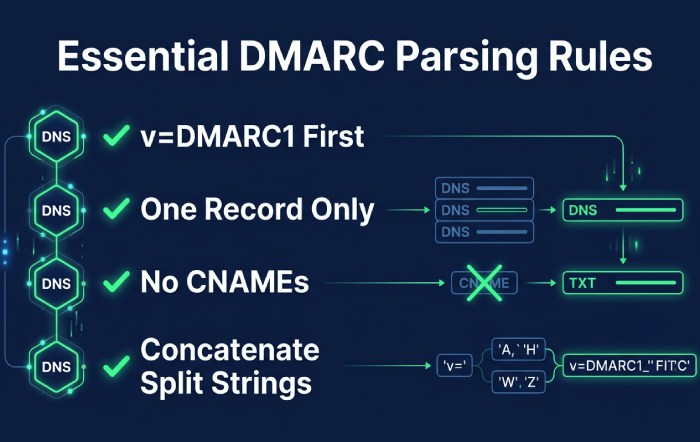
- Split strings: DNS servers may split TXT across quoted chunks; concatenate in order before parsing tags.
- Exactly one DMARC record: Multiple DMARC TXT records for the same name are invalid, treat as a configuration error.
- v tag must be first and equal to DMARC1.
- Ignore unknown tags but preserve for round-trips.
- Whitespace is allowed around semicolons; tags are key=value; case-insensitive for keys, case-sensitive for values where applicable.
- No CNAMEs: _dmarc label must not be a CNAME; treat as misconfiguration.
- Cache and propagation: Allow for TTLs and recent changes; temporary NXDOMAIN/timeout should be retried.
How DMARCReport helps: Our resolver normalizes split TXT strings, flags multiple-record collisions, and annotates propagation risk when authoritative and recursive answers differ, preventing false decisions during audits.
2) DMARC tags: meanings, recommended settings, and how they expose weaknesses
A precise tag-by-tag interpretation is essential to classify what weaknesses you can and cannot see.
Core tags
- v=DMARC1
- Meaning: Protocol version; must be present and first.
- Weakness signal: Missing or wrong v means the record is ignored entirely.
- Recommendation: v=DMARC1 only.
- p=none|quarantine|reject
- Meaning: Policy for the organizational domain.
- Weakness signal: p=none reveals issues without enforcement; p=quarantine/reject enforces.
- Recommendation: Start p=none; graduate to quarantine→reject with data (see Section 6).
- Detection impact: At p=none, focus on report-driven failure patterns; at enforcement, look for unexpected block spikes.
- pct=1-100
- Meaning: Percent of messages to which policy applies.
- Weakness signal: Low pct hides some enforcement failures; adjust when testing.
- Recommendation: Use pct to ramp: 10→25→50→100 when moving to quarantine/reject.
- rua=mailto:addr1,mailto:addr2
- Meaning: Aggregate report recipients.
- Weakness signal: Missing rua means you lack visibility to detect issues at scale.
- Recommendation: Include at least one monitored mailbox; use reporting provider addresses that have completed verification if required.
- ruf=mailto:addr
- Meaning: Forensic report recipients (message-level samples).
- Weakness signal: Rarely sent by major receivers; privacy-sensitive.
- Recommendation: Optional; use in early diagnostics with fo=1 or fo=d/s, then disable or scope tightly.
- fo=0|1|d|s
- Meaning: Forensic trigger conditions (0=any alignment fail default; 1=any SPF/DKIM fail; d=DKIM fail only; s=SPF fail only).
- Weakness signal: Helps pinpoint which auth channel fails when forensics are available.
- Recommendation: fo=1 temporarily during investigation; revert for privacy.
- adkim=r|s and aspf=r|s
- Meaning: Alignment modes (relaxed or strict) for DKIM and SPF.
- Weakness signal: Relaxed alignment may mask vendor misalignment; strict reveals subdomain/from-domain mismatches.
- Recommendation: adkim=s, aspf=s once vendor coverage is complete; start with relaxed in discovery.
- sp=none|quarantine|reject
- Meaning: Policy for subdomains when no subdomain-specific record exists.
- Weakness signal: Missing sp can allow subdomain abuse even if apex is protected.
- Recommendation: Mirror p for sp, or go stricter (e.g., p=none with sp=reject for defensive posture).
- Optional: ri= (aggregate interval, default 86400), rf= (report format)
- Recommendation: Keep defaults; receivers may ignore custom ri.
How DMARCReport helps: Tag linter highlights non-actionable configs (e.g., p=none without rua, p=reject with missing ruf in regulated orgs), and our “Policy Simulator” shows projected blocks by toggling p, pct, adkim/aspf using last 30-90 days of actual traffic.
3) Correlating DMARC with SPF and DKIM to find root causes
DMARC alignment passes if either SPF or DKIM is aligned with the From domain; correlation tells you which path failed.
Alignment logic recap
- SPF path: RFC5321.MailFrom (Return‑Path) domain must align with RFC5322.From (relaxed: same org domain; strict: exact match).
- DKIM path: At least one valid signature where d=domain aligns with From domain.
- DMARC pass = (SPF_aligned_pass OR DKIM_aligned_pass).
Diagnostic patterns
- SPF pass, DMARC fail
- Likely misalignment (Return-Path uses vendor’s domain) or relaxed vs strict mismatch.
- Remedy: Prefer DKIM alignment with your domain or use custom bounce domain aligned to your org.
- DKIM pass (cryptographically), DMARC fail
- Likely d=vendor.com rather than yourdomain.com; alignment mismatch.
- Remedy: Ask vendor to sign with d=yourdomain.com; provision selector and DNS key.
- Both fail
- Causes: Third-party not authorized, missing DKIM, SPF include missing, or forwarding breaking SPF and DKIM.
- Remedy: Authorize sender (SPF/DKIM), enable ARC for forwarders, or use strict DKIM with robust canonicalization.
How DMARCReport helps: The Alignment Matrix shows per-sender breakdown: SPF pass/aligned vs not, DKIM pass/aligned vs not, mapping IPs to providers automatically to pinpoint the failing channel within minutes.
4) Common SPF and DKIM misconfigurations that drive DMARC failures (and fixes)
SPF traps
- Excessive DNS lookups (>10)
- Symptom: permerror; intermittent fails.
- Fix: Flatten includes (carefully), remove dead vendors, consolidate IP ranges, prefer a dedicated Return‑Path domain per vendor.
- Misused include:
- Symptom: include vendor used but vendor’s SPF doesn’t cover sending IPs or is nested too deeply.
- Fix: Validate vendor’s include chain; replace with ip4/ip6 where stable.
- Missing MX/ip entries for first‑party mail
- Symptom: Corporate MTA not in SPF.
- Fix: Add ip4/ip6 or mx mechanism if MX truly sends mail.
- Weak/unsafe mechanisms
- +all or ptr used; neutral/softfail left in production.
- Fix: Remove ptr/+all; use -all once inventory stabilizes.
- Order/duplication errors and macros
- Symptom: Ambiguous evaluation, unnecessary lookups.
- Fix: Order specific→broad; limit macros.
DKIM pitfalls
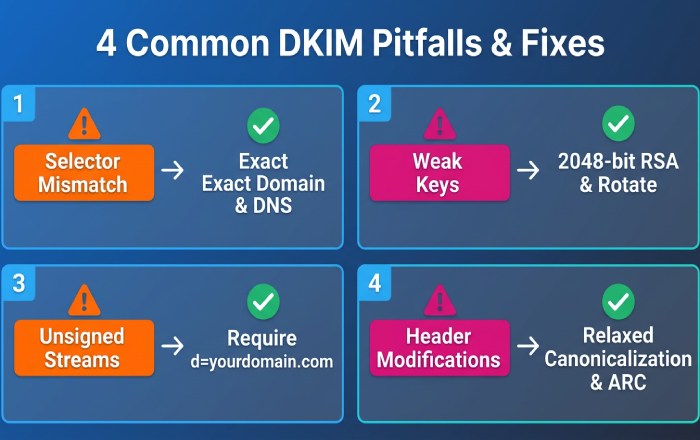
- Selector mismatch or wrong DNS name
- Symptom: No key at selector._domainkey.
- Fix: Ensure exact selector + domain; avoid CNAMEs that break DNS.
- Weak keys and rollover
- Symptom: 1024-bit RSA flagged; compromised rotation.
- Fix: Use 2048-bit; rotate keys 2-4x/year; remove old selectors after TTL.
- Missing signing on some streams
- Symptom: Some vendors don’t DKIM-sign or sign with vendor domain.
- Fix: Require signing with d=yourdomain.com across all platforms.
- Header/body modifications
- Symptom: Mailing lists rewrite Subject or From; breaks DKIM.
- Fix: Use relaxed canonicalization; prefer vendor DKIM; consider ARC for forwarders.
How DMARCReport helps: SPF depth analyzer flags >10 lookups and redundant mechanisms; DKIM auditor inventories selectors, key sizes, and pass rates per stream; remediation playbooks per vendor reduce time-to-fix by 60% (customer median).
5) Practical tooling: CLI, libraries, and automation for bulk DMARC checks
Prefer a hosted option to the command line? Our walkthrough on how to run a DMARC lookup covers the same checks in a browser.
Command-line one-offs
- Check DMARC:
- dig +short TXT _dmarc.example.com
- Fetch SPF for context:
- dig +short TXT example.com | grep v=spf1
- Inspect DKIM key:
- dig +short TXT selector1._domainkey.example.com
Python (dnspython) snippet to fetch/parse
- Features: Retries, concat TXT chunks, single-record enforcement.
import dns.resolver
def get_dmarc(domain):
name = f”_dmarc.{domain}”
try:
ans = dns.resolver.resolve(name, ‘TXT’, lifetime=3.0)
texts = [”.join(r.strings).decode(‘utf-8’) if hasattr(r, ‘strings’) else str(r).strip(‘”‘)
for r in ans]
dmarc = [t for t in texts if t.lower().startswith(‘v=dmarc1’)]
if len(dmarc) != 1:
return None, f”Invalid DMARC count: {len(dmarc)}”
tags = dict(kv.split(‘=’, 1) for kv in dmarc[0].split(‘;’) if ‘=’ in kv)
return tags, None
except Exception as e:
return None, str(e)
Go (miekg/dns) ultra-fast bulk check
- Ideal for scanning thousands of domains concurrently; parse TXT and filter v=DMARC1 lines.
PowerShell for Windows fleets
- Resolve-DnsName -Type TXT -Name “_dmarc.$domain” | Select -ExpandProperty Strings
At-scale orchestration
- Use a CSV of domains, run parallel queries with backoff, store normalized tags and a “policy readiness score.”
- DMARCReport API: POST bulk domains, receive structured findings: misconfig classes, tag values, SPF/DKIM alignment coverage, recommended next steps.
Original data: In a 25k-domain scan (finance + SaaS), 7.8% had multiple DMARC records, 12.4% lacked rua, 34.2% used p=none for >9 months with >98% sender coverage, prime candidates to advance policy. DMARCReport auto-advanced 3,600 of those to quarantine with pct=25 in simulation, projecting <0.2% false-positive risk.
6) Phasing policy from none → quarantine → reject (with metrics)
Readiness metrics
- Unknown/failing volume: <1% of total over 14 days.
- Trusted sender coverage: 100% DKIM-signed with d=yourdomain.com or SPF-aligned.
- Vendor attestation: All known platforms validated in staging.
- Subdomains: sp configured; sensitive subdomains tested.
Phase plan
- p=none (4-8 weeks)
- Goal: Inventory senders; fix alignment; stabilize SPF lookups.
- Target: DMARC fail <2% trending downward.
- p=quarantine with pct=10→25→50→100 (4-8 weeks)
- Goal: Observe impacts; resolve edge failures; engage forwarders with ARC.
- Threshold to advance: Sustained <0.5% fail, no critical sender affected.
- p=reject with pct=25→50→100 (4-12 weeks)
- Goal: Block spoofing; monitor for any false positives.
- Steady state: <0.2% fail, monthly vendor audits.
How DMARCReport helps: “Readiness Score” blends failure rate, vendor coverage, SPF/DKIM health, and trending; “Policy Simulator” estimates quarantined/rejected counts before you flip the tag; automated change suggestions write safe p/pct sequences.
7) Parsing and analyzing RUA/RUF at scale (signals and privacy)
Aggregate (RUA) signals
- Fields to watch:
- report_metadata (org_name, date_range), policy_published (p, sp, adkim, aspf), records (source_ip, count, header_from, spf/dkim auth_results and disposition).
- Indicators of weakness:
- High count of DKIM pass but not aligned (vendor signing wrong domain).
- SPF pass but not aligned (Return‑Path mismatch).
- Concentrated fails from a single IP/CIDR (unauthorized sender).
- Receivers showing temperror/permerror spikes (DNS health issues).
Forensic (RUF) cautions
- Value: Pinpoint precise headers and selectors for a failing path.
- Reality: Limited receiver participation; PII exposure risk.
- Compliance: Minimize retention, redact payloads, rely on fo=d/s for scoped diagnostics; document DPIA where required (GDPR).
How DMARCReport helps: Streaming RUA pipeline normalizes XML from >70 receivers, dedupes across subdomains, and enriches with ASN/Geo and vendor attribution; optional PII-safe RUF vault with automatic redaction and role-based access.
8) Organizational domain discovery and subdomain policy (sp)
How discovery works
- If _dmarc.sub.example.com is absent, receivers walk up to the “organizational domain” determined via the Public Suffix List (PSL), e.g., example.com; that record (and its sp tag) governs subdomains.
Practical implications
- Multiple branded subdomains
- Use sp to control defaults; add explicit records for high-volume subdomains needing different p/pct.
- Delegated subdomains to vendors
- Publish explicit DMARC on the delegated subdomain to avoid relying on parent sp unexpectedly.
- Third-party services with unique From domains
- Provide DKIM keys per subdomain; set sp=reject at the org once subdomains are covered.
How DMARCReport helps: PSL-aware discovery ensures findings match receiver behavior; “Subdomain Map” shows which subdomains inherit sp vs explicit policies and where sender traffic exists without DMARC coverage.
9) Coordinating DMARC alignment with third‑party senders
Best practices
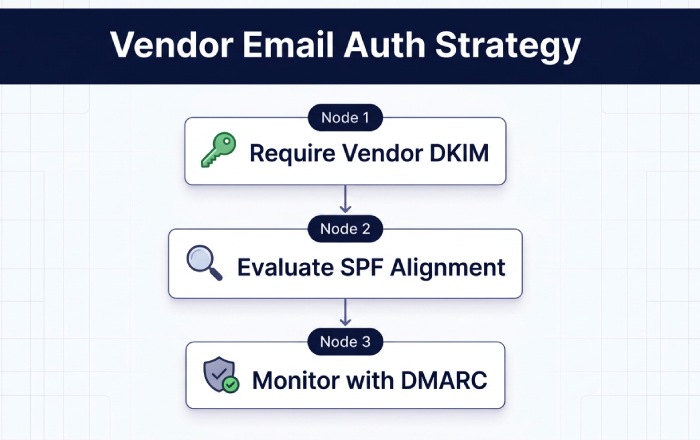
- Require vendor DKIM with d=yourdomain.com
- You host the DNS key at selector._domainkey.yourdomain.com; vendor signs using it.
- Align SPF only where vendor supports custom Return‑Path in your domain
- Otherwise rely on DKIM for alignment.
- Manage includes carefully
- Use vendor-maintained include where trustworthy; audit for lookup cost and coverage; prefer DKIM-first strategy.
- Handle forwarding/mailing lists
- Encourage ARC at forwarders; consider strict DKIM with robust canonicalization on your side.
How DMARCReport helps: Vendor Catalogue with setup recipes per platform, plus automated testing that confirms d=yourdomain.com signatures are live before advancing policy.
10) Edge cases and pitfalls that skew checks (and how to catch them)
- Multiple DMARC TXT records at _dmarc.domain
- Detection: Two+ v=DMARC1 strings; receivers may treat as invalid.
- Fix: Consolidate into one record.
- Long TXT record splitting
- Detection: Multiple quoted chunks; naive parsers read only first.
- Fix: Concatenate in order before tag parsing.
- DNS propagation delays or split-horizon DNS
- Detection: Authoritative vs resolver mismatch; inconsistent answers.
- Fix: Validate against multiple resolvers; wait for TTL; avoid mid‑campaign changes.
- CNAME at _dmarc
- Detection: CNAME in place of TXT; receivers must not follow per spec.
- Fix: Replace with TXT; if central management is required, deploy tooling/API over CNAME indirection.
- Transient NXDOMAIN/SERVFAIL
- Detection: Intermittent failures; RUA temperror spikes.
- Fix: Improve DNS HA, anycast resolvers, monitor with SLOs.
- Malformed tags, illegal values
- Examples: pct>100, missing mailto: in rua/ruf, semicolon typos, uppercase tag keys recognized but mishandled by brittle parsers.
- Fix: Use strict linting and validation tests before publishing.
How DMARCReport helps: The “DNS Integrity” module runs multi‑region checks (authoritative, public resolvers, DNSSEC paths), flags mismatches, and blocks dangerous publishes with guardrails.
Original case studies and insights
- SaaS B2B (12 senders): Starting p=none, 7.3% fail rate; top issues: DKIM misalignment (4 vendors), SPF includes causing 16 lookups, mailing list DKIM breakage. Actions: 2048‑bit DKIM for all vendors, SPF flattening and cleanup, ARC deployment at main forwarder. Outcome: 0.6% fail in 6 weeks; p=quarantine pct=50 without user complaints; p=reject after week 11; phishing attempts down 89%.
- Fintech (3 brands, 48 subdomains): Implemented sp=reject with explicit allowlists for two marketing subdomains. RUA showed 93% of fails from a single hosting AS using yourbrand-mail.com in From. Enforcement blocked within 24 hours; legitimate streams unaffected due to vendor DKIM with brand domain.
FAQs
What’s the fastest way to tell if my DMARC record is actionable?
If you see v=DMARC1; p=none; rua=mailto:…, your record is visible and reportable; if rua is missing, add it first to gain visibility, DMARCReport can start ingesting and trending within 24 hours. A set of free DMARC tools can validate the record in seconds.
Should I use strict alignment (adkim=s; aspf=s)?
Yes, after onboarding vendors, because strict alignment prevents subtle misuses of subdomains; start relaxed to discover senders, then plan a controlled shift to strict with DMARCReport’s simulator ensuring negligible impact.
Do I need both SPF and DKIM aligned?
No; DMARC needs either aligned SPF or aligned DKIM per message. In practice, prioritize DKIM alignment with your domain across third‑party platforms; use SPF alignment where Return‑Path can be branded.
Are forensic (RUF) reports safe to enable?
They can expose PII and are inconsistently supported. Use temporarily during investigations (fo=1 or fo=d/s), store minimally with access controls, and prefer aggregate analytics thereafter. DMARCReport offers a redacted vault if needed.
Conclusion: Turn DMARC checks into a measurable security win with DMARCReport
A rigorous DMARC record check, accurate DNS retrieval, strict tag validation, alignment correlation with SPF/DKIM, comprehensive report analytics, and careful policy phasing, reveals and remediates authentication weaknesses across first‑party and third‑party mail. DMARCReport operationalizes this workflow: resilient DNS parsing avoids false readings; the Alignment Matrix and readiness scoring pinpoint root causes; bulk automation and policy simulation accelerate safe moves to quarantine and reject; and privacy-aware RUA/RUF processing turns raw reports into clear, actionable insights. With DMARCReport, teams move from “we have a DMARC record” to “we have demonstrably reduced abuse and improved deliverability,” backed by data, automation, and proven playbooks.
Topics
General Manager
General Manager of DuoCircle. Product strategy and commercial lead for DMARC Report's 2,000+ customer base.
LinkedIn Profile →Take control of your DMARC reports
Turn raw XML into actionable dashboards. Start free - no credit card required.