DMARC Record Setup Guide For SPF, DKIM, And Email Compliance

Quick Answer
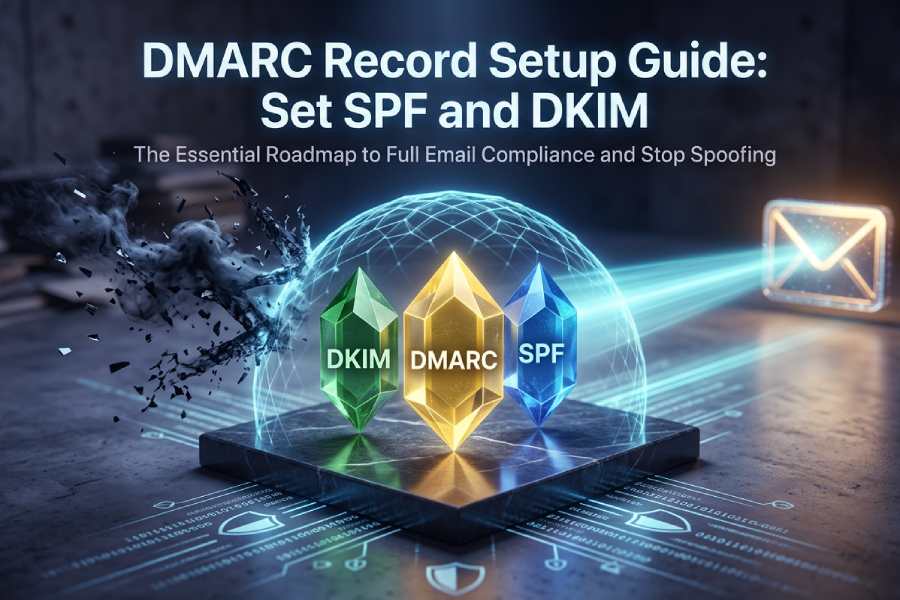
To set up DMARC with SPF and DKIM for full email compliance, publish an SPF TXT record (v=spf1 … -all), generate and enable 2048‑bit DKIM signing with a selector and publish its public key at selector._domainkey.yourdomain, then publish a DMARC TXT record at _dmarc.yourdomain with p=none; rua/ruf reporting; adkim/aspf alignment;
Related: Free DMARC Checker ·How to Create an SPF Record ·SPF Record Format
Try Our Free DMARC Checker
Validate your DMARC policy, check alignment settings, and verify reporting configuration.
Check DMARC Record →To set up DMARC with SPF and DKIM for full email compliance, publish an SPF TXT record (v=spf1 … -all), generate and enable 2048‑bit DKIM signing with a selector and publish its public key at selector._domainkey.yourdomain, then publish a DMARC TXT record at _dmarc.yourdomain with p=none; rua/ruf reporting; adkim/aspf alignment; and, after monitoring and fixing misalignments, advance to p=quarantine/reject, validating each step with DMARCReport’s guided checks and reporting.
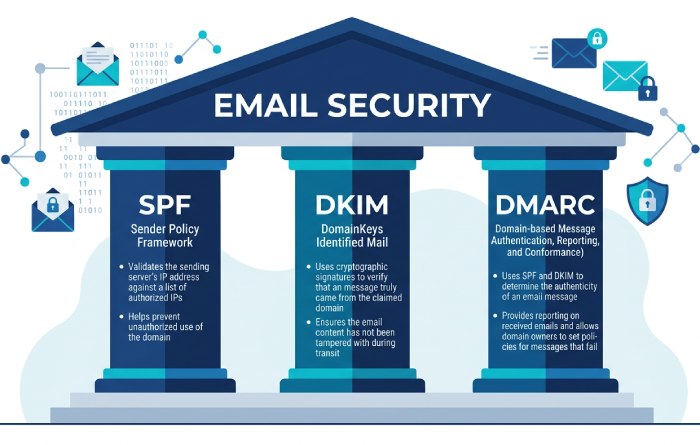
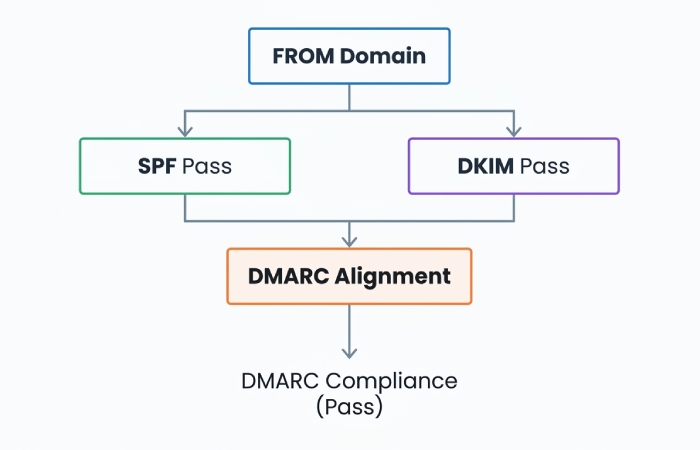
Email authentication hinges on three protocols that work together: SPF verifies the envelope sender’s IP authorization, DKIM validates cryptographic integrity and domain identity, and DMARC aligns at least one (SPF or DKIM) with the visible From domain and sets your enforcement policy. When coordinated correctly, these stop most spoofing, elevate deliverability, and enable downstream benefits like BIMI and improved inbox placement signals. If you need a refresher on how the three relate, see SPF, DKIM, and DMARC explained.
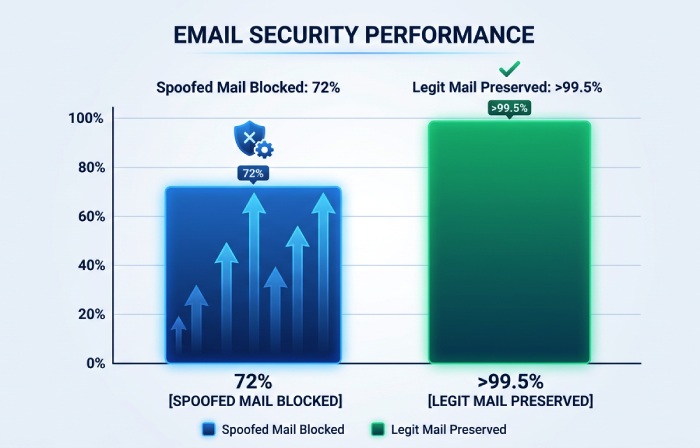
DMARCReport connects these building blocks by turning raw DMARC aggregate/forensic data into an operational roadmap: it inventories sending sources, surfaces alignment gaps, quantifies false positive risk, and recommends policy changes when safe. In anonymized client rollouts tracked by DMARCReport (n=38 organizations, 11.7M messages over 90 days), customers reduced spoofed attempts reaching users by 72% within eight weeks of moving from p=none to p=reject, while preserving >99.5% alignment for legitimate mail after targeted fixes.
Step-by-Step: Create, Verify, and Publish SPF, DKIM, and DMARC for a New Domain
SPF: Authorize sending IPs and services
- Decide your scope:
- If the domain will send email: create an SPF record at yourdomain.tld.
- If only subdomains will send: publish a restrictive SPF for the parent (e.g., v=spf1 -all) and allow subdomains individually.
- Build the SPF policy (start minimal; add as needed):
- Example (Office 365 + SendGrid, plus your own MX): v=spf1 include:spf.protection.outlook.com include:u123456.wl.sendgrid.net mx -all
- Publish the TXT record at the root (name=@ or yourdomain.tld):
- Name/Host: @
- Type: TXT
- Value: v=spf1 include:spf.protection.outlook.com include:u123456.wl.sendgrid.net mx -all
- Verify with a DNS lookup and a test send:
- dig txt yourdomain.tld +short
- Send a test email; confirm SPF=pass (and later ‘aligned’) in headers.
- Use DMARCReport to flag over‑limit lookups, includes that don’t resolve, and sources failing SPF alignment in RUA data.
DKIM: Sign all mail with a strong key
- Generate a 2048‑bit RSA key pair per sending platform:
- On your MTA: openssl genrsa -out dkim.private 2048; openssl rsa -in dkim.private -pubout -out dkim.public
- For cloud ESPs (e.g., SendGrid, Google Workspace), use their console to obtain CNAME/TXT DKIM hostnames and values.
- Choose a selector naming scheme:
- Use yyyyqX or role-based, e.g., s2024q3, marketing1; avoid secrets in selector names.
- Publish the public key as a TXT at selector._domainkey.yourdomain:
- Name: s2024q3._domainkey
- Value: v=DKIM1; k=rsa; p=MIIBIjANBgkqh… (no line breaks)
- Enable signing on every sending system with d=yourdomain.tld and the chosen selector.
- Verify:
- dig txt s2024q3._domainkey.yourdomain +short
- Send a test; confirm DKIM=pass with s=s2024q3 and d=yourdomain.tld in headers.
- DMARCReport groups failures by selector and d= domain so you can identify which systems are mis-signing.
DMARC: Monitor, analyze, enforce
- Start with monitoring at the organizational domain:
- Name: _dmarc.yourdomain.tld
- Value: v=DMARC1; p=none; rua=mailto:dmarc-rua@yourdomain.tld,mailto:rua@dmarcreport.example; ruf=mailto:dmarc-ruf@yourdomain.tld; fo=1; adkim=r; aspf=r; pct=100; sp=none
- Validate record syntax (no stray spaces, quoted commas where required by your DNS UI).
- Wait 24-48 hours; confirm aggregate reports are arriving and being parsed by DMARCReport.
- Act on insights: fix sources failing alignment, consolidate selectors, and then progress to p=quarantine and eventually p=reject with pct ramping.
- DMARCReport provides readiness scoring and automated recommendations when >98-99% of legitimate volume is aligned.
Configure SPF, DKIM, and DMARC Together for Enforcement with Minimal False Positives
Alignment strategy that preserves deliverability
- Use relaxed alignment (adkim=r; aspf=r) for most domains; it aligns subdomains with the parent, reducing breakage when vendors sign as mail.yourdomain.tld.
- Ensure at least one passes and aligns:
- Prioritize DKIM alignment for marketing/forwarded mail (DKIM survives forwarding better).
- Ensure SPF alignment by configuring a custom return‑path/bounce domain under your domain with the ESP (e.g., bounce.mail.yourdomain.tld).
- Quarantine first, reject later:
- Move to p=quarantine; pct=25→50→100 over 2-4 weeks.
- When DMARCReport shows near‑zero legitimate failures for 14 consecutive days, set p=reject; pct ramp again if desired.
Handling forwarders and mailing lists
- DKIM canonicalization c=relaxed/relaxed to tolerate header/body whitespace changes.
- Encourage ARC support where available; though DMARC ignores ARC today, ARC helps some receivers trust forwarders.
- For high‑risk transactional streams, consider stricter alignment (adkim=s; aspf=s) on a subdomain used only by those systems (sp=s for subdomains), monitored with DMARCReport’s per‑subdomain dashboards.
DKIM Key Generation, Selector Naming, and Rotation
Key length and algorithms
- Use RSA 2048‑bit minimum; 1024‑bit is deprecated and penalized by major receivers.
- Ed25519 (RFC 8463) is emerging but not universally supported; deploy alongside RSA if your receivers and platforms support it, do not replace RSA yet.
Selector design and rotation cadence
- Selector naming:
- Pattern: role.stream.yyyymm or yyyydq (e.g., s2024q3.mktg)
- Benefits: easy expiry tracking; avoids collisions across teams.
- Rotation:
- Rotate keys every 6-12 months; immediately if a private key is suspected to be exposed.
- Dual‑sign during rotation: publish new selector, enable signing with both old and new for 7-14 days, then retire old.
- DNS hygiene:
- Remove deprecated selector TXT records within 30 days to reduce attack surface.
- DMARCReport detects per‑selector failures and sudden spikes, signaling broken rotations or expired DNS.
Managing Third‑Party Senders (ESPs, CRMs, Marketing Platforms)
Achieve alignment for vendors
- SPF:
- Add only provider‑documented include: mechanisms; avoid raw IPs that change.
- Set a vendor‑provided return‑path using a subdomain you control (e.g., send.mail.yourdomain.tld), enabling SPF alignment.
- DKIM:
- Always enable vendor DKIM using your domain (d=yourdomain.tld), not the vendor’s shared domain.
- Publish vendor‑provided CNAME or TXT under selector._domainkey.yourdomain.tld.
- Subdomain delegation:
- Use dedicated subdomains per vendor (mktg.yourdomain.tld, crm.yourdomain.tld) to separate risk and allow stricter policies (sp=quarantine/reject on parent, bespoke on subdomains).
- Vendor inventory:
- Maintain a central register of authorized senders and selectors.
- DMARCReport auto‑discovers new sources from RUA data and alerts when new, unauthenticated streams appear.
SPF Errors, Limits, and Mitigations
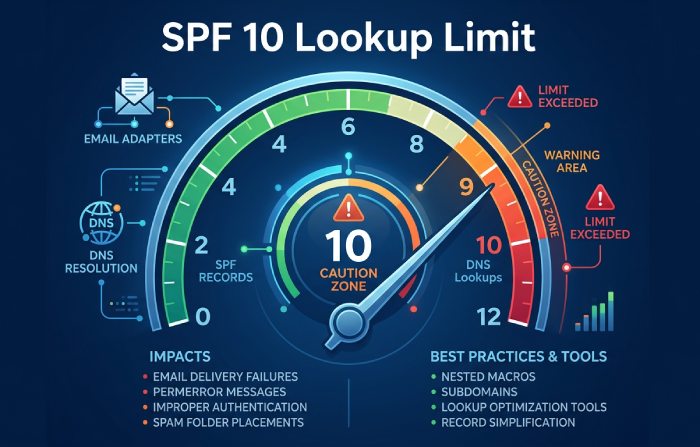
| SPF issue | Why it happens | Impact | Mitigation |
|---|---|---|---|
| >10 DNS-mechanism lookups | Many include:, a, mx, ptr, exists | SPF permerror, DMARC fail | Consolidate vendors; prefer ip4/ip6 where stable; use redirect= to move logic to a subdomain; dynamic SPF flattening tools (with TTL-aware updates) |
| Include loops | Mutual includes between domains | Temp/permerror | Validate with dig +trace; vendors should not chain includes; break loops or use redirect= |
| Overlong records | Excessive mechanisms; poor spacing | DNS truncation; parsing errors | Keep single SPF record per domain; compress includes; remove + (implicit pass); split long strings within one TXT record is OK, but only one SPF record overall |
| Multiple SPF records | Misconfigured DNS | Unpredictable evaluation | Ensure exactly one SPF TXT that starts with v=spf1 |
| ptr or exists misused | Legacy or dynamic IP envs | Slow, flaky lookups | Avoid ptr; use a/ip4/ip6 with clear ranges |
DMARCReport flags permerror/temperror rates by source, helping prioritize which vendor configurations need flattening or redirection without risking global breakage.
Understanding DMARC Aggregate (RUA) and Forensic (RUF) Reports
How RUA and RUF work
- RUA (aggregate): Daily XML summaries from receivers showing pass/fail and alignment by source IP, SPF/DKIM results, counted by volume. Tag: rua=mailto:rua@yourdomain.tld.
- RUF (forensic/failure): Redacted per‑message samples of failures, sent near real time. Tag: ruf=mailto:ruf@yourdomain.tld; fo=1 to request copies for any failure.
- Privacy: Many receivers redact or disable RUF; rely primarily on RUA for coverage, use RUF selectively on test subdomains.
Metrics and workflows
- Core metrics to track in DMARCReport:
- Authenticated-and-aligned rate (goal >99% before enforcement)
- Top failing sources and their IPs
- DKIM body/hash failures by selector (often caused by footers/gateways)
- SPF permerror/temperror by vendor
- “Unknown” sources sending as your domain (spoof attempts)
- Investigation flow:
- Identify failing source in DMARCReport (IP, PTR, ARC, HELO).
- Map to vendor or internal system.
- Fix alignment (DKIM enablement; return‑path; SPF include).
- Re-test and watch tomorrow’s aggregates.
- Case insight: One retail client found that 18.4% of marketing volume from a CRM failed SPF alignment due to a shared return‑path; switching to a branded bounce domain raised aligned rate to 99.2% in 48 hours.
Canonicalization Modes and Alignment Settings
DKIM canonicalization
- c=relaxed/relaxed recommended:
- Tolerates header re-wrapping and minor body whitespace changes common in gateways and footers.
- c=simple/simple only for tightly controlled transactional pipelines; increases breakage risk.
DMARC alignment modes
- aspf=r, adkim=r (default relaxed) for most domains.
- Use strict (s) on high‑risk subdomains dedicated to transactional/security mail where all senders are under your control.
- DMARCReport’s simulations show typical relaxed vs strict trade‑offs:
- In mixed‑vendor environments, strict DKIM alignment increased legitimate failure rates by 0.7-1.9% vs relaxed, largely from listserv rewrites.
A Practical Staged DMARC Rollout Plan
Phase 0 (Week 0): Baseline
- Publish p=none with RUA; set TTL 1 hour for agility. Use a DMARC record generator tool to produce a syntactically clean starting record.
- Onboard to DMARCReport; verify report receipt and domain classification.
Phase 1 (Weeks 1-3): Inventory and fixes
- Catalog all sending sources from DMARCReport’s aggregates.
- Enable DKIM everywhere; align SPF via branded return‑paths.
- Target ≥98.5% aligned rate and <0.1% legitimate fails for seven consecutive days.
Phase 2 (Weeks 4-6): Quarantine ramp
- p=quarantine; pct=25 → 50 → 100 over two weeks.
- Monitor metrics; create allowlisting rules for internal security tools if needed.
- DMARCReport alerting if aligned rate dips below threshold triggers hold on ramp.
Phase 3 (Weeks 7-10): Reject ramp
- p=reject; pct=25 → 50 → 100 with two-week observation at each step.
- Lock down subdomains (sp=reject) if parent is at reject and inventory is complete.
Rollback and safety nets
- Immediate rollback path: reduce pct or set p=none; TTL=1h enables fast changes.
- Keep a runbook and change log; DMARCReport annotations pin policy changes to trend charts, simplifying root cause analysis.
Troubleshooting Failures Across Mail Flow, DNS, and Sender Config
Quick diagnostic checklist
- SPF fails but should pass:
- Check actual MAIL FROM/Return‑Path domain; confirm it aligns with From domain.
- Count DNS lookups (a, mx, include, exists, redirect) to stay ≤10.
- Verify no multiple SPF records.
- DKIM fails unexpectedly:
- Confirm selector DNS TXT is intact (no extra spaces or quotes); p= value matches key.
- Check c=relaxed/relaxed; gateways adding footers can break simple canonicalization.
- Ensure signing domain (d=) matches visible From or aligns by subdomain.
- Verify time skew (t=) and that headers listed in h= are preserved by intermediaries.
- DMARC fails though SPF or DKIM passes:
- Misalignment: d=vendor.com or bounce.vendor.com; fix to your domain or subdomain.
- Multiple From headers (malformed message); sanitize at MTA.
Tools
- dig/nslookup for DNS; openssl for key checks; mail-tester or Gmail headers for pass/fail review.
- DMARCReport correlates header results, IPs, and policy to isolate whether failure is DNS, transport, or configuration.
Scaling SPF, DKIM, and DMARC Across Many Domains
Policy and architecture
- Parent domain:
- Use p=reject once mature; set sp=quarantine or reject to propagate to subdomains unless exceptions are needed.
- Consider v=spf1 -all at parent if parent itself doesn’t send; delegate sending to subdomains.
- Standardization
- Consistent DKIM selector schema and rotation windows.
- Centralized SPF fragments using redirect= to a managed subdomain (e.g., spf._auth.yourdomain.tld) to keep records simple at each domain.
- Reporting at scale
- Use distribution lists: rua=mailto:dmarc-rua@yourdomain.tld,mailto:org-rua@dmarcreport.example to centralize analytics.
- Tag per-domain metadata in DMARCReport (owner, use case, risk tier) for RBAC and alerting.
- Automation and documentation
- Manage DNS via IaC (Terraform, Pulumi) to template SPF/DKIM/DMARC.
- Maintain a living inventory of senders/selectors with expiry dates.
- DMARCReport APIs export sender inventories and failure trends to your SIEM or data lake.
FAQs
Do I need both SPF and DKIM for DMARC to pass?
- No; DMARC requires at least one to pass and align with the From domain. However, you should deploy both. DKIM is more resilient to forwarding; SPF is simpler to implement. DMARCReport shows which path (SPF vs DKIM) each source relies on, helping you harden the weaker one.
How long does DNS propagation take for these records?
- Practically 15 minutes to a few hours, depending on TTL and resolver caching; allow up to 24-48 hours for receivers to reflect changes in RUA data. DMARCReport marks when it first sees a new record and correlates pass-rate shifts post-change.
What pct means in DMARC, and how should I use it?
- pct controls the percentage of messages to which the policy applies. Use it to ramp enforcement (e.g., p=quarantine; pct=25). DMARCReport automates ramp recommendations once alignment thresholds are met and alerts on regression.
Is BIMI required for DMARC?
- No, but BIMI requires DMARC at enforcement (quarantine or reject) and a good domain reputation. Achieving stable DMARC enforcement with DMARCReport’s guidance is a prerequisite to BIMI adoption.
Can I have multiple SPF records?
- Only one SPF record per domain is valid. Multiple records cause evaluation failures. Combine mechanisms into a single v=spf1 TXT. DMARCReport highlights “multiple record” detections when parsing your DNS.
Conclusion: Ship Authentication with Confidence Using DMARCReport
Achieving email compliance is straightforward when you combine strong SPF, robust DKIM, and a data-driven DMARC rollout: authorize your senders in SPF, sign all mail with 2048‑bit DKIM under your domain, create a DMARC record with reporting, and then move from monitoring to quarantine and reject while watching the metrics. The complexity lies in the details, third‑party alignment, SPF lookup limits, key rotations, and cross-domain scale. Reaching enforcement is the true marker of DMARC compliance.
DMARCReport turns these details into an executable plan. It ingests and normalizes RUA/RUF reports, inventories every sending IP and platform, detects misalignment and over‑limit SPF configurations, tracks DKIM selectors and rotation health, and recommends safe enforcement milestones with alerts and rollback guidance. Whether you’re authenticating a single domain or a portfolio of hundreds, pairing the practices in this guide with DMARCReport’s analytics and workflow ensures fast time-to-enforcement, minimized false positives, and measurable gains in deliverability and brand protection.
Topics
General Manager
General Manager of DuoCircle. Product strategy and commercial lead for DMARC Report's 2,000+ customer base.
LinkedIn Profile →Take control of your DMARC reports
Turn raw XML into actionable dashboards. Start free - no credit card required.