Display Name Spoofing: Your Name On Emails You Didn't Send

Quick Answer
Email display name spoofing is a phishing tactic where scammers use your name as the sender while sending emails from a different email address. To prevent it, verify the sender's email address, enable SPF, DKIM, and DMARC on your domain, and educate users to spot suspicious emails.
If someone tells you they received an email with your name but a different email address, it can be alarming. In many cases, this is not a sign that your email account has been hacked but rather a common scam known as email display name spoofing. Scammers can make messages appear to come from a trusted person simply by using their name while sending the email from a different address. In this guide, you’ll learn what display name spoofing is, how it works, how to tell the difference between spoofing and a compromised account, and the steps you can take to protect yourself and your contacts.
What It Means When Emails Use Your Name but a Different Email Address
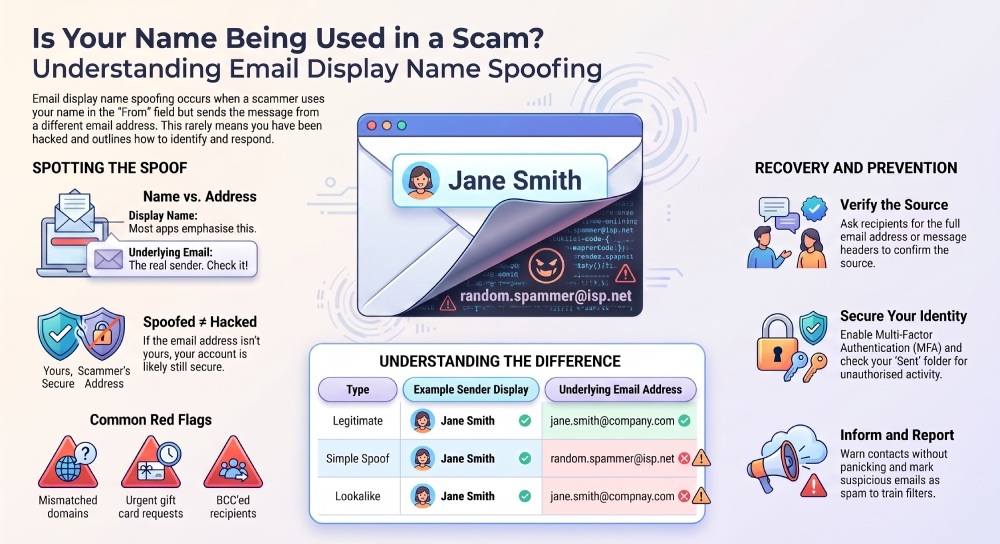
If people are receiving emails that show your name but not your actual email address, you are likely dealing with email display name spoofing. In this type of spoofing, the sender name appears to be yours, but the underlying email address belongs to someone else—or to a completely fake email account.
For example, a recipient might see: From: Jane Smith randomname@randomisp.com
Even though “Jane Smith” is your name, the front address is not your real email address. This is different from someone logging into your Gmail, Outlook, Yahoo, AOL, Hotmail, Outlook.com, or Google Mail account and sending mail directly from your personal account.
Display Name vs. Email Address
Most email program interfaces, including Mail, Outlook, Gmail, and mobile apps, emphasize the sender’s display name more prominently than the actual email address. Scammers exploit this because many recipients glance only at the name, not the full email address. That means spoofed messages can appear trustworthy at first glance, especially if they use your real name, workplace title, or information taken from a contact list, mailing list, social profile, or breach.
Spoofing Does Not Always Mean a Hacked Account
A key point: display name spoofing does not automatically mean you have a hacked account. If the email address is not yours, your user account may still be secure. A hacked account usually means the attacker can send messages from your real email address, access your contacts, set up forwarding, or change Account management settings.
However, if your contact list is being targeted repeatedly, or if contacts report unexpected email that appears to come from you, you should still check for signs of a hacked account, a data breach, or unauthorized access.
How Email Display Name Spoofing Works and Why Scammers Use It
Scammers use display name spoofing because it is easy, cheap, and effective. A spammer can configure an email program, script, compromised mail server, or email server to place almost any name in the display field while using a different email address behind it.
How the Scam Is Built
The Sender Chooses a Familiar Name
The attacker may use your name because it was found in a breach, scraped from social media, harvested from a contact list, or obtained from a compromised mailing list. In some cases, spoofed messages are sent to your contacts; in others, they go to strangers who have no relationship with you.
The Email Address May Look Similar
Attackers often use similar email addresses to increase trust. For example, if your email address is leonotenboom@example.com, a scammer might use leonotenboom@randomisp.com, leonotenbo0m@gmail.com (replacing the letter “o” with the number “0”), or a lookalike domain such as examp1e.com. These subtle differences can make phishing emails appear legitimate, especially when viewed quickly on a mobile device.
Similar email addresses are common in phishing, invoice fraud, and fake email campaigns. They may use domains that resemble canva.com, Microsoft, Cloudflare, or another known organization to fool the recipient.
The Message May Hide Recipients With BCC
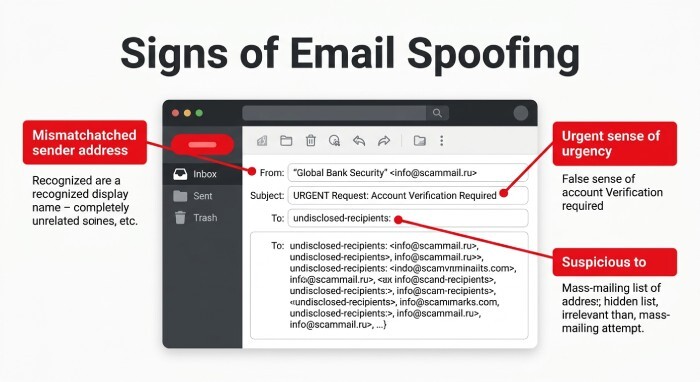
Many spoofed messages use BCC so each recipient cannot see who else received the email. A BCC recipient may believe the message was sent only to them. If the To line is blank, shows “undisclosed recipients,” or contains an unrelated address, that is a warning sign.
Scammers also use BCC to send spam at scale while reducing complaints. If your name is shown in the sender field, but the To line does not contain the recipient’s address, the message may have been BCC’ed.
The Reply-To Address May Be Different
Another trick is changing the reply-to address. The address might be one account, but replies go somewhere else. This helps scammers capture responses, payments, passwords, or identity theft information while avoiding direct detection.
Why This Works So Well
People trust names they recognize. A phishing email that appears to come from a colleague, friend, Community Manager, or known contact has a higher chance of being opened. That is why spoofed messages often impersonate real people rather than unknown brands.
Common Warning Signs That an Email Is Display Name Spoofed
Display name spoofing is often easy to detect if you inspect the full message details instead of relying on the visible name.
What Recipients Should Check
The Email Address Does Not Match the Name
The most obvious sign is that the email address is unfamiliar. If the name says “Shravya” but the email address is aol.com, hotmail.com, yahoo.com, or an unrelated domain that Shravya does not use, be skeptical.
This is especially important with similar email addresses. A scammer may use a small spelling change, extra dot, number, or different domain to make a fake email look legitimate.
The Message Sounds Urgent or Unusual
Phishing often creates pressure: “Are you available?”, “Buy gift cards,” “Review this invoice,” or “Open this document.” If the email feels like an unexpected email, treat it as suspicious. Many spam and phishing campaigns rely on urgency rather than detail.
The To Line, BCC, or Group Email Looks Odd
Check the To line carefully. If the To line contains a strange address, a group email, or no recognizable recipient, the message may have gone through BCC. A BCC’ed message is not always malicious, but in combination with an unfamiliar email address and urgent request, it is a strong warning sign.
The Message Header Shows a Different Source
Advanced users can inspect the message header. The message header may reveal the sending email server, mail server path, SPF/DKIM/DMARC results, and whether the form address aligns with the sending domain. See SPF, DKIM, and DMARC explained to interpret what these results mean. Microsoft Q&A, Ask Leo, JustAnswer, and peer-support help community discussions often recommend checking headers before assuming a hacked account.
What To Do If Someone Is Sending Emails Using Your Name
If someone reports spoofed messages using your name, respond calmly and focus on evidence. Do not assume every spoofed message means your account has been compromised.
Ask for the Full Email Address and Header
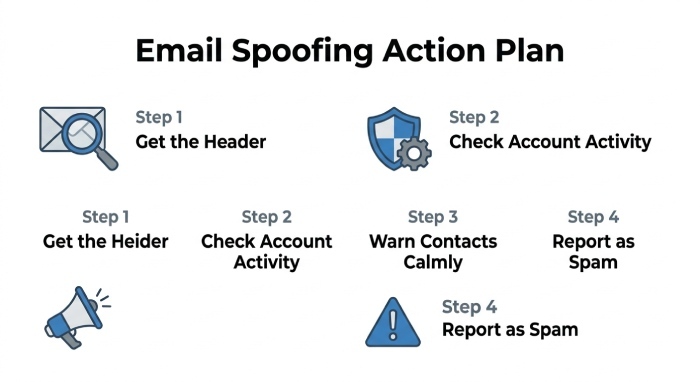
Ask the recipient to send the full email address, not just a screenshot of your name. If possible, request the message header. This helps determine whether the mail came from your real account, a similar email address, or a completely unrelated spam source.
Check Your Sent Mail, Forwarding, and Account Activity
Log in directly to your email service—Gmail, Outlook.com, Yahoo, AOL, or another provider—and inspect sent mail, deleted mail, forwarding rules, connected apps, and login history. If you see messages you did not send, you may have a hacked account.
Also review security and privacy settings. Change your password, enable multi-factor authentication, and remove unknown recovery options if there is any sign of a hacked account.
Warn Your Contacts Without Creating Panic
If spoofed messages are targeting your contact list, send a short informational notification from your real email address. Tell your contacts not to click links, not to reply, and to verify the email address before responding.
You might write: “If you received an unfamiliar email using my name but a different email address, please ignore it and mark it as spam. My account has not necessarily been hacked, but I am reviewing security.”
Report, Block, and Move On
Recipients should mark as spam, report phishing, or block the sender. In Gmail, Outlook, and other services, reporting Spam or a phishing email helps train filters. If the message did not come from your real email address and there is no evidence of a hacked account, the practical answer may be to ignore it, move on, and monitor for further abuse.
How To Prevent Display Name Spoofing and Protect Your Identity
You cannot fully stop someone from typing your name into a fake email sender field, but you can reduce risk, limit damage, and protect your identity.
Strengthen Your Email Security
Use a strong, unique password for every user account. Enable two-factor authentication on Google, Microsoft, Outlook, Gmail, Yahoo, AOL, Hotmail, and Outlook.com accounts. Review forwarding settings and recovery information regularly.
This protects against a true hacked account, where attackers access your contact list, send spam from your real email address, or create hidden forwarding rules.
Watch for Breach Exposure
Your name, email address, and contacts may appear in a breach or data breach involving an app, company, or mailing list. Once exposed, that information can be used in phishing and spoofed messages for years. If you learn of a breach, change passwords, monitor account activity, and be alert for spam.
A breach does not always expose your password, but even a simple list of names and email address records can help scammers build convincing campaigns.
Use Domain Protections Where Possible
If you own a domain, configure SPF, DKIM, and DMARC. It helps to first understand DMARC and how it authorizes legitimate senders. You can use our free tool to create DMARC record entries and start monitoring authentication. These records help receiving servers verify whether messages are authorized. They do not stop every display-name trick, but they reduce direct domain impersonation and improve email security. Businesses in the USA, Portugal, and elsewhere should also train employees to inspect the actual email address, especially when payments, credentials, or customer privacy are involved.
Educate Recipients to Verify Before Trusting
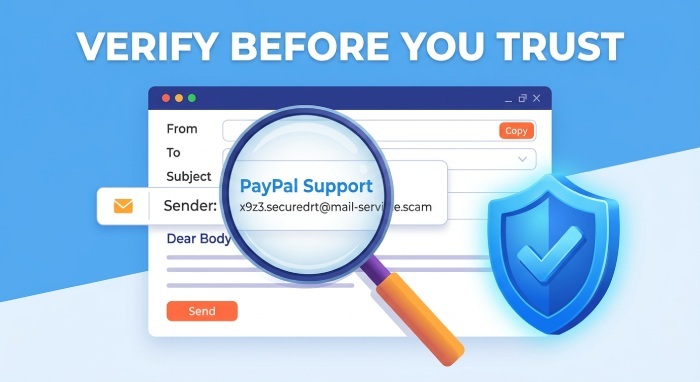
The best defense is awareness. Teach contacts to expand the sender field, verify the email address, examine the To line, look for BCC indicators, and be cautious with similar email addresses.
If a recipient receives spoofed messages using your name, they should not reply, click links, open attachments, or send money. They should report phishing, mark as spam, and contact you through a known channel.
Know When It Is Just Spoofing
If the message came from another email address, used BCC, had an unrelated To line, and does not appear in your sent folder, it is probably display name spoofing—not necessarily a hacked account. Continue monitoring, but do not overreact. The right response is practical: secure your account, notify affected contacts if needed, report the spam, and preserve your privacy.
General Manager
General Manager of DuoCircle. Product strategy and commercial lead for DMARC Report's 2,000+ customer base.
LinkedIn Profile →Take control of your DMARC reports
Turn raw XML into actionable dashboards. Start free - no credit card required.