What do enterprise email and messaging platforms need for cybersecurity compliance?

Quick Answer
_According to the FBI's 2022 Internet Crime Report (IC3), 300,497 US-based victims reported phishing incidents in a single year, and Business Email Compromise (BEC) caused more than $2.7 billion in direct losses. PCI DSS v4.0 (effective March 2025) requires organizations handling cardholder data to implement DMARC with a policy of at least `p=quarantine` on domains used in customer communications.
Related: Free DMARC Checker ·How to Create an SPF Record ·SPF Record Format

From a product strategy perspective, DMARC reporting is evolving from a security tool to a business intelligence platform, says Brad Slavin, General Manager of DuoCircle. The data in aggregate reports tells you not just who’s spoofing you, but who’s sending legitimate email on your behalf - and whether they’re doing it correctly.
_According to the FBI’s 2022 Internet Crime Report (IC3), 300,497 US-based victims reported phishing incidents in a single year, and Business Email Compromise (BEC) caused more than $2.7 billion in direct losses.
PCI DSS v4.0 (effective March 2025) requires organizations handling cardholder data to implement DMARC with a policy of at least p=quarantine on domains used in customer communications.
Almost every organization, big or small, operates through email.
Whether it’s communicating with your clients, managing internal operations, or sharing critical information, it all happens over email. But, because so much **information flows **through these systems, they also become one of the most targeted parts of your organization’s network.
This is why you need to go the extra mile to make sure your email and messaging systems are secure and compliant. By secure, we don’t mean just using strong passwords or installing antivirus software; every message should be protected end-to-end, and every sender should be verified before their email reaches the inbox.
In this article, we will walk you through the key requirements to ensure all your outgoing emails are **secure and compliant with the latest cybersecurity standards.
Why should your organization care about cybersecurity compliance?
Since emails carry critical information, like your customers’ data, financial records, internal reports, etc., protecting them is no longer optional. The stakes are too high, which is why it is important that your organization takes cybersecurity compliance seriously.
When it comes to cybersecurity compliance, auditors want proof that you’re doing the right things, the right way. This includes authenticating your emails, protecting personal data, keeping communication records safely, and having a plan to handle incidents if they occur.
Here are a few checkboxes you need to tick to ensure that your **email and messaging platforms **meet cybersecurity compliance requirements.
Basic email security checklist
Here is what you need to do to be safe from the prying eyes of cyberactors in 2025-
Ensure that your email identity is secure
For emails to be sent safely, it is important that you **authenticate your domain with SPF, DKIM, and DMARC. These authentication protocols verify that messages are coming from trusted sources and haven’t been tampered with. And even if an email tries to bypass these checks, with DMARC in place, the receiving server can detect and block it before it reaches the inbox. Publishing your DMARC record tells receiving servers how to treat unauthenticated mail.
Keep track of your verified sender inventory
Make sure that you maintain a list of platforms and servers that send emails on your behalf, be it marketing platforms, CRM, billing, or even ticketing systems. This way, you’ll always know who’s sending using your domain and can quickly spot any unauthorized or outdated senders.
Secure incoming emails as well
Not just the outgoing emails, even the inbound ones carry the risk of phishing, malware attacks, or fake links. So, make sure that you enable advanced threat protection features like attachment sandboxing, URL rewriting, and impersonation detection.
Keep an eye on external identities
To keep your email ecosystem secure, be sure to enforce **strict policies for grave attacks like display-name impersonation, lookalike domains, and vendor spoofing. You should also train your team to be careful with unusual requests, especially those asking for money or sensitive data.
Keep all email reports in one place
Send all your DMARC and other email security reports to one central dashboard. This makes it easier for your security team to quickly find and fix issues, spot any misuse of your domain, and keep everything in check.
Role-based access and identity compliance checklist
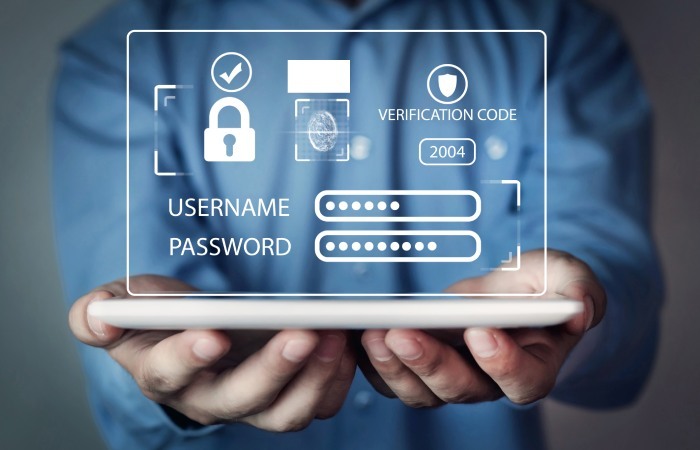
- **Enable MFA across all platforms Make sure multi-factor authentication (MFA) is enabled for everyone, especially admins and other important roles. It is always a good idea to add an extra layer of security with security keys or passkeys instead of regular text message codes.
-
**Limit access to where necessary Giving access to critical systems without control can open doors to mistakes or attacks. So, it is recommended that your team only have the permissions they need for their work. You can **grant higher access only when it’s really required and approved.
-
**Add and remove access automatically When someone joins, changes roles, or leaves, make sure their access to email and messages is updated right away. You should also terminate tokens and close any open sessions when they leave.
-
**Check third-party apps Keep a list of approved apps that can access your email or chat (like CRMs or integrations). Review permissions every few months and remove any apps that’s no longer used.
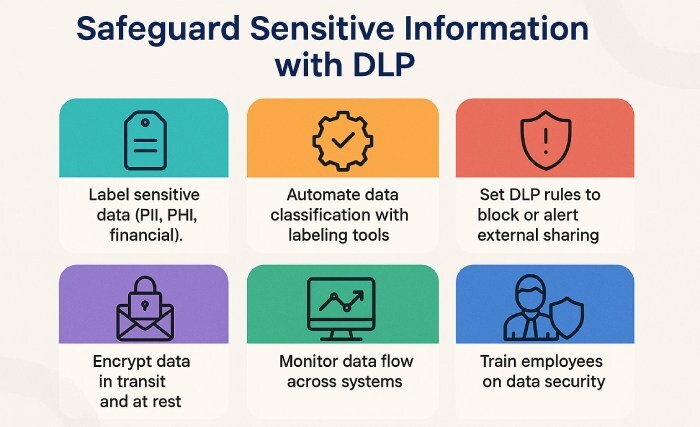
Data protection and retention checklist - **Label sensitive data _When you send sensitive information over email or messages, make sure it’s clearly marked. _Use **automatic labels for PII, PHI, and financial information, and set up Data Loss Prevention (DLP) rules to prevent it from being shared outside your organization by mistake.
-
**Encrypt your data Make sure emails and chats are encrypted while being sent (in transit) and when stored (at rest).
-
**Set clear retention rules Keep communication records only for as long as needed. If you need to keep them for longer for legal or business reasons, define a time period and use litigation hold to preserve it all.
Wrapping up
These compliance requirements are not just boxes to tick; they are prerequisites to keep your organization’s communication ecosystem secure and audit-ready. Working with a partner to achieve DMARC compliance removes much of the guesswork. While cybersecurity compliance is a non-negotiable, we understand that meeting these requirements can be complex and time-consuming. This is why we’re here to help you take the first steps by making email authentication a breeze. To know how, get in touch with us today!
Topics
Operations Lead
Operations Lead at DuoCircle. Runs project management, developer coordination, and technical support execution for DMARC Report.
LinkedIn Profile →Take control of your DMARC reports
Turn raw XML into actionable dashboards. Start free - no credit card required.