How Phishing Attacks Target the Education Sector and How to Prevent Them

Quick Answer
Phishing attacks target the education sector by exploiting students, staff, and administrators through fake emails and login pages. Prevent them with email authentication, multi-factor authentication, user awareness training, and strong cybersecurity policies.
A phishing email sent during exam week does not need to look perfect. It only needs to arrive when someone is busy, worried, or distracted.
That timing makes education an appealing target. Schools and universities depend on email, cloud platforms, shared documents, and learning management systems every day.
One deceptive message can expose student records, payroll details, research, or administrator credentials. It may also open the door to account takeover, fraud, or ransomware.
Understanding how phishing attacks target the education sector helps institutions lower risk without disrupting teaching. Strong prevention combines secure technology, clear procedures, and practical awareness.
Why Schools and Universities Attract Phishing Campaigns
Educational networks serve students, teachers, researchers, contractors, parents, and temporary staff. New accounts appear each term, while old access is not always removed promptly.
Users also have very different levels of digital confidence. A first-year student, visiting lecturer, and finance officer may respond differently to the same suspicious message.
Microsoft’s education guidance highlights this varied population and the difficulty of training every learner. It recommends systematic anti-phishing and anti-spoofing protection, particularly for younger users.
Valuable Information Across Connected Systems
Education databases hold more than grades and coursework. They may contain addresses, birth dates, health information, payment data, employee records, and unpublished research.
Stolen information can support identity fraud, extortion, or convincing follow-up scams. A compromised mailbox may also unlock cloud storage, library tools, and course platforms.
In May 2026, the FBI warned that stolen education-platform data could support highly realistic spear-phishing campaigns. Criminals may impersonate faculty, IT teams, or financial aid offices.
Trust, Authority, and Academic Pressure
Education runs on deadlines. Students expect notices about enrollment, tuition, scholarships, exams, assignments, and password changes.
Fraudsters copy those routines. A warning that an account will close before an exam can trigger a hurried click, even from a careful user.
Authority adds pressure. Requests that appear to come from a dean, professor, principal, or department head may feel difficult to question.
Academic pressure affects not only how quickly students respond to emails and notifications, but also their overall study performance. Managing multiple deadlines, exams, and coursework can be challenging, which is why some learners seek help with statistics assignment to stay on track and maintain the quality of their work. Access to reliable academic support can reduce stress and help students focus on meeting important educational goals. When combined with strong digital awareness, these habits contribute to a more secure and productive learning experience.
Common Phishing Methods Used Against Education
Fake Login Pages and Password Alerts
Credential phishing often starts with an expired-password warning, shared document, missed-class notice, or unusual sign-in alert. Its link opens a copied login page.
After the victim enters credentials, the intruder may access email, files, and connected applications. Messages sent from that trusted account become harder for colleagues to doubt.
Spoofing strengthens the disguise. A sender name, domain, or web address may differ from the genuine version by only one letter, symbol, or number.
Financial Aid, Payroll, and Invoice Fraud
Students may receive false scholarship offers, refund notices, or tuition warnings. Employees face fake payroll updates, purchasing requests, direct-deposit forms, and overdue invoices.
Business email compromise often targets one person with payment authority. A forged request from a senior leader can redirect funds before anyone verifies it elsewhere.
Spear Phishing Against Researchers and Administrators
Mass campaigns use broad bait, while spear phishing targets a specific person or department. Criminals study university websites, conference pages, social profiles, and staff directories.
Researchers may receive fake collaboration invitations or document requests. Administrators can see messages linked to grants, vendors, compliance reviews, or board meetings.
Real names, projects, and roles make the story believable. Yet the attachment, QR code, or sign-in page still serves the attacker.
Texts, Calls, and QR Codes
Not every lure reaches an inbox. Smishing uses text messages, while vishing relies on calls, voicemail, or internet-based voice services.
QR phishing places a code inside a message, poster, or document. Scanning may open a fake school portal on a phone, where the full address is harder to inspect.
Microsoft’s current education guidance identifies QR-based phishing as a growing concern in environments with personal and shared devices.
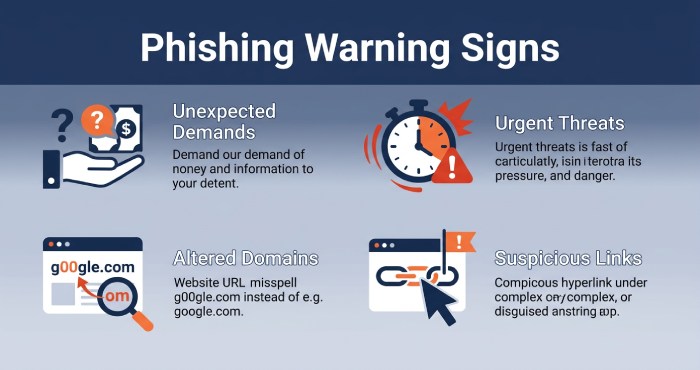
Several warning signs deserve attention before anyone responds:
- unexpected demands for passwords, payments, gift cards, or personal data;
- urgent threats involving lost access, disciplinary action, or missed deadlines;
- sender addresses or domains containing subtle spelling changes;
- login links opening outside the institution’s normal portal;
- attachments that were never discussed through another trusted channel.
One clue does not always prove fraud. Several combined signals justify verification through a known phone number, official portal, or separate conversation.
How Educational Institutions Can Prevent Phishing
Build Layered Email and Identity Security
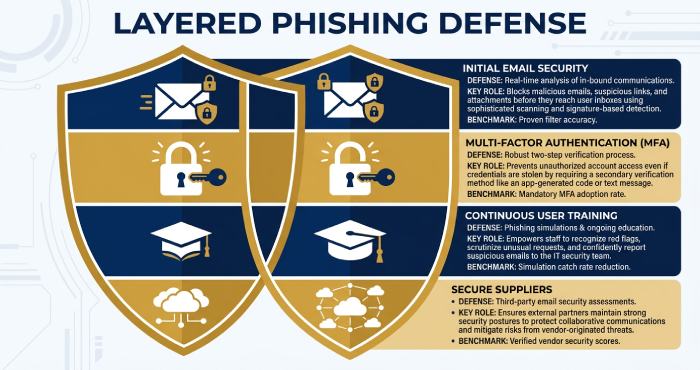
Training alone cannot block every polished message. The NCSC recommends a layered model because some phishing attempts will bypass filters and reach users.
A practical phishing prevention program should include these actions:
- Configure spam, malware, impersonation, and dangerous-link filtering across institutional email.
- Enforce multifactor authentication, prioritizing phishing-resistant methods for staff and privileged accounts.
- Apply SPF, DKIM, and DMARC to reduce domain spoofing and strengthen email authenticity. Institutions without a policy should create a DMARC record to stop spoofing.
- Separate administrator accounts from everyday browsing, teaching, and messaging.
- Use conditional access, device checks, and unusual-login alerts to restrict stolen credentials.
- Remove inactive accounts quickly and review third-party application permissions regularly.
- Maintain tested backups and an incident response plan for account takeover or ransomware.
These controls provide several chances to interrupt an intrusion. Reaching DMARC compliance ensures spoofed messages are rejected before they reach students and staff. They also limit damage when one password, mailbox, or device becomes compromised. Reviewing DMARC aggregate reports also reveals who is sending mail using the institution’s domain.
Teach Recognition Without Blaming People
Awareness training should reflect messages people genuinely receive. Students need examples involving grades, financial aid, campus jobs, course platforms, and account verification.
Staff sessions should cover invoices, payroll changes, document sharing, supplier impersonation, and executive requests. Brief refreshers during the year often feel more useful than one annual lecture.
Reporting must be simple and safe. A visible reporting button helps security teams investigate quickly and reassures users that honest mistakes should be disclosed.
The NCSC warns against expecting people to inspect every message perfectly. Human judgment works better when filtering, authentication, and rapid response support it.
Secure Learning Platforms and Suppliers
Many institutions connect email, single sign-on, cloud storage, payment tools, and learning management systems. One exposed integration or weak supplier can widen the attack surface.
IT teams should inventory services, limit application permissions, and require secure authentication. Contracts should define breach notification, log access, data protection, and recovery duties.
After a platform incident, schools should communicate through established channels. The FBI advises users to verify unusual requests separately and avoid unexpected links or attachments.
What to Do After a Suspicious Click
Fast reporting can prevent a small error from becoming a campus-wide incident. Users should not hide what happened or attempt a lengthy investigation alone.
- Disconnect the affected device if malware may have opened or installed.
- Contact the institution’s IT or security team through a trusted channel.
- Change the exposed password from a clean device and replace reused credentials elsewhere.
- Revoke active sessions, review MFA settings, and check account recovery details.
- Preserve the message, sender information, web address, and incident time.
- Contact the bank immediately if money or payment information was involved.
Security teams should find related messages, block malicious domains, reset affected accounts, and inspect sign-in logs. Leadership, partners, regulators, or families may also require notification.
Official guidance recommends contacting IT after a work-device incident, scanning for malware, and changing every account that reused the exposed password.
A Safer Digital Learning Environment
Phishing prevention in education is not a one-time campaign. It belongs within identity management, digital safeguarding, staff development, and institutional resilience.
The strongest approach never depends on perfect users. Secure email controls, phishing-resistant authentication, limited access, easy reporting, and rapid response work together.
When verification becomes normal, suspicious requests lose much of their power. Students and staff can then use digital tools confidently without treating every message as a crisis.
General Manager
General Manager of DuoCircle. Product strategy and commercial lead for DMARC Report's 2,000+ customer base.
LinkedIn Profile →Take control of your DMARC reports
Turn raw XML into actionable dashboards. Start free - no credit card required.