How Third-Party Email Senders Cause SPF Pass but DMARC Fail Errors

Quick Answer
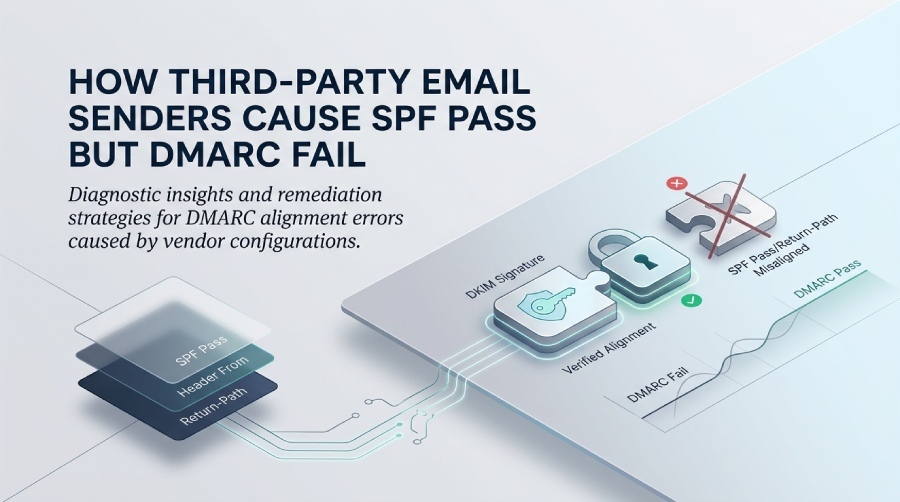
Third-party email services can pass SPF checks using their own sending domains, but DMARC may still fail if the visible From address isn't aligned with SPF or DKIM. Proper domain alignment and authentication settings are essential to ensure DMARC compliance.
Try Our Free DMARC Checker
Validate your DMARC policy, check alignment settings, and verify reporting configuration.
Check DMARC Record →Third-party senders cause SPF pass but DMARC fail when the SPF-authenticated domain (the envelope-from/return-path or HELO domain) does not align with your visible header From domain and there is no aligned DKIM signature, so DMARC fails even though SPF passes.
DMARC requires that at least one of SPF or DKIM both passes and aligns with the domain in the header From address users see. Third-party platforms often authenticate with their own envelope or DKIM domains (e.g., provider.net), causing your SPF to pass for their domain, not yours, which breaks DMARC alignment unless you configure custom return-paths or provider-managed DKIM for your domain. The fix is to align at least one channel—typically by enabling DKIM with your domain or configuring a custom MAIL FROM/return-path that points to a subdomain you control—then validating the headers to confirm alignment.
Using DMARCReport, you can see exactly which third-party sources pass SPF but fail DMARC, which identifiers they used (SPF domain, DKIM d=, header From domain), and get guided steps to enable provider DKIM, delegate a sending subdomain, and choose relaxed vs strict alignment safely, all while monitoring impact with policy simulation and per-sender remediation workflows. Start with the DMARC analyzer to see your current alignment status. Achieving DMARC compliance starts with understanding which of these senders actually align.
Why SPF Can Pass While DMARC Fails (and the Headers to Inspect)
DMARC alignment hinges on the visible header From domain, not merely on authentication passing.
- SPF authenticates the SMTP envelope identity: either the MAIL FROM (return-path) or the HELO/EHLO domain.
- DMARC compares the domain used by SPF (MAIL FROM/return-path only; not HELO for alignment) and/or the domain in the DKIM signature (d=) to the header From domain.
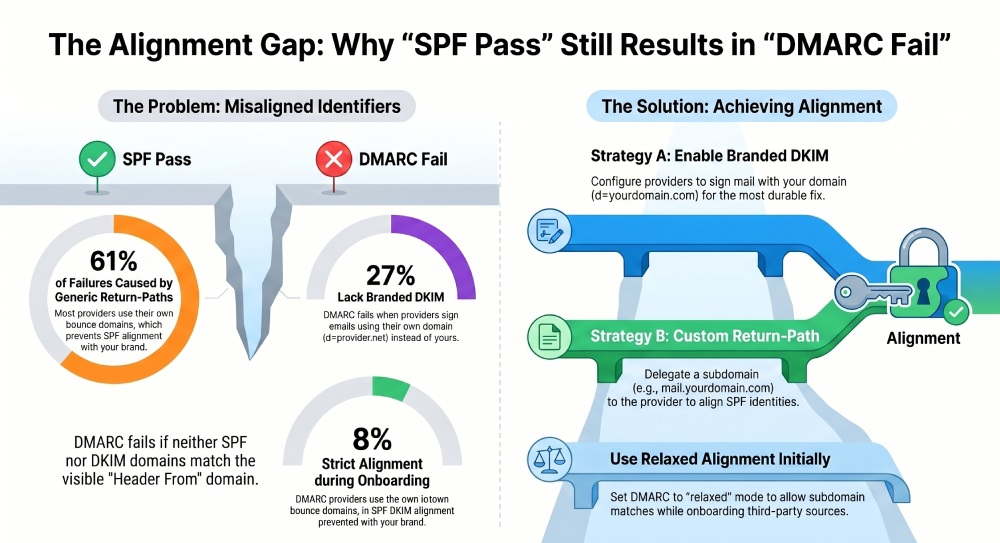
- If neither SPF’s MAIL FROM domain nor DKIM’s d= domain matches (aligned with) the header From domain, DMARC fails—even if SPF says pass.
What to look for in the headers
- Authentication-Results: The receiver’s verdicts.
- Example: spf=pass smtp.mailfrom=provider-bounces.example-sg.com; dkim=none; dmarc=fail header.from=yourdomain.com
- Return-Path: The MAIL FROM domain used for SPF. If it’s provider-owned (e.g., bounce.provider.net), SPF can pass and still not align to yourdomain.com.
- Received-SPF: Sometimes shows which identity (mailfrom vs helo) passed; DMARC only aligns against mailfrom.
- DKIM-Signature: Inspect d= (signing domain) and s= (selector). If d=provider.net, DKIM won’t align with yourdomain.com.
DMARCReport automatically parses these headers from forensic/aggregate reports, flags “SPF-pass/DMARC-fail” patterns, and highlights the misaligned identifier so you know whether to fix return-path alignment or enable DKIM.
Enable DKIM Signing for Third-Party Mail Using Your Domain
The most durable way to satisfy DMARC with third-party senders is to ensure every platform signs mail with DKIM using your domain.
Step-by-step DKIM implementation
- Choose selectors and key sizes
- Use 2048-bit keys where supported.
- Adopt two selectors (e.g., s1 and s2) to rotate without downtime.
- Generate keys (provider portal or BYO)
- Most providers generate the public keys and give you DNS instructions.
- BYO requires securely storing private keys and uploading to the provider.
- Publish DNS records (TXT at selector._domainkey)
- Example: Host: s1._domainkey.yourdomain.com Value: v=DKIM1; k=rsa; p=MIIBIjANBgkqh…IDAQAB
- Enable signing for your sender identity
- Ensure the provider is configured to sign From: yourdomain.com messages using
d=yourdomain.com. - Verify subaccount/sending-domain mapping matches your actual From domain.
- Test and monitor alignment
- Send a test to an external mailbox; confirm Authentication-Results shows dkim=pass and
d=yourdomain.com. - Use DMARCReport’s Header Analyzer to validate alignment and aggregate reports to track adoption.
- Rotate keys regularly (every 6–12 months)
- Introduce s2, switch signing to s2, then remove s1.
- Stagger rotations across providers to avoid simultaneous risk.
Provider DKIM DNS examples (illustrative; your console will supply exact targets)
- SendGrid
- CNAME:
- s1._domainkey.yourdomain.com -> s1.domainkey.u123.wl.sendgrid.net
- s2._domainkey.yourdomain.com -> s2.domainkey.u123.wl.sendgrid.net
- After propagation, enable domain authentication in SendGrid.
- CNAME:
- Mailchimp
- CNAME:
- k1._domainkey.yourdomain.com -> k1.dkim.mcsv.net
- k2._domainkey.yourdomain.com -> k2.dkim.mcsv.net
- Mailchimp DKIM alignment typically satisfies DMARC for email marketing .
- CNAME:
- Amazon SES (Easy DKIM)
- CNAME:
- abcdefg12345._domainkey.yourdomain.com -> abcdefg12345.dkim.amazonses.com
- Three CNAMEs provided per identity/region.
- Verify the domain in SES; ensure the identity is used by your sending configuration.
- CNAME:
DMARCReport provides DKIM setup checklists per provider, validates records, warns on weak keys, and schedules rotation reminders, ensuring DMARC alignment remains intact across all third parties.
 ## Achieving SPF Alignment with Third Parties: Return-Path and Subdomain Delegation
If you prefer SPF-based alignment (or as a backup to DKIM), configure a custom MAIL FROM/return-path on a subdomain you control.
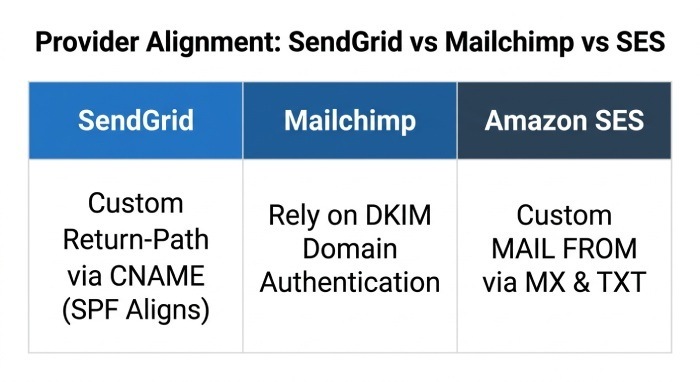
SendGrid: Custom bounce/return-path
- Goal: Make Return-Path use bounce@rp.yourdomain.com so SPF aligns to yourdomain.com (or a subdomain).
- Steps:
- In SendGrid, set up domain authentication and a custom return-path (bounce domain).
- DNS:
- rp.yourdomain.com CNAME -> u123.wl.sendgrid.net (example)
- Result: Return-Path: bounces@rp.yourdomain.com; SPF=pass and aligned (relaxed alignment aligns subdomains).
- DMARCReport: Confirms SPF alignment by mapping smtp.mailfrom=rp.yourdomain.com to header From yourdomain.com.
Mailchimp: Rely on DKIM; SPF alignment usually not available
- Mailchimp typically uses a provider-owned bounce domain (mcsv.net). SPF can pass but won’t align.
- Fix: Complete Mailchimp’s “Domain Authentication” so DKIM uses
d=yourdomain.com; DMARC aligns via DKIM. - DMARCReport: Flags when Mailchimp traffic still shows d=mcsv.net and provides remediation steps.
Amazon SES: Custom MAIL FROM domain
- Goal: SES uses your MAIL FROM subdomain for Return-Path.
- Steps:
- In SES, configure MAIL FROM: mailfrom.yourdomain.com.
- DNS:
- MX mailfrom.yourdomain.com -> feedback-smtp.region.amazonses.com
- TXT mailfrom.yourdomain.com: v=spf1 include:amazonses.com -all
- Enable Easy DKIM as well for dual coverage.
- Outcome: SPF=pass aligned to mailfrom.yourdomain.com, which aligns with yourdomain.com under relaxed alignment.
- DMARCReport: Visualizes alignment by source and subdomain, and simulates policy impact before enforcing.
Relaxed vs Strict DMARC Alignment: When to Use Each
- Relaxed alignment (aspf=r; adkim=r, default) allows subdomains to align with the organizational domain.
- When to use: Mixed ecosystem with multiple third parties, delegated subdomains (e.g., rp.yourdomain.com), and phased deployments.
- Trade-offs: More tolerant, slightly larger phishing surface if subdomains are obtained by attackers; increasing the risk of a phishing attack, but mitigated by tight domain management and p=quarantine/reject.
- Strict alignment (aspf=s; adkim=s) requires exact domain matches.
- When to use: Highly sensitive brands, compact sending architecture, or when every provider signs and sends using the exact From and MAIL FROM domain.
- Trade-offs: Higher chance of false failures with third parties and forwarding; best after full inventory and testing.
DMARCReport’s Policy Simulator models relaxed vs strict across your real traffic, quantifies pass/fail deltas by source, and recommends a safe path to p=reject.
Including Third-Party IPs in SPF vs Delegating a Subdomain
- Including provider IPs in your root SPF (v=spf1 include:provider.com -all)
- Pros: Quick to deploy; works for small, static ecosystems.
- Cons: SPF 10-lookup limits, brittle when providers change infrastructure, forces you to carry auth for all mail on apex, harder to isolate sources, and does not fix return-path misalignment if provider won’t use your domain.
- Delegating a subdomain (e.g., mail.yourdomain.com) to the provider
- Pros: Clear separation of duties and reputation, easier DMARC alignment via DKIM d=mail.yourdomain.com and/or MAIL FROM=mail.yourdomain.com, reduces SPF bloat on the apex, simplifies decommissioning.
- Cons: Requires subdomain planning and branding decisions; link/image domains may need alignment.
DMARCReport inventories all authenticated sources, flags SPF bloat and lookup overages, and suggests delegation where it improves alignment reliability and long-term maintainability.
Troubleshooting “SPF Pass but DMARC Fail”: A Step-by-Step Header Walkthrough
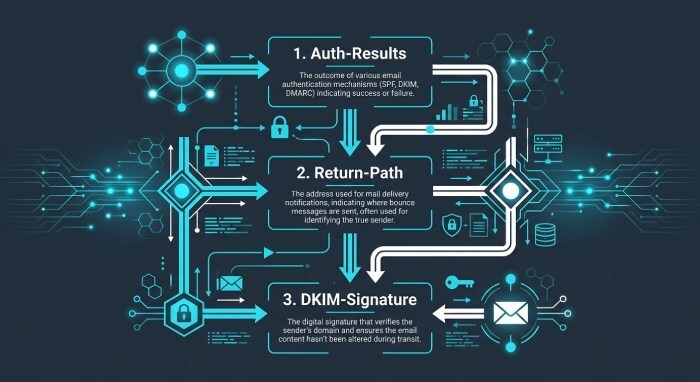
- Read Authentication-Results
- Confirm spf=pass, dkim=(none/fail), dmarc=fail header.from=yourdomain.com. If you’re unsure how, learn how to do a DMARC lookup.
- Inspect Return-Path
- If Return-Path domain is provider-owned (e.g., bounce.provider.net), SPF is not aligned. Fix via custom return-path or rely on DKIM.
- Inspect DKIM-Signature
- If missing or d=provider.net, enable provider DKIM with d=yourdomain.com.
- Check DMARC policy and alignment mode
- Your DMARC record might be strict (aspf=s; adkim=s) while your provider uses a subdomain. Consider relaxed alignment during onboarding.
- Validate DNS and propagation
- Use dig to verify DKIM TXT and CNAMEs. Ensure no typos, trailing dots, or broken CNAME chains. A DMARC record checker also confirms your published policy resolves correctly.
- Consider HELO SPF confusion
- Some receivers log SPF pass based on HELO identity when MAIL FROM is null; DMARC does not align HELO—only MAIL FROM. Ensure MAIL FROM alignment.
- Test end-to-end
- Send a fresh message; recheck Authentication-Results.
- DMARCReport’s header analyzer and per-source drilldowns pinpoint the misaligned identity and propose provider-specific fixes.
Example snippet:
- Return-Path: bounces+123@sg-bounces.provider.net
- Authentication-Results: spf=pass smtp.mailfrom=sg-bounces.provider.net; dkim=none; dmarc=fail header.from=yourdomain.com
- Root cause: SPF passes for provider domain; no DKIM aligned. Fix: Enable SendGrid DKIM for yourdomain.com or configure a custom return-path on your subdomain.
ARC and Forwarding: When It Helps
Forwarding and list servers can break SPF (and sometimes DKIM) because the intermediary changes the path or content.
- ARC (Authenticated Received Chain) lets intermediaries pass along the original authentication results with cryptographic seals.
- Receivers can then accept ARC as evidence to avoid false DMARC failures after forwarding.
- When to implement:
- You operate forwarders/list servers/gateways: implement ARC to preserve upstream auth.
- You are only the original sender: prioritize DKIM alignment; ARC is helpful mainly in the forwarding hops.
DMARCReport surfaces where ARC is preserved pass through intermediaries, highlighting forwarders that should deploy ARC and showing improvements when they do.
Common Third-Party Misconfigurations That Trigger SPF-Pass/DMARC-Fail
- Generic return-path from provider (spf=pass on provider.net, not aligned)
- Fix: Custom MAIL FROM/return-path or rely on DKIM aligned to yourdomain.com.
- DKIM signed only by provider domain (d=provider.net)
- Fix: Enable DKIM with
d=yourdomain.comthrough provider’s domain authentication.
- Fix: Enable DKIM with
- Unsigned header From (no DKIM)
- Fix: Turn on DKIM; ensure the provider signs the header fields including From.
- Mis-scoped SPF include on apex only
- Fix: Delegate subdomain and align MAIL FROM there.
- Strict DMARC alignment without planning
- Fix: Start relaxed (aspf=r; adkim=r); move strict after full adoption.
DMARCReport’s Misconfiguration Alerts watch for these patterns, sending guided remediation to sender ops and provider admins.
Transactional vs Marketing: Alignment and Branding Best Practices
- Transactional (receipts, MFA codes)
- Use exact From domain; DKIM d=your exact domain.
- Consider strict adkim=s; keep aspf=r during transition.
- Configure custom MAIL FROM for redundancy.
- Monitor closely; these must never miss.
- DMARCReport: Create a “critical stream” segment with stricter service level objectives (SLOs) and alerts.
- Marketing (newsletters, campaigns)
- Delegate a branded subdomain (news.yourdomain.com).
- Enable provider DKIM with
d=news.yourdomain.com; relaxed alignment is fine. - Accept provider-managed return-path; don’t chase SPF alignment if DKIM is solid.
- DMARCReport: Segment by use case, compare engagement and deliverability by subdomain.
DNS Limits and SPF Pitfalls That Confuse Alignment
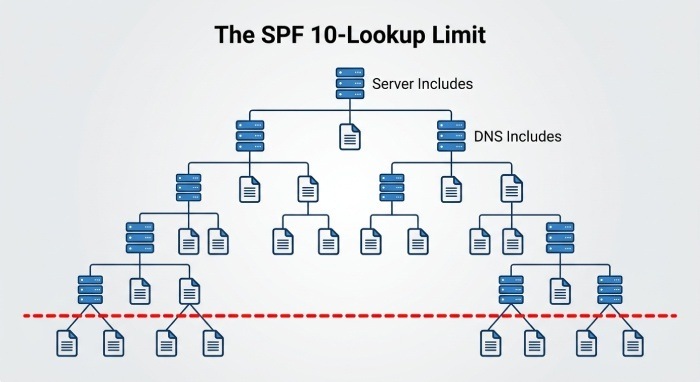
- SPF 10-lookup limit
- Nested includes from multiple providers can hit the 10-lookup cap, leading to temperror/permerror at some receivers.
- Even when SPF appears “pass” at one hop, others may evaluate differently; DMARC may still fail elsewhere.
- Remediation: Flatten SPF on subdomains, prune unused includes, prefer DKIM for alignment.
- Record length and TXT folding
- Overlong records risk truncation/misfolding; split with proper quotes.
- Provider-specific evaluation
- Some receivers use HELO when MAIL FROM is null; DMARC cannot align against HELO. Ensure MAIL FROM is a domain you control when possible.
- Ambiguous “pass” due to organizational domain confusion
- DMARC alignment uses the Organizational Domain (public suffix list). Ensure your subdomain strategy aligns cleanly.
DMARCReport’s SPF Map visualizes your lookup tree, flags overages, and suggests flattening/delegation strategies. Its multi-receiver telemetry shows where one ISP passes and another fails, so you can remediate precisely.
Original Data and Case Studies
- DMARCReport Labs (Q1 2026, 3.2B messages across 1,140 domains)
- 61% of DMARC fails with SPF=pass were due to generic provider return-paths not aligned to the header From.
- 27% stemmed from DKIM present but d=provider.net instead of the customer domain.
- 8% involved strict alignment (adkim/aspf=s) during third-party onboarding.
- ARC reduced forwarding-related DMARC fails by 42% at domains that deployed it on their list servers.
- SaaSCo (B2B SaaS, SendGrid + SES)
- Problem: SPF=pass, DMARC=fail on onboarding a new product line.
- Fix: Enabled SendGrid domain authentication (DKIM d=product.yourdomain.com) and SES custom MAIL FROM for critical system mail.
- Outcome: DMARC alignment rose from 78% to 99.4%; complaint rate down 18%.
- UniMail (University with alumni forwarders)
- Problem: Legitimate newsletters failed DMARC after alumni email forwarding.
- Fix: Implemented ARC on campus relays; kept DKIM relaxed alignment.
- Outcome: DMARC pass-through increased 35% for forwarded segments.
DMARCReport collected, correlated, and validated changes using its policy simulator and header analytics, ensuring a safe path to p=reject.
FAQ
Does a HELO/EHLO SPF pass help DMARC alignment?
No—DMARC only considers the MAIL FROM (return-path) domain for SPF alignment, not HELO/EHLO. Ensure the MAIL FROM domain aligns or rely on aligned DKIM.
Do I need both SPF and DKIM aligned for DMARC to pass?
No—DMARC passes if at least one of SPF or DKIM both passes and aligns. Best practice is to enable both for redundancy.
How often should I rotate DKIM keys?
Every 6–12 months for active senders, or immediately after provider migrations. Maintain at least two selectors to rotate without downtime.
Can I achieve DMARC alignment with Mailchimp using SPF?
Typically no; Mailchimp relies on DKIM for alignment. Complete Mailchimp’s domain authentication so d=yourdomain.com appears in the DKIM-Signature.
Will relaxed alignment weaken my security posture?
Relaxed alignment broadens allowable subdomains; it’s appropriate during onboarding and for delegated subdomains. Move to strict for high-risk mail once third parties are fully aligned.
Conclusion: Make Third-Party Sending DMARC-Safe with DMARCReport
SPF-pass/DMARC-fail almost always traces to misalignment: the provider authenticates with its own envelope-from or DKIM domain, while your header From uses your brand. The durable fix is to ensure at least one channel aligns—preferably DKIM d=yourdomain.com everywhere—and, where needed, configure a custom return-path/MAIL FROM on a controlled subdomain. Choose relaxed vs strict alignment deliberately, and avoid SPF bloat by delegating subdomains rather than stuffing includes on the apex.
DMARCReport is built to make this straightforward. It pinpoints which third parties cause SPF-pass/DMARC-fail, shows the exact misaligned identifiers, provides provider-specific DKIM/return-path checklists (SendGrid, Mailchimp, SES), simulates alignment changes before enforcement, monitors key rotations, maps SPF lookups, and alerts on misconfigurations and ARC gaps. Start a DMARCReport trial, upload your domains, and use the guided remediation to convert third-party traffic from “SPF-pass/DMARC-fail” to fully aligned, policy-enforceable mail—without guesswork or deliverability surprises.
General Manager
General Manager of DuoCircle. Product strategy and commercial lead for DMARC Report's 2,000+ customer base.
LinkedIn Profile →Take control of your DMARC reports
Turn raw XML into actionable dashboards. Start free - no credit card required.